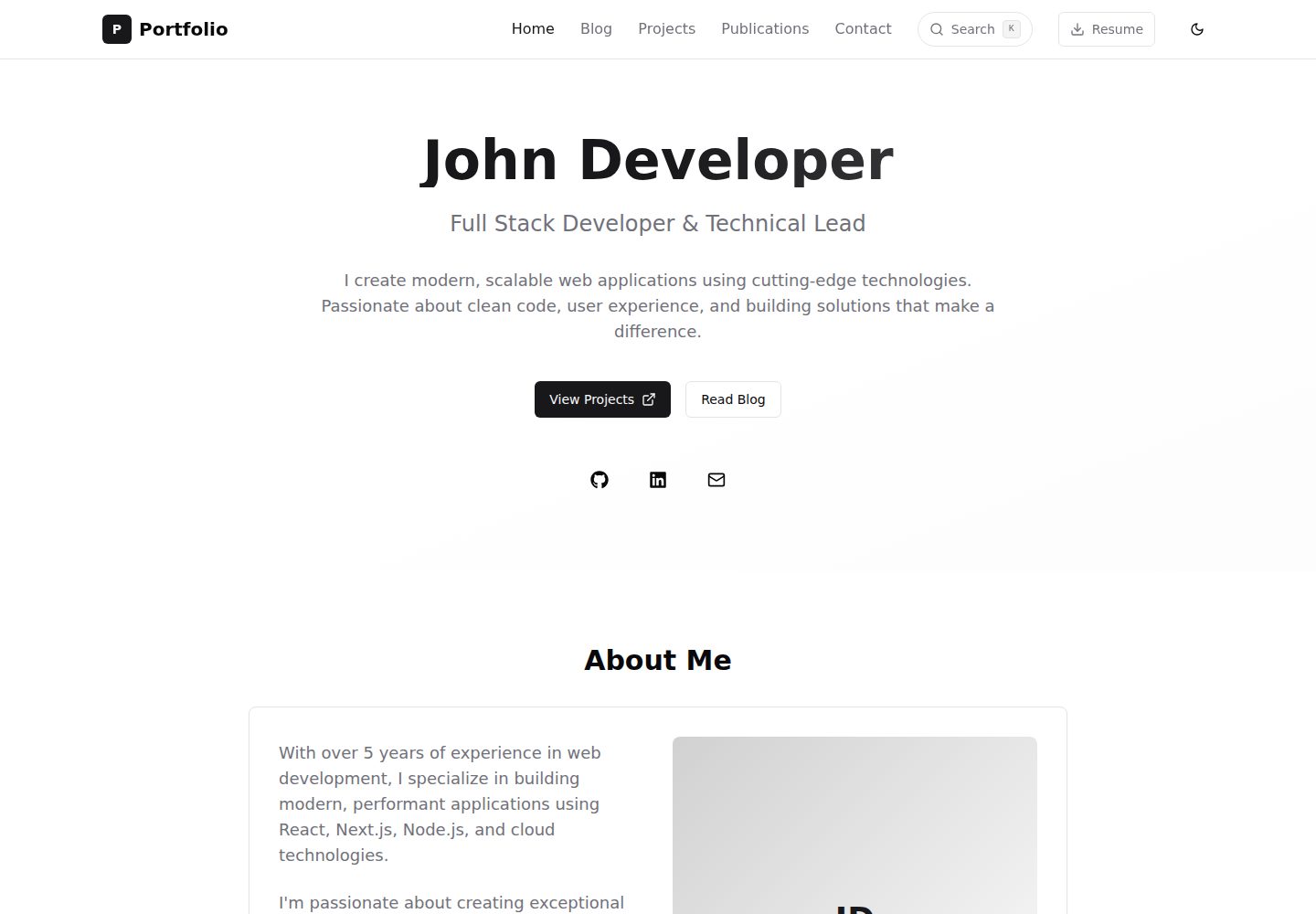
命令面板式全局搜索(Ctrl+K/Cmd+K),支持模糊匹配、标签过滤与键盘导航
Next.jsReact作品集
nextjs-portfolio-template — Next.js 作品集模板
作者 ShardulJunagade
基于 Next.js 15、TypeScript 与 Tailwind CSS 的个人作品集网站模板,包含命令面板搜索、Markdown 博客、Jupyter Notebook 渲染与多类内容页面。
看看你的网站会是什么样
浏览真实页面截图,比较内容排版与手机效果。点击下方缩略图切换,放大查看整页细节。
全部页面与视图 3
截图用于了解视觉与布局,交互效果请以实际项目为准。
采集于 2026-10-14查看来源
值得关注的模板亮点
从已有项目资料中,快速了解它的特点。
基于 Markdown 的博客、项目、出版物、经历与更新内容管理
支持 Jupyter Notebook 渲染,使用 meta.yaml 与 .ipynb 文件组织
通过 next-themes 实现深色/浅色模式与系统偏好检测
使用 Next.js App Router 动态路由生成博客、项目、出版物等独立页面
包含带验证的联系表单与简历 PDF
模板详细介绍
该模板是一个个人作品集网站,使用 Next.js 15、TypeScript 和 Tailwind CSS 构建。README 说明其包含命令面板式全局搜索(Ctrl+K/Cmd+K),支持模糊匹配、按标签过滤与键盘导航;界面为移动优先的响应式设计,并通过 next-themes 提供深色/浅色模式及系统偏好检测。
内容管理以 Markdown 文件为主:博客文章、项目、出版物、经历与更新分别放在 src/content 下的对应目录,Jupyter Notebook 以文件夹形式存放,包含 meta.yaml 元数据与 .ipynb 文件。页面通过 Next.js App Router 动态路由为博客文章、项目、出版物等生成独立页面,并包含简历 PDF 与带验证的联系表单。README 还提到使用 Next.js metadata API、语义化 HTML、ARIA 标签和键盘支持。
README 未提供具体的部署步骤、环境变量要求、依赖版本号或性能数据,也未说明模板在生产环境中的就绪程度。
Next.js作品集
适合你的项目吗?
适用场景
- 搭建个人作品集网站,展示博客、项目与出版物
- 发布包含 Jupyter Notebook 的数据科学或技术文章
- 用 Markdown 维护经历时间线与最新动态
- 需要全局搜索快速定位站内内容的个人站点
适合人群
- 使用 Next.js 与 TypeScript 的开发者
- 需要展示技术文章、项目与学术出版物的个人
- 希望以 Markdown 与 Notebook 管理内容的用户
上手与定制指南
结合仓库当前版本的说明,按下面的资料检查内容、配置与运行要求。
- 1
克隆仓库:git clone https://github.com/ShardulJunagade/nextjs-portfolio-template
- 2
安装依赖:npm install
- 3
启动开发服务器:npm run dev,并访问 http://localhost:3000
- 4
常用命令包括 npm run build、npm run start、npm run lint 与 npx prettier --write .
- 5
README 未提供部署步骤与环境变量说明
授权与来源资料
使用条件与限制
免费使用 · 保留许可声明本次收录的是公开仓库中采用 MIT 许可的免费版本;免费范围为该版本代码,不代表外部服务或第三方素材免费。
使用时需要遵守
- 允许免费使用、修改、商用和分发该版本代码。
- 分发代码副本或实质性部分时,保留原作者版权声明和完整 MIT 许可声明。
- 代码按现状提供;担保与责任限制以原许可证及适用法律为准。
额外费用与待核对事项
- 演示图片、字体、图标及其他第三方素材需按各自许可核对,不能仅凭代码的 MIT 许可判断。
- 域名、托管、数据库、支付或 AI 等外部服务可能另外收费。
查看原文依据
https://github.com/ShardulJunagade/nextjs-portfolio-template/blob/main/LICENSEhttps://github.com/ShardulJunagade/nextjs-portfolio-template/blob/main/README.mdPermission is hereby granted, free of charge
许可证原文
DeepSeek 根据仓库许可证和 README 整理 ·2026-10-14。结果仅覆盖已读取资料,依赖、图片、字体及后续条款变更以各自原文为准。
项目核对记录与介绍依据
模板资料
- 来源平台
- GitHub
- 资料与维护参考分
- 资料一般 · 74 / 100
- 技术栈
- Next.js · React
- 网站类型
- 作品集
这个分数如何计算
本站按许可资料(最高30分)、演示链接(12分)、预览图(10分)、Star数(15分)、记录的维护时间(15分)、描述完整度(8分)、功能记录(5分)和分类资料(5分)计算。它不是代码、安全或性能测试,也不是 Google 评分;有链接不代表已实测可用。
这个项目需要核对什么
- 记录的仓库更新时间
- 2025-06-30
- 截图检查日期
- 2026-10-14
已收录演示链接。请用你的内容与屏幕尺寸检查;有演示不代表表单、认证或支付已经可用。
目录记录的主要技术栈是 Next.js。请通过依赖清单和锁文件核对实际版本与托管要求。这些说明基于收录资料,不代表代码审计或部署实测。
查看具体选型方法 →介绍的制作与核对状态
介绍由 AI 辅助整理目录与仓库资料。仓库作者不等于这篇介绍的审核者。
审核声明: codex-user-requested-batch-review-20261015 · 2026-10-15
查看当时使用的来源资料
SHA-256: 9cbd9a27db73c300b43cf08da180ede88fcb07a192efdd9e63aaed1c1cab4570
2026-10-14T08:44:30.450Z
来源文件 / 仓库# Next.js Portfolio Template
A comprehensive, modern portfolio website built with Next.js 15, TypeScript, and Tailwind CSS. Features advanced search functionality with a global command palette, Jupyter Notebook integration, dynamic content management, and a professional design system.
## 📑 Table of Contents
- [✨ Features](#features)
- [🚀 Getting Started](#getting-started)
- [📁 Project Structure](#project-structure)
- [🎨 Customization](#customization)
- [📝 Blog Posts](#blog-posts)
- [📓 Jupyter Notebooks](#jupyter-notebooks)
- [🛠️ Projects](#projects)
- [📚 Publications](#publications)
- [💼 Experience & Updates](#experience--updates)
- [📄 License](#license)
- [🤝 Contributing](#contributing)
## Features
- **Modern Tech Stack**: Next.js 15, TypeScript, Tailwind CSS
- **Search Palette**: Command palette-style global search (Ctrl+K/Cmd+K), fuzzy matching, tag-based filtering and keyboard navigation
- **Responsive Design**: Mobile-first, clean UI, dark/light mode with system preference detection (`next-themes`)
- **Content Management**: Markdown-based blog, Jupyter Notebook rendering, project showcase, publications, timeline, updates, resume PDF, and validated contact form
- **SEO & Accessibility**: Next.js metadata API, semantic HTML, ARIA labels, keyboard support
- **Dynamic Routing**: Individual pages for blog posts, projects, publications, and more
## Getting Started
To run this project locally, follow these steps:
1. Clone the repository:
```bash
git clone https://github.com/ShardulJunagade/nextjs-portfolio-template
```
2. Install dependencies:
```bash
npm install
```
3. Start the development server:
```bash
npm run dev
```
4. Open [http://localhost:3000](http://localhost:3000) in your browser
### Common Commands
```bash
npm run dev # Start development server with Turbopack
npm run build # Build for production
npm run start # Start production server
npm run lint # Run ESLint
npx prettier --write . # Format and prettify all files
```
## Project Structure
```text
src/
├── app/ # Next.js App Router pages
│ ├── blog/ # Blog pages with search, filtering, and reading time
│ │ ├── [slug]/ # Individual blog post pages (markdown & notebooks)
│ │ └── blog-client.tsx # Client-side blog functionality
│ ├── projects/ # Projects showcase with filtering
│ │ ├── [slug]/ # Individual project detail pages
│ │ └── projects-client.tsx # Client-side project functionality
│ ├── publications/ # Academic/professional publications
│ │ └── publications-client.tsx # Client-side publications functionality
│ ├── experience/ # Professional experience timeline (dynamic content)
│ ├── updates/ # Latest news and achievements (dynamic content)
│ ├── contact/ # Contact form and information
│ └── page.tsx # Home page with hero, timeline, and recent updates
├── components/ # Reusable UI components
│ ├── ui/ # Base UI components (button, card, input, etc.)
│ ├── navigation.tsx # Main navigation with search integration
│ ├── search-bar.tsx # Search bar component
│ ├── search-palette.tsx # Advanced command palette search
│ ├── search-provider.tsx # Search context and global shortcuts
│ ├── timeline.tsx # Interactive timeline component
│ ├── timeline-section.tsx # Reusable timeline section component
│ ├── recent-updates-section.tsx # Updates display component
│ ├── notebook-renderer.tsx # Advanced Jupyter Notebook renderer
│ ├── dashboard-layout.tsx # Layout for internal pages
│ ├── theme-provider.tsx # Dark/light mode theme management
│ ├── theme-toggle.tsx # Theme toggle button
│ └── footer.tsx # Site footer component
├── content/ # Markdown and notebook content
│ ├── blog/ # Blog posts (markdown files)
│ ├── projects/ # Project descriptions (markdown files)
│ ├── publications/ # Publications data (markdown files)
│ ├── experience/ # Professional experience (markdown metadata)
│ ├── updates/ # News and updates (markdown metadata)
│ └── notebooks/ # Jupyter notebooks with metadata
├── lib/ # Utility functions and data management
│ ├── content.ts # Content management utilities (blog, projects, etc.)
│ ├── search-content.ts # Search index building
│ ├── search.ts # Search engine with Fuse.js
│ └── utils.ts # General utilities and helpers
├── hooks/ # Custom React hooks
│ └── use-debounce.ts # Debounced search functionality
└── types/ # TypeScript type definitions
└── index.ts # All interface definitions
```
## Customization
### Blog Posts
Add markdown files to `src/content/blog/` with frontmatter:
```markdown
---
title: 'Your Post Title'
description: 'Post description'
date: '2024-01-01'
tags: ['tag1', 'tag2']
---
Your content here...
```
### Jupyter Notebooks
1. Add notebook folder to `src/content/notebooks/`
2. Include `meta.yaml` with metadata:
```yaml
title: 'Notebook Title'
description: 'Notebook description'
date: '2024-01-01'
tags: ['jupyter', 'python', 'data-science']
```
3. Place your `.ipynb` file in the same folder
### Projects
Add markdown files to `src/content/projects/` with frontmatter:
```markdown
---
title: 'Project Name'
description: 'Project description'
tags: ['react', 'typescript']
github: 'https://github.com/user/repo'
demo: 'https://demo.com'
featured: true
---
Project details...
```
### Publications
Add markdown files to `src/content/publications/` with metadata:
```markdown
---
title: 'Publication Title'
authors: ['Author One', 'Author Two']
journal: 'Journal Name'
year: 2024
type: 'article'
tags: ['research', 'ai']
link: 'https://paper.com'
---
```
### Experience & Updates
Add markdown files with frontmatter metadata only:
- `src/content/experience/` - Professional timeline entries
- `src/content/updates/` - Latest news and achievements
## License
This project is open source and available under the [MIT License](LICENSE).
## Contributing
Contributions are welcome! Please feel free to submit a Pull Request.
看看同类模板
对比同技术栈与用途的模板,找到更适合的视觉与内容结构。

react-resume-template
A personal resume website template built with React.js, Typescript, Next.js, and styled with Tailwind css
Next.js · 作品集

nxt-lnk
Custom bio links for creatives who love coding. A perfect custom alternative for linktree, bio and other short…
Next.js · 作品集

sylph
A minimal portfolio template.
Next.js · 作品集

sleek-portfolio
sleek-portfolio 是一个面向开发者个人品牌展示的现代作品集模板,基于 Next.js 15、TypeScript、Tailwind CSS 和 Shadcn UI 构建。
Next.js · 作品集

research-website-template
React + Next.js template for research websites (for PhD students, researchers, etc)
Next.js · 作品集

shadcn-portfolio
shadcn-portfolio 是一个面向开发者的作品集模板,技术栈为 Next.js 15、shadcn/ui、Tailwind CSS 和 Framer Motion。
Next.js · 作品集