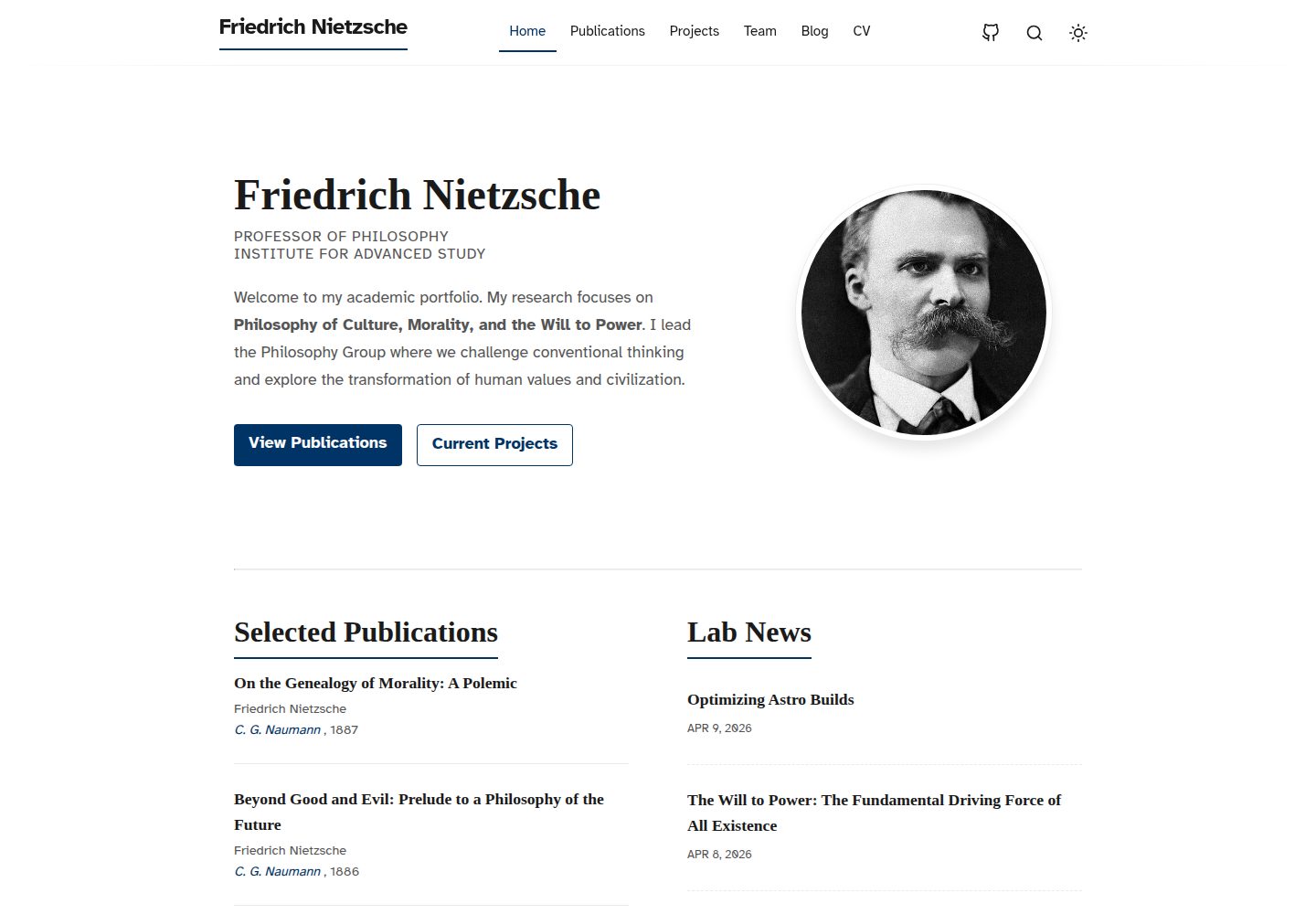
Astro + MDX 内容工作流,博客文章带目录与偏阅读的版式
Astro作品集博客
astro-scholar — Astro 作品集模板
作者 shravanngoswamii
面向研究者、教师、学生与学术团队的 Astro 作品集模板,包含博客、项目、出版物、团队与作者页面,采用 MDX 内容工作流并支持静态部署。
看看你的网站会是什么样
浏览真实页面截图,比较内容排版与手机效果。点击下方缩略图切换,放大查看整页细节。
全部页面与视图 3
截图用于了解视觉与布局,交互效果请以实际项目为准。
采集于 2026-10-02查看来源
值得关注的模板亮点
从已有项目资料中,快速了解它的特点。
出版物列表由 BibTeX 文件生成,项目与作者资料分别用 JSON 数据维护
内置团队页与作者数据模型,适合多人学术团队展示
集成 Pagefind 搜索索引、RSS 订阅与 sitemap 生成,并提供 OG 图片生成
自带 GitHub Pages 部署工作流与 PR 预览部署工作流
可选 Umami 分析,默认关闭且未提交追踪 ID,需自行配置环境变量
模板详细介绍
astro-scholar 是一个基于 Astro 的学术作品集模板,面向研究者、教授、学生以及学术团队。它把学术场景中常见的几类内容拆成独立模块:博客用于记录想法、笔记与随笔,项目页展示研究工作,出版物列表由 BibTeX 生成,另外还有团队页与作者资料数据模型。内容以 Astro + MDX 工作流组织,博客文章带目录,阅读版式偏文字向。
模板内置 RSS 订阅与 sitemap 生成,搜索索引通过 Pagefind 实现,并提供 OG 图片生成。仓库自带 GitHub Pages 部署工作流,主分支自动发布,Pull Request 会生成预览站点;base path 在 astro.config.mjs 中配置,默认是 /astro-scholar。
自定义入口集中在少数文件:src/consts.ts 管理站点标题与全局常量,src/data/authors.json、projects.json、publications.bib 分别对应作者、项目与出版物数据,博客内容放在 src/content/blog/ 下的 Markdown 文件,主题与排版在 src/styles/global.css。布局与组件可改 src/layouts/BlogPost.astro、src/components/Header.astro 与 Footer.astro。
分析功能可选:内置 Umami 但默认关闭,仓库中没有提交追踪 ID,需要自行设置 PUBLIC_UMAMI_WEBSITE_ID 环境变量启用,自托管时可用 PUBLIC_UMAMI_SRC 覆盖脚本地址。
使用限制方面,模板的免费范围是 MIT 许可下的这份代码,演示图片、字体、图标等第三方素材需按各自许可单独核对;域名、托管等外部服务可能另行收费。README 中提到的 Lighthouse 满分截图属于仓库自带素材,不作为本模板的性能承诺。
Astro作品集博客
适合你的项目吗?
适用场景
- 研究者或教授搭建个人学术主页,集中展示论文、项目与随笔
- 实验室或学术团队维护成员介绍、团队成果与共享博客
- 学生整理课程项目、研究笔记与个人写作
- 需要静态输出并托管在 GitHub Pages 上的学术类站点
适合人群
- 研究者、教授与高校教师
- 学生与研究生
- 有多个作者或成员的学术团队
- 偏好用 Markdown/MDX 写作、以静态站点发布内容的用户
上手与定制指南
结合仓库当前版本的说明,按下面的资料检查内容、配置与运行要求。
- 1
克隆仓库后执行 npm install 与 npm run dev,本地默认访问 http://localhost:4321/astro-scholar
- 2
优先修改 src/consts.ts、src/data/authors.json、src/data/projects.json、src/data/publications.bib 与 src/content/blog/ 下的 Markdown
- 3
站点 base path 在 astro.config.mjs 中配置,默认 /astro-scholar,PR 预览路径为 /astro-scholar/pr-previews/<PR_NUMBER>
- 4
启用 Umami 分析需设置 PUBLIC_UMAMI_WEBSITE_ID,自托管时可用 PUBLIC_UMAMI_SRC 覆盖脚本地址;不设置则保持关闭
- 5
部署到 GitHub Pages 时,main 分支走 website-deploy.yml,PR 走 preview.yml
授权与来源资料
使用条件与限制
免费使用 · 保留许可声明本次收录的是公开仓库中采用 MIT 许可的免费版本;免费范围为该版本代码,不代表外部服务或第三方素材免费。
使用时需要遵守
- 允许免费使用、修改、商用和分发该版本代码。
- 分发代码副本或实质性部分时,保留原作者版权声明和完整 MIT 许可声明。
- 代码按现状提供;担保与责任限制以原许可证及适用法律为准。
额外费用与待核对事项
- 分析功能默认关闭,启用需自行提供 Umami 网站 ID(PUBLIC_UMAMI_WEBSITE_ID),自托管时可用 PUBLIC_UMAMI_SRC 覆盖脚本地址;不设置则保持关闭,不涉及付费。
- 部署面向 GitHub Pages,使用其工作流;域名、托管等外部服务可能另行收费,需自行承担。
- 演示图片、字体、图标及其他第三方素材需按各自许可核对,不能仅凭代码的 MIT 许可判断。
- 域名、托管、数据库、支付或 AI 等外部服务可能另外收费。
查看原文依据
Permission is hereby granted, free of charge
许可证原文
Umami](https://umami.is) analytics is built in and disabled by default — no tracking ID is committed. To enable it, set the `PUBLIC_UMAMI_WEBSITE_ID` environment variable to your own Umami website ID
README 原文
https://github.com/shravanngoswamii/astro-scholar/blob/main/LICENSEhttps://github.com/shravanngoswamii/astro-scholar/blob/main/README.mdThis repo is ready for GitHub Pages.
README 原文
DeepSeek 根据仓库许可证和 README 整理 ·2026-10-03。结果仅覆盖已读取资料,依赖、图片、字体及后续条款变更以各自原文为准。
项目核对记录与介绍依据
模板资料
- 来源平台
- GitHub
- 资料与维护参考分
- 资料较完整 · 92 / 100
- 技术栈
- Astro
- 网站类型
- 作品集 · 博客
这个分数如何计算
本站按许可资料(最高30分)、演示链接(12分)、预览图(10分)、Star数(15分)、记录的维护时间(15分)、描述完整度(8分)、功能记录(5分)和分类资料(5分)计算。它不是代码、安全或性能测试,也不是 Google 评分;有链接不代表已实测可用。
这个项目需要核对什么
- 记录的仓库更新时间
- 2026-06-10
- 截图检查日期
- 2026-10-03
已收录演示链接。请用你的内容与屏幕尺寸检查;有演示不代表表单、认证或支付已经可用。
目录记录的主要技术栈是 Astro。请通过依赖清单和锁文件核对实际版本与托管要求。这些说明基于收录资料,不代表代码审计或部署实测。
查看具体选型方法 →介绍的制作与核对状态
介绍由 AI 辅助整理目录与仓库资料。仓库作者不等于这篇介绍的审核者。
审核声明: [email protected] · 2026-10-04
查看当时使用的来源资料
SHA-256: 12af0297c411277afed395deed319c632a778ab3065abb7547135019f6618987
2026-10-03T20:22:38.091Z
来源文件 / 仓库<h1 align="center">Astro Scholar</h1> <p align="center"> A clean, modern Astro portfolio template for researchers, professors, students, and academic teams. </p> ## Lighthouse <p align="center"> <img src=".github/lighthouse-score.png" alt="Lighthouse score showing 100 across all categories" width="900" /> </p> ## Why This Template Most portfolio templates look generic. This one is built for academic storytelling: - Blog posts for ideas, notes, and essays - Project pages for research work - Publications section from BibTeX - Team and author profiles - Search and generated OG images Built with Astro for speed, static output, and straightforward deployment. ## What You Get - Astro + MDX content workflow - Blog with table of contents and reading-friendly layout - Projects and publications pages - Team page and author data model - RSS feed and sitemap generation - Search indexing via Pagefind - GitHub Pages deployment workflow - PR preview deployment workflow ## Quick Start 1. Clone the repository. 2. Install dependencies. 3. Run the dev server. ```bash npm install npm run dev ``` Then open http://localhost:4321/astro-scholar ## Commands | Command | Description | |---|---| | `npm run dev` | Start local dev server | | `npm run build` | Build production site | | `npm run preview` | Preview production build | | `npm run astro -- <command>` | Run Astro CLI commands | ## Customization Guide Update these files first: - `src/consts.ts`: site title and global constants - `src/data/authors.json`: author profiles - `src/data/projects.json`: project entries - `src/data/publications.bib`: publication list - `src/content/blog/*.md`: blog posts - `src/styles/global.css`: theme and typography Layout and components: - `src/layouts/BlogPost.astro`: post layout - `src/components/Header.astro`: top navigation - `src/components/Footer.astro`: footer ## Analytics (optional) [Umami](https://umami.is) analytics is built in and disabled by default — no tracking ID is committed. To enable it, set the `PUBLIC_UMAMI_WEBSITE_ID` environment variable to your own Umami website ID: - Locally: add `PUBLIC_UMAMI_WEBSITE_ID=your-id` to a `.env` file. - On GitHub Pages: add it as an Actions secret/variable (it's passed to the build in `website-deploy.yml`). Self-hosting Umami? Override the script URL with `PUBLIC_UMAMI_SRC`. Leave the ID unset to keep analytics off. ## Deployment This repo is ready for GitHub Pages. - `main` branch deploys via `.github/workflows/website-deploy.yml` - Pull requests deploy preview sites via `.github/workflows/preview.yml` Base path is configured in `astro.config.mjs`: - default: `/astro-scholar` - PR preview: `/astro-scholar/pr-previews/<PR_NUMBER>` ## Project Structure ```text src/ components/ Reusable UI components content/blog/ Markdown blog content data/ Authors, projects, publications layouts/ Page layouts pages/ Route files styles/ Global styles utils/ Utility helpers public/ fonts/ Webfonts and static assets ``` ## Community - Contributing guide: [.github/CONTRIBUTING.md](.github/CONTRIBUTING.md) - Code of conduct: [.github/CODE_OF_CONDUCT.md](.github/CODE_OF_CONDUCT.md) - Security policy: [.github/SECURITY.md](.github/SECURITY.md) - Pull request template: [.github/pull_request_template.md](.github/pull_request_template.md) ## Feedback & Suggestions If you have any suggestions/feedback, you can contact me via [my email]([email protected]). Alternatively, feel free to open an issue if you find bugs or want to request new features. ## License Licensed under the MIT [LICENSE](LICENSE), Copyright © 2026
看看同类模板
对比同技术栈与用途的模板,找到更适合的视觉与内容结构。

astrowind
⭕️ AstroWind: A free template using Astro v7 and Tailwind CSS v4. Astro starter theme.
Astro · 博客

astro-paper
A minimal, accessible and SEO-friendly Astro blog theme.
Astro · 博客

fuwari
✨A static blog template built with Astro.
Astro · 博客

Firefly
Firefly 是一款基于 Astro 的静态博客主题,由 CuteLeaf 在 saicaca 的 Fuwari 模板基础上二次开发,主打清新美观的视觉风格。
Astro · 博客

astro-theme-cactus
A simple Astro theme. Use it to create your blog or website.
Astro · 作品集

astrofy
Astrofy is a free and open-source template for your Personal Portfolio Website built with Astro and TailwindCS…
Astro · 作品集