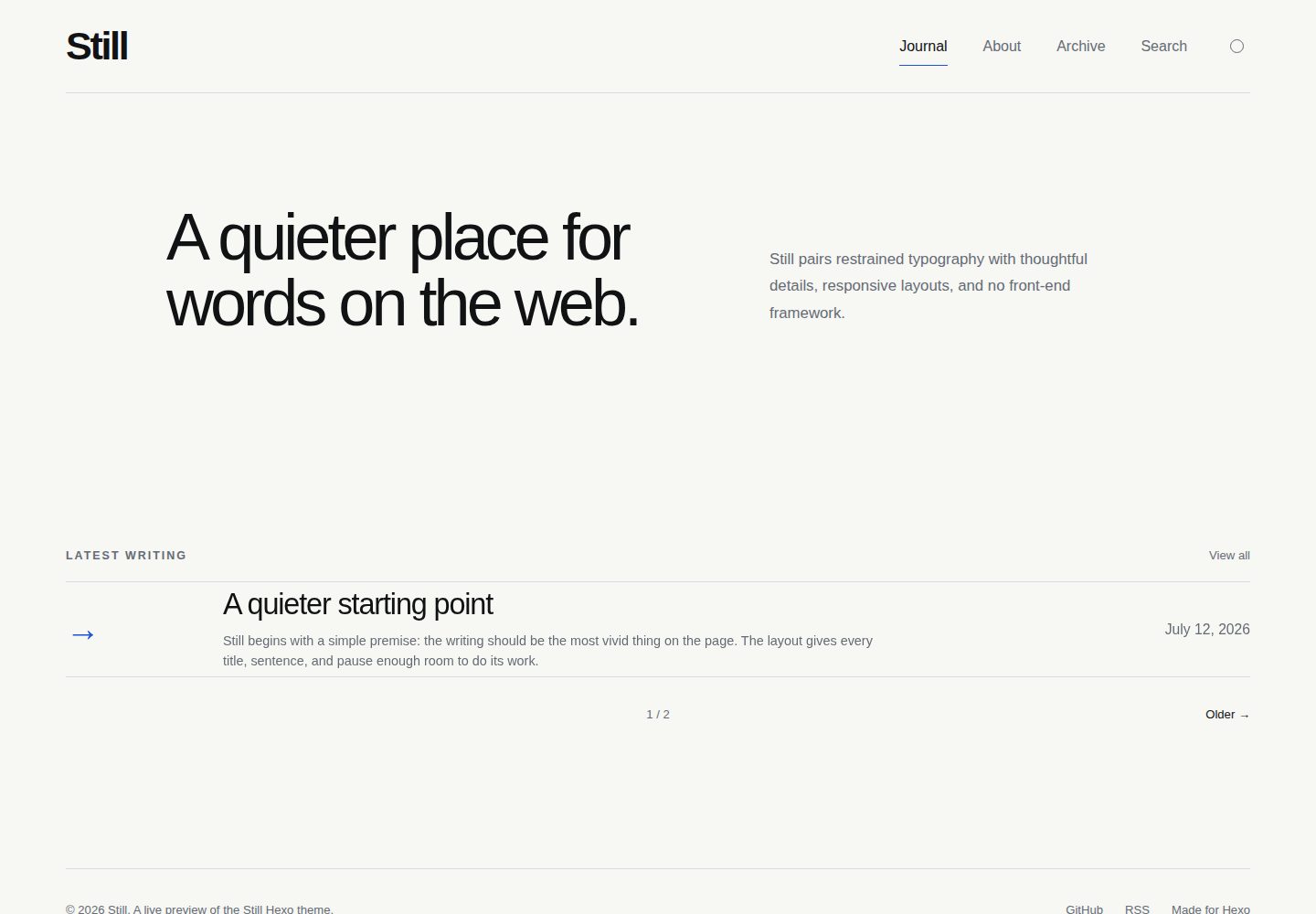
以排版为核心,使用单一响应式网格、系统字体栈和单一强调色
Hexo博客
hexo_theme_still — Hexo 博客模板
作者 simple-is-awesome
Still 是一款面向 Hexo 个人博客的排版优先主题,采用响应式网格、系统字体栈与少量无依赖 JavaScript,内置本地搜索和明暗配色模式。
看看你的网站会是什么样
浏览真实页面截图,比较内容排版与手机效果。点击下方缩略图切换,放大查看整页细节。
全部页面与视图 3
截图用于了解视觉与布局,交互效果请以实际项目为准。
采集于 2026-10-01查看来源
值得关注的模板亮点
从已有项目资料中,快速了解它的特点。
内置由 Hexo 文章生成的本地客户端搜索,自动产出 /search/ 与 search.json
支持明、暗、跟随系统三种配色模式,重复访问无闪烁
Markdown 样式覆盖表格、引用块、脚注与代码高亮
提供阅读时长、可选更新日期、上一篇/下一篇导航与分页
包含语义化 HTML、跳转链接、键盘焦点样式、减少动效与打印样式
模板详细介绍
Still 是 Hexo 个人博客主题,定位为安静、以排版为核心的阅读界面。它使用单一响应式网格、单一系统字体栈、单一强调色,并只引入少量不依赖第三方库的 JavaScript。主题覆盖日志、文章、页面、归档、分类和标签等布局,Markdown 样式较完整,包含表格、引用块、脚注和代码高亮。
功能上提供由 Hexo 文章生成的本地客户端搜索、明暗与跟随系统三种配色模式(重复访问时无闪烁)、阅读时长与可选更新日期、上一篇/下一篇导航与分页、RSS/Atom 发现元数据、可选的 Giscus 评论,以及英文和简体中文界面文案。可访问性方面包含语义化 HTML、跳转链接、键盘焦点样式、减少动效支持和打印样式。主题不依赖网络字体、图片库、前端框架或分析服务。
使用前需注意:要求 Hexo 7 或更新版本(README 称已在 Hexo 8.1.2 上测试),并需要 hexo-renderer-ejs;归档、分类、标签页建议配合标准 Hexo 生成器,如需 atom.xml 则安装 feed 生成器。本地搜索由主题自动生成 /search/ 与 search.json,无需额外搜索插件。评论默认关闭,启用 Giscus 需自行填写仓库与分类标识。设计令牌集中在 source/css/style.css 顶部,字体使用读者设备已安装字体。
Hexo博客
适合你的项目吗?
适用场景
- 搭建以文字阅读为主的 Hexo 个人博客
- 需要本地搜索而不想引入第三方搜索服务的站点
- 希望提供明暗配色切换并兼顾系统偏好的博客
- 面向中英文读者、需要界面文案本地化的个人站点
适合人群
- 使用 Hexo 7 或更新版本的个人博客作者
- 偏好简洁排版、不依赖前端框架与网络字体的用户
- 需要本地搜索、明暗模式与基本可访问性支持的站点
- 希望用 Giscus 作为可选评论方案的博客
上手与定制指南
结合仓库当前版本的说明,按下面的资料检查内容、配置与运行要求。
- 1
将主题文件夹放入 Hexo 站点的 themes/still,并在站点 _config.yml 中设置 theme: still
- 2
需要 hexo-renderer-ejs;归档、分类、标签页建议安装对应标准生成器,atom.xml 需安装 hexo-generator-feed
- 3
把要修改的设置从 themes/still/_config.yml 复制到站点的 _config.still.yml,避免主题更新覆盖配置
- 4
本地搜索由主题自动生成,无需单独安装搜索插件;评论默认关闭,启用 Giscus 需填写 repo、repo_id、category 与 category_id
- 5
简体中文界面将站点 language 设为 zh-CN;设计令牌位于 source/css/style.css 顶部
授权与来源资料
使用条件与限制
免费使用 · 保留许可声明本次收录的是公开仓库中采用 MIT 许可的免费版本;免费范围为该版本代码,不代表外部服务或第三方素材免费。
使用时需要遵守
- 允许免费使用、修改、商用和分发该版本代码。
- 分发代码副本或实质性部分时,保留原作者版权声明和完整 MIT 许可声明。
- 代码按现状提供;担保与责任限制以原许可证及适用法律为准。
额外费用与待核对事项
- 评论功能默认关闭,启用 Giscus 需自行创建 Giscus 配置并填写 repo、repo_id、category、category_id,依赖 GitHub 仓库与 Giscus 外部服务。
- 如需 atom.xml 订阅文件,必须额外安装 hexo-generator-feed 生成器,主题本身不提供该功能。
- 使用该主题必须安装 hexo-renderer-ejs 渲染器依赖,否则无法正常渲染。
- 演示图片、字体、图标及其他第三方素材需按各自许可核对,不能仅凭代码的 MIT 许可判断。
- 域名、托管、数据库、支付或 AI 等外部服务可能另外收费。
查看原文依据
Permission is hereby granted, free of charge
许可证原文
Optional Giscus comments
README 原文
Install the feed generator if you want `atom.xml`
README 原文
https://github.com/simple-is-awesome/hexo_theme_still/blob/main/LICENSEhttps://github.com/simple-is-awesome/hexo_theme_still/blob/main/README.md`hexo-renderer-ejs`
README 原文
DeepSeek 根据仓库许可证和 README 整理 ·2026-10-01。结果仅覆盖已读取资料,依赖、图片、字体及后续条款变更以各自原文为准。
项目核对记录与介绍依据
模板资料
- 来源平台
- GitHub
- 资料与维护参考分
- 资料较完整 · 80 / 100
- 技术栈
- Hexo
- 网站类型
- 博客
这个分数如何计算
本站按许可资料(最高30分)、演示链接(12分)、预览图(10分)、Star数(15分)、记录的维护时间(15分)、描述完整度(8分)、功能记录(5分)和分类资料(5分)计算。它不是代码、安全或性能测试,也不是 Google 评分;有链接不代表已实测可用。
这个项目需要核对什么
- 记录的仓库更新时间
- 2026-07-13
- 截图检查日期
- 2026-10-01
已收录演示链接。请用你的内容与屏幕尺寸检查;有演示不代表表单、认证或支付已经可用。
目录记录的主要技术栈是 Hexo。请通过依赖清单和锁文件核对实际版本与托管要求。这些说明基于收录资料,不代表代码审计或部署实测。
查看具体选型方法 →介绍的制作与核对状态
介绍由 AI 辅助整理目录与仓库资料。仓库作者不等于这篇介绍的审核者。
已完成服务器许可规则与 AI 来源核对;未经过人工编辑审核。
查看当时使用的来源资料
SHA-256: 4d9a700d95526a4b0b133adc6a8b438262f13abe67dded654855d44e5490a33a
2026-10-01T03:14:06.710Z
来源文件 / 仓库# Still
Still is a quiet, typography-first theme for Hexo personal blogs. It uses one responsive grid, one system-font stack, one accent color, and a small amount of dependency-free JavaScript.
[Live demo](https://simple-is-awesome.github.io/hexo_theme_still/)
> [!NOTE]
> This is a work by GPT 5.6 Sol Max.
## Features
- Responsive journal, post, page, archive, category, and tag layouts
- Complete Markdown styling, including tables, blockquotes, footnotes, and highlighted code
- Local client-side search generated from your Hexo posts
- Light, dark, and system color modes with no flash on repeat visits
- Reading time and optional updated dates
- Previous/next post navigation and pagination
- RSS/Atom discovery metadata
- Optional Giscus comments
- English and Simplified Chinese interface strings
- Semantic HTML, skip link, keyboard focus styles, reduced-motion support, and print styles
- No web fonts, image library, front-end framework, or analytics dependency
## Requirements
- Hexo 7 or newer (tested with Hexo 8.1.2)
- Node.js supported by your installed Hexo version
- `hexo-renderer-ejs`
The standard Hexo generators for index, archive, category, and tag pages are recommended. Install the feed generator if you want `atom.xml`:
```bash
npm install hexo-renderer-ejs hexo-generator-index hexo-generator-archive \
hexo-generator-category hexo-generator-tag hexo-generator-feed
```
## Install
1. Extract this folder to `themes/still` inside your Hexo site.
2. Set the theme in the site's `_config.yml`:
```yaml
theme: still
```
3. Copy any settings you want to change from `themes/still/_config.yml` into the site's `_config.still.yml`. Hexo merges that file over the theme defaults and keeps your configuration separate from theme updates.
4. Clean and generate:
```bash
hexo clean
hexo generate
hexo server
```
## Site configuration
A practical starting point for the main Hexo `_config.yml`:
```yaml
title: Still
subtitle: Notes on design, code, and the quiet details.
description: A personal blog about design, code, and careful work.
author: Your Name
language: en
url: https://example.com
permalink: journal/:title/
theme: still
highlight:
enable: true
line_number: true
auto_detect: false
tab_replace: " "
```
For Simplified Chinese interface text, use `language: zh-CN`.
## Navigation and pages
Edit `menu` in the theme configuration. Create an About page with:
```bash
hexo new page about
```
Then set its front matter:
```yaml
---
title: About
subtitle: About
description: A short introduction.
---
```
Still generates `/search/` and `search.json` automatically when local search is enabled. You do not need a separate search plugin.
## Excerpts
The home page is title-first by default. Set `home_excerpt: true` to show a short plain-text excerpt below each title. You can control an individual excerpt using Hexo's `<!-- more -->` marker.
## Comments
Comments are disabled by default. To enable Giscus, create a Giscus configuration for your repository and fill in:
```yaml
comments:
provider: giscus
giscus:
repo: owner/repository
repo_id: your-repo-id
category: General
category_id: your-category-id
mapping: pathname
```
Set `comments: false` in a post's front matter to disable comments on that post.
## Color and typography
All design tokens are at the top of `source/css/style.css`:
```css
:root {
--canvas: #f7f7f4;
--ink: #111214;
--muted: #656b74;
--line: #d9dce1;
--accent: #1f52d6;
}
```
The default font stack uses fonts already installed on the reader's device. This keeps the theme fast and avoids third-party requests.
## License
MIT
看看同类模板
对比同技术栈与用途的模板,找到更适合的视觉与内容结构。

hexo-theme-matery
A beautiful hexo blog theme with material design and responsive design.一个基于材料设计和响应式设计而成的全面、美观的Hexo主题。
Hexo · 博客

hexo-theme-cactus
:cactus: A responsive, clean and simple theme for Hexo.
Hexo · 博客

hexo-theme-volantis
A Wonderful Theme for Hexo.
Hexo · 博客

hexo-theme-aurora
Hexo Theme Aurora 是一款以极光色彩和渐变 UI 为核心的 Hexo 博客主题,整体走未来感路线。 它的首页采用杂志式网格布局,文章列表与精选区域层次分明,视觉上更接近个人媒体站点而非传统博客。
Hexo · 博客

hexo-theme-Claudia
Claudia 是一款为 Hexo 设计的博客主题,主打简洁外观与易配置。 它支持自动跟随设备深色模式,并在 README 中宣称拥有 90+ 的 Lighthouse 评分,适合追求轻量与性能的博客作者。
Hexo · 博客

hexo-theme-A4
A hexo theme that looks like an A4 paper.(一个类A4纸张质感的hexo博客主题。 )
Hexo · 博客