使用 Next.js、Tailwind CSS 和 TypeScript 构建
Next.jsReact博客
nextjs-hashnode-blog — Next.js 博客模板
作者 soufianeelc
基于 Next.js、Tailwind CSS、TypeScript 并接入 Hashnode API 的博客模板,通过 Hashnode 发布文章后自动拉取展示。
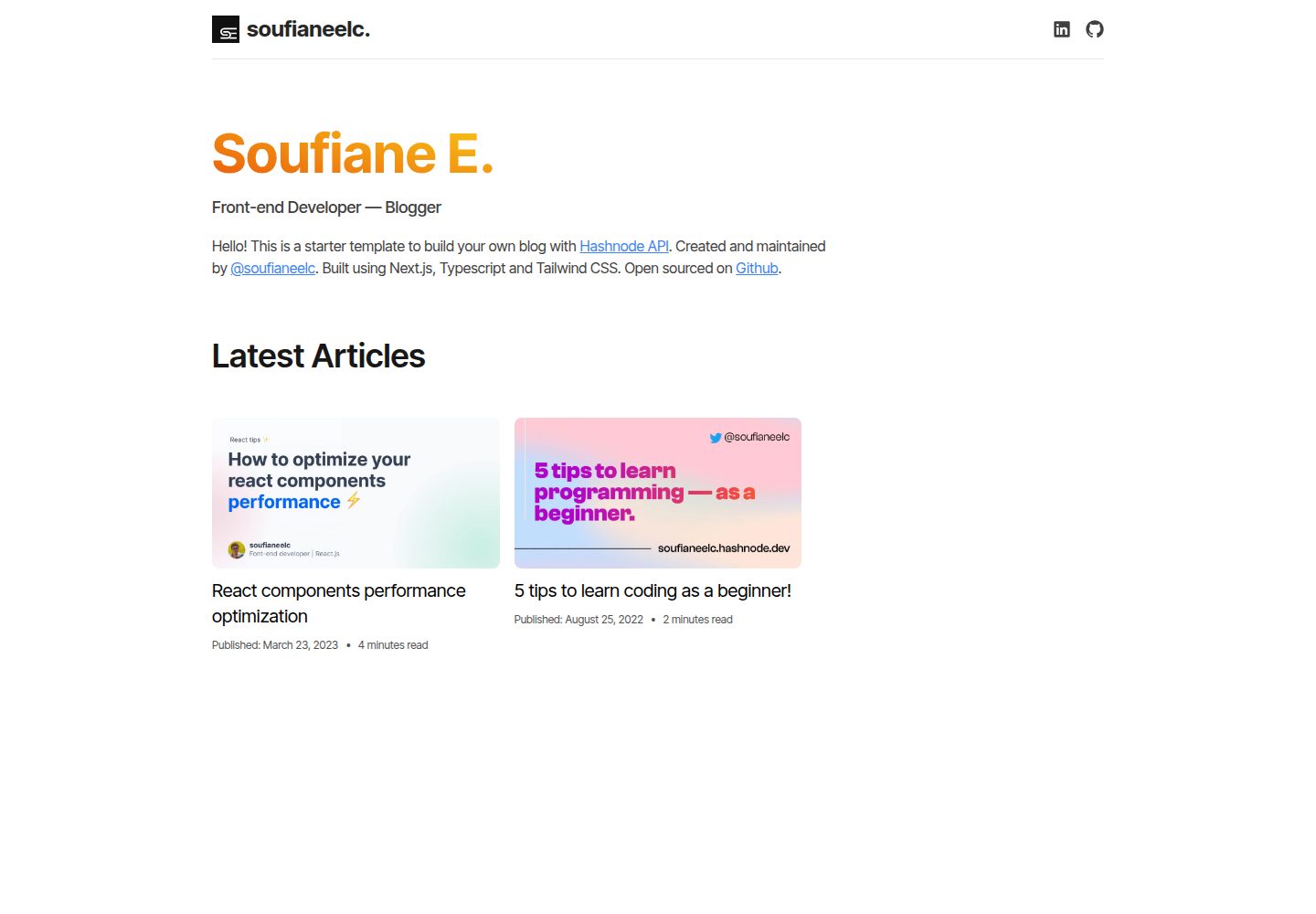
看看你的网站会是什么样
浏览真实页面截图,比较内容排版与手机效果。点击下方缩略图切换,放大查看整页细节。
全部页面与视图 2
截图用于了解视觉与布局,交互效果请以实际项目为准。
采集于 2026-10-13查看来源
值得关注的模板亮点
从已有项目资料中,快速了解它的特点。
通过 Hashnode API 获取并展示博客内容
在 Hashnode 发布文章后自动同步到博客
提供克隆、安装依赖和启动开发服务器的步骤
采用 MIT 开源许可证
模板详细介绍
该模板为搭建博客提供起点,技术栈为 Next.js、Tailwind CSS、TypeScript,内容管理接入 Hashnode API。README 说明其目标是提供整洁、有组织的项目结构,便于开始写作。
使用方式:先克隆仓库,进入项目目录,用 yarn 安装依赖,再运行 yarn dev 启动开发服务器,在 http://localhost:3000 查看博客。
内容更新:在 Hashnode 账号中新建文章并确保已发布,模板会自动拉取并展示。部署方面,README 仅提到可部署到 Vercel、Netlify 或其他平台,未给出具体部署步骤。项目采用 MIT 许可证。README 未说明 Hashnode API 的认证方式、环境变量配置、分页或缓存策略,也未提供页面结构、组件清单和测试说明。
Next.js博客
适合你的项目吗?
适用场景
- 用 Hashnode 作为内容后台搭建个人博客
- 以该模板为起点定制博客的页面与样式
- 在 Vercel 或 Netlify 等平台部署博客
适合人群
- 希望用 Hashnode 管理文章、用自有前端展示的开发者
- 熟悉 Next.js 与 TypeScript、需要博客起始结构的用户
- 想基于 MIT 许可模板二次开发的人
上手与定制指南
结合仓库当前版本的说明,按下面的资料检查内容、配置与运行要求。
- 1
需预先安装 Node.js 和 npm
- 2
克隆仓库后进入项目目录,使用 yarn 安装依赖
- 3
运行 yarn dev 启动开发服务器,访问 http://localhost:3000
- 4
在 Hashnode 创建并发布文章后,模板会自动拉取展示
- 5
README 未说明 Hashnode API 的认证与环境变量配置,需自行确认
授权与来源资料
使用条件与限制
免费使用 · 保留许可声明本次收录的是公开仓库中采用 MIT 许可的免费版本;免费范围为该版本代码,不代表外部服务或第三方素材免费。
使用时需要遵守
- 允许免费使用、修改、商用和分发该版本代码。
- 分发代码副本或实质性部分时,保留原作者版权声明和完整 MIT 许可声明。
- 代码按现状提供;担保与责任限制以原许可证及适用法律为准。
额外费用与待核对事项
- 演示图片、字体、图标及其他第三方素材需按各自许可核对,不能仅凭代码的 MIT 许可判断。
- 域名、托管、数据库、支付或 AI 等外部服务可能另外收费。
- 使用该模板需要拥有 Hashnode 账号,并在该账号中创建和发布文章,博客内容依赖 Hashnode 平台。
- 文章内容由模板自动从 Hashnode 拉取展示,内容托管与发布依赖 Hashnode 服务。
查看原文依据
Permission is hereby granted, free of charge
许可证原文
1. Create a new post on your Hashnode account.
README 原文
https://github.com/soufianeelc/nextjs-hashnode-blog/blob/main/LICENSEhttps://github.com/soufianeelc/nextjs-hashnode-blog/blob/main/README.md3. The template will automatically fetch and display it on your blog.
README 原文
DeepSeek 根据仓库许可证和 README 整理 ·2026-10-13。结果仅覆盖已读取资料,依赖、图片、字体及后续条款变更以各自原文为准。
项目核对记录与介绍依据
模板资料
- 来源平台
- GitHub
- 资料与维护参考分
- 资料一般 · 72 / 100
- 技术栈
- Next.js · React
- 网站类型
- 博客
这个分数如何计算
本站按许可资料(最高30分)、演示链接(12分)、预览图(10分)、Star数(15分)、记录的维护时间(15分)、描述完整度(8分)、功能记录(5分)和分类资料(5分)计算。它不是代码、安全或性能测试,也不是 Google 评分;有链接不代表已实测可用。
这个项目需要核对什么
- 记录的仓库更新时间
- 2023-10-01
- 截图检查日期
- 2026-10-13
已收录演示链接。请用你的内容与屏幕尺寸检查;有演示不代表表单、认证或支付已经可用。
目录记录的主要技术栈是 Next.js。请通过依赖清单和锁文件核对实际版本与托管要求。这些说明基于收录资料,不代表代码审计或部署实测。
查看具体选型方法 →介绍的制作与核对状态
介绍由 AI 辅助整理目录与仓库资料。仓库作者不等于这篇介绍的审核者。
审核声明: codex-user-requested-batch-review-20261015 · 2026-10-15
查看当时使用的来源资料
SHA-256: 8186fde010d8aafa4f4b5bfcb84cb6998ecfe9579e3414a822fe6048a3f15114
2026-10-13T21:57:49.964Z
来源文件 / 仓库# Next.js, Tailwind CSS, TypeScript, and Hashnode API Blog Template --- This template provides a starting point for building a blog using Next.js, Tailwind CSS, TypeScript, and integrating with the Hashnode API for content management. It aims to offer a clean and organized structure to kickstart your blogging journey. # Getting Started ### Prerequisites - Node.js and npm installed on your machine. ### Installation 1. Clone this repository to your local machine: ```bash git clone https://github.com/Soufianeelc/nextjs-hashnode-blog.git ``` 2. Navigate into the project directory: ```bash cd nextjs-hashnode-blog ``` 3. Install dependencies: ```bash yarn ``` 4. Start the development server: ```bash yarn dev ``` Open [http://localhost:3000](http://localhost:3000/) to view your blog. # Customizing Content ### Blog Posts 1. Create a new post on your Hashnode account. 2. Ensure it's published. 3. The template will automatically fetch and display it on your blog. # Deployment You can deploy your blog using platforms like Vercel, Netlify, or any other of your choice. # Contributing Feel free to contribute to this project by opening issues or submitting pull requests. Your contributions are highly appreciated! # License This project is open-source and available under the [MIT License](/LICENSE). # Acknowledgements - Built with ❤️ using Next.js, Tailwind CSS, TypeScript, and Hashnode API.
看看同类模板
对比同技术栈与用途的模板,找到更适合的视觉与内容结构。

tailwind-nextjs-starter-blog
tailwind-nextjs-starter-blog 是一个面向个人技术博客的 Next.js 与 Tailwind CSS 启动模板,其 v2 版本基于 App Router 与 React Server Comp…
Next.js · 博客

Nextjs-tailwindcss-blog-template
使用 Tailwind CSS 的 Next.js 博客。当前分支通过 Velite 处理 Markdown,早期 Contentlayer 实现保留在单独的历史分支中。
Next.js · 博客

Next-js-Blog-Boilerplate
Next-js-Blog-Boilerplate 是一套面向个人与技术博客的启动代码,基于 Next.js 12 与 Tailwind CSS 3 构建,同时集成了 TypeScript、ESLint、Prettier …
Next.js · 博客

nextjs-blog-theme
nextjs-blog-theme 是 Netlify 团队维护的一个博客启动模板,基于 Next.js 15(Pages Router)和 Tailwind CSS 4.x 构建,设计由 Bejamas 机构完成。
Next.js · 博客

blog
🚀 My personal blog made with Tailwind CSS and NextJS. Template from Timlrx. Feel free to fork, follow and use…
Next.js · 博客

tailnext
Tailnext 是一个基于 Next.js 14 App Router 和 Tailwind CSS 的免费开源模板,由 onWidget 团队创建并维护。
Next.js · 博客