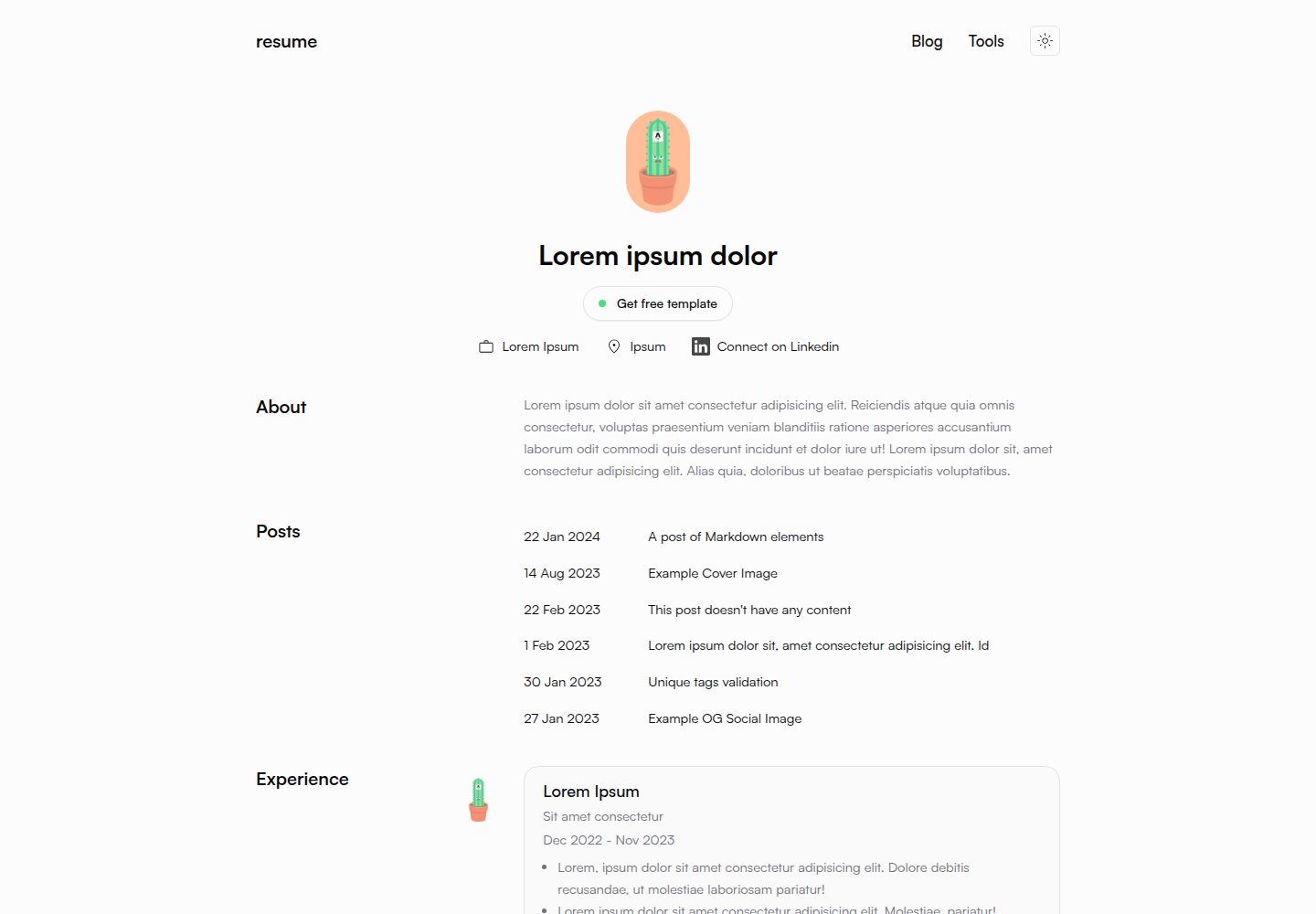
首页为简历展示,另含独立博客模块
Astro作品集博客
astro-theme-resume — Astro 作品集模板
作者 srleom
基于 Astro 与 Tailwind 的开源个人简历站点模板,首页为简历,附带支持 Markdown/MDX 的博客。
看看你的网站会是什么样
浏览真实页面截图,比较内容排版与手机效果。点击下方缩略图切换,放大查看整页细节。
全部页面与视图 3
截图用于了解视觉与布局,交互效果请以实际项目为准。
采集于 2026-09-30查看来源
值得关注的模板亮点
从已有项目资料中,快速了解它的特点。
使用 TailwindCSS 工具类,支持深色/浅色模式
博客文章支持 Markdown 与 MDX 格式
内置分页、自动 RSS 订阅与 sitemap 生成
预置 ESLint 与 Prettier 配置
通过 Astro Assets Integration 处理图片优化
模板详细介绍
astro-theme-resume 是一个用 Astro 构建的个人简历站点模板,首页呈现简历内容,并内置一个博客模块。样式使用 TailwindCSS 工具类,提供深色/浅色模式切换,页面采用语义化 HTML 标记。博客文章以 Markdown 或 MDX 文件形式放在 src/content/ 目录,支持分页、自动生成 RSS 订阅和 sitemap,代码块使用 Expressive Code 高亮。项目预置 ESLint 与 Prettier 配置,并通过 Astro Assets Integration 处理图片优化。
模板的站点信息集中在 src/site.config.ts,简历首页内容与设计在 src/pages/index.astro,全站布局在 src/layouts/BaseLayout.astro,博客文章布局在 src/layouts/BlogPost.astro,主题颜色在 src/styles/app.css,字体需自行放入 public 并在样式与 Tailwind 配置中注册。README 说明博客设计参考 astro-theme-cactus,简历首页设计参考 minirezume-framer。
使用限制方面,仓库采用 MIT 许可,允许免费使用、修改、商用和分发该版本代码,但分发时需保留版权声明与完整 MIT 许可声明;演示图片、字体、图标等第三方素材需按各自许可单独核对,域名、托管等外部服务可能另行收费。
Astro作品集博客
适合你的项目吗?
适用场景
- 搭建个人在线简历并附设技术博客
- 作为 Astro 学习项目,参考其内容集合与布局组织方式
- 在已有简历内容基础上快速替换站点信息与主题颜色
- 需要 RSS 与 sitemap 的静态个人站点
适合人群
- 希望用静态站点发布简历与文章的开发者
- 熟悉或愿意使用 Astro 与 TailwindCSS 的用户
- 需要 Markdown/MDX 写作流程的个人站点维护者
上手与定制指南
结合仓库当前版本的说明,按下面的资料检查内容、配置与运行要求。
- 1
站点标题、描述等信息在 src/site.config.ts 中修改
- 2
简历首页内容与设计在 src/pages/index.astro 中编辑
- 3
博客文章以 .md 文件放入 src/content/ 目录,图片可放入同目录子文件夹并在文中引用
- 4
主题颜色在 src/styles/app.css 调整,自定义字体需放入 public 并在样式与 tailwind.config.js 中注册
- 5
仓库采用 MIT 许可,分发时需保留版权声明与完整许可声明,第三方素材需单独核对许可
授权与来源资料
使用条件与限制
免费使用 · 保留许可声明本次收录的是公开仓库中采用 MIT 许可的免费版本;免费范围为该版本代码,不代表外部服务或第三方素材免费。
使用时需要遵守
- 允许免费使用、修改、商用和分发该版本代码。
- 分发代码副本或实质性部分时,保留原作者版权声明和完整 MIT 许可声明。
- 代码按现状提供;担保与责任限制以原许可证及适用法律为准。
额外费用与待核对事项
- 博客部分设计参考自 astro-theme-cactus 项目,该部分设计来源为第三方项目,若需再分发或商用相关设计,应自行核对其许可条件。
- 简历首页设计参考自 minirezume-framer(Framer 网站),该设计来源为第三方,使用或再分发相关设计时需自行确认其授权情况。
- 自定义字体需自行提供字体文件并放入 public 目录,字体本身的授权需用户自行确认,模板不附带可用字体授权。
- 演示图片、字体、图标及其他第三方素材需按各自许可核对,不能仅凭代码的 MIT 许可判断。
- 域名、托管、数据库、支付或 AI 等外部服务可能另外收费。
查看原文依据
Permission is hereby granted, free of charge
许可证原文
[astro-theme-cactus](https://github.com/chrismwilliams/astro-theme-cactus) for blog design
README 原文
[minirezume-framer](https://minirezume.framer.website/) for resume homepage design
README 原文
https://github.com/srleom/astro-theme-resume/blob/main/LICENSEhttps://github.com/srleom/astro-theme-resume/blob/main/README.mdTo change the fonts of the site, add your font files into `/public`
README 原文
DeepSeek 根据仓库许可证和 README 整理 ·2026-10-01。结果仅覆盖已读取资料,依赖、图片、字体及后续条款变更以各自原文为准。
项目核对记录与介绍依据
模板资料
- 来源平台
- GitHub
- 资料与维护参考分
- 资料较完整 · 81 / 100
- 技术栈
- Astro
- 网站类型
- 作品集 · 博客
这个分数如何计算
本站按许可资料(最高30分)、演示链接(12分)、预览图(10分)、Star数(15分)、记录的维护时间(15分)、描述完整度(8分)、功能记录(5分)和分类资料(5分)计算。它不是代码、安全或性能测试,也不是 Google 评分;有链接不代表已实测可用。
这个项目需要核对什么
- 记录的仓库更新时间
- 2024-04-13
- 截图检查日期
- 2026-10-01
已收录演示链接。请用你的内容与屏幕尺寸检查;有演示不代表表单、认证或支付已经可用。
目录记录的主要技术栈是 Astro。请通过依赖清单和锁文件核对实际版本与托管要求。这些说明基于收录资料,不代表代码审计或部署实测。
查看具体选型方法 →介绍的制作与核对状态
介绍由 AI 辅助整理目录与仓库资料。仓库作者不等于这篇介绍的审核者。
已完成服务器许可规则与 AI 来源核对;未经过人工编辑审核。
查看当时使用的来源资料
SHA-256: 837b5d366cfa16f7b99b1b575622ae13d9384a04efb11e49fe0739ac73f6010f
2026-10-01T13:52:41.751Z
来源文件 / 仓库# Astro Resume
## Features
- Astro v4
- TailwindCSS utility classes
- ESLint / Prettier pre-installed and pre-configured
- Accessible, semantic HTML markup
- Responsive & SEO-friendly
- Dark / Light mode, using Tailwind and CSS variables (referenced from shadcn)
- [Astro Assets Integration](https://docs.astro.build/en/guides/assets/) for optimised images
- MD & [MDX](https://docs.astro.build/en/guides/markdown-content/#mdx-only-features) posts
- Pagination
- [Automatic RSS feed](https://docs.astro.build/en/guides/rss)
- Auto-generated [sitemap](https://docs.astro.build/en/guides/integrations-guide/sitemap/)
- [Expressive Code](https://expressive-code.com/) source code and syntax highlighter
## Credits
- [astro-theme-cactus](https://github.com/chrismwilliams/astro-theme-cactus) for blog design
- [minirezume-framer](https://minirezume.framer.website/) for resume homepage design
## Project Structure
Inside of your Astro project, you'll see the following folders and files:
```text
├── public/
├── src/
├── assets/
│ ├── components/
│ ├── content/
│ ├── layouts/
| ├── pages/
| ├── styles/
| ├── utils/
| ├── site.config.ts
│ └── types.ts
├── .elintrc.cjs
├── .gitignore
├── .prettierignore
├── package.json
├── prettier.config.cjs
├── README.md
├── tailwind.config.js
└── tsconfig.json
```
## Editing guide
### Site info
To edit site info such as site title and description, edit the `src/site.config.ts` file.
### Page contents
To edit the resume homepage content and design, edit the `src/pages/index.astro` file.
### Page components
To edit page components found site-wide such as the card used in the homepage, edit the files found in the `src/components/` directory.
### Layouts
To edit the base layouts of all pages, edit the `src/layouts/BaseLayout.astro` file.
To edit the layout of a blog article, edit the `src/layouts/BlogPost.astro` file.
### Blog content
To add blog content, insert `.md` files in the `src/content/` directory.
To add images in blog articles, insert a folder in the `src/content/` directory, add both the `.md` and image files into the new folder, and reference the image in your `.md` file.
## Theming
To change the theme colours of the site, edit the `src/styles/app.css` file.
To change the fonts of the site, add your font files into `/public`, add it as a `@font-face` in the `src/styles/app.css` file, as a `fontFamily` in the `tailwind.config.js` file, and apply the new font class to the `body` tag in the `src/layouts/BaseLayout.astro` file.
看看同类模板
对比同技术栈与用途的模板,找到更适合的视觉与内容结构。

astrowind
⭕️ AstroWind: A free template using Astro v7 and Tailwind CSS v4. Astro starter theme.
Astro · 博客

astro-paper
A minimal, accessible and SEO-friendly Astro blog theme.
Astro · 博客

fuwari
✨A static blog template built with Astro.
Astro · 博客

Firefly
Firefly 是一款基于 Astro 的静态博客主题,由 CuteLeaf 在 saicaca 的 Fuwari 模板基础上二次开发,主打清新美观的视觉风格。
Astro · 博客

astro-theme-cactus
A simple Astro theme. Use it to create your blog or website.
Astro · 作品集

astrofy
Astrofy is a free and open-source template for your Personal Portfolio Website built with Astro and TailwindCS…
Astro · 作品集