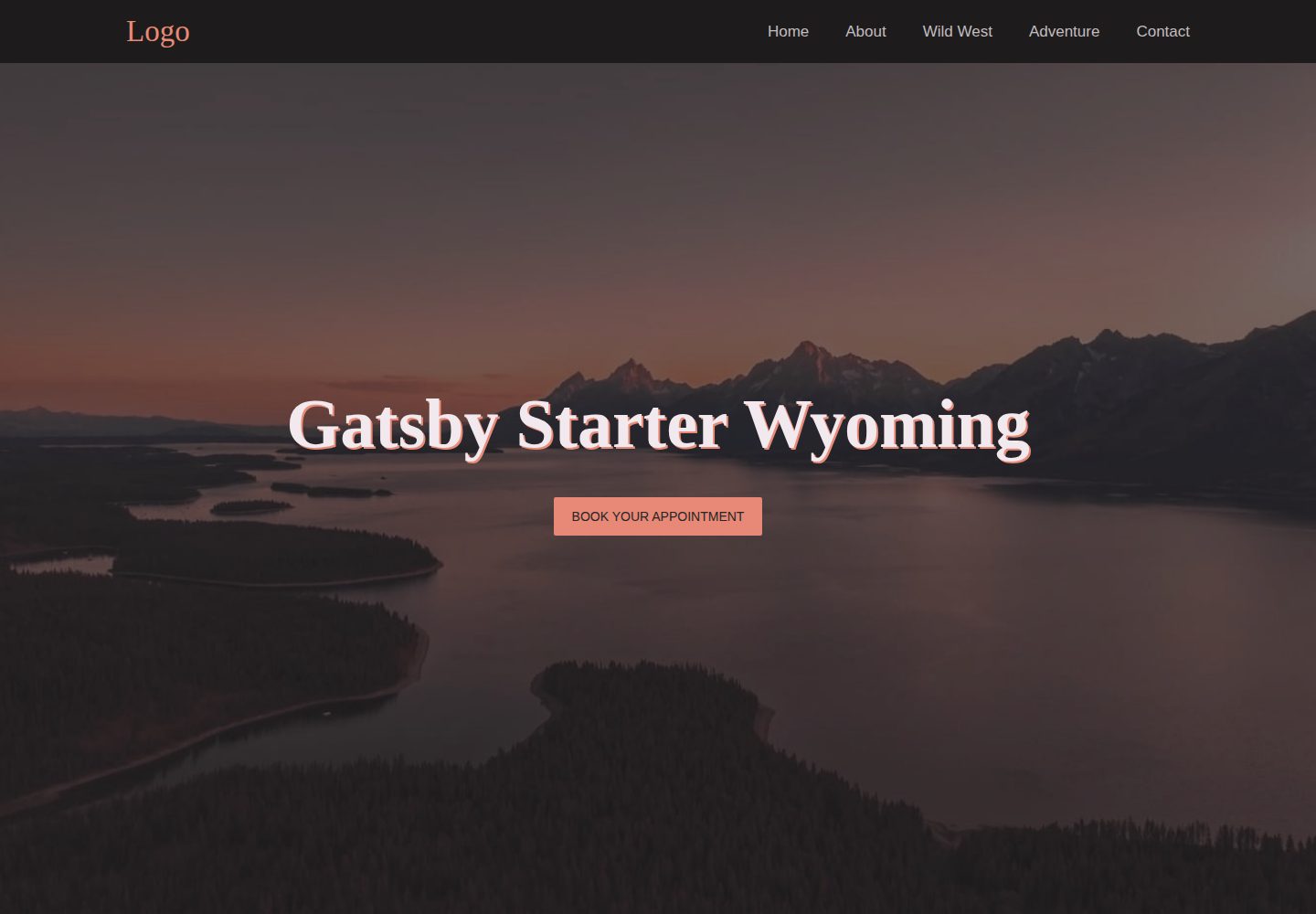
单页响应式布局,含桌面与移动端导航
GatsbyReact企业官网启动器
gatsby-starter-wyoming — Gatsby 企业官网模板
作者 stormcloud266
面向小型企业官网的 Gatsby 单页启动模板,内置联系表单、SEO 组件与 GDPR 合规的统计代码接入。
看看你的网站会是什么样
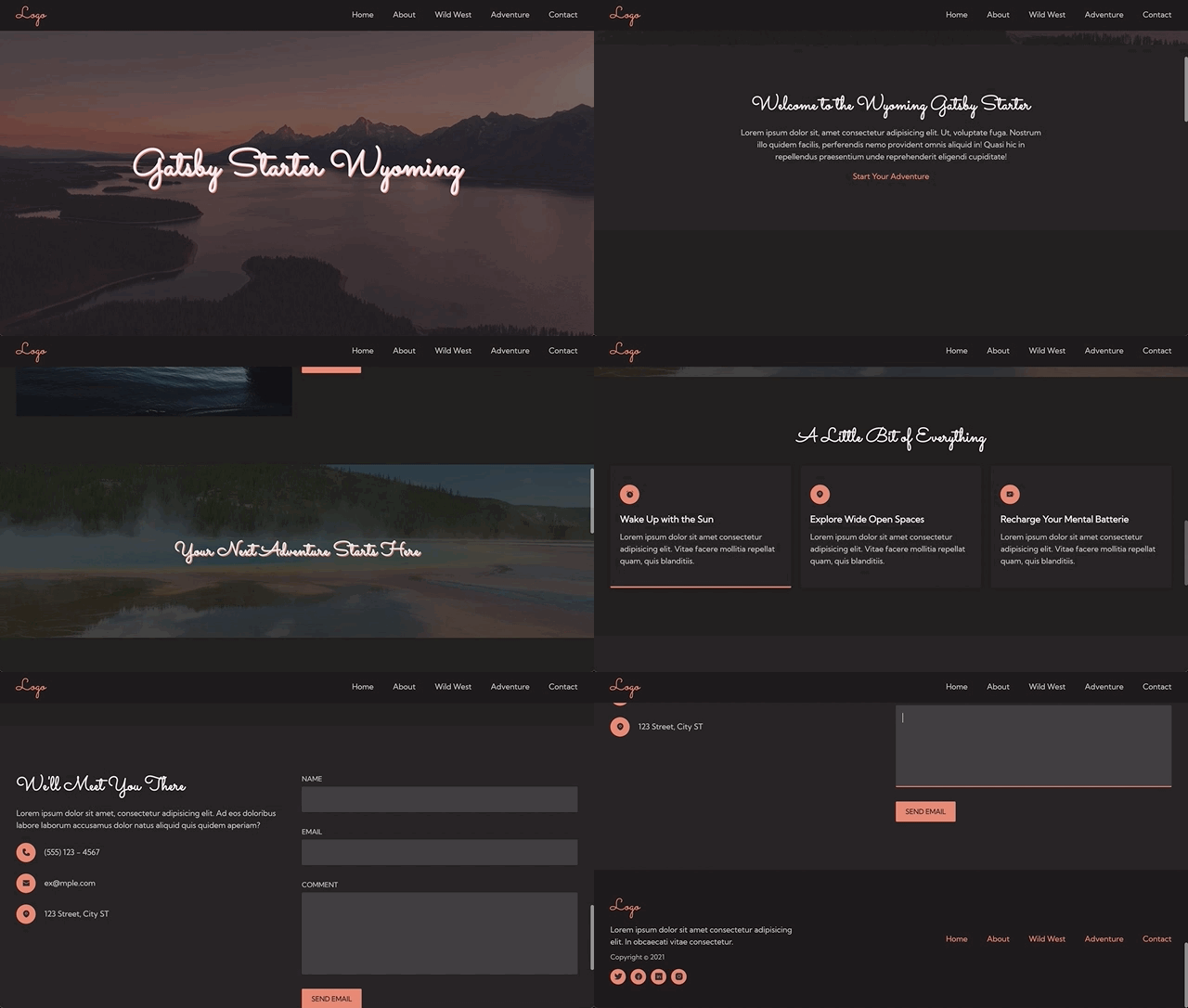
浏览真实页面截图,比较内容排版与手机效果。点击下方缩略图切换,放大查看整页细节。
全部页面与视图 2
截图用于了解视觉与布局,交互效果请以实际项目为准。
采集于 2026-10-02查看来源
值得关注的模板亮点
从已有项目资料中,快速了解它的特点。
Netlify 联系表单与自定义成功页面
SEO 组件支持 Open Graph、Twitter 卡片与 JSON-LD
构建时生成 sitemap.xml
通过 cookie 同意横幅接入 Google Analytics 与 Facebook Pixel
SCSS 变量与 SCSS modules 集中管理全局样式
模板详细介绍
gatsby-starter-wyoming 是一个基于 Gatsby 的启动模板,定位为小型企业网站项目。它提供单页结构,包含响应式布局、桌面与移动端导航、联系表单以及带自定义成功页的 Netlify 表单,并配有样式化的 404 页面。模板基于 Gatsby Starter Default 构建,沿用其默认插件。
在可配置性方面,站点标题、描述、分析 ID 等集中在 src/data/config.js,链接与图标位于 links.js;全局样式使用 SCSS 变量与 SCSS modules,可调整颜色、字体、断点、容器宽度与区块内边距。字体文件放在 static/fonts,图标来自 TeenyIcons 并转为 React 组件使用。
SEO 与合规方面,模板提供 SEO 组件,支持 Open Graph、Twitter 卡片与 JSON-LD 结构化数据,构建时生成 sitemap.xml;Google Analytics 与 Facebook Pixel 通过 cookie 同意横幅接入,需自行填写跟踪 ID 并配置 cookieName。无障碍方面包含跳转链接、键盘导航、aria 标签、alt 文本与语义化 HTML。
使用限制:模板为单页结构,未包含多页面路由或 CMS 集成;分析功能需要自备 Google Analytics 或 Facebook Pixel 的跟踪 ID;表单依赖 Netlify Forms,部署到其他平台时需另行处理表单后端。
Gatsby企业官网启动器
适合你的项目吗?
适用场景
- 为小型企业快速搭建单页官网
- 需要一个带联系表单与 SEO 基础配置的 Gatsby 起点
- 在 Netlify 上部署并希望使用其表单服务的项目
- 需要为统计代码加入 cookie 同意流程的站点
适合人群
- 熟悉 Gatsby 与 SCSS 的前端开发者
- 需要单页企业展示站的小型团队
- 以 Netlify 为主要部署平台的项目
上手与定制指南
结合仓库当前版本的说明,按下面的资料检查内容、配置与运行要求。
- 1
克隆仓库后进入目录执行 yarn install,再用 yarn develop 启动开发环境
- 2
在 src/data/config.js 中更新标题、siteUrl、描述与创建者信息
- 3
替换 favicon 与 static 目录下的 meta-card-banner 图片
- 4
如需统计功能,填写 Google Analytics 或 Facebook Pixel 的跟踪 ID,并配置 cookieName
- 5
表单默认名为 contact,可通过 name 属性区分多个 Netlify 表单
授权与来源资料
使用条件与限制
免费使用 · 保留许可声明本次收录的是公开仓库中采用 0BSD 许可的免费版本;免费范围为该版本代码,不代表外部服务或第三方素材免费。
使用时需要遵守
- 允许为任何目的使用、复制、修改和分发,包括免费或收费的商业用途。
- 该代码许可不要求在副本中保留版权或许可声明;第三方素材仍以各自许可为准。
- 代码按现状提供;担保与责任限制以原许可证及适用法律为准。
额外费用与待核对事项
- 使用统计功能需自备 Google Analytics 跟踪 ID 或 Facebook Pixel ID,模板本身不提供这些账号或 ID。
- 联系表单依赖 Netlify Forms 服务,部署到 Netlify 以外的平台时需自行实现表单后端。
- 打赏为自愿支持,不影响代码在 0BSD 下的免费使用。
- 演示图片、字体、图标及其他第三方素材需按各自许可核对,不能仅凭代码的 0BSD 许可判断。
- 域名、托管、数据库、支付或 AI 等外部服务可能另外收费。
查看原文依据
for any purpose with or without fee is hereby granted
许可证原文
To start using analytics, you will need your Google Analytics tracking ID and/or Facebook Pixel ID.
README 原文
This allows you to use the same component for multiple forms while differentiating them in Netlify Forms
README 原文
https://github.com/stormcloud266/gatsby-starter-wyoming/blob/main/LICENSE.mdhttps://github.com/stormcloud266/gatsby-starter-wyoming/blob/main/README.mdIf you've enjoyed using this starter and would like to show support monetarily, you can buy me a coffee here.
README 原文
DeepSeek 根据仓库许可证和 README 整理 ·2026-10-02。结果仅覆盖已读取资料,依赖、图片、字体及后续条款变更以各自原文为准。
项目核对记录与介绍依据
模板资料
- 来源平台
- GitHub
- 资料与维护参考分
- 资料一般 · 73 / 100
- 技术栈
- Gatsby · React
- 网站类型
- 企业官网 · 启动器
这个分数如何计算
本站按许可资料(最高30分)、演示链接(12分)、预览图(10分)、Star数(15分)、记录的维护时间(15分)、描述完整度(8分)、功能记录(5分)和分类资料(5分)计算。它不是代码、安全或性能测试,也不是 Google 评分;有链接不代表已实测可用。
这个项目需要核对什么
- 记录的仓库更新时间
- 2022-03-15
- 截图检查日期
- 2026-10-02
已收录演示链接。请用你的内容与屏幕尺寸检查;有演示不代表表单、认证或支付已经可用。
目录记录的主要技术栈是 Gatsby。请通过依赖清单和锁文件核对实际版本与托管要求。这些说明基于收录资料,不代表代码审计或部署实测。
查看具体选型方法 →介绍的制作与核对状态
介绍由 AI 辅助整理目录与仓库资料。仓库作者不等于这篇介绍的审核者。
已完成服务器许可规则与 AI 来源核对;未经过人工编辑审核。
查看当时使用的来源资料
SHA-256: 48036087431f6064b7bbf305b69a7dde4a9a76fcc76517bb9255f5638ca60f0b
2026-10-02T08:57:33.460Z
来源文件 / 仓库# gatsby-starter-wyoming
This is a GatsbyJS V3 starter template designed with **small business website** projects in mind. It is a fully-responsive, one-page site with a contact form, SEO, and GDPR-compliant FB Pixel and Google Analytics integration to help get small business websites up and running fast with Gatsby.
## Preview
[Visit Site](https://gatsby-starter-wyoming.netlify.app/)
## Overview
This starter is based on [Gatsby Starter Default](https://github.com/gatsbyjs/gatsby-starter-default) and comes with all the default plugins.
### Features
**Configurable**
- Easy style customization with SCSS variables
- Site data, links, and icons located in data folder
- Alias imports for easy folder structuring
- Intuitive styling with SCSS modules
**Accessible**
- Skip link
- Keyboard navigable
- Aria labels and alt tags
- Sematic html
**SEO Optimized**
- SEO component with open graph, Twitter cards, and JSON LD schema
- GDPR compliant Google Analytics and Facebook Pixel with cookie consent banner
- sitemap.xml on build
**Ready for Launch**
- Full responsive design
- Header component with desktop and mobile nav
- Lazy loaded images
- Netlify form with custom success page
- Styled 404 page
## :rocket: Quick Start
### Install using the command line
1. **Create your new project.**
```sh
git clone https://github.com/stormcloud266/gatsby-starter-wyoming
```
2. **Move into your new project's directory**
```sh
cd gatsby-starter-wyoming
```
3. **Install Dependencies**
```sh
yarn install
```
4. **Start developing**
```sh
yarn develop
```
## :art: Customizations
### Configuration
User data can be configured in the `src/data` folder. The `config.js` file contains all the options for title, descriptions, analytics ids, etc. The `gatsby-config` file pulls info from this file.
All links and associated icons are located in the `links.js` file.
### Global Styles
Global styles are located in `src/assets/globalStyles`. The `variables` file allows for site-wide style changes including the following:
- text, background, and accent colors
- font families and sizes
- break point sizes
- wrapper widths
- section paddings
### Fonts
Web fonts are located in the `static/fonts` directory can be changed in the `src/globalStyles/_fonts.scss` file. The can then be updated in `src/assets/globalStyles/_variables.scss`
```scss
$font-family: 'Kumbh Sans', sans-serif;
$font-family-title: 'Sacramento', cursive;
```
### Icons
The icons used in this project come from [TeenyIcons](https://teenyicons.com/). They are copied into the `src/assets/images/icons.js` file. They can be converted to React components using [this tool](https://react-svgr.com/playground/).
### Form
The default form name is "contact" but can be changed through the `name` prop. This allows you to use the same component for multiple forms while differentiating them in Netlify Forms
```javascript
<Form name='application' />
```
### SEO
The image for the large summary card is located in the `static/` folder, and is pulled in with a static query.
Default info can be updated in the `src/data/config.js`. All fields can be edited on a page-by-page basis with props.
Create your own schema [here](https://hallanalysis.com/json-ld-generator/) or read more [here](https://schema.org/).
```javascript
<SEO title='New Title Here' description='New example description.' />
```
### Analytics
:warning: To start using analytics, you will need your Google Analytics tracking ID and/or Facebook Pixel ID.
1. **Add tracking ID to src/data/config.js file**
```javascript
analytics: {
googleAnalyticsID: 'UA-thisisatest',
googleTagManagerID: '',
facebookPixelID: '',
},
```
2. **Add cookieName to cookieBanner.js**
In `src/components/global/cookieBanner.js` the CookieConsent component has a prop named "cookieName." The value of this prop should match the cookieName in your gatsby-config.
```javascript
cookieName = 'gatsby-gdpr-google-analytics'
```
If you want to have more than one cookie initialized, use the "onAccept" prop.
```javascript
// cookieName="gatsby-gdpr-google-analytics"
onAccept={() => {
Cookies.set("gatsby-gdpr-google-analytics")
Cookies.set("gatsby-gdpr-facebook-pixel")
}}
```
3. **Add cookieBanner to layout**
In your `src/components/global/layout.js` import the cookieBanner component.
```javascript
import CookieBanner from '@components/cookieBanner'
const Layout = ({ children }) => (
<>
<Header />
<main>{children}</main>
<Footer />
<CookieBanner />
</>
)
```
## :white_check_mark: Before Launch Checklist
A short list to help make this template yours.
- [ ] Update site's config data
- [ ] title
- [ ] siteUrl
- [ ] creator
- [ ] description
- [ ] Replace favicon
- [ ] Replace `meta-card-banner` (used in Twitter cards and OG Data)
- [ ] Add GA or FB tracking IDs (if applicable)
- [ ] Enable CookieConsent (if applicable)
## License
This project is licensed under the BSD Zero Clause License. See the [LICENSE](https://choosealicense.com/licenses/0bsd/) file for more details.
## Support
If you've enjoyed using this starter and would like to show support monetarily, you can buy me a coffee here.
<a href="https://www.buymeacoffee.com/tawnee" target="_blank"><img src="https://cdn.buymeacoffee.com/buttons/v2/default-violet.png" alt="Buy Me A Coffee" height="41" width="174"></a>
看看同类模板
对比同技术栈与用途的模板,找到更适合的视觉与内容结构。

gatsby-starter-gcn
gatsby-starter-gcn 是一个面向静态网站构建的 Gatsby 启动器,将内容管理、部署和前端开发串联起来。
Gatsby · 博客

gatsby-starter-morning-dew
:rocket: A Gatsby theme/starter to build lightning-fast blog/websites
Gatsby · 博客

starter-gatsby-blog
这是一个由 Contentful 社区维护的 Gatsby 博客启动器,目标是把静态站点的低维护成本与 Contentful 的友好编辑界面结合起来。
Gatsby · 社区

automatic-gatsbyjs-app-landing-page
Automatic GatsbyJS App Landing Page - Automatically generate iOS app landing page using GatsbyJS
Gatsby · 工具站
gatsby-starter-cv
A simple starter to get up and developing your digital curriculum with GatsbyJS
Gatsby · 启动器

clay-theme
Image-centric Gatsby theme for publishers, portfolios, photographers blogs and more.
Gatsby · 作品集