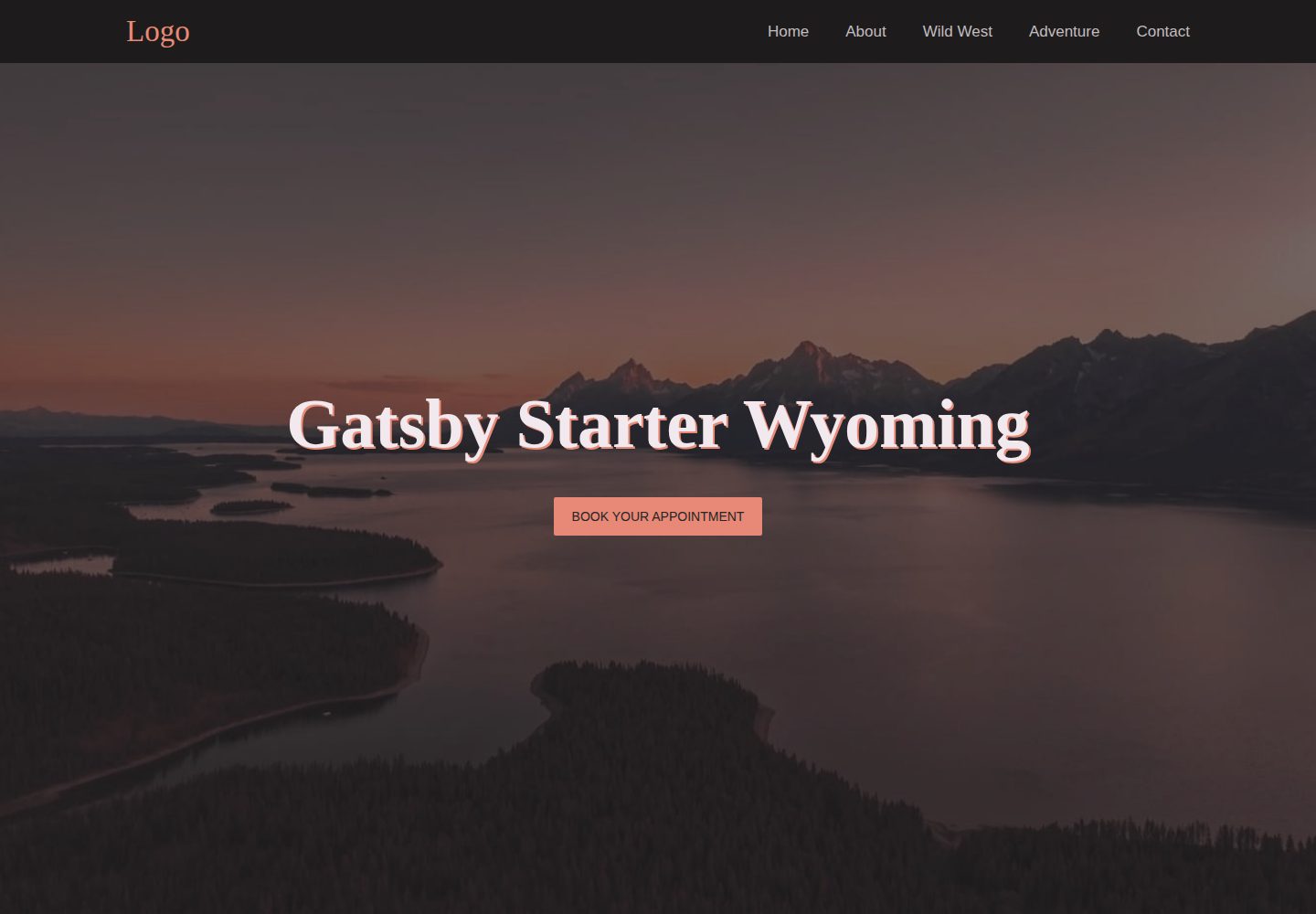
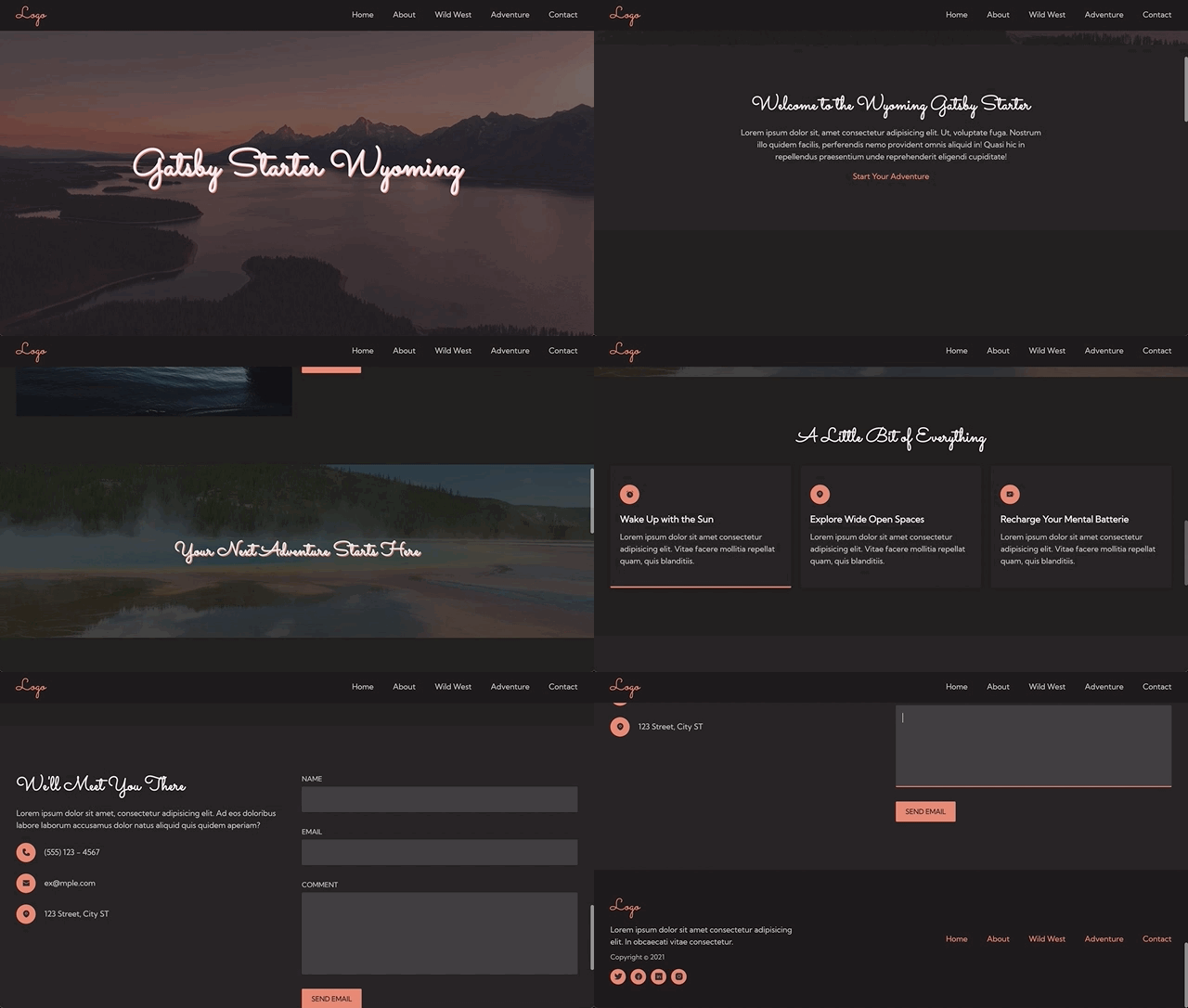
Single-page responsive layout with desktop and mobile navigation
GatsbyReactCorporate WebsiteStarter
gatsby-starter-wyoming — Gatsby Business Template
By stormcloud266
A Gatsby single-page starter template for small business websites, with a built-in contact form, SEO component, and GDPR-compliant analytics integration.
Explore the design
Compare the page layouts and mobile experience. Open any screenshot for a closer look.
Desktop homepage1 / 2
Desktop captureTop of page
Actual screenshot captured by the server browser.
All pages & views 2
Screenshots show visual appearance; interactive behavior may differ.
Recorded 2026-10-02View source
What stands out
A quick read of the recorded project description.
Netlify contact form with a custom success page
SEO component supporting Open Graph, Twitter cards, and JSON-LD
Generates sitemap.xml at build time
Google Analytics and Facebook Pixel integrated via a cookie consent banner
Global styles managed centrally with SCSS variables and SCSS modules
Template Details
gatsby-starter-wyoming is a Gatsby-based starter template positioned for small business website projects. It provides a single-page structure with a responsive layout, desktop and mobile navigation, a contact form, and a Netlify form with a custom success page, plus a styled 404 page. The template is built on Gatsby Starter Default and reuses its default plugins.
For configurability, the site title, description, analytics ID, and similar settings are centralized in src/data/config.js, while links and icons are in links.js; global styles use SCSS variables and SCSS modules, allowing adjustment of colors, fonts, breakpoints, container width, and section padding. Font files go in static/fonts, and icons come from TeenyIcons and are converted into React components.
For SEO and compliance, the template provides an SEO component supporting Open Graph, Twitter cards, and JSON-LD structured data, and generates sitemap.xml at build time; Google Analytics and Facebook Pixel are integrated via a cookie consent banner, and you must supply your own tracking IDs and configure cookieName. Accessibility features include skip links, keyboard navigation, aria labels, alt text, and semantic HTML.
Usage limitations: the template is a single-page structure and does not include multi-page routing or CMS integration; analytics requires your own Google Analytics or Facebook Pixel tracking ID; the form relies on Netlify Forms, so deploying to other platforms requires handling the form backend separately.
GatsbyBusiness websiteStarter
Is it right for your project?
Use Cases
- Quickly building a single-page website for a small business
- Needing a Gatsby starting point with a contact form and basic SEO configuration
- Projects deployed on Netlify that want to use its form service
- Sites that need a cookie consent flow for analytics code
Suitable For
- Front-end developers familiar with Gatsby and SCSS
- Small teams needing a single-page business showcase site
- Projects primarily deployed on Netlify
Getting started & customization
Use these recorded setup notes alongside the repository instructions for your chosen version.
- 1
After cloning the repository, enter the directory and run yarn install, then start the development environment with yarn develop
- 2
Update the title, siteUrl, description, and creator information in src/data/config.js
- 3
Replace the favicon and the meta-card-banner image in the static directory
- 4
If analytics is needed, fill in the Google Analytics or Facebook Pixel tracking ID and configure cookieName
- 5
The form is named contact by default; multiple Netlify forms can be distinguished via the name attribute
License & source material
Usage conditions & limitations
Free to use · keep license noticeThis entry covers the free version in the public repository under the 0BSD license; the free scope is the code of that version and does not imply that external services or third-party assets are free.
Must comply with when using
- Use, copy, modify, and distribute for any purpose is permitted, including commercial use, whether free or paid.
- The code license does not require retaining copyright or license notices in copies; third-party assets remain subject to their own licenses.
- The code is provided as is; warranties and limitations of liability are governed by the original license and applicable law.
Additional costs & items to verify
- Using analytics requires your own Google Analytics tracking ID or Facebook Pixel ID; the template itself does not provide these accounts or IDs.
- The contact form relies on the Netlify Forms service; deploying to platforms other than Netlify requires implementing a form backend yourself.
- Donations are voluntary support and do not affect the free use of the code under 0BSD.
- Demo images, fonts, icons, and other third-party assets must be checked against their respective licenses; they cannot be judged solely by the code's 0BSD license.
- External services such as domains, hosting, databases, payments, or AI may incur additional charges.
View Original Text Basis
for any purpose with or without fee is hereby granted
Original License Text
To start using analytics, you will need your Google Analytics tracking ID and/or Facebook Pixel ID.
Original README
This allows you to use the same component for multiple forms while differentiating them in Netlify Forms
Original README
https://github.com/stormcloud266/gatsby-starter-wyoming/blob/main/LICENSE.mdhttps://github.com/stormcloud266/gatsby-starter-wyoming/blob/main/README.mdIf you've enjoyed using this starter and would like to show support monetarily, you can buy me a coffee here.
Original README
Compiled by DeepSeek based on repository license and README ·2026-10-02. Results only cover the materials read; dependencies, images, fonts, and subsequent term changes are subject to their respective original texts.
Project checks & description sources
Template Information
- Source platforms
- GitHub
- Documentation and maintenance reference score
- Partly documented · 73 / 100
- Technologies
- Gatsby · React
- Website type
- Corporate Website · Starter
How this score is calculated
Our heuristic uses license records (up to 30), a demo link (12), a preview (10), stars (15), recorded maintenance (15), description completeness (8), feature records (5) and classification data (5). It is not a code, security or performance test, or a Google score. A link does not establish tested functionality.
What to verify for this project
- Repository update recorded
- 2022-03-15
- Screenshot last checked
- 2026-10-02
A demo link is listed. Check it with your own content and viewport sizes; its presence does not confirm that forms, authentication or payments work.
The catalog identifies Gatsby as the primary stack. Check the actual dependency manifest and lockfile for versions and hosting requirements. These notes use recorded metadata, not a code audit or a deployment test.
Use a selection guide →How this description was prepared
AI-assisted description based on catalog records and repository material. Repository authors are not automatically the reviewers of this description.
Automatically checked against source and license rules; no manual editorial review.
Inspect the recorded source material
SHA-256: 48036087431f6064b7bbf305b69a7dde4a9a76fcc76517bb9255f5638ca60f0b
2026-10-02T08:57:33.460Z
Source file / repository# gatsby-starter-wyoming
This is a GatsbyJS V3 starter template designed with **small business website** projects in mind. It is a fully-responsive, one-page site with a contact form, SEO, and GDPR-compliant FB Pixel and Google Analytics integration to help get small business websites up and running fast with Gatsby.
## Preview
[Visit Site](https://gatsby-starter-wyoming.netlify.app/)
## Overview
This starter is based on [Gatsby Starter Default](https://github.com/gatsbyjs/gatsby-starter-default) and comes with all the default plugins.
### Features
**Configurable**
- Easy style customization with SCSS variables
- Site data, links, and icons located in data folder
- Alias imports for easy folder structuring
- Intuitive styling with SCSS modules
**Accessible**
- Skip link
- Keyboard navigable
- Aria labels and alt tags
- Sematic html
**SEO Optimized**
- SEO component with open graph, Twitter cards, and JSON LD schema
- GDPR compliant Google Analytics and Facebook Pixel with cookie consent banner
- sitemap.xml on build
**Ready for Launch**
- Full responsive design
- Header component with desktop and mobile nav
- Lazy loaded images
- Netlify form with custom success page
- Styled 404 page
## :rocket: Quick Start
### Install using the command line
1. **Create your new project.**
```sh
git clone https://github.com/stormcloud266/gatsby-starter-wyoming
```
2. **Move into your new project's directory**
```sh
cd gatsby-starter-wyoming
```
3. **Install Dependencies**
```sh
yarn install
```
4. **Start developing**
```sh
yarn develop
```
## :art: Customizations
### Configuration
User data can be configured in the `src/data` folder. The `config.js` file contains all the options for title, descriptions, analytics ids, etc. The `gatsby-config` file pulls info from this file.
All links and associated icons are located in the `links.js` file.
### Global Styles
Global styles are located in `src/assets/globalStyles`. The `variables` file allows for site-wide style changes including the following:
- text, background, and accent colors
- font families and sizes
- break point sizes
- wrapper widths
- section paddings
### Fonts
Web fonts are located in the `static/fonts` directory can be changed in the `src/globalStyles/_fonts.scss` file. The can then be updated in `src/assets/globalStyles/_variables.scss`
```scss
$font-family: 'Kumbh Sans', sans-serif;
$font-family-title: 'Sacramento', cursive;
```
### Icons
The icons used in this project come from [TeenyIcons](https://teenyicons.com/). They are copied into the `src/assets/images/icons.js` file. They can be converted to React components using [this tool](https://react-svgr.com/playground/).
### Form
The default form name is "contact" but can be changed through the `name` prop. This allows you to use the same component for multiple forms while differentiating them in Netlify Forms
```javascript
<Form name='application' />
```
### SEO
The image for the large summary card is located in the `static/` folder, and is pulled in with a static query.
Default info can be updated in the `src/data/config.js`. All fields can be edited on a page-by-page basis with props.
Create your own schema [here](https://hallanalysis.com/json-ld-generator/) or read more [here](https://schema.org/).
```javascript
<SEO title='New Title Here' description='New example description.' />
```
### Analytics
:warning: To start using analytics, you will need your Google Analytics tracking ID and/or Facebook Pixel ID.
1. **Add tracking ID to src/data/config.js file**
```javascript
analytics: {
googleAnalyticsID: 'UA-thisisatest',
googleTagManagerID: '',
facebookPixelID: '',
},
```
2. **Add cookieName to cookieBanner.js**
In `src/components/global/cookieBanner.js` the CookieConsent component has a prop named "cookieName." The value of this prop should match the cookieName in your gatsby-config.
```javascript
cookieName = 'gatsby-gdpr-google-analytics'
```
If you want to have more than one cookie initialized, use the "onAccept" prop.
```javascript
// cookieName="gatsby-gdpr-google-analytics"
onAccept={() => {
Cookies.set("gatsby-gdpr-google-analytics")
Cookies.set("gatsby-gdpr-facebook-pixel")
}}
```
3. **Add cookieBanner to layout**
In your `src/components/global/layout.js` import the cookieBanner component.
```javascript
import CookieBanner from '@components/cookieBanner'
const Layout = ({ children }) => (
<>
<Header />
<main>{children}</main>
<Footer />
<CookieBanner />
</>
)
```
## :white_check_mark: Before Launch Checklist
A short list to help make this template yours.
- [ ] Update site's config data
- [ ] title
- [ ] siteUrl
- [ ] creator
- [ ] description
- [ ] Replace favicon
- [ ] Replace `meta-card-banner` (used in Twitter cards and OG Data)
- [ ] Add GA or FB tracking IDs (if applicable)
- [ ] Enable CookieConsent (if applicable)
## License
This project is licensed under the BSD Zero Clause License. See the [LICENSE](https://choosealicense.com/licenses/0bsd/) file for more details.
## Support
If you've enjoyed using this starter and would like to show support monetarily, you can buy me a coffee here.
<a href="https://www.buymeacoffee.com/tawnee" target="_blank"><img src="https://cdn.buymeacoffee.com/buttons/v2/default-violet.png" alt="Buy Me A Coffee" height="41" width="174"></a>
Explore similar templates
Compare previews and descriptions within the same stack and category.

gatsby-starter-gcn
A Gatsby starter for building static blogs with Contentful and Netlify.
Gatsby · Blog

gatsby-starter-morning-dew
A Gatsby and React blog starter/theme that uses Markdown or MDX for posts, supports multilingual content, dark mode, tag grouping, PWA, and Disqus comments, and is MIT licensed.
Gatsby · Blog

starter-gatsby-blog
A community-maintained Gatsby blog starter for Contentful, with a simple content model, npm run setup import, Sync API support, and gatsby-plugin-image. Suitable for quickly building a CMS-driven static blog or learning Gatsby and Headless CMS integration.
Gatsby · 社区

automatic-gatsbyjs-app-landing-page
A GatsbyJS template for iOS app landing pages, ported from Emil Baehr's Automatic App Landing Page. Configure content in site-config.js without writing HTML or CSS, upload video previews or screenshots, and deploy via Netlify or build for GitHub Pages.
Gatsby · Tool Site
gatsby-starter-cv
A Gatsby and React starter for building a responsive personal digital resume. It includes sections for About, Skills, Job experiences, GitHub repositories, and Portfolio, with all personal data configured in data/siteConfig.js.
Gatsby · Starter

clay-theme
Clay is an image-centric Gatsby theme for publishers, portfolios, and photography blogs. It includes PWA support, a preconfigured Netlify/Decap CMS, PurgeCSS, Netlify deployment settings, and Netlify Forms.
Gatsby · Portfolio