基于 Next.js App Router、Tailwind CSS 与 shadcn/ui 构建
Next.jsReact作品集
minimal-portfolio-template — Next.js 作品集模板
作者 SublimeAli
面向设计师与开发者的极简作品集模板,基于 Next.js、Tailwind CSS 与 shadcn/ui,采用 Turborepo 单仓库结构,内容由 portfolio.ts 与 MDX 驱动。
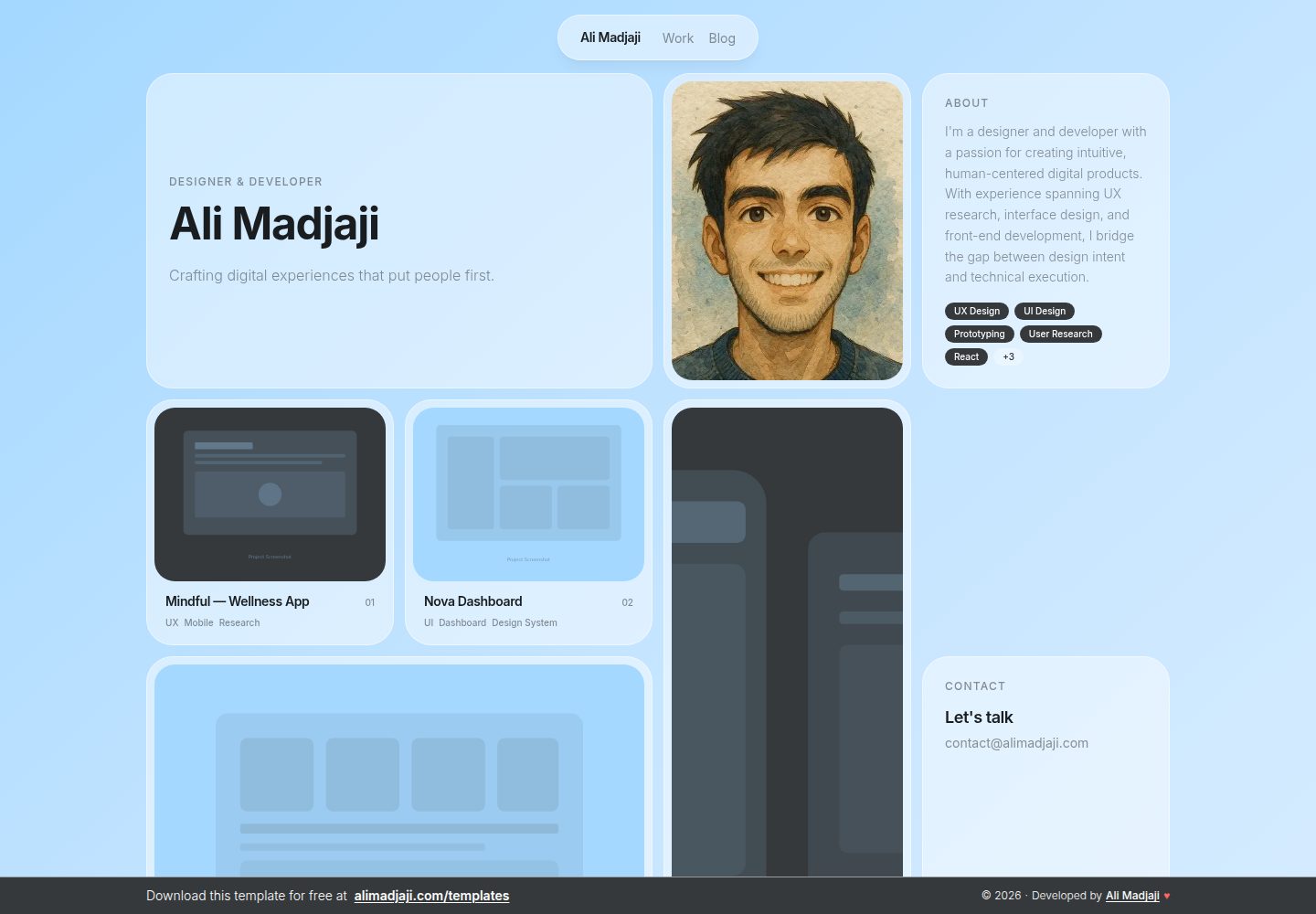
看看你的网站会是什么样
浏览真实页面截图,比较内容排版与手机效果。点击下方缩略图切换,放大查看整页细节。
全部页面与视图 3
截图用于了解视觉与布局,交互效果请以实际项目为准。
采集于 2026-10-14查看来源
值得关注的模板亮点
从已有项目资料中,快速了解它的特点。
使用 MDX 管理博客与项目内容
Turborepo 单仓库结构,含 apps/web 与 packages/ui 工作区
落地页内容集中在 apps/web/data/portfolio.ts 单文件维护
支持通过 degit 或 GitHub Use this template 快速创建新项目
MIT 许可证发布,可免费下载使用
模板详细介绍
这是一个用于搭建个人作品集网站的模板,README 说明其面向设计师和开发者,由 Ali Madjaji 设计开发,可免费下载。技术栈为 Next.js(App Router)、Tailwind CSS 与 shadcn/ui,博客和项目内容使用 MDX,整体组织为 Turborepo 单仓库,包含 apps/web 与 packages/ui 两个工作区。
使用方式有两种:通过 GitHub 的 Use this template 按钮创建新仓库,或用 degit 拉取干净工作树后执行 npm install 与 npm run dev。运行要求为 Node.js 20 及以上版本,并使用 npm(npm workspaces 加 Turborepo)。本地开发默认在 http://localhost:3000 启动。
定制内容集中在 apps/web/data/portfolio.ts,落地页上几乎所有可见信息(姓名、角色、简介、项目、联系方式)都由该文件驱动;图片放在 apps/web/public/images/,默认主视觉为 apps/web/public/ali.webp。博客与项目通过 apps/web/content/blog 和 apps/web/content/projects 下的 MDX 文件添加,SEO 元数据在 apps/web/app/layout.tsx 中修改。README 特别说明底部横幅用于署名模板作者,属于模板的一部分,发布作品集时请保留可见,可在 apps/web/components/banner.tsx 中编辑。
部署方面,README 推荐 Vercel 零配置部署:推送仓库后在 vercel.com/new 导入,将 Root Directory 设为 apps/web 即可;Netlify、Cloudflare Pages 或自托管(在 apps/web 下执行 npm run build && npm start)同样可行,且不需要环境变量。模板以 MIT 许可证发布。README 未提供关于性能、无障碍、浏览器兼容性或测试覆盖的说明。
Next.js作品集
适合你的项目吗?
适用场景
- 设计师搭建个人作品集与项目展示页
- 开发者整理项目案例并附带 MDX 博客
- 需要单仓库结构、UI 组件可复用的前端项目起步
- 部署到 Vercel、Netlify、Cloudflare Pages 或自托管服务器
适合人群
- 熟悉 Next.js 与 React 的前端开发者
- 希望用单文件集中管理作品集内容的设计师
- 需要 MDX 写作流程的博客与项目展示场景
- 接受保留模板作者署名横幅的使用者
上手与定制指南
结合仓库当前版本的说明,按下面的资料检查内容、配置与运行要求。
- 1
要求 Node.js 20 及以上版本,并使用 npm(npm workspaces + Turborepo)
- 2
推荐用 GitHub 的 Use this template 按钮,或执行 npx degit SublimeAli/minimal-portfolio-template my-portfolio 后 git init、npm install、npm run dev
- 3
克隆仓库后执行 npm install 与 npm run dev,访问 http://localhost:3000
- 4
内容改 apps/web/data/portfolio.ts,图片放 apps/web/public/images/,博客与项目 MDX 放 apps/web/content/blog 与 apps/web/content/projects
- 5
Vercel 部署需将 Root Directory 设为 apps/web;自托管在 apps/web 下执行 npm run build && npm start,无需环境变量
授权与来源资料
使用条件与限制
免费使用 · 保留许可声明本次收录的是公开仓库中采用 MIT 许可的免费版本;免费范围为该版本代码,不代表外部服务或第三方素材免费。
使用时需要遵守
- 允许免费使用、修改、商用和分发该版本代码。
- 分发代码副本或实质性部分时,保留原作者版权声明和完整 MIT 许可声明。
- 代码按现状提供;担保与责任限制以原许可证及适用法律为准。
额外费用与待核对事项
- 演示图片、字体、图标及其他第三方素材需按各自许可核对,不能仅凭代码的 MIT 许可判断。
- 域名、托管、数据库、支付或 AI 等外部服务可能另外收费。
- 模板底部横幅用于署名模板作者,属于模板的一部分;若发布作品集,请保持其可见(可在 apps/web/components/banner.tsx 中编辑)。
查看原文依据
Permission is hereby granted, free of charge
许可证原文
https://github.com/SublimeAli/minimal-portfolio-template/blob/main/LICENSEhttps://github.com/SublimeAli/minimal-portfolio-template/blob/main/README.md- **Banner** — the bottom banner credits the template author and is part of the template; please keep it visible if you publish your portfolio. You can edit it in `apps/web/components/banner.tsx`.
README 原文
DeepSeek 根据仓库许可证和 README 整理 ·2026-10-14。结果仅覆盖已读取资料,依赖、图片、字体及后续条款变更以各自原文为准。
项目核对记录与介绍依据
模板资料
- 来源平台
- GitHub
- 资料与维护参考分
- 资料较完整 · 80 / 100
- 技术栈
- Next.js · React
- 网站类型
- 作品集
这个分数如何计算
本站按许可资料(最高30分)、演示链接(12分)、预览图(10分)、Star数(15分)、记录的维护时间(15分)、描述完整度(8分)、功能记录(5分)和分类资料(5分)计算。它不是代码、安全或性能测试,也不是 Google 评分;有链接不代表已实测可用。
这个项目需要核对什么
- 记录的仓库更新时间
- 2026-04-09
- 截图检查日期
- 2026-10-14
已收录演示链接。请用你的内容与屏幕尺寸检查;有演示不代表表单、认证或支付已经可用。
目录记录的主要技术栈是 Next.js。请通过依赖清单和锁文件核对实际版本与托管要求。这些说明基于收录资料,不代表代码审计或部署实测。
查看具体选型方法 →介绍的制作与核对状态
介绍由 AI 辅助整理目录与仓库资料。仓库作者不等于这篇介绍的审核者。
审核声明: codex-user-requested-batch-review-20261015 · 2026-10-15
查看当时使用的来源资料
SHA-256: d1993ada4bb3075f304f497e7d52511592425a89cad08e0e11d19294d02a124e
2026-10-14T18:36:53.172Z
来源文件 / 仓库# Minimal Portfolio Template A minimal portfolio template for designers and developers, built with Next.js, Tailwind CSS, and shadcn/ui in a Turborepo monorepo. Designed and developed by **[Ali Madjaji](https://www.alimadjaji.com)** — free to download at [alimadjaji.com/templates](https://www.alimadjaji.com/templates).  ## Stack - Next.js (App Router) - Tailwind CSS + shadcn/ui - MDX for blog and project content - Turborepo monorepo (`apps/web`, `packages/ui`) ## Use this template The fastest way is the green **Use this template** button at the top of this repo — it creates a fresh repository on your account with a clean commit history. Prefer the command line? `degit` strips the `.git` folder and gives you a pristine working tree: ```bash npx degit SublimeAli/minimal-portfolio-template my-portfolio cd my-portfolio git init npm install npm run dev ``` ## Requirements - Node.js **≥ 20** - npm (this repo uses **npm workspaces** + Turborepo) ## Getting started If you've cloned the repo directly instead of using one of the options above: ```bash npm install npm run dev ``` Then open [http://localhost:3000](http://localhost:3000). ## Customizing your portfolio - **Content** — edit `apps/web/data/portfolio.ts` to update your name, role, bio, projects, and contact info. Almost everything visible on the landing page is driven from this single file. - **Images** — drop your own assets into `apps/web/public/images/` (e.g. `hero.svg`, `project-01.svg`, `blog-01.svg`) and reference them as `/images/your-file.svg` from `portfolio.ts` and your MDX frontmatter. The default hero (`/ali.webp`) lives directly in `apps/web/public/` — replace it with your own photo and update `portfolio.heroImage`. - **Blog & projects** — add MDX files under `apps/web/content/blog` and `apps/web/content/projects`. - **SEO metadata** — update title, description, and OpenGraph tags in `apps/web/app/layout.tsx`. - **Banner** — the bottom banner credits the template author and is part of the template; please keep it visible if you publish your portfolio. You can edit it in `apps/web/components/banner.tsx`. ## Adding shadcn components ```bash npx shadcn@latest add button -c apps/web ``` Components are placed in `packages/ui/src/components` and imported via `@workspace/ui/components/<name>`. ## Deploy The fastest way is Vercel (zero config): 1. Push this repo to GitHub. 2. Go to [vercel.com/new](https://vercel.com/new) and import the repo. 3. Vercel auto-detects Next.js. Set the **Root Directory** to `apps/web`. 4. Click Deploy. Netlify, Cloudflare Pages, or self-hosting (`npm run build && npm start` from `apps/web`) all work too — no environment variables required. ## License Released under the [MIT License](./LICENSE). --- © [Ali Madjaji](https://www.alimadjaji.com) · [alimadjaji.com](https://www.alimadjaji.com)
看看同类模板
对比同技术栈与用途的模板,找到更适合的视觉与内容结构。

react-resume-template
A personal resume website template built with React.js, Typescript, Next.js, and styled with Tailwind css
Next.js · 作品集

nxt-lnk
Custom bio links for creatives who love coding. A perfect custom alternative for linktree, bio and other short…
Next.js · 作品集

sylph
A minimal portfolio template.
Next.js · 作品集

sleek-portfolio
sleek-portfolio 是一个面向开发者个人品牌展示的现代作品集模板,基于 Next.js 15、TypeScript、Tailwind CSS 和 Shadcn UI 构建。
Next.js · 作品集

research-website-template
React + Next.js template for research websites (for PhD students, researchers, etc)
Next.js · 作品集

shadcn-portfolio
shadcn-portfolio 是一个面向开发者的作品集模板,技术栈为 Next.js 15、shadcn/ui、Tailwind CSS 和 Framer Motion。
Next.js · 作品集