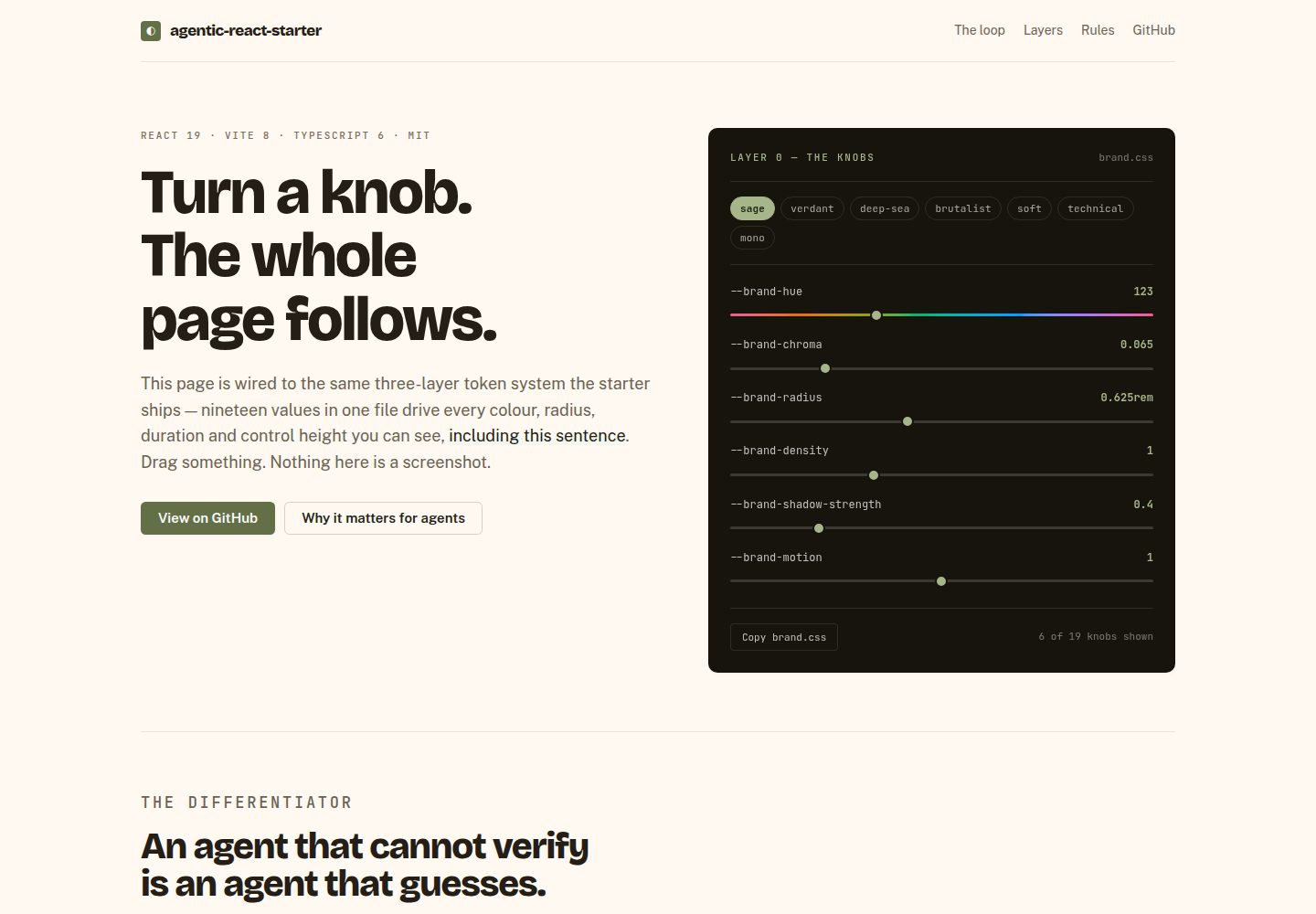
brand.css 中 19 个参数控制全站配色、圆角、字体、密度、阴影与动效,浅色与深色同步生效
ViteReact启动器
agentic-react-starter — Vite 启动器模板
作者 swapnil-saal
基于 Vite、React 19、TypeScript 与 Base UI 的 React 起始模板,采用三层设计令牌系统,通过 brand.css 中的 19 个参数统一控制全站外观,并附带面向 Claude Code 的代理层与令牌校验脚本。
看看你的网站会是什么样
浏览真实页面截图,比较内容排版与手机效果。点击下方缩略图切换,放大查看整页细节。
全部页面与视图 2
截图用于了解视觉与布局,交互效果请以实际项目为准。
采集于 2026-10-18查看来源
值得关注的模板亮点
从已有项目资料中,快速了解它的特点。
四层设计令牌结构:brand、tokens、theme、Tailwind 工具类,语义值使用 light-dark() 声明
约 37 个自有组件基于 Base UI 无头原语,样式使用 Tailwind v4 与 CVA
/brand 页面可实时调参、执行 WCAG 对比度审计、使用色彩和谐与字号比例,并导出 brand.css
pnpm check:tokens 在构建与代理编辑时拦截硬编码颜色、像素值与字面时长等六类写法
附带 TanStack Router、TanStack Query、React Hook Form + Zod、MSW 模拟 API 与 Playwright axe 扫描
模板详细介绍
这是一个 Vite + React 19 + TypeScript 起始模板,组件构建在 Base UI 无头原语之上,样式使用 Tailwind v4 与 CVA。README 说明仓库内约有 37 个自有组件,组件源码全部位于本仓库,可直接修改。
外观由 src/design-system/brand.css 中的 19 个参数驱动,包括品牌色相、彩度、圆角、边框宽度、字体、字号比例、密度、阴影强度与动效等。令牌分四层:brand.css 定义参数,tokens.css 派生尺度,theme.css 定义语义值,styles/index.css 输出 Tailwind 工具类;语义值使用 CSS light-dark() 同时覆盖浅色、深色与跟随系统。presets 目录附带 sage、verdant、deep-sea、brutalist、soft、technical、mono 七套预设,/brand 页面可实时调整参数、进行 WCAG 对比度审计并导出 brand.css。
应用层还包括 TanStack Router 文件式路由、TanStack Query、React Hook Form + Zod、MSW 模拟 API、路由级错误页与移动端抽屉导航。测试使用 Vitest、Testing Library 与 Playwright,e2e 中包含对每条路由在浅色与深色下的 axe 扫描。pnpm check:tokens 会检查十六进制颜色、rgb()/hsl() 字面量、Tailwind 调色板类、任意像素值、字面时长与 Tailwind v3 变量语法。
代理层包含 CodeGraph、Ponytail 插件、.claude/skills/ 下的五个项目技能、编辑文件后检查设计令牌的 PostToolUse 钩子以及 /new-component 命令。README 称这些工具免费且可离线使用,无需账号或 API 密钥。
限制方面:README 明确 Base UI 未覆盖日期选择器、颜色选择器、富文本编辑器、图表与数据表格;模板自带示例路由 /users 与 /form-demo,可用 pnpm reset 移除并保留基础设施。README 未说明生产部署流程、浏览器兼容范围或性能指标。
ViteReact启动器
适合你的项目吗?
适用场景
- 需要一个可完全修改组件源码、而非仅从外部覆盖样式的 React 项目起点
- 希望用少量品牌参数统一调整全站外观,并在浅色与深色下保持一致
- 在 Claude Code 等代理工具辅助下开发,并希望设计令牌规则在编辑时被自动检查
- 需要带类型化路由、数据查询、表单校验与模拟 API 的前端脚手架
- 想通过 /brand 页面快速试验配色、圆角、字体与密度并导出品牌配置
适合人群
- 使用 React 与 TypeScript 的前端项目
- 重视设计系统与令牌一致性的团队
- 使用 Claude Code 代理并希望有项目级技能与钩子的开发者
- 需要无后端即可运行演示数据的原型开发
上手与定制指南
结合仓库当前版本的说明,按下面的资料检查内容、配置与运行要求。
- 1
执行 pnpm install,复制 .env.example 为 .env,再运行 pnpm doctor 安装并校验代理工具链,最后 pnpm dev 启动开发服务器
- 2
开始自有应用前可先运行 pnpm reset --dry-run 查看将删除的示例内容,再执行 pnpm reset;该命令要求工作区干净
- 3
在 package.json 中重命名项目,侧边栏、页头与浏览器标题会随之变化
- 4
在 /brand 页面设置品牌参数并导出,覆盖 src/design-system/brand.css,然后运行 pnpm check 与 pnpm e2e
- 5
新增组件遵循 src/design-system/ADDING-A-COMPONENT.md 中的配方
授权与来源资料
使用条件与限制
免费使用 · 保留许可声明本次收录的是公开仓库中采用 MIT 许可的免费版本;免费范围为该版本代码,不代表外部服务或第三方素材免费。
使用时需要遵守
- 允许免费使用、修改、商用和分发该版本代码。
- 分发代码副本或实质性部分时,保留原作者版权声明和完整 MIT 许可声明。
- 代码按现状提供;担保与责任限制以原许可证及适用法律为准。
额外费用与待核对事项
- 演示图片、字体、图标及其他第三方素材需按各自许可核对,不能仅凭代码的 MIT 许可判断。
- 域名、托管、数据库、支付或 AI 等外部服务可能另外收费。
- Base UI 未覆盖日期选择器、颜色选择器、富文本编辑器、图表与数据表格,需要时须自行实现。
- 模板自带示例路由 /users 与 /form-demo 及营销首页,可用 pnpm reset 移除并保留基础设施。
- pnpm reset 要求工作区干净,否则拒绝运行。
- 全新克隆后代理层(CodeGraph 二进制、Claude 插件、代码索引、Playwright 浏览器)需运行 pnpm doctor 修复,否则不可用。
- 需复制 .env.example 为 .env 并配置环境变量。
- 需在 package.json 中重命名项目,侧边栏、页头与浏览器标题随之变化。
- 品牌参数需在 /brand 页面设置并导出,覆盖 src/design-system/brand.css。
查看原文依据
Permission is hereby granted, free of charge
许可证原文
Not covered by Base UI, if you need them: date picker, colour picker, rich
README 原文
That removes the example routes (`/users`, `/form-demo`), the marketing home
README 原文
It refuses to run on a dirty tree, so `git checkout .` is always an undo.
README 原文
`pnpm install` restores dependencies, but not the global CodeGraph binary, the
README 原文
cp .env.example .env
README 原文
1. **Rename the project in `package.json`** — the sidebar, header and browser
README 原文
https://github.com/swapnil-saal/agentic-react-starter/blob/main/LICENSEhttps://github.com/swapnil-saal/agentic-react-starter/blob/main/README.md2. **Set your brand** at `/brand`, export, and save over
README 原文
DeepSeek 根据仓库许可证和 README 整理 ·2026-10-18。结果仅覆盖已读取资料,依赖、图片、字体及后续条款变更以各自原文为准。
项目核对记录与介绍依据
模板资料
- 来源平台
- GitHub
- 资料与维护参考分
- 资料较完整 · 85 / 100
- 技术栈
- Vite · React
- 网站类型
- 启动器
这个分数如何计算
本站按许可资料(最高30分)、演示链接(12分)、预览图(10分)、Star数(15分)、记录的维护时间(15分)、描述完整度(8分)、功能记录(5分)和分类资料(5分)计算。它不是代码、安全或性能测试,也不是 Google 评分;有链接不代表已实测可用。
这个项目需要核对什么
- 记录的仓库更新时间
- 2026-10-16
- 截图检查日期
- 2026-10-18
已收录演示链接。请用你的内容与屏幕尺寸检查;有演示不代表表单、认证或支付已经可用。
目录记录的主要技术栈是 Vite。请通过依赖清单和锁文件核对实际版本与托管要求。这些说明基于收录资料,不代表代码审计或部署实测。
查看具体选型方法 →介绍的制作与核对状态
介绍由 AI 辅助整理目录与仓库资料。仓库作者不等于这篇介绍的审核者。
审核声明: codex-user-requested-batch-review-20261018 · 2026-10-18
查看当时使用的来源资料
SHA-256: c866b199330990dd11a87ef78e10641378ea361030a48331487b3e49d1a1aac2
2026-10-18T00:29:19.752Z
来源文件 / 仓库# Agentic React Starter
[](https://github.com/swapnil-saal/agentic-react-starter/actions/workflows/ci.yml)
[](LICENSE)
[](https://github.com/swapnil-saal/agentic-react-starter/generate)
### One file's 19 knobs restyle the entire app. Every component is source you own.

Every frame above is the same build — no rebuild, no theme file, nothing
swapped out. **[Turn the knobs yourself →](https://swapnil-saal.github.io/agentic-react-starter/)**
A Vite + React 19 + TypeScript starter on [Base UI](https://base-ui.com)
primitives, with a three-layer token system and a Claude Code agent layer that
enforces the rules on every edit.
## Quick start
```bash
pnpm install
cp .env.example .env
pnpm doctor # installs/verifies the agent toolchain
pnpm dev
```
Open http://localhost:5173 and look around.
## Starting your own app
The clone ships with example screens so you can see the patterns working.
When you're ready to build, strip them:
```bash
pnpm reset --dry-run # see exactly what it would change
pnpm reset # do it
```
That removes the example routes (`/users`, `/form-demo`), the marketing home
page, the feature module behind them, and the tests that cover them — then
leaves you a blank home. It keeps the parts that are infrastructure:
| Kept | Why |
| -------------------- | -------------------------------------------------- |
| `src/design-system/` | the whole point — your components and tokens |
| `/components` | living style guide; how you see your design system |
| `/brand` | brand settings and the contrast audit |
| `src/mocks/` | wiring intact, handlers emptied — add your own |
It refuses to run on a dirty tree, so `git checkout .` is always an undo.
Then:
1. **Rename the project in `package.json`** — the sidebar, header and browser
title all follow it.
2. **Set your brand** at `/brand`, export, and save over
`src/design-system/brand.css`.
3. `pnpm check && pnpm e2e`.
Files that `pnpm reset` removes carry an `EXAMPLE` header, so it's obvious
what is scaffolding even before you run it.
## The idea
Most starters hand you someone else's component library. You can restyle it
from the outside, but you cannot change how it works — and when your design
diverges from its opinions, you end up fighting it.
Here, **every component is source in this repo**. They are built on
[Base UI](https://base-ui.com) headless primitives, which supply the genuinely
hard parts — focus management, keyboard navigation, positioning, ARIA wiring —
while styling and API are yours. Point an agent at `src/design-system/` and ask
it to build your design system on top; there is nothing to fight.
## What's in it
**Application**
- Vite 8, React 19, TypeScript 6
- ~37 owned components on Base UI primitives, styled with Tailwind v4 + CVA
- A shared motion vocabulary, so one knob can slow or disable every animation
- A brand layer: 19 knobs in one file restyle the entire app
- Light, dark and follow-the-OS themes from a single set of declarations
- TanStack Router (file-based, fully typed) + TanStack Query
- React Hook Form + Zod, including boot-time environment validation
- A worked data layer: typed queries, an optimistic mutation with rollback, and
an MSW mock API so it runs with no backend — served to the browser and to
Vitest from one set of handlers
- Forms that handle both halves: Zod client validation and server-side field
errors mapped back onto the field that caused them
- Route-level error and not-found pages, and a drawer nav on small screens
- Vitest + Testing Library + Playwright, with four unit-test archetypes to copy
- An axe accessibility scan over every route, in light and dark
- ESLint 10, Prettier, Husky, lint-staged
**Agent layer**
- [CodeGraph](https://colbymchenry.github.io/codegraph) — the repo indexed as a
queryable graph over MCP, so the agent traces callers and impact rather than
grepping
- [Ponytail](https://github.com/DietrichGebert/ponytail) — a Claude Code plugin
that biases toward writing minimal, necessary code
- Five project skills in `.claude/skills/`: the design system, UI design
standards, React patterns, testing, and the routing workflow
- A `PostToolUse` hook that checks design tokens on every file the agent edits,
so a violation lands in the tool result instead of at the end of the task
- `/new-component` — scaffolds a component against the recipe and verifies it
Everything is free and works offline. No account, no paid tier, no API key.
## One file defines the look
`src/design-system/brand.css` is the only file a new project needs to edit.
19 knobs drive the entire UI. The shipped defaults are the Sage preset:
```css
--brand-hue: 123; /* colour ramps generated in OKLCH */
--brand-chroma: 0.065; /* 0 grey · 0.13 vivid · 0.25 neon */
--brand-radius: 0.625rem; /* 0 sharp → 1.5rem pillowy */
--brand-border-width: 1px;
--brand-font: 'Inter', …;
--brand-type-ratio: 1.15; /* modular scale for every heading */
--brand-density: 1; /* control heights AND all spacing */
--brand-shadow-strength: 0.4; /* 0 flat → 2 floating */
--brand-motion: 1; /* 0 disables every transition */
--brand-ease: cubic-bezier(0.16, 1, 0.3, 1);
```
The rest: `--neutral-hue`, `--neutral-chroma`, `--status-chroma`,
`--brand-field-border-width`, `--brand-font-mono`, `--brand-font-heading`,
`--brand-text-base`, `--brand-heading-weight`, `--brand-heading-tracking`.
Change one number and the whole app follows — in light and dark together.
Same components, a different product.
**Presets.** `src/design-system/presets/` ships seven complete looks —
`sage` (the default), `verdant`, `deep-sea`, `brutalist`, `soft`, `technical`
and `mono`. Copy one over the `:root` block in `brand.css` to adopt it, or
preview them all at `/brand`.
Got a look of your own? **[Contribute a preset](CONTRIBUTING.md#contributing-a-preset)**
— it is one CSS file and a screenshot.
**Settings page.** Run `pnpm dev` and open **`/brand`**. It drives the real
component library — not a mock — and includes:
- **A live WCAG contrast audit** of the pairings a brand can actually break,
measured from the resolved tokens. It caught a real AA failure in this
repo's own accent.
- **Colour harmonies** (monochromatic, analogous, complementary, triadic) that
set the neutral hue in relation to the brand hue.
- **Named type scales** from the musical modular scale — minor third, perfect
fourth, golden ratio.
- **Download / copy a complete `brand.css`**, ready to save over the existing
one.
**Enforced, not just documented.** `pnpm check:tokens` fails the build on hex
codes, `rgb()`/`hsl()` literals, Tailwind palette classes, arbitrary pixel
values, literal durations and Tailwind v3 variable syntax — the six ways
components quietly stop responding to the brand. It runs as part of `pnpm check`, and again from an editor hook on
every file an agent touches.
`e2e/a11y.spec.ts` covers the other half: an axe scan of every route in both
themes, which catches the contrast failures a brand change can introduce
without any component being edited. It found three real ones in this repo.
### How it layers
| Layer | File | Holds |
| -------------- | -------------------------- | ----------------------------------------- |
| 0 — brand | `design-system/brand.css` | the knobs you edit |
| 1 — primitives | `design-system/tokens.css` | scales _derived_ from the knobs |
| 2 — semantics | `design-system/theme.css` | meaning: `--ds-surface`, `--ds-accent` |
| 3 — utilities | `styles/index.css` | Tailwind classes: `bg-surface`, `text-fg` |
Each layer references only the one above. Semantic values are CSS
`light-dark(light, dark)` pairs, so one declaration covers light mode, dark
mode and "follow the OS" — no media queries, no duplication.
Never hardcode a colour or spacing value, and avoid raw Tailwind palette
classes like `bg-slate-800` — they bypass the tokens and won't retheme.
## Adding a component
Follow **`src/design-system/ADDING-A-COMPONENT.md`** — the full recipe, with a
template, the Base UI primitive list, the motion table and the rules. A new
component written to it retheres with `brand.css` and respects motion settings
automatically.
Not covered by Base UI, if you need them: date picker, colour picker, rich
text editor, charts, data tables.
## Commands
| Command | Does |
| ------------------------------- | ------------------------------------- |
| `pnpm dev` | Dev server |
| `pnpm build` | Typecheck + production build |
| `pnpm check` | Typecheck + lint + tokens + tests |
| `pnpm check:tokens` | Design-system rule enforcement |
| `pnpm test` | Vitest in watch mode |
| `pnpm e2e` | Playwright against a production build |
| `pnpm lint:fix` / `pnpm format` | Autofix / format |
| `pnpm doctor` | Verify and repair the agent toolchain |
| `pnpm doctor:check` | Report only — for CI |
## `pnpm doctor`
`pnpm install` restores dependencies, but not the global CodeGraph binary, the
Claude plugin registry, the code index, or Playwright's browsers — so a fresh
clone has a working app and a hollow agent layer, silently. `pnpm doctor`
detects that and repairs what it safely can. It is idempotent, never writes
secrets, and only fails on genuinely required problems.
## Project structure
```
src/
design-system/ the UI library — you own every line
routes/ file-based routes; __root.tsx is the app shell
/brand is a live playground for the knobs
routeTree.gen.ts generated — never edit
styles/index.css semantic tokens → Tailwind utilities
lib/ validated env, the api() wrapper, query client
e2e/ Playwright specs
scripts/ doctor, token checker, reset, the editor hook
.claude/skills/ project skills for the agent
CLAUDE.md project guide the agent reads first
.claude/commands/ /new-component
```
See [CLAUDE.md](./CLAUDE.md) for the conventions this project follows.
## Contributing
Issues and pull requests are welcome — see [CONTRIBUTING.md](CONTRIBUTING.md)
for how the project is scoped and what CI will check. Participation is covered
by our [Code of Conduct](CODE_OF_CONDUCT.md), and security reports have their
own [private channel](SECURITY.md).
## License
[MIT](LICENSE) © Swapnil Shukla
看看同类模板
对比同技术栈与用途的模板,找到更适合的视觉与内容结构。

cove
The Cove Stack: 🏝️ minimal TanStack Start template with Vite+, Better Auth, Drizzle ORM, shadcn/ui
Vite · SaaS

vite-react-boilerplate
A production ready, scalable starter template for Vite + React
Vite · 启动器

vital
Starter template for Vite with React (TypeScript). Supports Tailwind. Vitest and @react/testing-library config…
Vite · 启动器

react-vite-admin
This Starter utilizes React, Recoil, React Query, React Hooks, Typescript, Axios And Vite. 全新技术栈的后台管理系统
Vite · 后台

typescript-react_best_practices-vite_template
<⚡⚛️> Start your React project with Vite following code best practices (TypeScript, Linting, testing, CI/CD…)
Vite · 启动器

cloudflare-starter-kit
Template (boilerplate) repository for scaffolding Cloudflare Workers projects
Vite · 启动器