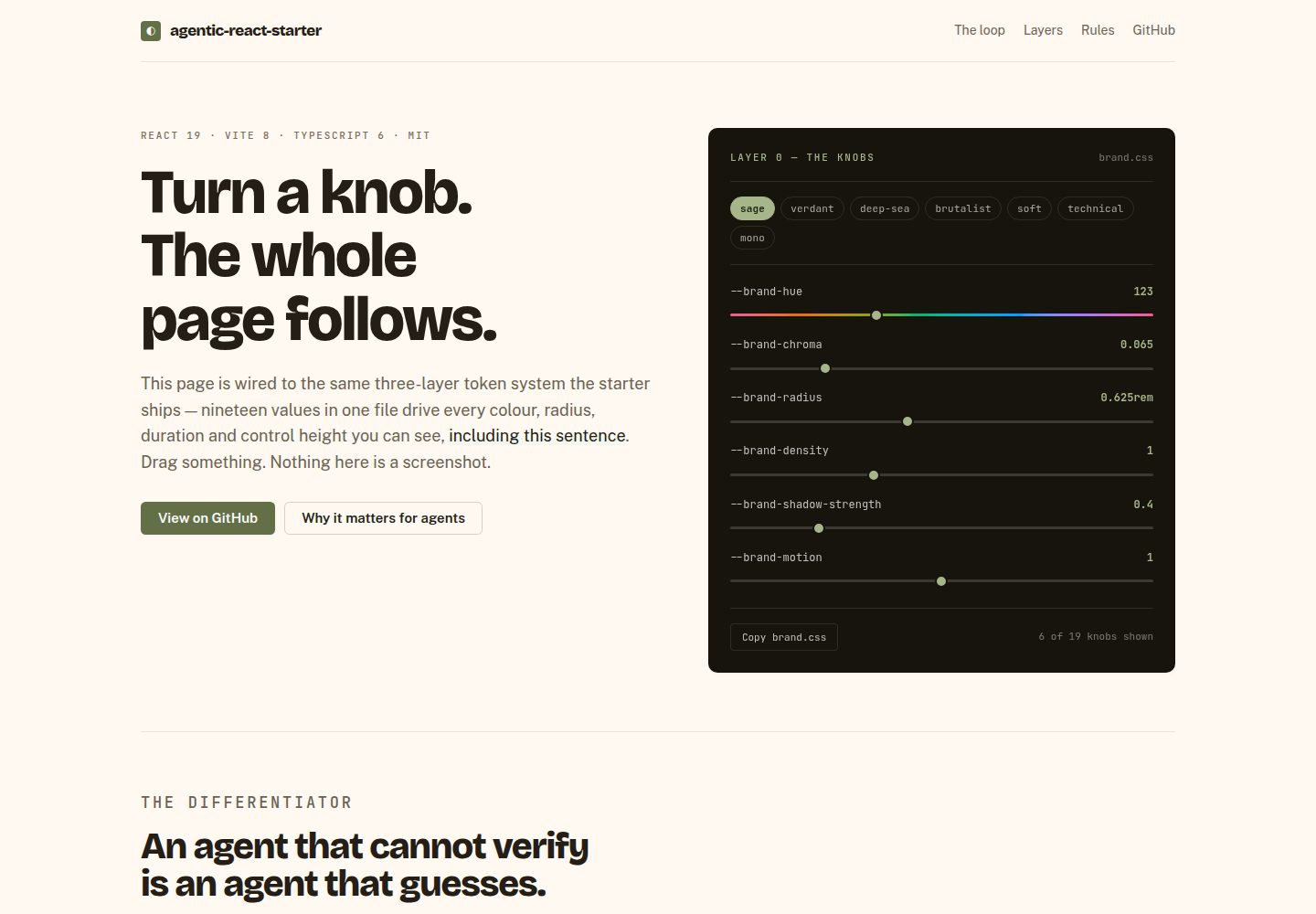
19 parameters in brand.css control site-wide color, corner radius, fonts, density, shadows and motion, applied to both light and dark modes
ViteReactStarter
agentic-react-starter — Vite Starter Template
By swapnil-saal
A React starter template built on Vite, React 19, TypeScript and Base UI, using a three-layer design token system in which 19 parameters in brand.css control the entire site's appearance, plus a Claude Code-oriented agent layer and a token validation script.
Explore the design
Compare the page layouts and mobile experience. Open any screenshot for a closer look.
Desktop homepage1 / 2
Desktop captureTop of page
Actual screenshot captured by the server browser.
All pages & views 2
Screenshots show visual appearance; interactive behavior may differ.
Recorded 2026-10-18View source
What stands out
A quick read of the recorded project description.
Four-layer design token structure: brand, tokens, theme and Tailwind utility classes, with semantic values declared via light-dark()
About 37 of its own components built on Base UI headless primitives, styled with Tailwind v4 and CVA
The /brand page supports live parameter tuning, WCAG contrast auditing, color harmony and type scale, and export of brand.css
pnpm check:tokens blocks six categories of hardcoded values, including colors, pixel values and literal durations, at build time and during agent edits
Ships TanStack Router, TanStack Query, React Hook Form + Zod, MSW mock APIs and Playwright axe scans
Template Details
This is a Vite + React 19 + TypeScript starter template. Components are built on Base UI headless primitives, with styling via Tailwind v4 and CVA. The README states the repository contains about 37 of its own components, all with source in the repo and directly editable.
Appearance is driven by 19 parameters in src/design-system/brand.css, including brand hue, chroma, corner radius, border width, fonts, type scale, density, shadow strength and motion. Tokens are split into four layers: brand.css defines the parameters, tokens.css derives the scales, theme.css defines semantic values, and styles/index.css outputs Tailwind utility classes; semantic values use CSS light-dark() to cover light, dark and system-following modes at once. The presets directory ships seven presets — sage, verdant, deep-sea, brutalist, soft, technical and mono — and the /brand page allows live parameter adjustment, WCAG contrast auditing and export of brand.css.
The application layer also includes TanStack Router file-based routing, TanStack Query, React Hook Form + Zod, MSW mock APIs, route-level error pages and mobile drawer navigation. Testing uses Vitest, Testing Library and Playwright, with e2e axe scans of every route in both light and dark modes. pnpm check:tokens checks for hex colors, rgb()/hsl() literals, Tailwind palette classes, arbitrary pixel values, literal durations and Tailwind v3 variable syntax.
The agent layer includes CodeGraph, the Ponytail plugin, five project skills under .claude/skills/, a PostToolUse hook that checks design tokens after file edits, and a /new-component command. The README states these tools are free and work offline, with no account or API key required.
Limitations: the README explicitly states that Base UI does not cover date pickers, color pickers, rich text editors, charts or data tables; the template ships example routes /users and /form-demo, which can be removed with pnpm reset while retaining the infrastructure. The README does not document the production deployment process, browser compatibility range or performance metrics.
ViteReactStarter
Is it right for your project?
Use Cases
- A React project starting point where component source can be fully modified rather than only overridden from outside
- Teams that want to adjust site-wide appearance through a small set of brand parameters while keeping light and dark modes consistent
- Development assisted by agent tools such as Claude Code, with design token rules checked automatically during edits
- A frontend scaffold needing typed routing, data querying, form validation and mock APIs
- Quickly experimenting with color, corner radius, fonts and density via the /brand page and exporting the brand configuration
Suitable For
- Frontend projects using React and TypeScript
- Teams that value design systems and token consistency
- Developers using the Claude Code agent who want project-level skills and hooks
- Prototype development that needs demo data without a backend
Getting started & customization
Use these recorded setup notes alongside the repository instructions for your chosen version.
- 1
Run pnpm install, copy .env.example to .env, then run pnpm doctor to install and validate the agent toolchain, and finally pnpm dev to start the dev server
- 2
Before starting your own app, run pnpm reset --dry-run to see what example content will be deleted, then run pnpm reset; the command requires a clean working tree
- 3
Rename the project in package.json; the sidebar, page header and browser title change accordingly
- 4
Set brand parameters on the /brand page and export them, overwriting src/design-system/brand.css, then run pnpm check and pnpm e2e
- 5
Follow the recipe in src/design-system/ADDING-A-COMPONENT.md when adding components
License & source material
Usage conditions & limitations
Free to use · keep license noticeThis listing covers the free version under the MIT license in the public repository; the free scope is that version's code and does not mean external services or third-party assets are free.
Must comply with when using
- The code of this version may be used, modified, used commercially and distributed free of charge.
- When distributing copies or substantial portions of the code, retain the original author's copyright notice and the full MIT license notice.
- The code is provided as is; warranties and limitations of liability are governed by the original license and applicable law.
Additional costs & items to verify
- Demo images, fonts, icons and other third-party assets must be checked against their own licenses; the code's MIT license alone is not sufficient to judge them.
- External services such as domains, hosting, databases, payments or AI may incur separate charges.
- Base UI does not cover date pickers, color pickers, rich text editors, charts or data tables; these must be implemented yourself if needed.
- The template ships example routes /users and /form-demo plus a marketing home page, which can be removed with pnpm reset while retaining the infrastructure.
- pnpm reset requires a clean working tree and refuses to run otherwise.
- After a fresh clone, the agent layer (CodeGraph binary, Claude plugin, code index, Playwright browsers) must be repaired by running pnpm doctor, otherwise it is unavailable.
- You must copy .env.example to .env and configure environment variables.
- You must rename the project in package.json; the sidebar, page header and browser title change accordingly.
- Brand parameters must be set on the /brand page and exported, overwriting src/design-system/brand.css.
View Original Text Basis
Permission is hereby granted, free of charge
Original License Text
Not covered by Base UI, if you need them: date picker, colour picker, rich
Original README
That removes the example routes (`/users`, `/form-demo`), the marketing home
Original README
It refuses to run on a dirty tree, so `git checkout .` is always an undo.
Original README
`pnpm install` restores dependencies, but not the global CodeGraph binary, the
Original README
cp .env.example .env
Original README
1. **Rename the project in `package.json`** — the sidebar, header and browser
Original README
https://github.com/swapnil-saal/agentic-react-starter/blob/main/LICENSEhttps://github.com/swapnil-saal/agentic-react-starter/blob/main/README.md2. **Set your brand** at `/brand`, export, and save over
Original README
Compiled by DeepSeek based on repository license and README ·2026-10-18. Results only cover the materials read; dependencies, images, fonts, and subsequent term changes are subject to their respective original texts.
Project checks & description sources
Template Information
- Source platforms
- GitHub
- Documentation and maintenance reference score
- More documented · 85 / 100
- Technologies
- Vite · React
- Website type
- Starter
How this score is calculated
Our heuristic uses license records (up to 30), a demo link (12), a preview (10), stars (15), recorded maintenance (15), description completeness (8), feature records (5) and classification data (5). It is not a code, security or performance test, or a Google score. A link does not establish tested functionality.
What to verify for this project
- Repository update recorded
- 2026-10-16
- Screenshot last checked
- 2026-10-18
A demo link is listed. Check it with your own content and viewport sizes; its presence does not confirm that forms, authentication or payments work.
The catalog identifies Vite as the primary stack. Check the actual dependency manifest and lockfile for versions and hosting requirements. These notes use recorded metadata, not a code audit or a deployment test.
Use a selection guide →How this description was prepared
AI-assisted description based on catalog records and repository material. Repository authors are not automatically the reviewers of this description.
Review declaration: codex-user-requested-batch-review-20261018 · 2026-10-18
Inspect the recorded source material
SHA-256: c866b199330990dd11a87ef78e10641378ea361030a48331487b3e49d1a1aac2
2026-10-18T00:29:19.752Z
Source file / repository# Agentic React Starter
[](https://github.com/swapnil-saal/agentic-react-starter/actions/workflows/ci.yml)
[](LICENSE)
[](https://github.com/swapnil-saal/agentic-react-starter/generate)
### One file's 19 knobs restyle the entire app. Every component is source you own.

Every frame above is the same build — no rebuild, no theme file, nothing
swapped out. **[Turn the knobs yourself →](https://swapnil-saal.github.io/agentic-react-starter/)**
A Vite + React 19 + TypeScript starter on [Base UI](https://base-ui.com)
primitives, with a three-layer token system and a Claude Code agent layer that
enforces the rules on every edit.
## Quick start
```bash
pnpm install
cp .env.example .env
pnpm doctor # installs/verifies the agent toolchain
pnpm dev
```
Open http://localhost:5173 and look around.
## Starting your own app
The clone ships with example screens so you can see the patterns working.
When you're ready to build, strip them:
```bash
pnpm reset --dry-run # see exactly what it would change
pnpm reset # do it
```
That removes the example routes (`/users`, `/form-demo`), the marketing home
page, the feature module behind them, and the tests that cover them — then
leaves you a blank home. It keeps the parts that are infrastructure:
| Kept | Why |
| -------------------- | -------------------------------------------------- |
| `src/design-system/` | the whole point — your components and tokens |
| `/components` | living style guide; how you see your design system |
| `/brand` | brand settings and the contrast audit |
| `src/mocks/` | wiring intact, handlers emptied — add your own |
It refuses to run on a dirty tree, so `git checkout .` is always an undo.
Then:
1. **Rename the project in `package.json`** — the sidebar, header and browser
title all follow it.
2. **Set your brand** at `/brand`, export, and save over
`src/design-system/brand.css`.
3. `pnpm check && pnpm e2e`.
Files that `pnpm reset` removes carry an `EXAMPLE` header, so it's obvious
what is scaffolding even before you run it.
## The idea
Most starters hand you someone else's component library. You can restyle it
from the outside, but you cannot change how it works — and when your design
diverges from its opinions, you end up fighting it.
Here, **every component is source in this repo**. They are built on
[Base UI](https://base-ui.com) headless primitives, which supply the genuinely
hard parts — focus management, keyboard navigation, positioning, ARIA wiring —
while styling and API are yours. Point an agent at `src/design-system/` and ask
it to build your design system on top; there is nothing to fight.
## What's in it
**Application**
- Vite 8, React 19, TypeScript 6
- ~37 owned components on Base UI primitives, styled with Tailwind v4 + CVA
- A shared motion vocabulary, so one knob can slow or disable every animation
- A brand layer: 19 knobs in one file restyle the entire app
- Light, dark and follow-the-OS themes from a single set of declarations
- TanStack Router (file-based, fully typed) + TanStack Query
- React Hook Form + Zod, including boot-time environment validation
- A worked data layer: typed queries, an optimistic mutation with rollback, and
an MSW mock API so it runs with no backend — served to the browser and to
Vitest from one set of handlers
- Forms that handle both halves: Zod client validation and server-side field
errors mapped back onto the field that caused them
- Route-level error and not-found pages, and a drawer nav on small screens
- Vitest + Testing Library + Playwright, with four unit-test archetypes to copy
- An axe accessibility scan over every route, in light and dark
- ESLint 10, Prettier, Husky, lint-staged
**Agent layer**
- [CodeGraph](https://colbymchenry.github.io/codegraph) — the repo indexed as a
queryable graph over MCP, so the agent traces callers and impact rather than
grepping
- [Ponytail](https://github.com/DietrichGebert/ponytail) — a Claude Code plugin
that biases toward writing minimal, necessary code
- Five project skills in `.claude/skills/`: the design system, UI design
standards, React patterns, testing, and the routing workflow
- A `PostToolUse` hook that checks design tokens on every file the agent edits,
so a violation lands in the tool result instead of at the end of the task
- `/new-component` — scaffolds a component against the recipe and verifies it
Everything is free and works offline. No account, no paid tier, no API key.
## One file defines the look
`src/design-system/brand.css` is the only file a new project needs to edit.
19 knobs drive the entire UI. The shipped defaults are the Sage preset:
```css
--brand-hue: 123; /* colour ramps generated in OKLCH */
--brand-chroma: 0.065; /* 0 grey · 0.13 vivid · 0.25 neon */
--brand-radius: 0.625rem; /* 0 sharp → 1.5rem pillowy */
--brand-border-width: 1px;
--brand-font: 'Inter', …;
--brand-type-ratio: 1.15; /* modular scale for every heading */
--brand-density: 1; /* control heights AND all spacing */
--brand-shadow-strength: 0.4; /* 0 flat → 2 floating */
--brand-motion: 1; /* 0 disables every transition */
--brand-ease: cubic-bezier(0.16, 1, 0.3, 1);
```
The rest: `--neutral-hue`, `--neutral-chroma`, `--status-chroma`,
`--brand-field-border-width`, `--brand-font-mono`, `--brand-font-heading`,
`--brand-text-base`, `--brand-heading-weight`, `--brand-heading-tracking`.
Change one number and the whole app follows — in light and dark together.
Same components, a different product.
**Presets.** `src/design-system/presets/` ships seven complete looks —
`sage` (the default), `verdant`, `deep-sea`, `brutalist`, `soft`, `technical`
and `mono`. Copy one over the `:root` block in `brand.css` to adopt it, or
preview them all at `/brand`.
Got a look of your own? **[Contribute a preset](CONTRIBUTING.md#contributing-a-preset)**
— it is one CSS file and a screenshot.
**Settings page.** Run `pnpm dev` and open **`/brand`**. It drives the real
component library — not a mock — and includes:
- **A live WCAG contrast audit** of the pairings a brand can actually break,
measured from the resolved tokens. It caught a real AA failure in this
repo's own accent.
- **Colour harmonies** (monochromatic, analogous, complementary, triadic) that
set the neutral hue in relation to the brand hue.
- **Named type scales** from the musical modular scale — minor third, perfect
fourth, golden ratio.
- **Download / copy a complete `brand.css`**, ready to save over the existing
one.
**Enforced, not just documented.** `pnpm check:tokens` fails the build on hex
codes, `rgb()`/`hsl()` literals, Tailwind palette classes, arbitrary pixel
values, literal durations and Tailwind v3 variable syntax — the six ways
components quietly stop responding to the brand. It runs as part of `pnpm check`, and again from an editor hook on
every file an agent touches.
`e2e/a11y.spec.ts` covers the other half: an axe scan of every route in both
themes, which catches the contrast failures a brand change can introduce
without any component being edited. It found three real ones in this repo.
### How it layers
| Layer | File | Holds |
| -------------- | -------------------------- | ----------------------------------------- |
| 0 — brand | `design-system/brand.css` | the knobs you edit |
| 1 — primitives | `design-system/tokens.css` | scales _derived_ from the knobs |
| 2 — semantics | `design-system/theme.css` | meaning: `--ds-surface`, `--ds-accent` |
| 3 — utilities | `styles/index.css` | Tailwind classes: `bg-surface`, `text-fg` |
Each layer references only the one above. Semantic values are CSS
`light-dark(light, dark)` pairs, so one declaration covers light mode, dark
mode and "follow the OS" — no media queries, no duplication.
Never hardcode a colour or spacing value, and avoid raw Tailwind palette
classes like `bg-slate-800` — they bypass the tokens and won't retheme.
## Adding a component
Follow **`src/design-system/ADDING-A-COMPONENT.md`** — the full recipe, with a
template, the Base UI primitive list, the motion table and the rules. A new
component written to it retheres with `brand.css` and respects motion settings
automatically.
Not covered by Base UI, if you need them: date picker, colour picker, rich
text editor, charts, data tables.
## Commands
| Command | Does |
| ------------------------------- | ------------------------------------- |
| `pnpm dev` | Dev server |
| `pnpm build` | Typecheck + production build |
| `pnpm check` | Typecheck + lint + tokens + tests |
| `pnpm check:tokens` | Design-system rule enforcement |
| `pnpm test` | Vitest in watch mode |
| `pnpm e2e` | Playwright against a production build |
| `pnpm lint:fix` / `pnpm format` | Autofix / format |
| `pnpm doctor` | Verify and repair the agent toolchain |
| `pnpm doctor:check` | Report only — for CI |
## `pnpm doctor`
`pnpm install` restores dependencies, but not the global CodeGraph binary, the
Claude plugin registry, the code index, or Playwright's browsers — so a fresh
clone has a working app and a hollow agent layer, silently. `pnpm doctor`
detects that and repairs what it safely can. It is idempotent, never writes
secrets, and only fails on genuinely required problems.
## Project structure
```
src/
design-system/ the UI library — you own every line
routes/ file-based routes; __root.tsx is the app shell
/brand is a live playground for the knobs
routeTree.gen.ts generated — never edit
styles/index.css semantic tokens → Tailwind utilities
lib/ validated env, the api() wrapper, query client
e2e/ Playwright specs
scripts/ doctor, token checker, reset, the editor hook
.claude/skills/ project skills for the agent
CLAUDE.md project guide the agent reads first
.claude/commands/ /new-component
```
See [CLAUDE.md](./CLAUDE.md) for the conventions this project follows.
## Contributing
Issues and pull requests are welcome — see [CONTRIBUTING.md](CONTRIBUTING.md)
for how the project is scoped and what CI will check. Participation is covered
by our [Code of Conduct](CODE_OF_CONDUCT.md), and security reports have their
own [private channel](SECURITY.md).
## License
[MIT](LICENSE) © Swapnil Shukla
Explore similar templates
Compare previews and descriptions within the same stack and category.

cove
Cove is a minimal TanStack Start starter template maintained by mugnavo, integrating React, TanStack Router/Query, Tailwind CSS, shadcn/ui, Drizzle ORM with PostgreSQL, Better Auth, Vite Plus, and Nitro.
Vite · SaaS

vite-react-boilerplate
A production-ready Vite + React starter template with TypeScript, Tailwind CSS, TanStack Router/Query/Table, Storybook, React Hook Form + Zod, Vitest and Playwright testing, plus Husky/Commitizen/Commitlint commit conventions.
Vite · Starter

vital
Vital is a Vite-based React starter template using TypeScript and Tailwind CSS, with an Atomic Design component directory, path aliases and Hero Icons.
Vite · Starter

react-vite-admin
A backend management starter built on Vite and React, integrating Recoil, React Query, TypeScript, and Axios, with Ant Design-style interface screenshots. Suitable as a starting point for management-side projects, licensed under MIT, with Chinese documentation and common scripts.
Vite · Admin dashboard

typescript-react_best_practices-vite_template
A Vite + React + TypeScript starter template by CodelyTV, preconfigured with Jest and React Testing Library unit tests, Cypress end-to-end tests, ESLint and Prettier using Codely's shared configuration, GitHub Actions workflows, a Makefile, and Sass.
Vite · Starter

cloudflare-starter-kit
A Cloudflare Workers project scaffolding template maintained by kriasoft, using Vite and TypeScript, with three built-in workspaces: api, app, and edge, and preconfigured local testing, multiple environments, and a GitHub Actions deployment workflow.
Vite · Starter