脚注以原地弹层呈现,桌面端显示在引用上方,移动端固定为底部面板,无 JavaScript 时回退为传统脚注
Eleventy博客启动器
eleventy-prose-blog — Eleventy 博客模板
作者 tepiton
基于 Eleventy 的个人散文博客启动器,提供脚注弹层、明暗主题切换、RSS 订阅和图片优化等写作向功能。
看看你的网站会是什么样
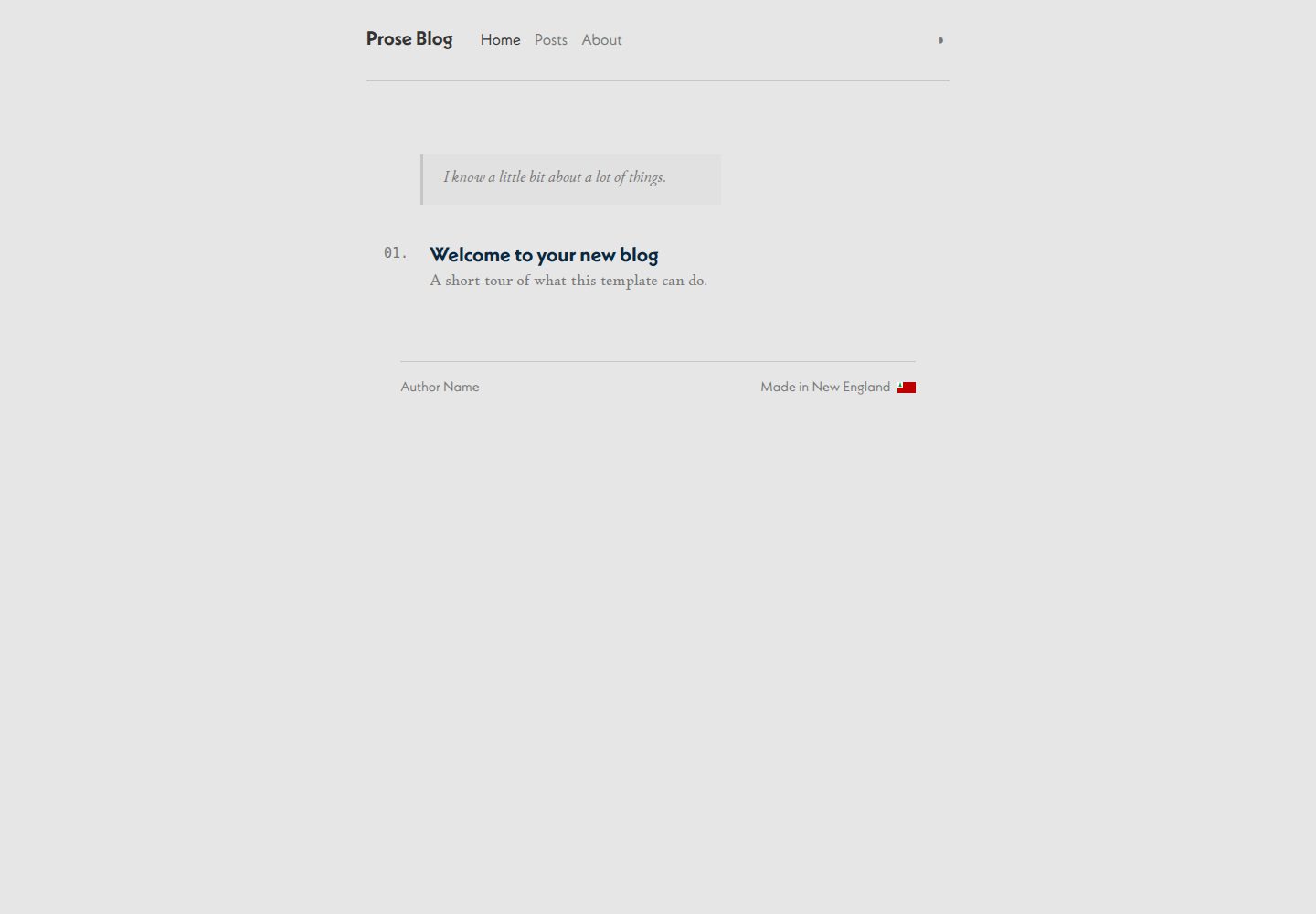
浏览真实页面截图,比较内容排版与手机效果。点击下方缩略图切换,放大查看整页细节。
全部页面与视图 3
截图用于了解视觉与布局,交互效果请以实际项目为准。
采集于 2026-09-30查看来源
值得关注的模板亮点
从已有项目资料中,快速了解它的特点。
支持浅色、深色和跟随系统三种主题,通过页头下拉切换并持久化到 localStorage
生成带自定义 XSL 样式的 RSS/Atom feed
自动生成 AVIF/WebP 图片并启用懒加载
文章 front matter 中的 tags 自动生成标签页,draft: true 的草稿不进入生产构建
站点元数据集中在 content/_data/metadata.js,content/ 目录整体可移植
模板详细介绍
这是一个面向个人散文写作的 Eleventy 启动器,代码以 MIT 许可发布。它把写作相关的基础设施预先搭好:文章用 Markdown 写在 content/posts/ 下,通过 front matter 里的 date 控制排序、tags 自动生成标签页、draft: true 将草稿排除出生产构建;站点标题、作者、URL、语言和 feed 配置集中在 content/_data/metadata.js 中,整个 content/ 目录可独立迁移。阅读体验方面,标准 Markdown 脚注会渲染为可点击的原地弹层,桌面端显示在引用位置上方,移动端固定为底部面板,无 JavaScript 时回退为传统脚注;主题支持浅色、深色和跟随系统,通过页头下拉切换并存入 localStorage。构建侧包含 RSS/Atom feed(带自定义 XSL 样式)、自动生成 AVIF/WebP 并懒加载的图片处理、PrismJS 语法高亮,以及 Netlify 和 Vercel 的部署配置。
使用上的限制需要留意:模板默认引用 Adobe Fonts(Typekit)的 p22-stickley-pro-text 与 neue-kabel,字体套件 ID 写在 _includes/layouts/base.njk 中,换字体需替换 Typekit 链接并同步修改 css/index.css 顶部的 CSS 自定义属性;颜色和字体变量同样集中在该文件顶部。开发服务器运行在 0.0.0.0:8089,生产构建输出到 _site/,另有 debug 和 benchmark 两个 npm 脚本。GitHub Pages 未附带工作流,需要自行添加 .github/workflows/pages.yml。演示图片、字体、图标等第三方素材的许可需单独核对,不能仅凭代码的 MIT 许可判断。
Eleventy博客启动器
适合你的项目吗?
适用场景
- 写以文字为主、需要脚注的个人散文或随笔博客
- 希望文章以 Markdown 存放、用 front matter 管理日期、标签和草稿的写作流程
- 需要 RSS 订阅输出并希望控制 feed 样式的站点
- 部署到 Netlify 或 Vercel 的静态博客项目
适合人群
- 习惯用 Markdown 写作并自行维护静态站点的个人作者
- 需要脚注、明暗主题和标签页等阅读向功能的散文类博客
- 愿意替换默认 Adobe Fonts 配置、自行调整 CSS 变量的使用者
- 接受自行补充 GitHub Pages 工作流等部署细节的开发者
上手与定制指南
结合仓库当前版本的说明,按下面的资料检查内容、配置与运行要求。
- 1
克隆仓库后执行 npm install,再用 npm run start 启动开发服务器,默认地址为 http://localhost:8089
- 2
在 content/_data/metadata.js 中填写站点标题、siteName、url、语言、描述和作者信息
- 3
文章放入 content/posts/,front matter 至少包含 title 和 date,可用 tags 生成标签页、draft: true 排除草稿
- 4
默认字体来自 Adobe Fonts(Typekit),需替换 _includes/layouts/base.njk 中的 Typekit 链接并更新 css/index.css 顶部的 CSS 变量
- 5
npm run build 输出到 _site/;GitHub Pages 需自行添加 .github/workflows/pages.yml,Netlify 和 Vercel 配置文件已包含
授权与来源资料
使用条件与限制
免费使用 · 保留许可声明本次收录的是公开仓库中采用 MIT 许可的免费版本;免费范围为该版本代码,不代表外部服务或第三方素材免费。
使用时需要遵守
- 允许免费使用、修改、商用和分发该版本代码。
- 分发代码副本或实质性部分时,保留原作者版权声明和完整 MIT 许可声明。
- 代码按现状提供;担保与责任限制以原许可证及适用法律为准。
额外费用与待核对事项
- 模板默认字体来自 Adobe Fonts(Typekit),需有 Adobe Fonts 订阅/套件授权才能正常显示;替换字体须修改 base.njk 中的 Typekit 链接并同步更新 css/index.css 顶部的 CSS 变量。
- GitHub Pages 部署未附带工作流,需自行添加 .github/workflows/pages.yml 才能发布。
- 演示图片、字体、图标及其他第三方素材需按各自许可核对,不能仅凭代码的 MIT 许可判断。
- 域名、托管、数据库、支付或 AI 等外部服务可能另外收费。
查看原文依据
Permission is hereby granted, free of charge
许可证原文
**Adobe Fonts (Typekit):** This template uses `p22-stickley-pro-text` and `neue-kabel`. The kit IDs are baked into `_includes/layouts/base.njk`
README 原文
https://github.com/tepiton/eleventy-prose-blog/blob/main/LICENSEhttps://github.com/tepiton/eleventy-prose-blog/blob/main/README.mdFor GitHub Pages, add a `.github/workflows/pages.yml` build workflow.
README 原文
DeepSeek 根据仓库许可证和 README 整理 ·2026-10-01。结果仅覆盖已读取资料,依赖、图片、字体及后续条款变更以各自原文为准。
项目核对记录与介绍依据
模板资料
- 来源平台
- GitHub
- 资料与维护参考分
- 资料较完整 · 85 / 100
- 技术栈
- Eleventy
- 网站类型
- 博客 · 启动器
这个分数如何计算
本站按许可资料(最高30分)、演示链接(12分)、预览图(10分)、Star数(15分)、记录的维护时间(15分)、描述完整度(8分)、功能记录(5分)和分类资料(5分)计算。它不是代码、安全或性能测试,也不是 Google 评分;有链接不代表已实测可用。
这个项目需要核对什么
- 记录的仓库更新时间
- 2026-09-12
- 截图检查日期
- 2026-10-01
已收录演示链接。请用你的内容与屏幕尺寸检查;有演示不代表表单、认证或支付已经可用。
目录记录的主要技术栈是 Eleventy。请通过依赖清单和锁文件核对实际版本与托管要求。这些说明基于收录资料,不代表代码审计或部署实测。
查看具体选型方法 →介绍的制作与核对状态
介绍由 AI 辅助整理目录与仓库资料。仓库作者不等于这篇介绍的审核者。
已完成服务器许可规则与 AI 来源核对;未经过人工编辑审核。
查看当时使用的来源资料
SHA-256: ebd57744d92c378d53925b3920b2f43c0eaf90afde265f9dc9f4ba7f6325a41a
2026-10-01T13:36:28.536Z
来源文件 / 仓库# eleventy-prose-blog
An Eleventy v3 starter for personal prose blogs. Designed for writers who want a polished reading experience: footnote popovers, light/dark theming, RSS feeds, and image optimization.
## Quick start
```
git clone <this-repo> my-project
cd my-project
npm install
npm run start
```
Then open `http://localhost:8089`.
## Customization
### Site metadata
Edit `content/_data/metadata.js`:
```js
export default {
title: "Your Blog",
siteName: "yoursite.com",
url: "https://example.com/",
language: "en",
description: "A description of your blog.",
author: {
name: "Your Name",
email: "[email protected]",
url: "https://example.com/about/",
},
}
```
Note: `metadata.js` lives inside `content/_data/` so the entire `content/` directory is self-contained and portable.
### Writing posts
Add Markdown files to `content/posts/`. Each post needs front matter:
```yaml
---
title: The Title of This Post
date: 2025-01-15
tags:
- writing
- topic
description: Optional. Used in the HTML meta description and feed.
---
```
- `date` controls sort order
- `tags` generate automatic tag pages
- Add `draft: true` to exclude from production builds
### Footnotes
Footnotes render as interactive in-place popovers. Write standard Markdown footnotes:
```markdown
This sentence has a footnote.[^1]
[^1]: The footnote content appears in a popover on click.
```
Popovers appear above the reference on desktop and as a fixed bottom panel on mobile. Falls back to traditional footnotes without JavaScript.
### Themes
The site supports light, dark, and system-preference modes. Users switch via the header dropdown; preference is persisted in localStorage.
Colors and fonts are CSS custom properties at the top of `css/index.css`:
```css
:root {
--font-body: p22-stickley-pro-text, neue-kabel, Palatino, Georgia, serif;
--font-heading: neue-kabel, 'Gill Sans', 'Helvetica Neue', sans-serif;
--color-bg: #fffff8;
--color-text: #1a1a18;
}
```
**Adobe Fonts (Typekit):** This template uses `p22-stickley-pro-text` and `neue-kabel`. The kit IDs are baked into `_includes/layouts/base.njk` under a `<!-- fonts: swap these links -->` comment. To use different fonts, replace the Typekit `<link>` tags and update the CSS variables.
## Project structure
```
content/
_data/
metadata.js # Title, author, URL, feed config
posts/
my-first-post.md
...
pages/ # Static pages (About, etc.)
_includes/
layouts/
base.njk # HTML shell with theme switcher
post.njk # Post layout with footnote support
_config/
filters.js # Date formatting, tag filtering
css/
index.css # All styles, theme variables
js/
theme-switcher.js # Theme persistence
footnote-interactions.js # Popover logic
```
## npm scripts
| Command | Description |
|:--------|:------------|
| `npm run start` | Dev server at `0.0.0.0:8089` with live reload |
| `npm run build` | Production build to `_site/` |
| `npm run debug` | Build with Eleventy debug output |
| `npm run benchmark` | Performance benchmarking |
## Features
- **Footnote popovers** — in-place popover system with smart viewport positioning, falls back gracefully
- **Theme switching** — light, dark, system preference, persisted in localStorage
- **RSS/Atom feeds** — with custom XSL styling
- **Image optimization** — automatic AVIF/WebP generation with lazy loading
- **Syntax highlighting** — PrismJS
- **Tag pages** — automatic generation from post front matter
- **Drafts** — excluded from production builds via `draft: true`
## Deploy
Netlify and Vercel config files are included. For GitHub Pages, add a `.github/workflows/pages.yml` build workflow.
看看同类模板
对比同技术栈与用途的模板,找到更适合的视觉与内容结构。

eleventy-base-blog
A starter repository for a blog web site using the Eleventy static site generator.
Eleventy · 博客

eleventy-garden
:seedling: A starter site for building a mind garden with eleventy
Eleventy · 启动器

eleventastic
An Eleventy Starter Kit
Eleventy · 启动器

neat-starter
Starter Template for Netlify CMS, Eleventy, Alpine JS & Tailwind CSS
Eleventy · 启动器

Eleventy-Starter-Boilerplate
🚀 Eleventy Starter is production-ready with SEO-friendly for quickly starting a blog. ⚡ Built with Eleventy, …
Eleventy · 博客

eleventy-plus-vite
A clean and fast Eleventy Starter Project with Vite
Eleventy · 启动器