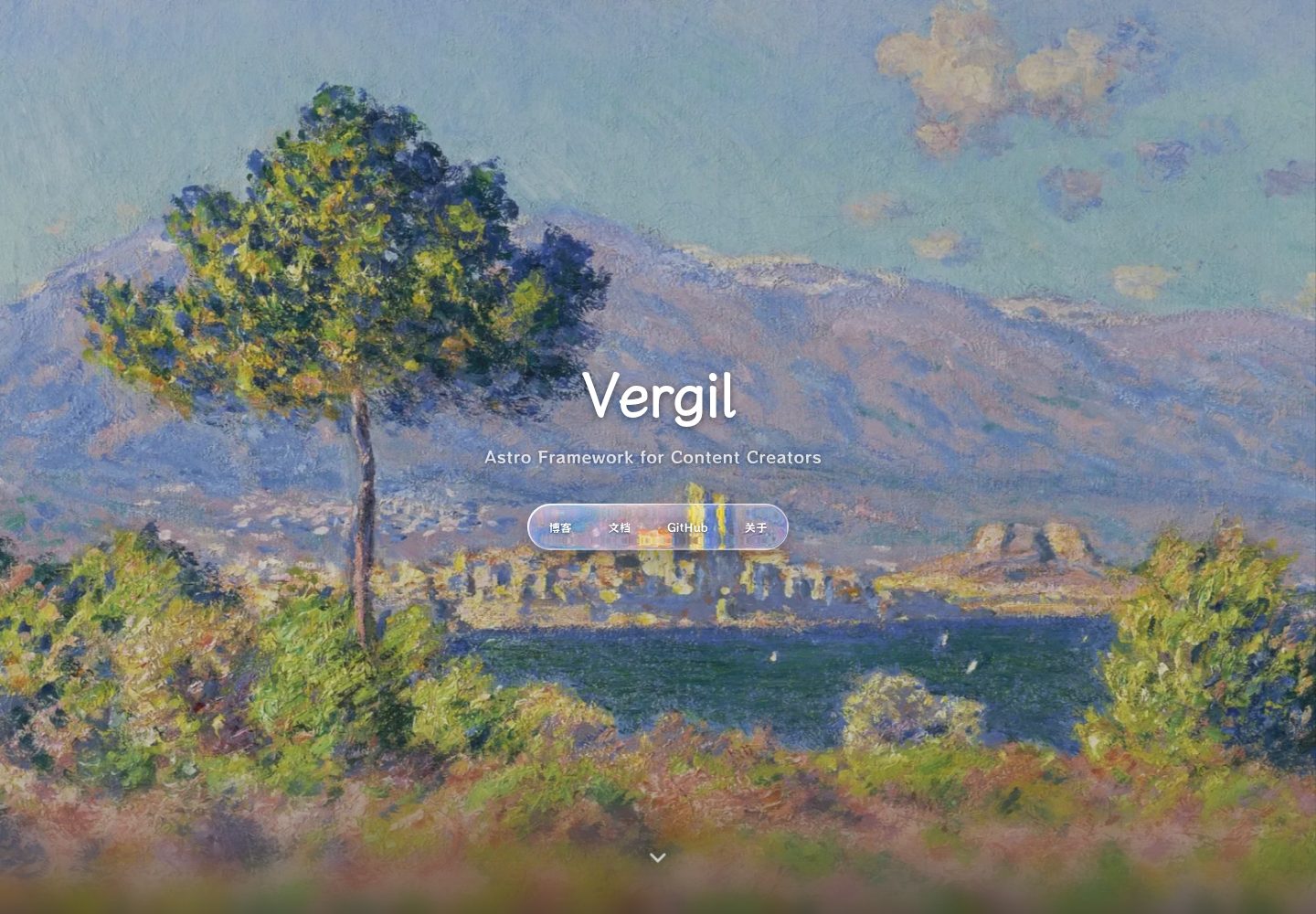
用 `:::` Markdown 指令渲染提示框、时间线、图表、相册、看板等组件,无需编写组件或 CSS
Astro博客文档
vergil-astro-theme — Astro 博客模板
作者 vergil-astro
基于 Astro 的博客与文档主题,用 Markdown 指令渲染提示框、时间线、图表、相册等组件,无需编写组件或 CSS。
看看你的网站会是什么样
浏览真实页面截图,比较内容排版与手机效果。点击下方缩略图切换,放大查看整页细节。
全部页面与视图 3
截图用于了解视觉与布局,交互效果请以实际项目为准。
采集于 2026-10-07查看来源
值得关注的模板亮点
从已有项目资料中,快速了解它的特点。
共 51 个指令,分为结构排版、内容展示、媒体嵌入、卡片与链接、文字与交互、图表可视化、时间规划、可视化叙事八类
提供默认视图、极简模式、简历模式三套独立布局与导航
内容组织支持标签、分类、专栏、层级文档四个维度自由组合
相册含 Golden 与 Seasons 两套主题,支持 Lightbox、EXIF 信息与季节过滤
内置深色模式、全文搜索、评论、RSS、Sitemap 与站点助理,界面文案可中英切换
模板详细介绍
Vergil 是一套基于 Astro 的内容站点主题,面向博客与文档两类场景。它的核心做法是把常见的内容组件做成 Markdown 指令:在 Markdown 里写 `:::` 开头的指令即可渲染出提示框、时间线、图表、相册、看板等元素,不需要另外编写组件或调整 CSS。仓库说明中共有 51 个指令,按用途分为结构排版、内容展示、媒体嵌入、卡片与链接、文字与交互、图表可视化、时间规划、可视化叙事八类;数学公式用 `$...$` 直接书写,不占用指令。
除指令外,主题还提供多视图(默认视图、极简模式、简历模式,各自有独立布局与导航)、内容组织维度(标签、分类、专栏、层级文档)、两套相册主题(Golden 与 Seasons,含 Lightbox、EXIF 信息与季节过滤)、可插拔的左右侧栏组件(热力图、标签云、目录、相关文章),以及深色模式、全文搜索、评论、RSS、Sitemap、站点助理等站点功能。界面文案支持中英切换,不影响用户自己写的内容。
使用前需要留意:仓库自带的文章、相册和示例文档均为演示内容,官方提供了 `pnpm reset` 系列命令用于清理,其中 `pnpm reset` 会保留主题自带的使用文档,`pnpm reset:all` 则一并删除。完整配置与写作说明在站点启动后的 `/docs` 路径下,源文件位于 `src/content/docs/vergil-guide/`。项目由个人在业余时间维护,代码采用 MIT 许可,但演示图片、字体、图标等第三方素材需按各自许可单独核对。
Astro博客文档
适合你的项目吗?
适用场景
- 搭建以 Markdown 写作为主的个人博客,需要提示框、时间线、图表等排版元素
- 建立带层级文档树与侧边目录的知识库或产品文档站
- 制作带 EXIF 信息与季节过滤的摄影相册页面
- 用简历模式呈现个人履历页面
- 为内容站点配置标签、分类、专栏等多维度内容组织方式
适合人群
- 习惯用 Markdown 写作、不想手写组件或调 CSS 的内容创作者
- 需要同时承载博客与文档两类内容的站点
- 希望用指令快速插入图表、时间线、相册等可视化元素的项目
- 接受由个人维护、以 MIT 许可发布的开源主题的开发者
上手与定制指南
结合仓库当前版本的说明,按下面的资料检查内容、配置与运行要求。
- 1
需要 Node.js 22(CI 使用的版本)与 pnpm
- 2
克隆仓库后执行 pnpm install 与 pnpm dev 启动本地开发
- 3
仓库自带文章、相册与示例文档为演示内容,可用 pnpm reset:dry 预览、pnpm reset 清理;pnpm reset 会保留主题使用文档,pnpm reset:all 则一并删除
- 4
完整配置与写作说明在站点启动后的 /docs 路径,源文件位于 src/content/docs/vergil-guide/
- 5
代码为 MIT 许可,但演示图片、字体、图标等第三方素材需按各自许可单独核对
授权与来源资料
使用条件与限制
免费使用 · 保留许可声明本次收录的是公开仓库中采用 MIT 许可的免费版本;免费范围为该版本代码,不代表外部服务或第三方素材免费。
使用时需要遵守
- 允许免费使用、修改、商用和分发该版本代码。
- 分发代码副本或实质性部分时,保留原作者版权声明和完整 MIT 许可声明。
- 代码按现状提供;担保与责任限制以原许可证及适用法律为准。
额外费用与待核对事项
- 演示图片、字体、图标及其他第三方素材需按各自许可核对,不能仅凭代码的 MIT 许可判断。
- 域名、托管、数据库、支付或 AI 等外部服务可能另外收费。
- 仓库自带的文章、相册与示例文档均为演示内容,正式使用前需自行清理或替换。
- 清理命令 pnpm reset 会保留主题自带的使用文档;如需一并删除,须改用 pnpm reset:all。
- 运行环境要求 Node.js 22 与 pnpm,版本不符时可能无法正常构建。
查看原文依据
Permission is hereby granted, free of charge
许可证原文
The posts, galleries, and sample documents included in the repository are demo content.
README 原文
`pnpm reset` keeps the built-in Vergil documentation for future reference. To remove it as well, use `pnpm reset:all`.
README 原文
https://github.com/vergil-astro/vergil-astro-theme/blob/main/LICENSEhttps://github.com/vergil-astro/vergil-astro-theme/blob/main/README.mdRequires Node.js 22 (the version used in CI) and pnpm.
README 原文
DeepSeek 根据仓库许可证和 README 整理 ·2026-10-07。结果仅覆盖已读取资料,依赖、图片、字体及后续条款变更以各自原文为准。
项目核对记录与介绍依据
模板资料
- 来源平台
- GitHub
- 资料与维护参考分
- 资料较完整 · 85 / 100
- 技术栈
- Astro
- 网站类型
- 博客 · 文档
这个分数如何计算
本站按许可资料(最高30分)、演示链接(12分)、预览图(10分)、Star数(15分)、记录的维护时间(15分)、描述完整度(8分)、功能记录(5分)和分类资料(5分)计算。它不是代码、安全或性能测试,也不是 Google 评分;有链接不代表已实测可用。
这个项目需要核对什么
- 记录的仓库更新时间
- 2026-10-07
- 截图检查日期
- 2026-10-07
已收录演示链接。请用你的内容与屏幕尺寸检查;有演示不代表表单、认证或支付已经可用。
目录记录的主要技术栈是 Astro。请通过依赖清单和锁文件核对实际版本与托管要求。这些说明基于收录资料,不代表代码审计或部署实测。
查看具体选型方法 →介绍的制作与核对状态
介绍由 AI 辅助整理目录与仓库资料。仓库作者不等于这篇介绍的审核者。
审核声明: [email protected] · 2026-10-07
查看当时使用的来源资料
SHA-256: 205e8436e2f910edb25095c34aca7a41521bba83fffb912dad8c56bb0ee43d58
2026-10-07T10:01:06.557Z
来源文件 / 仓库<div align="center">
<img src="public/favicon.svg" width="96" alt="Vergil">
# Vergil
</div>
<details>
<summary><a href="README_CN.md">简体中文</a>(点击展开 / 收起)</summary>
<div align="center">
**写 Markdown,剩下的交给主题。**
一套基于 Astro 的内容站点框架。提示框、时间线、图表、相册、看板这些东西都做成了 Markdown 指令,不用写组件,不用碰 CSS。
[](https://astro.build)
[](https://tailwindcss.com)
[](https://www.typescriptlang.org)
[](LICENSE)
[](https://github.com/vergil-astro/vergil-astro-theme)

</div>
## 快速开始
需要 Node.js 22(CI 上用的版本)和 pnpm。
```bash
git clone https://github.com/vergil-astro/vergil-astro-theme.git
cd vergil-astro-theme
pnpm install
pnpm dev
```
仓库自带的文章、相册、示例文档是演示内容。确认能跑起来之后,清掉它们:
```bash
pnpm reset:dry # 先看会删什么
pnpm reset # 确认后真正清理
```
`pnpm reset` 会保留站内的 Vergil 使用文档,那是你之后要查的东西。想一起删掉用 `pnpm reset:all`。
## 它能做什么
写一段 `:::` 指令,得到一个组件:
```markdown
:::callout{type="tip"}
这是一条小技巧,读者一眼就能注意到。
:::
:::timeline
- 2024-01 | 项目启动
- 2024-06 | 第一个版本
:::
:::video{bilibili="BV1xx411c7mD"}
:::
```
一共 51 个指令,按用途分为八类:结构排版、内容展示、媒体嵌入、卡片与链接、文字与交互、图表可视化、时间规划、可视化叙事。数学公式用 `$...$` 直接写,不需要指令。
除了指令,Vergil 还提供这些:
| | |
|---|---|
| **多视图** | 默认视图、极简模式、简历模式,各自独立的布局和导航 |
| **内容组织** | 标签、分类、专栏、层级文档,四个维度自由组合 |
| **相册** | Golden 与 Seasons 两套主题,Lightbox、EXIF 信息、季节过滤 |
| **侧边栏** | 左右侧栏组件可插拔,热力图、标签云、目录、相关文章 |
| **开箱即用** | 深色模式、全文搜索、评论、RSS、Sitemap、站点助理 |
| **界面语言** | 主题文案支持中英切换,你写的内容不受影响 |

四格分别是:文章里的折叠块与时间线指令、Golden 主题的影集、带侧边目录树的知识库、按分类筛选的极简模式。
具体怎么配、怎么写,跑起来之后站内的 `/docs` 就是完整文档,源文件在 [`src/content/docs/vergil-guide/`](src/content/docs/vergil-guide)。
## 生态工具
- **[vergil-cli](https://github.com/vergil-astro/vergil-cli)** — 命令行工具 `vg`,初始化项目、新建文章相册动态、发布草稿
- **[vergil-writing-skills](https://github.com/vergil-astro/vergil-writing-skills)** — AI 写作技能,让助手用 Vergil 指令帮你排版,支持 Claude Code、Codex CLI、Cursor、Gemini CLI
## 参与贡献
Vergil 由个人在业余时间维护,欢迎提 Bug、聊想法、改文档、翻译界面文字。
改代码之前建议先开一个 [issue](https://github.com/vergil-astro/vergil-astro-theme/issues) 聊聊思路,免得白写。提交信息遵循 [Conventional Commits](https://www.conventionalcommits.org/)。
接下来要做什么、已经在做什么,都在 [issues](https://github.com/vergil-astro/vergil-astro-theme/issues) 里。
## 关于名字
Vergil 基于极简主题 [Dante](https://github.com/JustGoodUI/dante-astro-theme) 做了大量改造。名字致敬但丁的老对手,也代表这个项目从极简出发、走向体系化的方向。
## 致谢
- [Dante](https://github.com/JustGoodUI/dante-astro-theme) — Vergil 的起点
- [Hexo Stellar](https://github.com/xaoxuu/hexo-theme-stellar) — 标签体系与文档系统的设计灵感
- [Astro](https://astro.build) — 让静态站点开发重新变得有趣
## License
[MIT](LICENSE)
</details>
<details open>
<summary>English (click to collapse / expand)</summary>
<div align="center">
**Write Markdown. Let the theme handle the rest.**
A content site framework built on Astro. Callouts, timelines, charts, galleries, and kanban boards are all available as Markdown directives—no components to write or CSS to touch.
[](https://astro.build)
[](https://tailwindcss.com)
[](https://www.typescriptlang.org)
[](LICENSE)
[](https://github.com/vergil-astro/vergil-astro-theme)

</div>
## Quick Start
Requires Node.js 22 (the version used in CI) and pnpm.
```bash
git clone https://github.com/vergil-astro/vergil-astro-theme.git
cd vergil-astro-theme
pnpm install
pnpm dev
```
The posts, galleries, and sample documents included in the repository are demo content. Once the site is running, you can remove them:
```bash
pnpm reset:dry # Preview what will be removed
pnpm reset # Remove it after reviewing the preview
```
`pnpm reset` keeps the built-in Vergil documentation for future reference. To remove it as well, use `pnpm reset:all`.
## Features
Write a `:::` directive to render a component:
```markdown
:::callout{type="tip"}
Here's a quick tip your readers can spot at a glance.
:::
:::timeline
- 2024-01 | Project kickoff
- 2024-06 | First release
:::
:::video{bilibili="BV1xx411c7mD"}
:::
```
There are 51 directives across eight categories: structure and layout, content display, media embeds, cards and links, text and interaction, charts and visualization, time planning, and visual storytelling. Write math formulas directly with `$...$`—no directive needed.
Beyond directives, Vergil also includes:
| | |
|---|---|
| **Multiple views** | Default, immersive reading, and resume modes, each with its own layout and navigation |
| **Content organization** | Mix and match tags, categories, series, and hierarchical documentation |
| **Galleries** | Golden and Seasons themes, with a lightbox, EXIF metadata, and seasonal filtering |
| **Sidebars** | Pluggable components on both sides: heatmaps, tag clouds, table of contents, and related posts |
| **Ready to use** | Dark mode, full-text search, comments, RSS, sitemap, and a site assistant |
| **Interface language** | Switch theme text between English and Chinese without affecting your content |

The four panels show collapsible blocks and timeline directives in a post, a Golden-themed gallery, a knowledge base with a sidebar document tree, and an immersive reading view filtered by category.
For configuration and writing instructions, visit `/docs` after starting the site. The full documentation source is in [`src/content/docs/vergil-guide/`](src/content/docs/vergil-guide).
## Ecosystem Tools
- **[vergil-cli](https://github.com/vergil-astro/vergil-cli)** — The `vg` command-line tool for initializing projects, creating posts, galleries, and updates, and publishing drafts
- **[vergil-writing-skills](https://github.com/vergil-astro/vergil-writing-skills)** — AI writing skills that help assistants format your content with Vergil directives. Supports Claude Code, Codex CLI, Cursor, and Gemini CLI
## Contributing
Vergil is maintained by one person in their spare time. Bug reports, ideas, documentation improvements, and interface translations are welcome.
Before making code changes, consider opening an [issue](https://github.com/vergil-astro/vergil-astro-theme/issues) to discuss your approach and avoid wasted effort. Commit messages follow [Conventional Commits](https://www.conventionalcommits.org/).
Planned and ongoing work is tracked in [issues](https://github.com/vergil-astro/vergil-astro-theme/issues).
## About the Name
Vergil extensively reworks the minimalist [Dante](https://github.com/JustGoodUI/dante-astro-theme) theme. The name pays homage to Dante's longtime rival and reflects the project's journey from minimalism toward a more comprehensive framework.
## Acknowledgments
- [Dante](https://github.com/JustGoodUI/dante-astro-theme) — Vergil's starting point
- [Hexo Stellar](https://github.com/xaoxuu/hexo-theme-stellar) — Inspiration for the tag and documentation systems
- [Astro](https://astro.build) — Making static site development fun again
## License
[MIT](LICENSE)
</details>
看看同类模板
对比同技术栈与用途的模板,找到更适合的视觉与内容结构。

astrowind
⭕️ AstroWind: A free template using Astro v7 and Tailwind CSS v4. Astro starter theme.
Astro · 博客

astro-paper
A minimal, accessible and SEO-friendly Astro blog theme.
Astro · 博客

fuwari
✨A static blog template built with Astro.
Astro · 博客

Firefly
Firefly 是一款基于 Astro 的静态博客主题,由 CuteLeaf 在 saicaca 的 Fuwari 模板基础上二次开发,主打清新美观的视觉风格。
Astro · 博客

astro-theme-cactus
A simple Astro theme. Use it to create your blog or website.
Astro · 作品集

astrofy
Astrofy is a free and open-source template for your Personal Portfolio Website built with Astro and TailwindCS…
Astro · 作品集