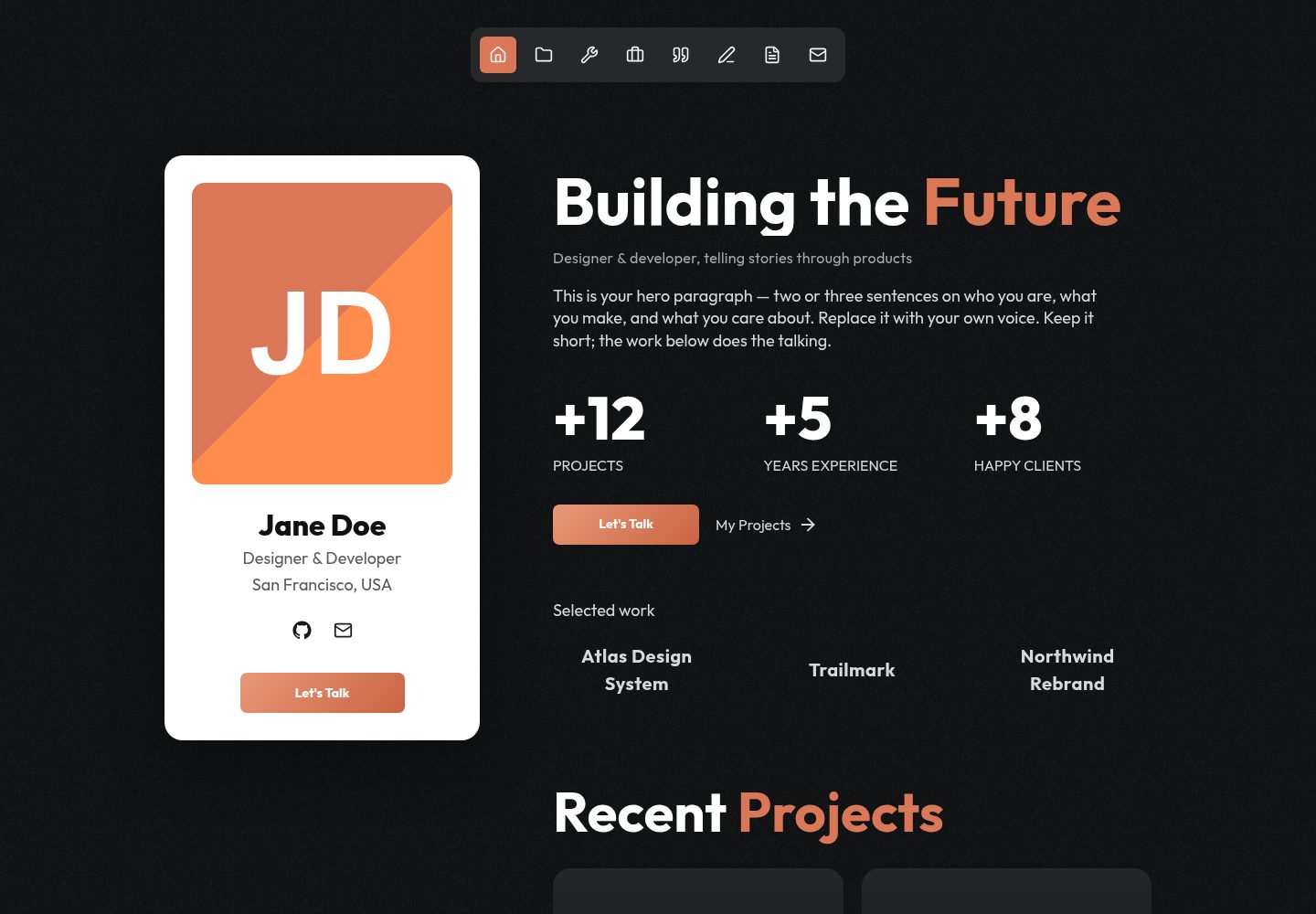
使用 Next.js、Tailwind 和 GSAP 构建,支持静态导出,无需服务器、数据库或 API 密钥
Next.jsReact作品集
portfolio-template (ViryaZheng) — Next.js 作品集模板
作者 ViryaZheng
基于 Next.js、Tailwind 与 GSAP 的个人作品集模板,静态导出后可部署到 GitHub Pages,内容集中在五个标记文件中,便于由 AI 编码代理替换。
看看你的网站会是什么样
浏览真实页面截图,比较内容排版与手机效果。点击下方缩略图切换,放大查看整页细节。
全部页面与视图 3
截图用于了解视觉与布局,交互效果请以实际项目为准。
采集于 2026-10-14查看来源
值得关注的模板亮点
从已有项目资料中,快速了解它的特点。
包含首页、项目及详情页、博客及详情页、工具、经历、推荐语和联系页面
提供打印优先的 /cv 简历页面,可渲染为 A4 并打印为 PDF,也可复制为多个版本
内容集中在五个标记文件中,README 说明可由 AI 编码代理按 AGENTS.md 替换
附带 GitHub Actions 工作流,可部署到 GitHub Pages
响应式深色主题,颜色和字体使用 CSS 变量,便于重新品牌化
模板详细介绍
这是一个个人作品集网站模板,使用 Next.js、Tailwind 和 GSAP 构建,支持静态导出为 HTML,并可通过仓库自带的 GitHub Actions 工作流部署到 GitHub Pages,无需服务器、数据库或 API 密钥。README 说明其设计目标是交给 AI 编码代理(如 Codex、Claude Code、Cursor)使用:代理可依据 AGENTS.md 替换内容并完成部署。
模板包含首页、项目(含详情页)、博客(含详情页)、工具、经历、推荐语和联系页面,并提供打印优先的 /cv 简历页面,可渲染为 A4 纸张并打印为 PDF,也可复制为多语言或面向不同岗位的版本。视觉上采用响应式深色主题,颜色和字体通过 CSS 变量定义,便于改版;动画包括 GSAP 滚动动画、磁性按钮和 3D 卡片倾斜。
内容维护集中在五个明确标记的文件中:site.config.ts 用于姓名、角色、地点、SEO、联系方式和社交链接;data.ts 用于项目和博客文章;cv.data.ts 用于简历页面;较小的文案位于 i18n.tsx 和 site.tsx。README 未提供关于性能、可访问性、浏览器兼容性或生产就绪程度的进一步说明。
Next.js作品集
适合你的项目吗?
适用场景
- 个人开发者或设计师搭建作品集网站并托管到 GitHub Pages
- 使用 AI 编码代理(如 Codex、Claude Code、Cursor)按 AGENTS.md 自动替换模板内容
- 需要同时展示项目、博客、工具、经历和推荐语的多板块个人网站
- 需要可打印为 PDF 的在线简历页面,并可能维护多语言或多岗位版本
适合人群
- 希望以静态方式免费部署个人作品集到 GitHub Pages 的用户
- 愿意通过编辑配置文件维护内容的开发者
- 计划借助 AI 编码代理完成内容替换和部署的用户
- 需要深色主题、带动画效果且可自定义配色的个人网站
上手与定制指南
结合仓库当前版本的说明,按下面的资料检查内容、配置与运行要求。
- 1
运行 npm install 安装依赖,npm run dev 启动本地开发服务器(默认 http://localhost:3000)
- 2
编辑 src/config/site.config.ts 设置姓名、角色、地点、SEO、联系方式和社交链接
- 3
编辑 src/components/portfolio/data.ts 和 cv.data.ts 分别填写项目/博客内容与简历页面
- 4
替换 public/images/、public/og.jpg 中的占位图片以及 src/app/icon.png 图标
- 5
部署到 GitHub Pages 前,将 site.config.ts 中的 url 设为真实部署地址,并在仓库 Settings → Pages 中选择 GitHub Actions 作为来源
授权与来源资料
使用条件与限制
免费使用 · 保留许可声明本次收录的是公开仓库中采用 MIT 许可的免费版本;免费范围为该版本代码,不代表外部服务或第三方素材免费。
使用时需要遵守
- 允许免费使用、修改、商用和分发该版本代码。
- 分发代码副本或实质性部分时,保留原作者版权声明和完整 MIT 许可声明。
- 代码按现状提供;担保与责任限制以原许可证及适用法律为准。
额外费用与待核对事项
- 演示图片、字体、图标及其他第三方素材需按各自许可核对,不能仅凭代码的 MIT 许可判断。
- 域名、托管、数据库、支付或 AI 等外部服务可能另外收费。
查看原文依据
https://github.com/ViryaZheng/portfolio-template/blob/main/LICENSEhttps://github.com/ViryaZheng/portfolio-template/blob/main/README.mdPermission is hereby granted, free of charge
许可证原文
DeepSeek 根据仓库许可证和 README 整理 ·2026-10-14。结果仅覆盖已读取资料,依赖、图片、字体及后续条款变更以各自原文为准。
项目核对记录与介绍依据
模板资料
- 来源平台
- GitHub
- 资料与维护参考分
- 资料较完整 · 80 / 100
- 技术栈
- Next.js · React
- 网站类型
- 作品集
这个分数如何计算
本站按许可资料(最高30分)、演示链接(12分)、预览图(10分)、Star数(15分)、记录的维护时间(15分)、描述完整度(8分)、功能记录(5分)和分类资料(5分)计算。它不是代码、安全或性能测试,也不是 Google 评分;有链接不代表已实测可用。
这个项目需要核对什么
- 记录的仓库更新时间
- 2026-08-05
- 截图检查日期
- 2026-10-14
已收录演示链接。请用你的内容与屏幕尺寸检查;有演示不代表表单、认证或支付已经可用。
目录记录的主要技术栈是 Next.js。请通过依赖清单和锁文件核对实际版本与托管要求。这些说明基于收录资料,不代表代码审计或部署实测。
查看具体选型方法 →介绍的制作与核对状态
介绍由 AI 辅助整理目录与仓库资料。仓库作者不等于这篇介绍的审核者。
审核声明: codex-user-requested-batch-review-20261015 · 2026-10-15
查看当时使用的来源资料
SHA-256: 8cd7fcbdc57ed9ff817f15d581f28a7b1cb273c8bd23c60627360bb16731a222
2026-10-14T22:31:06.038Z
来源文件 / 仓库# Portfolio Template A clean, animated personal-portfolio template built with **Next.js + Tailwind + GSAP**. It exports to static HTML and deploys **free on GitHub Pages** — no server, no database, no API keys. It's designed to be filled in by an **AI coding agent** (Codex, Claude Code, Cursor, …): hand the project to your agent and it follows [`AGENTS.md`](./AGENTS.md) to swap in your content and deploy. **▶ [Live demo](https://viryazheng.github.io/portfolio-template/)** — this repo, deployed as-is with its placeholder content. That's what you get before you change a word. ## Features - ⚡️ Next.js 16 (App Router, React 19, TypeScript) — static export, fast and SEO-friendly - 🎬 GSAP scroll animations, magnetic buttons, 3D card tilt - 📱 Responsive dark theme; all colors + font are CSS variables (easy to rebrand) - 🧩 Home, Projects (+ detail pages), Blog (+ detail pages), Tools, Experience, Endorsements, Contact - 📄 A print-first **`/cv` résumé page** — renders as an A4 sheet, prints to a clean PDF, and can be cloned into several versions (another language, or one aimed at a different kind of role) - 🤖 Agent-ready: your content lives in five clearly-marked files, with no hidden overrides - 🚀 One-click-ish deploy to GitHub Pages via the included GitHub Actions workflow ## Quick start ```bash npm install npm run dev # http://localhost:3000 ``` Then edit your content: - **`src/config/site.config.ts`** — your name, role, location, SEO, contact + social links - **`src/components/portfolio/data.ts`** — your projects and blog posts - **`src/components/portfolio/cv.data.ts`** — the `/cv` résumé page (to drop it, delete `src/app/cv/`, this file, and the CV item in `Nav`) - Smaller copy (hero, FAQ, toolkit, work) lives in `src/components/portfolio/i18n.tsx` and `site.tsx` Replace the placeholder images in `public/images/` and `public/og.jpg`, and the favicon `src/app/icon.png`. > 💡 **Using an AI agent?** Just tell it: *"Read AGENTS.md and set up this portfolio with my info."* > It knows where everything goes. ## Deploy to GitHub Pages 1. Set `url` in `src/config/site.config.ts` to your real deploy URL. (`.env.local` is gitignored and never reaches the GitHub Actions build — it's a local override only.) 2. Create a GitHub repo and push to `main`. Name it `<your-username>.github.io` for the cleanest URL, or anything you like — the workflow detects which case you're in and sets the deploy path accordingly, so images work either way. 3. In the repo: **Settings → Pages → Source → "GitHub Actions"**. 4. Push — the included workflow builds and publishes. Done. See [`AGENTS.md`](./AGENTS.md) for repo-naming options, custom domains, and the full guide. ## Build commands ```bash npm run dev # local dev server npm run build # static export → ./out npm run serve # preview the built ./out npm run typecheck # tsc --noEmit npm run check # lint + typecheck + build ``` ## License MIT — the scaffold derives from the MIT-licensed [ai-website-cloner-template](https://github.com/JCodesMore/ai-website-cloner-template); see [LICENSE](./LICENSE). Your content is yours.
看看同类模板
对比同技术栈与用途的模板,找到更适合的视觉与内容结构。

react-resume-template
A personal resume website template built with React.js, Typescript, Next.js, and styled with Tailwind css
Next.js · 作品集

nxt-lnk
Custom bio links for creatives who love coding. A perfect custom alternative for linktree, bio and other short…
Next.js · 作品集

sylph
A minimal portfolio template.
Next.js · 作品集

sleek-portfolio
sleek-portfolio 是一个面向开发者个人品牌展示的现代作品集模板,基于 Next.js 15、TypeScript、Tailwind CSS 和 Shadcn UI 构建。
Next.js · 作品集

research-website-template
React + Next.js template for research websites (for PhD students, researchers, etc)
Next.js · 作品集

shadcn-portfolio
shadcn-portfolio 是一个面向开发者的作品集模板,技术栈为 Next.js 15、shadcn/ui、Tailwind CSS 和 Framer Motion。
Next.js · 作品集