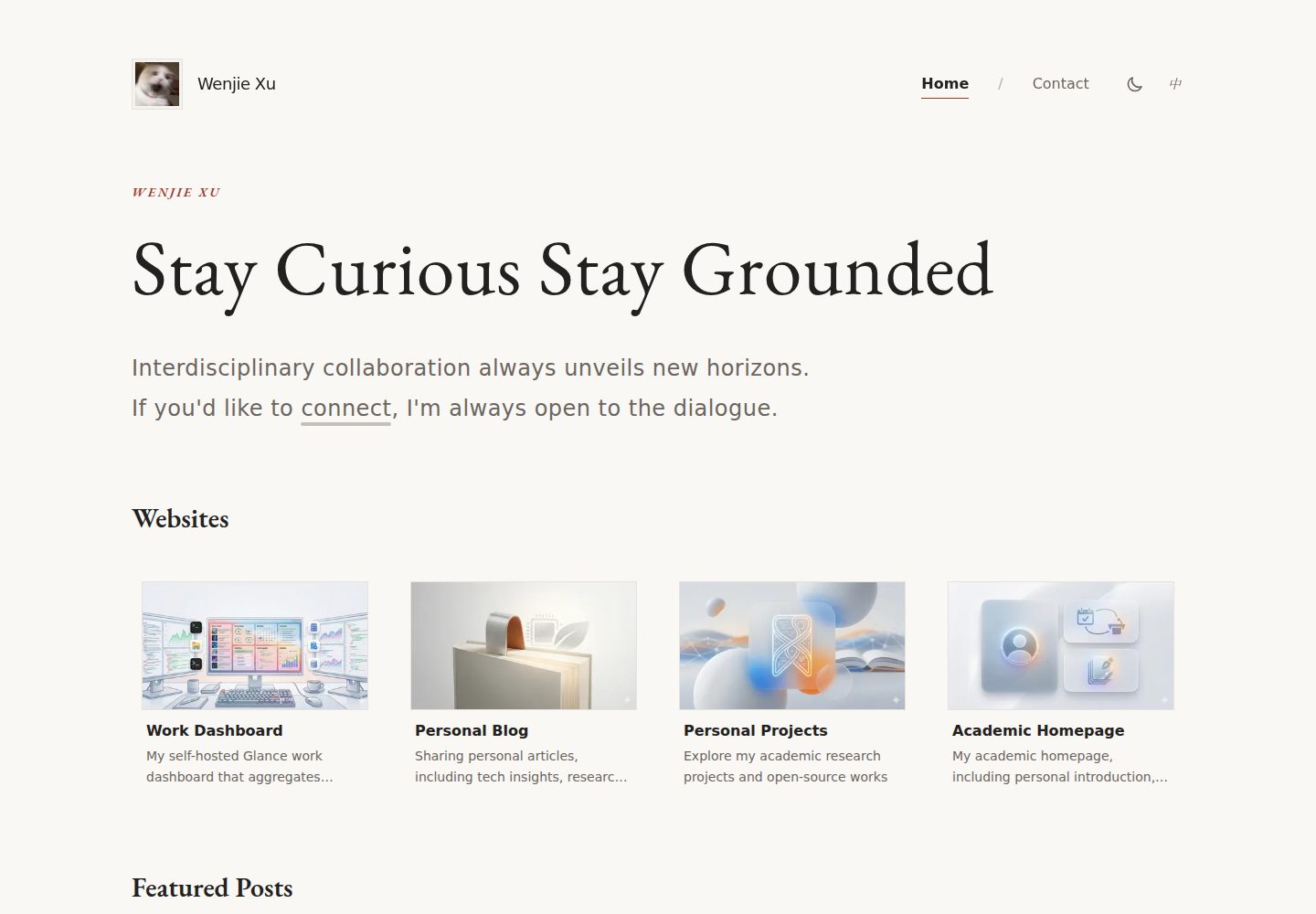
内置 Astro 原生 i18n 路由,默认 zh_CN,同时提供 en_US,内容分别存放在 i18n 目录下的 JSON 文件中
Astro作品集企业官网
LandingPage — Astro 作品集模板
作者 Vncntvx
基于 Astro 的极简个人落地页主题,内置中英双语路由、深色模式、RSS 聚合与 EmailJS 联系表单,内容由 i18n JSON 文件驱动。
看看你的网站会是什么样
浏览真实页面截图,比较内容排版与手机效果。点击下方缩略图切换,放大查看整页细节。
全部页面与视图 2
截图用于了解视觉与布局,交互效果请以实际项目为准。
采集于 2026-10-11查看来源
值得关注的模板亮点
从已有项目资料中,快速了解它的特点。
深色模式支持系统偏好检测与 localStorage 持久化,由 React 岛 ThemeToggle 控制
精选文章区可聚合 RSS/Atom 源,构建前由 Bun 脚本抓取并生成 rss-posts.json,支持多 feed 与条数限制
联系表单预置 EmailJS 集成与表单校验,通过环境变量配置 service、template 与 public key
内容结构由 src/content.config.ts 的 Zod schema 校验,字段覆盖站点、导航、Hero、作品、About、Contact 与页脚
集成 sitemap 与 robots.txt 自动生成,并支持 Astro Image API 处理本地与远程图片
模板详细介绍
LandingPage 是一个用 Astro 构建的极简个人落地页主题,仓库采用 MIT 许可,演示站点为 wenjiexu.site。页面结构围绕个人主页展开:首页包含 Hero 介绍、网站作品展示区(WebsitesSection)与精选文章区(FeaturedPostsSection),另有 About、Contact 和 404 页面,路由按语言前缀区分。
内容不写在组件里,而是集中在 i18n/zh_CN.json 与 i18n/en_US.json 两个文件中,字段覆盖站点信息、导航、头像、Hero、网站列表、精选文章、页脚备案与社交链接、About 时间线与价值观、Contact 卡片与表单文案等,并通过 src/content.config.ts 的 Zod schema 做校验。主题内置 Astro 原生 i18n 路由与中间件,默认语言为 zh_CN,支持 zh_CN 与 en_US。
交互部分使用 React 岛:HeaderBar、PrimaryNav、LanguageSwitcher、ThemeToggle、Contact 表单与 ErrorBoundary;静态展示部分为 Astro 组件。深色模式根据系统偏好自动切换并写入 localStorage。精选文章支持从 RSS/Atom 源抓取,构建前由 scripts/fetch-rss.bun.js 拉取并生成 src/data/rss-posts.json,可配置多个 feed 与解析器及条数上限。联系表单依赖 EmailJS,需要配置对应的环境变量;Google Analytics 为可选。站点输出为静态文件,构建产物在 dist/ 目录。
使用前需要留意:演示图片、字体、图标等第三方素材的许可需单独核对;EmailJS、托管、域名等外部服务可能产生费用;主题未声明生产环境下的具体表现。
Astro作品集企业官网
适合你的项目吗?
适用场景
- 搭建个人主页,集中展示自我介绍、作品网站与博客精选文章
- 需要中英双语切换的个人站点或小型企业官网落地页
- 希望用 JSON 文件而非代码来维护站点文案与导航结构
- 把已有博客的 RSS/Atom 源聚合到落地页的精选文章区域
- 需要一个带深色模式和联系表单的静态个人站点起点
适合人群
- 熟悉 Astro 与 React 基础、愿意通过 JSON 文件维护内容的开发者
- 需要中英双语个人主页或作品集页面的独立开发者与设计师
- 希望以静态输出方式部署、并自行配置 EmailJS 等外部服务的用户
上手与定制指南
结合仓库当前版本的说明,按下面的资料检查内容、配置与运行要求。
- 1
需要 Bun 1.0+ 或 Node.js 18+,克隆仓库后执行 bun install,再用 bun run dev 启动开发服务器(默认 http://localhost:4321)
- 2
联系表单需在项目根目录创建 .env,填写 PUBLIC_EMAILJS_SERVICE_ID、PUBLIC_EMAILJS_TEMPLATE_ID、PUBLIC_EMAILJS_PUBLIC_KEY;Google Analytics 可选填 PUBLIC_GA_ID
- 3
站点 URL、i18n 语言与路由、图片远程域名等配置位于 astro.config.mjs,部署前需把 site 改为实际域名
- 4
构建命令 bun run build 会先抓取 RSS 源,产物输出到 dist/ 目录,可用 bun run preview 预览
- 5
演示图片、字体与图标等第三方素材的许可需单独核对,EmailJS、域名与托管等外部服务可能另行收费
授权与来源资料
使用条件与限制
免费使用 · 保留许可声明本次收录的是公开仓库中采用 MIT 许可的免费版本;免费范围为该版本代码,不代表外部服务或第三方素材免费。
使用时需要遵守
- 允许免费使用、修改、商用和分发该版本代码。
- 分发代码副本或实质性部分时,保留原作者版权声明和完整 MIT 许可声明。
- 代码按现状提供;担保与责任限制以原许可证及适用法律为准。
额外费用与待核对事项
- 演示图片、字体、图标及其他第三方素材需按各自许可核对,不能仅凭代码的 MIT 许可判断。
- 域名、托管、数据库、支付或 AI 等外部服务可能另外收费。
- 联系表单功能依赖 EmailJS 外部服务,必须自行注册并配置 SERVICE_ID、TEMPLATE_ID 与 PUBLIC_KEY 三个环境变量,否则表单无法发送邮件。
- Google Analytics 为可选集成,需自行提供 GA 衡量 ID 并配置环境变量,未配置则不启用统计。
- 运行与构建需要 Bun 1.0+ 或 Node.js 18+ 环境,属于使用前的本地工具链要求。
- 精选文章聚合需自行提供可访问的 RSS/Atom 源地址,构建时会从这些外部源抓取内容,源不可用会影响该区域数据。
- 页脚版权文案为占位示例,使用者需替换为自己的署名与年份,不能直接沿用示例内容。
查看原文依据
Permission is hereby granted, free of charge
许可证原文
# EmailJS (required for contact form) PUBLIC_EMAILJS_SERVICE_ID=your_service_id PUBLIC_EMAILJS_TEMPLATE_ID=your_template_id PUBLIC_EMAILJS_PUBLIC_KEY=your_public_key
README 原文
# Google Analytics (optional) PUBLIC_GA_ID=G-XXXXXXXXXX
README 原文
- [Bun](https://bun.sh/) 1.0+ (recommended) or [Node.js](https://nodejs.org/) 18+
README 原文
"feeds": [ { "url": "https://blog.example.com/feed.xml", "parser": "default" } ],
README 原文
https://github.com/Vncntvx/LandingPage/blob/main/LICENSEhttps://github.com/Vncntvx/LandingPage/blob/main/README.md"copyright": "© 2024 Your Name. All rights reserved.",
README 原文
DeepSeek 根据仓库许可证和 README 整理 ·2026-10-11。结果仅覆盖已读取资料,依赖、图片、字体及后续条款变更以各自原文为准。
项目核对记录与介绍依据
模板资料
- 来源平台
- GitHub
- 资料与维护参考分
- 资料较完整 · 85 / 100
- 技术栈
- Astro
- 网站类型
- 作品集 · 企业官网
这个分数如何计算
本站按许可资料(最高30分)、演示链接(12分)、预览图(10分)、Star数(15分)、记录的维护时间(15分)、描述完整度(8分)、功能记录(5分)和分类资料(5分)计算。它不是代码、安全或性能测试,也不是 Google 评分;有链接不代表已实测可用。
这个项目需要核对什么
- 记录的仓库更新时间
- 2026-10-11
- 截图检查日期
- 2026-10-11
已收录演示链接。请用你的内容与屏幕尺寸检查;有演示不代表表单、认证或支付已经可用。
目录记录的主要技术栈是 Astro。请通过依赖清单和锁文件核对实际版本与托管要求。这些说明基于收录资料,不代表代码审计或部署实测。
查看具体选型方法 →介绍的制作与核对状态
介绍由 AI 辅助整理目录与仓库资料。仓库作者不等于这篇介绍的审核者。
审核声明: [email protected] · 2026-10-11
查看当时使用的来源资料
SHA-256: fb0b3f16e86c4de3d1dcb045a1657af553eef53792287b1371800e2c2583c031
2026-10-11T09:06:57.456Z
来源文件 / 仓库<p align="center">
<img src="public/assets/img/website.png" alt="LandingPage Preview" width="800" />
</p>
<h1 align="center">LandingPage</h1>
<p align="center">
<strong>A modern, minimalist personal landing page theme built with Astro 5, React 19 and Tailwind CSS</strong>
</p>
<p align="center">
<a href="https://github.com/Vncntvx/LandingPage/blob/main/LICENSE">
<img src="https://img.shields.io/badge/license-MIT-blue.svg" alt="License" />
</a>
<a href="https://astro.build/">
<img src="https://img.shields.io/badge/Astro-5.x-ff5d01.svg?logo=astro" alt="Astro" />
</a>
<a href="https://react.dev/">
<img src="https://img.shields.io/badge/React-19.x-61dafb.svg?logo=react" alt="React" />
</a>
<a href="https://tailwindcss.com/">
<img src="https://img.shields.io/badge/Tailwind-3.x-38bdf8.svg?logo=tailwindcss" alt="Tailwind CSS" />
</a>
<a href="https://bun.sh/">
<img src="https://img.shields.io/badge/Bun-1.x-fbf0df.svg?logo=bun" alt="Bun" />
</a>
</p>
<p align="center">
<a href="#features">Features</a> •
<a href="#quick-start">Quick Start</a> •
<a href="#project-structure">Project Structure</a> •
<a href="#configuration">Configuration</a> •
<a href="#deployment">Deployment</a> •
<a href="#contributing">Contributing</a>
</p>
<p align="center">
<a href="README.md">English</a> | <a href="README_zh.md">中文</a>
</p>
---
## ✨ Features
| Feature | Description |
| ----------------------------- | ------------------------------------------------------------------------------------------------------- |
| **🌐 Internationalization** | Built-in i18n with Astro's native routing and Content Collections with TypeScript validation |
| **🌙 Dark Mode** | Automatic theme switching with system preference detection and localStorage persistence |
| **📱 Responsive Design** | Mobile-first design optimized for all devices |
| **📰 RSS Aggregation** | Advanced RSS/Atom feed system with multiple parsers, automatic image generation, and pre-build fetching |
| **📧 Contact Form** | Pre-configured EmailJS integration with form validation |
| **📊 Analytics** | Optional Google Analytics 4 integration |
| **🏝️ Islands Architecture** | React components loaded on demand, minimizing JS bundle size |
| **🔍 SEO Optimized** | Auto-generated sitemap.xml and robots.txt with i18n support |
| **⚡ Fast Performance** | Static site generation with optimized assets and image processing |
| **🖼️ Image Optimization** | Astro's Image API integration with responsive image generation |
| **📝 Content Validation** | Zod schema validation for all content with TypeScript type safety |
| **🔄 Automated RSS Fetching** | Pre-build RSS fetching with retry logic and error handling |
## 🚀 Quick Start
### Prerequisites
- [Bun](https://bun.sh/) 1.0+ (recommended) or [Node.js](https://nodejs.org/)
18+
### Create Your Site
```bash
# Clone the repository
git clone https://github.com/Vncntvx/LandingPage.git my-site
cd my-site
# Install dependencies
bun install
# Start development server
bun run dev
```
Open [http://localhost:4321](http://localhost:4321) to see your site.
### Build for Production
```bash
# Build the site (RSS feeds are automatically fetched)
bun run build
# Preview the production build
bun run preview
```
Output is generated in the `dist/` directory, ready for deployment.
## 📁 Project Structure
```
src/
├── components/
│ ├── react/ # React Islands (interactive components)
│ │ ├── Contact.jsx # Contact form with EmailJS
│ │ ├── ErrorBoundary.jsx # React error boundary
│ │ ├── HeaderBar.jsx # Navigation header with language switcher
│ │ ├── LanguageSwitcher.jsx # Language selector component
│ │ ├── PrimaryNav.jsx # Primary navigation menu
│ │ ├── ThemeToggle.jsx # Dark/light mode toggle
│ │ └── UnderlineEffects.jsx # Underline hover effects
│ │
│ └── ui/ # Astro Components (static components)
│ ├── Hero.astro # Hero section
│ ├── Footer.astro # Site footer
│ ├── WebsiteItem.astro # Website showcase item
│ ├── WebsitesSection.astro # Websites showcase section
│ ├── FeaturedPostItem.astro # Featured post item
│ └── FeaturedPostsSection.astro # Featured posts section
│
├── layouts/
│ └── BaseLayout.astro # Global layout with SEO and meta tags
│
├── lib/
│ ├── i18n.ts # Internationalization utilities
│ ├── utils.ts # Common utility functions
│ ├── localImages.ts # Local image processing utilities
│ └── websiteImages.ts # Website image processing utilities
│
├── pages/
│ ├── index.astro # Root homepage (renders Chinese version)
│ ├── 404.astro # Root 404 page
│ └── [lang]/ # Dynamic routes for languages
│ ├── index.astro # Language-specific homepage
│ ├── about.astro # About page
│ ├── contact.astro # Contact page
│ └── 404.astro # Language-specific 404 page
│
├── data/
│ └── rss-posts.json # RSS aggregated posts data (auto-generated)
│
└── styles/
└── global.css # Global styles and custom CSS
i18n/ # Internationalization content
├── zh_CN.json # Chinese content
└── en_US.json # English content
scripts/
└── fetch-rss.bun.js # RSS fetching script with advanced parsing
src/
├── content.config.ts # Content collections schema and validation
└── middleware.ts # Internationalization routing middleware
```
## ⚙️ Configuration
### Environment Variables
Create a `.env` file in the project root:
```env
# EmailJS (required for contact form)
PUBLIC_EMAILJS_SERVICE_ID=your_service_id
PUBLIC_EMAILJS_TEMPLATE_ID=your_template_id
PUBLIC_EMAILJS_PUBLIC_KEY=your_public_key
# Google Analytics (optional)
PUBLIC_GA_ID=G-XXXXXXXXXX
```
### Site Configuration
Main configuration is in `astro.config.mjs`:
```js
export default defineConfig({
// Site URL for production
site: 'https://your-domain.com',
// Static site generation
output: 'static',
// Internationalization
i18n: {
defaultLocale: 'zh_CN',
locales: ['zh_CN', 'en_US'],
routing: {
prefixDefaultLocale: true,
redirectToDefaultLocale: false,
},
},
// Integrations
integrations: [
react(), // React support
mdx(), // MDX support
tailwind(), // Tailwind CSS
icon(), // Iconify icons
sitemap({
// Auto-generate sitemap.xml with i18n support
i18n: {
defaultLocale: 'zh_CN',
locales: {
zh_CN: 'zh-CN',
en_US: 'en-US',
},
},
}),
robotsTxt(), // Auto-generate robots.txt
],
// Image optimization
image: {
domains: ['images.unsplash.com', 'unsplash.com', 'picsum.photos'],
remotePatterns: [
{
protocol: 'https',
hostname: '**.unsplash.com',
},
{
protocol: 'https',
hostname: 'picsum.photos',
},
],
},
});
```
### Content Management
All site content is managed through JSON files in `i18n/`:
| File | Description |
| ------------ | --------------- |
| `zh_CN.json` | Chinese content |
| `en_US.json` | English content |
Content structure follows a strict schema defined in `src/content.config.ts`
with Zod validation:
```json
{
"site": {
"title": "Site Title",
"author": "Your Name",
"description": "Site description",
"keywords": "keywords, for, seo"
},
"nav": [
{ "label": "Home", "href": "index.html" },
{ "label": "About", "href": "about.html" },
{ "label": "Contact", "href": "contact.html" }
],
"header": {
"avatar": "/img/prof_pic.png",
"name": "Your Name"
},
"hero": {
"subtitle": "Welcome",
"title": "Your Name",
"description": "Your introduction text..."
},
"websites": {
"title": "My Websites",
"items": [
{
"id": "website-1",
"title": "Website Title",
"image": "/websites/website.png",
"url": "https://example.com",
"description": "Website description"
}
]
},
"featuredPosts": {
"title": "Featured Posts",
"rss": {
"enabled": true,
"feeds": [
{ "url": "https://blog.example.com/feed.xml", "parser": "default" }
],
"limit": 6
},
"items": [],
"seeAllText": "See all posts",
"seeAllUrl": "https://blog.example.com"
},
"footer": {
"copyright": "© 2024 Your Name. All rights reserved.",
"icp": {
"text": "ICP备案号",
"url": "https://beian.miit.gov.cn"
},
"mps": {
"text": "公安备案号",
"url": "https://www.beian.gov.cn",
"logo": "/assets/img/mps-logo.png"
},
"socialLinks": [
{
"icon": "mdi:github",
"url": "https://github.com/yourusername",
"title": "GitHub"
}
]
},
"about": {
"hero": {
"subtitle": "About",
"title": "About Me",
"description": "About me description..."
},
"timeline": {
"subtitle": "Journey",
"title": "My Timeline",
"period": "2018 - Present",
"items": [
{
"period": "2020-2023",
"title": "Job Title",
"description": "Job description..."
}
]
},
"values": {
"subtitle": "Values",
"title": "My Values",
"items": [
{
"label": "Value 1",
"text": "Value description..."
}
],
"product": {
"subtitle": "Product",
"title": "My Product",
"description": "Product description...",
"linkText": "Learn more",
"linkUrl": "https://product.example.com"
}
},
"philosophy": {
"subtitle": "Philosophy",
"title": "My Philosophy",
"description": "Philosophy description...",
"ctaText": "Get in touch",
"ctaUrl": "/contact"
}
},
"contact": {
"hero": {
"subtitle": "Contact",
"title": "Get in Touch",
"description": "Contact description..."
},
"cards": {
"email": {
"subtitle": "Email",
"address": "[email protected]",
"note": "Response within 24 hours"
},
"social": {
"subtitle": "Social Media",
"items": [
{
"label": "GitHub",
"url": "https://github.com/yourusername",
"icon": "mdi:github",
"handle": "@yourusername"
}
]
}
},
"form": {
"subtitle": "Send Message",
"title": "Contact Form",
"note": "All fields are required"
},
"actions": {
"writeEmail": "Write Email",
"copy": "Copy",
"copied": "Copied!"
},
"formLabels": {
"name": "Name",
"email": "Email",
"topic": "Topic",
"message": "Message"
},
"formPlaceholders": {
"name": "Your name",
"email": "[email protected]",
"message": "Your message..."
},
"formOptions": {
"consulting": "Consulting",
"content": "Content Creation",
"share": "Share Ideas",
"other": "Other"
},
"formSubmit": {
"default": "Send Message",
"sending": "Sending...",
"success": "Message Sent!",
"error": "Error Sending"
},
"services": {
"items": [
{
"subtitle": "Service 1",
"title": "Service Title",
"description": "Service description..."
}
]
}
}
}
```
### RSS Configuration
Configure RSS aggregation in your locale JSON:
```json
{
"featuredPosts": {
"rss": {
"enabled": true,
"feeds": [
{ "url": "https://blog.example.com/feed.xml", "parser": "default" },
{
"url": "https://astro-paper.vercel.app/rss.xml",
"parser": "astroPaper"
}
],
"limit": 6
}
}
}
```
#### Supported RSS Parsers
| Parser | Description | Use Case |
| ------------ | ------------------------ | ----------------------------- |
| `default` | Standard RSS/Atom parser | Most RSS feeds |
| `astroPaper` | Astro Paper theme parser | Blogs using Astro Paper theme |
| `jekyllFeed` | Jekyll feed parser | Jekyll-based blogs |
#### RSS Features
- **Multi-parser support**: Different parsers for different feed formats
- **Automatic image generation**: Deterministic hash-based images from Picsum
- **Retry logic**: Exponential backoff for failed requests
- **Content validation**: Type-safe content processing
- **Pre-build fetching**: Automatically runs before build
Fetch RSS feeds manually:
```bash
bun run fetch:rss
```
## 🛠️ Customization
### Adding a New Language
1. **Update Astro configuration** (`astro.config.mjs`):
```js
i18n: {
defaultLocale: 'zh_CN',
locales: ['zh_CN', 'en_US', 'NEW_LOCALE'],
},
// Update sitemap i18n config
sitemap({
i18n: {
defaultLocale: 'zh_CN',
locales: {
zh_CN: 'zh-CN',
en_US: 'en-US',
NEW_LOCALE: 'new-locale',
},
},
}),
```
2. **Update i18n utilities** (`src/lib/i18n.ts`):
```ts
export const locales = ['zh_CN', 'en_US', 'NEW_LOCALE'] as const;
export const localeConfig: Record<
Locale,
{ label: string; name: string; hrefLang: string }
> = {
NEW_LOCALE: {
label: 'XX',
name: 'Language Name',
hrefLang: 'new-locale',
},
};
```
3. **Create translation file** (`i18n/NEW_LOCALE.json`): Copy `en_US.json` and
translate all content.
4. **Create page routes** (`src/pages/[lang]/`): Copy existing language pages
and update content references.
### Styling
- **Colors & Theme**: Edit `tailwind.config.mjs`
- **Global Styles**: Edit `src/styles/global.css`
- **Dark Mode**: Use Tailwind's `dark:` prefix
- **Custom Icons**: Add to `public/assets/css/custom-icons.css`
### Components
| Component | Purpose | Client Directive |
| ---------------------- | --------------------------------- | ---------------- |
| `HeaderBar.jsx` | Navigation with language switcher | `client:load` |
| `Contact.jsx` | Contact form with EmailJS | `client:load` |
| `ErrorBoundary.jsx` | React error boundary | - |
| `LanguageSwitcher.jsx` | Language selector | `client:load` |
| `PrimaryNav.jsx` | Primary navigation | `client:load` |
| `ThemeToggle.jsx` | Dark/light mode toggle | `client:load` |
| `UnderlineEffects.jsx` | Underline hover effects | `client:idle` |
## 🚀 Deployment
### Environment Variables for Production
Set these environment variables in your hosting platform:
```env
# EmailJS (required for contact form)
PUBLIC_EMAILJS_SERVICE_ID=your_service_id
PUBLIC_EMAILJS_TEMPLATE_ID=your_template_id
PUBLIC_EMAILJS_PUBLIC_KEY=your_public_key
# Google Analytics (optional)
PUBLIC_GA_ID=G-XXXXXXXXXX
```
## 📦 Scripts
| Command | Description |
| ---------------------- | -------------------------------------------------------- |
| `bun run dev` | Start development server (Bun runtime) |
| `bun run dev:node` | Start development server (Node.js runtime) |
| `bun run build` | Build for production (Bun runtime) |
| `bun run build:node` | Build for production (Node.js runtime) |
| `bun run preview` | Preview production build |
| `bun run fetch:rss` | Fetch RSS feeds manually |
| `bun run prebuild` | Pre-build RSS fetching (runs automatically before build) |
| `bun run format` | Format code with Prettier |
| `bun run format:check` | Check code formatting |
| `bun run type-check` | TypeScript type checking |
| `bun run lint` | Astro code linting |
| `bun run clean` | Clean build artifacts |
| `bun run reinstall` | Clean and reinstall dependencies |
## 🏗️ Tech Stack
- **Framework**: [Astro](https://astro.build/) 5.x
- **UI**: [React](https://react.dev/) 19.x
- **Styling**: [Tailwind CSS](https://tailwindcss.com/) 3.x
- **Runtime**: [Bun](https://bun.sh/) 1.x (recommended) or Node.js 18+
- **Email**: [EmailJS](https://www.emailjs.com/)
- **Icons**: [Iconify](https://iconify.design/) (Material Design Icons)
- **Content**: Astro Content Collections with TypeScript validation
- **SEO**: Auto-generated sitemap.xml and robots.txt with i18n support
- **Images**: Astro Image API with responsive optimization
## 📊 Performance
### PageSpeed Insights Results
<p align="center">
<strong>Desktop Performance</strong><br>
<img src="public/assets/img/desktop_pagespeed.png" alt="Desktop PageSpeed Insights" width="600" />
</p>
<p align="center">
<strong>Mobile Performance</strong><br>
<img src="public/assets/img/mobile_pagespeed.png" alt="Mobile PageSpeed Insights" width="600" />
</p>
## 🤝 Contributing
Contributions are welcome! Please read our [Contributing Guide](CONTRIBUTING.md)
before submitting a PR.
1. Fork the repository
2. Create a feature branch (`git checkout -b feature/amazing-feature`)
3. Commit your changes (`git commit -m 'Add amazing feature'`)
4. Push to the branch (`git push origin feature/amazing-feature`)
5. Open a Pull Request
## 📄 License
This project is licensed under the [MIT License](LICENSE).
---
<p align="center">
Made with ❤️ by <a href="https://github.com/Vncntvx">Wenjie Xu</a>
</p>
看看同类模板
对比同技术栈与用途的模板,找到更适合的视觉与内容结构。

astrowind
⭕️ AstroWind: A free template using Astro v7 and Tailwind CSS v4. Astro starter theme.
Astro · 博客

astro-theme-cactus
A simple Astro theme. Use it to create your blog or website.
Astro · 作品集

astrofy
Astrofy is a free and open-source template for your Personal Portfolio Website built with Astro and TailwindCS…
Astro · 作品集

astro-nano
Astro Nano is a static, minimalist, lightweight, lightning fast portfolio and blog.
Astro · 作品集

astro-erudite
An opinionated, unstyled static blogging template built with Astro and native CSS.
Astro · 作品集

astro-sphere
Astro Sphere is a static, minimalist, lightweight, lightning fast portfolio and blog.
Astro · 作品集