原生 HTML/CSS/JS 实现,无构建步骤、无 npm 依赖
HTML作品集博客工具站
neovim-web — HTML 作品集模板
作者 vojay-dev
一个以 Neovim 为主题的纯前端个人网站框架,使用原生 HTML/CSS/JS,通过 config.js 配置,支持 Vim 键位、Telescope 模糊查找、DuckDB SQL 控制台、多主题与 Markdown 博客。
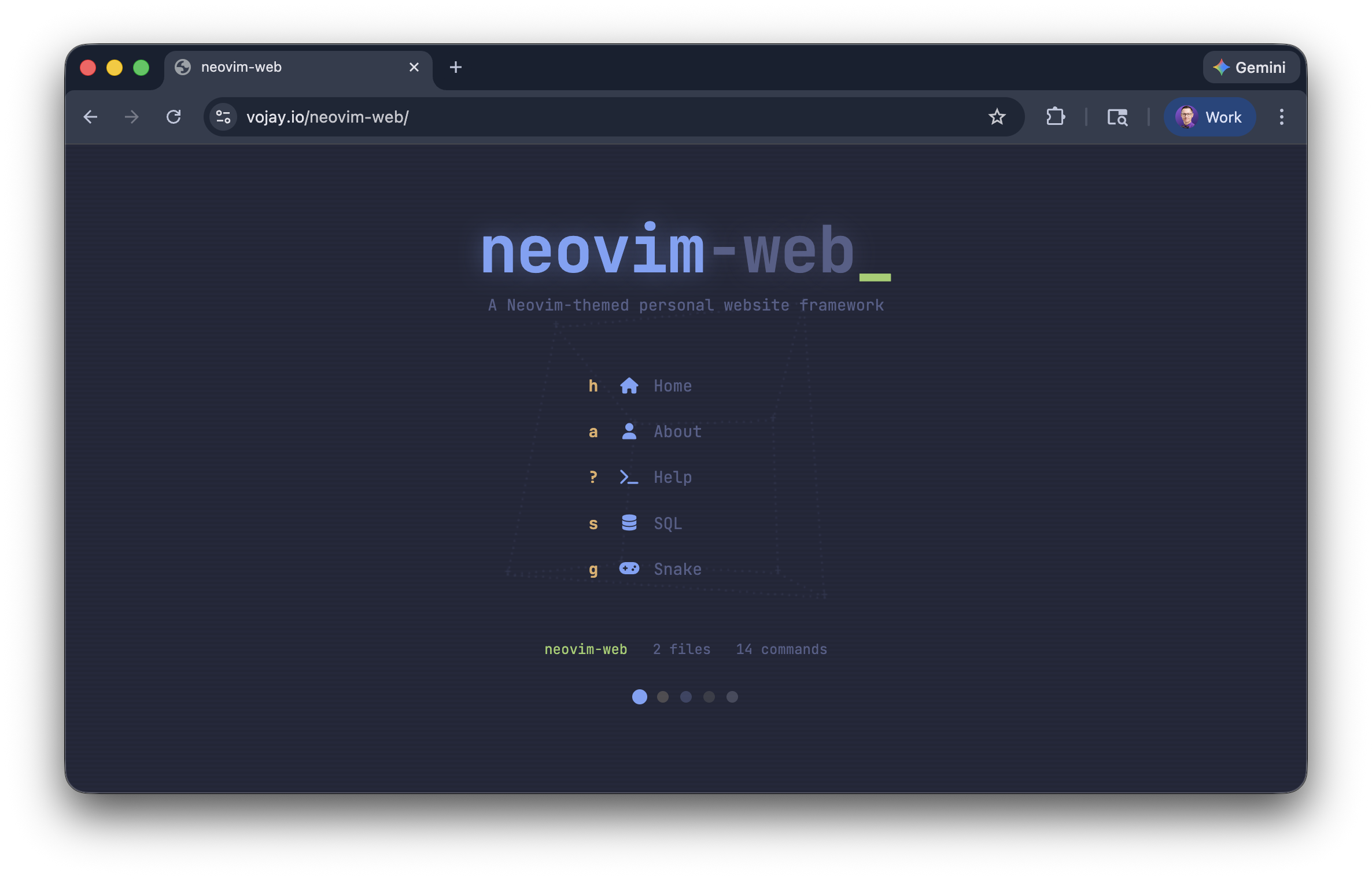
看看你的网站会是什么样
浏览真实页面截图,比较内容排版与手机效果。点击下方缩略图切换,放大查看整页细节。
目前有 1 张原始预览,可打开完整图片查看设计细节。
截图用于了解视觉与布局,交互效果请以实际项目为准。
采集于 2026-10-03查看来源
值得关注的模板亮点
从已有项目资料中,快速了解它的特点。
Vim 键位与 : 命令模式,支持 j/k 滚动、/ 或 Ctrl+p 打开 Telescope 模糊查找
内置 DuckDB WASM SQL 控制台,将站点页面加载为 pages 表供查询
5 种配色主题,可通过 :theme 或状态栏切换,并支持自定义主题变量
Markdown 页面与带 YAML frontmatter 的博客系统,支持代码高亮和 Font Awesome 内联图标
Alpha 启动仪表盘、缓冲区标签与彩蛋命令(:snake、:matrix、:sl)
模板详细介绍
neovim-web 是一个 Neovim 主题的个人网站框架,采用原生 HTML/CSS/JavaScript 实现,不需要构建步骤或 npm。整个站点通过根目录的 config.js 配置,页面以 Markdown 文件放在 content/ 目录,博客文章放在 posts/ 目录并带有 YAML frontmatter。站点提供 Vim 风格的键位(j/k 滚动、: 命令模式、/ 或 Ctrl+p 打开 Telescope 模糊查找),内置 Alpha 启动仪表盘、5 种配色主题(Tokyo Night、Gruvbox、Dracula、Cyberpunk、Latte)、缓冲区标签、Font Awesome 内联图标以及若干彩蛋命令(:snake、:matrix、:sl)。:sql 命令会通过 DuckDB WASM 在浏览器端把站点页面内容加载为 pages 表,可执行 SQL 查询。部署方式为静态托管,README 以 GitHub Pages 为例。
使用限制与注意点:站点内容与命令逻辑都在客户端运行,DuckDB 查询也完全在浏览器内完成;博客需要先运行 make posts 从 frontmatter 重新生成 posts/posts.json 清单,部署前可用 make bust 更新缓存参数。自定义命令需编辑 commands.js,自定义主题需在 style.css 中补充 CSS 变量并加入 config.themes。脚本加载顺序固定为 config.js → commands.js → engine.js。
HTML作品集博客工具站
适合你的项目吗?
适用场景
- 搭建以编辑器/终端风格为视觉主题的个人主页或作品集
- 用 Markdown 维护内容并生成带卡片列表的静态博客
- 在浏览器内用 SQL 查询站点自身内容,用于演示或数据探索
- 部署到 GitHub Pages 等静态托管服务,无需构建流程
适合人群
- 熟悉 Vim/Neovim 操作习惯、希望网站也采用相同交互的开发者
- 需要零构建、纯静态、可直接推送到 GitHub Pages 的个人站点作者
- 想以 Markdown 管理页面和博客文章的内容维护者
- 对在浏览器端运行 DuckDB SQL 查询感兴趣的演示或数据类项目
上手与定制指南
结合仓库当前版本的说明,按下面的资料检查内容、配置与运行要求。
- 1
克隆仓库后编辑 config.js 填写站点标题、起始页、页面列表、链接、Alpha 仪表盘、联系方式、博客与主题等配置。
- 2
新增页面:在 content/ 创建 Markdown 文件,并把文件名加入 config.files;页面会自动获得侧边栏入口、:命令 与 Telescope 索引。
- 3
新增博客:在 posts/ 创建带 YAML frontmatter 的 Markdown 文件,运行 make posts 重新生成 posts/posts.json,部署前可运行 make bust 更新缓存参数。
- 4
本地预览运行 make run,默认在 http://localhost:8000 启动;脚本加载顺序必须为 config.js → commands.js → engine.js。
- 5
部署到 GitHub Pages 时在仓库 Settings > Pages 选择从 main 分支根目录发布;使用自定义域名需添加 CNAME 文件。
授权与来源资料
使用条件与限制
免费使用 · 保留许可声明本次收录的是公开仓库中采用 MIT 许可的免费版本;免费范围为该版本代码,不代表外部服务或第三方素材免费。
使用时需要遵守
- 允许免费使用、修改、商用和分发该版本代码。
- 分发代码副本或实质性部分时,保留原作者版权声明和完整 MIT 许可声明。
- 代码按现状提供;担保与责任限制以原许可证及适用法律为准。
额外费用与待核对事项
- 部署示例以 GitHub Pages 为主;使用其他静态托管需自行适配,README 未提供其他平台的部署说明。
- 新增或修改博客文章后必须运行 make posts 重新生成 posts/posts.json 清单,否则博客列表不会更新。
- 部署前建议运行 make bust 更新 index.html 中 CSS/JS 的 ?v= 缓存参数,否则访客可能看到旧版本资源。
- 脚本加载顺序固定为 config.js → commands.js → engine.js,engine.js 在加载时读取 config 与 customCommands,顺序错误会导致站点无法正常工作。
- 启用 Google Analytics 需在 config.js 中填写 googleId,属于第三方外部服务,可能涉及数据收集与合规要求。
- 项目基于 vojay.io 的架构构建,署名与版权信息(Copyright (c) 2026 Volker Janz)需按 MIT 许可保留。
- 演示图片、字体、图标及其他第三方素材需按各自许可核对,不能仅凭代码的 MIT 许可判断。
- 域名、托管、数据库、支付或 AI 等外部服务可能另外收费。
查看原文依据
Permission is hereby granted, free of charge
许可证原文
Deploy on GitHub Pages in minutes.
README 原文
Regenerate the manifest:
README 原文
Cache bust before deploying:
README 原文
config.js → commands.js → engine.js
README 原文
Google Analytics (optional)
README 原文
https://github.com/vojay-dev/neovim-web/blob/main/LICENSEhttps://github.com/vojay-dev/neovim-web/blob/main/README.mdBuilt on the architecture of [vojay.io](https://vojay.io) by [Volker Janz](https://github.com/vojay-dev).
README 原文
DeepSeek 根据仓库许可证和 README 整理 ·2026-10-03。结果仅覆盖已读取资料,依赖、图片、字体及后续条款变更以各自原文为准。
项目核对记录与介绍依据
模板资料
- 来源平台
- GitHub
- 资料与维护参考分
- 资料较完整 · 92 / 100
- 技术栈
- HTML
- 网站类型
- 作品集 · 博客 · 工具站
这个分数如何计算
本站按许可资料(最高30分)、演示链接(12分)、预览图(10分)、Star数(15分)、记录的维护时间(15分)、描述完整度(8分)、功能记录(5分)和分类资料(5分)计算。它不是代码、安全或性能测试,也不是 Google 评分;有链接不代表已实测可用。
这个项目需要核对什么
- 记录的仓库更新时间
- 2026-02-21
- 截图检查日期
- 2026-10-03
已收录演示链接。请用你的内容与屏幕尺寸检查;有演示不代表表单、认证或支付已经可用。
目录记录的主要技术栈是 HTML。请通过依赖清单和锁文件核对实际版本与托管要求。这些说明基于收录资料,不代表代码审计或部署实测。
查看具体选型方法 →介绍的制作与核对状态
介绍由 AI 辅助整理目录与仓库资料。仓库作者不等于这篇介绍的审核者。
已完成服务器许可规则与 AI 来源核对;未经过人工编辑审核。
查看当时使用的来源资料
SHA-256: b8dd2299be8ce9bce8192608ea78c6bcfe1d6a43c45059c8d87bf2b7d900d8c3
2026-10-03T04:58:46.382Z
来源文件 / 仓库# neovim-web
[](LICENSE)
[](#)
A **Neovim-themed personal website framework**. Zero build, zero npm, pure vanilla JS/CSS/HTML. Deploy on GitHub Pages in minutes.
Your entire site is configured through a single `config.js` file. Add pages by dropping markdown files. Built-in DuckDB SQL console, Telescope fuzzy finder, vim keybindings, 5 color themes, and fun easter eggs.
`neovim-web` is fully responsive and works great on mobile (yes, even the commands).
👉 **[Live Demo](https://vojay-dev.github.io/neovim-web/)**


---
## Quick Start
```bash
git clone https://github.com/vojay-dev/neovim-web.git
cd neovim-web
```
Edit `config.js` with your info, then:
```bash
make run
# Open http://localhost:8000
```
Deploy to GitHub Pages. No build step needed, just push and go.
---
## Features
- **Vim keybindings** - `j`/`k` scroll, `:` commands, `/` search
- **Telescope fuzzy finder** - search files, commands, and links
- **Alpha dashboard** - animated startup screen with 3D ASCII art backgrounds
- **5 color themes** - Tokyo Night, Gruvbox, Dracula, Cyberpunk, Latte
- **DuckDB SQL** - query your own site content with SQL in the browser
- **Blog system** - markdown posts with frontmatter, auto-generated cards
- **Buffer tabs** - open multiple pages like Neovim buffers
- **Font Awesome icons** - inline icon syntax in markdown (`:fab fa-github:`)
- **Mobile friendly** - responsive layout with touch support
- **Easter eggs** - `:snake` (playable game!), `:matrix`, `:sl`


---
## Configuration
Everything lives in `config.js`:
```js
const config = {
// Site title (shown in browser tab)
title: 'my-site',
// Default page loaded on visit
startPage: 'home',
// Pages: each entry maps to content/{name}.md
files: ['home', 'about'],
// Sidebar links (external)
links: [
{ label: 'GitHub', url: 'https://github.com/you', icon: 'fab fa-github' },
],
// Alpha dashboard (startup screen)
alpha: {
enabled: true, // set false to skip startup screen
animation: 'cube', // 'donut', 'starfield', 'cube', or false
title: 'your-name', // animated typing text
titleColor: 'var(--blue)',
titleAccent: '.dev', // dimmed suffix
titleAccentColor: 'var(--comment)',
subtitle: 'Your tagline here',
subtitleColor: 'var(--comment)',
actions: [ // quick-launch buttons
{ key: 'h', icon: 'fas fa-home', label: 'Home', cmd: 'home' },
// cmd: 'filename' opens a page, cmd: ':command' runs a command
]
},
// Contact email (used by :contact command)
contact: { email: '[email protected]' },
// Google Analytics (optional)
analytics: { enabled: false, googleId: '' },
// Git repo link in status bar (optional)
repo: { url: 'https://github.com/you/your-site', branch: 'main' },
// Blog system
blog: {
enabled: true,
manifestPath: 'posts/posts.json',
postsDir: 'posts'
},
// Available themes and default
themes: ['tokyo', 'gruvbox', 'dracula', 'cyberpunk', 'latte'],
defaultTheme: 'tokyo',
};
```
---
## Adding Pages
1. Create `content/mypage.md`
2. Add `'mypage'` to `config.files`
Done. The page automatically gets:
- A sidebar entry
- A `:mypage` command
- Telescope search inclusion
- A DuckDB `pages` table row
### Markdown Features
- Standard markdown (rendered via [Marked.js](https://marked.js.org/))
- Syntax highlighting for code blocks (Python, Bash, Java, SQL, JSON, YAML, Ruby, TOML)
- Font Awesome icons inline: `:fab fa-github:` renders as a GitHub icon
- Images with click-to-lightbox
---
## Adding Blog Posts
1. Create a markdown file in `posts/`:
```
posts/2026-03-15-my-post.md
```
2. Add YAML frontmatter:
```yaml
---
title: My Post Title
date: 2026-03-15
description: A short summary shown on the blog card.
image: images/blog/cover.jpg
tags:
- javascript
- tutorial
---
Your content here...
```
3. Regenerate the manifest:
```bash
make posts
```
4. Cache bust before deploying:
```bash
make bust
```
The blog page appears in the sidebar automatically when posts exist.
---
## Built-in Commands
Type `:` to enter command mode.
| Command | Description |
|---------|-------------|
| `:help` | List all commands |
| `:theme` | Cycle through themes |
| `:sql` | DuckDB SQL console (queries your site content!) |
| `:contact` | Send email |
| `:socials` | Show social links |
| `:date` | Current date/time |
| `:whoami` | Device & location info |
| `:snake` | Play snake with vim keys |
| `:matrix` | Matrix rain effect |
| `:sl` | ASCII train animation |
| `:alpha` | Show startup dashboard |
| `:telescope` | Fuzzy finder |
| `:clear` | Clear output |
| `:q` | Close current buffer |
### Adding Custom Commands
Edit `commands.js`:
```js
const customCommands = {
'mycommand': {
desc: 'Description shown in :help',
fn: (args, sys) => {
// sys.openFile('pagename') - open a page
// sys.print('<p>HTML</p>') - render HTML
// sys.alert('message') - info toast
// sys.error('message') - error toast
// sys.success('message') - success toast
}
},
// ... existing commands
};
```
---
## Keybindings
| Key | Mode | Action |
|-----|------|--------|
| `j` / `k` | Normal | Scroll down / up |
| `:` | Normal | Enter command mode |
| `/` or `Ctrl+p` | Normal | Open Telescope |
| `Escape` | Command/Telescope | Return to normal |
| `Enter` | Command | Execute command |
| Arrow keys / `Ctrl+n/p` | Telescope | Navigate results |
---
## Themes
Five built-in themes:
| Theme | Style |
|-------|-------|
| **Tokyo Night** (default) | Soft blues and purples |
| **Gruvbox** | Warm retro tones |
| **Dracula** | Vibrant darks |
| **Cyberpunk** | Neon high-contrast |
| **Latte** | Light theme |
Switch with `:theme`, the palette icon in the status bar, or the dots on the Alpha dashboard.
### Adding a Custom Theme
1. Add CSS variables in `style.css`:
```css
[data-theme="mytheme"] {
--bg: #1a1a2e;
--bg-dark: #16162a;
--fg: #eaeaea;
--blue: #4fc1ff;
--cyan: #56d6c2;
--purple: #c792ea;
--orange: #f78c6c;
--yellow: #ffcb6b;
--green: #c3e88d;
--red: #ff5370;
--magenta: #ff79c6;
--comment: #546e7a;
--line-nr: #3b4261;
--selection: #2a2a4a;
--status-bg: #16162a;
--border: #2a2a4a;
--badge-fg: #16162a;
--seg-bg: #2a2a4a;
--hover-bg: rgba(255,255,255,0.03);
--shadow: rgba(0,0,0,0.3);
--h1: var(--green);
--h2: var(--blue);
--h3: var(--purple);
}
```
2. Add the name to `config.themes`:
```js
themes: ['tokyo', 'gruvbox', 'dracula', 'cyberpunk', 'latte', 'mytheme'],
```
---
## Deployment (GitHub Pages)
1. Push your site to a GitHub repository
2. Go to **Settings > Pages**
3. Set source to **Deploy from a branch** > `main` / `root`
4. Your site will be live at `https://username.github.io/repo-name/`
For a custom domain, add a `CNAME` file with your domain name.
---
## Development
```bash
make run # Start local server at http://localhost:8000
make bust # Cache bust (bump ?v= on CSS/JS in index.html)
make posts # Regenerate blog manifest from frontmatter
```
### File Structure
```
index.html HTML shell, layout, meta tags, script loading
config.js Your site configuration (edit this!)
commands.js Command definitions (add custom commands here)
engine.js Core runtime (modes, rendering, keybindings)
style.css All styling + theme definitions
content/ Markdown pages
posts/ Blog posts with YAML frontmatter
```
### Script Load Order
```
config.js → commands.js → engine.js
```
`engine.js` reads from `config` and `customCommands` on load, so these must be loaded first.
---
## DuckDB SQL Console
Run `:sql` to launch an in-browser SQL engine powered by [DuckDB WASM](https://duckdb.org/docs/api/wasm/overview.html). Your site pages are automatically loaded into a `pages` table:


```sql
SELECT filename, word_count FROM pages ORDER BY word_count DESC;
```
```sql
SELECT filename FROM pages WHERE content LIKE '%javascript%';
```
The data is dynamically added on the first execution of the `:sql` command based on your content. Which means, this works out-of-the-box, even with new content you add to the site.
It is also safe as the database completely runs on client side. A nice feature, especially if you work in data 😉.
---
## Contributing
Contributions are welcome! See [CONTRIBUTING.md](CONTRIBUTING.md) for guidelines.
## Credits
Built on the architecture of [vojay.io](https://vojay.io) by [Volker Janz](https://github.com/vojay-dev).
## License
[MIT](LICENSE)
看看同类模板
对比同技术栈与用途的模板,找到更适合的视觉与内容结构。

simplefolio
⚡️ A minimal portfolio template for Developers
HTML · 作品集

Freelancer
Freelancer 是 Start Bootstrap 出品的单页作品集模板,专为自由职业者、设计师和小型工作室设计。 页面结构清晰,包含多个内容区块、响应式作品集网格,每个作品项目配有模态窗口展示详情。
HTML · 作品集

Casper
Casper 是 Ghost 官方出品的经典主题,曾长期作为默认主题,现在仍持续维护。 它的定位很纯粹:一套结构清晰、注释详尽的博客主题,适合直接使用,也适合作为学习 Ghost 主题开发的入门范本。
HTML · 杂志资讯

Resume
Resume 是 Start Bootstrap 推出的简历与 CV 主题,基于 Bootstrap 构建,采用固定侧边栏加内容区块的结构。
HTML · 作品集

Creative
Creative 是 Start Bootstrap 团队维护的一款单页营销模板,定位明确:为创意机构或产品服务提供一个以作品展示和行动号召为核心的落地页。
HTML · 企业官网
startbootstrap-clean-blog
A clean Bootstrap blog theme created by Start Bootstrap
HTML · 博客