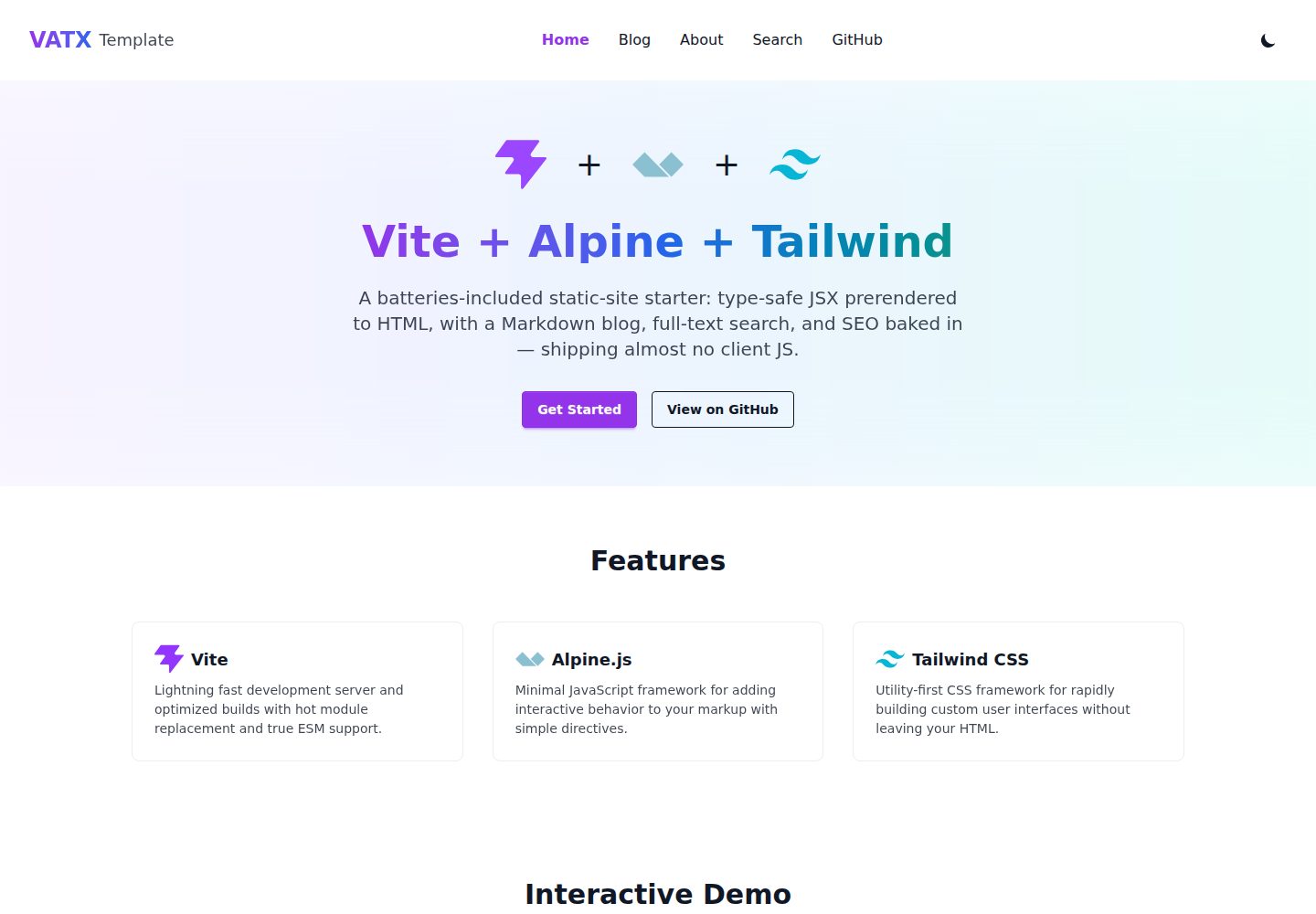
用 @kitajs/html 编写类型安全 JSX,构建时预渲染为静态 HTML,Alpine.js 在运行时水合交互
ViteHTML博客启动器
vite-alpine-tailwind-x — Vite 博客模板
作者 vzsoares
基于 Vite、Alpine.js 与 Tailwind CSS 的静态站点模板,用 @kitajs/html 编写类型安全 JSX,构建时预渲染为静态 HTML,并包含文件路由、Markdown 博客、Pagefind 搜索与 GitHub Pages 部署配置。
看看你的网站会是什么样
浏览真实页面截图,比较内容排版与手机效果。点击下方缩略图切换,放大查看整页细节。
全部页面与视图 3
截图用于了解视觉与布局,交互效果请以实际项目为准。
采集于 2026-10-16查看来源
值得关注的模板亮点
从已有项目资料中,快速了解它的特点。
基于 src/config.ts 中 ROUTES 表的文件式静态路由,每个路由生成独立 HTML 文件,使用原生 View Transitions API 平滑跨页导航
Markdown 博客在构建时生成动态路由,使用 Shiki 高亮与 prose 样式
通过 Pagefind 对构建产物提供全文搜索,搜索页仅在生产构建中可用
按路由生成 title/meta、Open Graph、canonical,并输出 sitemap.xml、rss.xml、robots.txt 与每篇文章的社交卡片
内置暗色模式、可访问性处理、预渲染的 404/500 页面,以及 Biome、Vitest、Playwright 和 GitHub Pages 部署工作流
模板详细介绍
该模板是一个静态站点起始项目,UI 全部用 @kitajs/html 的类型安全 JSX 编写,在构建时预渲染为静态 HTML,再由 Alpine.js 在运行时接管交互。README 说明其包含文件路由、Markdown 博客、基于 Pagefind 的全文搜索、按路由生成的 SEO 元信息与 Open Graph、sitemap.xml、rss.xml、robots.txt、社交卡片、暗色模式、404/500 预渲染错误页,以及 GitHub Pages 自动部署工作流。技术栈方面 README 列出 Vite、Alpine.js、htmx、Tailwind CSS、JSX、TypeScript、Bun、Biome、Vitest 与 Playwright;未提供具体版本号。构建流程中 @kitajs/html 只在构建期运行,不会发送到客户端;路由由 src/config.ts 中的 ROUTES 表映射到页面组件与输出文件,每个路由生成独立静态 HTML。博客等动态路由在构建时根据 src/content/posts.ts 中的数据生成。README 还给出安装、开发、构建、预览命令,以及使用模板后需要修改的配置项与 GitHub Pages 启用步骤。
ViteHTML博客启动器
适合你的项目吗?
适用场景
- 搭建以内容为主、需要预渲染 HTML 与良好 SEO 的静态站点
- 用 Markdown 维护博客文章,并希望每篇文章自动生成独立页面与社交卡片
- 需要在不引入客户端 UI 框架的前提下,用 Alpine.js 添加局部交互
- 将站点免费部署到 GitHub Pages,并使用仓库自带的 CI 与部署工作流
适合人群
- 熟悉 TypeScript、JSX 与 Vite,希望以静态预渲染方式构建站点的开发者
- 需要文件路由、Markdown 博客与静态全文搜索的内容型项目
- 计划使用 GitHub Pages 托管并接受其子路径部署方式的用户
- 希望用 Alpine.js 做轻量客户端交互、不引入完整前端框架的团队
上手与定制指南
结合仓库当前版本的说明,按下面的资料检查内容、配置与运行要求。
- 1
使用模板后运行 bun install,再执行 bun run dev 启动开发服务器,bun run build 生成 dist/,bun run preview 预览生产构建
- 2
首次运行端到端测试前需执行 bunx playwright install chromium 安装浏览器
- 3
按 README 的安装后清单修改 package.json 中的版本、名称、描述、作者、homepage、repository 与 bugs 字段
- 4
在 src/config.ts 中更新 BASE、SITE_URL、SITE 名称、标题、描述、关键词、作者、仓库链接等站点身份信息
- 5
替换 public/og.png 为 1200×630 的社交卡片图片,并在 GitHub 仓库 Settings → Pages 中将 Source 设为 GitHub Actions
授权与来源资料
使用条件与限制
免费使用 · 保留许可声明本次收录的是公开仓库中采用 MIT 许可的免费版本;免费范围为该版本代码,不代表外部服务或第三方素材免费。
使用时需要遵守
- 允许免费使用、修改、商用和分发该版本代码。
- 分发代码副本或实质性部分时,保留原作者版权声明和完整 MIT 许可声明。
- 代码按现状提供;担保与责任限制以原许可证及适用法律为准。
额外费用与待核对事项
- 演示图片、字体、图标及其他第三方素材需按各自许可核对,不能仅凭代码的 MIT 许可判断。
- 域名、托管、数据库、支付或 AI 等外部服务可能另外收费。
- 搜索功能仅在执行生产构建后可用(bun run build && bun run preview);开发模式下 /search/ 只显示提示,不提供实际搜索。
- 部署到 GitHub 项目页面时,robots.txt 位于子路径下,不会被域名根目录读取;如需搜索引擎收录,需手动提交 sitemap。
- 若部署到 GitHub Pages 以外的平台,需先修改 src/config.ts 中的 base 与 SITE_URL。
- 首次运行端到端测试前需额外执行 bunx playwright install chromium 安装浏览器。
- 每篇文章的社交卡片在构建时由 @resvg/resvg-js 生成,依赖系统字体,字体缺失可能影响卡片渲染效果。
查看原文依据
Permission is hereby granted, free of charge
许可证原文
build`). The search UI therefore only works in the **production build** (`bun
README 原文
domain/repo. (On GitHub *project* pages, `robots.txt` lives under the subpath
README 原文
`.github/workflows/deploy.yml`. Deploying somewhere else? Update `base` and
README 原文
> First time running e2e tests? Install the browser once:
README 原文
https://github.com/vzsoares/vite-alpine-tailwind-x/blob/main/LICENSEhttps://github.com/vzsoares/vite-alpine-tailwind-x/blob/main/README.md(`@resvg/resvg-js` at build, uses system fonts).
README 原文
DeepSeek 根据仓库许可证和 README 整理 ·2026-10-16。结果仅覆盖已读取资料,依赖、图片、字体及后续条款变更以各自原文为准。
项目核对记录与介绍依据
模板资料
- 来源平台
- GitHub
- 资料与维护参考分
- 资料较完整 · 85 / 100
- 技术栈
- Vite · HTML
- 网站类型
- 博客 · 启动器
这个分数如何计算
本站按许可资料(最高30分)、演示链接(12分)、预览图(10分)、Star数(15分)、记录的维护时间(15分)、描述完整度(8分)、功能记录(5分)和分类资料(5分)计算。它不是代码、安全或性能测试,也不是 Google 评分;有链接不代表已实测可用。
这个项目需要核对什么
- 记录的仓库更新时间
- 2026-09-09
- 截图检查日期
- 2026-10-16
已收录演示链接。请用你的内容与屏幕尺寸检查;有演示不代表表单、认证或支付已经可用。
目录记录的主要技术栈是 Vite。请通过依赖清单和锁文件核对实际版本与托管要求。这些说明基于收录资料,不代表代码审计或部署实测。
查看具体选型方法 →介绍的制作与核对状态
介绍由 AI 辅助整理目录与仓库资料。仓库作者不等于这篇介绍的审核者。
审核声明: codex-user-requested-batch-review-20261017 · 2026-10-16
查看当时使用的来源资料
SHA-256: 6fdc454e0bb42d9e6cc52fd587dda857fca449d25d957cd5a2c18bccddeb6dae
2026-10-16T03:24:05.646Z
来源文件 / 仓库<p align="center">
<img src="./public/og.png" alt="Vite + Alpine + Tailwind" width="640" />
</p>
# ⚡ Vite + 🗻 Alpine + 🎨 Tailwind — Template


🔗 **[Live demo](https://vzsoares.github.io/vite-alpine-tailwind-x/)**
A **static-site starter** that authors its whole UI in **type-safe JSX**,
prerenders it to **static HTML at build time**, and hydrates with **Alpine.js**
— so it's batteries-included (file-based routing 🧭, a Markdown blog 📝,
full-text search 🔍, SEO + social cards 🖼️, dark mode 🌙) yet ships almost no
client JS and deploys free to **GitHub Pages**. 🚀
> Want the **lean, pure client-side** sibling — **plain HTML pages** +
> **pinecone-router** SPA, no prerender? That's
> **[vite-alpine-tailwind](https://github.com/vzsoares/vite-alpine-tailwind)**.
> This repo is the batteries-included, prerendered counterpart.
## ✨ Features
**Stack**
- ⚡️ **Vite** — lightning-fast dev server and builds (Rolldown / oxc)
- 🗻 **Alpine.js** — sprinkle-on client interactivity
- 🔁 **htmx** — bundled & typed, ready for server-driven UI (see [docs/htmx.md](docs/htmx.md))
- 🎨 **Tailwind CSS v4** — utility-first styling (+ `typography` prose + **daisyUI** components)
- ⚛️ **JSX** — type-safe HTML templating via [@kitajs/html](https://github.com/kitajs/html), XSS-scanned
- 📦 **TypeScript** · 🍞 **Bun** · 🧹 **Biome** · 🧪 **Vitest** · 🎭 **Playwright**
**What you get**
- 🏗️ **Static prerendering (SSG)** — JSX → HTML at build; zero UI-framework JS shipped
- 🧭 **File-based routing** — one static file per route, smooth native View Transitions
- 📝 **Markdown blog** — build-time dynamic routes, Shiki highlighting, `prose` styling
- 🔍 **Static search** — full-text search over the built site via [Pagefind](https://pagefind.app)
- 🔎 **SEO baked in** — per-route `<title>`/meta, Open Graph, canonical, `sitemap.xml`, `rss.xml`, `robots.txt`
- 🖼️ **Social cards** — a default `og.png` plus a generated per-post card
- 🌙 **Dark mode** — `data-theme` + `.dark`, remembers your choice
- ♿ **Accessible** — skip link, landmarks, visible focus rings
- 🧨 **404 + 500** prerendered error pages
- 🛡️ **Hardened CI** — lint/type/XSS/unit + e2e (dev **and** production build),
Dependabot, CodeQL & gitleaks, auto-deploy to GitHub Pages
## 🏁 Quick Start
```bash
# Use this template, then:
bun install
bun run dev # 👉 http://localhost:5173
bun run build # build static site into dist/
bun run preview # preview the production build
```
> First time running e2e tests? Install the browser once:
> `bunx playwright install chromium`
## 🛠️ Post-install checklist
After clicking **"Use this template"** and cloning your new repo, run through these
once before your first commit:
**Identity & metadata (one file does most of it)**
- [ ] **Version** — reset `"version"` in `package.json` to `"0.1.0"`
- [ ] **`package.json`** — update `"name"`, `"description"`, `"author"`,
`"homepage"`, `"repository.url"`, and `"bugs.url"`
- [ ] **`src/config.ts`** — this is the central identity file; update:
- `BASE` → `"/<your-repo-name>/"` (Vite base path + canonical prefix)
- `SITE_URL` → `https://<your-username>.github.io/<your-repo-name>/`
- `SITE.name`, `.headline`, `.description`, `.keywords`
- `SITE.author`, `.authorUrl` (used in the footer and RSS feed)
- `SITE.repoUrl` (used in the nav GitHub link)
**Social image**
- [ ] **`public/og.png`** — replace with your own 1200 × 630 image (used as the
default OG card; per-post cards are generated from the post title at build time)
**GitHub Pages**
- [ ] **Enable Pages** — go to **Settings → Pages → Source** and select
**"GitHub Actions"** (the deploy workflow is already wired up)
**Documentation**
- [ ] **Rewrite this README** — replace the template docs with your project's own
description, features, and instructions
## 📜 Scripts
| Command | Description |
| ------------------- | -------------------------------------------- |
| `bun run dev` | Start the Vite dev server with HMR |
| `bun run build` | Build into `dist/` + index it for search |
| `bun run preview` | Preview the production build locally |
| `bun run check` | Lint **and** format the codebase (Biome) |
| `bun run lint` | Lint without writing changes (Biome) |
| `bun run format` | Format files in place (Biome) |
| `bun run typecheck` | Type-check with `tsc --noEmit` |
| `bun run xss-scan` | Scan JSX for XSS (`@kitajs/ts-html-plugin`) |
| `bun run test` | Run unit tests once (Vitest) |
| `bun run test:watch`| Run unit tests in watch mode (Vitest) |
| `bun run test:e2e` | End-to-end browser tests vs. dev (Playwright)|
| `bun run test:e2e:preview` | E2E vs. the **production build** (preview) |
## 🗂️ Project Structure
```
/
├── public/ # Static assets copied as-is (favicon.ico, og.png, logos/)
├── src/ # Source files
│ ├── config.ts # Central site config: identity, links, routes (shared
│ │ # by the build and the components)
│ ├── render.test.ts # Unit tests asserting component HTML output
│ ├── app.ts # Alpine bootstrap (registers data, starts Alpine)
│ ├── alpine.ts # Typed Alpine.data() components (e.g. counter)
│ ├── jsx.d.ts # Opts into @kitajs/html's Alpine.js + x-on:/x-bind: types
│ ├── styles.css # Tailwind + typography + dark mode + x-cloak + view-transition
│ ├── content/posts.ts # Blog content (Markdown) → one static page per post
│ ├── components/ # Reusable JSX components (build-time HTML)
│ │ ├── layout.tsx # Shared chrome (nav + footer) wrapping each route
│ │ ├── error-page.tsx # Shared status-page layout (404 / 500)
│ │ └── nav.tsx · hero.tsx · features.tsx · demo.tsx · footer.tsx
│ ├── pages/ # One JSX component per route (the ROUTES table in
│ │ │ # config.ts maps each to an output file)
│ │ ├── home.tsx # "/" → index.html
│ │ ├── about.tsx # "/about/" → about/index.html
│ │ ├── blog.tsx # "/blog/" index + post.tsx (per-post template)
│ │ ├── search.tsx # "/search/" (Pagefind, prod build only)
│ │ └── 404.tsx · 500.tsx # status pages → 404.html / 500.html
│ └── lib/ # Framework-agnostic helpers
│ ├── utils.ts
│ ├── utils.test.ts # Example Vitest unit test
│ └── markdown.ts # Markdown → HTML (marked + Shiki, build-time)
├── e2e/ # Playwright end-to-end tests
│ ├── pages.spec.ts # Every route renders, loads assets, boots Alpine
│ ├── blog.spec.ts # Dynamic blog routes (index + each post)
│ ├── version.spec.ts # Footer shows the app version
│ ├── counter.spec.ts # Typed Alpine counter component
│ ├── routing.spec.ts # Navigation between the home and about pages
│ └── dark-mode.spec.ts # Theme toggle + persistence
├── e2e-preview/ # E2E against the production build (base path, search, OG)
│ └── build.spec.ts
├── index.html # The single shell template; every route is stamped from it
├── vite.config.ts # Vite config (Tailwind, JSX prerender plugin, Vitest)
├── playwright.config.ts # Playwright e2e configuration
├── biome.json # Biome linter & formatter config
├── tsconfig.json # TypeScript configuration (incl. JSX + ts-html-plugin)
├── tsconfig.scan.json # Emit-free config for the xss-scan CLI
├── DESIGN.md # Design system / tokens (for humans + coding agents)
├── AGENTS.md # Repo guide for AI coding agents (verify, tools, gotchas)
└── docs/htmx.md # How to use the bundled htmx / go server-side
```
## 🎨 Make it yours
- ✏️ Edit **`src/config.ts`** — site name, description, social links, and `ROUTES`.
- 🎨 Recolor the whole site via the `@theme` **brand tokens** in **`src/styles.css`**.
- 🖼️ Swap the logos in **`public/logos/`** and the **`public/og.png`** social card.
- 📝 Add posts in **`src/content/posts.ts`** (Markdown) — each becomes its own page.
- 🧩 Add pages in **`src/pages/`**, reusable bits in **`src/components/`**.
## ⚛️ JSX
The entire UI is authored as JSX components under `src/components/` and `src/pages/`, powered by
[@kitajs/html](https://github.com/kitajs/html) (full type coverage for every
HTML element/attribute). It's wired via the automatic JSX transform
(`jsxImportSource: "@kitajs/html"`) in `tsconfig.json` and `vite.config.ts`.
### Build-time prerendering
@kitajs/html renders JSX to **HTML strings**, so the app is rendered to static
HTML **at build time** rather than in the browser. The `render-jsx-app` plugin
in `vite.config.ts` renders each route's page component and injects it into the
`<!--app-->` placeholder of its HTML shell; Alpine then hydrates the static
markup at runtime.
- **Dev** loads the JSX through the server's SSR pipeline (`ssrLoadModule`).
- **Build** runs it through Vite's `runnerImport` (Node can't import `.tsx`).
The payoff: the browser receives complete HTML (great for SEO / no flash), and
**@kitajs/html is never shipped to the client** — it only runs during the build.
```tsx
// src/components/demo.tsx — a component returning an HTML string
function Counter(): JSX.Element {
return (
<div x-data="counter(0)" class="text-center">
<p x-text="count">0</p>
<button type="button" x-on:click="increment()">+</button>
</div>
);
}
```
Notes:
- **Directives:** `x-data`, `x-text`, `x-show`, ... are typed by
`@kitajs/html/alpine`. The namespaced `x-on:click` / `x-bind:class` are made
typed props by an augmentation in `src/jsx.d.ts`. The `@click` / `:class`
shorthands stay unsupported (`@` / leading `:` aren't valid JSX prop names);
the body-level `:class` for dark mode lives in `index.html`, not JSX.
- **XSS:** interpolated variables in children need kitajs's `safe` attribute
(e.g. `<span safe>{value}</span>`). `bun run xss-scan` enforces this in CI
(via `tsconfig.scan.json`, whose `noEmit` lets the CLI's validation pass).
## 🧭 Routing
Routing is **static and generated from one template** — every route is stamped
from a single `index.html` shell at build time, so each ends up its own static
HTML file (no client-side router ships to the browser).
- A `ROUTES` table in `src/config.ts` maps each route to a page component and
output file. At build the `render-jsx-app` plugin reuses the asset-injected
`index.html` as a template and emits one file per route (`generateBundle`); in
dev a middleware serves the non-home routes through the same transform.
- **Add a route** with just two edits: create `src/pages/<name>.tsx` (exporting
`Page`) and add a `ROUTES` entry — no hand-written HTML shell needed.
- Navigation is plain `<a href>`; the `Layout`/`Nav` receive the configured
`base` so links work under the GitHub Pages subpath.
- Cross-page navigation is smoothed by the native **View Transitions API**
(`@view-transition { navigation: auto; }` in `styles.css`) — a progressive
enhancement, ignored by browsers that don't support it.
`src/pages/about.tsx` is a worked example whose Alpine accordion hydrates
after navigation (covered by `e2e/routing.spec.ts`).
### Dynamic routes (build-time)
Routes whose params are known at build time (blog posts, docs, …) are generated
one static file per item. The `/blog/` demo derives its routes from data:
```ts
// src/config.ts
import { posts } from "./content/posts";
export const ROUTES = [
// ...static routes
...posts.map((post) => ({
out: `blog/${post.slug}/index.html`, // → /blog/<slug>/
page: "post", // one shared component
title: `${post.title} · ${SITE.name}`,
description: post.excerpt,
data: post, // payload passed to <Page>
})),
];
```
The plugin renders `Page({ version, base, data })` for each route, so
`src/pages/post.tsx` is a template reused for every post. Post bodies are
**Markdown** (rendered at build with `marked`, styled by
`@tailwindcss/typography`'s `prose`). Add a post by adding an entry to
`src/content/posts.ts` — it gets its own prerendered page, sitemap + RSS entry,
and `<head>` metadata automatically (see `e2e/blog.spec.ts`). Post bodies are
rendered with **Shiki** syntax highlighting (`src/lib/markdown.ts`, sync core),
and each post gets prev/next navigation.
For params known only at runtime (infinite/user-specific), prerender one shell
page and let an Alpine component read the param and `fetch()` the data instead.
## 🔎 SEO & metadata
Each route carries its own `<head>`. The `ROUTES` table (`src/config.ts`) holds
a `title` + `description` per route; the plugin stamps in `<title>`,
`description`, canonical, Open Graph, and Twitter Card tags via the `<!--head-->`
placeholder. Status pages set `robots: "noindex"`.
- **Social cards:** `public/og.png` (1200×630, project gradient) is the default
`og:image`; each blog post also gets a **generated** card with its title
(`@resvg/resvg-js` at build, uses system fonts).
- **`sitemap.xml`, `robots.txt`, and `rss.xml`** are generated at build (RSS
from the blog posts; noindex routes are excluded from the sitemap).
- **`SITE_URL`** in `src/config.ts` is the absolute origin used for canonical /
OG / sitemap URLs — update it (and `base`) when you deploy to your own
domain/repo. (On GitHub *project* pages, `robots.txt` lives under the subpath
and isn't read at the domain root; submit the sitemap manually if needed.)
Accessibility: a skip-to-content link and a `<main>` landmark wrap each page, and
a global `:focus-visible` ring (`styles.css`) keeps keyboard focus visible.
## 🔍 Search
The `/search/` route uses [Pagefind](https://pagefind.app), which indexes the
built site in a post-build step (`pagefind --site dist`, part of `bun run
build`). The search UI therefore only works in the **production build** (`bun
run build && bun run preview`) — in dev, `/search/` shows a hint instead.
## 🎨 UI components (daisyUI)
[daisyUI](https://daisyui.com) is enabled as a Tailwind plugin (`@plugin
"daisyui"` in `styles.css`). Themes switch via `data-theme` on `<body>` (wired
to the dark-mode toggle), and its `primary` is mapped to the brand color, so
`btn-primary` matches the gradient. The counter in `demo.tsx` is built with
daisyUI's `card` / `btn`; the rest of the UI stays hand-rolled Tailwind.
## 🚀 Deploy
Pushing to `main` runs the checks and deploys `dist/` to **GitHub Pages** via
`.github/workflows/deploy.yml`. Deploying somewhere else? Update `base` and
`SITE_URL` in `src/config.ts` first.
## 📚 Docs
- 🎨 **[DESIGN.md](DESIGN.md)** — design tokens & visual system
- 🤖 **[AGENTS.md](AGENTS.md)** — guide for AI coding agents (verify, tools, gotchas)
- 🔁 **[docs/htmx.md](docs/htmx.md)** — using the bundled htmx / going server-side
## 📄 License
[MIT License](LICENSE)
---
Created by [vzsoares](https://github.com/vzsoares) 💜
看看同类模板
对比同技术栈与用途的模板,找到更适合的视觉与内容结构。

cove
The Cove Stack: 🏝️ minimal TanStack Start template with Vite+, Better Auth, Drizzle ORM, shadcn/ui
Vite · SaaS

vite-react-boilerplate
A production ready, scalable starter template for Vite + React
Vite · 启动器

vital
Starter template for Vite with React (TypeScript). Supports Tailwind. Vitest and @react/testing-library config…
Vite · 启动器

react-vite-admin
This Starter utilizes React, Recoil, React Query, React Hooks, Typescript, Axios And Vite. 全新技术栈的后台管理系统
Vite · 后台

typescript-react_best_practices-vite_template
<⚡⚛️> Start your React project with Vite following code best practices (TypeScript, Linting, testing, CI/CD…)
Vite · 启动器

cloudflare-starter-kit
Template (boilerplate) repository for scaffolding Cloudflare Workers projects
Vite · 启动器