使用 Astro MDX 管理文章、作者与标签内容,每个标签和作者都有独立页面
Astro博客启动器
tailwind-astro-starting-blog — Astro 博客模板
作者 wanoo21
基于 Astro 与 Tailwind CSS 的博客启动模板,支持 MDX、多作者、多标签、分页与 Giscus 评论,采用 MIT 许可。
看看你的网站会是什么样
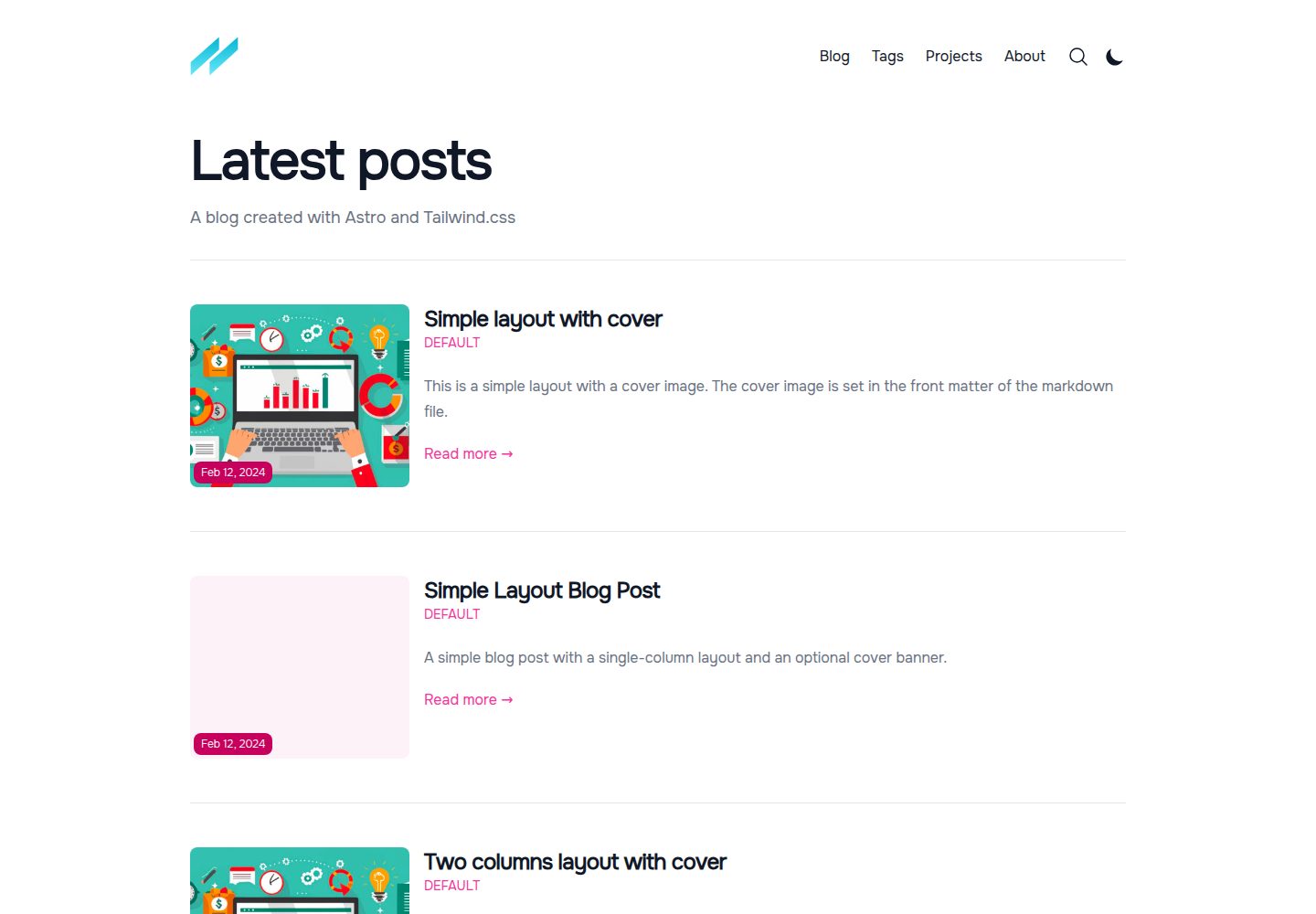
浏览真实页面截图,比较内容排版与手机效果。点击下方缩略图切换,放大查看整页细节。
全部页面与视图 3
截图用于了解视觉与布局,交互效果请以实际项目为准。
采集于 2026-10-04查看来源
值得关注的模板亮点
从已有项目资料中,快速了解它的特点。
支持多作者、相关文章、博客与标签页分页,以及两种文章布局和两种列表布局
通过 Tailwind CSS 与 primary color 属性进行样式定制,内置明暗主题与移动端适配
集成 Giscus 评论,基于 GitHub Discussions,可全局或按文章控制显示
提供 i18n 结构,默认英语,可在 src/i18n/ui.ts 中扩展语言
包含 Docker 构建与运行命令,便于容器化部署
模板详细介绍
这是一个面向博客场景的 Astro 启动模板,使用 Tailwind CSS 进行样式定制,并支持通过 primary color 属性调整主色。内容层使用 Astro MDX,文章、作者与标签均以 MDX 文件形式维护,模板内置多作者页面、多标签页面、相关文章、博客与标签页分页,以及两种文章布局和两种列表布局。交互部分引入 Solid.js,评论通过 Giscus 接入 GitHub Discussions。模板提供明暗主题、移动端适配、字体优化与 Astro 图片组件自动优化,并包含 i18n 支持,默认语言为英语,可在 src/i18n/ui.ts 中扩展语言,但不支持动态切换语言。
模板的定制入口集中在 src/consts.ts(站点标题、描述、作者、社交链接、评论配置等)、src/functions.ts(文章排序与草稿排除)、src/content/authors 与 src/content/tags 目录(作者与标签的 MDX 文件),以及 src/content/config.ts(内容字段定义)。评论功能需要先在 GitHub 仓库启用 Discussions 并安装 Giscus 应用,再填写仓库 ID、分类 ID 等配置;也可通过 POST_METADATA 中的 showComments 全局关闭。
使用限制方面,模板的 MIT 许可仅覆盖代码本身,演示图片、字体、图标等第三方素材需单独核对许可;域名、托管等外部服务可能产生额外费用。README 中提到的 Lighthouse 分数属于特定部署环境下的测量结果,不构成对部署后表现的保证。
Astro博客启动器
适合你的项目吗?
适用场景
- 个人技术博客或写作站点,需要多作者、标签分类与分页
- 希望以 Astro 和 Tailwind CSS 为基础快速搭建内容站点的项目
- 需要接入 GitHub Discussions 评论并支持明暗主题的博客
- 需要容器化部署或参考 Docker 命令的 Astro 项目
适合人群
- 熟悉 Astro 与 Markdown/MDX 内容组织的开发者
- 需要多作者、多标签与分页功能的博客项目
- 希望使用 Tailwind CSS 定制视觉风格的前端开发者
- 计划通过 Giscus 接入评论并自行配置 GitHub 仓库的团队或个人
上手与定制指南
结合仓库当前版本的说明,按下面的资料检查内容、配置与运行要求。
- 1
运行 npm install 安装依赖,npm run dev 启动本地开发服务器(localhost:4321),npm run build 生成生产站点到 ./dist/
- 2
在 src/consts.ts 中修改站点标题、描述、作者、社交链接等常量
- 3
在 src/content/authors 与 src/content/tags 目录添加 MDX 文件以新增作者和标签
- 4
启用 Giscus 评论需先在 GitHub 仓库开启 Discussions 并安装 Giscus 应用,再填写仓库与分类 ID
- 5
Docker 部署可使用 docker build -t app:1.0.0 . 构建镜像,docker run -p 80:4321 app:1.0.0 运行容器
授权与来源资料
使用条件与限制
免费使用 · 保留许可声明本次收录的是公开仓库中采用 MIT 许可的免费版本;免费范围为该版本代码,不代表外部服务或第三方素材免费。
使用时需要遵守
- 允许免费使用、修改、商用和分发该版本代码。
- 分发代码副本或实质性部分时,保留原作者版权声明和完整 MIT 许可声明。
- 代码按现状提供;担保与责任限制以原许可证及适用法律为准。
额外费用与待核对事项
- 演示图片、字体、图标及其他第三方素材需按各自许可核对,不能仅凭代码的 MIT 许可判断。
- 域名、托管、数据库、支付或 AI 等外部服务可能另外收费。
- 评论功能依赖 Giscus 与 GitHub Discussions 外部服务,需自行启用并配置,非模板内置独立评论系统。
- 使用评论功能前必须在自己的 GitHub 仓库中手动启用 Discussions 功能。
- 需安装第三方 Giscus 应用并完成配置,属于外部服务依赖。
- i18n 不支持运行时动态切换语言,仅提供静态多语言结构,需自行实现动态切换。
查看原文依据
Permission is hereby granted, free of charge
许可证原文
This template now supports [Giscus](https://giscus.app/) comments, which uses GitHub Discussions as a backend. To enable comments on your blog:
README 原文
1. **Enable GitHub Discussions** on your repository:
README 原文
2. **Install the Giscus app**:
README 原文
https://github.com/wanoo21/tailwind-astro-starting-blog/blob/main/LICENSEhttps://github.com/wanoo21/tailwind-astro-starting-blog/blob/main/README.mdIt doesn't have support for dynamic language change, but it's easy to implement.
README 原文
DeepSeek 根据仓库许可证和 README 整理 ·2026-10-04。结果仅覆盖已读取资料,依赖、图片、字体及后续条款变更以各自原文为准。
项目核对记录与介绍依据
模板资料
- 来源平台
- Astro Themes
- 资料与维护参考分
- 资料较完整 · 96 / 100
- 技术栈
- Astro
- 网站类型
- 博客 · 启动器
这个分数如何计算
本站按许可资料(最高30分)、演示链接(12分)、预览图(10分)、Star数(15分)、记录的维护时间(15分)、描述完整度(8分)、功能记录(5分)和分类资料(5分)计算。它不是代码、安全或性能测试,也不是 Google 评分;有链接不代表已实测可用。
这个项目需要核对什么
- 记录的仓库更新时间
- 2026-02-11
- 截图检查日期
- 2026-10-04
已收录演示链接。请用你的内容与屏幕尺寸检查;有演示不代表表单、认证或支付已经可用。
目录记录的主要技术栈是 Astro。请通过依赖清单和锁文件核对实际版本与托管要求。这些说明基于收录资料,不代表代码审计或部署实测。
查看具体选型方法 →介绍的制作与核对状态
介绍由 AI 辅助整理目录与仓库资料。仓库作者不等于这篇介绍的审核者。
审核声明: [email protected] · 2026-10-04
查看当时使用的来源资料
SHA-256: 5059191d2f3153161d0145e93880157e759d5abb056f466c03170e9d49b0bc2c
2026-10-04T14:32:03.249Z
来源文件 / 仓库
# Tailwind Astro Starter Project
[](https://GitHub.com/wanoo21/tailwind-astro-starting-blog/stargazers/)
[](https://GitHub.com/wanoo21/tailwind-astro-starting-blog/network/)
[](https://twitter.com/ipwanciu)
[](https://github.com/sponsors/wanoo21)
[](https://vercel.com/new/git/external?repository-url=https://github.com/wanoo21/tailwind-astro-starting-blog)
This template is perfect for those who want to use Tailwind CSS and Astro to build a blog.
It is inspired by the [Tailwind Next.js Starter Blog](https://github.com/timlrx/tailwind-nextjs-starter-blog) - one of the most popular Next.js blogging templates.
Feature request or Facing issue? Check the [discussion page](https://github.com/wanoo21/tailwind-astro-starting-blog/discussions) to see if it has been brought up previously. Otherwise, feel free to start a new discussion thread. All ideas are welcomed!
## Demo
[Live Demo](https://tasb.yon.fun/) - Deployed on Vercel.
## Features
- Astro v5 with TypeScript
- Astro MDX support
- [Solid-js](https://solidjs.com) for some interactivity
- Easy styling customization with [Tailwind CSS v4](https://tailwindcss.com/docs/upgrade-guide) (via the official `@tailwindcss/vite` plugin) and primary color attribute
- Mobile-friendly view
- Light and dark theme
- Font optimization via [@fontsource](https://fontsource.org/)
- Automatic image optimization via Astro image component
- Support for tags - each unique tag will be its own page
- Support for multiple authors
- 2 different blog post layouts, including a full-width cover image
- 2 different blog listing layouts
- Support for nested routing of blog posts
- Support for [Giscus](https://giscus.app/) comments (powered by GitHub Discussions)
- Projects page
- i18n support
- **Fully SEO optimized**, including Open Graph and Twitter Cards
- Almost Perfect lighthouse score (for mobile - 99/95/100/91) - [Lighthouse Report](https://pagespeed.web.dev/analysis/https-tasb-yon-fun/gp1vypobei?form_factor=mobile)

Even thought these features looks the same as the original template, they are implemented in a different way, and there are more to come.
However, there are some features that are not in the original template, like:
- Support for multiple authors pages - **each author will have** its own page, with a list of all the posts written by him/her.
- Support for multiple tags pages - **each tag has its own page with custom description**, that can be customized with markdown.
- Related posts - **each post has** a list of related posts, provided by the author inside the markdown file.
- Pagination inside blog/tags pages - **each blog/tags page has** a pagination.
- Cool animations provided by Astro.
- And many more that would come in the future.
## Internationalization
This template has support for i18n, it's set up for English as default. You can add more languages in the `src/i18n/ui.ts` file. It doesn't have support for dynamic language change, but it's easy to implement.
## Extend / Customize
`src/consts.ts` contains a list of constants that you can customize to your liking, including the blog title, description, author, social media links, etc.
`src/functions.ts` contains a list of functions that changes the default behavior of the template, including default post sorting and exclude draft posts.
`src/content/authors/default.mdx` contains the default author information. You can add more authors by adding more `.mdx` files in the `src/content/authors` folder.
`src/content/tags/default.mdx` contains the default tag information. You can add more tags by adding more `.mdx` files in the `src/content/tags` folder.
`src/content/config.ts` contains all fields for author, blog and tags pages. Check what's required and what's not. You can also add more fields if you want to.
## Comments
This template now supports [Giscus](https://giscus.app/) comments, which uses GitHub Discussions as a backend. To enable comments on your blog:
1. **Enable GitHub Discussions** on your repository:
- Go to your repository settings
- Scroll down to the "Features" section
- Enable "Discussions"
2. **Install the Giscus app**:
- Visit [giscus.app](https://giscus.app/)
- Follow the configuration steps to get your repository details
3. **Configure Giscus in your blog**:
- Open `src/consts.ts`
- Find the `comments` section in `SITE_METADATA`
- Fill in your Giscus configuration:
```typescript
comments: {
provider: 'giscus', // Set to 'giscus' to enable comments or null to disable
giscusConfig: {
repo: 'username/repo', // Your GitHub repository
repositoryId: 'R_xxxxx', // Your repository ID from giscus.app
category: 'General', // Discussion category
categoryId: 'DIC_xxxxx', // Category ID from giscus.app
mapping: 'pathname', // How to map pages to discussions
reactionsEnabled: '1', // Enable reactions: '1' or '0'
emitMetadata: '0', // Emit discussion metadata: '1' or '0'
inputPosition: 'top', // Comment box position: 'top' or 'bottom'
theme: 'light', // Theme for light mode
darkTheme: 'dark', // Theme for dark mode
lang: 'en', // Language code
loading: 'lazy', // Loading mode: 'lazy' or 'eager'
},
}
```
4. **Control comment visibility** (optional):
- In `src/consts.ts`, under `POST_METADATA`, you can disable comments globally:
```typescript
showComments: false, // Set to false to hide comments on all posts
```
The comments section will automatically adapt to your site's theme (light/dark mode).
## 🧞 Commands
All commands are run from the root of the project, from a terminal:
| Command | Action |
| :------------------------ | :----------------------------------------------- |
| `npm install` | Installs dependencies |
| `npm run dev` | Starts local dev server at `localhost:4321` |
| `npm run build` | Build your production site to `./dist/` |
| `npm run preview` | Preview your build locally, before deploying |
| `npm run astro ...` | Run CLI commands like `astro add`, `astro check` |
| `npm run astro -- --help` | Get help using the Astro CLI |
### 🐳 Docker Commands
All Docker commands are run from the root of the project, from a terminal:
| Command | Action |
| :-------------------------------- | :------------------------------------------------------- |
| `docker build -t app:1.0.0 .` | Build the Docker image for the Astro application. |
| `docker run -p 80:4321 app:1.0.0` | Run a Docker container with the built Astro application. |
| `docker pull edwardb11/app:2.0.0` | Download the Docker image from Docker Hub. |
看看同类模板
对比同技术栈与用途的模板,找到更适合的视觉与内容结构。

astrowind
⭕️ AstroWind: A free template using Astro v7 and Tailwind CSS v4. Astro starter theme.
Astro · 博客

astro-paper
A minimal, accessible and SEO-friendly Astro blog theme.
Astro · 博客

fuwari
✨A static blog template built with Astro.
Astro · 博客

Firefly
Firefly 是一款基于 Astro 的静态博客主题,由 CuteLeaf 在 saicaca 的 Fuwari 模板基础上二次开发,主打清新美观的视觉风格。
Astro · 博客

astro-theme-cactus
A simple Astro theme. Use it to create your blog or website.
Astro · 作品集

astrofy
Astrofy is a free and open-source template for your Personal Portfolio Website built with Astro and TailwindCS…
Astro · 作品集