基于 Astro 构建,使用 Tailwind CSS 进行样式开发
Astro作品集
astro-resume-theme — Astro 作品集模板
作者 wasutz
基于 Astro 与 Tailwind CSS 的在线简历/作品集模板,通过 JSON 配置简历数据,支持深色模式与 MDX 博客。
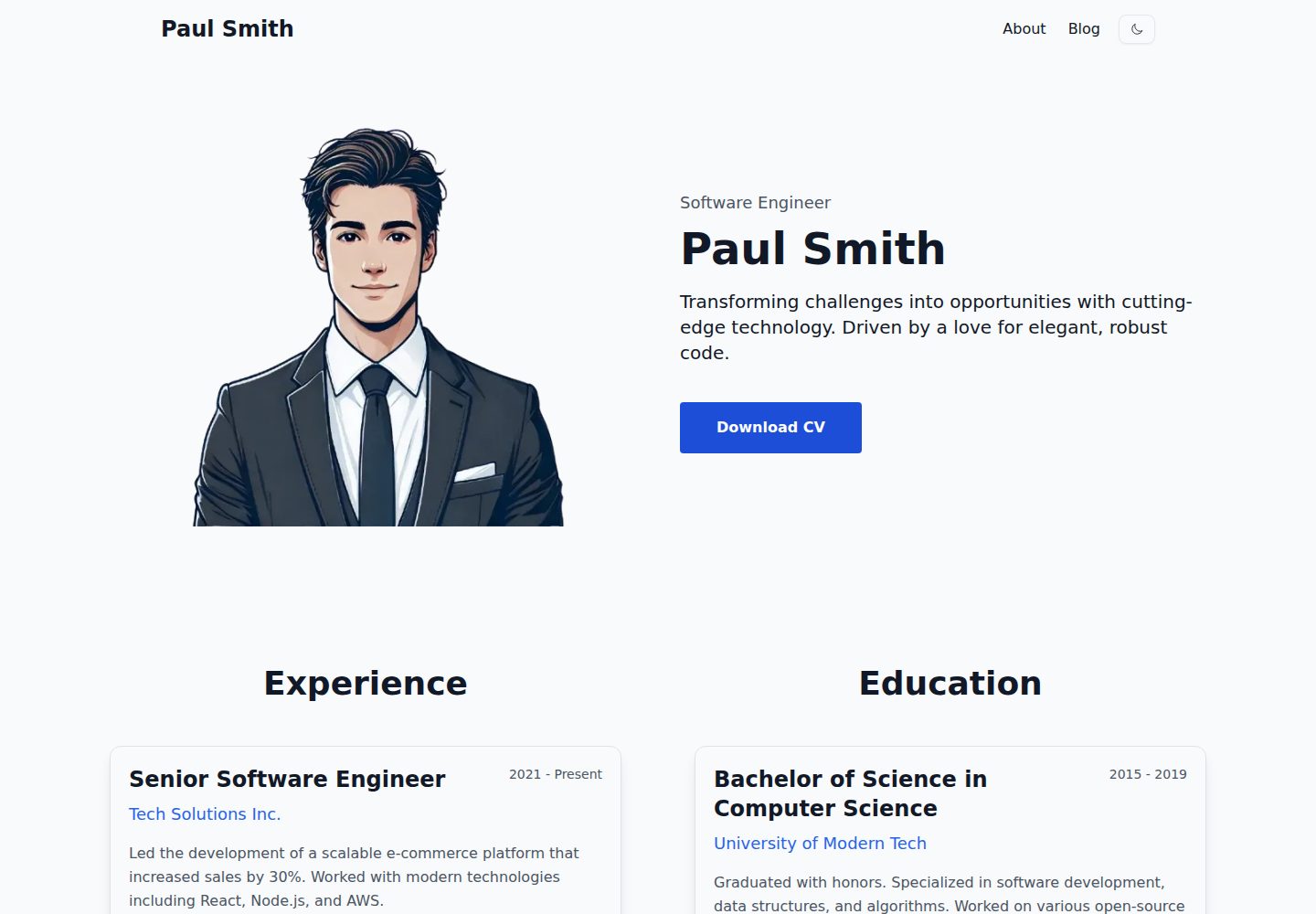
看看你的网站会是什么样
浏览真实页面截图,比较内容排版与手机效果。点击下方缩略图切换,放大查看整页细节。
全部页面与视图 3
截图用于了解视觉与布局,交互效果请以实际项目为准。
采集于 2026-09-30查看来源
值得关注的模板亮点
从已有项目资料中,快速了解它的特点。
简历数据集中在 src/config/cv.json 中维护
主题颜色可在 src/styles/theme.ts 中调整
内置深色模式切换与响应式布局
支持用 MDX 编写博客文章,仓库含博客内页示例
提供 create astro 模板初始化命令,兼容 bun、npm、pnpm、yarn
模板详细介绍
Astro Resume Theme 是一个用于搭建个人在线简历或作品集页面的 Astro 模板,样式使用 Tailwind CSS。简历内容集中在 src/config/cv.json 中维护,主题颜色在 src/styles/theme.ts 中调整,CV 文件放在 src/public/cv 并在配置中引用文件名,因此不需要改动页面结构即可替换个人信息。模板内置深色模式切换、响应式布局,并支持用 MDX 编写博客文章,仓库内提供了博客内页示例。
使用方式是通过 create astro 命令以该仓库为模板初始化项目,随后用 bun(或 npm 等包管理器)安装依赖并运行开发服务器,默认地址为 localhost:4321,构建输出到 ./dist/。仓库采用 MIT 许可,允许免费使用、修改、商用与分发代码,但演示图片、字体、图标等第三方素材需单独核对许可,域名、托管等外部服务也可能产生费用。README 中提到的 Lighthouse/PageSpeed 评分与 SEO 友好属于作者自述,未在资料中给出可核验数据。
Astro作品集
适合你的项目吗?
适用场景
- 制作个人在线简历页面,并附上可下载的 CV 文件
- 搭建包含博客文章的作品集站点
- 需要深色模式与移动端适配的个人主页
- 以 JSON 配置方式快速替换简历内容,而不改动页面结构
适合人群
- 需要快速上线个人简历或作品集的开发者与求职者
- 熟悉 Astro 或愿意使用 Astro 命令初始化项目的用户
- 希望通过配置文件而非改模板来维护简历内容的人
- 需要博客与简历放在同一站点的个人用户
上手与定制指南
结合仓库当前版本的说明,按下面的资料检查内容、配置与运行要求。
- 1
使用 bun create astro@latest --template wasutz/astro-resume-theme 或对应的 npm、pnpm、yarn 命令初始化项目
- 2
在 src/config/cv.json 中填写简历数据,并把 CV 文件放入 src/public/cv 后更新配置中的文件名
- 3
在 src/styles/theme.ts 中修改配色,主题相关样式位于 src/styles/theme.css
- 4
运行 bun run dev 启动本地开发服务器,默认地址为 localhost:4321,构建产物输出到 ./dist/
- 5
演示图片、字体、图标等第三方素材需按各自许可单独核对,不能仅依据代码的 MIT 许可判断
授权与来源资料
使用条件与限制
免费使用 · 保留许可声明本次收录的是公开仓库中采用 MIT 许可的免费版本;免费范围为该版本代码,不代表外部服务或第三方素材免费。
使用时需要遵守
- 允许免费使用、修改、商用和分发该版本代码。
- 分发代码副本或实质性部分时,保留原作者版权声明和完整 MIT 许可声明。
- 代码按现状提供;担保与责任限制以原许可证及适用法律为准。
额外费用与待核对事项
- 代码采用 MIT 许可,可免费使用、修改、商用与分发,但必须保留版权与许可声明。
- 使用与再分发时需随附 MIT 许可全文,遵守其版权与免责声明条款。
- 演示图片、字体、图标及其他第三方素材需按各自许可核对,不能仅凭代码的 MIT 许可判断。
- 域名、托管、数据库、支付或 AI 等外部服务可能另外收费。
查看原文依据
Permission is hereby granted, free of charge
许可证原文
Licensed under the MIT License, Copyright © Wasut Panyawiphat.
README 原文
https://github.com/wasutz/astro-resume-theme/blob/main/LICENSEhttps://github.com/wasutz/astro-resume-theme/blob/main/README.mdSee [LICENSE](/LICENSE) for more information.
README 原文
DeepSeek 根据仓库许可证和 README 整理 ·2026-10-01。结果仅覆盖已读取资料,依赖、图片、字体及后续条款变更以各自原文为准。
项目核对记录与介绍依据
模板资料
- 来源平台
- GitHub
- 资料与维护参考分
- 资料较完整 · 81 / 100
- 技术栈
- Astro
- 网站类型
- 作品集
这个分数如何计算
本站按许可资料(最高30分)、演示链接(12分)、预览图(10分)、Star数(15分)、记录的维护时间(15分)、描述完整度(8分)、功能记录(5分)和分类资料(5分)计算。它不是代码、安全或性能测试,也不是 Google 评分;有链接不代表已实测可用。
这个项目需要核对什么
- 记录的仓库更新时间
- 2025-08-23
- 截图检查日期
- 2026-10-01
已收录演示链接。请用你的内容与屏幕尺寸检查;有演示不代表表单、认证或支付已经可用。
目录记录的主要技术栈是 Astro。请通过依赖清单和锁文件核对实际版本与托管要求。这些说明基于收录资料,不代表代码审计或部署实测。
查看具体选型方法 →介绍的制作与核对状态
介绍由 AI 辅助整理目录与仓库资料。仓库作者不等于这篇介绍的审核者。
已完成服务器许可规则与 AI 来源核对;未经过人工编辑审核。
查看当时使用的来源资料
SHA-256: 5ac0f42b29acb4914e61a0a8c0d23200d346c5f63c0ef6ed6fd1b4c72c7c1064
2026-10-01T14:05:09.904Z
来源文件 / 仓库# Astro Resume Theme Astro Resume Theme is a fully customizable and responsive template, built to help you create a beautiful online resume or portfolio with ease. It is powered by Astro and styled using Tailwind CSS, making it fast, modern, and easy to work with. ## Usage You can bootstrap a new Astro project using the following command: ```bash # Bun bun create astro@latest --template wasutz/astro-resume-theme # npm 7+ npm create astro@latest -- --template wasutz/astro-resume-theme # pnpm pnpm dlx create-astro --template wasutz/astro-resume-theme # yarn yarn create astro --template wasutz/astro-resume-theme ``` ## 🚀 Features - Tailwind CSS: Utilizes utility-first styling for rapid UI development. - Dark Mode: Built-in dark mode toggle for better UX. - Theme Customization: Easily adjustable in src/styles/theme.css. - Responsive Design: Optimized for mobile, tablet, and desktop devices. - MDX Support: Allows blog posts written in Markdown with JSX components. - Excellent Lighthouse/PageSpeed scores - SEO-friendly ## 🧞 Commands All commands are run from the root of the project, from a terminal: (Could be use 'npm' instead of bun) | Command | Action | | :------------------------ | :----------------------------------------------- | | `bun install` | Installs dependencies | | `bun run dev` | Starts local dev server at `localhost:4321` | | `bun run build` | Build your production site to `./dist/` | | `bun run preview` | Preview your build locally, before deploying | | `bun run astro ...` | Run CLI commands like `astro add`, `astro check` | | `bun run astro -- --help` | Get help using the Astro CLI | # Getting Started 1) Initialize the project Run one of the commands listed in the Quick Start section. 2) Customize your resume data Edit your resume data in `src/config/cv.json` 3) Customize theme colors Modify the color scheme by editing `src/styles/theme.ts` to match your personal branding. 4) Replace your CV file Put your cv file in `src/public/cv` and then replace the file name in `src/config/cv.json` (basic.cv_file_name) 5) Run the project locally Once you’ve made your customizations, run the development server: ``` bun run dev ``` Open http://localhost:4321 in your browser to view the result 🚀 ## License Licensed under the MIT License, Copyright © Wasut Panyawiphat. See [LICENSE](/LICENSE) for more information.
看看同类模板
对比同技术栈与用途的模板,找到更适合的视觉与内容结构。

astro-theme-cactus
A simple Astro theme. Use it to create your blog or website.
Astro · 作品集

astrofy
Astrofy is a free and open-source template for your Personal Portfolio Website built with Astro and TailwindCS…
Astro · 作品集

astro-nano
Astro Nano is a static, minimalist, lightweight, lightning fast portfolio and blog.
Astro · 作品集

astro-erudite
An opinionated, unstyled static blogging template built with Astro and native CSS.
Astro · 作品集

astro-sphere
Astro Sphere is a static, minimalist, lightweight, lightning fast portfolio and blog.
Astro · 作品集

astro-micro
Blog theme for Astro with search and comments built-in. Zero frameworks.
Astro · 作品集