在 Eleventy 基础博客模板之上集成 WikiBonsai 知识层支持
Eleventy工具站启动器
eleventy-bloomz — Eleventy 工具站模板
作者 wikibonsai
基于 Eleventy 的 WikiBonsai 知识层启动模板,用于把 WikiBonsai 数字花园中的内容发布为静态站点。
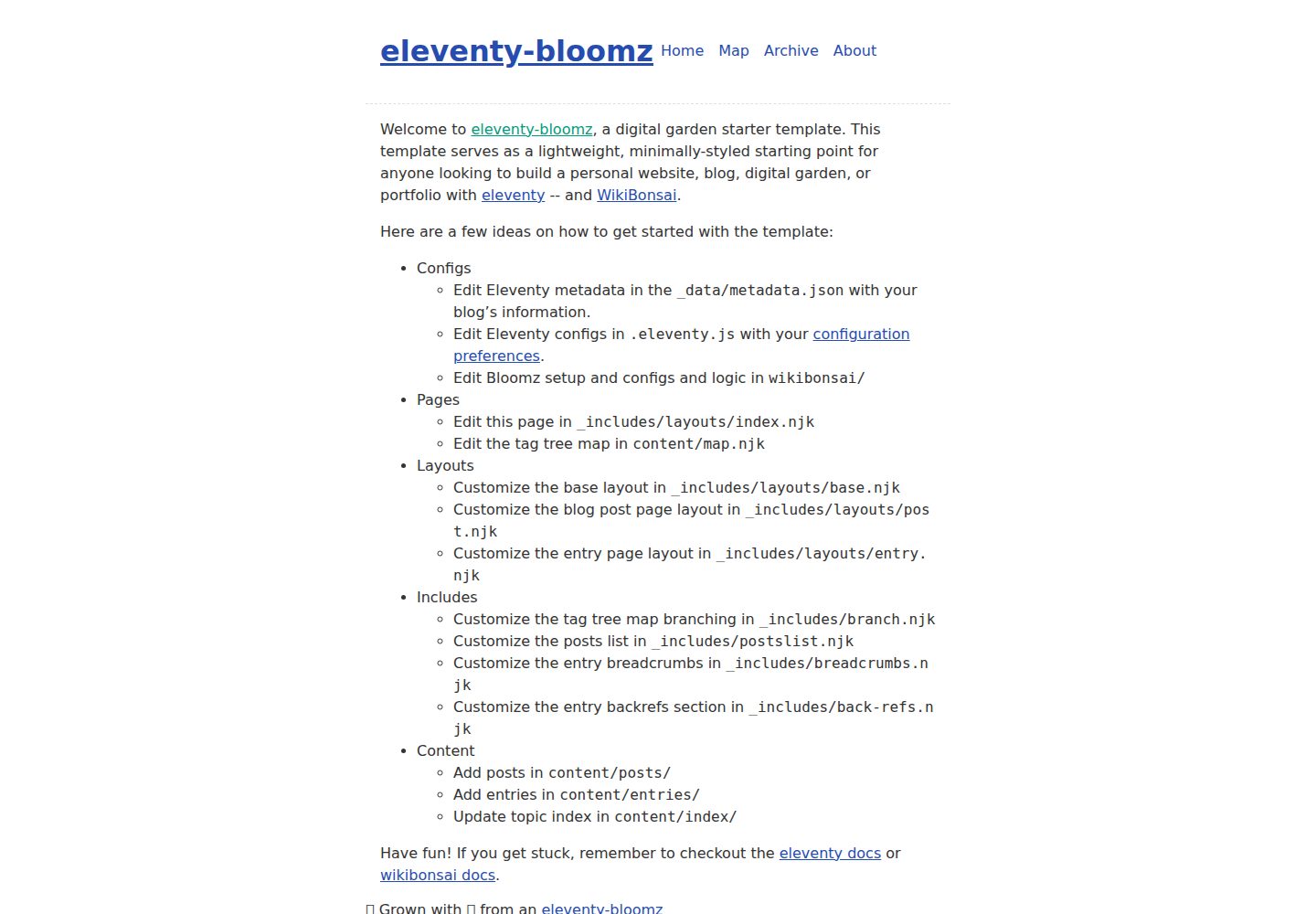
看看你的网站会是什么样
浏览真实页面截图,比较内容排版与手机效果。点击下方缩略图切换,放大查看整页细节。
全部页面与视图 3
截图用于了解视觉与布局,交互效果请以实际项目为准。
采集于 2026-09-30查看来源
值得关注的模板亮点
从已有项目资料中,快速了解它的特点。
提供 _data、_includes/layouts、content、css、img、wikibonsai 等完整目录结构
内置 base、home、post 三个布局与可复用的 postlist.njk 文章列表组件
通过 front matter 的 eleventyNavigation 键配置顶层站点导航
feed/feed.njk 提供文章 feed 模板并演示全局数据文件用法
MIT 许可,允许免费使用、修改、商用和分发
模板详细介绍
这是一个 Eleventy 静态站点生成器的启动项目,在 11ty 基础博客模板之上加入 WikiBonsai 支持,用于承载 WikiBonsai 知识层。项目提供可直接克隆的仓库结构,包含 _data、_includes/layouts、content、css、img、wikibonsai 等目录,以及 .eleventy.js 配置文件。
内容组织沿用 Eleventy 的约定:about/index.md 展示如何添加内容页,posts/ 存放博客文章(也可放在任意目录,只需加上 post 标签归入集合),front matter 中的 eleventyNavigation 键用于把模板加入顶层站点导航。内容可使用任意模板格式,支持的格式在 .eleventy.js 的 templateFormats 中配置。css 与 img 目录通过 addPassthroughCopy() 复制到输出目录。
模板自带三个布局:base.njk 为顶层 HTML 结构,home.njk 为首页模板,post.njk 为文章模板,二者都包裹在 base.njk 中;_includes/postlist.njk 是可复用的文章列表组件,index.njk 中有使用示例。feed/feed.njk 提供博客文章 feed 模板,并演示了如何引用 _data/metadata.json 全局数据文件。
使用方式为克隆仓库、安装依赖后通过 npx @11ty/eleventy 构建,或用 --serve 启动本地开发服务器、--watch 监听模板变化、DEBUG=* 进入调试模式;package.json 中也提供了 build、bench、watch、serve、start、debug 等脚本命令。仓库采用 MIT 许可,允许免费使用、修改、商用和分发该版本代码,分发时需保留版权声明与完整 MIT 许可声明;演示图片、字体、图标等第三方素材以及域名、托管等外部服务需另行核对许可与费用。
Eleventy工具站启动器
适合你的项目吗?
适用场景
- 把 WikiBonsai 数字花园中的内容发布为静态站点
- 以 Eleventy 博客模板为基础搭建带知识层结构的内容站点
- 在本地通过 --serve、--watch 或调试模式预览和迭代模板
- 自定义布局、导航与内容集合,扩展为个人知识发布站点
适合人群
- 使用 Eleventy 并希望接入 WikiBonsai 知识层的开发者
- 需要可克隆、可修改的静态站点启动项目的个人或团队
- 以 Markdown 或其他 Eleventy 支持模板格式维护内容的写作者
上手与定制指南
结合仓库当前版本的说明,按下面的资料检查内容、配置与运行要求。
- 1
克隆仓库后进入目录,运行 npm install 安装依赖
- 2
使用 npx @11ty/eleventy 构建,或 npx @11ty/eleventy --serve 启动本地开发服务器
- 3
构建产物输出到 ./dist/,也可使用 npm run build、watch、serve、debug 等脚本
- 4
如需调整 Eleventy 选项或支持的模板格式,查看并修改 .eleventy.js
- 5
第三方素材与外部托管服务需按各自许可和计费规则单独核对
授权与来源资料
使用条件与限制
免费使用 · 保留许可声明本次收录的是公开仓库中采用 MIT 许可的免费版本;免费范围为该版本代码,不代表外部服务或第三方素材免费。
使用时需要遵守
- 允许免费使用、修改、商用和分发该版本代码。
- 分发代码副本或实质性部分时,保留原作者版权声明和完整 MIT 许可声明。
- 代码按现状提供;担保与责任限制以原许可证及适用法律为准。
额外费用与待核对事项
- 该模板基于 11ty 的 eleventy-base-blog 并集成 WikiBonsai 支持,使用时需遵循上游 Eleventy 与 WikiBonsai 项目的许可与使用条件。
- 模板定位为从 WikiBonsai 数字花园发布内容,若未使用 WikiBonsai 知识层,需自行调整内容来源与结构。
- 使用与扩展需参考 Eleventy 和 WikiBonsai 的外部文档,相关外部服务与依赖的可用性、费用由使用者自行确认。
- 演示图片、字体、图标及其他第三方素材需按各自许可核对,不能仅凭代码的 MIT 许可判断。
- 域名、托管、数据库、支付或 AI 等外部服务可能另外收费。
查看原文依据
Permission is hereby granted, free of charge
许可证原文
An [11ty template](https://github.com/11ty/eleventy-base-blog) with [WikiBonsai](https://github.com/wikibonsai/wikibonsai) support.
README 原文
🌸 Share bloomz from your [🎋 WikiBonsai](https://github.com/wikibonsai/wikibonsai) digital garden.
README 原文
https://github.com/wikibonsai/eleventy-bloomz/blob/main/LICENSEhttps://github.com/wikibonsai/eleventy-bloomz/blob/main/README.mdCheck out the [eleventy documentation](https://www.11ty.dev/docs/local-installation/) or [WikiBonsai documentation](https://github.com/wikibonsai/wikibonsai/).
README 原文
DeepSeek 根据仓库许可证和 README 整理 ·2026-10-01。结果仅覆盖已读取资料,依赖、图片、字体及后续条款变更以各自原文为准。
项目核对记录与介绍依据
模板资料
- 来源平台
- GitHub
- 资料与维护参考分
- 资料较完整 · 88 / 100
- 技术栈
- Eleventy
- 网站类型
- 工具站 · 启动器
这个分数如何计算
本站按许可资料(最高30分)、演示链接(12分)、预览图(10分)、Star数(15分)、记录的维护时间(15分)、描述完整度(8分)、功能记录(5分)和分类资料(5分)计算。它不是代码、安全或性能测试,也不是 Google 评分;有链接不代表已实测可用。
这个项目需要核对什么
- 记录的仓库更新时间
- 2026-08-05
- 截图检查日期
- 2026-10-01
已收录演示链接。请用你的内容与屏幕尺寸检查;有演示不代表表单、认证或支付已经可用。
目录记录的主要技术栈是 Eleventy。请通过依赖清单和锁文件核对实际版本与托管要求。这些说明基于收录资料,不代表代码审计或部署实测。
查看具体选型方法 →介绍的制作与核对状态
介绍由 AI 辅助整理目录与仓库资料。仓库作者不等于这篇介绍的审核者。
已完成服务器许可规则与 AI 来源核对;未经过人工编辑审核。
查看当时使用的来源资料
SHA-256: 903966df52075a17073556585f35ef25f070ab15ef54eb7dab4e8806bb5e8909
2026-10-01T14:44:13.303Z
来源文件 / 仓库# Eleventy-Bloomz [](https://github.com/wikibonsai/wikibonsai) <p align="center"> <img src="./img/eleventy-logo.svg" width="150" height="150"/> <img src="./img/bloomz.svg" width="150" height="150"/> </p> An [11ty template](https://github.com/11ty/eleventy-base-blog) with [WikiBonsai](https://github.com/wikibonsai/wikibonsai) support. You can see the live demo [here](https://eleventy-bloomz.netlify.app/). 🌸 Share bloomz from your [🎋 WikiBonsai](https://github.com/wikibonsai/wikibonsai) digital garden. ## Getting Started ### 1. Clone this Repository ``` git clone https://github.com/wikibonsai/eleventy-bloomz.git my-blog-name ``` ### 2. Navigate to the directory ``` cd my-blog-name ``` Specifically have a look at `.eleventy.js` to see if you want to configure any Eleventy options differently. ### 3. Install dependencies ``` npm install ``` ### 4. Run ``` npx @11ty/eleventy ``` Or build and host locally for local development ``` npx @11ty/eleventy --serve ``` Or build automatically when a template changes: ``` npx @11ty/eleventy --watch ``` Or in debug mode: ``` DEBUG=* npx @11ty/eleventy ``` ## 🪴 Project Structure Inside of your Eleventy-Bloomz project, you'll see the following folders and files: ```text ├── _data/ ├── _includes/ │ └── layouts/ ├── content/ ├── css/ ├── img/ ├── wikibonsai/ ├── .eleventy.js ├── .eleventyignore ├── README.md └── package.json ``` - `about/index.md` shows how to add a content page. - `posts/` has the blog posts but really they can live in any directory. They need only the `post` tag to be added to this collection. - Use the `eleventyNavigation` key in your front matter to add a template to the top level site navigation. For example, this is in use on `index.njk` and `about/index.md`. - Content can be any template format (blog posts needn’t be markdown, for example). Configure your supported templates in `.eleventy.js` -> `templateFormats`. - The `css` and `img` directories in the input directory will be copied to the output folder (via `addPassthroughCopy()` in the `.eleventy.js` file). - The blog post feed template is in `feed/feed.njk`. This is also a good example of using a global data files in that it uses `_data/metadata.json`. - This example uses three layouts: - `_includes/layouts/base.njk`: the top level HTML structure - `_includes/layouts/home.njk`: the home page template (wrapped into `base.njk`) - `_includes/layouts/post.njk`: the blog post template (wrapped into `base.njk`) - `_includes/postlist.njk` is a Nunjucks include and is a reusable component used to display a list of all the posts. `index.njk` has an example of how to use it. ## 🧚 Commands All commands are run from the root of the project, from a terminal: | Command | Action | | :------------------------ | :----------------------------------------------- | | `npm install` | Installs dependencies | | `npm run build` | Build your production site to `./dist/` | | `npm run bench` | Run benchmarks | | `npm run watch` | Preview your build locally, watch for changes | | `npm run serve` | Starts local dev server at `localhost:4321` | | `npm run start` | Preview your build locally, before deploying | | `npm run debug` | Run in debug mode | ## 👀 Want to learn more? Check out the [eleventy documentation](https://www.11ty.dev/docs/local-installation/) or [WikiBonsai documentation](https://github.com/wikibonsai/wikibonsai/).
看看同类模板
对比同技术栈与用途的模板,找到更适合的视觉与内容结构。

eleventy-base-blog
A starter repository for a blog web site using the Eleventy static site generator.
Eleventy · 博客

eleventy-garden
:seedling: A starter site for building a mind garden with eleventy
Eleventy · 启动器

eleventastic
An Eleventy Starter Kit
Eleventy · 启动器

neat-starter
Starter Template for Netlify CMS, Eleventy, Alpine JS & Tailwind CSS
Eleventy · 启动器

Eleventy-Starter-Boilerplate
🚀 Eleventy Starter is production-ready with SEO-friendly for quickly starting a blog. ⚡ Built with Eleventy, …
Eleventy · 博客

eleventy-plus-vite
A clean and fast Eleventy Starter Project with Vite
Eleventy · 启动器