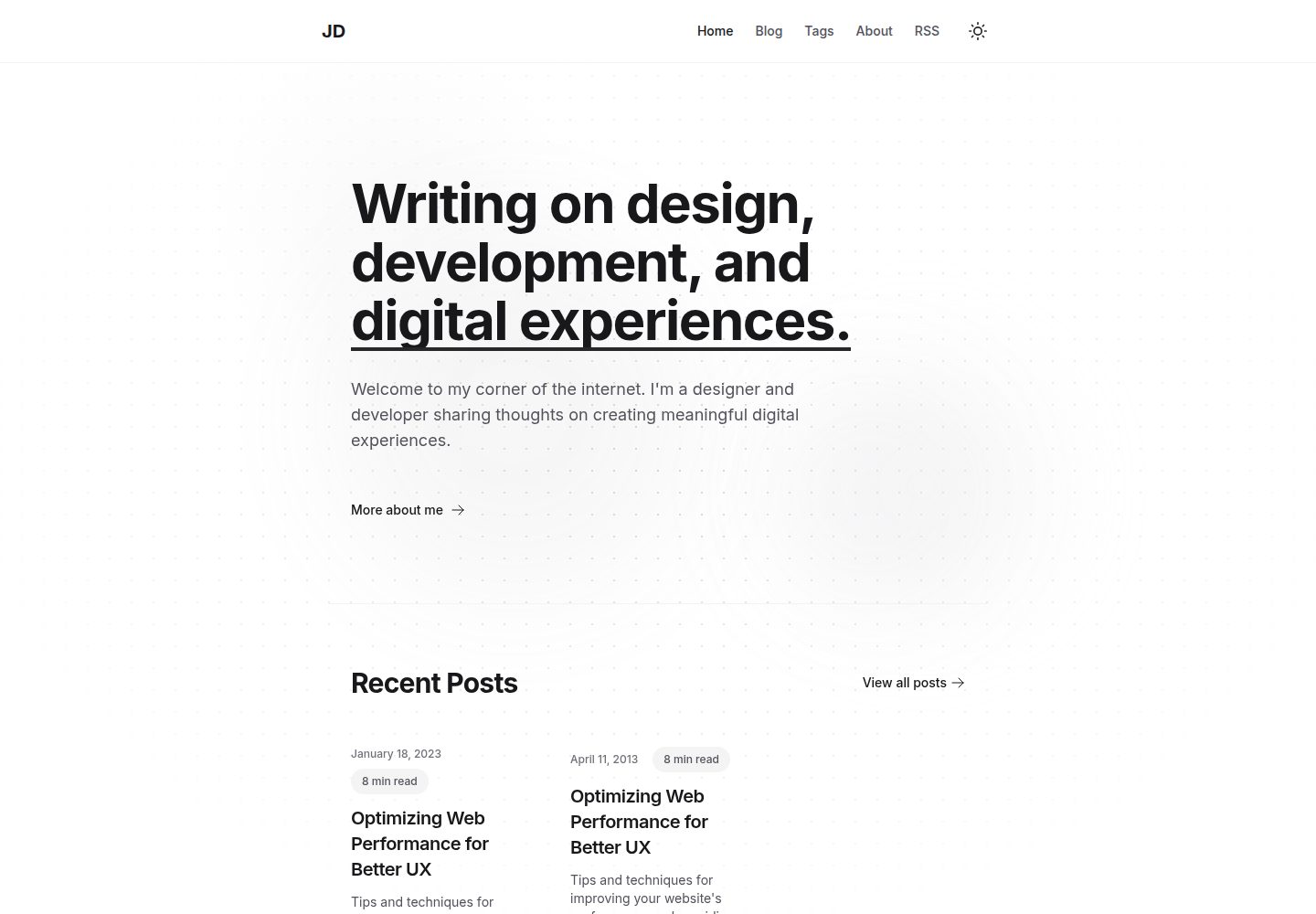
内容以 Markdown/MDX 文件管理,frontmatter 可配置标题、描述、发布日期、封面图、阅读时长与标签
Astro博客
astro-blog — Astro 博客模板
作者 williamcachamwri
基于 Astro 的极简博客模板,支持 Markdown/MDX 写作、明暗主题、标签分类与 RSS,采用 MIT 许可。
看看你的网站会是什么样
浏览真实页面截图,比较内容排版与手机效果。点击下方缩略图切换,放大查看整页细节。
全部页面与视图 3
截图用于了解视觉与布局,交互效果请以实际项目为准。
采集于 2026-10-05查看来源
值得关注的模板亮点
从已有项目资料中,快速了解它的特点。
提供明暗主题切换、响应式布局与页面过渡效果
内置标签与分类、RSS 订阅以及 Open Graph、Twitter Cards 等 SEO 元信息
展示阅读时长与浏览量等统计信息,并预留多语言支持
可选接入 Spotify 显示当前播放曲目,通过环境变量配置凭据
采用 MIT 许可,可免费使用、修改、商用与分发
模板详细介绍
这是一个用 Astro 构建的博客模板,仓库与在线演示均可访问。内容以 Markdown 或 MDX 文件形式放在 src/content/blog 目录,通过 frontmatter 填写标题、描述、发布日期、封面图、阅读时长与标签。界面走极简路线,提供明暗主题切换、响应式布局和页面过渡效果;内置标签与分类、RSS 订阅、SEO 元信息(含 Open Graph 与 Twitter Cards)以及阅读时长、浏览量等统计展示。模板还预留了多语言支持,并可选接入 Spotify 显示当前播放曲目。
使用前需要 Node.js 16+ 与 npm/yarn,安装依赖后复制 .env.example 为 .env 并填写配置。Spotify 的 Now Playing 功能需在 Spotify 开发者后台创建应用,取得 Client ID、Client Secret 与 Refresh Token 后写入环境变量,不接入也可正常使用其余功能。构建产物为静态站点,README 给出 Netlify 与 Vercel 的部署入口。
许可方面,仓库采用 MIT 许可,可免费使用、修改、商用和分发该版本代码,分发时需保留版权与许可声明;演示图片、字体、图标等第三方素材需单独核对授权,域名、托管等外部服务可能另行收费。
Astro博客
适合你的项目吗?
适用场景
- 搭建以文字内容为主的个人技术博客或写作站点
- 需要明暗主题、标签分类与 RSS 输出的静态博客
- 希望用 Markdown/MDX 写作并自行控制前端样式的项目
- 愿意通过环境变量接入 Spotify 展示当前播放状态的个人主页
适合人群
- 熟悉 Astro 与 Markdown/MDX 写作流程的开发者
- 需要极简阅读界面、以内容为中心的博客作者
- 计划部署到 Netlify 或 Vercel 等静态托管平台的用户
上手与定制指南
结合仓库当前版本的说明,按下面的资料检查内容、配置与运行要求。
- 1
需要 Node.js 16+ 以及 npm 或 yarn
- 2
克隆仓库后执行 npm install,并将 .env.example 复制为 .env 填写配置
- 3
开发服务器默认运行在 http://localhost:4321,构建与预览分别使用 npm run build 和 npm run preview
- 4
Spotify Now Playing 为可选项,需在 Spotify 开发者后台创建应用并配置 Client ID、Client Secret 与 Refresh Token
- 5
主题颜色与字体在 tailwind.config.js 中调整,文章放在 src/content/blog 目录
授权与来源资料
使用条件与限制
免费使用 · 保留许可声明本次收录的是公开仓库中采用 MIT 许可的免费版本;免费范围为该版本代码,不代表外部服务或第三方素材免费。
使用时需要遵守
- 允许免费使用、修改、商用和分发该版本代码。
- 分发代码副本或实质性部分时,保留原作者版权声明和完整 MIT 许可声明。
- 代码按现状提供;担保与责任限制以原许可证及适用法律为准。
额外费用与待核对事项
- 演示图片、字体、图标及其他第三方素材需按各自许可核对,不能仅凭代码的 MIT 许可判断。
- 域名、托管、数据库、支付或 AI 等外部服务可能另外收费。
- Spotify 的“正在播放”功能为可选项,需要拥有 Spotify 账号;不接入该功能时模板其余部分仍可正常使用。
- 启用 Spotify 集成需自行在 Spotify 开发者后台创建应用,获取 Client ID、Client Secret 与 Refresh Token 并写入 .env 环境变量,属于外部服务依赖。
查看原文依据
Permission is hereby granted, free of charge
许可证原文
- Spotify account (optional, for Now Playing feature)
README 原文
https://github.com/williamcachamwri/astro-blog/blob/main/LICENSE.mdhttps://github.com/williamcachamwri/astro-blog/blob/main/README.md1. Create an app at [Spotify Developer Dashboard](https://developer.spotify.com/dashboard/) 2. Get your Client ID and Client Secret 3. Add them to your `.env` file:
README 原文
DeepSeek 根据仓库许可证和 README 整理 ·2026-10-05。结果仅覆盖已读取资料,依赖、图片、字体及后续条款变更以各自原文为准。
项目核对记录与介绍依据
模板资料
- 来源平台
- Astro Themes
- 资料与维护参考分
- 资料较完整 · 81 / 100
- 技术栈
- Astro
- 网站类型
- 博客
这个分数如何计算
本站按许可资料(最高30分)、演示链接(12分)、预览图(10分)、Star数(15分)、记录的维护时间(15分)、描述完整度(8分)、功能记录(5分)和分类资料(5分)计算。它不是代码、安全或性能测试,也不是 Google 评分;有链接不代表已实测可用。
这个项目需要核对什么
- 记录的仓库更新时间
- 2025-04-09
- 截图检查日期
- 2026-10-05
已收录演示链接。请用你的内容与屏幕尺寸检查;有演示不代表表单、认证或支付已经可用。
目录记录的主要技术栈是 Astro。请通过依赖清单和锁文件核对实际版本与托管要求。这些说明基于收录资料,不代表代码审计或部署实测。
查看具体选型方法 →介绍的制作与核对状态
介绍由 AI 辅助整理目录与仓库资料。仓库作者不等于这篇介绍的审核者。
审核声明: [email protected] · 2026-10-06
查看当时使用的来源资料
SHA-256: a58b44c9084d9eff1b8b87ebee32eb4cfbcbe09751acfe656d88fec3b1bc55db
2026-10-05T13:45:49.919Z
来源文件 / 仓库
# ✨ Astro Blog
<p align="center">
<img src="public/favicon.svg" alt="Astro Blog Logo" width="120" height="120">
</p>
<p align="center">
<strong>A modern, minimalist, high-performance blog platform built with Astro.js</strong>
</p>
<p align="center">
<a href="#demo">Demo</a> •
<a href="#features">Features</a> •
<a href="#getting-started">Getting Started</a> •
<a href="#project-structure">Project Structure</a> •
<a href="#customization">Customization</a> •
<a href="#deployment">Deployment</a> •
</p>
<p align="center">
<img src="public/image.png" alt="Astro Blog Screenshot" width="800">
</p>
## Demo
[View Live Demo](https://astro-blog-pi-ashen.vercel.app/)
## Features
- 🚀 **Maximum Performance** - Built with Astro.js for lightning-fast static sites
- 🎨 **Minimalist Design** - Clean UI that focuses on content
- 🌓 **Light/Dark Mode** - Smooth theme switching
- 📱 **Responsive** - Perfect experience on all devices
- ⚡ **SPA Transitions** - Smooth page navigation with transition effects
- 📝 **Markdown & MDX** - Write posts with Markdown and extend with MDX
- 🔍 **SEO Optimized** - Meta tags, Open Graph, and Twitter Cards
- 📊 **Analytics** - Reading time, views, and statistics
- 🔖 **Categorization** - Tags and categories system
- 🔄 **RSS Feed** - Automatically generated RSS feed
- 🎵 **Spotify Integration** - Display currently playing track
- 🌐 **Internationalization Ready** - Prepared for multiple languages
- 🔒 **Secure** - No unnecessary client-side JavaScript
## Getting Started
### Requirements
- Node.js 16+ and npm/yarn
- Spotify account (optional, for Now Playing feature)
### Installation
```bash
# Clone repository
git clone https://github.com/williamcachamwri/astro-blog
# Navigate to project directory
cd astro-blog
# Install dependencies
npm install
# Create .env file from template
cp .env.example .env
# Edit .env with your information
```
### Development
```bash
# Start development server
npm run dev
# Open browser at http://localhost:4321
```
### Build
```bash
# Create production build
npm run build
# Preview production build
npm run preview
```
## Project Structure
```
/
├── public/ # Static assets
├── src/
│ ├── components/ # Reusable UI components
│ ├── content/ # Blog content (Markdown/MDX)
│ ├── layouts/ # Page layouts
│ ├── pages/ # Pages and routes
│ ├── styles/ # CSS and Tailwind
│ └── utils/ # Utilities and helpers
├── astro.config.mjs # Astro configuration
├── tailwind.config.js # Tailwind configuration
└── tsconfig.json # TypeScript configuration
```
## Customization
### Changing Theme
Edit `tailwind.config.js` to change colors, fonts, and other design variables:
```js
// tailwind.config.js
module.exports = {
theme: {
extend: {
colors: {
primary: {...},
secondary: {...}
},
fontFamily: {
sans: ['Inter', ...],
serif: [...]
}
}
}
}
```
### Adding New Posts
Create a new Markdown or MDX file in the `src/content/blog` directory:
```md
---
title: "Optimizing Web Performance for Better UX"
description: "Tips and techniques for improving your website's performance and providing a better user experience."
pubDate: 2023-01-18
heroImage: "/placeholder.svg?height=630&width=1200"
readingTime: "8 min read"
tags: ["performance", "web development", "user experience"]
---
Your post content here...
```
## Spotify Integration
To enable the "Now Playing" feature from Spotify:
1. Create an app at [Spotify Developer Dashboard](https://developer.spotify.com/dashboard/)
2. Get your Client ID and Client Secret
3. Add them to your `.env` file:
```env
SPOTIFY_CLIENT_ID=your_client_id
SPOTIFY_CLIENT_SECRET=your_client_secret
SPOTIFY_REFRESH_TOKEN=your_refresh_token
```
## Deployment
### Netlify
[](https://app.netlify.com/start/deploy?repository=https://github.com/williamcachamwri/astro-blog)
### Vercel
[](https://vercel.com/new/clone?repository-url=https://github.com/williamcachamwri/astro-blog)
---
<p align="center">
Made with ❤️ by <a href="https://github.com/williamcachamwri">William Cachamwri</a>
</p>
看看同类模板
对比同技术栈与用途的模板,找到更适合的视觉与内容结构。

astrowind
⭕️ AstroWind: A free template using Astro v7 and Tailwind CSS v4. Astro starter theme.
Astro · 博客

astro-paper
A minimal, accessible and SEO-friendly Astro blog theme.
Astro · 博客

fuwari
✨A static blog template built with Astro.
Astro · 博客

Firefly
Firefly 是一款基于 Astro 的静态博客主题,由 CuteLeaf 在 saicaca 的 Fuwari 模板基础上二次开发,主打清新美观的视觉风格。
Astro · 博客

astro-theme-cactus
A simple Astro theme. Use it to create your blog or website.
Astro · 作品集

astrofy
Astrofy is a free and open-source template for your Personal Portfolio Website built with Astro and TailwindCS…
Astro · 作品集