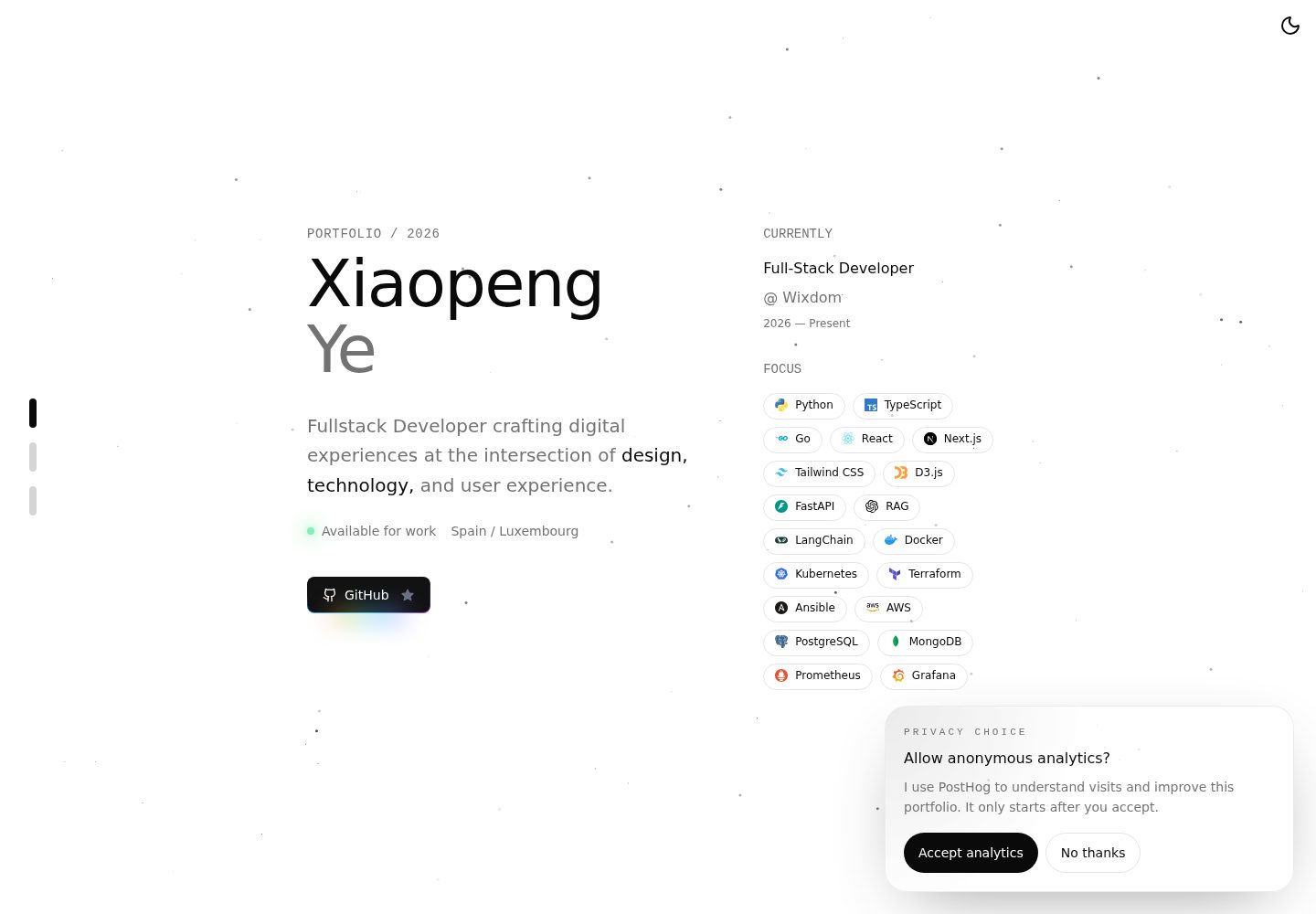
单页作品集结构,包含介绍、作品、随笔、联系方式与页脚区块
Next.jsReact作品集
minimalist-portfolio — Next.js 作品集模板
作者 xiaopeng-ye
基于 Next.js 与 Tailwind CSS 的单页个人作品集模板,含明暗主题切换、滚动导航与粒子背景,内容集中在配置文件里,适合静态托管。
看看你的网站会是什么样
浏览真实页面截图,比较内容排版与手机效果。点击下方缩略图切换,放大查看整页细节。
全部页面与视图 2
截图用于了解视觉与布局,交互效果请以实际项目为准。
采集于 2026-10-13查看来源
值得关注的模板亮点
从已有项目资料中,快速了解它的特点。
明暗主题切换带 View Transitions 动画,滚动时导航状态与进度同步更新
粒子背景与细微动效,并在支持的设备上提供触觉反馈
个人资料、技能、经历、社交链接与 SEO 信息集中在 lib/portfolio-config.ts 配置
内容在构建时静态嵌入,适合 GitHub Pages 等静态托管
通过 posthog-js 接入分析,默认关闭,访客同意后才启用
模板详细介绍
这是一个单页结构的个人作品集模板,使用 Next.js 的 App Router 组织页面,配合 Tailwind CSS 完成样式,并以 TypeScript 编写。页面由介绍、作品、随笔、联系方式与页脚等区块组成,导航会随滚动位置更新当前区块状态,并显示滚动进度。主题切换带有动画过渡效果,页面还包含粒子背景与若干细微动效,在支持的设备上提供触觉反馈。
个人内容集中存放在 lib/portfolio-config.ts,包括姓名、角色、简介、所在地、可接单状态、技能与图标映射、经历时间线、联系邮箱、社交链接以及 SEO 标题、描述和站点地址。页面组合在 app/page.tsx,主题变量与全局样式在 app/globals.css,各区块的布局在 components/sections 下。作品集内容在构建时静态写入,不依赖运行时数据源。
部署方面,项目按静态托管准备,可发布到 GitHub Pages,通过 GitHub Actions 作为 Pages 来源。项目在客户端通过 instrumentation-client.ts 接入 posthog-js,分析默认关闭,仅在访客接受同意横幅后启动,需要在仓库中配置 NEXT_PUBLIC_POSTHOG_PROJECT_TOKEN 与 NEXT_PUBLIC_POSTHOG_HOST;由于是静态站点,这些值会被打包进客户端产物,应使用面向客户端分析的项目令牌。
许可为 MIT,允许免费使用、修改、商用与分发该版本代码,分发时需保留版权与许可声明。演示图片、字体、图标等第三方素材的许可需单独核对,域名、托管等外部服务可能产生费用。
Next.js作品集
适合你的项目吗?
适用场景
- 开发者搭建个人主页,集中展示简介、技能、经历与作品链接
- 需要明暗主题与滚动交互效果的单页作品集站点
- 希望以静态方式部署到 GitHub Pages 的个人站点
- 需要把个人资料与 SEO 信息集中在一处维护的作品集
适合人群
- 希望用 Next.js 与 Tailwind CSS 快速起步个人作品集的开发者
- 偏好单页结构、内容由配置文件驱动的个人站点
- 计划使用 GitHub Pages 等静态托管方式的用户
- 需要明暗主题切换与滚动导航反馈的作品集页面
上手与定制指南
结合仓库当前版本的说明,按下面的资料检查内容、配置与运行要求。
- 1
克隆仓库后使用 pnpm install 安装依赖,pnpm dev 启动本地开发服务器并访问 http://localhost:3000
- 2
在 lib/portfolio-config.ts 中替换 personal、skills、experience、contact、social 与 siteMetadata 等个人内容
- 3
如需启用 PostHog 分析,复制 .env.example 为 .env.local 并填写 NEXT_PUBLIC_POSTHOG_PROJECT_TOKEN 与 NEXT_PUBLIC_POSTHOG_HOST,部署时在仓库中配置同名 secrets
- 4
部署到 GitHub Pages 时,将 Pages 来源设为 GitHub Actions,推送默认分支后在 Actions 标签页查看工作流
- 5
使用自定义域名时需更新 DNS 记录并在 GitHub Pages 设置中填写域名
授权与来源资料
使用条件与限制
免费使用 · 保留许可声明本次收录的是公开仓库中采用 MIT 许可的免费版本;免费范围为该版本代码,不代表外部服务或第三方素材免费。
使用时需要遵守
- 允许免费使用、修改、商用和分发该版本代码。
- 分发代码副本或实质性部分时,保留原作者版权声明和完整 MIT 许可声明。
- 代码按现状提供;担保与责任限制以原许可证及适用法律为准。
额外费用与待核对事项
- 演示图片、字体、图标及其他第三方素材需按各自许可核对,不能仅凭代码的 MIT 许可判断。
- 域名、托管、数据库、支付或 AI 等外部服务可能另外收费。
- 使用 PostHog 分析功能需自行提供 PostHog 项目令牌与主机地址,并在部署仓库中配置为 secrets;未配置则分析不可用。
- 本地开发启用分析需复制 .env.example 为 .env.local 并填写自己的 PostHog 配置值。
- 因静态站点会将 NEXT_PUBLIC_* 值打包进客户端产物,必须使用面向客户端分析的项目令牌,不能使用敏感的服务端令牌。
- 使用自定义域名时需自行更新 DNS 记录并在 GitHub Pages 设置中填写域名,涉及外部服务配置。
查看原文依据
Permission is hereby granted, free of charge
许可证原文
Add these repository secrets before deploying: - `NEXT_PUBLIC_POSTHOG_PROJECT_TOKEN` - `NEXT_PUBLIC_POSTHOG_HOST`
README 原文
For local development, copy `.env.example` to `.env.local` and fill in your own values.
README 原文
Use a PostHog project token intended for client-side analytics.
README 原文
https://github.com/xiaopeng-ye/minimalist-portfolio/blob/main/LICENSEhttps://github.com/xiaopeng-ye/minimalist-portfolio/blob/main/README.mdIf you use a custom domain, update your DNS records and set the domain in GitHub Pages settings.
README 原文
DeepSeek 根据仓库许可证和 README 整理 ·2026-10-13。结果仅覆盖已读取资料,依赖、图片、字体及后续条款变更以各自原文为准。
项目核对记录与介绍依据
模板资料
- 来源平台
- GitHub
- 资料与维护参考分
- 资料较完整 · 83 / 100
- 技术栈
- Next.js · React
- 网站类型
- 作品集
这个分数如何计算
本站按许可资料(最高30分)、演示链接(12分)、预览图(10分)、Star数(15分)、记录的维护时间(15分)、描述完整度(8分)、功能记录(5分)和分类资料(5分)计算。它不是代码、安全或性能测试,也不是 Google 评分;有链接不代表已实测可用。
这个项目需要核对什么
- 记录的仓库更新时间
- 2026-09-19
- 截图检查日期
- 2026-10-13
已收录演示链接。请用你的内容与屏幕尺寸检查;有演示不代表表单、认证或支付已经可用。
目录记录的主要技术栈是 Next.js。请通过依赖清单和锁文件核对实际版本与托管要求。这些说明基于收录资料,不代表代码审计或部署实测。
查看具体选型方法 →介绍的制作与核对状态
介绍由 AI 辅助整理目录与仓库资料。仓库作者不等于这篇介绍的审核者。
审核声明: [email protected] · 2026-10-13
查看当时使用的来源资料
SHA-256: 268791df75bdd2ae5083c2b3517f6ca5aad5cb15a8f7bc0f7f5045ac789b5b8b
2026-10-13T05:18:29.399Z
来源文件 / 仓库# Minimalist Portfolio A refined portfolio starter built with Next.js 16, React 19, TypeScript, and Tailwind CSS 4. It is designed for developers who want a fast, personal site with polished motion, strong typography, and a setup that is easy to customize. ## Overview - Clean single-page portfolio structure - Responsive layout for desktop and mobile - Animated light/dark theme toggle - Section-aware navigation and scroll progress feedback - Particle background and subtle motion details - Static-friendly setup for GitHub Pages deployment ## Tech Stack - Next.js 16 (App Router) - React 19 - TypeScript - Tailwind CSS 4 - `@wrksz/themes` for theme management - `motion` for UI animation - `web-haptics` for tactile feedback on supported devices - Lucide React and Simple Icons ## Local Development ```bash git clone https://github.com/xiaopeng-ye/minimalist-portfolio.git cd minimalist-portfolio pnpm install pnpm dev ``` Open `http://localhost:3000` in your browser. ## Scripts ```bash pnpm dev pnpm build pnpm start pnpm lint pnpm lint:fix pnpm format pnpm format:check pnpm typecheck ``` ## Project Structure ```text minimalist-portfolio/ ├── app/ # App Router entry, metadata, global styles ├── components/ │ ├── sections/ # Intro, work, thoughts, connect, footer │ └── ui/ # Reusable UI pieces and visual effects ├── lib/ # Portfolio content and helpers ├── public/ # Static assets └── types/ # Shared TypeScript types ``` ## Customize Your Portfolio Most personal content lives in `lib/portfolio-config.ts`. Update these areas to make the site your own: - `personal`: name, role, bio, location, availability - `skills`: tech stack and icon mappings - `experience`: timeline entries and descriptions - `contact`: email address - `social`: external links - `siteMetadata`: SEO title, description, and site URL You can also adjust layout and presentation here: - `app/page.tsx` for page composition - `app/globals.css` for theme tokens and global styling - `components/sections/*.tsx` for section-specific content and layout ## Features Worth Noting - Theme switching uses `@wrksz/themes` with an animated View Transitions reveal - Scroll tracking updates navigation state as sections enter view - Metadata, manifest, and Open Graph assets are configured in `app/layout.tsx` and `app/opengraph-image.tsx` - The portfolio content is statically embedded at build time from `lib/portfolio-config.ts` ## Deployment This project is set up well for static hosting and can be deployed to GitHub Pages. Typical flow: 1. Enable GitHub Pages with **GitHub Actions** as the source. 2. Push changes to your default branch. 3. Monitor the workflow in the repository's **Actions** tab. ### PostHog on GitHub Pages This project uses `posthog-js` via `instrumentation-client.ts`, which works with the App Router and static export builds. For privacy-friendly behavior on a static site, analytics stay disabled by default and only start after the visitor accepts the consent banner. Add these repository secrets before deploying: - `NEXT_PUBLIC_POSTHOG_PROJECT_TOKEN` - `NEXT_PUBLIC_POSTHOG_HOST` For local development, copy `.env.example` to `.env.local` and fill in your own values. Note: because this is a static site and PostHog runs in the browser, `NEXT_PUBLIC_*` values are embedded into the built client bundle. Use a PostHog project token intended for client-side analytics. If you use a custom domain, update your DNS records and set the domain in GitHub Pages settings. ## Live Site - Portfolio: `https://xiaopengye.kkcloud.org` ## License Released under the [MIT License](LICENSE).
看看同类模板
对比同技术栈与用途的模板,找到更适合的视觉与内容结构。

react-resume-template
A personal resume website template built with React.js, Typescript, Next.js, and styled with Tailwind css
Next.js · 作品集

nxt-lnk
Custom bio links for creatives who love coding. A perfect custom alternative for linktree, bio and other short…
Next.js · 作品集

sylph
A minimal portfolio template.
Next.js · 作品集

sleek-portfolio
sleek-portfolio 是一个面向开发者个人品牌展示的现代作品集模板,基于 Next.js 15、TypeScript、Tailwind CSS 和 Shadcn UI 构建。
Next.js · 作品集

research-website-template
React + Next.js template for research websites (for PhD students, researchers, etc)
Next.js · 作品集

shadcn-portfolio
shadcn-portfolio 是一个面向开发者的作品集模板,技术栈为 Next.js 15、shadcn/ui、Tailwind CSS 和 Framer Motion。
Next.js · 作品集