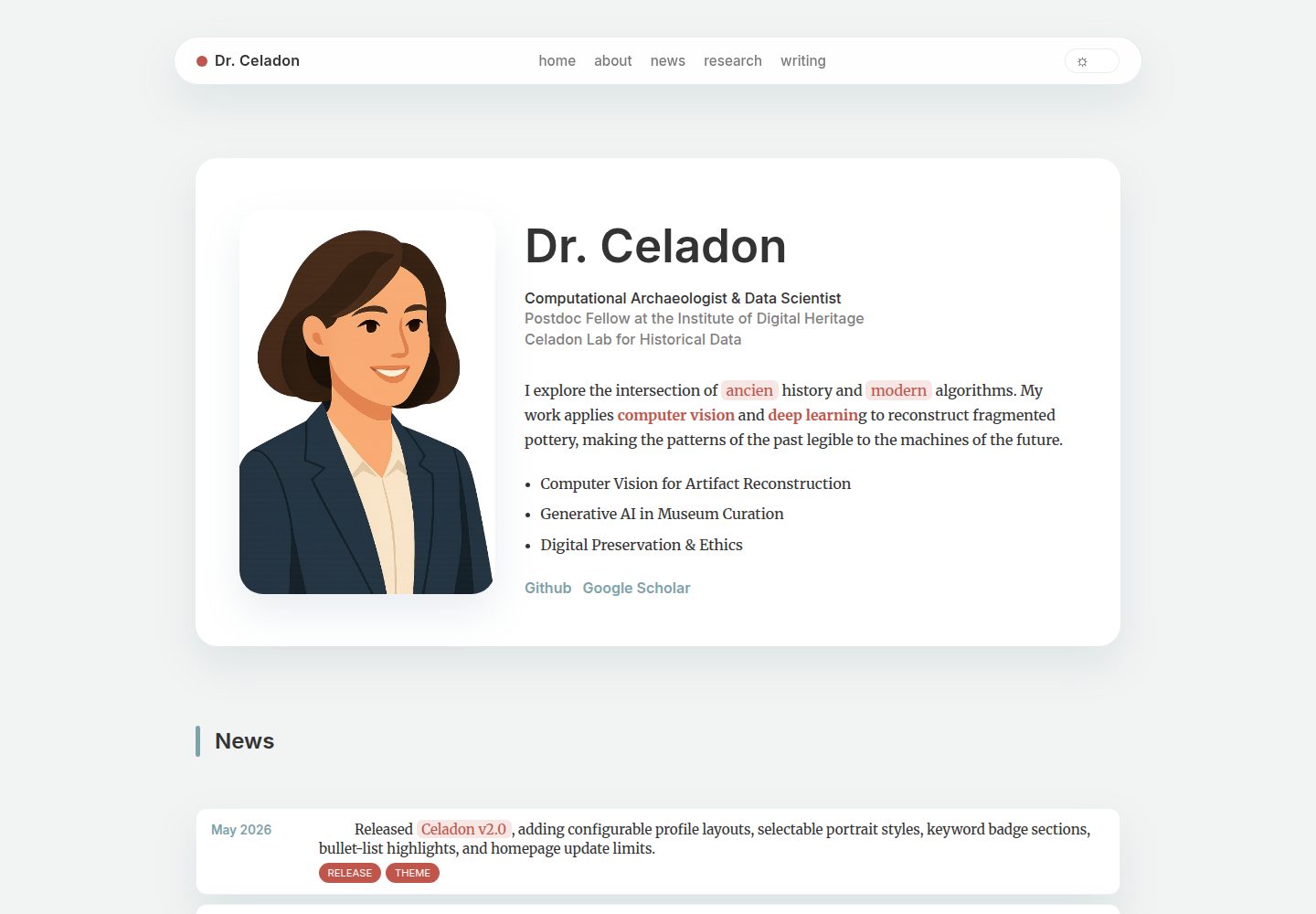
单页滚动首页,区块顺序由 hugo.toml 的 sections 列表控制
Hugo启动器
hugo-celadon — Hugo 启动器模板
作者 Yajie-Xu
hugo-celadon 是一个面向学术与创意技术方向个人作品集的 Hugo 单页主题,采用莫兰迪色系与模块化首页区块。
看看你的网站会是什么样
浏览真实页面截图,比较内容排版与手机效果。点击下方缩略图切换,放大查看整页细节。
全部页面与视图 2
截图用于了解视觉与布局,交互效果请以实际项目为准。
采集于 2026-10-03查看来源
值得关注的模板亮点
从已有项目资料中,快速了解它的特点。
首页内容与深层文章分离,分别放在 data/ 的 YAML 文件和 content/ 的 Markdown 中
内置莫兰迪色系与自动深色模式,提供柔和青色、暖陶色、朱砂色等强调色
原生支持 KaTeX 数学公式与 Hugo Chroma 代码高亮
news 时间线布局支持 limit 参数控制初始显示条数,超出部分折叠展开
profile、news、research 数据支持 Markdown 与内联 HTML 混排
模板详细介绍
hugo-celadon 是一个基于 Hugo 的单页作品集主题,作者将其定位为兼顾学术严谨与创意设计的个人主页方案,目标使用者包括学术研究者、数据科学家和创意技术工作者。主题通过首页单页滚动的方式组织内容,把简介、动态、研究、写作等区块集中在一个页面,再通过链接进入更深层的内容页面。
在视觉与交互层面,主题提供莫兰迪色系的配色方案,包含柔和青色、暖陶色与朱砂色等强调色,并内置自动深色模式。首页区块由 hugo.toml 中的 sections 列表控制顺序,每个区块对应 data/ 目录下的同名 YAML 数据文件,支持 hero、news、cards、grid 等布局,其中 news 布局可设置 limit 控制初始显示条数,超出部分通过“Show More”按钮展开。
内容层面,主题区分首页数据与深层页面:首页卡片内容写在 data/ 下的 YAML 文件中,文章与笔记放在 content/ 目录,需要为每个栏目建立带 _index.md 的文件夹。主题原生支持 KaTeX 数学公式与 Hugo Chroma 代码高亮,并在 profile、news、research 等数据文件中支持一定程度的 Markdown 与内联 HTML 混排,用于加粗、强调、链接和标签覆盖。
限制方面,主题为单页架构,深层内容依赖独立页面承载;演示图片、字体、图标等第三方素材需单独核对许可,不能仅凭代码的 MIT 许可判断;README 中未说明浏览器兼容范围与可访问性支持程度。
Hugo启动器
适合你的项目吗?
适用场景
- 学术研究者搭建包含论文列表与个人简介的单页主页
- 数据科学家或创意技术工作者整理项目、写作与动态的个人作品集
- 需要数学公式与代码高亮的个人技术笔记站点
- 希望用 YAML 数据文件而非模板代码来维护首页内容的 Hugo 用户
适合人群
- 使用 Hugo 并希望快速搭建单页个人主页的用户
- 需要展示研究、写作、动态等模块化内容的学术或技术从业者
- 偏好通过配置文件和数据文件调整首页结构、而非直接改模板的开发者
- 接受以单页为入口、深层内容另建页面的内容组织方式
上手与定制指南
结合仓库当前版本的说明,按下面的资料检查内容、配置与运行要求。
- 1
先执行 hugo new site 初始化站点并初始化 git 仓库
- 2
通过 git submodule 将主题添加到 themes/celadon 目录
- 3
复制 exampleSite 中的 hugo.toml 到站点根目录,或手动设置 theme = "celadon"
- 4
在 hugo.toml 的 [params.homepage] 中配置 sections 顺序,并在 data/ 下建立同名 YAML 数据文件
- 5
深层栏目需在 content/ 下建立文件夹并包含 _index.md,再将首页数据中的 link 指向该路径
授权与来源资料
使用条件与限制
免费使用 · 保留许可声明本次收录的是公开仓库中采用 MIT 许可的免费版本;免费范围为该版本代码,不代表外部服务或第三方素材免费。
使用时需要遵守
- 允许免费使用、修改、商用和分发该版本代码。
- 分发代码副本或实质性部分时,保留原作者版权声明和完整 MIT 许可声明。
- 代码按现状提供;担保与责任限制以原许可证及适用法律为准。
额外费用与待核对事项
- 演示图片、字体、图标及其他第三方素材需按各自许可核对,不能仅凭代码的 MIT 许可判断。
- 域名、托管、数据库、支付或 AI 等外部服务可能另外收费。
查看原文依据
https://github.com/Yajie-Xu/hugo-celadon/blob/main/LICENSE.txthttps://github.com/Yajie-Xu/hugo-celadon/blob/main/README.mdPermission is hereby granted, free of charge
许可证原文
DeepSeek 根据仓库许可证和 README 整理 ·2026-10-03。结果仅覆盖已读取资料,依赖、图片、字体及后续条款变更以各自原文为准。
项目核对记录与介绍依据
模板资料
- 来源平台
- Hugo Themes
- 资料与维护参考分
- 资料较完整 · 75 / 100
- 技术栈
- Hugo
- 网站类型
- 启动器
这个分数如何计算
本站按许可资料(最高30分)、演示链接(12分)、预览图(10分)、Star数(15分)、记录的维护时间(15分)、描述完整度(8分)、功能记录(5分)和分类资料(5分)计算。它不是代码、安全或性能测试,也不是 Google 评分;有链接不代表已实测可用。
这个项目需要核对什么
- 记录的仓库更新时间
- 2026-05-24
- 截图检查日期
- 2026-10-03
已收录演示链接。请用你的内容与屏幕尺寸检查;有演示不代表表单、认证或支付已经可用。
目录记录的主要技术栈是 Hugo。请通过依赖清单和锁文件核对实际版本与托管要求。这些说明基于收录资料,不代表代码审计或部署实测。
查看具体选型方法 →介绍的制作与核对状态
介绍由 AI 辅助整理目录与仓库资料。仓库作者不等于这篇介绍的审核者。
审核声明: [email protected] · 2026-10-04
查看当时使用的来源资料
SHA-256: 1a9a4c29b2c16b0d5c27a3dabb1c198accf727ec38322b222254e199336a31d9
2026-10-03T15:04:18.257Z
来源文件 / 仓库# Celadon 🍵
**An intellectual portfolio theme exploring the equilibrium between academic rigor and creative design.**
| Preview | Alternate Profile Layout |
| - | - |
| <img src="https://github.com/Yajie-Xu/hugo-celadon/blob/main/images/screenshot.png?raw=true" alt="Celadon theme preview" width="900"> | <img src="https://github.com/Yajie-Xu/hugo-celadon/blob/main/images/screenshot2.png?raw=true" alt="Celadon alternate profile layout preview" width="900"> |
➤ Check out the [Live Demo](https://yajie-xu.github.io/hugo-celadon/) | ➤ View on [Hugo Themes](https://themes.gohugo.io/themes/hugo-celadon/)
**Celadon** is a lightweight, responsive, one-page portfolio theme for [Hugo](https://gohugo.io). It is designed for **Academics**, **Data Scientists**, and **Creative Technologists**. It balances a rigorous publication list with a soft, "Morandi" color palette and modern grid layouts.
## ✨ Features
* **🎨 Morandi Design System:** A calm, high-contrast palette featuring Muted Teal, Warm Clay, and Cinnabar accents.
* **📜 One-Page Architecture:** A smooth-scrolling homepage that acts as a gateway to deep content.
* **🌙 Auto Dark Mode:** A sophisticated "Deep Slate" theme for low-light reading.
* **🧮 Academic Ready:** Native support for **KaTeX** (Math) and **Hugo Chroma** (Code Highlighting) with a "Gemini-style" copy interface.
* **🧩 Modular Sections:** Easily reorder sections (About, News, Research, Builds, Writing) via `hugo.toml`.
* **📱 Fully Responsive:** Collapsible layouts that look great on mobile and tablets.
## 🚀 Installation
### 1. Initialize Hugo
Inside your empty project folder:
```bash
hugo new site my-portfolio
cd my-portfolio
git init
```
### 2. Add Celadon Theme
```bash
git submodule add [https://github.com/Yajie-Xu/hugo-celadon.git](https://github.com/Yajie-Xu/hugo-celadon.git) themes/celadon
```
### 3. Update Configuration
Copy the `hugo.toml` from the exampleSite folder to your root, or add this to your existing config:
```toml
theme = "celadon"
```
## 📘 User Guide: Customizing Your Site
Celadon is designed to separate your **Content** (Markdown) from your **Homepage Layout** (Data).
### 1. Project Structure
Here is a map of what you should edit and what you can ignore.
```text
my-portfolio/
├── hugo.toml <-- ⚙️ CONFIG: Menu, Title, Section ordering
├── content/ <-- 📝 CONTENT: Your deep pages (Blogs, Papers)
│ ├── study/
│ │ ├── _index.md <-- Required for the section cover info
│ │ └── math-note.md <-- Actual content page
│ └── _index.md <-- Do not delete (Homepage entry point)
├── data/ <-- 🗂️ HOMEPAGE DATA: Content for the main page cards
│ ├── news.yaml <-- Matches "news" section
│ ├── research.yaml <-- Matches "research" section
│ └── profile.yaml <-- Your bio info
├── static/ <-- 🖼️ ASSETS: Images, PDFs
│ └── images/
├── themes/ <-- ⛔ THEME: Do not edit directly
│ └── celadon/
│ ├── images/
│ │ ├── tn.png <-- Ignore (Required for Hugo Gallery)
│ │ └── screenshot.png <-- Ignore (Required for Hugo Gallery)
│ └── ...
└── ...
```
### 2. Managing the Homepage
The homepage is built dynamically based on your configuration.
**Step 1: Define Sections** Open `hugo.toml`. Under `[params.homepage]`, the `sections` list determines what appears and in what order.
````toml
[params.homepage]
sections = ["hero", "news", "research", "writing"]
````
**Step 2: Create Matching Data Files** For every item in that list (e.g., `"writing"`), Hugo looks for a matching YAML file in the `data/` folder (e.g., `data/writing.yaml`).
* *Note*: The naming is case-insensitive, but keeping them lowercase is recommended.
**Step 3: Choose the Layout** In `hugo.toml`, tell Celadon how to render that section:
```toml
[params.homepage.writing]
enable = true
title = "Selected Writing"
layout = "grid" # Options: "hero", "news", "cards", "grid"
```
For timeline-style sections that use the `news` layout, you can also set how many entries are visible before the “Show More” button appears:
```toml
[params.homepage.news]
enable = true
title = "Updates"
layout = "news"
limit = 5
```
The `limit` value controls the number of `data/news.yaml` items shown initially on the homepage. If there are more entries than the limit, Celadon hides the rest behind the expandable button.
### 3. Creating Deep Pages (Sub-pages)
To link a Homepage Card (e.g., "Study Notes") to a list of actual articles:
**3.1. Create the Folder Structure** Inside `content/`, create a folder that matches your topic. You must include an `_index.md` file for the list layout to work.
```text
content/
└── study/
├── _index.md <-- The "List" page definition
├── note-01.md
└── note-02.md
```
**3.2. Configure** `_index.md` This file defines the title and description users see when they click through.
```markdown
---
title: "Study Notes"
description: "My raw notes on math and code."
layout: "list"
---
(Welcome text here...)
```
**3.3. Add Articles** Inside the same folder, add your individual notes or articles as separate Markdown files.
```markdown
---
title: "Understanding Eigenvalues"
date: 2025-11-20
summary: "A deep dive into eigenvalues and their applications."
image: "/images/EigenArt.png"
tags: ["Math", "Linear Algebra"]
---
(Content of the article...)
```
**3.4. Link it from the Homepage** Open your data file (e.g., `data/writing.yaml`) and set the `link` property to the folder path.
```yaml
items:
- title: "Study Notes"
image: "/images/cover.jpg"
link: "/study/" <-- This points to content/study/_index.md
```
### 4. System Files (What to Ignore)
If you look inside themes/hugo-celadon/, you will see specific image files required for theme submission. You do not need to replace these unless you are forking the theme to release your own version.
* images/screenshot.png: Used by the Hugo Theme Gallery to preview the theme.
* images/tn.png: A thumbnail used by the Hugo Theme Gallery.
* layouts/: The logic engine. Don't touch unless you are a developer modifying the core code.
## Rich Text & Custom Labels
| Area | Field(s) | Rich Text Capabilities | Notes |
| - | - | - | - |
| Profile card (`data/profile.yaml`) | `title`, `summary`, `affiliation` | Inline HTML (`<br>`, `<em>`) + Markdown (`~~strike~~`, `**bold**`) | Rendered through `enrich-text`, so HTML/Markdown mixes safely. |
| News timeline (`data/news.yaml`) | `detail` | Markdown links `[text](url)` + inline formatting | Badges stay plain strings; only `detail` is enriched. |
| Research cards (`data/research.yaml`) | `summary`, `links`, `coauthors`, `coauthors_label` | Markdown summaries, standard YAML links, per-card label overrides | `coauthors_label`/`coauthorsLabel` replaces the default “Co-authors”. |
Common rich text patterns:
| Style | YAML example | Result |
| - | - | - |
| Bold | `detail: "Released **Celadon v2.0**"` | Normal Markdown bold |
| Accent text | `detail: "Released ~~Celadon v2.0~~"` | Theme accent color |
| Highlight pill | `detail: "Released ==Celadon v2.0=="` | Soft highlighted mark |
| Link | `detail: "Read the [docs](https://example.com)"` | Styled Markdown link |
#### Example Snippet for Profile
```yaml
# Profile
name: "Dr. Ada Sol"
title: "Research Lead • AstroEconomics<br>M.S. • Applied AI"
summary: >
Explorer of ~~boring~~ *bold* market dynamics on Mars. Enthusiastic about
cooperative agents and <strong>playful policy experiments</strong>.
affiliation: "New Olympus University<br><em>Institute for Stellar Trade</em>"
profile_image: "/images/profile.png"
profile_layout: "modern" # Options: "modern" or "classic"
profile_image_style: "circle" # Options: "circle" or "rectangle"
list:
- "Bullet-style highlight"
- "Another highlight"
keyword_sections:
- title: "Keyword Badge Section"
rows:
- ["Badge One", "Badge Two"]
```
Use `list` for the original bullet-style profile highlights. Use `keyword_sections` for grouped badge rows. If both are present, both render: `keyword_sections` first, then `list`.
#### Example Snippet for News
```yaml
# News Entry
- date: "Jan 2026"
detail: "Presented joint work with [Ravi Zenith](https://example.com) on comet-futures at the [Galactic Finance Forum](https://example.org)."
badges: ["Talk"]
```
#### Example Snippet for Cards
```yaml
# Research Card
- title: "Agentic Hedging in Zero-G Ports"
summary: >
Simulates cargo-insurance strategies using cooperative RL pilots.
coauthors_label: "Collaborators"
coauthors:
- name: "Eli Vega"
url: "https://eli-vega.space"
- name: "Mira Chen"
image: "/images/research/zero-g.jpg"
tags: ["RL", "finance"]
links:
- label: "Preprint"
url: "https://example.com/zero-g.pdf"
```
<!-- ## Rich Text in Profile + News
Both `data/profile.yaml` and `data/news.yaml` are rendered with `safeHTML`, so you can mix Markdown + inline HTML to highlight important bits.
### Supported Patterns
| Purpose | Syntax in YAML (raw text) | Notes |
|------------------|---------------------------------------------------------------------|------------------------------------|
| **Bold** | `detail: "**Accepted** to CVPR 2025."` | Standard Markdown bold |
| *Italic* | `summary: "*Behavioral* + computational economics."` | Standard Markdown italic |
| Hyperlink | `detail: "Joint work with [Kazuma Takakura](https://kazumatakakura.github.io/)"` | Markdown links auto-styled |
| Highlight text | `summary: "Exploring <mark>Bayesian incentives</mark> in markets."` | Uses hero highlight pill colors |
| Accent in news | `detail: "<span class=\"news-accent\">1st Place</span> Best Overall"` | Renders in accent color for news only |
| Line break | `title: "Ph.D. Candidate • Economics<br>M.S. • Artificial Intelligence"` | Use `<br>` where you want the break |
### Example
```yaml
# data/profile.yaml
summary: >
Interdisciplinary researcher studying <mark>network economics</mark> and
<a href="/writing/">computational design</a>.
highlights:
- "Co-led the <mark>Impact Lab</mark> fellowship."
- "Published *Bayesian Incentives* in **Econometrica**."
# data/news.yaml
- date: "Nov 2025"
detail: "Presented joint work with [Kazuma Takakura](https://kazumatakakura.github.io/) on innovation networks."
badges: ["Talk"]
- date: "Apr 2025"
detail: "<span class=\"news-accent\">1st place</span> Best Overall at [HackUSF 2025](https://devpost.com/software/skin-scan)."
badges: ["Award"]
``` -->
## 🤠 Favicon
To customize the favicon, add your `favicon.ico` files to the `static/` directory of your Hugo site. You can generate a favicon using online tools like [favicon.io](https://favicon.io/). The files' name are automactically genreated via the tool. The file structure should look like this:
```text
static/
├─ android-chrome-192x192.png
├─ android-chrome-512x512.png
├─ apple-touch-icon.png
├─ favicon-16x16.png
├─ favicon-32x32.png
├─ favicon.ico
└─ site.webmanifest
```
## ⚖️ License
This project is licensed under the MIT License - see the [LICENSE](https://github.com/Yajie-Xu/hugo-celadon/blob/main/LICENSE.txt) file for details.
## 👩🏻💻 Author
[Yajie Xu](https://yajiexu.com)
看看同类模板
对比同技术栈与用途的模板,找到更适合的视觉与内容结构。

hugo-xmin
eXtremely Minimal Hugo theme: about 140 lines of code in total, including HTML and CSS (with no dependencies)
Hugo · 启动器

hugo-theme-gallery
Gallery Theme for Hugo
Hugo · 启动器

reveal-hugo
📽️ Create rich HTML-based presentations with Hugo and Reveal.js
Hugo · 启动器

anatole
Anatole is a minimalistic two-column theme for Hugo.
Hugo · 启动器

hugo-theme-diary
Moments piled up. A Hugo theme ported from SumiMakito/hexo-theme-Journal.
Hugo · 启动器

risotto
A minimalist, responsive hugo theme inspired by terminal ricing aesthetics.
Hugo · 启动器