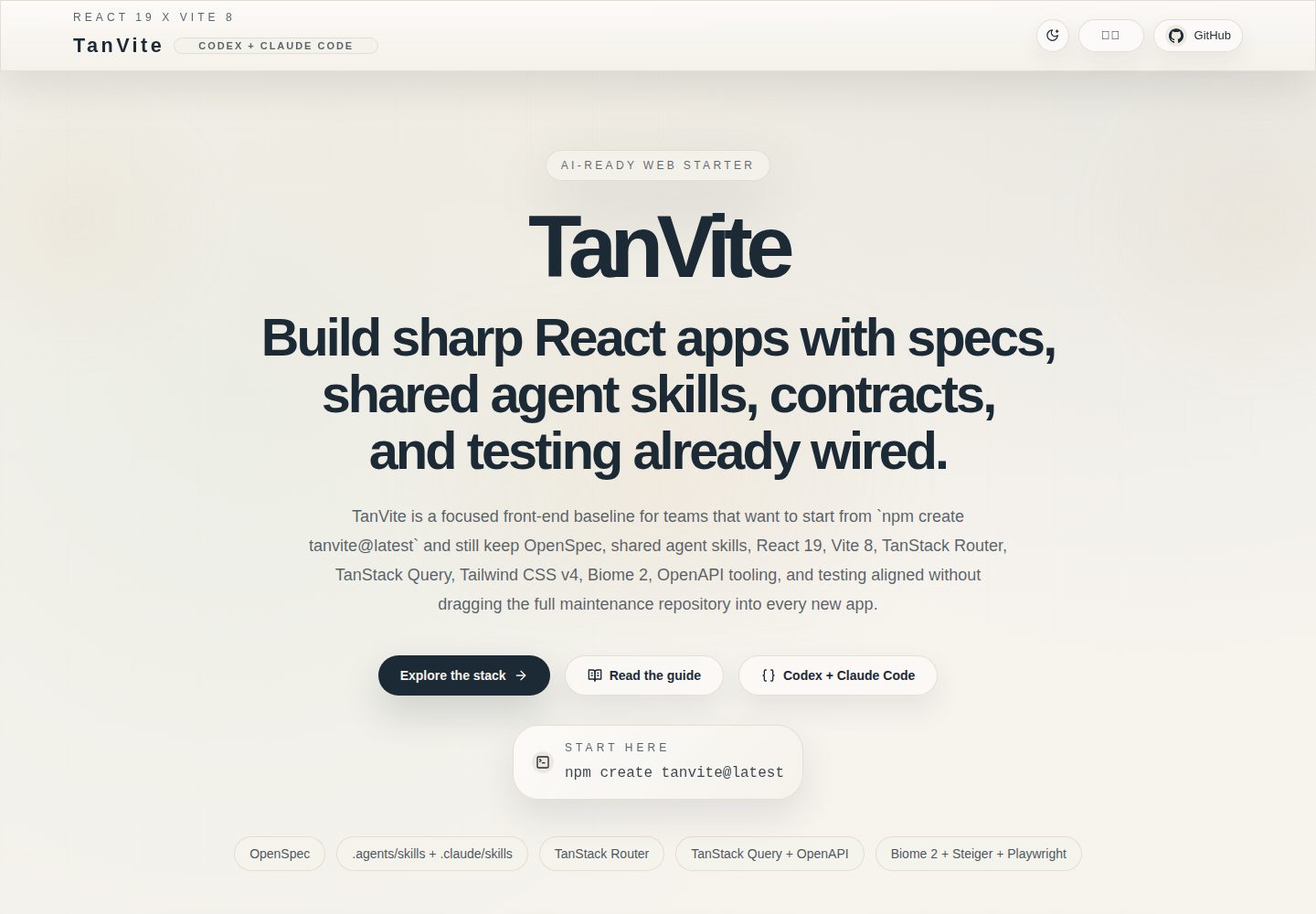
提供已发布的 create-tanvite 脚手架,支持 npm、pnpm、yarn 创建项目,并可通过 preset 或 --with 选择 OpenSpec、OpenAPI、Playwright、Pages、agents 等可选能力
ViteReact启动器
tanvite — Vite 启动器模板
作者 YangsonHung
TanVite 是一个基于 React 19、TypeScript 和 Vite 的前端工程起始模板,包含 create-tanvite 脚手架、TanStack Router 与 Query、OpenAPI 代码生成、测试与 CI 配置,并集成 OpenSpec 规格工作流和 AI 编码代理技能。
看看你的网站会是什么样
浏览真实页面截图,比较内容排版与手机效果。点击下方缩略图切换,放大查看整页细节。
全部页面与视图 2
截图用于了解视觉与布局,交互效果请以实际项目为准。
采集于 2026-10-17查看来源
值得关注的模板亮点
从已有项目资料中,快速了解它的特点。
集成 TanStack Router 文件式路由与 TanStack Query 数据层,路由文件位于 src/app/routes,页面与组件按 pages、widgets、shared 等目录组织
通过 Orval 从 OpenAPI 文档生成 API 客户端、React Query hooks 与 MSW mock,并提供 openapi:check、openapi:generate、openapi:mock 脚本
内置 OpenSpec spec-driven 工作流,变更提案与基线规格分别存放在 openspec/changes 和 openspec/specs,并提供 openspec:list、new、validate 等命令
包含 Biome、Vitest、Testing Library、Playwright、Husky、lint-staged、commitlint 与 Steiger 等代码质量与测试工具配置
提供 Codex 与 Claude Code 的技能目录及可选运行时钩子,用于 pnpm 约束、文件保护、自动格式化、上下文注入和 FSD 边界检查
模板详细介绍
TanVite 是面向产品团队的前端工程基础模板,通过已发布的 create-tanvite 脚手架生成新项目。README 说明其技术栈包括 React 19、TypeScript、Vite、pnpm、TanStack Router 文件式路由、TanStack Query 数据层、Tailwind CSS,以及 shadcn/ui 相关工具。API 层可由 Orval 根据 OpenAPI 文档生成客户端、React Query hooks 和 MSW mock,也可用 Prism 启动独立 mock 服务器。
工程规范方面,模板集成 Biome 负责 lint 与格式化,Vitest 与 Testing Library 做单元测试,Playwright 做端到端测试,Husky、lint-staged 与 commitlint 约束提交流程,Steiger 检查 FSD 目录结构与导入边界。仓库已初始化 OpenSpec 的 spec-driven 模式,变更提案放在 openspec/changes/,基线规格放在 openspec/specs/。
AI 协作部分提供 .agents/skills(Codex)与 .claude/skills 及 OPSX 命令(Claude Code),覆盖设计、代码审查、测试、Git 流程和浏览器自动化。通过 create-tanvite 的 hooks 选项可为 Claude Code 或 Codex 生成运行时钩子,包括阻止非 pnpm 安装命令、保护生成文件与 .env、编辑后自动格式化、注入项目规则、停止前执行 FSD 边界检查等。
使用限制:README 将源码仓库定位为维护 TanVite 本身,新项目应通过 create-tanvite 创建,而不是直接复制仓库。运行环境要求 Node.js 20+ 与 pnpm 10+。README 未说明该模板在生产环境的实际表现或性能数据。
ViteReact启动器
适合你的项目吗?
适用场景
- 需要从统一前端基线快速创建新 React 产品项目,并希望路由、数据请求、样式、测试与 CI 已预先配置的团队
- 希望在仓库内用 OpenSpec 管理变更提案和基线规格,并结合 AI 编码代理技能开展设计、审查与测试的工作流
- 后端提供 OpenAPI/Swagger 文档,希望自动生成前端 API 客户端、查询 hooks 与 mock 数据,并在 MSW 或 Prism mock 环境下开发
- 需要为公开项目提供落地页与指南页,并通过 GitHub Pages 构建和预览展示站点
- 希望用 Husky、lint-staged、commitlint 和 Steiger 约束提交规范与 FSD 目录边界的前端工程
适合人群
- 使用 React、TypeScript 与 Vite 构建前端产品,并希望以脚手架方式起步的团队
- 需要将 OpenSpec 规格驱动流程和 OpenAPI 代码生成纳入同一仓库的前端项目
- 使用 Claude Code 或 Codex 辅助开发,并希望以技能和钩子固化项目规则的前端团队
- 需要单元测试、端到端测试、代码质量检查与提交钩子基线配置的项目
- 需要构建 GitHub Pages 展示站点并本地预览的项目
上手与定制指南
结合仓库当前版本的说明,按下面的资料检查内容、配置与运行要求。
- 1
运行环境要求 Node.js 20+ 与 pnpm 10+;README 将 pnpm 列为包管理器
- 2
新项目通过 npm create tanvite@latest、pnpm create tanvite@latest 或 yarn create tanvite@latest 创建,进入目录后执行 pnpm install 与 pnpm dev,默认访问 http://localhost:4319
- 3
OpenAPI 流程需复制 .env.example 为 .env.local,设置 OPENAPI_SCHEMA_URL,再运行 pnpm openapi:check 与 pnpm openapi:generate;可用 pnpm dev:mock 或 pnpm openapi:mock 启动 mock
- 4
GitHub Pages 本地预览需先执行 pnpm build:pages,再执行 pnpm preview:pages,并访问 http://localhost:4419/tanvite/
- 5
AI 代理钩子需在 create-tanvite 创建项目时通过 --hooks 与 --hooks-agents claude|codex|claude,codex 启用;full preset 默认同时为两个代理启用钩子
授权与来源资料
使用条件与限制
免费使用 · 保留许可声明本次收录的是公开仓库中采用 MIT 许可的免费版本;免费范围为该版本代码,不代表外部服务或第三方素材免费。
使用时需要遵守
- 允许免费使用、修改、商用和分发该版本代码。
- 分发代码副本或实质性部分时,保留原作者版权声明和完整 MIT 许可声明。
- 代码按现状提供;担保与责任限制以原许可证及适用法律为准。
额外费用与待核对事项
- 演示图片、字体、图标及其他第三方素材需按各自许可核对,不能仅凭代码的 MIT 许可判断。
- 域名、托管、数据库、支付或 AI 等外部服务可能另外收费。
- 源码仓库定位为维护 TanVite 本身(脚手架、起始模板与展示站点);新项目应通过 create-tanvite 创建,而非直接复制该仓库。
- 运行环境要求 Node.js 20+。
- 运行环境要求 pnpm 10+。
- OpenAPI 代码生成需在 .env.local 中设置 OPENAPI_SCHEMA_URL 指向后端 Swagger/OpenAPI 端点。
- 运行 pnpm openapi:generate 前必须将 OPENAPI_SCHEMA_URL 指向自己的后端规格。
- AI 代理运行时钩子需在 create-tanvite 创建项目时通过 --hooks 与 --hooks-agents 选择 Claude Code 和/或 Codex 启用。
- GitHub Pages 部署需使用 /tanvite/ 作为生产基础路径。
- GitHub Pages 输出需保留 404.html 与 .nojekyll 以支持 SPA 托管。
查看原文依据
Permission is hereby granted, free of charge
许可证原文
The source repository is for maintaining TanVite itself: the `create-tanvite` scaffolder, the starter template, and the public showcase. Product teams starting a new app should use `npm create tanvite@latest` (or `pnpm create tanvite@latest` / `yarn create tanvite@latest`).
README 原文
- Node.js 20+
README 原文
- Node.js 20+ - pnpm 10+
README 原文
2. Set `OPENAPI_SCHEMA_URL` to your backend Swagger/OpenAPI endpoint.
README 原文
- Point `OPENAPI_SCHEMA_URL` at your backend spec before running `pnpm openapi:generate`
README 原文
Select agents during scaffolding with `--hooks --hooks-agents claude`, `--hooks --hooks-agents codex`, or `--hooks --hooks-agents claude,codex`. The `full` preset enables hooks for both agents by default.
README 原文
- Use `/tanvite/` as the production base path
README 原文
https://github.com/YangsonHung/tanvite/blob/main/LICENSEhttps://github.com/YangsonHung/tanvite/blob/main/README.md- Keep `404.html` and `.nojekyll` in the Pages output for SPA hosting
README 原文
DeepSeek 根据仓库许可证和 README 整理 ·2026-10-17。结果仅覆盖已读取资料,依赖、图片、字体及后续条款变更以各自原文为准。
项目核对记录与介绍依据
模板资料
- 来源平台
- GitHub
- 资料与维护参考分
- 资料较完整 · 88 / 100
- 技术栈
- Vite · React
- 网站类型
- 启动器
这个分数如何计算
本站按许可资料(最高30分)、演示链接(12分)、预览图(10分)、Star数(15分)、记录的维护时间(15分)、描述完整度(8分)、功能记录(5分)和分类资料(5分)计算。它不是代码、安全或性能测试,也不是 Google 评分;有链接不代表已实测可用。
这个项目需要核对什么
- 记录的仓库更新时间
- 2026-04-28
- 截图检查日期
- 2026-10-17
已收录演示链接。请用你的内容与屏幕尺寸检查;有演示不代表表单、认证或支付已经可用。
目录记录的主要技术栈是 Vite。请通过依赖清单和锁文件核对实际版本与托管要求。这些说明基于收录资料,不代表代码审计或部署实测。
查看具体选型方法 →介绍的制作与核对状态
介绍由 AI 辅助整理目录与仓库资料。仓库作者不等于这篇介绍的审核者。
审核声明: codex-user-requested-batch-review-20261018 · 2026-10-18
查看当时使用的来源资料
SHA-256: e4198a711fb9bc282c2d4d57032e80d6f454356c5461a76ebef987b63319c27f
2026-10-17T01:35:10.160Z
来源文件 / 仓库# ⚡ TanVite
[](#-tech-stack)
[](#-tech-stack)
[](#-tech-stack)
[](#-tech-stack)
[](#-license)
[](https://github.com/YangsonHung/tanvite/actions/workflows/deploy-pages.yml)
[](https://github.com/YangsonHung/tanvite/actions/workflows/ci.yml)
[](https://yangsonhung.github.io/tanvite/)
**English** | [中文](README.zh-CN.md)
TanVite is a production-grade React 19 starter system designed as a reusable frontend engineering foundation for serious product teams. It combines a publishable `create-tanvite` scaffolder, Vite, TypeScript, OpenSpec, `.agents/skills` for Codex, `.claude/skills` plus OPSX commands for Claude Code, TanStack Router, TanStack Query, OpenAPI tooling, Tailwind CSS, automated testing, code-quality enforcement, and GitHub Pages-ready delivery into a polished, high-standard stack for launching new products with spec-driven workflow, AI-assisted implementation, and modern frontend best practices already in place.

## 🛰️ Why TanVite
- Start from a modern React 19 starter without assembling tooling by hand
- Work with OpenSpec from day one so change proposals and baseline specs stay inside the repository
- Use `.agents/skills` for Codex and `.claude/skills` plus OPSX commands for Claude Code to cover design, code review, testing, git workflows, and browser automation
- Keep routing, data fetching, styling, testing, and CI aligned from the first commit
- Build product work on top of a frontend baseline that already standardizes routing, data, styling, testing, and CI
- Combine OpenSpec-driven planning with OpenAPI-driven API generation in one repository
- Reuse a polished landing page and guide page for public project presentation
- Start new product work through `npm create tanvite@latest` / `pnpm create tanvite@latest` / `yarn create tanvite@latest` instead of copying the full maintenance repository
## 🚀 Create A Project
Use the published scaffolder when you want a new TanVite-based product project.
Pick the package manager you use:
```bash
# npm
npm create tanvite@latest my-app
# pnpm
pnpm create tanvite@latest my-app
# yarn
yarn create tanvite@latest my-app
```
Then install and start the dev server:
```bash
cd my-app
pnpm install
pnpm dev
```
Open `http://localhost:4319`.
Optional examples (flags go after `--` for `npm`, directly for `pnpm` / `yarn`):
```bash
# npm
npm create tanvite@latest my-app -- --preset full
npm create tanvite@latest my-app -- --with openspec,openapi,playwright,pages,agents
npm create tanvite@latest my-app -- --hooks --hooks-agents claude,codex
# pnpm
pnpm create tanvite@latest my-app --preset full
pnpm create tanvite@latest my-app --with openspec,openapi,playwright,pages,agents
pnpm create tanvite@latest my-app --hooks --hooks-agents claude,codex
# yarn
yarn create tanvite@latest my-app --preset full
yarn create tanvite@latest my-app --with openspec,openapi,playwright,pages,agents
yarn create tanvite@latest my-app --hooks --hooks-agents claude,codex
```
### 🧭 Next Steps
1. Replace the landing copy and branding.
2. Add or remove TanStack route entries under `src/app/routes`.
3. Compose route-facing pages in `src/pages`, then move reusable screen blocks into `src/widgets` and shared runtime logic into `src/shared`.
4. Keep the existing testing and CI setup as the project baseline.
## 🛠️ Maintainers Only
The source repository is for maintaining TanVite itself: the `create-tanvite` scaffolder, the starter template, and the public showcase. Product teams starting a new app should use `npm create tanvite@latest` (or `pnpm create tanvite@latest` / `yarn create tanvite@latest`).
### Publish `create-tanvite`
Release from `packages/create-tanvite` and verify tarball contents before publish.
```bash
cd packages/create-tanvite
npm version patch --no-git-tag-version
TARBALL=$(pnpm pack | tail -n 1)
tar -tzf "$TARBALL" | grep -E "template/base/(gitignore|\\.gitignore|src/routeTree\\.gen\\.ts)"
pnpm publish --access public --no-git-checks --registry=https://registry.npmjs.org
```
Then verify npm dist-tags:
```bash
npm view create-tanvite version dist-tags --json --registry=https://registry.npmjs.org
```
## 💠 Features
- `create-tanvite` scaffolder for curated starter generation
- React 19 + TypeScript + Vite 8 starter baseline
- OpenSpec workspace initialized in `spec-driven` mode
- `.agents/skills` for Codex and `.claude/skills` plus OPSX commands for Claude Code, covering frontend design, review, testing, git workflows, and browser automation
- TanStack Router file-based routing
- TanStack Query data layer
- OpenAPI-driven client, hook, and mock generation via Orval
- Tailwind CSS and shadcn/ui-ready utilities
- Biome for linting and formatting
- Vitest + Testing Library for unit tests
- Playwright for end-to-end tests
- MSW and Prism for browser-level mocks and standalone mock server workflows
- Husky + lint-staged + commitlint for commit workflow enforcement
- Steiger-powered FSD structure and import-boundary checks
- AI agent hooks for Claude Code and Codex — pnpm enforcement, file protection, auto-format, context injection, FSD checks, and desktop notifications
## 🧩 Tech Stack
| Category | Technology |
| --- | --- |
| Framework | React 19 |
| Language | TypeScript |
| Build Tool | Vite |
| Package Manager | pnpm |
| Specification Workflow | OpenSpec |
| AI Collaboration | `.agents/skills`, `.claude/skills`, Codex, Claude Code, OPSX commands, agent hooks |
| Routing | TanStack Router |
| Data Fetching | TanStack Query |
| API Contract | Orval, OpenAPI |
| Mocking | MSW, Prism |
| Styling | Tailwind CSS |
| UI Utilities | shadcn/ui, class-variance-authority, tailwind-merge |
| Code Quality | Biome |
| Unit Testing | Vitest, Testing Library, jsdom |
| E2E Testing | Playwright |
| Git Hooks | Husky, lint-staged |
## 🖥️ Requirements
- Node.js 20+
- pnpm 10+
## 💻 Scripts
```bash
pnpm routes:generate # Generate the TanStack Router route tree
pnpm openapi:check # Validate the remote OpenAPI document
pnpm openapi:generate # Generate API clients, React Query hooks, and MSW mocks
pnpm openapi:mock # Start a standalone Prism mock server
pnpm dev # Start the Vite dev server
pnpm dev:mock # Start Vite with the MSW browser mock enabled
pnpm dev:showcase # Start the isolated showcase app locally
pnpm build # Build the app into dist/
pnpm build:pages # Build the showcase site into dist-pages/
pnpm preview # Preview dist/ on http://localhost:4419
pnpm preview:pages # Preview dist-pages/ on http://localhost:4419
pnpm test # Run Vitest in watch mode
pnpm test:run # Run unit tests once
pnpm test:coverage # Generate a coverage report
pnpm test:e2e # Run Playwright tests
pnpm test:e2e:ui # Run Playwright in UI mode
pnpm check # Run Biome checks with fixes
pnpm lint # Run Biome lint
pnpm format # Run Biome format
```
## 🌐 Preview GitHub Pages Locally
1. Build the Pages artifact.
2. Start the Pages preview server.
3. Open the project-site path.
```bash
pnpm build:pages
pnpm preview:pages
```
Open `http://localhost:4419/tanvite/`.
## 🧠 OpenAPI Workflow
1. Copy `.env.example` to `.env.local`.
2. Set `OPENAPI_SCHEMA_URL` to your backend Swagger/OpenAPI endpoint.
3. Validate the contract and generate the API layer.
4. Start development against either MSW or a standalone Prism mock server.
```bash
cp .env.example .env.local
pnpm openapi:check
pnpm openapi:generate
pnpm dev:mock
```
Use `pnpm openapi:mock` when you want a separate mock server on `http://127.0.0.1:4010`.
## 🧭 OpenSpec Workflow
This repository has already been initialized with OpenSpec and uses the `spec-driven` schema.
- Keep active change proposals under `openspec/changes/`
- Keep baseline specifications under `openspec/specs/`
- Keep repository-level OpenSpec settings in `openspec/config.yaml`
Common commands:
```bash
pnpm openspec:list
pnpm openspec:new <name>
pnpm openspec:validate
pnpm openspec:spec:list
```
## 🤖 Integrated Skills
The current workspace ships with Codex skills under `.agents/skills/`, Claude Code skills under `.claude/skills/`, and OpenSpec command assets under `.claude/commands/opsx/`.
- `openspec-*` skills and `opsx/*` commands for OpenSpec change exploration, proposal, application, and archiving
- `frontend-design`, `ui-ux-pro-max`, and `web-design-guidelines` for product-facing UI work
- `frontend-code-review` and `code-review-expert` for review passes on pending changes
- `react-expert` and `typescript-expert` for framework and language-specific guidance
- `agent-browser` and `webapp-testing` for browser automation and local app verification
- `git-commit` and `git-pushing` for conventional commit and delivery workflows
## 🪝 Agent Hooks
When the `hooks` feature is enabled via `create-tanvite`, the generated project ships with deterministic runtime hooks for Claude Code and/or Codex. These hooks enforce project rules automatically rather than relying on the AI to remember them.
### Claude Code
| Hook | Event | What it does |
| --- | --- | --- |
| pnpm enforcement | `PreToolUse` (Bash) | Blocks `npm`, `yarn`, `bun` install commands |
| File protection | `PreToolUse` (Edit\|Write) | Blocks edits to `src/routeTree.gen.ts`, `src/shared/api/generated/`, `.env`, `package-lock.json` |
| Auto-format | `PostToolUse` (Edit\|Write) | Runs `biome check --write` after every file edit |
| Context injection | `SessionStart` | Injects project rules on session start and after context compaction |
| FSD check | `Stop` | Runs Steiger through `pnpm check:boundaries` before the agent stops |
| Desktop notification | `Notification` | Sends a macOS notification when the agent needs input |
### Codex
| Hook | Event | What it does |
| --- | --- | --- |
| pnpm enforcement | `PreToolUse` (Bash) | Blocks `npm`, `yarn`, `bun` install commands |
| Context injection | `SessionStart` | Injects project rules on session start |
| FSD check | `Stop` | Runs Steiger through `pnpm check:boundaries` before the agent stops |
Select agents during scaffolding with `--hooks --hooks-agents claude`, `--hooks --hooks-agents codex`, or `--hooks --hooks-agents claude,codex`. The `full` preset enables hooks for both agents by default.
## 🗺️ Project Structure
```text
src/
├── routeTree.gen.ts
├── app/
│ ├── main.tsx
│ ├── providers/
│ ├── routes/
│ │ ├── __root.tsx
│ │ └── index.tsx
│ ├── router.tsx
│ └── styles/
├── entities/
├── features/
├── pages/
│ └── home/
├── shared/
│ ├── api/
│ ├── i18n/
│ ├── lib/
│ ├── model/
│ └── ui/
├── widgets/
│ └── starter-home/
└── vite-env.d.ts
openspec/
├── changes/
├── specs/
└── config.yaml
.agents/
└── skills/
├── agent-browser/
├── frontend-design/
├── openspec-propose/
├── react-expert/
├── typescript-expert/
└── webapp-testing/
.claude/
└── commands/
└── opsx/
showcase/
├── index.html
└── src/
├── app.tsx
├── components/
├── lib/
├── main.tsx
└── styles.css
packages/
└── create-tanvite/
├── bin/
├── src/
└── template/
tests/
├── e2e/
│ └── home.spec.ts
├── lib/
│ └── utils.test.ts
└── setup.ts
```
## 🛣️ Routing
Generate the route tree with:
```bash
pnpm routes:generate
```
`pnpm build` and `pnpm build:pages` run route generation automatically before bundling.
## ☁️ GitHub Pages
Use the official GitHub Actions Pages deployment flow.
- App build output: `dist/`
- Pages build output: `dist-pages/`
- Public URL: `https://yangsonhung.github.io/tanvite`
- Deployment workflow: [.github/workflows/deploy-pages.yml](./.github/workflows/deploy-pages.yml)
For GitHub Pages:
- Build with `pnpm build:pages`
- Use `/tanvite/` as the production base path
- Publish the GitHub Actions artifact instead of committing `docs/`
- Keep `404.html` and `.nojekyll` in the Pages output for SPA hosting
For regular production deployment, use `pnpm build`.
## 🧰 Development Defaults
- Enable React Query Devtools and TanStack Router Devtools only in development
- Track requirement and behavior changes in `openspec/changes` before implementation work grows
- Keep `.agents/skills`, `.claude/skills`, and `.claude/commands/opsx` versioned with the project so Codex and Claude Code stay aligned on the same workflows
- Point `OPENAPI_SCHEMA_URL` at your backend spec before running `pnpm openapi:generate`
- Keep FSD layers as `app/pages/widgets/features/entities/shared`; `processes` is intentionally omitted because it is deprecated
- Run `pnpm check:boundaries` to validate the FSD structure with Steiger
- Generated API artifacts live under `src/shared/api/generated`
- Keep shared query defaults in `src/shared/api/query-client.ts`
- Use `src/shared/lib/utils.ts` for the `cn()` helper
## 🤝 Contributing
Read [CONTRIBUTING.md](./CONTRIBUTING.md) before opening a pull request.
## 🌀 Changelog
Track project history in [CHANGELOG.md](./CHANGELOG.md).
## 🪪 License
MIT
看看同类模板
对比同技术栈与用途的模板,找到更适合的视觉与内容结构。

cove
The Cove Stack: 🏝️ minimal TanStack Start template with Vite+, Better Auth, Drizzle ORM, shadcn/ui
Vite · SaaS

vite-react-boilerplate
A production ready, scalable starter template for Vite + React
Vite · 启动器

vital
Starter template for Vite with React (TypeScript). Supports Tailwind. Vitest and @react/testing-library config…
Vite · 启动器

react-vite-admin
This Starter utilizes React, Recoil, React Query, React Hooks, Typescript, Axios And Vite. 全新技术栈的后台管理系统
Vite · 后台

typescript-react_best_practices-vite_template
<⚡⚛️> Start your React project with Vite following code best practices (TypeScript, Linting, testing, CI/CD…)
Vite · 启动器

cloudflare-starter-kit
Template (boilerplate) repository for scaffolding Cloudflare Workers projects
Vite · 启动器