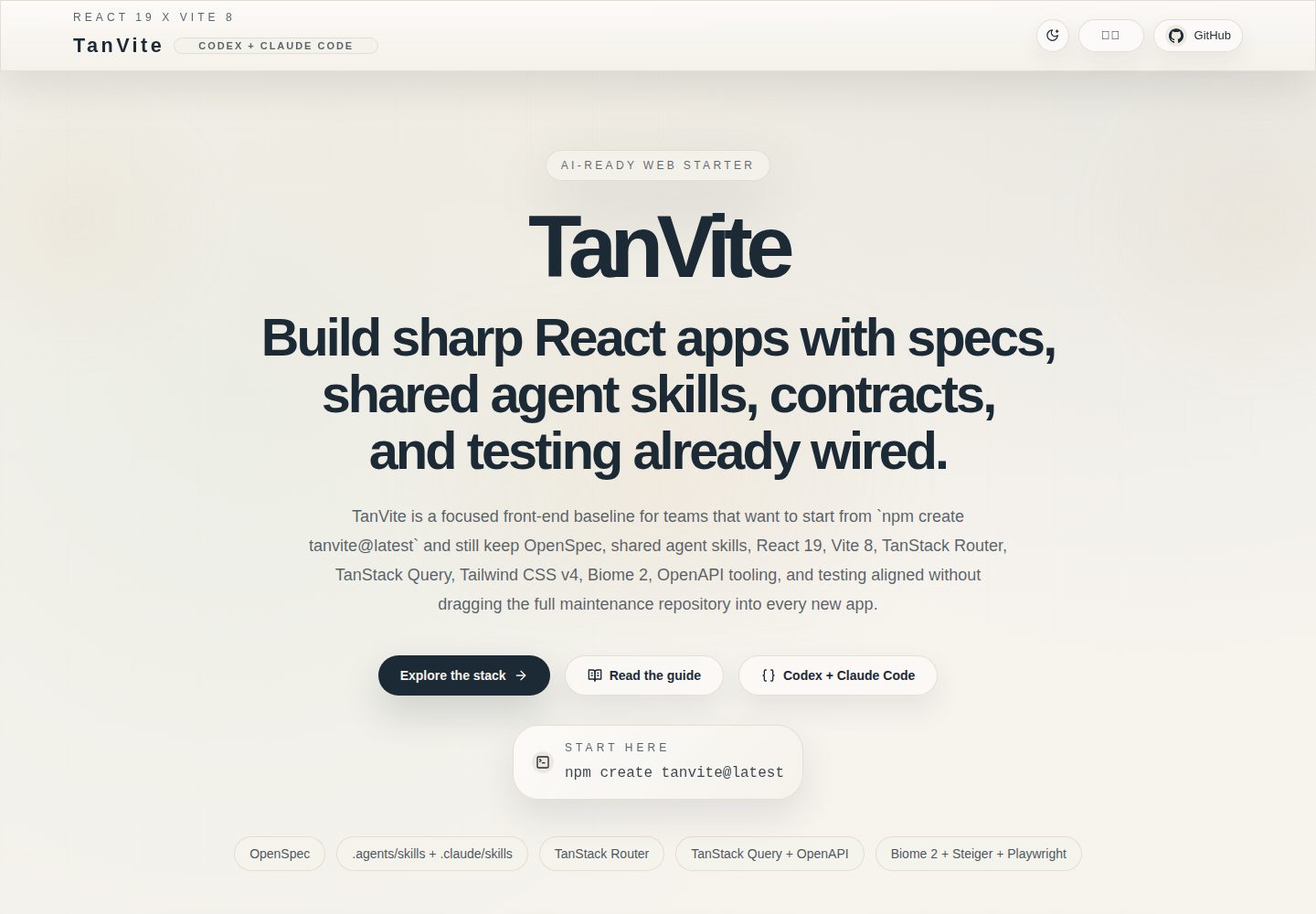
Provides the published create-tanvite scaffold, supports project creation with npm, pnpm, and yarn, and allows selecting optional capabilities such as OpenSpec, OpenAPI, Playwright, Pages, and agents via preset or --with
ViteReactStarter
tanvite — Vite Starter Template
By YangsonHung
TanVite is a frontend engineering starter template based on React 19, TypeScript, and Vite. It includes the create-tanvite scaffold, TanStack Router and Query, OpenAPI code generation, testing and CI configuration, and integrates the OpenSpec specification workflow and AI coding agent skills.
Explore the design
Compare the page layouts and mobile experience. Open any screenshot for a closer look.
Desktop homepage1 / 2
Desktop captureTop of page
Actual screenshot captured by the server browser.
All pages & views 2
Screenshots show visual appearance; interactive behavior may differ.
Recorded 2026-10-17View source
What stands out
A quick read of the recorded project description.
Integrates TanStack Router file-based routing and the TanStack Query data layer, with route files in src/app/routes and pages and components organized by directories such as pages, widgets, and shared
Generates API clients, React Query hooks, and MSW mocks from OpenAPI documents via Orval, and provides openapi:check, openapi:generate, and openapi:mock scripts
Built-in OpenSpec spec-driven workflow, with change proposals and baseline specs stored in openspec/changes and openspec/specs respectively, and commands such as openspec:list, new, and validate
Includes configuration for code quality and testing tools such as Biome, Vitest, Testing Library, Playwright, Husky, lint-staged, commitlint, and Steiger
Provides skill directories for Codex and Claude Code and optional runtime hooks for pnpm constraints, file protection, auto-formatting, context injection, and FSD boundary checks
Template Details
TanVite is a frontend engineering foundation template for product teams, generating new projects through the published create-tanvite scaffold. The README states its stack includes React 19, TypeScript, Vite, pnpm, TanStack Router file-based routing, TanStack Query for the data layer, Tailwind CSS, and shadcn/ui-related tooling. The API layer can use Orval to generate clients, React Query hooks, and MSW mocks from OpenAPI documents, or use Prism to start a standalone mock server.
On engineering standards, the template integrates Biome for linting and formatting, Vitest and Testing Library for unit tests, Playwright for end-to-end tests, Husky, lint-staged, and commitlint to constrain the commit workflow, and Steiger to check FSD directory structure and import boundaries. The repository has initialized OpenSpec's spec-driven mode, with change proposals in openspec/changes/ and baseline specs in openspec/specs/.
The AI collaboration part provides .agents/skills (Codex) and .claude/skills plus OPSX commands (Claude Code), covering design, code review, testing, Git workflows, and browser automation. Through create-tanvite's hooks option, runtime hooks can be generated for Claude Code or Codex, including blocking non-pnpm install commands, protecting generated files and .env, auto-formatting after edits, injecting project rules, and running FSD boundary checks before stopping.
Usage limitations: the README positions the source repository as maintaining TanVite itself; new projects should be created via create-tanvite rather than by directly copying the repository. The runtime requires Node.js 20+ and pnpm 10+. The README does not document the template's actual production behavior or performance data.
ViteReactScaffold
Is it right for your project?
Use Cases
- Teams that need to quickly create new React product projects from a unified frontend baseline and want routing, data fetching, styling, testing, and CI preconfigured
- Workflows that want to manage change proposals and baseline specs with OpenSpec within the repository and combine AI coding agent skills for design, review, and testing
- When the backend provides OpenAPI/Swagger documents, teams want to automatically generate frontend API clients, query hooks, and mock data, and develop in MSW or Prism mock environments
- Projects that need to provide a landing page and guide pages for a public project and build and preview the site via GitHub Pages
- Frontend engineering that wants to enforce commit conventions and FSD directory boundaries with Husky, lint-staged, commitlint, and Steiger
Suitable For
- Teams building frontend products with React, TypeScript, and Vite who want to start from a scaffold
- Frontend projects that need to incorporate the OpenSpec spec-driven process and OpenAPI code generation into the same repository
- Frontend teams using Claude Code or Codex for assisted development who want to codify project rules as skills and hooks
- Projects that need baseline configuration for unit tests, end-to-end tests, code quality checks, and commit hooks
- Projects that need to build a GitHub Pages showcase site and preview it locally
Getting started & customization
Use these recorded setup notes alongside the repository instructions for your chosen version.
- 1
The runtime requires Node.js 20+ and pnpm 10+; the README lists pnpm as the package manager
- 2
New projects are created via npm create tanvite@latest, pnpm create tanvite@latest, or yarn create tanvite@latest; after entering the directory, run pnpm install and pnpm dev, and by default access http://localhost:4319
- 3
The OpenAPI flow requires copying .env.example to .env.local, setting OPENAPI_SCHEMA_URL, then running pnpm openapi:check and pnpm openapi:generate; mocks can be started with pnpm dev:mock or pnpm openapi:mock
- 4
Local preview of GitHub Pages requires running pnpm build:pages first, then pnpm preview:pages, and accessing http://localhost:4419/tanvite/
- 5
AI agent hooks must be enabled when creating a project with create-tanvite via --hooks and --hooks-agents claude|codex|claude,codex; the full preset enables hooks for both agents by default
License & source material
Usage conditions & limitations
Free to use · keep license noticeThis listing covers the free version under the MIT license in the public repository; the free scope is the code of this version and does not imply that external services or third-party assets are free.
Must comply with when using
- Free use, modification, commercial use, and distribution of this version's code are permitted.
- When distributing copies or substantial portions of the code, retain the original author's copyright notice and the complete MIT license notice.
- The code is provided as-is; warranties and limitations of liability are governed by the original license and applicable law.
Additional costs & items to verify
- Demo images, fonts, icons, and other third-party assets must be checked against their respective licenses and cannot be judged solely by the code's MIT license.
- External services such as domains, hosting, databases, payments, or AI may incur separate charges.
- The source repository is positioned as maintaining TanVite itself (scaffold, starter template, and showcase site); new projects should be created via create-tanvite rather than by directly copying the repository.
- The runtime requires Node.js 20+.
- The runtime requires pnpm 10+.
- OpenAPI code generation requires setting OPENAPI_SCHEMA_URL in .env.local to point to the backend Swagger/OpenAPI endpoint.
- Before running pnpm openapi:generate, OPENAPI_SCHEMA_URL must point to your own backend specification.
- AI agent runtime hooks must be enabled when creating a project with create-tanvite via --hooks and --hooks-agents to select Claude Code and/or Codex.
- GitHub Pages deployment must use /tanvite/ as the production base path.
- GitHub Pages output must retain 404.html and .nojekyll to support SPA hosting.
View Original Text Basis
Permission is hereby granted, free of charge
Original License Text
The source repository is for maintaining TanVite itself: the `create-tanvite` scaffolder, the starter template, and the public showcase. Product teams starting a new app should use `npm create tanvite@latest` (or `pnpm create tanvite@latest` / `yarn create tanvite@latest`).
Original README
- Node.js 20+
Original README
- Node.js 20+ - pnpm 10+
Original README
2. Set `OPENAPI_SCHEMA_URL` to your backend Swagger/OpenAPI endpoint.
Original README
- Point `OPENAPI_SCHEMA_URL` at your backend spec before running `pnpm openapi:generate`
Original README
Select agents during scaffolding with `--hooks --hooks-agents claude`, `--hooks --hooks-agents codex`, or `--hooks --hooks-agents claude,codex`. The `full` preset enables hooks for both agents by default.
Original README
- Use `/tanvite/` as the production base path
Original README
https://github.com/YangsonHung/tanvite/blob/main/LICENSEhttps://github.com/YangsonHung/tanvite/blob/main/README.md- Keep `404.html` and `.nojekyll` in the Pages output for SPA hosting
Original README
Compiled by DeepSeek based on repository license and README ·2026-10-17. Results only cover the materials read; dependencies, images, fonts, and subsequent term changes are subject to their respective original texts.
Project checks & description sources
Template Information
- Source platforms
- GitHub
- Documentation and maintenance reference score
- More documented · 88 / 100
- Technologies
- Vite · React
- Website type
- Starter
How this score is calculated
Our heuristic uses license records (up to 30), a demo link (12), a preview (10), stars (15), recorded maintenance (15), description completeness (8), feature records (5) and classification data (5). It is not a code, security or performance test, or a Google score. A link does not establish tested functionality.
What to verify for this project
- Repository update recorded
- 2026-04-28
- Screenshot last checked
- 2026-10-17
A demo link is listed. Check it with your own content and viewport sizes; its presence does not confirm that forms, authentication or payments work.
The catalog identifies Vite as the primary stack. Check the actual dependency manifest and lockfile for versions and hosting requirements. These notes use recorded metadata, not a code audit or a deployment test.
Use a selection guide →How this description was prepared
AI-assisted description based on catalog records and repository material. Repository authors are not automatically the reviewers of this description.
Review declaration: codex-user-requested-batch-review-20261018 · 2026-10-18
Inspect the recorded source material
SHA-256: e4198a711fb9bc282c2d4d57032e80d6f454356c5461a76ebef987b63319c27f
2026-10-17T01:35:10.160Z
Source file / repository# ⚡ TanVite
[](#-tech-stack)
[](#-tech-stack)
[](#-tech-stack)
[](#-tech-stack)
[](#-license)
[](https://github.com/YangsonHung/tanvite/actions/workflows/deploy-pages.yml)
[](https://github.com/YangsonHung/tanvite/actions/workflows/ci.yml)
[](https://yangsonhung.github.io/tanvite/)
**English** | [中文](README.zh-CN.md)
TanVite is a production-grade React 19 starter system designed as a reusable frontend engineering foundation for serious product teams. It combines a publishable `create-tanvite` scaffolder, Vite, TypeScript, OpenSpec, `.agents/skills` for Codex, `.claude/skills` plus OPSX commands for Claude Code, TanStack Router, TanStack Query, OpenAPI tooling, Tailwind CSS, automated testing, code-quality enforcement, and GitHub Pages-ready delivery into a polished, high-standard stack for launching new products with spec-driven workflow, AI-assisted implementation, and modern frontend best practices already in place.

## 🛰️ Why TanVite
- Start from a modern React 19 starter without assembling tooling by hand
- Work with OpenSpec from day one so change proposals and baseline specs stay inside the repository
- Use `.agents/skills` for Codex and `.claude/skills` plus OPSX commands for Claude Code to cover design, code review, testing, git workflows, and browser automation
- Keep routing, data fetching, styling, testing, and CI aligned from the first commit
- Build product work on top of a frontend baseline that already standardizes routing, data, styling, testing, and CI
- Combine OpenSpec-driven planning with OpenAPI-driven API generation in one repository
- Reuse a polished landing page and guide page for public project presentation
- Start new product work through `npm create tanvite@latest` / `pnpm create tanvite@latest` / `yarn create tanvite@latest` instead of copying the full maintenance repository
## 🚀 Create A Project
Use the published scaffolder when you want a new TanVite-based product project.
Pick the package manager you use:
```bash
# npm
npm create tanvite@latest my-app
# pnpm
pnpm create tanvite@latest my-app
# yarn
yarn create tanvite@latest my-app
```
Then install and start the dev server:
```bash
cd my-app
pnpm install
pnpm dev
```
Open `http://localhost:4319`.
Optional examples (flags go after `--` for `npm`, directly for `pnpm` / `yarn`):
```bash
# npm
npm create tanvite@latest my-app -- --preset full
npm create tanvite@latest my-app -- --with openspec,openapi,playwright,pages,agents
npm create tanvite@latest my-app -- --hooks --hooks-agents claude,codex
# pnpm
pnpm create tanvite@latest my-app --preset full
pnpm create tanvite@latest my-app --with openspec,openapi,playwright,pages,agents
pnpm create tanvite@latest my-app --hooks --hooks-agents claude,codex
# yarn
yarn create tanvite@latest my-app --preset full
yarn create tanvite@latest my-app --with openspec,openapi,playwright,pages,agents
yarn create tanvite@latest my-app --hooks --hooks-agents claude,codex
```
### 🧭 Next Steps
1. Replace the landing copy and branding.
2. Add or remove TanStack route entries under `src/app/routes`.
3. Compose route-facing pages in `src/pages`, then move reusable screen blocks into `src/widgets` and shared runtime logic into `src/shared`.
4. Keep the existing testing and CI setup as the project baseline.
## 🛠️ Maintainers Only
The source repository is for maintaining TanVite itself: the `create-tanvite` scaffolder, the starter template, and the public showcase. Product teams starting a new app should use `npm create tanvite@latest` (or `pnpm create tanvite@latest` / `yarn create tanvite@latest`).
### Publish `create-tanvite`
Release from `packages/create-tanvite` and verify tarball contents before publish.
```bash
cd packages/create-tanvite
npm version patch --no-git-tag-version
TARBALL=$(pnpm pack | tail -n 1)
tar -tzf "$TARBALL" | grep -E "template/base/(gitignore|\\.gitignore|src/routeTree\\.gen\\.ts)"
pnpm publish --access public --no-git-checks --registry=https://registry.npmjs.org
```
Then verify npm dist-tags:
```bash
npm view create-tanvite version dist-tags --json --registry=https://registry.npmjs.org
```
## 💠 Features
- `create-tanvite` scaffolder for curated starter generation
- React 19 + TypeScript + Vite 8 starter baseline
- OpenSpec workspace initialized in `spec-driven` mode
- `.agents/skills` for Codex and `.claude/skills` plus OPSX commands for Claude Code, covering frontend design, review, testing, git workflows, and browser automation
- TanStack Router file-based routing
- TanStack Query data layer
- OpenAPI-driven client, hook, and mock generation via Orval
- Tailwind CSS and shadcn/ui-ready utilities
- Biome for linting and formatting
- Vitest + Testing Library for unit tests
- Playwright for end-to-end tests
- MSW and Prism for browser-level mocks and standalone mock server workflows
- Husky + lint-staged + commitlint for commit workflow enforcement
- Steiger-powered FSD structure and import-boundary checks
- AI agent hooks for Claude Code and Codex — pnpm enforcement, file protection, auto-format, context injection, FSD checks, and desktop notifications
## 🧩 Tech Stack
| Category | Technology |
| --- | --- |
| Framework | React 19 |
| Language | TypeScript |
| Build Tool | Vite |
| Package Manager | pnpm |
| Specification Workflow | OpenSpec |
| AI Collaboration | `.agents/skills`, `.claude/skills`, Codex, Claude Code, OPSX commands, agent hooks |
| Routing | TanStack Router |
| Data Fetching | TanStack Query |
| API Contract | Orval, OpenAPI |
| Mocking | MSW, Prism |
| Styling | Tailwind CSS |
| UI Utilities | shadcn/ui, class-variance-authority, tailwind-merge |
| Code Quality | Biome |
| Unit Testing | Vitest, Testing Library, jsdom |
| E2E Testing | Playwright |
| Git Hooks | Husky, lint-staged |
## 🖥️ Requirements
- Node.js 20+
- pnpm 10+
## 💻 Scripts
```bash
pnpm routes:generate # Generate the TanStack Router route tree
pnpm openapi:check # Validate the remote OpenAPI document
pnpm openapi:generate # Generate API clients, React Query hooks, and MSW mocks
pnpm openapi:mock # Start a standalone Prism mock server
pnpm dev # Start the Vite dev server
pnpm dev:mock # Start Vite with the MSW browser mock enabled
pnpm dev:showcase # Start the isolated showcase app locally
pnpm build # Build the app into dist/
pnpm build:pages # Build the showcase site into dist-pages/
pnpm preview # Preview dist/ on http://localhost:4419
pnpm preview:pages # Preview dist-pages/ on http://localhost:4419
pnpm test # Run Vitest in watch mode
pnpm test:run # Run unit tests once
pnpm test:coverage # Generate a coverage report
pnpm test:e2e # Run Playwright tests
pnpm test:e2e:ui # Run Playwright in UI mode
pnpm check # Run Biome checks with fixes
pnpm lint # Run Biome lint
pnpm format # Run Biome format
```
## 🌐 Preview GitHub Pages Locally
1. Build the Pages artifact.
2. Start the Pages preview server.
3. Open the project-site path.
```bash
pnpm build:pages
pnpm preview:pages
```
Open `http://localhost:4419/tanvite/`.
## 🧠 OpenAPI Workflow
1. Copy `.env.example` to `.env.local`.
2. Set `OPENAPI_SCHEMA_URL` to your backend Swagger/OpenAPI endpoint.
3. Validate the contract and generate the API layer.
4. Start development against either MSW or a standalone Prism mock server.
```bash
cp .env.example .env.local
pnpm openapi:check
pnpm openapi:generate
pnpm dev:mock
```
Use `pnpm openapi:mock` when you want a separate mock server on `http://127.0.0.1:4010`.
## 🧭 OpenSpec Workflow
This repository has already been initialized with OpenSpec and uses the `spec-driven` schema.
- Keep active change proposals under `openspec/changes/`
- Keep baseline specifications under `openspec/specs/`
- Keep repository-level OpenSpec settings in `openspec/config.yaml`
Common commands:
```bash
pnpm openspec:list
pnpm openspec:new <name>
pnpm openspec:validate
pnpm openspec:spec:list
```
## 🤖 Integrated Skills
The current workspace ships with Codex skills under `.agents/skills/`, Claude Code skills under `.claude/skills/`, and OpenSpec command assets under `.claude/commands/opsx/`.
- `openspec-*` skills and `opsx/*` commands for OpenSpec change exploration, proposal, application, and archiving
- `frontend-design`, `ui-ux-pro-max`, and `web-design-guidelines` for product-facing UI work
- `frontend-code-review` and `code-review-expert` for review passes on pending changes
- `react-expert` and `typescript-expert` for framework and language-specific guidance
- `agent-browser` and `webapp-testing` for browser automation and local app verification
- `git-commit` and `git-pushing` for conventional commit and delivery workflows
## 🪝 Agent Hooks
When the `hooks` feature is enabled via `create-tanvite`, the generated project ships with deterministic runtime hooks for Claude Code and/or Codex. These hooks enforce project rules automatically rather than relying on the AI to remember them.
### Claude Code
| Hook | Event | What it does |
| --- | --- | --- |
| pnpm enforcement | `PreToolUse` (Bash) | Blocks `npm`, `yarn`, `bun` install commands |
| File protection | `PreToolUse` (Edit\|Write) | Blocks edits to `src/routeTree.gen.ts`, `src/shared/api/generated/`, `.env`, `package-lock.json` |
| Auto-format | `PostToolUse` (Edit\|Write) | Runs `biome check --write` after every file edit |
| Context injection | `SessionStart` | Injects project rules on session start and after context compaction |
| FSD check | `Stop` | Runs Steiger through `pnpm check:boundaries` before the agent stops |
| Desktop notification | `Notification` | Sends a macOS notification when the agent needs input |
### Codex
| Hook | Event | What it does |
| --- | --- | --- |
| pnpm enforcement | `PreToolUse` (Bash) | Blocks `npm`, `yarn`, `bun` install commands |
| Context injection | `SessionStart` | Injects project rules on session start |
| FSD check | `Stop` | Runs Steiger through `pnpm check:boundaries` before the agent stops |
Select agents during scaffolding with `--hooks --hooks-agents claude`, `--hooks --hooks-agents codex`, or `--hooks --hooks-agents claude,codex`. The `full` preset enables hooks for both agents by default.
## 🗺️ Project Structure
```text
src/
├── routeTree.gen.ts
├── app/
│ ├── main.tsx
│ ├── providers/
│ ├── routes/
│ │ ├── __root.tsx
│ │ └── index.tsx
│ ├── router.tsx
│ └── styles/
├── entities/
├── features/
├── pages/
│ └── home/
├── shared/
│ ├── api/
│ ├── i18n/
│ ├── lib/
│ ├── model/
│ └── ui/
├── widgets/
│ └── starter-home/
└── vite-env.d.ts
openspec/
├── changes/
├── specs/
└── config.yaml
.agents/
└── skills/
├── agent-browser/
├── frontend-design/
├── openspec-propose/
├── react-expert/
├── typescript-expert/
└── webapp-testing/
.claude/
└── commands/
└── opsx/
showcase/
├── index.html
└── src/
├── app.tsx
├── components/
├── lib/
├── main.tsx
└── styles.css
packages/
└── create-tanvite/
├── bin/
├── src/
└── template/
tests/
├── e2e/
│ └── home.spec.ts
├── lib/
│ └── utils.test.ts
└── setup.ts
```
## 🛣️ Routing
Generate the route tree with:
```bash
pnpm routes:generate
```
`pnpm build` and `pnpm build:pages` run route generation automatically before bundling.
## ☁️ GitHub Pages
Use the official GitHub Actions Pages deployment flow.
- App build output: `dist/`
- Pages build output: `dist-pages/`
- Public URL: `https://yangsonhung.github.io/tanvite`
- Deployment workflow: [.github/workflows/deploy-pages.yml](./.github/workflows/deploy-pages.yml)
For GitHub Pages:
- Build with `pnpm build:pages`
- Use `/tanvite/` as the production base path
- Publish the GitHub Actions artifact instead of committing `docs/`
- Keep `404.html` and `.nojekyll` in the Pages output for SPA hosting
For regular production deployment, use `pnpm build`.
## 🧰 Development Defaults
- Enable React Query Devtools and TanStack Router Devtools only in development
- Track requirement and behavior changes in `openspec/changes` before implementation work grows
- Keep `.agents/skills`, `.claude/skills`, and `.claude/commands/opsx` versioned with the project so Codex and Claude Code stay aligned on the same workflows
- Point `OPENAPI_SCHEMA_URL` at your backend spec before running `pnpm openapi:generate`
- Keep FSD layers as `app/pages/widgets/features/entities/shared`; `processes` is intentionally omitted because it is deprecated
- Run `pnpm check:boundaries` to validate the FSD structure with Steiger
- Generated API artifacts live under `src/shared/api/generated`
- Keep shared query defaults in `src/shared/api/query-client.ts`
- Use `src/shared/lib/utils.ts` for the `cn()` helper
## 🤝 Contributing
Read [CONTRIBUTING.md](./CONTRIBUTING.md) before opening a pull request.
## 🌀 Changelog
Track project history in [CHANGELOG.md](./CHANGELOG.md).
## 🪪 License
MIT
Explore similar templates
Compare previews and descriptions within the same stack and category.

cove
Cove is a minimal TanStack Start starter template maintained by mugnavo, integrating React, TanStack Router/Query, Tailwind CSS, shadcn/ui, Drizzle ORM with PostgreSQL, Better Auth, Vite Plus, and Nitro.
Vite · SaaS

vite-react-boilerplate
A production-ready Vite + React starter template with TypeScript, Tailwind CSS, TanStack Router/Query/Table, Storybook, React Hook Form + Zod, Vitest and Playwright testing, plus Husky/Commitizen/Commitlint commit conventions.
Vite · Starter

vital
Vital is a Vite-based React starter template using TypeScript and Tailwind CSS, with an Atomic Design component directory, path aliases and Hero Icons.
Vite · Starter

react-vite-admin
A backend management starter built on Vite and React, integrating Recoil, React Query, TypeScript, and Axios, with Ant Design-style interface screenshots. Suitable as a starting point for management-side projects, licensed under MIT, with Chinese documentation and common scripts.
Vite · Admin dashboard

typescript-react_best_practices-vite_template
A Vite + React + TypeScript starter template by CodelyTV, preconfigured with Jest and React Testing Library unit tests, Cypress end-to-end tests, ESLint and Prettier using Codely's shared configuration, GitHub Actions workflows, a Makefile, and Sass.
Vite · Starter

cloudflare-starter-kit
A Cloudflare Workers project scaffolding template maintained by kriasoft, using Vite and TypeScript, with three built-in workspaces: api, app, and edge, and preconfigured local testing, multiple environments, and a GitHub Actions deployment workflow.
Vite · Starter