以 Astro 集成方式提供,可新建项目或安装到已有项目
Astro博客
astro-charm — Astro 博客模板
作者 Yuhanawa
astro-charm 是 Yuhanawa 开发的 Astro 博客主题,基于 MIT 许可发布,提供分类、标签、暗色模式、搜索、giscus 评论与 RSS 等博客常用功能。
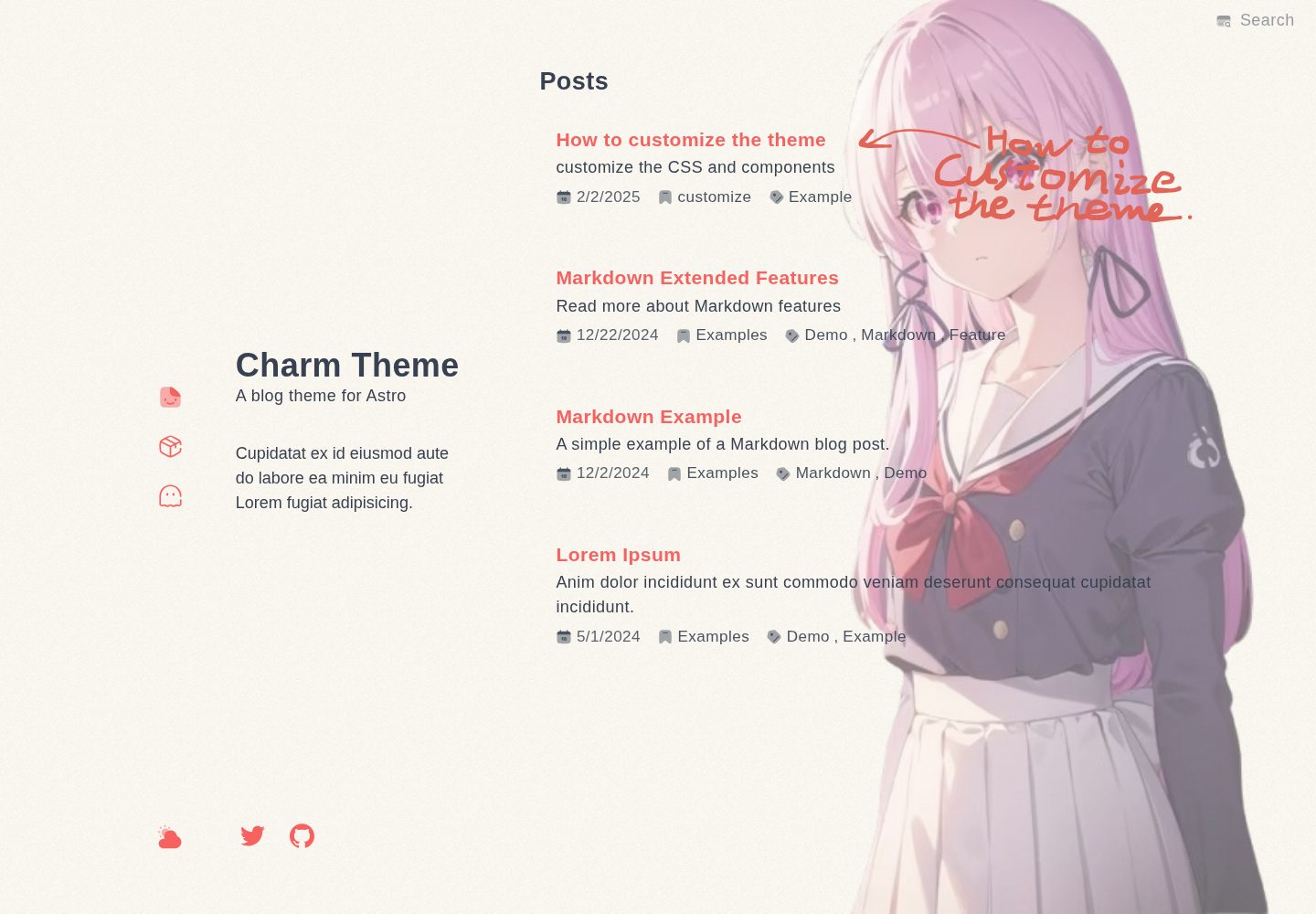
看看你的网站会是什么样
浏览真实页面截图,比较内容排版与手机效果。点击下方缩略图切换,放大查看整页细节。
全部页面与视图 3
截图用于了解视觉与布局,交互效果请以实际项目为准。
采集于 2026-10-02查看来源
值得关注的模板亮点
从已有项目资料中,快速了解它的特点。
内置分类页与标签页,便于按主题组织文章
支持暗色模式、代码块与站内搜索
支持 giscus 评论与 Google Analytics
提供 Sitemap 与 RSS 输出
通过配置项自定义站点信息、侧边栏、导航、页脚与目录
模板详细介绍
astro-charm 是一个面向博客场景的 Astro 主题,仓库与在线演示均公开可访问。主题以侧边栏信息区加文章列表的编辑式布局呈现,同时提供桌面端与移动端页面,并包含分类页、标签页以及代表性内页(如 /projects)。
功能方面,主题内置暗色模式、代码块、搜索、giscus 评论、Google Analytics、Sitemap 与 RSS,并支持通过配置项自定义站点语言、标题、描述、作者、侧边栏文案、导航与页脚样式、目录(TOC)、Markdown 选项以及 giscus 参数。主题以 Astro 集成方式接入,可新建项目或安装到已有项目。
使用上需要注意:需要在 astro.config.ts 中提供 site 字段,因为 Sitemap 与 RSS 依赖该配置;图片转换报错时需手动安装 Sharp;若出现响应已发送的错误,需在 src/content 下创建 posts 目录并至少放入一个 Markdown 文章。演示站点右侧的图片不属于主题本身。
Astro博客
适合你的项目吗?
适用场景
- 搭建以文章列表和侧边栏信息为主的个人博客
- 为已有 Astro 项目添加博客主题与分类、标签页面
- 需要暗色模式、搜索、评论和 RSS 的静态博客站点
- 希望用配置项调整站点标题、描述、导航与页脚样式的场景
适合人群
- 使用 Astro 并希望快速获得博客主题的开发者
- 需要分类与标签组织的技术博客作者
- 偏好 MIT 许可、可自行修改主题代码的用户
上手与定制指南
结合仓库当前版本的说明,按下面的资料检查内容、配置与运行要求。
- 1
新建项目可运行 pnpm create astro-theme@latest use astro-charm;已有项目可运行 pnpm astro add astro-charm
- 2
需在 src/content.config.ts 中合并 astro-charm/content 导出的 collections
- 3
必须在 astro.config.ts 中设置 site,Sitemap 与 RSS 依赖该字段
- 4
图片转换报错时需手动安装 Sharp
- 5
出现响应已发送错误时,需在 src/content 下创建 posts 目录并放入至少一个 Markdown 文章
授权与来源资料
使用条件与限制
免费使用 · 保留许可声明本次收录的是公开仓库中采用 MIT 许可的免费版本;免费范围为该版本代码,不代表外部服务或第三方素材免费。
使用时需要遵守
- 允许免费使用、修改、商用和分发该版本代码。
- 分发代码副本或实质性部分时,保留原作者版权声明和完整 MIT 许可声明。
- 代码按现状提供;担保与责任限制以原许可证及适用法律为准。
额外费用与待核对事项
- 评论功能依赖第三方 giscus 服务,需自行提供 GitHub 仓库与分类等配置,属于外部服务依赖。
- 启用 Google Analytics 需提供 googleAnalyticsId,属于第三方外部服务与账号配置。
- 必须在 astro.config.ts 中设置 site 字段,否则 Sitemap 与 RSS 无法正常工作。
- 图片转换报错时需手动安装 Sharp 依赖。
- 出现响应已发送错误时,需在 src/content 下创建 posts 目录并至少放入一个 Markdown 文章。
- 演示站点右侧图片不属于主题本身,不应视为主题自带资源。
- 演示图片、字体、图标及其他第三方素材需按各自许可核对,不能仅凭代码的 MIT 许可判断。
- 域名、托管、数据库、支付或 AI 等外部服务可能另外收费。
查看原文依据
Permission is hereby granted, free of charge
许可证原文
Comments support (giscus)
README 原文
Google Analytics support
README 原文
you need to add `site` to `astro.config.ts` file, because `charm` use it for `sitemap` and `rss`
README 原文
Please install Sharp (`sharp`) manually into your project
README 原文
Please create `posts` folder in `src\content` folder, and create a post ( `.md` file ) in it
README 原文
https://github.com/Yuhanawa/astro-charm/blob/main/LICENSEhttps://github.com/Yuhanawa/astro-charm/blob/main/README.mdThe image on the right in the `Live Demo` is not part of the Charm theme
README 原文
DeepSeek 根据仓库许可证和 README 整理 ·2026-10-02。结果仅覆盖已读取资料,依赖、图片、字体及后续条款变更以各自原文为准。
项目核对记录与介绍依据
模板资料
- 来源平台
- GitHub
- 资料与维护参考分
- 资料较完整 · 87 / 100
- 技术栈
- Astro
- 网站类型
- 博客
这个分数如何计算
本站按许可资料(最高30分)、演示链接(12分)、预览图(10分)、Star数(15分)、记录的维护时间(15分)、描述完整度(8分)、功能记录(5分)和分类资料(5分)计算。它不是代码、安全或性能测试,也不是 Google 评分;有链接不代表已实测可用。
这个项目需要核对什么
- 记录的仓库更新时间
- 2025-11-18
- 截图检查日期
- 2026-10-02
已收录演示链接。请用你的内容与屏幕尺寸检查;有演示不代表表单、认证或支付已经可用。
目录记录的主要技术栈是 Astro。请通过依赖清单和锁文件核对实际版本与托管要求。这些说明基于收录资料,不代表代码审计或部署实测。
查看具体选型方法 →介绍的制作与核对状态
介绍由 AI 辅助整理目录与仓库资料。仓库作者不等于这篇介绍的审核者。
已完成服务器许可规则与 AI 来源核对;未经过人工编辑审核。
查看当时使用的来源资料
SHA-256: 309540ebcb14e4928947df41be2ae4a1d50080d5ce59e957011ddf7e7388945a
2026-10-02T09:42:53.503Z
来源文件 / 仓库# Astro Theme: Charm
[English](./README.md) | [日本語](./README-ja.md) | [中文](./README-zh-cn.md)
Beautiful, simple and easy-to-use blog theme

[Github](https://github.com/yuhanawa/astro-charm) | [Live Demo](https://astro-charm.vercel.app/) | [PageSpeed](https://pagespeed.web.dev/analysis?url=https%3A%2F%2Fastro-charm.vercel.app%2F)
Note: The image on the right in the `Live Demo` is not part of the Charm theme
## Features
- Built with Astro v5
- Desktop and Mobile support
- High PageSpeed score
- 100! [Report from Dec 29, 2024](https://pagespeed.web.dev/analysis/https-astro-charm-vercel-app/g1cxq98foh)
- view new [PageSpeed](https://pagespeed.web.dev/analysis?url=https%3A%2F%2Fastro-charm.vercel.app%2F)
- Category and Tag page
- Dark mode
- Code Block
- Search
- Comments support (giscus)
- Google Analytics support
- Sitemap
- RSS
- Custom
- [How to customize the theme](https://astro-charm.vercel.app/posts/custom)
## How to use
1. Run the following command to create a new project with `astro-charm` theme.
```bash
pnpm create astro-theme@latest use astro-charm
```
2. Add `src/content.config.ts` to your project.
```ts
import { collections as charmCollections } from "astro-charm/content";
export const collections = {
// your other collections
...charmCollections,
};
```
3. Modify config and enjoy it!
Note: you need to add `site` to `astro.config.ts` file, because `charm` use it for `sitemap` and `rss`.
To learn more, see: [Config](#config)
<details>
<summary>Install to existing project</summary>
1. Install `astro-charm` to your project.
```bash
pnpm astro add astro-charm
```
2. Modify `src/content.config.ts` file.
```ts
import { collections as charmCollections } from "astro-charm/content";
export const collections = {
// your other collections
...charmCollections,
};
```
3. Modify `astro.config.ts` file.
```ts
import { defineConfig } from "astro/config";
import charm from "astro-charm";
export default defineConfig({
prefetch: true,
site: "<your-site-url>",
integrations: [
charm({
config: {
lang: "en", // for HTML's lang attribute and RSS
title: "Title on home page", // for seo on home page
description: "Description on home page", // for seo on home page
side: {
title: "Title",
sub: "Sub title",
bio: "Your bio, about 50~90 characters, automatic line wrap",
},
// more config
},
}),
],
});
```
</details>
## Config
You need to add `site` to `astro.config.ts` file, because `charm` use it for `sitemap` and `rss`.
### Minimal config
```ts
import { defineConfig } from "astro/config";
import charm from "astro-charm";
export default defineConfig({
prefetch: true,
site: "<your-site-url>",
integrations: [
charm({
config: {
lang: "en", // for HTML's lang attribute and RSS
title: "Title on home page", // for seo on home page
description: "Description on home page", // for seo on home page
side: {
title: "Title",
sub: "Sub title",
bio: "Your bio, about 50~90 characters, automatic line wrap",
},
},
}),
],
});
```
### [Config schema](https://github.com/Yuhanawa/astro-charm/blob/main/package/index.ts#L59-L161)
```ts
const configSchema = z.object({
lang: z.string(),
title: z.string(),
titleSuffix: z.string().or(z.boolean()).default(true),
description: z.string().optional(),
author: z.string().optional(),
placeholderImage: z.string().min(1).optional(),
licenseId: z.enum([...licenses] as [string, ...string[]]).optional(),
rss: z.boolean().default(true),
googleAnalyticsId: z.string().optional(),
font: z
.enum(["auto", "full", "only-en", "disabled", "dynamic"])
.default("auto"),
shootingStar: z.boolean().default(true),
side: z.object({
title: z.string(),
sub: z.string(),
bio: z.string(),
navHome: z
.object({
title: z.string().default("Home"),
link: z.string().default("/"),
icon: iconStringOrLightDarkOrWithStates.default({
default: "solar:file-text-broken",
hover: "solar:file-smile-outline",
active: "solar:file-smile-bold-duotone",
}),
})
.default({}),
footer: z
.array(
z.object({
title: z.string(),
link: z.string(),
icon: iconStringOrLightDarkOrWithStates,
}),
)
.min(1)
.default([
{
title: "Twitter",
link: "https://x.com/",
icon: "simple-icons:twitter",
},
{
title: "GitHub",
link: "https://github.com/yuhanawa/astro-charm",
icon: "simple-icons:github",
},
]),
navStyle: z.enum(["default", "only-icon", "only-title"]).default("default"),
footerStyle: z
.enum(["default", "only-icon", "only-title"])
.default("default"),
toc: z
.object({
enabled: z.boolean().optional().default(true),
title: z.string().optional().default("Table of contents"),
minLength: z.number().min(1).max(3).optional(),
maxDepth: z.number().min(1).max(6).optional(),
})
.default({}),
}),
markdown: z
.object({
colorizedBrackets: z
.object({
explicitTrigger: z.boolean().default(false), // if true, ```ts colorize-brackets
})
.default({}),
twoslash: z
.object({
explicitTrigger: z.boolean().default(true), // if true, ```ts twoslash
})
.default({}),
headingAnchor: z.string().default("#"),
})
.default({}),
giscus: z
.object({
repo: z.string(),
repoId: z.string(),
category: z.string(),
categoryId: z.string(),
mapping: z
.enum(["pathname", "url", "title", "og:title"])
.default("pathname"),
strict: z.boolean().default(false),
reactions: z.boolean().default(true),
emitMetadata: z.boolean().default(false),
inputPosition: z.enum(["top", "bottom"]).default("top"),
theme: z
.object({
light: z.string(),
dark: z.string(),
})
.default({
light: "light",
dark: "dark",
}),
})
.optional(),
});
```
## Troubleshooting
### [CouldNotTransformImage] Could not transform image
Please install Sharp (`sharp`) manually into your project
```bash
pnpm add sharp
```
### ResponseSentError: The response has already been sent to the browser and cannot be altered.
Please create `posts` folder in `src\content` folder, and create a post ( `.md` file ) in it
The minimal md file:
```
---
title: title
published: 2025-04-10
---
```
## Questions & Suggestions
If you have any questions or suggestions, feel free to open an issue. All PRs are welcome!
看看同类模板
对比同技术栈与用途的模板,找到更适合的视觉与内容结构。

astrowind
⭕️ AstroWind: A free template using Astro v7 and Tailwind CSS v4. Astro starter theme.
Astro · 博客

astro-paper
A minimal, accessible and SEO-friendly Astro blog theme.
Astro · 博客

fuwari
✨A static blog template built with Astro.
Astro · 博客

Firefly
Firefly 是一款基于 Astro 的静态博客主题,由 CuteLeaf 在 saicaca 的 Fuwari 模板基础上二次开发,主打清新美观的视觉风格。
Astro · 博客

astro-theme-cactus
A simple Astro theme. Use it to create your blog or website.
Astro · 作品集

astrofy
Astrofy is a free and open-source template for your Personal Portfolio Website built with Astro and TailwindCS…
Astro · 作品集