明暗模式切换,选择通过 localStorage 持久化
Hexo博客
hexo-theme-zobot — Hexo 博客模板
作者 zhuoqizheng
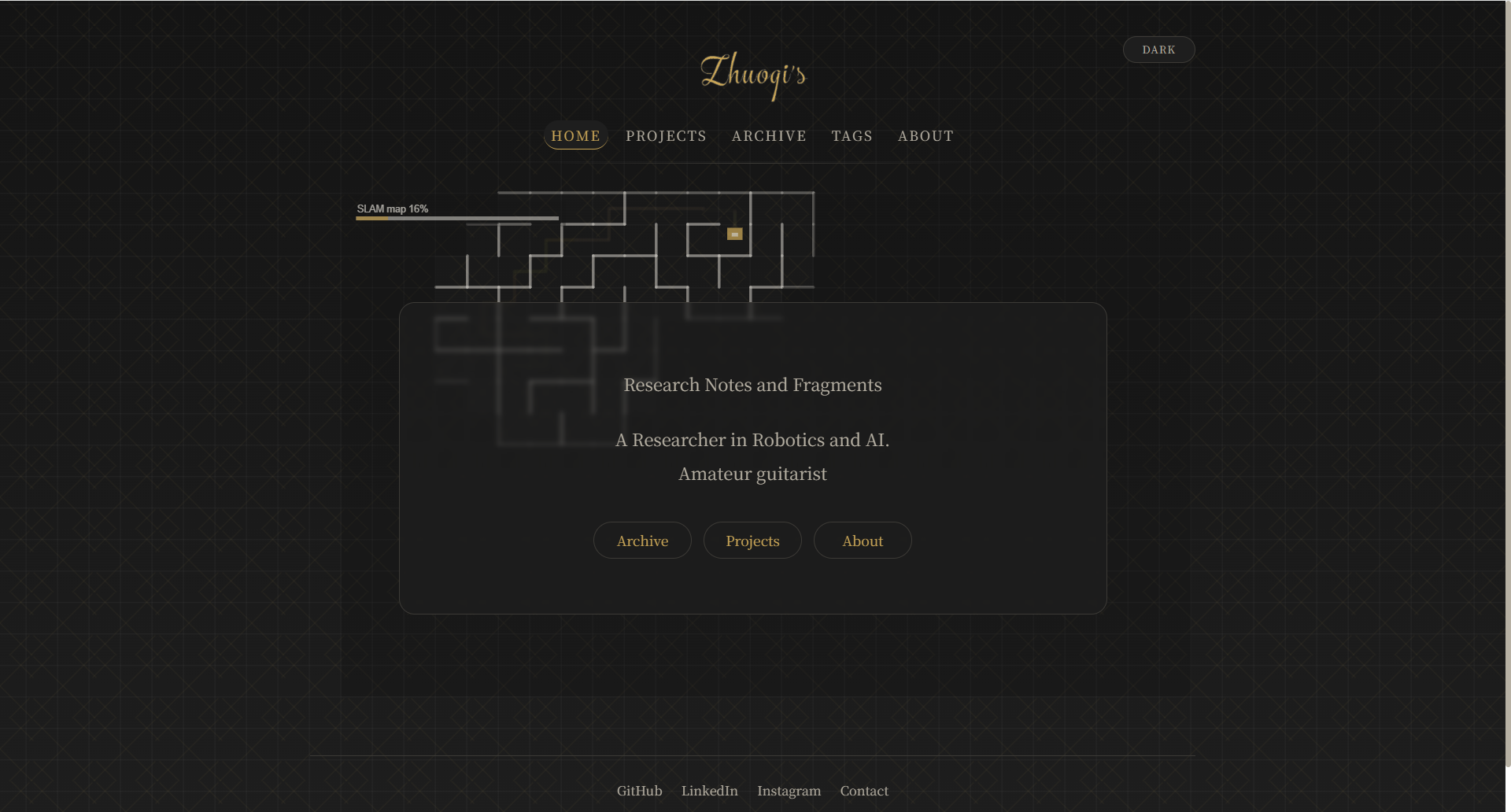
hexo-theme-zobot 是一个基于 Hexo 的极简博客主题,提供明暗模式切换、canvas 机器人首页动画与衬线字体排版。
看看你的网站会是什么样
浏览真实页面截图,比较内容排版与手机效果。点击下方缩略图切换,放大查看整页细节。
目前有 1 张原始预览,可打开完整图片查看设计细节。
截图用于了解视觉与布局,交互效果请以实际项目为准。
采集于 2026-10-03查看来源
值得关注的模板亮点
从已有项目资料中,快速了解它的特点。
首页用 canvas 绘制 SLAM 风格机器人在迷宫中行走的动画
滚动进度条与返回顶部按钮
Prism.js 代码高亮,配套 material-light / material-dark 主题
标题 Cormorant Garamond、正文 Noto Serif SC、代码 JetBrains Mono 的衬线排版
EJS 模板与 Stylus 样式,响应式布局带动态背景图案
模板详细介绍
hexo-theme-zobot 是发布在 GitHub 上的 Hexo 博客主题,采用 MIT 许可。它基于 xmizore 的 hexo-theme-insnow(同为 MIT)做了较大幅度的定制,形成名为 zobot 的版本。主题使用 EJS 模板与 Stylus 样式,定位是极简、偏编辑感的博客外观。
功能方面,主题提供明暗模式切换并通过 localStorage 记住选择;首页用 canvas 绘制一个 SLAM 风格的机器人在迷宫中行走的动画;页面包含滚动进度条与返回顶部按钮;代码高亮使用 Prism.js,并配套 material-light / material-dark 两套配色。字体上,标题用 Cormorant Garamond,正文用 Noto Serif SC,代码用 JetBrains Mono,整体为衬线排版风格,布局为响应式并带动态背景图案。
使用上,主题通过 git clone 到 Hexo 站点的 themes/zobot 目录,并在站点 _config.yml 中设置 theme: zobot。主题配置 themes/zobot/_config.yml 可设置页脚社交链接(github、linkedin、mail、instagram 与版权起始年份 since)、首页副标题与额外介绍文字,以及明暗模式各自的 logo 图片路径(logo 文件需放在站点 source/image/ 目录)。关于、标签、分类、归档等页面需用 hexo new page 创建,并在各自 front-matter 中指定 layout 为 about、tags、categories、archive。README 给出的演示站点为 zhuoqi.me。
限制方面,仓库未提供依赖清单或版本要求,安装前需自行确认与所用 Hexo 版本的兼容性;主题的第三方素材(演示图片、字体、图标等)需按各自许可单独核对,代码的 MIT 许可不覆盖这些内容。
Hexo博客
适合你的项目吗?
适用场景
- 搭建以文字阅读为主的个人 Hexo 博客
- 需要明暗两种阅读模式并希望记住用户选择的站点
- 希望在首页用 canvas 动画替代静态头图的博客
- 偏好衬线字体与简洁编辑式排版的写作站点
适合人群
- 使用 Hexo 生成静态博客的站长
- 喜欢极简、衬线排版风格的写作者
- 需要明暗模式切换与代码高亮的开发者博客
- 愿意按 README 手动配置页脚链接、logo 与页面的用户
上手与定制指南
结合仓库当前版本的说明,按下面的资料检查内容、配置与运行要求。
- 1
将仓库克隆到 Hexo 站点的 themes/zobot 目录,并在站点 _config.yml 中设置 theme: zobot
- 2
在 themes/zobot/_config.yml 中配置页脚社交链接、版权起始年份、首页副标题与明暗模式 logo 路径
- 3
logo 图片需放入站点 source/image/ 目录,再在主题配置中填写对应路径
- 4
用 hexo new page 创建 about、tags、categories、archive 页面,并在 front-matter 中设置对应 layout
- 5
README 未列出依赖清单与版本要求,安装前请自行确认与所用 Hexo 版本的兼容性
授权与来源资料
使用条件与限制
免费使用 · 保留许可声明本次收录的是公开仓库中采用 MIT 许可的免费版本;免费范围为该版本代码,不代表外部服务或第三方素材免费。
使用时需要遵守
- 允许免费使用、修改、商用和分发该版本代码。
- 分发代码副本或实质性部分时,保留原作者版权声明和完整 MIT 许可声明。
- 代码按现状提供;担保与责任限制以原许可证及适用法律为准。
额外费用与待核对事项
- 该主题基于 xmizore 的 hexo-theme-insnow(MIT 许可)大幅定制而来,使用时需保留原项目的 MIT 版权与许可声明。
- 需自行准备 logo 图片并放入站点 source/image/ 目录,再在主题配置中填写路径,主题本身不附带 logo 素材。
- about、tags、categories、archive 等页面需用户自行用 hexo new page 创建并在 front-matter 指定 layout,主题不自动生成这些页面。
- 演示图片、字体、图标及其他第三方素材需按各自许可核对,不能仅凭代码的 MIT 许可判断。
- 域名、托管、数据库、支付或 AI 等外部服务可能另外收费。
查看原文依据
Permission is hereby granted, free of charge
许可证原文
Based on [hexo-theme-insnow](https://github.com/xmizore/hexo-theme-insnow) by xmizore (MIT), heavily customized into **zobot**.
README 原文
Place your logo images in your site's `source/image/` directory, then set the paths under `logo:` above.
README 原文
https://github.com/zhuoqizheng/hexo-theme-zobot/blob/main/LICENSEhttps://github.com/zhuoqizheng/hexo-theme-zobot/blob/main/README.mdCreate the following pages as needed:
README 原文
DeepSeek 根据仓库许可证和 README 整理 ·2026-10-03。结果仅覆盖已读取资料,依赖、图片、字体及后续条款变更以各自原文为准。
项目核对记录与介绍依据
模板资料
- 来源平台
- GitHub
- 资料与维护参考分
- 资料一般 · 68 / 100
- 技术栈
- Hexo
- 网站类型
- 博客
这个分数如何计算
本站按许可资料(最高30分)、演示链接(12分)、预览图(10分)、Star数(15分)、记录的维护时间(15分)、描述完整度(8分)、功能记录(5分)和分类资料(5分)计算。它不是代码、安全或性能测试,也不是 Google 评分;有链接不代表已实测可用。
这个项目需要核对什么
- 记录的仓库更新时间
- 2026-04-17
- 截图检查日期
- 2026-10-03
目前没有记录演示链接。请依据仓库说明在本地评估;仅凭截图无法确认交互行为。
目录记录的主要技术栈是 Hexo。请通过依赖清单和锁文件核对实际版本与托管要求。这些说明基于收录资料,不代表代码审计或部署实测。
查看具体选型方法 →介绍的制作与核对状态
介绍由 AI 辅助整理目录与仓库资料。仓库作者不等于这篇介绍的审核者。
已完成服务器许可规则与 AI 来源核对;未经过人工编辑审核。
查看当时使用的来源资料
SHA-256: 1021bea581cdaa42f64d4cf2f3ad3ef714ffe50bdc9f0e04132e8b602c6ce96b
2026-10-03T03:35:08.434Z
来源文件 / 仓库# hexo-theme-zobot A minimal, elegant Hexo blog theme featuring: - **Light / Dark mode** toggle (persisted via `localStorage`) - **Animated home page** — SLAM-style robot maze-walker drawn on `<canvas>` - **Scroll progress bar** + back-to-top button - **Syntax highlighting** via Prism.js with matching `material-light` / `material-dark` themes - **Clean typography**: Cormorant Garamond headings · Noto Serif SC body · JetBrains Mono code - **Responsive** layout with animated background pattern - EJS templates · Stylus CSS ## Preview **Demo:** [zhuoqi.me](https://zhuoqi.me)   ## Installation ```bash cd your-hexo-site git clone https://github.com/zhuoqizheng/hexo-theme-zobot themes/zobot ``` Set the theme in your site's `_config.yml`: ```yaml theme: zobot ``` ## Theme Configuration Edit `themes/zobot/_config.yml`: ```yaml # Footer social links (remove any you don't need) footer: github: https://github.com/yourusername linkedin: https://www.linkedin.com/in/yourusername mail: mailto:[email protected] instagram: https://www.instagram.com/yourusername since: 2024 # copyright start year # Home page text home: subtitle: "My Blog" # shown below the logo on the home page extra_intro: "" # optional second intro line # Logo image paths — place your logo files in your site's source/image/ folder logo: light: /image/logo.png # logo for light mode dark: /image/logo.png # logo for dark mode (can be the same file) ``` ### Logo Place your logo images in your site's `source/image/` directory, then set the paths under `logo:` above. ### Pages Create the following pages as needed: ```bash hexo new page about hexo new page tags hexo new page categories hexo new page archive ``` Set `layout` in each page's front-matter: ```yaml # source/tags/index.md layout: tags # source/categories/index.md layout: categories # source/about/index.md layout: about ``` ## Credits Based on [hexo-theme-insnow](https://github.com/xmizore/hexo-theme-insnow) by xmizore (MIT), heavily customized into **zobot**. ## License MIT
看看同类模板
对比同技术栈与用途的模板,找到更适合的视觉与内容结构。

hexo-theme-matery
A beautiful hexo blog theme with material design and responsive design.一个基于材料设计和响应式设计而成的全面、美观的Hexo主题。
Hexo · 博客

hexo-theme-cactus
:cactus: A responsive, clean and simple theme for Hexo.
Hexo · 博客

hexo-theme-volantis
A Wonderful Theme for Hexo.
Hexo · 博客

hexo-theme-aurora
Hexo Theme Aurora 是一款以极光色彩和渐变 UI 为核心的 Hexo 博客主题,整体走未来感路线。 它的首页采用杂志式网格布局,文章列表与精选区域层次分明,视觉上更接近个人媒体站点而非传统博客。
Hexo · 博客

hexo-theme-Claudia
Claudia 是一款为 Hexo 设计的博客主题,主打简洁外观与易配置。 它支持自动跟随设备深色模式,并在 README 中宣称拥有 90+ 的 Lighthouse 评分,适合追求轻量与性能的博客作者。
Hexo · 博客

hexo-theme-A4
A hexo theme that looks like an A4 paper.(一个类A4纸张质感的hexo博客主题。 )
Hexo · 博客