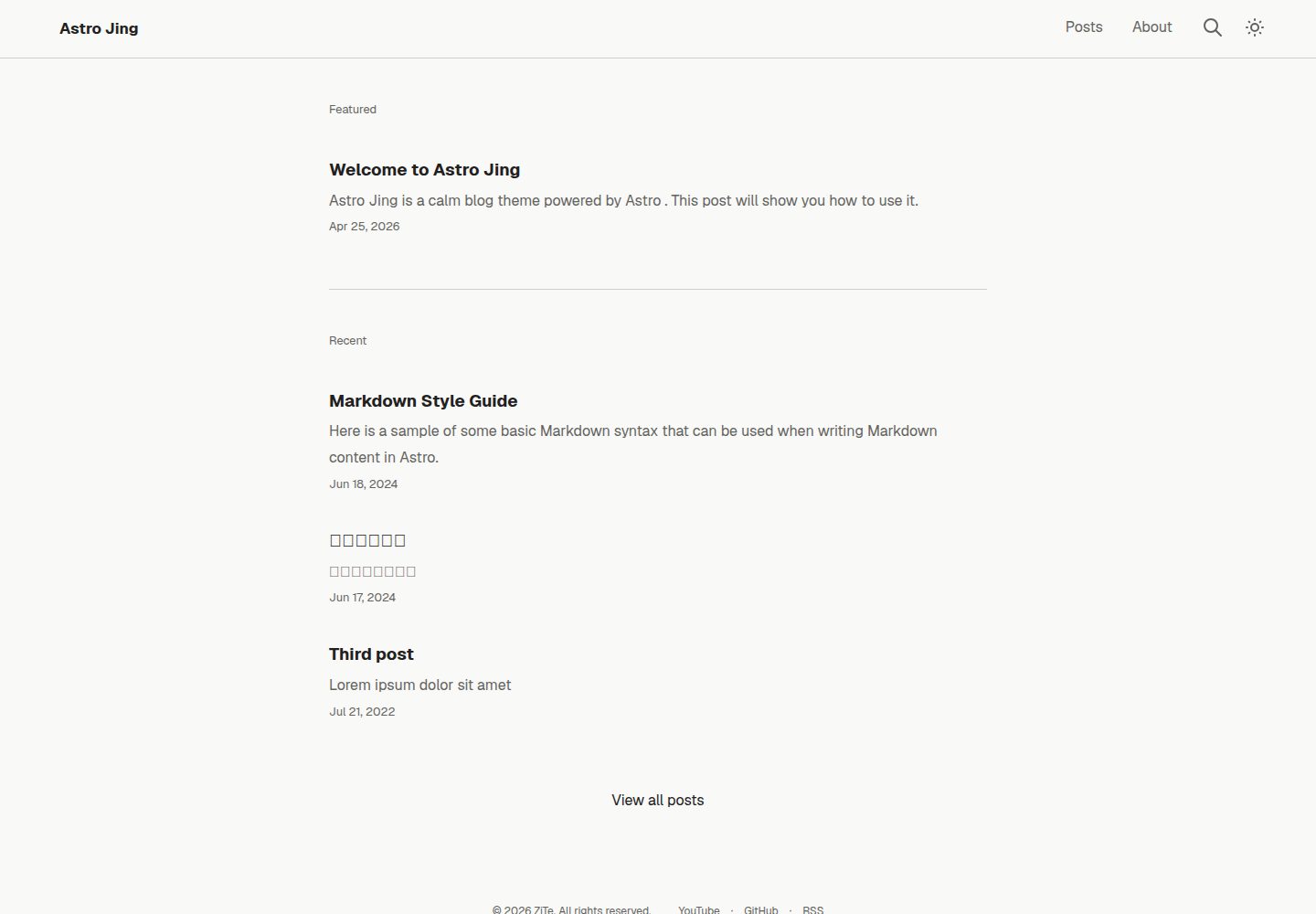
基于 Astro 的静态博客主题,提供桌面端与移动端页面
Astro博客
astro-jing-theme — Astro 博客模板
作者 ziteh
Astro Jing 是一个基于 Astro 的静态博客主题,界面风格平静克制,内置全文搜索、目录、数学公式、评论与国际化等常用博客功能。
看看你的网站会是什么样
浏览真实页面截图,比较内容排版与手机效果。点击下方缩略图切换,放大查看整页细节。
全部页面与视图 3
截图用于了解视觉与布局,交互效果请以实际项目为准。
采集于 2026-09-30查看来源
值得关注的模板亮点
从已有项目资料中,快速了解它的特点。
文章描述可按字符数或 <!-- more --> 标记自动生成
目录自动展开与折叠,并支持全文搜索与代码语法高亮
支持数学公式、国际化、Giscus/Disqus 评论、站点地图与 RSS
可生成带哈希文件名的 Open Graph 图片,并支持以 Markdown 查看文章
可通过模板创建新仓库,或作为 git subtree 并入已有博客仓库
模板详细介绍
Astro Jing 是一个以 Astro 构建的静态博客主题,仓库采用 MIT 许可,演示站点可直接访问。主题围绕写作与阅读场景提供多项内置能力:文章描述可根据字符数或 <!-- more --> 标记自动生成;目录支持自动展开与折叠;可生成带哈希文件名的 Open Graph 图片;提供全文搜索、代码语法高亮、数学公式渲染、国际化、Giscus 或 Disqus 评论、站点地图与 RSS 订阅,并支持以 Markdown 形式查看文章。
使用方式上,既可以直接从该模板创建新仓库,也可以将其作为 git subtree 拉入已有博客仓库,让主题文件与内容共存于同一仓库,并通过 git subtree pull 获取后续主题更新。项目结构包含 src/config 下的站点、语言与社交链接配置,src/content 下的博客文章与关于页,以及 astro.config.ts 等配置文件。
开发与验证方面,README 列出了 Radix Colors、Tabler、Tocbot、KaTeX、Satori、astro-pagefind、Expressive Code 等依赖,并提供 pnpm test、Lighthouse、URL 与无障碍测试脚本,以及 SEOnaut 的本地检查方式。部署可参考 Astro 官方部署指南与 Cloudflare Pages 构建系统文档。
限制说明:本主题为静态站点方案,评论、搜索等能力依赖相应外部服务或构建期处理;演示图片、字体、图标等第三方素材需按各自许可核对,不能仅凭代码的 MIT 许可判断。
Astro博客
适合你的项目吗?
适用场景
- 搭建以 Markdown 写作的个人技术博客或文章站点
- 需要全文搜索、目录、数学公式与代码高亮的文档型博客
- 希望将主题作为 git subtree 并入已有博客仓库并持续获取主题更新
- 需要多语言站点、RSS 订阅与 Open Graph 分享图的博客项目
适合人群
- 使用 Astro 并希望快速获得完整博客结构的开发者
- 偏好静态站点、以 Markdown 管理内容的写作者
- 需要评论、搜索、国际化等常见博客功能的站点维护者
- 希望主题代码可自由修改并保留 MIT 许可声明的项目
上手与定制指南
结合仓库当前版本的说明,按下面的资料检查内容、配置与运行要求。
- 1
克隆仓库后使用 pnpm i 安装依赖,pnpm dev 启动开发服务器,pnpm build 构建生产版本,pnpm preview 预览构建结果。
- 2
可直接从该模板创建新仓库,或通过 git subtree add 将主题以 theme 前缀并入已有博客仓库。
- 3
作为 git subtree 使用时,需在主题目录下创建 .env 并设置 CONTENT_DIR 指向内容目录。
- 4
站点信息、语言与社交链接分别在 src/config/site.ts、lang.ts、socials.ts 中配置。
- 5
演示图片、字体、图标等第三方素材需按各自许可核对,外部服务可能另行收费。
授权与来源资料
使用条件与限制
免费使用 · 保留许可声明本次收录的是公开仓库中采用 MIT 许可的免费版本;免费范围为该版本代码,不代表外部服务或第三方素材免费。
使用时需要遵守
- 允许免费使用、修改、商用和分发该版本代码。
- 分发代码副本或实质性部分时,保留原作者版权声明和完整 MIT 许可声明。
- 代码按现状提供;担保与责任限制以原许可证及适用法律为准。
额外费用与待核对事项
- 评论功能依赖 Giscus 或 Disqus 等第三方服务,需自行注册并配置相应账号,可能受其服务条款约束。
- SEOnaut 本地检查需启动额外容器服务并访问本地端口,属于可选开发工具,非主题运行必需。
- 演示图片、字体、图标及其他第三方素材需按各自许可核对,不能仅凭代码的 MIT 许可判断。
- 域名、托管、数据库、支付或 AI 等外部服务可能另外收费。
查看原文依据
Permission is hereby granted, free of charge
许可证原文
Comment systems (Giscus / Disqus)
README 原文
https://github.com/ziteh/astro-jing-theme/blob/main/LICENSEhttps://github.com/ziteh/astro-jing-theme/blob/main/README.mdOpen <http://localhost:9000/signin> and enter <http://host.containers.internal:4321> as the target URL.
README 原文
DeepSeek 根据仓库许可证和 README 整理 ·2026-10-01。结果仅覆盖已读取资料,依赖、图片、字体及后续条款变更以各自原文为准。
项目核对记录与介绍依据
模板资料
- 来源平台
- GitHub
- 资料与维护参考分
- 资料较完整 · 80 / 100
- 技术栈
- Astro
- 网站类型
- 博客
这个分数如何计算
本站按许可资料(最高30分)、演示链接(12分)、预览图(10分)、Star数(15分)、记录的维护时间(15分)、描述完整度(8分)、功能记录(5分)和分类资料(5分)计算。它不是代码、安全或性能测试,也不是 Google 评分;有链接不代表已实测可用。
这个项目需要核对什么
- 记录的仓库更新时间
- 2026-09-28
- 截图检查日期
- 2026-10-01
已收录演示链接。请用你的内容与屏幕尺寸检查;有演示不代表表单、认证或支付已经可用。
目录记录的主要技术栈是 Astro。请通过依赖清单和锁文件核对实际版本与托管要求。这些说明基于收录资料,不代表代码审计或部署实测。
查看具体选型方法 →介绍的制作与核对状态
介绍由 AI 辅助整理目录与仓库资料。仓库作者不等于这篇介绍的审核者。
已完成服务器许可规则与 AI 来源核对;未经过人工编辑审核。
查看当时使用的来源资料
SHA-256: c2fa48f45afa905a457e2f3d62921bb4382dcf652e66af58e64183fb1965a047
2026-10-01T14:41:52.966Z
来源文件 / 仓库# Astro Jing

A calm blog theme powered by [Astro](https://astro.build/). [Demo site](https://astro-jing-theme.ziteh.dev/).
Features:
- Auto-generate post descriptions based on character count or up to the `<!-- more -->` tag
- Auto-expanding & collapsing table of contents
- Generate Open Graph images with hashed filenames
- Full-text search
- Syntax highlighting
- Math equations
- Internationalization (i18n)
- Comment systems (Giscus / Disqus)
- Sitemap & RSS feed
- Static site
- View the post as Markdown
## Usage
You can directly [create a new repo from this template](https://github.com/new?template_name=astro-jing-theme&template_owner=ziteh), or use this repo as a [git subtree](#using-as-a-git-subtree).
```bash
# After cloning...
pnpm i # Install dependencies
pnpm dev # Start dev server
pnpm build # Production build
pnpm preview # Preview built site
```
### Using as a Git Subtree
This theme can be pulled into your own blog repo as a git subtree, so your content lives alongside it in one repo, and you can still pull in future theme updates.
Unlike a git submodule, the theme files (`src/config/*.ts`, `astro.config.ts`, etc.) become regular files in your repo, so you're free to edit them directly. Theme updates are then just a normal `git subtree pull`; if you've edited a file the update also touches, git will ask you to resolve the conflict like any other merge.
project structure:
```text
my-blog/ # Your blog repo
├── theme/ # astro-jing-theme (subtree)
│ ├── astro.config.ts
│ ├── package.json
│ ├── src/
│ │ └── content.config.ts
│ ├── .env # CONTENT_DIR=../content
│ └── ...
└── content/ # Your blog content
├── blog/
│ └── post.md
└── about.md
```
```bash
cd my-blog
mkdir -p content/blog
touch content/about.md && touch content/blog/post.md
# Then edit the content files and commit
git subtree add --prefix theme https://github.com/ziteh/astro-jing-theme main --squash
cd theme
echo "CONTENT_DIR=../content" > .env
# Now edit src/config/site.ts, socials.ts, lang.ts, astro.config.ts, etc. directly
pnpm i && pnpm build
```
To pull in later theme updates:
```bash
git subtree pull --prefix theme https://github.com/ziteh/astro-jing-theme main --squash
```
## Development
Tech stack:
- Colors: [Radix Colors](https://www.radix-ui.com/colors)
- Icons: [Tabler](https://tabler.io/icons)
- TOC: [Tocbot](https://tscanlin.github.io/tocbot/)
- Math: [KaTeX](https://katex.org/)
- OG image: [Satori](https://github.com/vercel/satori)
- Search: [astro-pagefind](https://github.com/shishkin/astro-pagefind)
- Syntax highlighting: [Expressive Code](https://expressive-code.com/)
- A11y testing: [axe-core](https://github.com/dequelabs/axe-core)
- Linter: [Biome](https://biomejs.dev/)
- Formatter: [Prettier](https://prettier.io/)
### Project Structure
Refer to [Astro project structure](https://docs.astro.build/en/basics/project-structure/).
```text
├── public/ # Unprocessed assets
│ └── _headers # Custom headers, such as CSP and Cache-Control
├── tests/
├── src/
│ ├── config/
│ │ ├── site.ts # Site config
│ │ ├── lang.ts # I18n and locale config
│ │ └── socials.ts # Social media links
│ ├── assets/
│ ├── content/
│ │ ├── blog/ # Markdown posts
│ │ └── about.md # About page
│ ├── components/
│ ├── layouts/
│ ├── pages/ # Routes
│ ├── utils/
│ ├── styles/ # CSS
│ └── content.config.ts # Content collection
├── astro.config.ts # Astro config
├── package.json
└── README.md
```
## Testing
```bash
pnpm test # All tests
pnpm test:lh # Lighthouse
pnpm test:urls # URLs
pnpm test:a11y # Accessibility
```
### SEOnaut
```bash
pnpm seonaut:up
pnpm dev --host
```
Open <http://localhost:9000/signin> and enter <http://host.containers.internal:4321> as the target URL.
## Deploy
- [Deploy your Astro Site](https://docs.astro.build/en/guides/deploy/)
- [Cloudflare Pages build system](https://developers.cloudflare.com/pages/configuration/build-image/#languages-and-runtime)
看看同类模板
对比同技术栈与用途的模板,找到更适合的视觉与内容结构。

astrowind
⭕️ AstroWind: A free template using Astro v7 and Tailwind CSS v4. Astro starter theme.
Astro · 博客

astro-paper
A minimal, accessible and SEO-friendly Astro blog theme.
Astro · 博客

fuwari
✨A static blog template built with Astro.
Astro · 博客

Firefly
Firefly 是一款基于 Astro 的静态博客主题,由 CuteLeaf 在 saicaca 的 Fuwari 模板基础上二次开发,主打清新美观的视觉风格。
Astro · 博客

astro-theme-cactus
A simple Astro theme. Use it to create your blog or website.
Astro · 作品集

astrofy
Astrofy is a free and open-source template for your Personal Portfolio Website built with Astro and TailwindCS…
Astro · 作品集