Interactively select one of 8 UI engines via pnpm launch, with the configuration written to .uirc.json for the Vite configuration to read
VueViteStarter
vue-launchpad — Vue Starter Template
By a289399282
Vue-Launchpad is a Vue project starter template based on Vite, Vue 3 and TypeScript. It provides file-based routing, Pinia, UnoCSS, an Axios request layer, and an initialization flow that selects a UI component library and i18n through an interactive script.
Explore the design
Compare the page layouts and mobile experience. Open any screenshot for a closer look.
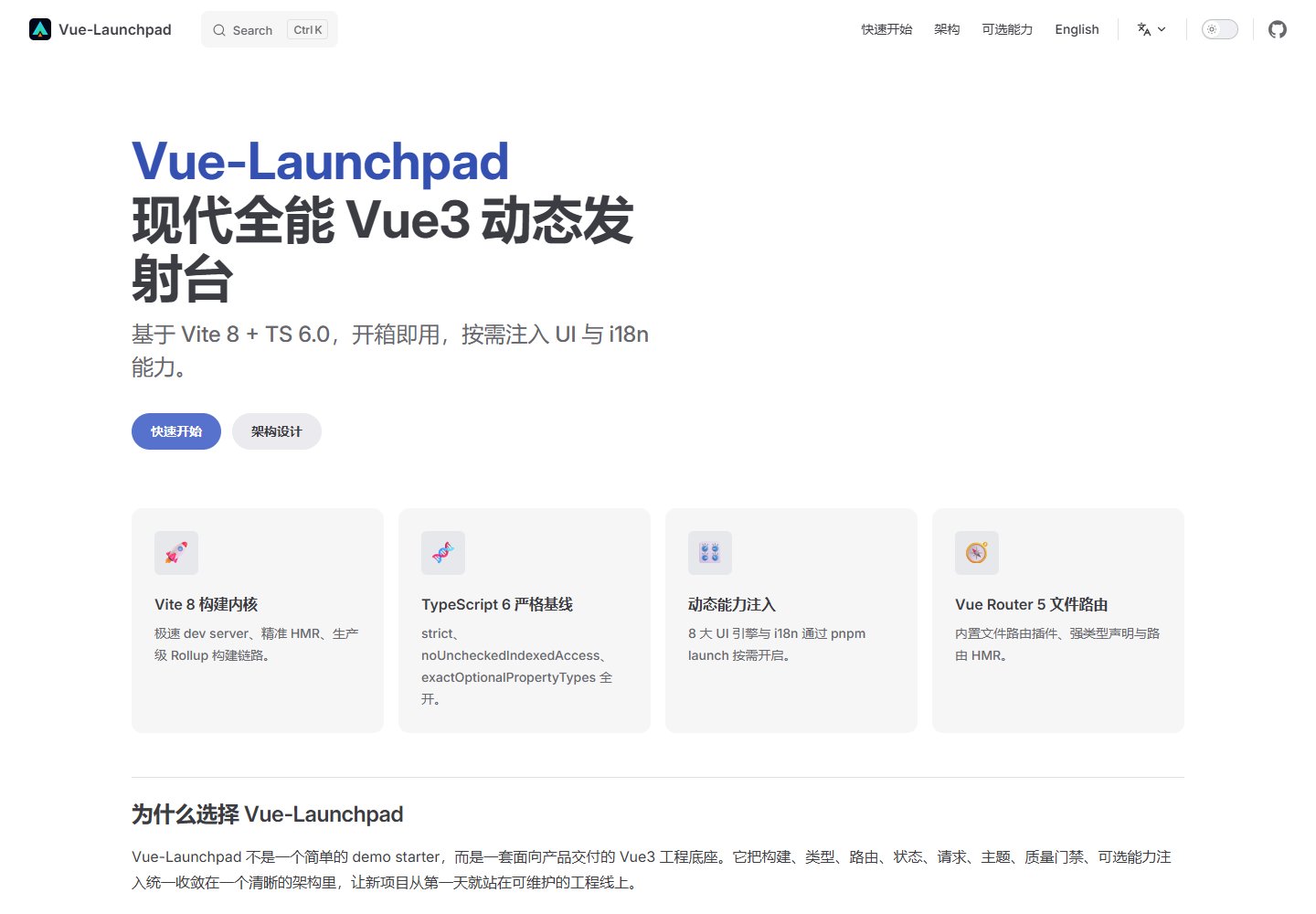
Desktop homepage1 / 2
Desktop captureTop of page
Actual browser screenshot from the verified demo.
All pages & views 2
Screenshots show visual appearance; interactive behavior may differ.
Recorded 2026-10-18View source
What stands out
A quick read of the recorded project description.
Vue Router 5 file-based routing generates typed routes from src/pages and integrates route hot updates
TypeScript enables strict, noUncheckedIndexedAccess and exactOptionalPropertyTypes by default
The Axios request layer includes auth injection, response unwrapping and request deduplication
Biome handles formatting, lint and import sorting uniformly, working with Husky and lint-staged for pre-commit checks
The build side provides environment variable validation, dynamic proxy generation, manual chunk splitting, gzip compression and optional bundle analysis
Template Details
Vue-Launchpad is a starter template for Vue 3 projects; the README positions it as an out-of-the-box launchpad. The technical baseline includes Vite 8, Vue 3.5, TypeScript 6.0, Vue Router 5.1, Pinia 3, UnoCSS 66, Axios 1, Biome 2.4 and Vitest 4, and uses Husky and lint-staged for pre-commit checks.
The template's core mechanism is interactive initialization via pnpm launch: after selecting a UI engine and optional i18n capability, the configuration is written to .uirc.json, and the Vite configuration adjusts component resolvers, dependency pre-bundling and component scan directories accordingly. Optional UI engines include Element Plus, Ant Design Vue, Naive UI, TDesign, Arco Design, Shadcn-Vue, Nuxt UI and Varlet.
On the engineering side, it provides file-based routing under src/pages, Pinia setup stores, an Axios request layer (auth injection, response unwrapping, request deduplication), environment variable validation, dynamic proxy generation, manual chunk splitting, gzip compression and optional bundle analysis. Scripts cover development, generation, type checking, Biome checks, testing, building, preview and auto-fix.
Limitations: the README does not document the specific versions of each UI engine, the implementation details of i18n, the scope of test coverage, and does not provide production deployment steps or runtime performance data; the preview screenshots only indicate that pages exist and cannot be used to infer functionality.
VueVitelaunchpad
Is it right for your project?
Use Cases
- When creating a new Vue 3 + TypeScript project, a starting structure including routing, state management, styling and a request layer is needed
- A team needs to switch quickly between multiple UI component libraries and have the Vite configuration adapt component resolvers automatically
- A project needs a generatable base code skeleton such as file-based routing, Pinia stores and API templates
- Formatting, lint and type checking need to be run uniformly before commits
Suitable For
- Mid-to-back-office or general web projects developed with Vue 3 and TypeScript
- Teams that want to select a UI component library interactively and retain the ability to switch later
- Projects that need file-based routing, Pinia, UnoCSS and an Axios request layer as a starting point
Getting started & customization
Use these recorded setup notes alongside the repository instructions for your chosen version.
- 1
Environment requirements: Node.js >=20.0.0, pnpm >=11.0.0
- 2
Run pnpm install, then pnpm launch to select the UI engine and optional capabilities, then pnpm dev to start the development server
- 3
Use pnpm build for production builds; pnpm build:staging for pre-release builds; pnpm build:analyze to generate stats.html for bundle analysis
- 4
Quality checks can use pnpm check (Biome + TypeScript) and pnpm test; pnpm lint:fix automatically fixes formatting and import order
- 5
The README does not provide specific deployment steps; the deployment method must be determined separately based on the chosen build output
License & source material
Usage conditions & limitations
Free to use · keep license noticeThis listing covers the free version under the MIT license in the public repository; the free scope is the code of that version and does not mean external services or third-party assets are free.
Must comply with when using
- The code of this version may be used, modified, used commercially and distributed free of charge.
- When distributing copies or substantial portions of the code, retain the original author's copyright notice and the complete MIT license notice.
- The code is provided as is; warranty and liability limitations are governed by the original license and applicable law.
Additional costs & items to verify
- Demo images, fonts, icons and other third-party assets must be checked against their respective licenses and cannot be judged solely by the code's MIT license.
- External services such as domains, hosting, databases, payments or AI may incur separate charges.
- The runtime environment requires Node.js >=20.0.0.
- The package manager requires pnpm >=11.0.0.
- pnpm launch must first be run to interactively select the UI engine and optional capabilities; only after the configuration is written to .uirc.json does the Vite configuration adapt accordingly.
- UI engine selection depends on the .uirc.json configuration file, and the Vite configuration adjusts component resolvers, dependency pre-bundling and component scan directories accordingly.
View Original Text Basis
Permission is hereby granted, free of charge
Original License Text
- Node.js `>=20.0.0`
Original README
- pnpm `>=11.0.0`
Original README
# 2. Select the UI engine and optional capabilities
Original README
https://github.com/a289399282/vue-launchpad/blob/main/LICENSEhttps://github.com/a289399282/vue-launchpad/blob/main/README.md`pnpm launch` writes the selected profile into `.uirc.json`. The Vite config then adjusts component resolvers, dependency pre-bundling, and component scan directories from that profile.
Original README
Compiled by DeepSeek based on repository license and README ·2026-10-17. Results only cover the materials read; dependencies, images, fonts, and subsequent term changes are subject to their respective original texts.
Project checks & description sources
Template Information
- Source platforms
- GitHub
- Documentation and maintenance reference score
- More documented · 88 / 100
- Technologies
- Vue · Vite
- Website type
- Starter
How this score is calculated
Our heuristic uses license records (up to 30), a demo link (12), a preview (10), stars (15), recorded maintenance (15), description completeness (8), feature records (5) and classification data (5). It is not a code, security or performance test, or a Google score. A link does not establish tested functionality.
What to verify for this project
- Repository update recorded
- 2026-06-09
- Screenshot last checked
- 2026-10-18
A demo link is listed. Check it with your own content and viewport sizes; its presence does not confirm that forms, authentication or payments work.
The catalog identifies Vue as the primary stack. Check the actual dependency manifest and lockfile for versions and hosting requirements. These notes use recorded metadata, not a code audit or a deployment test.
Use a selection guide →How this description was prepared
AI-assisted description based on catalog records and repository material. Repository authors are not automatically the reviewers of this description.
Review declaration: codex-user-requested-batch-review-20261018 · 2026-10-18
Inspect the recorded source material
SHA-256: 545743b5dc7121fd89aab25855132113b2219c0b9e66fc8b544c4b77ffc69447
2026-10-17T19:29:25.026Z
Source file / repository<div align="center"> ```text __ __ _ _ _____ _ _ _ _ _ _ ____ _ _ ____ _ ____ \ \ / /| | | | ____| | | / \ | | | | \ | |/ ___| | | | _ \ / \ | _ \ \ \ / / | | | | _| _____ | | / _ \ | | | | \| | | | |_| | |_) / _ \ | | | | \ V / | |_| | |__|_____| | |___ / ___ \| |_| | |\ | |___| _ | __/ ___ \| |_| | \_/ \___/|_____| |_____/_/ \_\\___/|_| \_|\____|_| |_|_| /_/ \_\____/ ``` # Vue-Launchpad [](https://vite.dev/) [](https://www.typescriptlang.org/) [](https://vuejs.org/) [](https://biomejs.dev/) [](./LICENSE) **A modern all-in-one Vue 3 launchpad powered by Vite 8 + TS 6.0, ready out of the box.** [Documentation](https://a289399282.github.io/vue-launchpad/) · [简体中文](./README.zh.md) </div> ## ✨ Features - 🚀 **Vite 8 as the build core**: modern ESM dev server, precise HMR, and production-grade Rollup builds. - 🧬 **TypeScript 6.0 strict baseline**: `strict`, `noUncheckedIndexedAccess`, and `exactOptionalPropertyTypes` enabled by default. - 🧭 **Vue Router 5 file-based routing**: typed routes generated from `src/pages`, with route HMR wired in. - 🎛️ **8 UI engines on demand**: Element Plus, Ant Design Vue, Naive UI, TDesign, Arco Design, Shadcn-Vue, Nuxt UI, and Varlet. - ⚡ **Biome-powered quality gate**: formatting, linting, and import organization through one fast toolchain. - 🏗️ **Production-minded build and network layer**: strict env validation, dynamic proxy generation, Axios infrastructure, request dedupe, manual chunks, gzip compression, and opt-in bundle analysis. ## 🚀 Quick Start ```bash # 1. Install dependencies pnpm install # 2. Select the UI engine and optional capabilities pnpm launch # 3. Start the dev server pnpm dev # 4. Build for production pnpm build ``` ## 🛠️ Available Scripts | Script | Description | | --- | --- | | `pnpm dev` | Start the Vite dev server with file routes, UnoCSS, auto imports, and proxy support. | | `pnpm launch` | Run the interactive initializer for UI and i18n capabilities, then write the selected profile to `.uirc.json`. | | `pnpm gen` | Generate page, component, store, and api templates with Plop. | | `pnpm typecheck` | Run `vue-tsc --noEmit` for Vue + TypeScript validation. | | `pnpm check` | Run Biome checks and TypeScript checks in sequence. | | `pnpm test` | Run the Vitest test suite. | | `pnpm test:run` | Run Vitest with coverage enabled. | | `pnpm build` | Type-check and build for production. | | `pnpm build:staging` | Build with the staging mode. | | `pnpm build:analyze` | Enable bundle visualizer and emit `stats.html`. | | `pnpm preview` | Preview the production build locally. | | `pnpm lint:fix` | Let Biome fix formatting, lint issues, and import order. | ## 📦 Tech Stack | Technology | Baseline | Why it is here | | --- | --- | --- | | Vite | 8.x | Fast dev server, modern build pipeline, and rich plugin ecosystem. | | Vue | 3.5.x | Composition API, high-performance reactivity, and mature SFC tooling. | | TypeScript | 6.0.x | Strict typing and modern bundler-style module resolution. | | Vue Router | 5.1.x | Built-in file-based routing plugin, typed routes, and route HMR. | | Pinia | 3.x | Lightweight setup stores with persisted-state support. | | UnoCSS | 66.x | Atomic CSS generation, semantic design tokens, and zero-runtime styling. | | Axios | 1.x | Unified request layer, auth injection, envelope unwrapping, and request dedupe. | | Biome | 2.4.x | One fast toolchain for formatting, linting, and import organization. | | Vitest | 4.x | Vite-native tests for build utilities and infrastructure modules. | | Husky + lint-staged | 9.x / 17.x | Pre-commit quality gate for team workflows. | ## 🎛️ UI Engine Matrix `pnpm launch` writes the selected profile into `.uirc.json`. The Vite config then adjusts component resolvers, dependency pre-bundling, and component scan directories from that profile. The same flow can also inject i18n support without forcing it into the clean baseline. | UI Engine | Best fit | | --- | --- | | Element Plus | Stable enterprise dashboards with broad component coverage. | | Ant Design Vue | Complex admin products, forms, and dense data workflows. | | Naive UI | Strong TypeScript ergonomics and flexible theming. | | TDesign | Enterprise-grade design language for Tencent-style products. | | Arco Design | Modern, high-density admin applications. | | Shadcn-Vue | Headless and atomic UI for custom design systems. | | Nuxt UI | Atomic UI composition for modern Vue interfaces. | | Varlet | Mobile-first and cross-platform Vue applications. | ## 🧱 Project Layout ```text src/ pages/ Vue Router 5 file-based route pages store/ Pinia setup stores utils/ Request layer and shared utilities assets/ Global styles and static assets build/ env.ts Environment loading and validation proxy.ts Dynamic proxy generation and custom proxy merging profile.ts UI profile reading and component resolver creation scripts/ init.ts UI engine and optional capability injector ``` ## 🔐 Requirements - Node.js `>=20.0.0` - pnpm `>=11.0.0` ## 📄 License [MIT](./LICENSE)
Explore similar templates
Compare previews and descriptions within the same stack and category.

vitesse
Vitesse is an opinionated Vite + Vue 3 starter template maintained by antfu-collective, offering file-based routing, component and API auto-import, Pinia, UnoCSS, PWA, i18n, Markdown, vite-ssg, TypeScript, Vitest, and Cypress.
Vue · Starter

vitesse-webext
vitesse-webext is a Vite-powered WebExtension starter template using Vue 3 and TypeScript, with built-in popup, options, and content script examples. It targets Chrome and Firefox, integrates webextension-polyfill, webext-bridge, UnoCSS, VueUse, and unplugin tools, and supports hot reload during development.
Vue · Starter

laravel-vue-spa
A Laravel + Vue SPA starter kit for quickly building a decoupled web application skeleton. It includes login, registration, email verification, and password reset flows, uses JWT for authentication, and integrates Laravel Socialite with GitHub as an example provider.
Vue · Starter

vue3-h5-template
A mobile H5 starter template built on Vue3, Vite, and Vant4, with TypeScript by default and JavaScript and i18n branches.
Vue · Starter

tov-template
tov-template is an MIT-licensed Vite + Vue 3 + TypeScript starter maintained by dishait. It bundles file-based routing, layouts, Mock, auto-imports, UnoCSS, Pinia, vue-request, Vitest, i18n, dark mode, Dockerfile, and engineering scripts.
Vue · Starter

shadcn-vue-landing-page
A Vue + Shadcn-Vue + TypeScript + Tailwind landing page template with sections like Navbar, Hero, Pricing, FAQ, Team, and Contact, plus dark mode and responsive layout.
Vue · Corporate Website