Provides common SaaS modules on top of Laravel Breeze rather than building from scratch
VueLaravelSaaSStarter
ssk — Vue SaaS Template
By axeldotdev
SSK is a SaaS starter built on Laravel and Vue, providing authentication, multi-tenancy, collaborator invitations, and feature flags on top of Laravel Breeze.
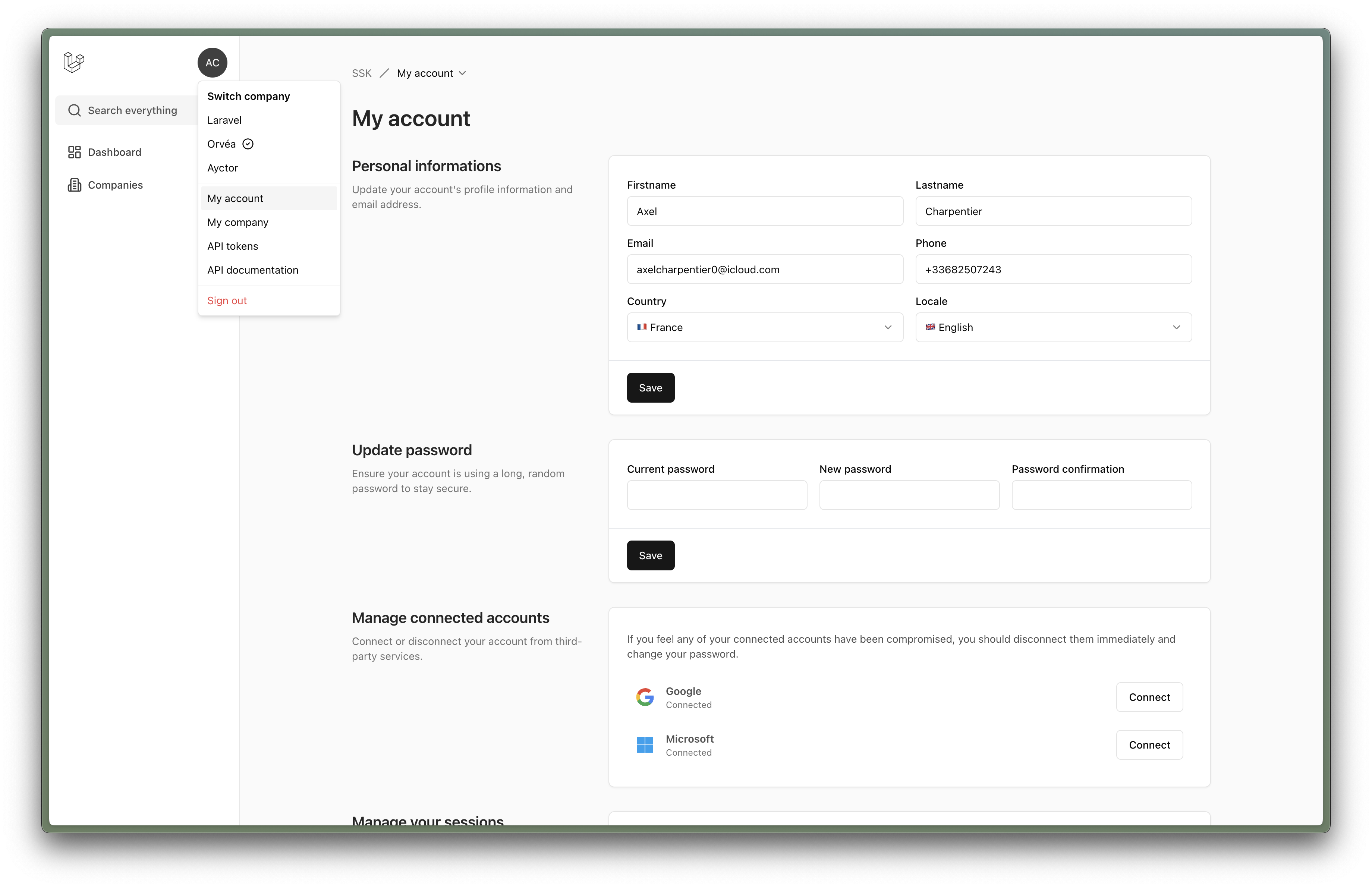
Explore the design
Compare the page layouts and mobile experience. Open any screenshot for a closer look.
Author preview
Author-provided previewTop of page
Preview provided in the project README.
One original preview is available. Open the full image to inspect the design.
Screenshots show visual appearance; interactive behavior may differ.
Recorded 2026-10-03View source
What stands out
A quick read of the recorded project description.
Supports multiple sign-in and sign-up methods: email, phone number, Google, and Microsoft
Built-in multi-tenancy (companies) and collaborator invitation mechanism
Enable or disable features as needed via feature flag classes under app/Features
Privacy policy, terms of service, and API documentation are maintained as localized Markdown files
Offers English and French translations
Template Details
SSK (SaaS Starter Kit) is a starter template for SaaS projects. Its stack is Laravel plus Vue, connected via Inertia. It is positioned as an extension of Laravel Breeze that adds a set of common SaaS capabilities, and also serves as a place for the author's reusable classes, enums, traits, and configuration.
Implemented features include: sign-in and sign-up via email, phone number, Google, or Microsoft; email or phone verification depending on the registration method; password reset via email; privacy policy and terms of service pages (using localized Markdown files); an onboarding flow (account, company, collaborators); inviting collaborators by email or phone; multi-tenancy (companies); API documentation (also based on localized Markdown); English and French translations; and a set of feature flags to toggle the above.
Features not yet completed are marked as coming soon in the README: active session management, company ownership transfer, two-factor authentication, token-based API, and global search with keyboard shortcuts.
The installation process is: clone the repository, run composer install, copy .env, generate the application key, create the storage symlink, run migrations, then run npm install and build. The default database is SQLite, which also stores sessions, cache, and queues; Horizon is installed and configured to make it easy to switch queues to Redis. The project includes a php artisan test command, an upgrade guide, a changelog, and contribution guidelines.
VueLaravelSaaSStarter
Is it right for your project?
Use Cases
- Quickly scaffolding a SaaS project skeleton with multi-tenancy and team collaboration
- Centrally managing authentication flows such as sign-in, sign-up, verification, and password reset
- Providing Markdown-based API documentation pages within the application
- Using feature flags to control feature toggles and gradually enable modules
Suitable For
- Developers familiar with Laravel and Vue who want to reuse ready-made SaaS foundation modules
- SaaS projects that need multi-tenancy and collaborator invitation capabilities
- Teams that prefer adjusting features by modifying code rather than through an admin panel
- Projects that accept SQLite as the default development database and switch storage later
Getting started & customization
Use these recorded setup notes alongside the repository instructions for your chosen version.
- 1
After cloning the repository, run composer install, copy .env.example to .env, php artisan key:generate, php artisan storage:link, and php artisan migrate in sequence.
- 2
Use npm install for frontend dependencies, run npm run dev during development, and npm run build for production builds.
- 3
The default database is SQLite, which also stores sessions, cache, and queues; Horizon is configured and can be switched to Redis queues.
- 4
To enable or disable a feature, open the corresponding class under app/Features and change the boolean returned by the resolve method.
- 5
SSO providers are configured in config/socialstream.php, and environment variables are registered in config/services.php.
License & source material
Usage conditions & limitations
Free to use · keep license noticeThis entry covers the free version under the MIT license in the public repository; the free scope is the code of this version and does not imply that external services or third-party assets are free.
Must comply with when using
- You are allowed to use, modify, commercialize, and distribute the code of this version for free.
- When distributing copies or substantial portions of the code, retain the original author's copyright notice and the full MIT license notice.
- The code is provided as is; warranties and limitations of liability are governed by the original license and applicable law.
Additional costs & items to verify
- SSO sign-in depends by default on Google and Microsoft third-party services; you need to configure providers in config/socialstream.php and register the corresponding environment variables (such as client ID and secret) in config/services.php. Using these sign-in methods requires you to apply for and bear third-party accounts and costs.
- Horizon is installed and configured, but to use its queue monitoring capabilities you need to switch queues to Redis, which means deploying and running an additional Redis service.
- SQLite is used by default to store the database, sessions, cache, and queues; it is only suitable for quick starts. Production environments typically require migrating to other database and cache/queue services.
- Active session management, company ownership transfer, two-factor authentication, token-based API, and global search with keyboard shortcuts are all marked as coming soon and are not yet implemented; they cannot be used as existing capabilities.
- Demo images, fonts, icons, and other third-party assets must be checked against their respective licenses; they cannot be judged solely by the code's MIT license.
- External services such as domains, hosting, databases, payments, or AI may incur additional charges.
View Original Text Basis
Permission is hereby granted, free of charge
Original License Text
SSK comes with Google and Microsoft by default.
Original README
Horizon is installed and configure so you can switch your queues to redis very quickly.
Original README
By default the database is **SQLite** and the session, cache and queues are stored in it.
Original README
https://github.com/axeldotdev/ssk/blob/main/LICENSE.mdhttps://github.com/axeldotdev/ssk/blob/main/README.md- 🔬 Active sessions management *[coming soon]*
Original README
Compiled by DeepSeek based on repository license and README ·2026-10-03. Results only cover the materials read; dependencies, images, fonts, and subsequent term changes are subject to their respective original texts.
Project checks & description sources
Template Information
- Source platforms
- GitHub
- Documentation and maintenance reference score
- Partly documented · 70 / 100
- Technologies
- Vue · Laravel
- Website type
- SaaS · Starter
How this score is calculated
Our heuristic uses license records (up to 30), a demo link (12), a preview (10), stars (15), recorded maintenance (15), description completeness (8), feature records (5) and classification data (5). It is not a code, security or performance test, or a Google score. A link does not establish tested functionality.
What to verify for this project
- Repository update recorded
- 2024-11-18
- Screenshot last checked
- 2026-10-03
No demo link is recorded. Use the repository instructions to evaluate the project locally; the screenshot alone cannot establish interactive behavior.
The catalog identifies Vue as the primary stack. Check the actual dependency manifest and lockfile for versions and hosting requirements. These notes use recorded metadata, not a code audit or a deployment test.
Use a selection guide →How this description was prepared
AI-assisted description based on catalog records and repository material. Repository authors are not automatically the reviewers of this description.
Automatically checked against source and license rules; no manual editorial review.
Inspect the recorded source material
SHA-256: 98a175576276dfbac23f6df062de63938f04973c51f7b6484a75520ea2597409
2026-10-03T07:44:42.161Z
Source file / repository<p align="center">
<img src="https://github.com/axeldotdev/ssk/blob/main/.github/header.png" alt="SSK UI Screenshot" />
</p>
<p align="center">
<a href="https://php.net">
<img alt="PHP 8.2" src="https://img.shields.io/badge/PHP-8.2-777BB4?style=for-the-badge&logo=php">
</a>
<a href="https://laravel.com">
<img alt="Laravel v11.x" src="https://img.shields.io/badge/Laravel-v11.x-FF2D20?style=for-the-badge&logo=laravel">
</a>
<a href="https://inertiajs.com/">
<img alt="Inertia v1.x" src="https://img.shields.io/badge/Inertia-v1.x-846CEE?style=for-the-badge">
</a>
<a href="https://vuejs.org/">
<img alt="Vue v3.x" src="https://img.shields.io/badge/Vue-v3.x-42B883?style=for-the-badge">
</a>
</p>
# SaaS Starter Kit (SSK)
The main goal of SSK is to help you (and me) build app quickly and it brings a ton of cool features on top of Laravel Breeze.
But my other goal is to use it as a storage for all the class, enums, traits, configs and other stuff that I use in every app I work on. And I hope it will be usefull for you too like a big Gist.
You can also use the [Livewire version here](https://github.com/axeldotdev/ssk-livewire).
## Installation
```bash
git clone [email protected]:axeldotdev/ssk.git your-project-name
cd your-project-name
composer install
cp .env.example .env
php artisan key:generate
php artisan storage:link
php artisan migrate
npm install
npm run build # npm run dev
```
By default the database is **SQLite** and the session, cache and queues are stored in it. It allows you to start building your app quickly and focus on the system later.
Horizon is installed and configure so you can switch your queues to redis very quickly.
**SSK** is just a wrapper around **Laravel Breeze** who is a wrapper around **Laravel**. You have all the power to modify it to suit your need.
## Available Features
- 🧑💻 Login and registration with email, phone, Google or Microsoft
- ✅ User verification via email or phone (depending on the sing up method)
- 🔑 Reset password for email
- 📜 Privacy policy and Terms of service pages (with localized markdown files)
- 🤝 Onboarding (account, company, collaborators)
- 🧑💼 Collaborators invitation by email or phone
- 🏁 Multiple tenants (companies)
- 🔬 Active sessions management *[coming soon]*
- 🖋️ Company transfer ownership *[coming soon]*
- 🔐 2FA *[coming soon]*
- 💻 API via token *[coming soon]*
- 🔍 Global search with shortcuts *[coming soon]*
- 📖 API documentation (with localized markdow files)
- 🇺🇸 English and 🇫🇷 French translations
- 🚦 Multiple feature flags (to enable the features listed above)
## Features Flags
To activate or deactivate a feature, you just need to open the class and change the boolean returned in the `resolve` method.
The features are located in the folder `app/Features`.
### SignViaEmail
Allows you to login and register via an email address.
### SignViaPhone
Allows you to login and register via a phone number.
### SignViaSSO
Allows you to login and register via a SSO provider.
You can add providers in the `config/socialstream.php` file and register the env variable in the `config/services.php` file.
SSK comes with Google and Microsoft by default.
### VerifyUser
Allows you to verify the user by email or phone according to his sign method.
### OnboardUser
Allows you to show an onboarding view to help user start using your app and register some important informations.
The onboarding feature just give you a basic system, it's up to you to add forms and other things into it.
### ApiTokens
Allows you to manage API tokens.
It comes with a view that list tokens and a form to create them. The tokens are default Laravel Sanctum tokens scoped on users.
### ApiDocumentation
Allows you to show an API documentation in your app when the user is authenticated.
The API works with markdown file so it's really easy to use, no PHP or Vue to add.
## Upgrading
If you need to upgrade your project to the newer version of SSk, we recommend you to follow [the upgrading guide](UPGRADING.md).
But! SSK is a starter kit and once you use it to init your project, the code is yours and you don't really need to upgrade to follow the newer version.
## Testing
```bash
php artisan test
```
## Changelog
Please see [CHANGELOG](CHANGELOG.md) for more information on what has changed recently.
## Contributing
Please see [CONTRIBUTING](CONTRIBUTING.md) for details.
## Need Help?
🐞 If you spot a bug, please [submit a detailed issue](https://github.com/axeldotdev/ssk/issues/new?assignees=&labels=bug&template=bug_report.md), and wait for assistance.
🤔 If you have a question or feature request, please [start a new discussion](https://github.com/axeldotdev/ssk/discussions/new). For quick help, ask questions in the appropriate channel.
🔐 If you discover a vulnerability, please review [our security policy](../../security/policy).
## Security Vulnerabilities
Please review [our security policy](../../security/policy) on how to report security vulnerabilities.
## Credits
- [Axel Charpentier](https://github.com/axeldotdev)
- [All Contributors](../../contributors)
## License
The MIT License (MIT). Please see [License File](LICENSE.md) for more information.
Explore similar templates
Compare previews and descriptions within the same stack and category.

vitesse
Vitesse is an opinionated Vite + Vue 3 starter template maintained by antfu-collective, offering file-based routing, component and API auto-import, Pinia, UnoCSS, PWA, i18n, Markdown, vite-ssg, TypeScript, Vitest, and Cypress.
Vue · Starter

vitesse-webext
vitesse-webext is a Vite-powered WebExtension starter template using Vue 3 and TypeScript, with built-in popup, options, and content script examples. It targets Chrome and Firefox, integrates webextension-polyfill, webext-bridge, UnoCSS, VueUse, and unplugin tools, and supports hot reload during development.
Vue · Starter

laravel-vue-spa
A Laravel + Vue SPA starter kit for quickly building a decoupled web application skeleton. It includes login, registration, email verification, and password reset flows, uses JWT for authentication, and integrates Laravel Socialite with GitHub as an example provider.
Vue · Starter

vue3-h5-template
A mobile H5 starter template built on Vue3, Vite, and Vant4, with TypeScript by default and JavaScript and i18n branches.
Vue · Starter

tov-template
tov-template is an MIT-licensed Vite + Vue 3 + TypeScript starter maintained by dishait. It bundles file-based routing, layouts, Mock, auto-imports, UnoCSS, Pinia, vue-request, Vitest, i18n, dark mode, Dockerfile, and engineering scripts.
Vue · Starter

shadcn-vue-landing-page
A Vue + Shadcn-Vue + TypeScript + Tailwind landing page template with sections like Navbar, Hero, Pricing, FAQ, Team, and Contact, plus dark mode and responsive layout.
Vue · Corporate Website