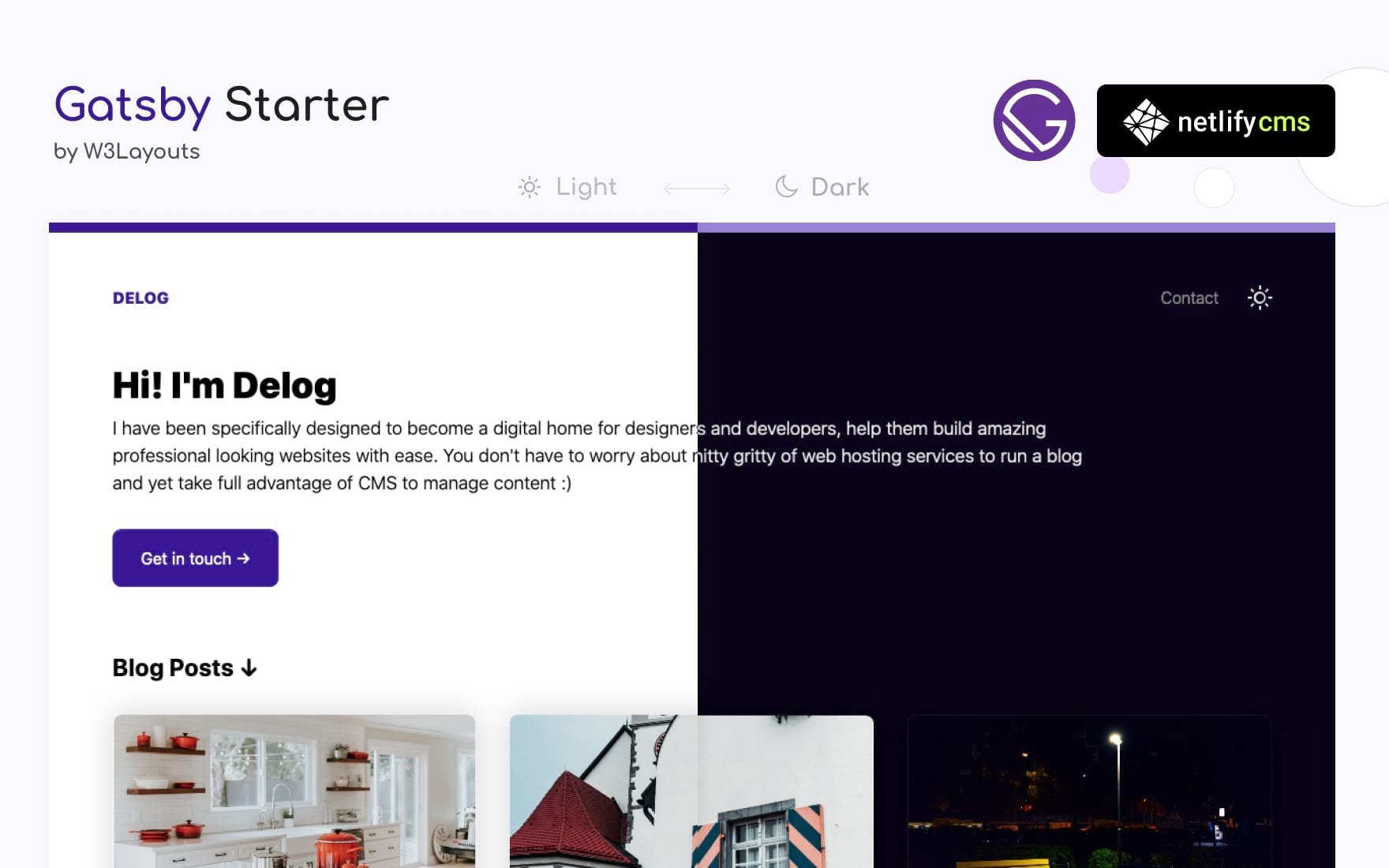
Built with GatsbyJS and supports CRUD operations for posts via Netlify CMS in the backend
GatsbyReactBlog
blog-gatsby — Gatsby Blog Template
By clairepeng0808
A developer/designer blog template based on GatsbyJS and Netlify CMS, supporting post management via CMS, dark mode, a contact form, and site metadata configuration.
Explore the design
Compare the page layouts and mobile experience. Open any screenshot for a closer look.
Author preview
Author-provided preview
Preview provided in the project README.
One original preview is available. Open the full image to inspect the design.
Screenshots show visual appearance; interactive behavior may differ.
Recorded 2026-10-13View source
What stands out
A quick read of the recorded project description.
Site title, description, URL, homepage title, and description are centrally managed and editable in the CMS
Includes SEO-related meta description configuration
Provides dark mode and user preference toggle
Includes a contact form integration provided by W3Layouts
Comes with Gatsby plugin configurations for a custom 404 page, sitemap, offline support, and manifest
Template Details
Delog is a personal blog template for developers and designers, built with GatsbyJS and integrated with Netlify CMS as the content management backend. Posts can be added, edited, updated, and deleted entirely within Netlify CMS, without directly modifying code. The template provides SEO-related meta description configuration, includes a contact form provided by W3Layouts, and features dark mode.
Site metadata (title, description, site URL, homepage title, and homepage description) is stored centrally in site-meta-data.json and can be modified via the Settings > Config page in Netlify CMS or by editing that file directly. Google Analytics requires filling in a trackingId in the gatsby-plugin-google-analytics plugin within gatsby-config.js.
Several external configurations are required before use: change the repository address in /static/admin/config.yml to your own username/repo-name; create an OAuth app in GitHub Developer Settings with the callback URL set to https://api.netlify.com/auth/done, then install the GitHub provider in Netlify's Access Control > OAuth and enter the Client ID and Secret; after that, visit the site's /admin/ path to log into the backend. The contact form relies on the W3Layouts form service and will only work after creating a form on their platform.
The template is MIT licensed, allowing free use, modification, commercial use, and distribution, but the demo images are from Unsplash and the CSS and SVG icons are from CSS.gg; these third-party assets must be checked separately under their respective licenses. The repository was last updated in 2020, and no further information about maintenance status is provided.
GatsbyBlog
Is it right for your project?
Use Cases
- Building a personal tech blog and wanting to write with a visual backend
- A developer blog that needs dark mode and basic SEO configuration
- Wanting to deploy and host a static blog with one-click Netlify deployment
- A personal site that needs a contact form to collect reader messages
Suitable For
- Developers familiar with or willing to learn GatsbyJS and the Netlify deployment process
- Authors who want to manage posts with Netlify CMS without directly editing Markdown
- Developers or designers' personal blogs that need dark mode and basic SEO settings
Getting started & customization
Use these recorded setup notes alongside the repository instructions for your chosen version.
- 1
Local installation: gatsby new gatsby-starter-delog https://github.com/W3Layouts/gatsby-starter-delog (requires NodeJS and GatsbyJS pre-installed)
- 2
Change the repository address in /static/admin/config.yml to your own username/repo-name
- 3
Create an OAuth app in GitHub Developer Settings with the callback URL set to https://api.netlify.com/auth/done, then install the GitHub provider in Netlify's Access Control > OAuth and enter the Client ID and Secret
- 4
The contact form requires creating a form on the W3Layouts form service before it will work
- 5
Google Analytics requires filling in a trackingId in the gatsby-plugin-google-analytics plugin within gatsby-config.js
License & source material
Usage conditions & limitations
Free to use · keep license noticeThis entry covers the free version under the MIT license in the public repository; the free scope applies to that version's code and does not imply that external services or third-party assets are free.
Must comply with when using
- Free use, modification, commercial use, and distribution of this version's code are permitted.
- When distributing copies or substantial portions of the code, retain the original author's copyright notice and the full MIT license notice.
- The code is provided as is; warranties and limitations of liability are governed by the original license and applicable law.
Additional costs & items to verify
- Demo images, fonts, icons, and other third-party assets must be checked under their respective licenses and cannot be judged solely by the code's MIT license.
- External services such as domains, hosting, databases, payments, or AI may incur additional charges.
- The built-in contact form relies on the external W3Layouts service and requires creating a form on their platform before it will work, constituting an external service dependency.
- The contact form must first be registered and created on the W3Layouts form service, otherwise the form will not work.
- Using the Netlify CMS backend requires creating your own GitHub OAuth app and configuring the Client ID and Secret, involving external accounts and keys.
- Enabling Google Analytics requires providing your own trackingId and depends on an external service.
- Demo images are from Unsplash and must be checked separately under Unsplash's own license; they are not licensed together with the MIT code license.
- CSS and SVG icons are from CSS.gg and must be checked separately under that third-party project's license.
View Original Text Basis
Permission is hereby granted, free of charge
Original License Text
In-built contact form powered by [W3Layouts](https://w3layouts.com)
Original README
To get the Contact form working. you need too add a form at [W3Layouts forms](https://my.w3layouts.com/Forms/).
Original README
### Creating Github OAuth Client ID
Original README
Change `trackingId` in `gatsby-config.js` at `gatsby-plugin-google-analytics` plugin
Original README
Awesome image used in demo is from [Unsplash](https://unsplash.com)
Original README
https://github.com/clairepeng0808/blog-gatsby/blob/master/LICENSEhttps://github.com/clairepeng0808/blog-gatsby/blob/master/README.mdCSS and SVG Icons by [CSS.gg](https://css.gg)
Original README
Compiled by DeepSeek based on repository license and README ·2026-10-13. Results only cover the materials read; dependencies, images, fonts, and subsequent term changes are subject to their respective original texts.
Project checks & description sources
Template Information
- Source platforms
- GitHub
- Documentation and maintenance reference score
- Less documented · 53 / 100
- Technologies
- Gatsby · React
- Website type
- Blog
How this score is calculated
Our heuristic uses license records (up to 30), a demo link (12), a preview (10), stars (15), recorded maintenance (15), description completeness (8), feature records (5) and classification data (5). It is not a code, security or performance test, or a Google score. A link does not establish tested functionality.
What to verify for this project
- Repository update recorded
- 2020-10-06
- Screenshot last checked
- 2026-10-13
No demo link is recorded. Use the repository instructions to evaluate the project locally; the screenshot alone cannot establish interactive behavior.
The catalog identifies Gatsby as the primary stack. Check the actual dependency manifest and lockfile for versions and hosting requirements. These notes use recorded metadata, not a code audit or a deployment test.
Use a selection guide →How this description was prepared
AI-assisted description based on catalog records and repository material. Repository authors are not automatically the reviewers of this description.
Review declaration: [email protected] · 2026-10-13
Inspect the recorded source material
SHA-256: 3825037ee0ec97b72aa74eb80442f2e74834e740eea44d643900d9cee132a92c
2026-10-13T10:01:18.758Z
Source file / repository[](https://app.netlify.com/sites/delog-w3layouts/deploys) <a href="https://twitter.com/intent/follow?screen_name=w3layouts"> <img src="https://img.shields.io/twitter/follow/w3layouts.svg?label=Follow%20@w3layouts" alt="Follow @w3layouts" /> </a> # Delog - Blog for Developer and Designer This simple website built with GatsbyJS and Netlify CMS. Deploys on netlify with single click. This Starter is sponsered by [W3Layouts](https://w3layouts.com). [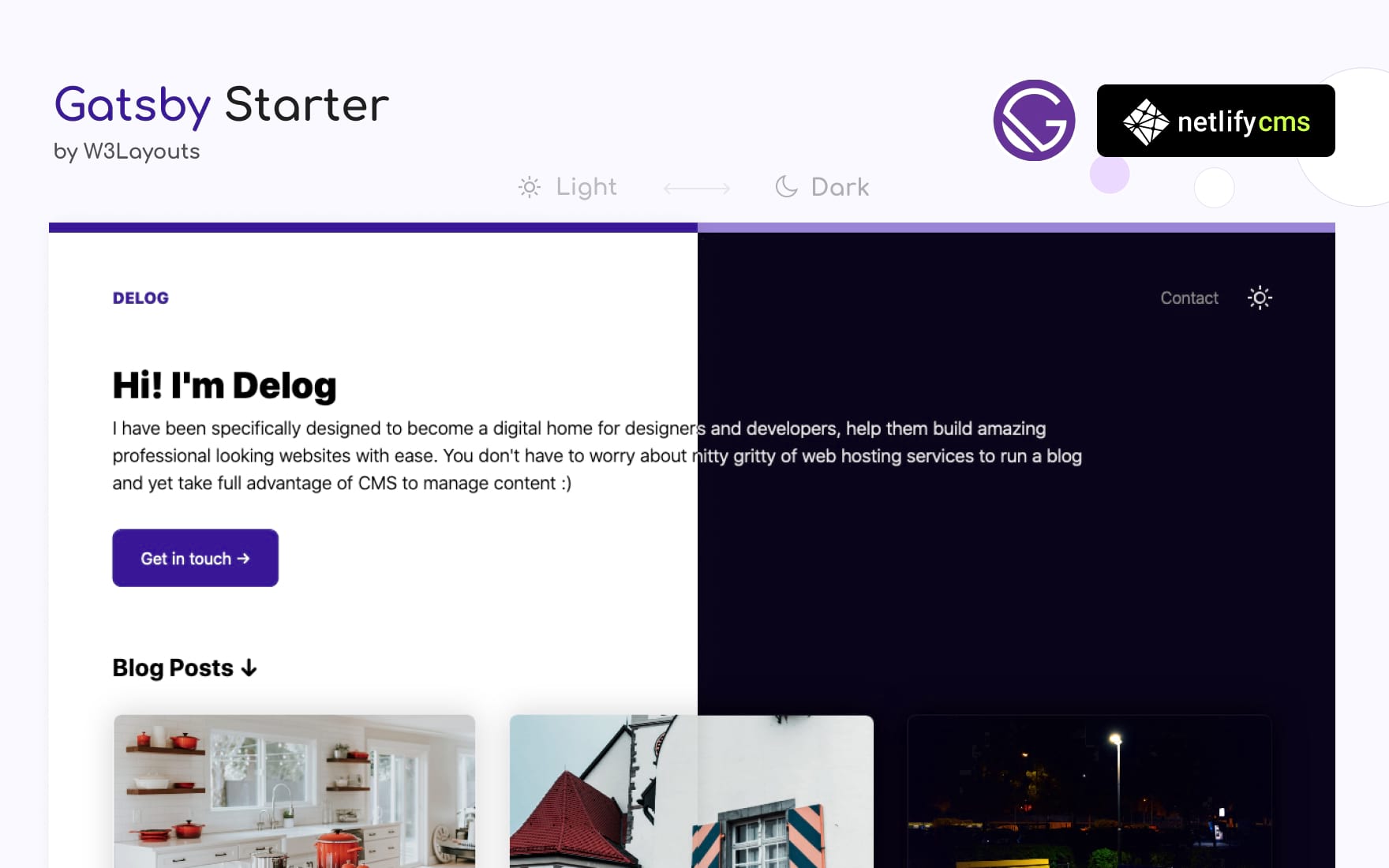](https://delog-w3layouts.netlify.com/) [](https://app.netlify.com/start/deploy?repository=https://github.com/W3Layouts/gatsby-starter-delog) Install this starter locally: (assuming you already have [NodeJS and GatsbyJS installed](https://www.gatsbyjs.org/tutorial/part-zero/)) ```bash gatsby new gatsby-starter-delog https://github.com/W3Layouts/gatsby-starter-delog ``` Instructions also available at W3Layouts [Delog Launch Article](https://w3layouts.com/articles/delog-gatsby-starter-netlify-cms/). ## Features - Built with GatsbyJS and Netlify CMS - Option to Add, Edit, Update and Delete posts via Netlify CMS - SEO friendly - Option to Add meta description - In-built contact form powered by [W3Layouts](https://w3layouts.com) - Comes with dark mode --- ## Documentation * Once you hit "[Deploy to Netlify](https://app.netlify.com/start/deploy?repository=https://github.com/W3Layouts/gatsby-starter-delog)" * Connect Github * Enter Repository Name * And your site starts build process. After the build process your website is live ### Changing repositary URL for Netlify CMS access You need to change repo URL to your own `repo` at `/static/admin/config.yml`, for example `username/repo-name` ### Creating Github OAuth Client ID * Goto Github [Developer Settings](https://github.com/settings/developers) * **New OAuth** * Enter Application name * Homepage URL as Netlify URL * And **Authorization callback URL** to `https://api.netlify.com/auth/done`) * Once Client ID and Secret token is generated configure same in [Netlify Access Control](#accessing-netlify-cms-admin) as described. ### Accessing Netlify CMS Admin * Goto your Netlify site admin * Goto **Access Control** > **OAuth** then **Install Provider** you need to select provider as `Github` as add `Client ID` and `Secret` * Your Netlify CMS is ready. Goto you netlify site URL and append `/admin/`. for example `example.netlify.com/admin/`, You will see login with Github button. ### Managing Blog Posts in Netlify CMS * Once logged in you will find all the blog post listed here. * You can create, edit, update and delete like any CMS ### Editing Meta Data Inside you Netlify CMS admin, `Settings > Config` or you can go to `site-meta-data.json`. Here you can edit following details * Title * Description * Site URL * Homepage Title * Homepage Description * To get the Contact form working. you need too add a form at [W3Layouts forms](https://my.w3layouts.com/Forms/). Follow the steps [How to enable W3Layouts Contact form](https://w3layouts.com/articles/introducing-contact-forms-for-static-websites/) instructions to create a form then your contact form is all set. ### Add Google Analytics Change `trackingId` in `gatsby-config.js` at `gatsby-plugin-google-analytics` plugin --- I hope you will build a great website with Delog. If you like it please spread the word, Feel free to contribute and raise a pull request :) For issues,feedback on enhancement or sharing your new awesome website built with delog. [Create New Issue](https://github.com/W3Layouts/gatsby-starter-delog/issues/new) Here --- ## Roadmap We are maintaining future task in [Github Project](https://github.com/W3Layouts/gatsby-starter-delog/projects/1), even though most changes are instantaious. We try keep them posted here. --- ## Credits - Awesome image used in demo is from [Unsplash](https://unsplash.com) - CSS and SVG Icons by [CSS.gg](https://css.gg) --- ## Changelog All notable changes to this project are listed here. ### [1.6.0] - 2020-05-03 #### Added - Custom 404 page. - Site name will be appended in blog posts and contact page. - Reordering fields in Netlify CMS for better flow of post creation. - Validation for path in Netlify CMS ### [1.5.0] - 2020-05-03 #### Added - Settings page in Netlify CMS to customize site meta data. - Site meta data is pulled from `site-meta-data.json`. maintained via Netlify CMS ### [1.4.0] - 2020-05-01 #### Added - `gatsby-plugin-sitemap` Creates a sitemap for your Gatsby site in production. #### Changed - Changelog improvements - Comments on `gatsby-config.js` - Comments on `static/admin/config.yml` ### [1.3.0] - 2020-04-30 #### Added - `gatsby-plugin-offline` drop-in support for making a GatsbyJS site work offline and more resistant to bad network connections. - `gatsby-plugin-manifest` configures GatsbyJS to create a manifest.webmanifest file on every site build ### [1.2.0] - 2020-04-28 #### Added - GatsbyJS Increment builds with Netlify deployment ### [1.1.0] - 2020-04-21 #### Added - Dark mode compatibitly and toggle for user preference ### [1.0.0] - 2020-03-14 - Launch of GatsbyJS and Netlify CMS based starter `gatsby-starter-delog`
Explore similar templates
Compare previews and descriptions within the same stack and category.

gatsby-starter-gcn
A Gatsby starter for building static blogs with Contentful and Netlify.
Gatsby · Blog
devblog
DevBlog is a lightweight, customizable personal blog template built with GatsbyJS and React. Posts are Markdown files in /src/pages, with URLs generated from folder names and frontmatter for title, date, and optional featured image.
Gatsby · Blog

gatsby-starter-morning-dew
A Gatsby and React blog starter/theme that uses Markdown or MDX for posts, supports multilingual content, dark mode, tag grouping, PWA, and Disqus comments, and is MIT licensed.
Gatsby · Blog

starter-gatsby-blog
A community-maintained Gatsby blog starter for Contentful, with a simple content model, npm run setup import, Sync API support, and gatsby-plugin-image. Suitable for quickly building a CMS-driven static blog or learning Gatsby and Headless CMS integration.
Gatsby · 社区

blog-template
A Gatsby scientific blog template streamlined from theaisummer.com, written in MDX with React components, TypeScript/TSX, and Sass.
Gatsby · Blog

clay-theme
Clay is an image-centric Gatsby theme for publishers, portfolios, and photography blogs. It includes PWA support, a preconfigured Netlify/Decap CMS, PurgeCSS, Netlify deployment settings, and Netlify Forms.
Gatsby · Portfolio