Hexo blog theme backup repository; README reuses the NexT theme documentation
HexoBlog
hexo_next_backup — Hexo Blog Template
By henryexhenry
HenryExHenry's Hexo NexT theme backup repository, used to store theme files for a personal blog; the repository is no longer maintained.
Explore the design
Compare the page layouts and mobile experience. Open any screenshot for a closer look.
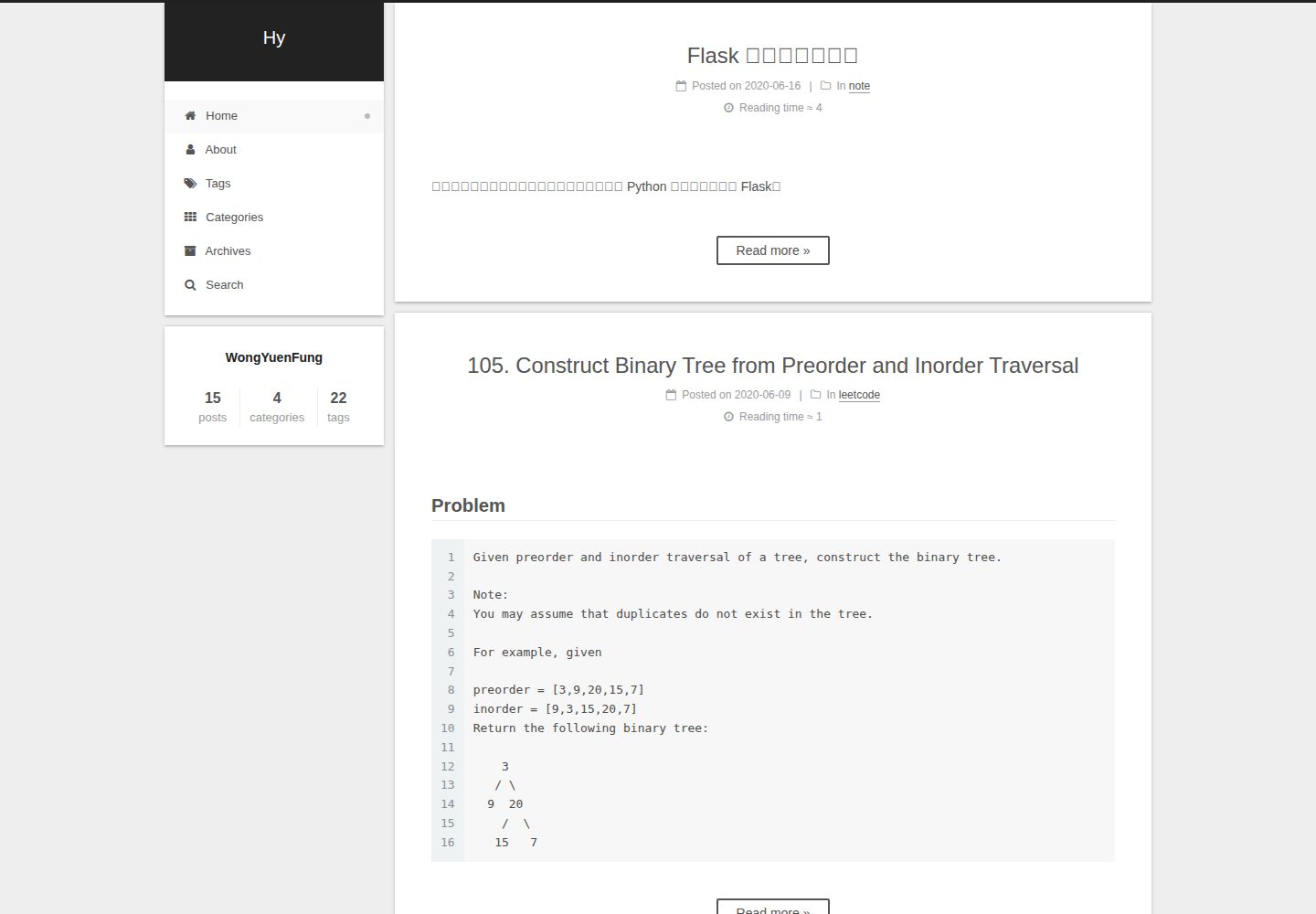
Desktop homepage1 / 3
Desktop captureTop of page
Actual screenshot captured by the server browser.
All pages & views 3
Screenshots show visual appearance; interactive behavior may differ.
Recorded 2026-10-02View source
What stands out
A quick read of the recorded project description.
Supports multiple languages including Simplified Chinese, Traditional Chinese, English, Russian, French, German, and Japanese
Built-in support for DuoShuo and Disqus comment systems
Provides configuration for tag pages, category pages, social links, and Feed links
Includes four appearance schemes: Muse, Mist, Pisces, and Gemini
The repository is no longer maintained and points to the community-maintained version
Template Details
This is a backup repository for a Hexo blog theme. The repository is named hexo_next_backup and described as "theme backup of Hexo blog", i.e., a backup of the NexT theme used by a Hexo blog. The repository itself contains no new theme development content; the README directly reuses the NexT theme documentation and notes at the top that the repository is no longer maintained, pointing to the community-maintained version theme-next/hexo-theme-next.
According to the README, NexT is a Hexo theme that supports multiple languages (Simplified Chinese, Traditional Chinese, English, Russian, French, German, Japanese, Indonesian, Portuguese, Korean, Italian, Dutch, Vietnamese), with built-in DuoShuo and Disqus comments, tag and category pages, social links, Feed links, and multiple code highlight themes. The theme offers four appearance schemes: Muse, Mist, Pisces, and Gemini. Installation involves placing the theme in the Hexo site's themes directory and setting theme: next in the site's _config.yml.
Limitations to note: the repository is explicitly no longer maintained, and the README points to the community-maintained version; the repository has 0 stars and was last updated in 2020, making it a personal backup that is not guaranteed to be compatible with current Hexo versions. The repository uses the MIT license, but third-party assets such as demo images, fonts, and icons require separate license verification.
HexoBlog
Is it right for your project?
Use Cases
- Referencing NexT theme configuration options and directory structure
- Backing up or migrating theme files for a personal Hexo blog
- Understanding how to configure NexT theme multilingual support and comment systems
Suitable For
- Developers building personal blogs with Hexo
- Users who need to consult historical NexT theme configuration documentation
- Users looking for examples of how others organize theme backups
Getting started & customization
Use these recorded setup notes alongside the repository instructions for your chosen version.
- 1
The repository is no longer maintained; the README recommends switching to the community-maintained version theme-next/hexo-theme-next
- 2
Place the theme in the Hexo site's themes directory and set theme: next in the site's _config.yml
- 3
If you encounter the error Cannot find module 'hexo-util', follow the README instructions to check the npm version or explicitly install hexo-util
- 4
The repository uses the MIT license, but third-party assets such as demo images, fonts, and icons must be verified under their respective licenses
License & source material
Usage conditions & limitations
Free to use · keep license noticeThis entry covers the free version of a public repository under the MIT license; the free scope applies to that version's code and does not imply that external services or third-party assets are free.
Must comply with when using
- Free use, modification, commercial use, and distribution of that version's code are permitted.
- When distributing copies or substantial portions of the code, retain the original author's copyright notice and the full MIT license notice.
- The code is provided as is; warranties and liability limitations are governed by the original license and applicable law.
Additional costs & items to verify
- The repository is no longer maintained and receives no updates; the README points to the community-maintained version theme-next/hexo-theme-next, so compatibility with current Hexo versions must be assessed independently before use.
- Using the Hexo data file configuration method requires upgrading Hexo to version 3.0 or above; if you insist on using Hexo 2.x, you can only use the old configuration method.
- Comment functionality depends on third-party services (DuoShuo or Disqus), requiring separate registration and shortname configuration, and may be subject to the availability and terms of those external services.
- Demo images, fonts, icons, and other third-party assets must be verified under their respective licenses and cannot be judged solely by the code's MIT license.
- External services such as domains, hosting, databases, payments, or AI may incur additional charges.
View Original Text Basis
Permission is hereby granted, free of charge
Original License Text
This repository is no longer maintained!
Original README
you need upgrade Hexo to 3.0 (or above) to use this feature
Original README
https://github.com/henryexhenry/hexo_next_backup/blob/master/LICENSEhttps://github.com/henryexhenry/hexo_next_backup/blob/master/README.mdNexT has native support for `DuoShuo` and `Disqus` comment systems.
Original README
Compiled by DeepSeek based on repository license and README ·2026-10-02. Results only cover the materials read; dependencies, images, fonts, and subsequent term changes are subject to their respective original texts.
Project checks & description sources
Template Information
- Source platforms
- GitHub
- Documentation and maintenance reference score
- Partly documented · 57 / 100
- Technologies
- Hexo
- Website type
- Blog
How this score is calculated
Our heuristic uses license records (up to 30), a demo link (12), a preview (10), stars (15), recorded maintenance (15), description completeness (8), feature records (5) and classification data (5). It is not a code, security or performance test, or a Google score. A link does not establish tested functionality.
What to verify for this project
- Repository update recorded
- 2020-05-25
- Screenshot last checked
- 2026-10-02
A demo link is listed. Check it with your own content and viewport sizes; its presence does not confirm that forms, authentication or payments work.
The catalog identifies Hexo as the primary stack. Check the actual dependency manifest and lockfile for versions and hosting requirements. These notes use recorded metadata, not a code audit or a deployment test.
Use a selection guide →How this description was prepared
AI-assisted description based on catalog records and repository material. Repository authors are not automatically the reviewers of this description.
Automatically checked against source and license rules; no manual editorial review.
Inspect the recorded source material
SHA-256: 6e73012c136ec6bc08d1a7fcca6f35cab968656bf7f190a16bc018096bc14434
2026-10-02T22:56:27.681Z
Source file / repository<h1 align="center">This repository is no longer maintained! :warning:</h1>
<h2 align="center">The community-maintained version is here: <a href="https://github.com/theme-next/hexo-theme-next">NexT v6 and v7 :triangular_flag_on_post:</a></h2>
<h1 align="center">NexT</h1>
<p align="center">NexT is a high quality elegant <a href="http://hexo.io">Hexo</a> theme. It is crafted from scratch, with love.</p>
[![gitter-image]][gitter-url]
[![mnt-image]](https://github.com/theme-next/hexo-theme-next)
[![travis-image]][travis-url]
[![rel-image]][releases-url]
[![hexo-image]][hexo-url]
[![lic-image]](LICENSE)
* [Chinese Documentation](README.cn.md)
## Live Preview
* :heart_decoration: Muse scheme: [LEAFERx](https://leaferx.online) | [XiaMo](https://notes.wanghao.work) | [OAwan](https://oawan.me)
* :six_pointed_star: Mist scheme: [Jeff](https://blog.zzbd.org) | [uchuhimo](http://uchuhimo.me) | [xirong](http://www.ixirong.com)
* :pisces: Pisces scheme: [Vi](http://notes.iissnan.com) | [Acris](https://acris.me) | [Rainy](https://rainylog.com)
* :gemini: Gemini scheme: [Ivan.Nginx](https://almostover.ru) | [Raincal](https://raincal.com) | [Dandy](https://dandyxu.me)
More NexT examples [here](https://github.com/iissnan/hexo-theme-next/issues/119).
## Installation
**1.** Change dir to **hexo root** directory. There must be `node_modules`, `source`, `themes` and other directories:
```sh
$ cd hexo
$ ls
_config.yml node_modules package.json public scaffolds source themes
```
**2.** Get theme from GitHub. There are several variants to do it:
### Download [latest release version][releases-latest-url].
At most cases **stable**. Recommended for most users.
[![curl-tar-wget-image]][curl-tar-wget-url]
```sh
$ mkdir themes/next
$ curl -s https://api.github.com/repos/iissnan/hexo-theme-next/releases/latest | grep tarball_url | cut -d '"' -f 4 | wget -i - -O- | tar -zx -C themes/next --strip-components=1
```
### Download [tagged release version][releases-url].
You must define version. Replace `v5.1.2` with any version from [tags list][tags-url].
[![curl-tar-image]][curl-tar-url]
```sh
$ mkdir themes/next
$ curl -L https://api.github.com/repos/iissnan/hexo-theme-next/tarball/v5.1.2 | tar -zxv -C themes/next --strip-components=1
```
[![git-image]][git-url]
```sh
$ git clone --branch v5.1.2 https://github.com/iissnan/hexo-theme-next themes/next
```
### Download [latest master branch][download-latest-url].
May be **unstable**, but includes latest features. Recommended for developers.
[![curl-tar-image]][curl-tar-url]
```sh
$ mkdir themes/next
$ curl -L https://api.github.com/repos/iissnan/hexo-theme-next/tarball | tar -zxv -C themes/next --strip-components=1
```
[![git-image]][git-url]
```sh
$ git clone https://github.com/iissnan/hexo-theme-next themes/next
```
Clone command will give you the **whole repository**. And in any time you can switch to any tagged release.\
Get tags list:
```sh
$ cd themes/next
$ git tag -l
…
v5.0.0
v5.0.1
v5.1.0
v5.1.1
v5.1.2
```
For example, you want to switch on `v5.1.0` [tagged release version][tags-url]. Input the following command:
```sh
$ git checkout tags/v5.1.0
Note: checking out 'tags/v5.1.0'.
…
HEAD now on 1f72f68... CSS: Remove global list-style setting of ul
```
And if you want to switch back on [master branch][commits-url], input this command:
```sh
$ git checkout master
```
**3.** Set theme in main **hexo root config** `_config.yml` file:
theme: next
### Bugs
For those who also encounter **Error: Cannot find module 'hexo-util'** [issue](https://github.com/iissnan/hexo-theme-next/issues/1490), please check your NPM version.
- `> 3`: Still not work. Please remove `node_modules` directory and reinstall using `npm install`.
- `< 3`: Please add `hexo-util` explicitly via `npm install --save-dev hexo-util` to you site package deps.
## Update
```sh
$ cd themes/next
$ git pull
```
### Bugs
> Commit your changes or stash them before you can merge
You must Commit, Stash or Discard local changes. See [here](https://stackoverflow.com/a/15745424/5861495) how to do it.
### Theme configurations using Hexo data files ([#328](https://github.com/iissnan/hexo-theme-next/issues/328))
Currently, it is not smooth to update NexT theme from pulling or downloading new releases. It is quite often running into conflict status when updating NexT theme via `git pull`, or need to merge configurations manually when upgrading to new releases.
At present, NexT encourages users to store some options in site's `_config.yml` and other options in theme's `_config.yml`. This approach is applicable, but has some drawbacks:
1. Configurations are splited into two pieces
2. Users maybe confuse which place should be for options
In order to resolve this issue, NexT will take advantage of Hexo [Data files](https://hexo.io/docs/data-files.html). Because Data files is introduced in Hexo 3, so you need upgrade Hexo to 3.0 (or above) to use this feature.
If you prefer Hexo 2.x, you can still use the old approach for configurations. NexT is still compatible with Hexo 2.x.
#### Benefits
With this feature, now you can put all your configurations into one place (`source/_data/next.yml`), you don't need to touch `next/_config.yml`. If there are any new options in new releases, you just need to copy those options from `next/_config.yml`, paste into `_data/next.yml` and set their values to whatever you want.
#### How to use this feature
1. Please ensure you are using Hexo 3 (or above)
2. Create an file named `next.yml` in site's `source/_data` directory (create `_data` directory if it did not exist)
3. Copy NexT theme options both in site's `_config.yml` and theme's `_config.yml` into `next.yml`.
4. Use `--config source/_data/next.yml` parameter to start server, generate or deploy.\
For example: `hexo clean --config source/_data/next.yml && hexo g --config source/_data/next.yml`.
## Features
### Multiple languages support, including:
:cn: Simplified Chinese & Traditional Chinese.<br>
:us: English<br>
:ru: Russian<br>
:fr: French<br>
:de: German<br>
:jp: Japanese<br>
:indonesia: Indonesian<br>
:portugal: Portuguese (Brazil)<br>
:kr: Korean<br>
:it: Italian<br>
:netherlands: Dutch<br>
:vietnam: Vietnamese
Default language is English.
```yml
language: en
# language: zh-Hans
# language: zh-hk
# language: zh-tw
# language: ru
# language: fr-FR
# language: de
# language: ja
# language: id
# language: pt
# language: pt-BR
# language: ko
# language: it
# language: nl-NL
# language: vi
```
Set `language` field as following in site `_config.yml` to change to Chinese.
```yml
language: zh-Hans
```
### Comment support.
NexT has native support for `DuoShuo` and `Disqus` comment systems.
Add the following snippets to your `_config.yml`:
```yml
duoshuo:
enable: true
shortname: your-duoshuo-shortname
```
OR
```yml
disqus_shortname: your-disqus-shortname
```
### Tags page.
> Add a tags page contains all tags in your site.
- Create a page named `tags`
hexo new page "tags"
- Edit tags page, set page type to `tags`.
title: All tags
date: 2014-12-22 12:39:04
type: "tags"
- Add `tags` to theme `_config.yml`:
menu:
home: /
archives: /archives
tags: /tags
### Categories page.
> Add a categories page contains all categories in your site.
- Create a page named `categories`
hexo new page "categories"
- Edit categories page, set page type to `categories`.
title: All categories
date: 2014-12-22 12:39:04
type: "categories"
- Add `categories` to theme `_config.yml`:
menu:
home: /
archives: /archives
categories: /categories
### Social Media
NexT can automatically add links to your Social Media accounts:
```yml
social:
GitHub: your-github-url
Twitter: your-twitter-url
Weibo: your-weibo-url
DouBan: your-douban-url
ZhiHu: your-zhihu-url
```
### Feed link.
> Show a feed link.
Set `rss` field in theme's `_config.yml`, as the following value:
1. `rss: false` will totally disable feed link.
2. `rss: ` use sites' feed link. This is the default option.
Follow the installation instruction in the plugin's README. After the configuration is done for this plugin, the feed link is ready too.
3. `rss: http://your-feed-url` set specific feed link.
### Up to 5 code highlight themes built-in.
NexT uses [Tomorrow Theme](https://github.com/chriskempson/tomorrow-theme) with 5 themes for you to choose from.
Next use `normal` by default. Have a preview about `normal` and `night`:
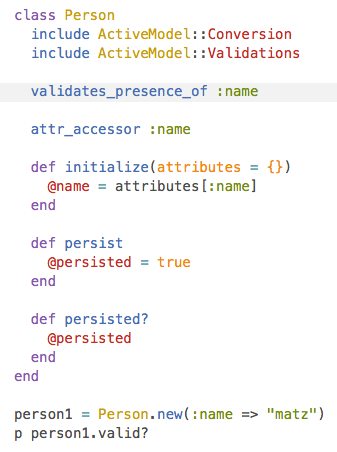
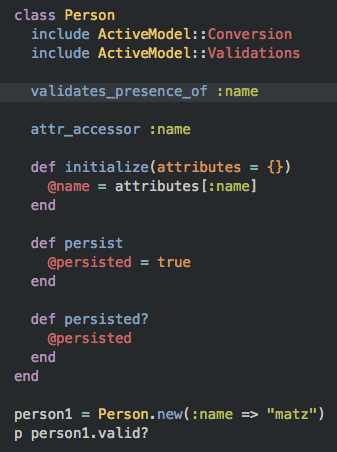
Head over to [Tomorrow Theme](https://github.com/chriskempson/tomorrow-theme) for more details.
## Configuration
NexT comes with few configurations.
```yml
# Menu configuration.
menu:
home: /
archives: /archives
# Favicon
favicon: /favicon.ico
# Avatar (put the image into next/source/images/)
# can be any image format supported by web browsers (JPEG,PNG,GIF,SVG,..)
avatar: /default_avatar.png
# Code highlight theme
# available: normal | night | night eighties | night blue | night bright
highlight_theme: normal
# Fancybox for image gallery
fancybox: true
# Specify the date when the site was setup
since: 2013
```
## Browser support
![browser-image]
[](https://www.browserstack.com/)
>**BrowserStack** is a cloud-based cross-browser testing tool that enables developers to test their websites across various browsers on different operating systems and mobile devices, without requiring users to install virtual machines, devices or emulators.
## Contributing
Contribution is welcome, feel free to open an issue and fork. Waiting for your pull request.
<!--
[![hexo-image]][hexo-url]
[![bower-image]][bower-url]
[![jquery-image]][jquery-url]
[hexo-image]: http://img.shields.io/badge/Hexo-2.4+-2BAF2B.svg?style=flat-square
[hexo-url]: http://hexo.io
[bower-image]: http://img.shields.io/badge/Bower-*-2BAF2B.svg?style=flat-square
[bower-url]: http://bower.io
[jquery-image]: https://img.shields.io/badge/jquery-1.9-blue.svg?style=flat-square
[jquery-url]: http://jquery.com/
-->
[browser-image]: https://img.shields.io/badge/browser-%20chrome%20%7C%20firefox%20%7C%20opera%20%7C%20safari%20%7C%20ie%20%3E%3D%209-lightgrey.svg
[browser-url]: https://www.browserstack.com
[gitter-image]: https://badges.gitter.im/Join%20Chat.svg
[gitter-url]: https://gitter.im/iissnan/hexo-theme-next?utm_source=badge&utm_medium=badge&utm_campaign=pr-badge&utm_content=badge
[travis-image]: https://travis-ci.org/iissnan/hexo-theme-next.svg?branch=master
[travis-url]: https://travis-ci.org/iissnan/hexo-theme-next?branch=master "Travis CI"
[hexo-image]: https://img.shields.io/badge/hexo-%3E%3D%203.0-blue.svg
[hexo-url]: http://hexo.io
[mnt-image]: https://img.shields.io/maintenance/yes/2017.svg
[rel-image]: https://img.shields.io/github/release/iissnan/hexo-theme-next.svg
<!--[lic-image]: https://img.shields.io/npm/l/hexo-theme-next.svg-->
[lic-image]: https://img.shields.io/dub/l/vibe-d.svg
[git-image]: https://img.shields.io/badge/install%20with%20-git-blue.svg
[curl-tar-image]: https://img.shields.io/badge/install%20with%20-curl%20%7C%20tar-blue.svg
[curl-tar-wget-image]: https://img.shields.io/badge/install%20with%20-curl%20%7C%20tar%20%7C%20wget-blue.svg
[git-url]: http://lmgtfy.com/?q=linux+git+install
[curl-tar-url]: http://lmgtfy.com/?q=linux+curl+tar+install
[curl-tar-wget-url]: http://lmgtfy.com/?q=linux+curl+tar+wget+install
[download-latest-url]: https://github.com/iissnan/hexo-theme-next/archive/master.zip
[releases-latest-url]: https://github.com/iissnan/hexo-theme-next/releases/latest
[releases-url]: https://github.com/iissnan/hexo-theme-next/releases
[tags-url]: https://github.com/iissnan/hexo-theme-next/tags
[commits-url]: https://github.com/iissnan/hexo-theme-next/commits/master
Explore similar templates
Compare previews and descriptions within the same stack and category.

hexo-theme-matery
hexo-theme-matery is a Material Design, responsive Hexo blog theme with homepage carousel, waterfall post list, timeline archive, word cloud tags, radar chart categories, and an about page.
Hexo · Blog

hexo-theme-cactus
Cactus is a responsive Hexo theme for personal websites and blogs, maintained by probberechts. It offers four color schemes (dark, light, white, classic), configurable navigation, homepage post lists, project lists, social links, and copyright year ranges.
Hexo · Blog

hexo-theme-volantis
Volantis is a blog theme for Hexo, distributed as the npm package hexo-theme-volantis and enabled by setting theme to volantis in the Hexo site's _config.yml. It requires Hexo 7.3+, hexo-cli 4.3+, Node.js 22.x LTS+, and npm 10.x LTS+.
Hexo · Blog

hexo-theme-aurora
Hexo Theme Aurora is a futuristic Hexo blog theme built around aurora gradients and a magazine-style grid layout.
Hexo · Blog

hexo-theme-Claudia
Claudia is a Hexo blog theme focused on a clean look and easy configuration. It automatically follows the device's dark mode and claims a 90+ Lighthouse score.
Hexo · Blog

hexo-theme-A4
hexo-theme-A4 is a minimalist Hexo blog theme that mimics the texture of A4 paper, emphasizing simplicity, small size, and minimal configuration.
Hexo · Blog