Hexo 博客主题备份仓库,README 沿用 NexT 主题文档
Hexo博客
hexo_next_backup — Hexo 博客模板
作者 henryexhenry
HenryExHenry 的 Hexo NexT 主题备份仓库,用于保存个人博客的主题文件,仓库已停止维护。
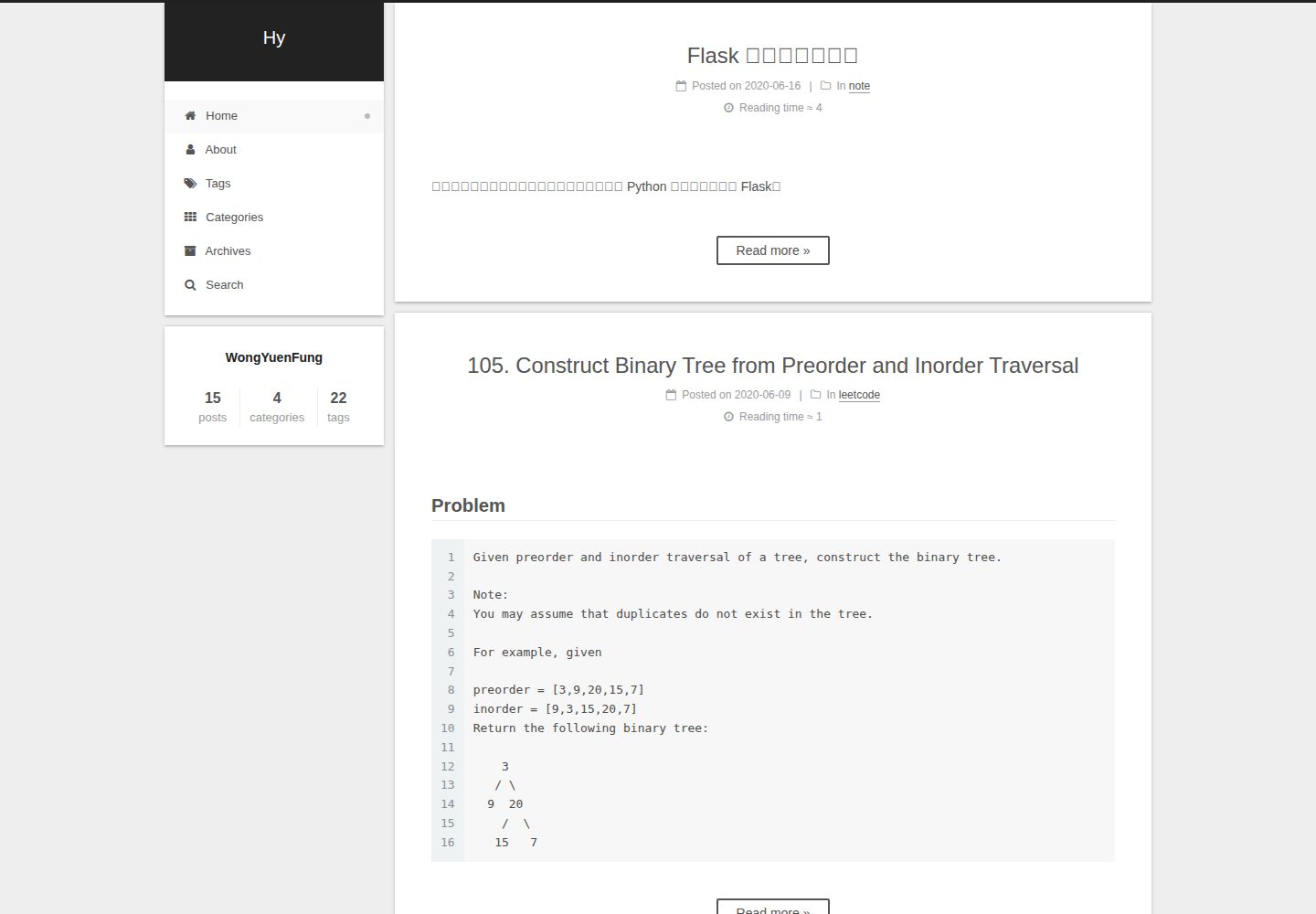
看看你的网站会是什么样
浏览真实页面截图,比较内容排版与手机效果。点击下方缩略图切换,放大查看整页细节。
全部页面与视图 3
截图用于了解视觉与布局,交互效果请以实际项目为准。
采集于 2026-10-02查看来源
值得关注的模板亮点
从已有项目资料中,快速了解它的特点。
支持简体中文、繁体中文、英文、俄语、法语、德语、日语等多语言
内置多说与 Disqus 评论系统支持
提供标签页、分类页、社交链接与 Feed 链接配置
包含 Muse、Mist、Pisces、Gemini 四种外观方案
仓库已停止维护,指向社区维护版本
模板详细介绍
这是一个 Hexo 博客主题的备份仓库,仓库名为 hexo_next_backup,描述为「theme backup of Hexo blog」,即对 Hexo 博客所用 NexT 主题的备份。仓库自身不包含新的主题开发内容,README 直接沿用 NexT 主题的说明文档,并在顶部标注该仓库已不再维护,指向社区维护版本 theme-next/hexo-theme-next。
从 README 内容看,NexT 是一个 Hexo 主题,支持多语言(简体中文、繁体中文、英文、俄语、法语、德语、日语、印尼语、葡萄牙语、韩语、意大利语、荷兰语、越南语),内置多说与 Disqus 评论、标签页与分类页、社交链接、Feed 链接,以及多套代码高亮主题。主题提供 Muse、Mist、Pisces、Gemini 四种外观方案。安装方式为将主题放入 Hexo 站点的 themes 目录,并在站点 _config.yml 中设置 theme: next。
需要注意的限制:该仓库已明确停止维护,README 指向社区维护版本;仓库 stars 为 0,最近更新时间为 2020 年,属于个人备份性质,不保证与当前 Hexo 版本兼容。仓库采用 MIT 许可,但演示图片、字体、图标等第三方素材需另行核对许可。
Hexo博客
适合你的项目吗?
适用场景
- 参考 NexT 主题的配置项与目录结构
- 备份或迁移个人 Hexo 博客的主题文件
- 了解 NexT 主题的多语言与评论系统配置方式
适合人群
- 使用 Hexo 搭建个人博客的开发者
- 需要查阅 NexT 主题历史配置文档的用户
- 希望参考他人主题备份组织方式的用户
上手与定制指南
结合仓库当前版本的说明,按下面的资料检查内容、配置与运行要求。
- 1
该仓库已停止维护,README 建议改用社区维护版本 theme-next/hexo-theme-next
- 2
将主题放入 Hexo 站点的 themes 目录,并在站点 _config.yml 中设置 theme: next
- 3
若遇到 Cannot find module 'hexo-util' 报错,需按 README 说明检查 npm 版本或显式安装 hexo-util
- 4
仓库采用 MIT 许可,但演示图片、字体、图标等第三方素材需按各自许可核对
授权与来源资料
使用条件与限制
免费使用 · 保留许可声明本次收录的是公开仓库中采用 MIT 许可的免费版本;免费范围为该版本代码,不代表外部服务或第三方素材免费。
使用时需要遵守
- 允许免费使用、修改、商用和分发该版本代码。
- 分发代码副本或实质性部分时,保留原作者版权声明和完整 MIT 许可声明。
- 代码按现状提供;担保与责任限制以原许可证及适用法律为准。
额外费用与待核对事项
- 该仓库已停止维护,不再更新,README 指向社区维护版本 theme-next/hexo-theme-next,使用前需自行评估与当前 Hexo 版本的兼容性。
- 使用 Hexo 数据文件配置方式需将 Hexo 升级至 3.0 或以上版本;若坚持使用 Hexo 2.x,则只能沿用旧配置方式。
- 评论功能依赖第三方服务(多说 DuoShuo 或 Disqus),需自行注册并配置 shortname,可能受该外部服务的可用性与条款约束。
- 演示图片、字体、图标及其他第三方素材需按各自许可核对,不能仅凭代码的 MIT 许可判断。
- 域名、托管、数据库、支付或 AI 等外部服务可能另外收费。
查看原文依据
Permission is hereby granted, free of charge
许可证原文
This repository is no longer maintained!
README 原文
you need upgrade Hexo to 3.0 (or above) to use this feature
README 原文
https://github.com/henryexhenry/hexo_next_backup/blob/master/LICENSEhttps://github.com/henryexhenry/hexo_next_backup/blob/master/README.mdNexT has native support for `DuoShuo` and `Disqus` comment systems.
README 原文
DeepSeek 根据仓库许可证和 README 整理 ·2026-10-02。结果仅覆盖已读取资料,依赖、图片、字体及后续条款变更以各自原文为准。
项目核对记录与介绍依据
模板资料
- 来源平台
- GitHub
- 资料与维护参考分
- 资料一般 · 57 / 100
- 技术栈
- Hexo
- 网站类型
- 博客
这个分数如何计算
本站按许可资料(最高30分)、演示链接(12分)、预览图(10分)、Star数(15分)、记录的维护时间(15分)、描述完整度(8分)、功能记录(5分)和分类资料(5分)计算。它不是代码、安全或性能测试,也不是 Google 评分;有链接不代表已实测可用。
这个项目需要核对什么
- 记录的仓库更新时间
- 2020-05-25
- 截图检查日期
- 2026-10-02
已收录演示链接。请用你的内容与屏幕尺寸检查;有演示不代表表单、认证或支付已经可用。
目录记录的主要技术栈是 Hexo。请通过依赖清单和锁文件核对实际版本与托管要求。这些说明基于收录资料,不代表代码审计或部署实测。
查看具体选型方法 →介绍的制作与核对状态
介绍由 AI 辅助整理目录与仓库资料。仓库作者不等于这篇介绍的审核者。
已完成服务器许可规则与 AI 来源核对;未经过人工编辑审核。
查看当时使用的来源资料
SHA-256: 6e73012c136ec6bc08d1a7fcca6f35cab968656bf7f190a16bc018096bc14434
2026-10-02T22:56:27.681Z
来源文件 / 仓库<h1 align="center">This repository is no longer maintained! :warning:</h1>
<h2 align="center">The community-maintained version is here: <a href="https://github.com/theme-next/hexo-theme-next">NexT v6 and v7 :triangular_flag_on_post:</a></h2>
<h1 align="center">NexT</h1>
<p align="center">NexT is a high quality elegant <a href="http://hexo.io">Hexo</a> theme. It is crafted from scratch, with love.</p>
[![gitter-image]][gitter-url]
[![mnt-image]](https://github.com/theme-next/hexo-theme-next)
[![travis-image]][travis-url]
[![rel-image]][releases-url]
[![hexo-image]][hexo-url]
[![lic-image]](LICENSE)
* [Chinese Documentation](README.cn.md)
## Live Preview
* :heart_decoration: Muse scheme: [LEAFERx](https://leaferx.online) | [XiaMo](https://notes.wanghao.work) | [OAwan](https://oawan.me)
* :six_pointed_star: Mist scheme: [Jeff](https://blog.zzbd.org) | [uchuhimo](http://uchuhimo.me) | [xirong](http://www.ixirong.com)
* :pisces: Pisces scheme: [Vi](http://notes.iissnan.com) | [Acris](https://acris.me) | [Rainy](https://rainylog.com)
* :gemini: Gemini scheme: [Ivan.Nginx](https://almostover.ru) | [Raincal](https://raincal.com) | [Dandy](https://dandyxu.me)
More NexT examples [here](https://github.com/iissnan/hexo-theme-next/issues/119).
## Installation
**1.** Change dir to **hexo root** directory. There must be `node_modules`, `source`, `themes` and other directories:
```sh
$ cd hexo
$ ls
_config.yml node_modules package.json public scaffolds source themes
```
**2.** Get theme from GitHub. There are several variants to do it:
### Download [latest release version][releases-latest-url].
At most cases **stable**. Recommended for most users.
[![curl-tar-wget-image]][curl-tar-wget-url]
```sh
$ mkdir themes/next
$ curl -s https://api.github.com/repos/iissnan/hexo-theme-next/releases/latest | grep tarball_url | cut -d '"' -f 4 | wget -i - -O- | tar -zx -C themes/next --strip-components=1
```
### Download [tagged release version][releases-url].
You must define version. Replace `v5.1.2` with any version from [tags list][tags-url].
[![curl-tar-image]][curl-tar-url]
```sh
$ mkdir themes/next
$ curl -L https://api.github.com/repos/iissnan/hexo-theme-next/tarball/v5.1.2 | tar -zxv -C themes/next --strip-components=1
```
[![git-image]][git-url]
```sh
$ git clone --branch v5.1.2 https://github.com/iissnan/hexo-theme-next themes/next
```
### Download [latest master branch][download-latest-url].
May be **unstable**, but includes latest features. Recommended for developers.
[![curl-tar-image]][curl-tar-url]
```sh
$ mkdir themes/next
$ curl -L https://api.github.com/repos/iissnan/hexo-theme-next/tarball | tar -zxv -C themes/next --strip-components=1
```
[![git-image]][git-url]
```sh
$ git clone https://github.com/iissnan/hexo-theme-next themes/next
```
Clone command will give you the **whole repository**. And in any time you can switch to any tagged release.\
Get tags list:
```sh
$ cd themes/next
$ git tag -l
…
v5.0.0
v5.0.1
v5.1.0
v5.1.1
v5.1.2
```
For example, you want to switch on `v5.1.0` [tagged release version][tags-url]. Input the following command:
```sh
$ git checkout tags/v5.1.0
Note: checking out 'tags/v5.1.0'.
…
HEAD now on 1f72f68... CSS: Remove global list-style setting of ul
```
And if you want to switch back on [master branch][commits-url], input this command:
```sh
$ git checkout master
```
**3.** Set theme in main **hexo root config** `_config.yml` file:
theme: next
### Bugs
For those who also encounter **Error: Cannot find module 'hexo-util'** [issue](https://github.com/iissnan/hexo-theme-next/issues/1490), please check your NPM version.
- `> 3`: Still not work. Please remove `node_modules` directory and reinstall using `npm install`.
- `< 3`: Please add `hexo-util` explicitly via `npm install --save-dev hexo-util` to you site package deps.
## Update
```sh
$ cd themes/next
$ git pull
```
### Bugs
> Commit your changes or stash them before you can merge
You must Commit, Stash or Discard local changes. See [here](https://stackoverflow.com/a/15745424/5861495) how to do it.
### Theme configurations using Hexo data files ([#328](https://github.com/iissnan/hexo-theme-next/issues/328))
Currently, it is not smooth to update NexT theme from pulling or downloading new releases. It is quite often running into conflict status when updating NexT theme via `git pull`, or need to merge configurations manually when upgrading to new releases.
At present, NexT encourages users to store some options in site's `_config.yml` and other options in theme's `_config.yml`. This approach is applicable, but has some drawbacks:
1. Configurations are splited into two pieces
2. Users maybe confuse which place should be for options
In order to resolve this issue, NexT will take advantage of Hexo [Data files](https://hexo.io/docs/data-files.html). Because Data files is introduced in Hexo 3, so you need upgrade Hexo to 3.0 (or above) to use this feature.
If you prefer Hexo 2.x, you can still use the old approach for configurations. NexT is still compatible with Hexo 2.x.
#### Benefits
With this feature, now you can put all your configurations into one place (`source/_data/next.yml`), you don't need to touch `next/_config.yml`. If there are any new options in new releases, you just need to copy those options from `next/_config.yml`, paste into `_data/next.yml` and set their values to whatever you want.
#### How to use this feature
1. Please ensure you are using Hexo 3 (or above)
2. Create an file named `next.yml` in site's `source/_data` directory (create `_data` directory if it did not exist)
3. Copy NexT theme options both in site's `_config.yml` and theme's `_config.yml` into `next.yml`.
4. Use `--config source/_data/next.yml` parameter to start server, generate or deploy.\
For example: `hexo clean --config source/_data/next.yml && hexo g --config source/_data/next.yml`.
## Features
### Multiple languages support, including:
:cn: Simplified Chinese & Traditional Chinese.<br>
:us: English<br>
:ru: Russian<br>
:fr: French<br>
:de: German<br>
:jp: Japanese<br>
:indonesia: Indonesian<br>
:portugal: Portuguese (Brazil)<br>
:kr: Korean<br>
:it: Italian<br>
:netherlands: Dutch<br>
:vietnam: Vietnamese
Default language is English.
```yml
language: en
# language: zh-Hans
# language: zh-hk
# language: zh-tw
# language: ru
# language: fr-FR
# language: de
# language: ja
# language: id
# language: pt
# language: pt-BR
# language: ko
# language: it
# language: nl-NL
# language: vi
```
Set `language` field as following in site `_config.yml` to change to Chinese.
```yml
language: zh-Hans
```
### Comment support.
NexT has native support for `DuoShuo` and `Disqus` comment systems.
Add the following snippets to your `_config.yml`:
```yml
duoshuo:
enable: true
shortname: your-duoshuo-shortname
```
OR
```yml
disqus_shortname: your-disqus-shortname
```
### Tags page.
> Add a tags page contains all tags in your site.
- Create a page named `tags`
hexo new page "tags"
- Edit tags page, set page type to `tags`.
title: All tags
date: 2014-12-22 12:39:04
type: "tags"
- Add `tags` to theme `_config.yml`:
menu:
home: /
archives: /archives
tags: /tags
### Categories page.
> Add a categories page contains all categories in your site.
- Create a page named `categories`
hexo new page "categories"
- Edit categories page, set page type to `categories`.
title: All categories
date: 2014-12-22 12:39:04
type: "categories"
- Add `categories` to theme `_config.yml`:
menu:
home: /
archives: /archives
categories: /categories
### Social Media
NexT can automatically add links to your Social Media accounts:
```yml
social:
GitHub: your-github-url
Twitter: your-twitter-url
Weibo: your-weibo-url
DouBan: your-douban-url
ZhiHu: your-zhihu-url
```
### Feed link.
> Show a feed link.
Set `rss` field in theme's `_config.yml`, as the following value:
1. `rss: false` will totally disable feed link.
2. `rss: ` use sites' feed link. This is the default option.
Follow the installation instruction in the plugin's README. After the configuration is done for this plugin, the feed link is ready too.
3. `rss: http://your-feed-url` set specific feed link.
### Up to 5 code highlight themes built-in.
NexT uses [Tomorrow Theme](https://github.com/chriskempson/tomorrow-theme) with 5 themes for you to choose from.
Next use `normal` by default. Have a preview about `normal` and `night`:
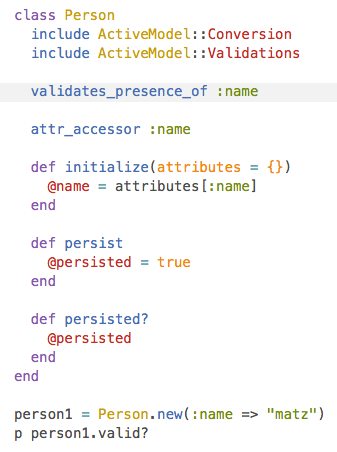
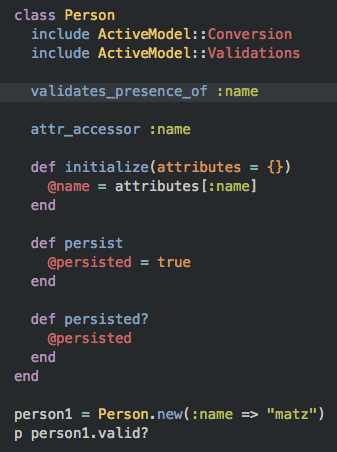
Head over to [Tomorrow Theme](https://github.com/chriskempson/tomorrow-theme) for more details.
## Configuration
NexT comes with few configurations.
```yml
# Menu configuration.
menu:
home: /
archives: /archives
# Favicon
favicon: /favicon.ico
# Avatar (put the image into next/source/images/)
# can be any image format supported by web browsers (JPEG,PNG,GIF,SVG,..)
avatar: /default_avatar.png
# Code highlight theme
# available: normal | night | night eighties | night blue | night bright
highlight_theme: normal
# Fancybox for image gallery
fancybox: true
# Specify the date when the site was setup
since: 2013
```
## Browser support
![browser-image]
[](https://www.browserstack.com/)
>**BrowserStack** is a cloud-based cross-browser testing tool that enables developers to test their websites across various browsers on different operating systems and mobile devices, without requiring users to install virtual machines, devices or emulators.
## Contributing
Contribution is welcome, feel free to open an issue and fork. Waiting for your pull request.
<!--
[![hexo-image]][hexo-url]
[![bower-image]][bower-url]
[![jquery-image]][jquery-url]
[hexo-image]: http://img.shields.io/badge/Hexo-2.4+-2BAF2B.svg?style=flat-square
[hexo-url]: http://hexo.io
[bower-image]: http://img.shields.io/badge/Bower-*-2BAF2B.svg?style=flat-square
[bower-url]: http://bower.io
[jquery-image]: https://img.shields.io/badge/jquery-1.9-blue.svg?style=flat-square
[jquery-url]: http://jquery.com/
-->
[browser-image]: https://img.shields.io/badge/browser-%20chrome%20%7C%20firefox%20%7C%20opera%20%7C%20safari%20%7C%20ie%20%3E%3D%209-lightgrey.svg
[browser-url]: https://www.browserstack.com
[gitter-image]: https://badges.gitter.im/Join%20Chat.svg
[gitter-url]: https://gitter.im/iissnan/hexo-theme-next?utm_source=badge&utm_medium=badge&utm_campaign=pr-badge&utm_content=badge
[travis-image]: https://travis-ci.org/iissnan/hexo-theme-next.svg?branch=master
[travis-url]: https://travis-ci.org/iissnan/hexo-theme-next?branch=master "Travis CI"
[hexo-image]: https://img.shields.io/badge/hexo-%3E%3D%203.0-blue.svg
[hexo-url]: http://hexo.io
[mnt-image]: https://img.shields.io/maintenance/yes/2017.svg
[rel-image]: https://img.shields.io/github/release/iissnan/hexo-theme-next.svg
<!--[lic-image]: https://img.shields.io/npm/l/hexo-theme-next.svg-->
[lic-image]: https://img.shields.io/dub/l/vibe-d.svg
[git-image]: https://img.shields.io/badge/install%20with%20-git-blue.svg
[curl-tar-image]: https://img.shields.io/badge/install%20with%20-curl%20%7C%20tar-blue.svg
[curl-tar-wget-image]: https://img.shields.io/badge/install%20with%20-curl%20%7C%20tar%20%7C%20wget-blue.svg
[git-url]: http://lmgtfy.com/?q=linux+git+install
[curl-tar-url]: http://lmgtfy.com/?q=linux+curl+tar+install
[curl-tar-wget-url]: http://lmgtfy.com/?q=linux+curl+tar+wget+install
[download-latest-url]: https://github.com/iissnan/hexo-theme-next/archive/master.zip
[releases-latest-url]: https://github.com/iissnan/hexo-theme-next/releases/latest
[releases-url]: https://github.com/iissnan/hexo-theme-next/releases
[tags-url]: https://github.com/iissnan/hexo-theme-next/tags
[commits-url]: https://github.com/iissnan/hexo-theme-next/commits/master
看看同类模板
对比同技术栈与用途的模板,找到更适合的视觉与内容结构。

hexo-theme-matery
A beautiful hexo blog theme with material design and responsive design.一个基于材料设计和响应式设计而成的全面、美观的Hexo主题。
Hexo · 博客

hexo-theme-cactus
:cactus: A responsive, clean and simple theme for Hexo.
Hexo · 博客

hexo-theme-volantis
A Wonderful Theme for Hexo.
Hexo · 博客

hexo-theme-aurora
Hexo Theme Aurora 是一款以极光色彩和渐变 UI 为核心的 Hexo 博客主题,整体走未来感路线。 它的首页采用杂志式网格布局,文章列表与精选区域层次分明,视觉上更接近个人媒体站点而非传统博客。
Hexo · 博客

hexo-theme-Claudia
Claudia 是一款为 Hexo 设计的博客主题,主打简洁外观与易配置。 它支持自动跟随设备深色模式,并在 README 中宣称拥有 90+ 的 Lighthouse 评分,适合追求轻量与性能的博客作者。
Hexo · 博客

hexo-theme-A4
A hexo theme that looks like an A4 paper.(一个类A4纸张质感的hexo博客主题。 )
Hexo · 博客