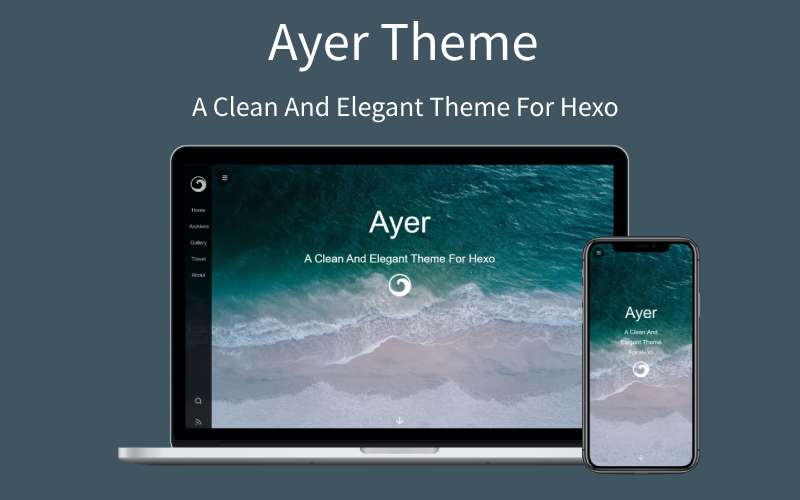
Written in EJS and Stylus, configured centrally via the theme _config.yml
HexoBlog
hero-theme-lvren — Hexo Blog Template
By jiaqiany
hero-theme-lvren is a Hexo-based blog theme written in EJS and Stylus, offering configurable features such as a sidebar menu, cover, table of contents, word count, reward, comments, search, RSS, and dark mode.
Explore the design
Compare the page layouts and mobile experience. Open any screenshot for a closer look.
Author preview
Author-provided preview
Preview provided in the project README.
One original preview is available. Open the full image to inspect the design.
Screenshots show visual appearance; interactive behavior may differ.
Recorded 2026-10-01View source
What stands out
A quick read of the recorded project description.
Sidebar menu, cover image, logo, and typewriter subtitle animation
Table of contents, click-to-fullscreen images, word count, and reward
Supports Valine and Gitalk comment systems
Supports dark mode, local search, RSS, and pinned posts
Integrates Busuanzi, CNZZ, Google Analytics, Baidu Analytics, MathJax, and KaTeX
Template Details
hero-theme-lvren is a Hexo blog theme published on GitHub. The repository description reads "My blog theme for hexo," and the README calls it "a quiet and elegant Hexo theme." The theme uses EJS templates and Stylus styles, and is configured through _config.yml in the theme directory.
The theme provides options for a sidebar menu, cover image and logo, typewriter subtitle animation, table of contents, click-to-fullscreen images, word count, reward, copyright notice, search, RSS, dark mode, click heart, and article and sidebar width adjustment. Comments support Valine and Gitalk. Statistics support Busuanzi, CNZZ, Google Analytics, and Baidu Analytics. Math formulas support MathJax and KaTeX.
Installation involves cloning the repository into the themes/hero-theme-lvren directory of a Hexo site and setting theme to hero-theme-lvren in the site _config.yml. Local search, RSS, and pinned posts require additional plugins: hexo-generator-searchdb, hexo-generator-feed, and hexo-generator-index-pin-top. Category, tag, and album pages require manually creating pages and filling in the corresponding front-matter. The album image list must be written in the albums field in the Markdown front matter; the README also notes that this approach is not ideal. The theme is released under the MIT license, allowing free use, modification, commercial use, and distribution, but third-party assets such as demo images, fonts, and icons require separate license verification.
HexoBlog
Is it right for your project?
Use Cases
- Building a personal blog with Hexo and wanting to change the theme
- A blog homepage with sidebar navigation, cover, and typewriter subtitle
- Adding a table of contents, word count, and reward entry to articles
- Integrating Valine or Gitalk comments and configuring site statistics
- Creating category, tag, and album pages
Suitable For
- Blog authors using Hexo
- Theme users who prefer the EJS and Stylus tech stack
- Sites needing a Chinese interface and domestic comment and statistics services
- Developers who want to freely modify and distribute theme code under the MIT license
Getting started & customization
Use these recorded setup notes alongside the repository instructions for your chosen version.
- 1
Clone the repository into the themes/hero-theme-lvren directory of a Hexo site and set theme to hero-theme-lvren in the site _config.yml
- 2
Local search, RSS, and pinned posts require installing hexo-generator-searchdb, hexo-generator-feed, and hexo-generator-index-pin-top respectively, and configuring them in the site _config.yml
- 3
Category and tag pages must be created via hexo new page, and type and layout set in the page front-matter
- 4
The album image list must be written in the albums field in the Markdown front matter
- 5
Valine requires creating a LeanCloud account and filling in app_id and app_key; Gitalk requires filling in the GitHub Application's clientID, clientSecret, repo, owner, and admin
License & source material
Usage conditions & limitations
Free to use · keep license noticeThis entry covers the free version under the MIT license in the public repository; the free scope is the code of this version and does not mean external services or third-party assets are free.
Must comply with when using
- Free use, modification, commercial use, and distribution of this version's code are permitted.
- When distributing copies or substantial portions of the code, retain the original author's copyright notice and the full MIT license notice.
- The code is provided as is; warranties and limitations of liability are governed by the original license and applicable law.
Additional costs & items to verify
- Before enabling Valine comments, you must register a LeanCloud account and fill in app_id and app_key in the theme configuration; otherwise, the comment feature is unavailable.
- Using Gitalk comments requires creating a GitHub Application yourself and filling in parameters such as clientID, clientSecret, repo, owner, and admin.
- The local search feature depends on additionally installing the hexo-generator-searchdb plugin and configuring it in the site _config.yml.
- The RSS feature depends on additionally installing the hexo-generator-feed plugin and configuring it in the site _config.yml.
- The pinned posts feature requires uninstalling hexo-generator-index and installing the hexo-generator-index-pin-top plugin.
- CNZZ statistics require filling in the url yourself; without configuration, this statistic is unavailable.
- Google Analytics statistics require filling in the tracking ID yourself; leaving it blank disables it.
- Baidu Analytics statistics require filling in the tracking ID yourself; leaving it blank disables it.
- Demo images, fonts, icons, and other third-party assets must be checked against their respective licenses; they cannot be judged solely by the code's MIT license.
- External services such as domain, hosting, database, payment, or AI may incur additional charges.
View Original Text Basis
Permission is hereby granted, free of charge
Original License Text
You need create leancloud account first (https://console.leancloud.app), then put the id|key in below.
Original README
clientID: # GitHub Application Client ID
Original README
$ npm install hexo-generator-searchdb --save
Original README
$ npm install hexo-generator-feed --save
Original README
$ npm install hexo-generator-index-pin-top --save
Original README
cnzz: enable: true url: #
Original README
google_analytics: ''
Original README
https://github.com/jiaqiany/hero-theme-lvren/blob/main/LICENSEhttps://github.com/jiaqiany/hero-theme-lvren/blob/main/README.mdbaidu_analytics: ''
Original README
Compiled by DeepSeek based on repository license and README ·2026-10-01. Results only cover the materials read; dependencies, images, fonts, and subsequent term changes are subject to their respective original texts.
Project checks & description sources
Template Information
- Source platforms
- GitHub
- Documentation and maintenance reference score
- Partly documented · 60 / 100
- Technologies
- Hexo
- Website type
- Blog
How this score is calculated
Our heuristic uses license records (up to 30), a demo link (12), a preview (10), stars (15), recorded maintenance (15), description completeness (8), feature records (5) and classification data (5). It is not a code, security or performance test, or a Google score. A link does not establish tested functionality.
What to verify for this project
- Repository update recorded
- 2026-09-22
- Screenshot last checked
- 2026-10-01
No demo link is recorded. Use the repository instructions to evaluate the project locally; the screenshot alone cannot establish interactive behavior.
The catalog identifies Hexo as the primary stack. Check the actual dependency manifest and lockfile for versions and hosting requirements. These notes use recorded metadata, not a code audit or a deployment test.
Use a selection guide →How this description was prepared
AI-assisted description based on catalog records and repository material. Repository authors are not automatically the reviewers of this description.
Automatically checked against source and license rules; no manual editorial review.
Inspect the recorded source material
SHA-256: dfd4016829f5ac34752bbe95f25768c7ca60e866cbec807a998cb467187f32eb
2026-10-01T03:07:09.080Z
Source file / repository<p align="center"><img width="100" src="logo.png" alt="hero-theme-lvren logo"></p>
<h3 align="center">一个安静且优雅的 Hexo 主题</h3>
<p align="center">
<a href="http://standardjs.com" target="_blank" rel="noopener noreferrer">
<img alt="js-standard-style" src="https://img.shields.io/badge/code%20style-standard-brightgreen.svg">
</a>
<img alt="language" src="https://img.shields.io/badge/language-ejs--stylus-orange.svg">
<a href="https://hexo.io/zh-cn/" target="_blank" rel="noopener noreferrer">
<img alt="hexo" src="https://img.shields.io/badge/hexo-%3E%3D3.0-blue.svg">
</a>
<img alt="platform" src="https://img.shields.io/badge/platform-PC--ios--android-cc2e8b.svg">
</p>
---
:ocean: hero-theme-lvren is a clean and elegant theme for Hexo, also fast, powerful and responsive. It contains many awesome features, It's perfect for your blog.
<b>注:收藏本主题请点右上角Star,谢谢~</b>

### Install
``` bash
$ git clone https://github.com/jiaqiany/hero-theme-lvren.git themes/hero-theme-lvren
```
### Enable
Modify `theme` setting in `_config.yml` to `hero-theme-lvren`
``` yml
theme: hero-theme-lvren
```
### Update
``` bash
cd themes/hero-theme-lvren
git pull
```
### Configuration
let me know if you have any questions.
``` yml
# Menu-Sidebar
menu:
Home: /
Archives: /archives
Categories: /categories
Tags: /tags
Gallery: /gallery
Travel: /tags/旅行/
About: /2019/about
# Subtitle and Typing animation
# https://github.com/mattboldt/typed.js
subtitle:
enable: true
text: A clean and elegant theme
text2: It's perfect for your hexo blog
text3: Have fun! #Supports up to three lines of text
startDelay: 0
typeSpeed: 200
loop: true
backSpeed: 100
showCursor: true
# Favicon and sidebar logo
favicon: /favicon.ico
logo: /images/ayer-side.svg
# Cover Setting
# enable: [true|false];path: [background-image];logo: [cover-logo-image]
cover:
enable: true
path: /images/cover1.jpg # there are some beautiful cover images in the theme's directory: /source/images, choose your favorite image to replace it.
logo: /images/ayer.svg
# ProgressBar
progressBar: true
# Article Setting
# (Use this to excerpt if article is too long:<!--more-->)
excerpt_link: Read More...
excerpt_all: false
# Share
share_enable: true
# If you are not in China, maybe you prefer to set:false
share_china: true
# share text
share_text: Share
# search text
search_text: Search
# nav text
nav_text:
page_prev: Prev page
page_next: Next page
post_prev: Newer posts
post_next: Older posts
# Catalog in article
toc: true
# images in the article support click to fullscreen
image_viewer: true
# https://github.com/willin/hexo-wordcount
word_count:
enable: true
# only display in article page(not in index page)
only_article_visit: true
# Reward Setting
# type:0-close reward; 1-only open in article which you have configured reward:true; 2-open in all articles
reward_type: 2
# reward word
reward_wording: 'Buy me a cup of coffee~'
# qrcode image path
alipay: /images/alipay.jpg
# qrcode image path
weixin: /images/wechat.jpg
# Copyright
# type:0-close all; 1-only display in article which you have configured copyright: true; 2-all articles
copyright_type: 2
# Search
# https://github.com/theme-next/hexo-generator-searchdb
search: true
# RSS
rss: /atom.xml
# DarkMode
darkmode: true
# ClickLove
clickLove: false
# articleWidth and sidebarWidth
layout:
article_width: 80rem
sidebar_width: 8rem
# Comment:1、Valine (recommended);2、Gitalk
# 1、Valine [A fast, simple & powerful comment system](https://github.com/xCss/Valine)
# You need create leancloud account first (https://console.leancloud.app), then put the id|key in below.
leancloud:
enable: true
app_id: #
app_key: #
# Valine Setting
valine:
enable: true
verify: false # comment verify
avatar: mp # (https://valine.js.org/avatar.html)
placeholder: Add some comments to my article~ # placeholder
# 2、Gitalk(https://github.com/gitalk/gitalk)
gitalk:
enable: false # true
clientID: # GitHub Application Client ID
clientSecret: # Client Secret
repo: # Repository name
owner: # GitHub ID
admin: # GitHub ID
# GitHub Ribbons(https://github.blog/2008-12-19-github-ribbons/)
github:
# (Set false if you don't need)
url: https://github.com/jiaqiany/hero-theme-lvren
# pv&uv statistics
busuanzi:
enable: true
# cnzz statistics
cnzz:
enable: true
url: #
# Google Analytics
google_analytics: ''
# Baidu Analytics
baidu_analytics: ''
# Mathjax Support
mathjax: true
# Katex Support
katex:
enable: false # true
allpost: true
copy_tex: false
# since year
since: 2019
# pageFooter (Set true can let more people know this theme, Thanks!)
pageFooter: true
```
### Plugins
+ [hexo-generator-search](https://github.com/wzpan/hexo-generator-search) (for Local Search)
```yml
$ npm install hexo-generator-searchdb --save
```
Then add the plugin configuration in hexo's configuration file `_config.yml` (note: not the theme's configuration file):
```yml
# Hexo-generator-search
search:
path: search.xml
field: post
format: html
```
+ [hexo-generate-feed](https://github.com/hexojs/hexo-generator-feed) (for RSS)
```yml
$ npm install hexo-generator-feed --save
```
Then add the plugin configuration in hexo's configuration file `_config.yml` (note: not the theme's configuration file):
```yml
feed:m
type: atom
path: atom.xml
limit: 20
hub:
content:
content_limit: 140
content_limit_delim: ' '
order_by: -date
```
+ [hexo-generator-index-pin-top](https://github.com/netcan/hexo-generator-index-pin-top) (for Sticky Post)
``` bash
$ npm uninstall hexo-generator-index --save
$ npm install hexo-generator-index-pin-top --save
```
### Categories
``` bash
hexo new page categories
```
Then paste following codes to file: /source/categories/index.md
``` md
---
title: categories
type: categories
layout: "categories"
---
```
### Tags
Same as categories.
### Gallery
Need to write in the head of the markdown, this is not a good way to write, I hope to get a better way to write on github.
``` md
---
title: Gallery
albums: [
["img_url","img_caption"],
["img_url","img_caption"]
]
---
```
### Toc
Use Tocbot to parse the title tags (h1~h6) in the content and insert the directory.
+ hero-theme-lvren/_config.yml
``` bash
# Toc
toc: true
```
+ If Toc is turned on in hero-theme-lvren/_config.yml, then Tocbot will generate a Toc article directory in the title tag of each blog parsing content, but not all blogs require Toc, so in the Front-matter section of markdown Can be closed:
``` md
---
no_toc: true
---
```
---
<br/>
Licensed under <a rel="license" href="https://www.mit-license.org/">MIT</a>.
Explore similar templates
Compare previews and descriptions within the same stack and category.

hexo-theme-matery
hexo-theme-matery is a Material Design, responsive Hexo blog theme with homepage carousel, waterfall post list, timeline archive, word cloud tags, radar chart categories, and an about page.
Hexo · Blog

hexo-theme-cactus
Cactus is a responsive Hexo theme for personal websites and blogs, maintained by probberechts. It offers four color schemes (dark, light, white, classic), configurable navigation, homepage post lists, project lists, social links, and copyright year ranges.
Hexo · Blog

hexo-theme-volantis
Volantis is a blog theme for Hexo, distributed as the npm package hexo-theme-volantis and enabled by setting theme to volantis in the Hexo site's _config.yml. It requires Hexo 7.3+, hexo-cli 4.3+, Node.js 22.x LTS+, and npm 10.x LTS+.
Hexo · Blog

hexo-theme-aurora
Hexo Theme Aurora is a futuristic Hexo blog theme built around aurora gradients and a magazine-style grid layout.
Hexo · Blog

hexo-theme-Claudia
Claudia is a Hexo blog theme focused on a clean look and easy configuration. It automatically follows the device's dark mode and claims a 90+ Lighthouse score.
Hexo · Blog

hexo-theme-A4
hexo-theme-A4 is a minimalist Hexo blog theme that mimics the texture of A4 paper, emphasizing simplicity, small size, and minimal configuration.
Hexo · Blog