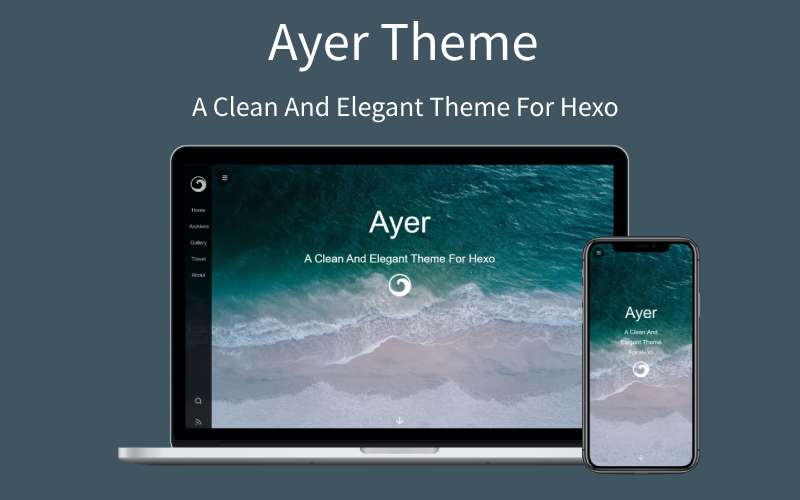
使用 EJS 与 Stylus 编写,通过主题 _config.yml 集中配置
Hexo博客
hero-theme-lvren — Hexo 博客模板
作者 jiaqiany
hero-theme-lvren 是一个基于 Hexo 的博客主题,采用 EJS 与 Stylus 编写,提供侧边栏菜单、封面、文章目录、字数统计、打赏、评论、搜索、RSS、暗色模式等可配置功能。
看看你的网站会是什么样
浏览真实页面截图,比较内容排版与手机效果。点击下方缩略图切换,放大查看整页细节。
目前有 1 张原始预览,可打开完整图片查看设计细节。
截图用于了解视觉与布局,交互效果请以实际项目为准。
采集于 2026-10-01查看来源
值得关注的模板亮点
从已有项目资料中,快速了解它的特点。
侧边栏菜单、封面图、logo 与打字机副标题动画
文章目录、图片点击全屏、字数统计与打赏功能
支持 Valine 与 Gitalk 两种评论系统
支持暗色模式、本地搜索、RSS 与置顶文章
集成不蒜子、CNZZ、Google Analytics、百度统计及 MathJax、KaTeX
模板详细介绍
hero-theme-lvren 是发布在 GitHub 上的 Hexo 博客主题,仓库描述为“My blog theme for hexo”,README 称其为“一个安静且优雅的 Hexo 主题”。主题使用 EJS 模板与 Stylus 样式,通过主题目录下的 _config.yml 进行配置。
主题提供侧边栏菜单、封面图与 logo、打字机副标题动画、文章目录、图片点击全屏、字数统计、打赏、版权声明、搜索、RSS、暗色模式、点击爱心、文章与侧边栏宽度调整等选项。评论支持 Valine 与 Gitalk 两种方案,统计支持不蒜子、CNZZ、Google Analytics 与百度统计,数学公式支持 MathJax 与 KaTeX。
安装方式为将仓库克隆到 Hexo 站点的 themes/hero-theme-lvren 目录,并在站点 _config.yml 中将 theme 设为 hero-theme-lvren。本地搜索、RSS 与置顶文章需要额外安装 hexo-generator-searchdb、hexo-generator-feed、hexo-generator-index-pin-top 等插件。分类、标签与相册页面需要手动创建页面并填写对应 front-matter。相册的图片列表需写在 Markdown 头部的 albums 字段中,README 也说明这种方式并不理想。主题以 MIT 许可发布,可免费使用、修改、商用和分发,但演示图片、字体、图标等第三方素材需单独核对许可。
Hexo博客
适合你的项目吗?
适用场景
- 使用 Hexo 搭建个人博客并希望更换主题
- 需要侧边栏导航、封面与打字机副标题的博客首页
- 为文章添加目录、字数统计与打赏入口
- 接入 Valine 或 Gitalk 评论并配置站点统计
- 创建分类、标签与相册页面
适合人群
- 使用 Hexo 的博客作者
- 偏好 EJS 与 Stylus 技术栈的主题使用者
- 需要中文界面与国内评论、统计服务的站点
- 希望以 MIT 许可自由修改和分发主题代码的开发者
上手与定制指南
结合仓库当前版本的说明,按下面的资料检查内容、配置与运行要求。
- 1
将仓库克隆到 Hexo 站点的 themes/hero-theme-lvren 目录,并在站点 _config.yml 中将 theme 设为 hero-theme-lvren
- 2
本地搜索、RSS 与置顶文章需分别安装 hexo-generator-searchdb、hexo-generator-feed、hexo-generator-index-pin-top 插件,并在站点 _config.yml 中配置
- 3
分类与标签页面需通过 hexo new page 创建,并在页面 front-matter 中设置 type 与 layout
- 4
相册图片列表需写在 Markdown 头部的 albums 字段中
- 5
Valine 需先创建 LeanCloud 账号并填写 app_id 与 app_key,Gitalk 需填写 GitHub Application 的 clientID、clientSecret、repo、owner 与 admin
授权与来源资料
使用条件与限制
免费使用 · 保留许可声明本次收录的是公开仓库中采用 MIT 许可的免费版本;免费范围为该版本代码,不代表外部服务或第三方素材免费。
使用时需要遵守
- 允许免费使用、修改、商用和分发该版本代码。
- 分发代码副本或实质性部分时,保留原作者版权声明和完整 MIT 许可声明。
- 代码按现状提供;担保与责任限制以原许可证及适用法律为准。
额外费用与待核对事项
- 启用 Valine 评论前需先注册 LeanCloud 账号,并在主题配置中填入 app_id 与 app_key,否则评论功能不可用。
- 使用 Gitalk 评论需自行创建 GitHub Application,并填写 clientID、clientSecret、repo、owner、admin 等参数。
- 本地搜索功能依赖额外安装 hexo-generator-searchdb 插件,并在站点 _config.yml 中配置。
- RSS 功能依赖额外安装 hexo-generator-feed 插件,并在站点 _config.yml 中配置。
- 置顶文章功能需卸载 hexo-generator-index 并安装 hexo-generator-index-pin-top 插件。
- CNZZ 统计需自行填写 url,未配置时该统计不可用。
- Google Analytics 统计需自行填写跟踪 ID,留空则不生效。
- 百度统计需自行填写跟踪 ID,留空则不生效。
- 演示图片、字体、图标及其他第三方素材需按各自许可核对,不能仅凭代码的 MIT 许可判断。
- 域名、托管、数据库、支付或 AI 等外部服务可能另外收费。
查看原文依据
Permission is hereby granted, free of charge
许可证原文
You need create leancloud account first (https://console.leancloud.app), then put the id|key in below.
README 原文
clientID: # GitHub Application Client ID
README 原文
$ npm install hexo-generator-searchdb --save
README 原文
$ npm install hexo-generator-feed --save
README 原文
$ npm install hexo-generator-index-pin-top --save
README 原文
cnzz: enable: true url: #
README 原文
google_analytics: ''
README 原文
https://github.com/jiaqiany/hero-theme-lvren/blob/main/LICENSEhttps://github.com/jiaqiany/hero-theme-lvren/blob/main/README.mdbaidu_analytics: ''
README 原文
DeepSeek 根据仓库许可证和 README 整理 ·2026-10-01。结果仅覆盖已读取资料,依赖、图片、字体及后续条款变更以各自原文为准。
项目核对记录与介绍依据
模板资料
- 来源平台
- GitHub
- 资料与维护参考分
- 资料一般 · 60 / 100
- 技术栈
- Hexo
- 网站类型
- 博客
这个分数如何计算
本站按许可资料(最高30分)、演示链接(12分)、预览图(10分)、Star数(15分)、记录的维护时间(15分)、描述完整度(8分)、功能记录(5分)和分类资料(5分)计算。它不是代码、安全或性能测试,也不是 Google 评分;有链接不代表已实测可用。
这个项目需要核对什么
- 记录的仓库更新时间
- 2026-09-22
- 截图检查日期
- 2026-10-01
目前没有记录演示链接。请依据仓库说明在本地评估;仅凭截图无法确认交互行为。
目录记录的主要技术栈是 Hexo。请通过依赖清单和锁文件核对实际版本与托管要求。这些说明基于收录资料,不代表代码审计或部署实测。
查看具体选型方法 →介绍的制作与核对状态
介绍由 AI 辅助整理目录与仓库资料。仓库作者不等于这篇介绍的审核者。
已完成服务器许可规则与 AI 来源核对;未经过人工编辑审核。
查看当时使用的来源资料
SHA-256: dfd4016829f5ac34752bbe95f25768c7ca60e866cbec807a998cb467187f32eb
2026-10-01T03:07:09.080Z
来源文件 / 仓库<p align="center"><img width="100" src="logo.png" alt="hero-theme-lvren logo"></p>
<h3 align="center">一个安静且优雅的 Hexo 主题</h3>
<p align="center">
<a href="http://standardjs.com" target="_blank" rel="noopener noreferrer">
<img alt="js-standard-style" src="https://img.shields.io/badge/code%20style-standard-brightgreen.svg">
</a>
<img alt="language" src="https://img.shields.io/badge/language-ejs--stylus-orange.svg">
<a href="https://hexo.io/zh-cn/" target="_blank" rel="noopener noreferrer">
<img alt="hexo" src="https://img.shields.io/badge/hexo-%3E%3D3.0-blue.svg">
</a>
<img alt="platform" src="https://img.shields.io/badge/platform-PC--ios--android-cc2e8b.svg">
</p>
---
:ocean: hero-theme-lvren is a clean and elegant theme for Hexo, also fast, powerful and responsive. It contains many awesome features, It's perfect for your blog.
<b>注:收藏本主题请点右上角Star,谢谢~</b>

### Install
``` bash
$ git clone https://github.com/jiaqiany/hero-theme-lvren.git themes/hero-theme-lvren
```
### Enable
Modify `theme` setting in `_config.yml` to `hero-theme-lvren`
``` yml
theme: hero-theme-lvren
```
### Update
``` bash
cd themes/hero-theme-lvren
git pull
```
### Configuration
let me know if you have any questions.
``` yml
# Menu-Sidebar
menu:
Home: /
Archives: /archives
Categories: /categories
Tags: /tags
Gallery: /gallery
Travel: /tags/旅行/
About: /2019/about
# Subtitle and Typing animation
# https://github.com/mattboldt/typed.js
subtitle:
enable: true
text: A clean and elegant theme
text2: It's perfect for your hexo blog
text3: Have fun! #Supports up to three lines of text
startDelay: 0
typeSpeed: 200
loop: true
backSpeed: 100
showCursor: true
# Favicon and sidebar logo
favicon: /favicon.ico
logo: /images/ayer-side.svg
# Cover Setting
# enable: [true|false];path: [background-image];logo: [cover-logo-image]
cover:
enable: true
path: /images/cover1.jpg # there are some beautiful cover images in the theme's directory: /source/images, choose your favorite image to replace it.
logo: /images/ayer.svg
# ProgressBar
progressBar: true
# Article Setting
# (Use this to excerpt if article is too long:<!--more-->)
excerpt_link: Read More...
excerpt_all: false
# Share
share_enable: true
# If you are not in China, maybe you prefer to set:false
share_china: true
# share text
share_text: Share
# search text
search_text: Search
# nav text
nav_text:
page_prev: Prev page
page_next: Next page
post_prev: Newer posts
post_next: Older posts
# Catalog in article
toc: true
# images in the article support click to fullscreen
image_viewer: true
# https://github.com/willin/hexo-wordcount
word_count:
enable: true
# only display in article page(not in index page)
only_article_visit: true
# Reward Setting
# type:0-close reward; 1-only open in article which you have configured reward:true; 2-open in all articles
reward_type: 2
# reward word
reward_wording: 'Buy me a cup of coffee~'
# qrcode image path
alipay: /images/alipay.jpg
# qrcode image path
weixin: /images/wechat.jpg
# Copyright
# type:0-close all; 1-only display in article which you have configured copyright: true; 2-all articles
copyright_type: 2
# Search
# https://github.com/theme-next/hexo-generator-searchdb
search: true
# RSS
rss: /atom.xml
# DarkMode
darkmode: true
# ClickLove
clickLove: false
# articleWidth and sidebarWidth
layout:
article_width: 80rem
sidebar_width: 8rem
# Comment:1、Valine (recommended);2、Gitalk
# 1、Valine [A fast, simple & powerful comment system](https://github.com/xCss/Valine)
# You need create leancloud account first (https://console.leancloud.app), then put the id|key in below.
leancloud:
enable: true
app_id: #
app_key: #
# Valine Setting
valine:
enable: true
verify: false # comment verify
avatar: mp # (https://valine.js.org/avatar.html)
placeholder: Add some comments to my article~ # placeholder
# 2、Gitalk(https://github.com/gitalk/gitalk)
gitalk:
enable: false # true
clientID: # GitHub Application Client ID
clientSecret: # Client Secret
repo: # Repository name
owner: # GitHub ID
admin: # GitHub ID
# GitHub Ribbons(https://github.blog/2008-12-19-github-ribbons/)
github:
# (Set false if you don't need)
url: https://github.com/jiaqiany/hero-theme-lvren
# pv&uv statistics
busuanzi:
enable: true
# cnzz statistics
cnzz:
enable: true
url: #
# Google Analytics
google_analytics: ''
# Baidu Analytics
baidu_analytics: ''
# Mathjax Support
mathjax: true
# Katex Support
katex:
enable: false # true
allpost: true
copy_tex: false
# since year
since: 2019
# pageFooter (Set true can let more people know this theme, Thanks!)
pageFooter: true
```
### Plugins
+ [hexo-generator-search](https://github.com/wzpan/hexo-generator-search) (for Local Search)
```yml
$ npm install hexo-generator-searchdb --save
```
Then add the plugin configuration in hexo's configuration file `_config.yml` (note: not the theme's configuration file):
```yml
# Hexo-generator-search
search:
path: search.xml
field: post
format: html
```
+ [hexo-generate-feed](https://github.com/hexojs/hexo-generator-feed) (for RSS)
```yml
$ npm install hexo-generator-feed --save
```
Then add the plugin configuration in hexo's configuration file `_config.yml` (note: not the theme's configuration file):
```yml
feed:m
type: atom
path: atom.xml
limit: 20
hub:
content:
content_limit: 140
content_limit_delim: ' '
order_by: -date
```
+ [hexo-generator-index-pin-top](https://github.com/netcan/hexo-generator-index-pin-top) (for Sticky Post)
``` bash
$ npm uninstall hexo-generator-index --save
$ npm install hexo-generator-index-pin-top --save
```
### Categories
``` bash
hexo new page categories
```
Then paste following codes to file: /source/categories/index.md
``` md
---
title: categories
type: categories
layout: "categories"
---
```
### Tags
Same as categories.
### Gallery
Need to write in the head of the markdown, this is not a good way to write, I hope to get a better way to write on github.
``` md
---
title: Gallery
albums: [
["img_url","img_caption"],
["img_url","img_caption"]
]
---
```
### Toc
Use Tocbot to parse the title tags (h1~h6) in the content and insert the directory.
+ hero-theme-lvren/_config.yml
``` bash
# Toc
toc: true
```
+ If Toc is turned on in hero-theme-lvren/_config.yml, then Tocbot will generate a Toc article directory in the title tag of each blog parsing content, but not all blogs require Toc, so in the Front-matter section of markdown Can be closed:
``` md
---
no_toc: true
---
```
---
<br/>
Licensed under <a rel="license" href="https://www.mit-license.org/">MIT</a>.
看看同类模板
对比同技术栈与用途的模板,找到更适合的视觉与内容结构。

hexo-theme-matery
A beautiful hexo blog theme with material design and responsive design.一个基于材料设计和响应式设计而成的全面、美观的Hexo主题。
Hexo · 博客

hexo-theme-cactus
:cactus: A responsive, clean and simple theme for Hexo.
Hexo · 博客

hexo-theme-volantis
A Wonderful Theme for Hexo.
Hexo · 博客

hexo-theme-aurora
Hexo Theme Aurora 是一款以极光色彩和渐变 UI 为核心的 Hexo 博客主题,整体走未来感路线。 它的首页采用杂志式网格布局,文章列表与精选区域层次分明,视觉上更接近个人媒体站点而非传统博客。
Hexo · 博客

hexo-theme-Claudia
Claudia 是一款为 Hexo 设计的博客主题,主打简洁外观与易配置。 它支持自动跟随设备深色模式,并在 README 中宣称拥有 90+ 的 Lighthouse 评分,适合追求轻量与性能的博客作者。
Hexo · 博客

hexo-theme-A4
A hexo theme that looks like an A4 paper.(一个类A4纸张质感的hexo博客主题。 )
Hexo · 博客