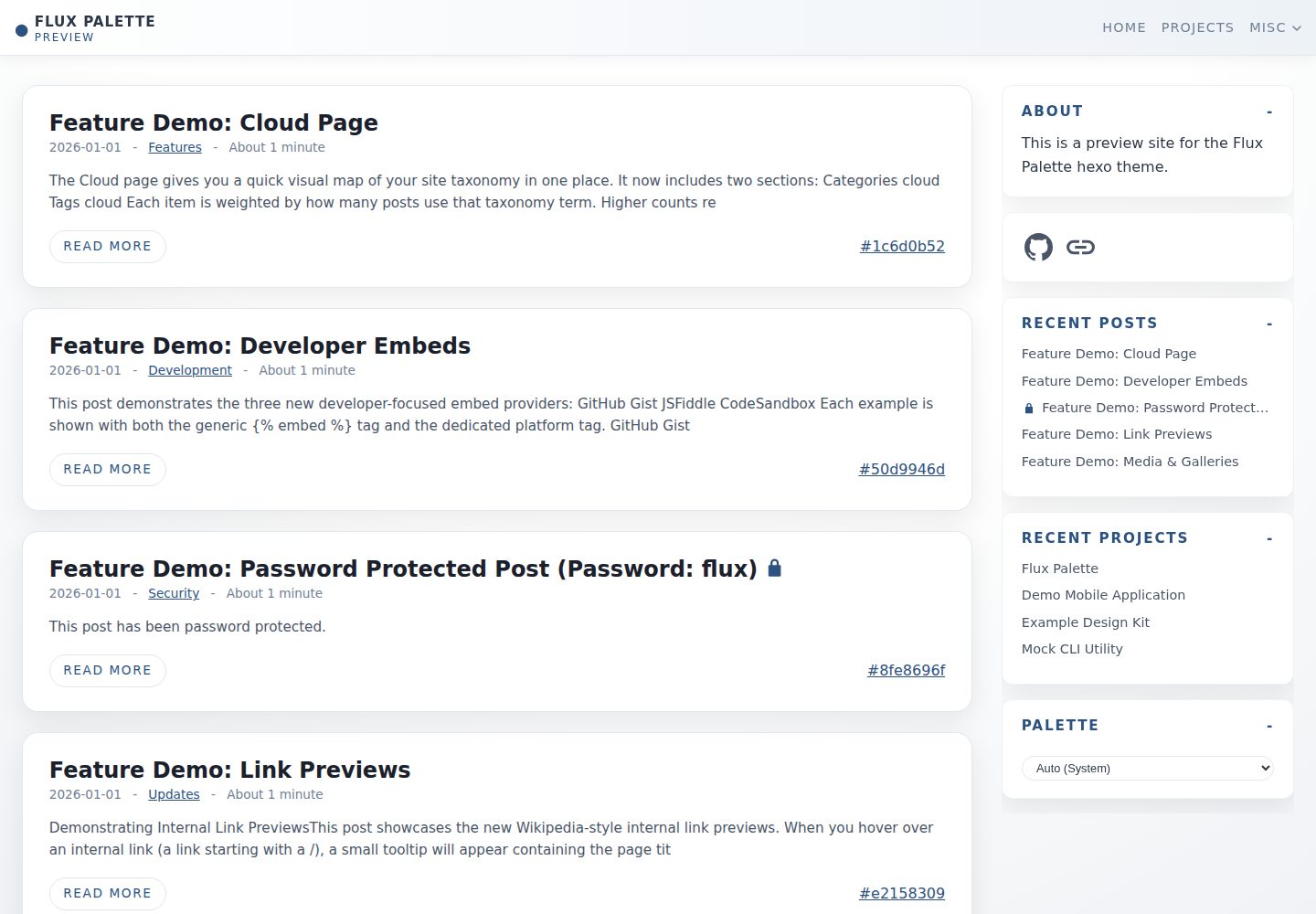
Over 15 built-in color palettes, plus a Flux customizer that generates palettes from a single color
HexoBlog
hexo-theme-flux-palette — Hexo Blog Template
By LTDev-LLC
Flux Palette is a blog and journal theme for Hexo, offering multiple color palettes, password-encrypted posts, rich Markdown tags, a project portfolio, multi-backend search, and comment support.
Explore the design
Compare the page layouts and mobile experience. Open any screenshot for a closer look.
Desktop homepage1 / 3
Desktop captureTop of page
Actual screenshot captured by the server browser.
All pages & views 3
Screenshots show visual appearance; interactive behavior may differ.
Recorded 2026-10-03View source
What stands out
A quick read of the recorded project description.
Supports AES-256-GCM encrypted posts and encrypted images, with passwords removed at build time and decryption on the client
Extended Markdown tags: alerts, tabs, accordions, image galleries, timelines, media embeds, and social buttons
A standalone project portfolio system with weight sorting, project tags, summaries, and external buttons
Search supports three backends: local, Upstash (Redis), and Supabase (Postgres)
Comments support giscus and utterances, and OG/Twitter metadata and an RSS feed are generated automatically
Template Details
Flux Palette is a blog/journal theme developed by LTDev-LLC for Hexo, released under the MIT license. The theme is designed around multiple color schemes, content privacy, and rich text expression, with over 15 built-in color palettes and a Flux customizer that generates palettes from a single color.
At the content level, the theme extends Markdown tags to support alerts, tabs, accordions, image galleries, timelines, media embeds (YouTube, Spotify, Vimeo, Twitch, TikTok, GitHub Gist, JSFiddle, CodeSandbox), and social buttons. Posts can be password-protected via AES-256-GCM encryption; encryption is performed at build time, plaintext passwords do not appear in the output, decryption happens client-side in the browser, and encrypted images are supported.
The theme also provides a standalone project portfolio system independent of the blog. Project files are placed under source/_projects and support weight sorting, project tags, summaries, and external buttons. Search supports three backends: local, Upstash (Redis), and Supabase (Postgres). The local backend generates search.json at build time, while Upstash and Supabase require external accounts and configuration per the documentation. Comments support giscus and utterances. The theme uses swc to precompile Alpine.js and custom scripts, and automatically generates OG/Twitter metadata and an RSS feed.
Installation requires cloning the theme into themes/flux-palette, optionally installing @swc/core to enable precompilation, and then setting theme: flux-palette in the Hexo configuration. A demo site and screenshots are available for reference, but the licenses for third-party assets such as demo images, fonts, and icons must be verified separately.
HexoBlog
Is it right for your project?
Use Cases
- Building a personal blog or journal site with multiple switchable color palettes
- Publishing private posts or project content that requires password protection
- Embedding external media such as videos, music, and code snippets in posts
- Creating project portfolio pages independent of the blog
- Configuring local or cloud search backends for a static blog
Suitable For
- Developers or writers building blogs with Hexo
- Content publishers who need password-protected posts and encrypted images
- Those who want to enrich post layout with custom Markdown tags
- Creators who need to showcase a project portfolio with external links
Getting started & customization
Use these recorded setup notes alongside the repository instructions for your chosen version.
- 1
Clone the theme into themes/flux-palette and set theme: flux-palette in the Hexo configuration
- 2
Optionally install @swc/core to enable precompilation of Alpine.js and custom scripts
- 3
Password-protected posts can use the password field in front matter, or reference environment variables via env:
- 4
The local search backend requires no additional configuration; Upstash and Supabase require registering accounts and filling in connection information per the documentation
- 5
Comment functionality requires configuring the repository and category information for giscus or utterances in _config.yml
License & source material
Usage conditions & limitations
Free to use · keep license noticeThis entry covers the free version under the MIT license in the public repository; the free scope applies to that version's code and does not imply that external services or third-party assets are free.
Must comply with when using
- Free use, modification, commercial use, and distribution of this version's code are permitted.
- When distributing copies or substantial portions of the code, retain the original author's copyright notice and the full MIT license notice.
- The code is provided as is; warranties and limitations of liability are governed by the original license and applicable law.
Additional costs & items to verify
- The README requests retaining the footer attribution (attribution.enabled: true, with the text Flux Palette by LTDev LLC). This is the author's request rather than a mandatory condition of the MIT license, but the attribution should be retained as a courtesy.
- Precompiling Alpine.js and custom scripts requires additionally installing @swc/core; without it, this performance optimization cannot be used.
- Once configured, the image gallery automatically calls external services such as wsrv.nl to generate thumbnails, which involves sending image URLs to third parties; privacy and availability should be assessed independently.
- Using the Upstash search backend requires registering an Upstash account and configuring the REST URL and read/write tokens, which is an external service dependency.
- Using the Supabase search backend requires registering a Supabase account, manually running SQL for table creation and RLS policies, and configuring the project URL and keys.
- Enabling giscus or utterances comments requires providing required information such as a GitHub repository and category, depending on a GitHub account and a public repository.
- Demo images, fonts, icons, and other third-party assets must be checked against their respective licenses; they cannot be judged solely by the code's MIT license.
- External services such as domains, hosting, databases, payments, or AI may incur additional charges.
View Original Text Basis
Permission is hereby granted, free of charge
Original License Text
If you enjoy this theme, please keep the attribution in the footer enabled.
Original README
Optionally, install `@swc/core` for use with pre-compilation.
Original README
it automatically generates thumbnails using an external service (like wsrv.nl) for performance.
Original README
Requires an external account.
Original README
Requires running SQL setup commands manually as well as an external account.
Original README
https://github.com/LTDev-LLC/hexo-theme-flux-palette/blob/main/LICENSEhttps://github.com/LTDev-LLC/hexo-theme-flux-palette/blob/main/README.mdrepo: "username/repository" # [Required]
Original README
Compiled by DeepSeek based on repository license and README ·2026-10-03. Results only cover the materials read; dependencies, images, fonts, and subsequent term changes are subject to their respective original texts.
Project checks & description sources
Template Information
- Source platforms
- GitHub
- Documentation and maintenance reference score
- More documented · 80 / 100
- Technologies
- Hexo
- Website type
- Blog
How this score is calculated
Our heuristic uses license records (up to 30), a demo link (12), a preview (10), stars (15), recorded maintenance (15), description completeness (8), feature records (5) and classification data (5). It is not a code, security or performance test, or a Google score. A link does not establish tested functionality.
What to verify for this project
- Repository update recorded
- 2026-03-08
- Screenshot last checked
- 2026-10-03
A demo link is listed. Check it with your own content and viewport sizes; its presence does not confirm that forms, authentication or payments work.
The catalog identifies Hexo as the primary stack. Check the actual dependency manifest and lockfile for versions and hosting requirements. These notes use recorded metadata, not a code audit or a deployment test.
Use a selection guide →How this description was prepared
AI-assisted description based on catalog records and repository material. Repository authors are not automatically the reviewers of this description.
Automatically checked against source and license rules; no manual editorial review.
Inspect the recorded source material
SHA-256: 2354464cbf95a22794aa406003930b2b7be7ac054bc6e2d1c4d316848dc8b5c0
2026-10-03T03:36:10.561Z
Source file / repository# Flux Palette
A responsive, high-performance blog/journal [Hexo](https://hexo.io/) theme designed around the idea of multiple color palettes, privacy, and rich content features.
[DEMO](https://flux-palette.ltdev.llc/)
## Table of Contents
- [Features](#features)
- [Installation](#installation)
- [Global Configuration](#global-configuration)
- [Writing Content](#writing-content)
- [Front Matter Options](#front-matter-options)
- [Password Protection](#password-protection)
- [Rich Content Tags](#rich-content-tags)
- [Alerts / Admonitions](#alerts)
- [Tabs](#tabs)
- [Accordions](#accordions)
- [Image Gallery](#image-gallery)
- [Media Embeds](#media-embeds)
- [Social Buttons](#social-buttons-tag)
- [Timeline](#timeline)
- [Projects System](#projects-system)
- [Search Configuration](#search-configuration)
- [Comments](#comments)
## Features
- **Dynamic Theming**: 15+ built-in color palettes with a "Flux" customizer that allows users to generate palettes from a single color.
- **Rich Markdown**: Custom tags for Galleries, Tabs, Accordions, Alerts and more.
- **Privacy First**: AES-256-GCM encrypted posts (password protected) with full encrypted image support.
- **Projects Portfolio**: Dedicated section for projects with weighting and external buttons.
- **Search**: Supports Local (offline), Upstash (Redis), and Supabase (Postgres) search backends.
- **Performance**: Pre-compiles Alpine.js and custom scripts using [swc](https://swc.rs/) for optimized assets.
- **Social**: Auto-generated OG/Twitter metadata, RSS feeds, and social linking.
## Installation
1. In the `root` directory:
* Optionally, install `@swc/core` for use with pre-compilation.
```bash
$ git clone --depth=1 https://github.com/LTDev-LLC/hexo-theme-flux-palette.git themes/flux-palette ; rm -rf !$/.git
$ npm install @swc/core --save
```
OR updating:
```bash
$ cp themes/flux-palette/_config.yml theme-config.yml ; rm -rf themes/flux-palette$ git clone --depth=1 https://github.com/LTDev-LLC/hexo-theme-flux-palette.git themes/flux-palette ; rm -rf !$/.git
$ mv theme-config.yml themes/flux-palette/_config.yml
```
2. Change the `theme` property in the `config.yml` file.
```yml
theme: flux-palette
```
3. Run: `hexo clean ; hexo g ; hexo s`
## Writing Content
### Front Matter Options
Standard Hexo front matter is supported, plus Flux-specific extensions:
```yml
---
title: My Awesome Post
date: 2025-10-24
tags: [hexo, theme]
categories: [Updates]
# Flux Specifics:
password: "super-secret-password" # Encrypts the post
cover: /images/banner.jpg # Used for OpenGraph/Twitter cards
comments: false # Disable comments for this specific post
read_time_minutes: 5 # Override auto-calculated read time
---
```
### Password Protection
You can password-protect any post or project using `AES-256-GCM` encryption.
1. The content and images are encrypted at build time.
2. The plaintext password is **removed** from the build output.
3. A JSON payload is generated; the client decrypts it in the browser.
```yml
---
title: Secret Diary
password: my_password_123
# OR use an environment variable (recommended for public repos)
password: env:MY_SECRET_VAR
---
```
### Rich Content Tags
Flux Palette extends Markdown with several powerful tags implemented in `scripts/markdown-enhancements.js`.
#### Alerts
Create callout boxes for Info, Warning, Danger, Success, or Tips.
```markdown
{% alert info Information %}
This is a standard info box.
{% endalert %}
{% alert warning "Watch Out" %}
You can use quotes for titles with spaces.
{% endalert %}
{% alert tip %}
If no title is provided, it defaults to the type name.
{% endalert %}
```
*Supported types:* `info`, `warning`, `danger`, `success`, `tip`.
#### Tabs
Organize content into tabbed interfaces.
```markdown
{% tabs %}
{% tab "First Tab" %}
This is the content of the first tab.
{% endtab %}
{% tab Second %}
Content for the second tab.
{% endtab %}
{% endtabs %}
```
#### Accordions
Collapsible content sections.
```markdown
{% accordions %}
{% accordion "Click to expand" %}
Hidden content revealed upon clicking.
{% endaccordion %}
{% accordion "Another Item" %}
More hidden content.
{% endaccordion %}
{% endaccordions %}
```
#### Image Gallery
Creates a responsive grid of images. If configured in `_config.yml`, it automatically generates thumbnails using an external service (like wsrv.nl) for performance.
```markdown
{% gallery %}


{% endgallery %}
```
*Options:* You can pass `thumb:false` to disable thumbnails for a specific gallery: `{% gallery thumb:false %}`.
#### Timeline
Create vertical timelines for project history, biographies, or changelogs.
```markdown
{% timeline %}
{% timeline_item "Jan 2024" "Inception" %}
The initial concept for the project was defined.
{% endtimeline_item %}
{% timeline_item "Mar 2024" "Alpha Release" %}
The first internal release was made available to the team.
* Completed core engine
* Added basic UI components
{% endtimeline_item %}
{% endtimeline %}
```
### Media Embeds
You can embed content from platforms like YouTube, Spotify, Vimeo, Twitch, TikTok, GitHub Gist, JSFiddle, and CodeSandbox within your posts using a powerful `embed` tag.
The plugin can automatically detect the platform from a URL.
**Generic `embed` tag:**
The generic `embed` tag is the most flexible way to embed content.
```
{% embed <url/id> [platform_hint] [type_hint] %}
```
* `<url/id>`: The full URL or the ID of the content to embed.
* `[platform_hint]`: (Optional) If you use an ID instead of a URL, you must provide a platform hint. Supported platforms: `youtube`, `spotify`, `vimeo`, `twitch`, `tiktok`, `gist`, `jsfiddle`, `codesandbox`.
* `[type_hint]`: (Optional) For Spotify, you can specify `track`, `playlist`, `artist`, or `episode`. For Twitch, you can specify `video` or `channel`.
* `CodeSandbox note`: the embed forces `view=editor+%2B+preview` so editor + preview is always visible.
**Examples:**
```yml
---
title: My Awesome Post
date: 2025-12-1
---
{# YouTube from URL #}
{% embed https://www.youtube.com/watch?v=dQw4w9WgXcQ %}
{# YouTube from ID #}
{% embed dQw4w9WgXcQ youtube %}
{# Spotify track from URL #}
{% embed https://open.spotify.com/track/3cLqK3LPVrTIzfENVmYLoU %}
{# Spotify playlist from ID #}
{% embed 1LcfcxzGNcselP4PIGeQ6V spotify playlist %}
{# Vimeo from URL #}
{% embed https://vimeo.com/59859181 %}
{# Twitch channel from URL #}
{% embed https://www.twitch.tv/theburntpeanut %}
{# Twitch video from ID #}
{% embed 123456789 twitch video %}
{# TikTok from URL #}
{% embed https://www.tiktok.com/@scout2015/video/6718335390845095173 %}
{# Gist from URL #}
{% embed https://gist.github.com/paulirish/12fb951a8b893a454b32 %}
{# JSFiddle from ID + hint #}
{% embed 2v3L7m0q jsfiddle %}
{# CodeSandbox from URL #}
{% embed https://codesandbox.io/embed/new %}
```
You can also use direct provider tags:
```md
{% gist https://gist.github.com/paulirish/12fb951a8b893a454b32 %}
{% jsfiddle 2v3L7m0q %}
{% codesandbox https://codesandbox.io/embed/new %}
```
#### Social Buttons Tag
Display your social links anywhere in a post (uses the `social` config from `_config.yml`).
```yml
social:
- name: GitHub
url: https://github.com/LTDev-LLC/hexo-theme-flux-palette
icon: mdi:github
- name: Website
url: https://flux-palette.ltdev.llc/
icon: material-symbols:link
```
## Projects System
Flux Palette includes a dedicated portfolio system separate from the blog.
1. Create a folder: `source/_projects`.
2. Add Markdown files.
3. Use project-specific front matter.
**Example `source/_projects/my-app.md`:**
```yml
---
title: My Cool App
date: 2025-01-01
weight: 100 # Higher numbers appear first
project_tags: [swift, ios]
project_summary: "A short description shown on the index page."
buttons:
- name: App Store
url: [https://apple.com/](https://apple.com/)...
- name: GitHub
url: [https://github.com/](https://github.com/)...
---
Detailed project description goes here...
```
## Search Configuration
Flux Palette supports flexible search providers, allowing you to choose between a simple local index or powerful cloud databases. Configure your preferred provider in `_config.yml`.
**Supported Providers:** `local`, `upstash`, `supabase`
```yml
search:
enabled: true
title: "Search"
service: "local" # Change to 'upstash' or 'supabase'
# ... provider specific config below
```
#### 1. Local Search (Default)
Generates a `search.json` file at build time. Best for small static sites or when you want zero external dependencies.
* **Pros:** Zero setup, completely free, works offline once loaded, private.
* **Cons:** The entire index is downloaded by the client (can be heavy for large sites), basic "fuzzy" matching.
#### 2. Upstash (Redis)
Uses a serverless Redis database to store the index. This is the recommended option for performance and scalability.
[Sign up at Upstash](https://upstash.com/)
**Setup:**
1. Create a Redis database in the Upstash console.
2. Scroll down to the **REST API** section.
3. Copy the `UPSTASH_REDIS_REST_URL`.
4. Copy the `UPSTASH_REDIS_REST_TOKEN` (use this as your primary `token` for writing during builds).
5. Copy a Read-Only token to enable search support on the client side as `read_token`.
**Configuration:**
```yml
search:
enabled: true
title: "Search"
service: upstash
upstash:
url: "https://your-db.upstash.io"
token: "your_primary_token" # Used during 'hexo generate' to upload index
read_token: "your_read_only_token" # Exposed to client for searching
index: "flux" # Prefix for keys
```
* **Pros:** Extremely fast (millisecond latency), excellent fuzzy matching, generous free tier (10k req/day).
* **Cons:** Requires an external account.
#### 3. Supabase (PostgreSQL)
Uses a Postgres database to store and query the index.
[Sign up at Supabase](https://supabase.com/)
**Setup:**
1. Create a new project.
2. Go to the **SQL Editor** and run the following commands to create tables and enable public read access:
```sql
-- Create Tables
CREATE TABLE flux_search_docs (
id text PRIMARY KEY,
title text,
url text,
date text,
type text,
excerpt text,
encrypted boolean
);
CREATE TABLE flux_search_index (
word text PRIMARY KEY,
doc_ids text[]
);
-- Enable RLS
ALTER TABLE flux_search_docs ENABLE ROW LEVEL SECURITY;
ALTER TABLE flux_search_index ENABLE ROW LEVEL SECURITY;
-- Allow public read access
CREATE POLICY "Public read docs" ON flux_search_docs FOR SELECT TO public USING (true);
CREATE POLICY "Public read index" ON flux_search_index FOR SELECT TO public USING (true);
```
3. Go to **Project Settings > Data API**.
4. Copy the **Project URL**.
4. Go to **Project Settings > API Keys**.
6. Copy the `Publishable Key` key (use as `pub_key` for reading).
5. Copy the `Secret Keys` key (use as `sec_key` for writing).
**Configuration:**
```yml
search:
enabled: true
title: "Search"
service: supabase
supabase:
url: "https://your-project.supabase.co"
sec_key: "your_service_role_key" # Used during 'hexo generate'
pub_key: "your_anon_key" # Exposed to client
table: "flux_search" # Prefix for tables (e.g. flux_search_docs)
```
* **Pros:** Robust relational database, highly scalable, reliable ecosystem.
* **Cons:** Requires running SQL setup commands manually as well as an external account.
## Comments
Supports privacy-focused comment systems.
```yml
comments:
enabled: true
service: giscus # Options: 'giscus', 'utterances'
giscus:
repo: "username/repository" # [Required]
repo_id: "R_..." # [Required]
category: "General" # [Required]
category_id: "DIC_..." # [Required]
mapping: "pathname"
reactions_enabled: "1"
emit_metadata: "0"
input_position: "top"
theme: "preferred_color_scheme"
lang: "en"
utterances:
repo: "username/repository" # [Required]
issue_term: "pathname"
label: "comments"
theme: "github-light"
```
## Attribution
If you enjoy this theme, please keep the attribution in the footer enabled.
```yml
attribution:
enabled: true
text: Flux Palette by LTDev LLC
link: https://ltdev.llc/projects/flux-palette/
```
### Root _config.yml
To enable syntax highlighting, use the following in your project root `_config.yml`.
```yml
# Syntax highlighting
syntax_highlighter: highlight.js
highlight:
enable: true # set to false to turn off syntax highlighting
line_number: true
auto_detect: false
tab_replace: ''
wrap: true
hljs: false # required to be false for Flux Palette styles
```
Explore similar templates
Compare previews and descriptions within the same stack and category.

hexo-theme-matery
hexo-theme-matery is a Material Design, responsive Hexo blog theme with homepage carousel, waterfall post list, timeline archive, word cloud tags, radar chart categories, and an about page.
Hexo · Blog

hexo-theme-cactus
Cactus is a responsive Hexo theme for personal websites and blogs, maintained by probberechts. It offers four color schemes (dark, light, white, classic), configurable navigation, homepage post lists, project lists, social links, and copyright year ranges.
Hexo · Blog

hexo-theme-volantis
Volantis is a blog theme for Hexo, distributed as the npm package hexo-theme-volantis and enabled by setting theme to volantis in the Hexo site's _config.yml. It requires Hexo 7.3+, hexo-cli 4.3+, Node.js 22.x LTS+, and npm 10.x LTS+.
Hexo · Blog

hexo-theme-aurora
Hexo Theme Aurora is a futuristic Hexo blog theme built around aurora gradients and a magazine-style grid layout.
Hexo · Blog

hexo-theme-Claudia
Claudia is a Hexo blog theme focused on a clean look and easy configuration. It automatically follows the device's dark mode and claims a 90+ Lighthouse score.
Hexo · Blog

hexo-theme-A4
hexo-theme-A4 is a minimalist Hexo blog theme that mimics the texture of A4 paper, emphasizing simplicity, small size, and minimal configuration.
Hexo · Blog