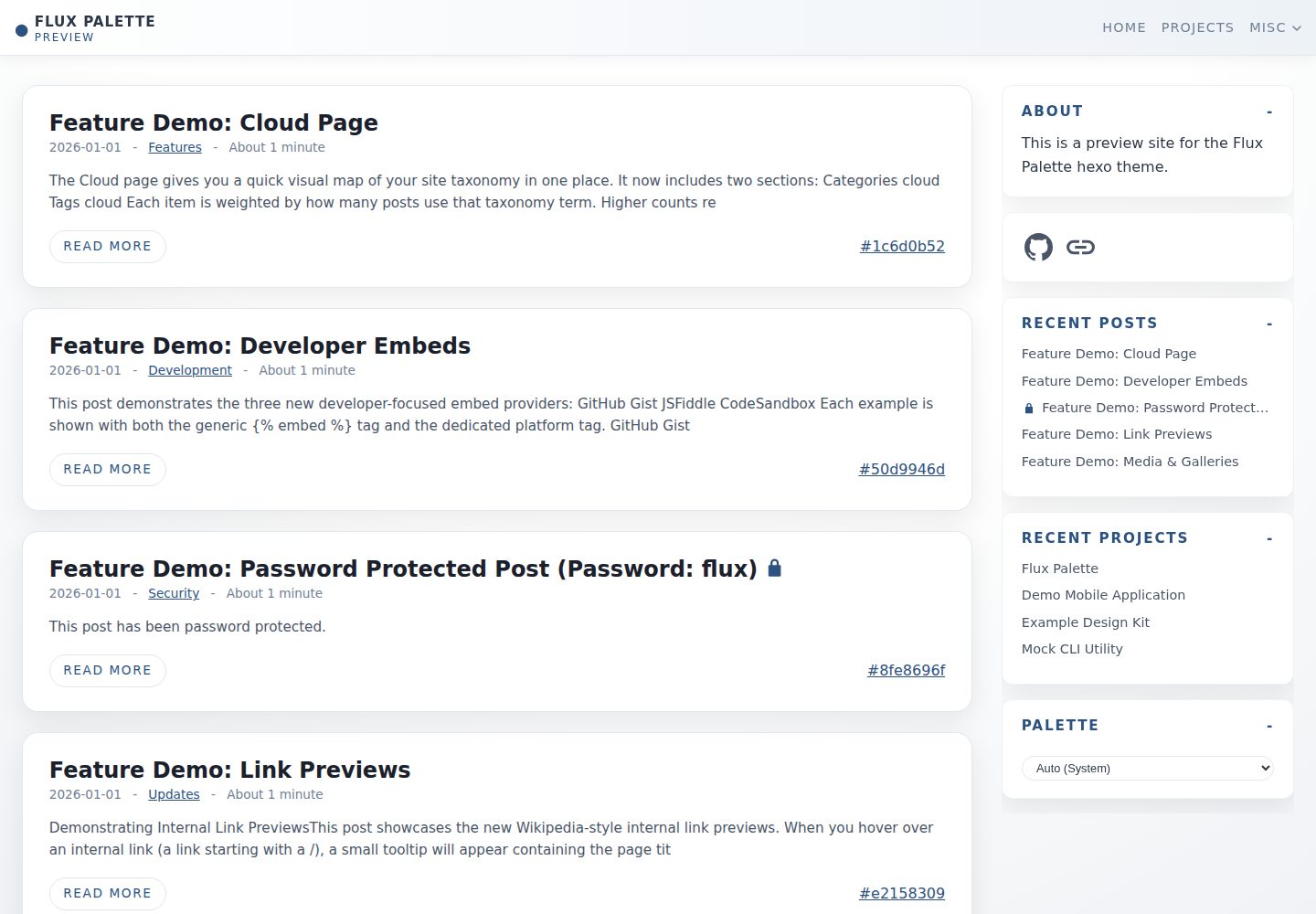
内置 15 套以上配色方案,并提供从单一颜色生成配色的 Flux 自定义器
Hexo博客
hexo-theme-flux-palette — Hexo 博客模板
作者 LTDev-LLC
Flux Palette 是面向 Hexo 的博客与日志主题,提供多套配色、密码加密文章、丰富 Markdown 标签、项目作品集、多后端搜索和评论支持。
看看你的网站会是什么样
浏览真实页面截图,比较内容排版与手机效果。点击下方缩略图切换,放大查看整页细节。
全部页面与视图 3
截图用于了解视觉与布局,交互效果请以实际项目为准。
采集于 2026-10-03查看来源
值得关注的模板亮点
从已有项目资料中,快速了解它的特点。
支持 AES-256-GCM 加密文章与加密图片,密码在构建时移除,客户端解密
扩展 Markdown 标签:提示框、标签页、折叠面板、图片画廊、时间线、媒体嵌入和社交按钮
独立的项目作品集系统,支持权重排序、项目标签、摘要和外部按钮
搜索支持 local、Upstash(Redis)和 Supabase(Postgres)三种后端
评论支持 giscus 和 utterances,并自动生成 OG/Twitter 元数据与 RSS 订阅
模板详细介绍
Flux Palette 是 LTDev-LLC 为 Hexo 开发的博客/日志主题,采用 MIT 许可发布。主题围绕多配色方案、内容隐私和富文本表达设计,内置 15 套以上配色,并提供从单一颜色生成配色的 Flux 自定义器。
在内容层面,主题扩展了 Markdown 标签,支持提示框(Alerts)、标签页(Tabs)、折叠面板(Accordions)、图片画廊、时间线、媒体嵌入(YouTube、Spotify、Vimeo、Twitch、TikTok、GitHub Gist、JSFiddle、CodeSandbox)以及社交按钮。文章可通过 AES-256-GCM 加密实现密码保护,加密在构建时完成,明文密码不会出现在输出中,客户端在浏览器内解密,并支持加密图片。
主题还提供独立于博客的项目作品集系统,项目文件放在 source/_projects 下,支持权重排序、项目标签、摘要和外部按钮。搜索支持 local、Upstash(Redis)和 Supabase(Postgres)三种后端,其中 local 在构建时生成 search.json,Upstash 和 Supabase 需要外部账号并按文档配置。评论支持 giscus 和 utterances。主题使用 swc 预编译 Alpine.js 和自定义脚本,并自动生成 OG/Twitter 元数据与 RSS 订阅。
安装需要将主题克隆到 themes/flux-palette,可选安装 @swc/core 以启用预编译,然后在 Hexo 配置中设置 theme: flux-palette。主题的演示站点和截图可供参考,但演示图片、字体、图标等第三方素材的许可需单独核对。
Hexo博客
适合你的项目吗?
适用场景
- 搭建带有多种配色可切换的个人博客或日志站点
- 发布需要密码保护的私密文章或项目内容
- 在文章中嵌入视频、音乐、代码片段等外部媒体
- 建立独立于博客的项目作品集页面
- 为静态博客配置本地或云端搜索后端
适合人群
- 使用 Hexo 构建博客的开发者或写作者
- 需要密码保护文章和加密图片的内容发布者
- 希望用自定义 Markdown 标签丰富文章排版的人
- 需要展示项目作品集并支持外部链接的创作者
上手与定制指南
结合仓库当前版本的说明,按下面的资料检查内容、配置与运行要求。
- 1
将主题克隆到 themes/flux-palette,并在 Hexo 配置中设置 theme: flux-palette
- 2
可选安装 @swc/core 以启用 Alpine.js 和自定义脚本的预编译
- 3
密码保护文章可在 front matter 中使用 password 字段,或通过 env: 引用环境变量
- 4
搜索后端 local 无需额外配置;Upstash 和 Supabase 需要注册账号并按文档填写连接信息
- 5
评论功能需在 _config.yml 中配置 giscus 或 utterances 的仓库与分类信息
授权与来源资料
使用条件与限制
免费使用 · 保留许可声明本次收录的是公开仓库中采用 MIT 许可的免费版本;免费范围为该版本代码,不代表外部服务或第三方素材免费。
使用时需要遵守
- 允许免费使用、修改、商用和分发该版本代码。
- 分发代码副本或实质性部分时,保留原作者版权声明和完整 MIT 许可声明。
- 代码按现状提供;担保与责任限制以原许可证及适用法律为准。
额外费用与待核对事项
- README 请求保留页脚署名(attribution.enabled: true,文本为 Flux Palette by LTDev LLC)。这是作者的请求而非 MIT 许可的强制条件,但使用时应保留署名以示尊重。
- 预编译 Alpine.js 与自定义脚本需要额外安装 @swc/core;不安装则无法使用该性能优化功能。
- 图片画廊在配置后会自动调用 wsrv.nl 等外部服务生成缩略图,涉及向第三方发送图片 URL,需自行评估隐私与可用性。
- 使用 Upstash 搜索后端需要注册 Upstash 账号并配置 REST URL 与读写令牌,属于外部服务依赖。
- 使用 Supabase 搜索后端需要注册 Supabase 账号、手动执行建表与 RLS 策略 SQL,并配置项目 URL 与密钥。
- 启用 giscus 或 utterances 评论需要提供 GitHub 仓库及分类等必填信息,依赖 GitHub 账号与公开仓库。
- 演示图片、字体、图标及其他第三方素材需按各自许可核对,不能仅凭代码的 MIT 许可判断。
- 域名、托管、数据库、支付或 AI 等外部服务可能另外收费。
查看原文依据
Permission is hereby granted, free of charge
许可证原文
If you enjoy this theme, please keep the attribution in the footer enabled.
README 原文
Optionally, install `@swc/core` for use with pre-compilation.
README 原文
it automatically generates thumbnails using an external service (like wsrv.nl) for performance.
README 原文
Requires an external account.
README 原文
Requires running SQL setup commands manually as well as an external account.
README 原文
https://github.com/LTDev-LLC/hexo-theme-flux-palette/blob/main/LICENSEhttps://github.com/LTDev-LLC/hexo-theme-flux-palette/blob/main/README.mdrepo: "username/repository" # [Required]
README 原文
DeepSeek 根据仓库许可证和 README 整理 ·2026-10-03。结果仅覆盖已读取资料,依赖、图片、字体及后续条款变更以各自原文为准。
项目核对记录与介绍依据
模板资料
- 来源平台
- GitHub
- 资料与维护参考分
- 资料较完整 · 80 / 100
- 技术栈
- Hexo
- 网站类型
- 博客
这个分数如何计算
本站按许可资料(最高30分)、演示链接(12分)、预览图(10分)、Star数(15分)、记录的维护时间(15分)、描述完整度(8分)、功能记录(5分)和分类资料(5分)计算。它不是代码、安全或性能测试,也不是 Google 评分;有链接不代表已实测可用。
这个项目需要核对什么
- 记录的仓库更新时间
- 2026-03-08
- 截图检查日期
- 2026-10-03
已收录演示链接。请用你的内容与屏幕尺寸检查;有演示不代表表单、认证或支付已经可用。
目录记录的主要技术栈是 Hexo。请通过依赖清单和锁文件核对实际版本与托管要求。这些说明基于收录资料,不代表代码审计或部署实测。
查看具体选型方法 →介绍的制作与核对状态
介绍由 AI 辅助整理目录与仓库资料。仓库作者不等于这篇介绍的审核者。
已完成服务器许可规则与 AI 来源核对;未经过人工编辑审核。
查看当时使用的来源资料
SHA-256: 2354464cbf95a22794aa406003930b2b7be7ac054bc6e2d1c4d316848dc8b5c0
2026-10-03T03:36:10.561Z
来源文件 / 仓库# Flux Palette
A responsive, high-performance blog/journal [Hexo](https://hexo.io/) theme designed around the idea of multiple color palettes, privacy, and rich content features.
[DEMO](https://flux-palette.ltdev.llc/)
## Table of Contents
- [Features](#features)
- [Installation](#installation)
- [Global Configuration](#global-configuration)
- [Writing Content](#writing-content)
- [Front Matter Options](#front-matter-options)
- [Password Protection](#password-protection)
- [Rich Content Tags](#rich-content-tags)
- [Alerts / Admonitions](#alerts)
- [Tabs](#tabs)
- [Accordions](#accordions)
- [Image Gallery](#image-gallery)
- [Media Embeds](#media-embeds)
- [Social Buttons](#social-buttons-tag)
- [Timeline](#timeline)
- [Projects System](#projects-system)
- [Search Configuration](#search-configuration)
- [Comments](#comments)
## Features
- **Dynamic Theming**: 15+ built-in color palettes with a "Flux" customizer that allows users to generate palettes from a single color.
- **Rich Markdown**: Custom tags for Galleries, Tabs, Accordions, Alerts and more.
- **Privacy First**: AES-256-GCM encrypted posts (password protected) with full encrypted image support.
- **Projects Portfolio**: Dedicated section for projects with weighting and external buttons.
- **Search**: Supports Local (offline), Upstash (Redis), and Supabase (Postgres) search backends.
- **Performance**: Pre-compiles Alpine.js and custom scripts using [swc](https://swc.rs/) for optimized assets.
- **Social**: Auto-generated OG/Twitter metadata, RSS feeds, and social linking.
## Installation
1. In the `root` directory:
* Optionally, install `@swc/core` for use with pre-compilation.
```bash
$ git clone --depth=1 https://github.com/LTDev-LLC/hexo-theme-flux-palette.git themes/flux-palette ; rm -rf !$/.git
$ npm install @swc/core --save
```
OR updating:
```bash
$ cp themes/flux-palette/_config.yml theme-config.yml ; rm -rf themes/flux-palette$ git clone --depth=1 https://github.com/LTDev-LLC/hexo-theme-flux-palette.git themes/flux-palette ; rm -rf !$/.git
$ mv theme-config.yml themes/flux-palette/_config.yml
```
2. Change the `theme` property in the `config.yml` file.
```yml
theme: flux-palette
```
3. Run: `hexo clean ; hexo g ; hexo s`
## Writing Content
### Front Matter Options
Standard Hexo front matter is supported, plus Flux-specific extensions:
```yml
---
title: My Awesome Post
date: 2025-10-24
tags: [hexo, theme]
categories: [Updates]
# Flux Specifics:
password: "super-secret-password" # Encrypts the post
cover: /images/banner.jpg # Used for OpenGraph/Twitter cards
comments: false # Disable comments for this specific post
read_time_minutes: 5 # Override auto-calculated read time
---
```
### Password Protection
You can password-protect any post or project using `AES-256-GCM` encryption.
1. The content and images are encrypted at build time.
2. The plaintext password is **removed** from the build output.
3. A JSON payload is generated; the client decrypts it in the browser.
```yml
---
title: Secret Diary
password: my_password_123
# OR use an environment variable (recommended for public repos)
password: env:MY_SECRET_VAR
---
```
### Rich Content Tags
Flux Palette extends Markdown with several powerful tags implemented in `scripts/markdown-enhancements.js`.
#### Alerts
Create callout boxes for Info, Warning, Danger, Success, or Tips.
```markdown
{% alert info Information %}
This is a standard info box.
{% endalert %}
{% alert warning "Watch Out" %}
You can use quotes for titles with spaces.
{% endalert %}
{% alert tip %}
If no title is provided, it defaults to the type name.
{% endalert %}
```
*Supported types:* `info`, `warning`, `danger`, `success`, `tip`.
#### Tabs
Organize content into tabbed interfaces.
```markdown
{% tabs %}
{% tab "First Tab" %}
This is the content of the first tab.
{% endtab %}
{% tab Second %}
Content for the second tab.
{% endtab %}
{% endtabs %}
```
#### Accordions
Collapsible content sections.
```markdown
{% accordions %}
{% accordion "Click to expand" %}
Hidden content revealed upon clicking.
{% endaccordion %}
{% accordion "Another Item" %}
More hidden content.
{% endaccordion %}
{% endaccordions %}
```
#### Image Gallery
Creates a responsive grid of images. If configured in `_config.yml`, it automatically generates thumbnails using an external service (like wsrv.nl) for performance.
```markdown
{% gallery %}


{% endgallery %}
```
*Options:* You can pass `thumb:false` to disable thumbnails for a specific gallery: `{% gallery thumb:false %}`.
#### Timeline
Create vertical timelines for project history, biographies, or changelogs.
```markdown
{% timeline %}
{% timeline_item "Jan 2024" "Inception" %}
The initial concept for the project was defined.
{% endtimeline_item %}
{% timeline_item "Mar 2024" "Alpha Release" %}
The first internal release was made available to the team.
* Completed core engine
* Added basic UI components
{% endtimeline_item %}
{% endtimeline %}
```
### Media Embeds
You can embed content from platforms like YouTube, Spotify, Vimeo, Twitch, TikTok, GitHub Gist, JSFiddle, and CodeSandbox within your posts using a powerful `embed` tag.
The plugin can automatically detect the platform from a URL.
**Generic `embed` tag:**
The generic `embed` tag is the most flexible way to embed content.
```
{% embed <url/id> [platform_hint] [type_hint] %}
```
* `<url/id>`: The full URL or the ID of the content to embed.
* `[platform_hint]`: (Optional) If you use an ID instead of a URL, you must provide a platform hint. Supported platforms: `youtube`, `spotify`, `vimeo`, `twitch`, `tiktok`, `gist`, `jsfiddle`, `codesandbox`.
* `[type_hint]`: (Optional) For Spotify, you can specify `track`, `playlist`, `artist`, or `episode`. For Twitch, you can specify `video` or `channel`.
* `CodeSandbox note`: the embed forces `view=editor+%2B+preview` so editor + preview is always visible.
**Examples:**
```yml
---
title: My Awesome Post
date: 2025-12-1
---
{# YouTube from URL #}
{% embed https://www.youtube.com/watch?v=dQw4w9WgXcQ %}
{# YouTube from ID #}
{% embed dQw4w9WgXcQ youtube %}
{# Spotify track from URL #}
{% embed https://open.spotify.com/track/3cLqK3LPVrTIzfENVmYLoU %}
{# Spotify playlist from ID #}
{% embed 1LcfcxzGNcselP4PIGeQ6V spotify playlist %}
{# Vimeo from URL #}
{% embed https://vimeo.com/59859181 %}
{# Twitch channel from URL #}
{% embed https://www.twitch.tv/theburntpeanut %}
{# Twitch video from ID #}
{% embed 123456789 twitch video %}
{# TikTok from URL #}
{% embed https://www.tiktok.com/@scout2015/video/6718335390845095173 %}
{# Gist from URL #}
{% embed https://gist.github.com/paulirish/12fb951a8b893a454b32 %}
{# JSFiddle from ID + hint #}
{% embed 2v3L7m0q jsfiddle %}
{# CodeSandbox from URL #}
{% embed https://codesandbox.io/embed/new %}
```
You can also use direct provider tags:
```md
{% gist https://gist.github.com/paulirish/12fb951a8b893a454b32 %}
{% jsfiddle 2v3L7m0q %}
{% codesandbox https://codesandbox.io/embed/new %}
```
#### Social Buttons Tag
Display your social links anywhere in a post (uses the `social` config from `_config.yml`).
```yml
social:
- name: GitHub
url: https://github.com/LTDev-LLC/hexo-theme-flux-palette
icon: mdi:github
- name: Website
url: https://flux-palette.ltdev.llc/
icon: material-symbols:link
```
## Projects System
Flux Palette includes a dedicated portfolio system separate from the blog.
1. Create a folder: `source/_projects`.
2. Add Markdown files.
3. Use project-specific front matter.
**Example `source/_projects/my-app.md`:**
```yml
---
title: My Cool App
date: 2025-01-01
weight: 100 # Higher numbers appear first
project_tags: [swift, ios]
project_summary: "A short description shown on the index page."
buttons:
- name: App Store
url: [https://apple.com/](https://apple.com/)...
- name: GitHub
url: [https://github.com/](https://github.com/)...
---
Detailed project description goes here...
```
## Search Configuration
Flux Palette supports flexible search providers, allowing you to choose between a simple local index or powerful cloud databases. Configure your preferred provider in `_config.yml`.
**Supported Providers:** `local`, `upstash`, `supabase`
```yml
search:
enabled: true
title: "Search"
service: "local" # Change to 'upstash' or 'supabase'
# ... provider specific config below
```
#### 1. Local Search (Default)
Generates a `search.json` file at build time. Best for small static sites or when you want zero external dependencies.
* **Pros:** Zero setup, completely free, works offline once loaded, private.
* **Cons:** The entire index is downloaded by the client (can be heavy for large sites), basic "fuzzy" matching.
#### 2. Upstash (Redis)
Uses a serverless Redis database to store the index. This is the recommended option for performance and scalability.
[Sign up at Upstash](https://upstash.com/)
**Setup:**
1. Create a Redis database in the Upstash console.
2. Scroll down to the **REST API** section.
3. Copy the `UPSTASH_REDIS_REST_URL`.
4. Copy the `UPSTASH_REDIS_REST_TOKEN` (use this as your primary `token` for writing during builds).
5. Copy a Read-Only token to enable search support on the client side as `read_token`.
**Configuration:**
```yml
search:
enabled: true
title: "Search"
service: upstash
upstash:
url: "https://your-db.upstash.io"
token: "your_primary_token" # Used during 'hexo generate' to upload index
read_token: "your_read_only_token" # Exposed to client for searching
index: "flux" # Prefix for keys
```
* **Pros:** Extremely fast (millisecond latency), excellent fuzzy matching, generous free tier (10k req/day).
* **Cons:** Requires an external account.
#### 3. Supabase (PostgreSQL)
Uses a Postgres database to store and query the index.
[Sign up at Supabase](https://supabase.com/)
**Setup:**
1. Create a new project.
2. Go to the **SQL Editor** and run the following commands to create tables and enable public read access:
```sql
-- Create Tables
CREATE TABLE flux_search_docs (
id text PRIMARY KEY,
title text,
url text,
date text,
type text,
excerpt text,
encrypted boolean
);
CREATE TABLE flux_search_index (
word text PRIMARY KEY,
doc_ids text[]
);
-- Enable RLS
ALTER TABLE flux_search_docs ENABLE ROW LEVEL SECURITY;
ALTER TABLE flux_search_index ENABLE ROW LEVEL SECURITY;
-- Allow public read access
CREATE POLICY "Public read docs" ON flux_search_docs FOR SELECT TO public USING (true);
CREATE POLICY "Public read index" ON flux_search_index FOR SELECT TO public USING (true);
```
3. Go to **Project Settings > Data API**.
4. Copy the **Project URL**.
4. Go to **Project Settings > API Keys**.
6. Copy the `Publishable Key` key (use as `pub_key` for reading).
5. Copy the `Secret Keys` key (use as `sec_key` for writing).
**Configuration:**
```yml
search:
enabled: true
title: "Search"
service: supabase
supabase:
url: "https://your-project.supabase.co"
sec_key: "your_service_role_key" # Used during 'hexo generate'
pub_key: "your_anon_key" # Exposed to client
table: "flux_search" # Prefix for tables (e.g. flux_search_docs)
```
* **Pros:** Robust relational database, highly scalable, reliable ecosystem.
* **Cons:** Requires running SQL setup commands manually as well as an external account.
## Comments
Supports privacy-focused comment systems.
```yml
comments:
enabled: true
service: giscus # Options: 'giscus', 'utterances'
giscus:
repo: "username/repository" # [Required]
repo_id: "R_..." # [Required]
category: "General" # [Required]
category_id: "DIC_..." # [Required]
mapping: "pathname"
reactions_enabled: "1"
emit_metadata: "0"
input_position: "top"
theme: "preferred_color_scheme"
lang: "en"
utterances:
repo: "username/repository" # [Required]
issue_term: "pathname"
label: "comments"
theme: "github-light"
```
## Attribution
If you enjoy this theme, please keep the attribution in the footer enabled.
```yml
attribution:
enabled: true
text: Flux Palette by LTDev LLC
link: https://ltdev.llc/projects/flux-palette/
```
### Root _config.yml
To enable syntax highlighting, use the following in your project root `_config.yml`.
```yml
# Syntax highlighting
syntax_highlighter: highlight.js
highlight:
enable: true # set to false to turn off syntax highlighting
line_number: true
auto_detect: false
tab_replace: ''
wrap: true
hljs: false # required to be false for Flux Palette styles
```
看看同类模板
对比同技术栈与用途的模板,找到更适合的视觉与内容结构。

hexo-theme-matery
A beautiful hexo blog theme with material design and responsive design.一个基于材料设计和响应式设计而成的全面、美观的Hexo主题。
Hexo · 博客

hexo-theme-cactus
:cactus: A responsive, clean and simple theme for Hexo.
Hexo · 博客

hexo-theme-volantis
A Wonderful Theme for Hexo.
Hexo · 博客

hexo-theme-aurora
Hexo Theme Aurora 是一款以极光色彩和渐变 UI 为核心的 Hexo 博客主题,整体走未来感路线。 它的首页采用杂志式网格布局,文章列表与精选区域层次分明,视觉上更接近个人媒体站点而非传统博客。
Hexo · 博客

hexo-theme-Claudia
Claudia 是一款为 Hexo 设计的博客主题,主打简洁外观与易配置。 它支持自动跟随设备深色模式,并在 README 中宣称拥有 90+ 的 Lighthouse 评分,适合追求轻量与性能的博客作者。
Hexo · 博客

hexo-theme-A4
A hexo theme that looks like an A4 paper.(一个类A4纸张质感的hexo博客主题。 )
Hexo · 博客