Write pages with Pug and styles with Sass, compiled uniformly via Gulp and webpack
VueStarter
website-template — Vue Starter Template
By manabuyasuda
A Vue starter template for static website production, built with Pug, Sass, and Gulp/webpack, with a style guide and development documentation.
Explore the design
Compare the page layouts and mobile experience. Open any screenshot for a closer look.
Desktop homepage1 / 2
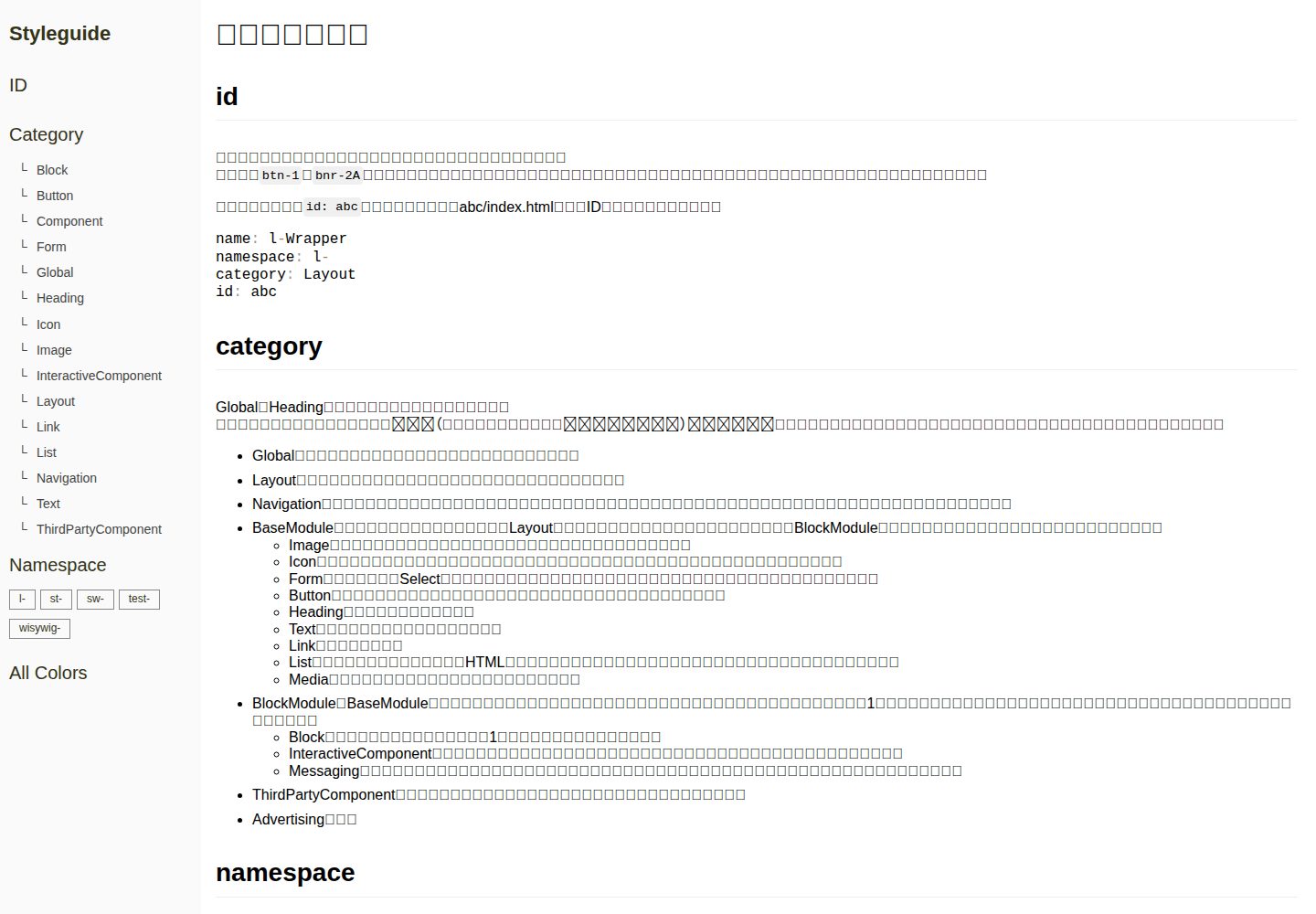
Desktop captureTop of page
Actual screenshot captured by the server browser.
All pages & views 2
Screenshots show visual appearance; interactive behavior may differ.
Recorded 2026-10-02View source
What stands out
A quick read of the recorded project description.
JavaScript compiles to ES5 and can handle Vue.js single-file components
Built-in check tasks for HTMLHint, gulp-w3cjs, stylelint, and ESLint
Provides a style guide page and documentation for css, html, image, js, icon, https, etc.
The static directory supports SSI, convenient for placing favicon and common files
Template Details
This template is for building static websites, aiming to introduce a relatively modern build process while maintaining broad applicability. The source code is in the src directory; Pug compiles to HTML, Sass compiles to CSS, JavaScript compiles to ES5 (including Vue single-file components), and an SVG sprite is generated. During development, a local server provides previews; the static directory holds files that do not need building but must go into htdocs. The repository provides a style guide page and documentation for css, html, image, js, icon, https, etc., explaining the usage and conventions of each part.
The template targets IE11 and above, iOS11 and above, Android5.1 and above by default, with other browsers using the latest version; the verification environment recorded in the README is macOS High Sierra and Node.js 10.16.0, with the version pinned by nodenv. The build process includes linting for HTML and Sass, JavaScript, as well as W3C validation with HTMLHint and gulp-w3cjs, and provides style guide generation. To run browser-sync under https, create .env from .env.example and configure the certificate paths.
VueStarter
Is it right for your project?
Use Cases
- Building corporate or product sites that are mainly static pages and require template reuse
- Static website projects that want to organize HTML and CSS with Pug and Sass
- Teams that need to include HTML, CSS, and JS checks and W3C validation in the build process
- Projects that need to generate a style guide as a style reference for a static site
Suitable For
- Front-end developers familiar with Node.js and command-line build processes
- Teams using Pug and Sass to write static pages
- Projects that need compatibility with IE11, iOS11, Android5.1 and above
Getting started & customization
Use these recorded setup notes alongside the repository instructions for your chosen version.
- 1
After cloning or downloading, run npm install to install dependencies
- 2
Run npm start to run development tasks, npm run release to build the production version
- 3
Run npm test to verify production environment behavior, npm run lint to run formatting and lint together
- 4
To start browser-sync under https, create .env from .env.example and fill in the certificate paths
- 5
The verification environment recorded in the README is macOS High Sierra and Node.js 10.16.0; other environments need to be confirmed separately
License & source material
Usage conditions & limitations
Free to use · keep license noticeThis entry covers the free version under the MIT license in a public repository; the free scope is the code of that version and does not mean external services or third-party assets are free.
Must comply with when using
- Free use, modification, commercial use, and distribution of this version's code are permitted.
- When distributing copies or substantial portions of the code, retain the original author's copyright notice and the full MIT license notice.
- The code is provided as is; warranties and limitations of liability are governed by the original license and applicable law.
Additional costs & items to verify
- To run browser-sync locally over https (for example, calling APIs that require an https environment), you must create .env from .env.example and configure the HTTPS_KEY and HTTPS_CERT certificate paths; otherwise, the https preview feature cannot be used.
- Demo images, fonts, icons, and other third-party assets must be checked against their respective licenses and cannot be judged solely by the code's MIT license.
- External services such as domains, hosting, databases, payments, or AI may incur additional charges.
View Original Text Basis
Permission is hereby granted, free of charge
Original License Text
https://github.com/manabuyasuda/website-template/blob/v4/LICENSEhttps://github.com/manabuyasuda/website-template/blob/v4/README.mdAPIの実行に`https`環境が必要な場合は、以下の設定が必要です。
Original README
Compiled by DeepSeek based on repository license and README ·2026-10-02. Results only cover the materials read; dependencies, images, fonts, and subsequent term changes are subject to their respective original texts.
Project checks & description sources
Template Information
- Source platforms
- GitHub
- Documentation and maintenance reference score
- Partly documented · 64 / 100
- Technologies
- Vue
- Website type
- Starter
How this score is calculated
Our heuristic uses license records (up to 30), a demo link (12), a preview (10), stars (15), recorded maintenance (15), description completeness (8), feature records (5) and classification data (5). It is not a code, security or performance test, or a Google score. A link does not establish tested functionality.
What to verify for this project
- Repository update recorded
- 2022-12-01
- Screenshot last checked
- 2026-10-02
A demo link is listed. Check it with your own content and viewport sizes; its presence does not confirm that forms, authentication or payments work.
The catalog identifies Vue as the primary stack. Check the actual dependency manifest and lockfile for versions and hosting requirements. These notes use recorded metadata, not a code audit or a deployment test.
Use a selection guide →How this description was prepared
AI-assisted description based on catalog records and repository material. Repository authors are not automatically the reviewers of this description.
Automatically checked against source and license rules; no manual editorial review.
Inspect the recorded source material
SHA-256: 3990b9c052ddaa3fd3ed7fd9291ba33005fa543b4e478cebae2570ab8ec367a2
2026-10-02T16:09:57.919Z
Source file / repository# Website Template 静的なWebサイトを作るためのテンプレートです。 なるべく多くの人が使えて、少しモダンな制作環境になることを目指しています。 以下のページで詳しく確認できます。 - [Styleguide](https://manabuyasuda-website-template.netlify.com/styleguide/) - [document/](document/) - [css.md](document/css.md) - [html.md](document/html.md) - [image.md](document/image.md) - [js.md](document/js.md) - [icon.md](document/icon.md) - [https.md](document/https.md) ## 確認環境 以下の環境で動作の確認をしています。 - macOS High Sierra 10.13.6 - Node.js 10.16.0 Node.jsのバージョンはnodenvで固定しています。 ## 始め方 開発に必要なパッケージなどは以下のコマンドですべてインストールされます。クローン、またはダウンロードをしたあとに実行してください。 ```bash npm install ``` ## ファイル構成 開発は`src`ディレクトリでおこない、テスト用の一時ファイルは`htdocs`ディレクトリに出力されます。 `static`ディレクトリは、Gulpの処理は必要ないけれど、ファビコンや共通ファイルのような最終的に`htdocs`ディレクトリに含めたいファイルを置きます。 `template`ディレクトリはPugファイルのテンプレートです。このテンプレートを元にファイルを作成してください。 ``` root/ ├── src/ │ ├── _data/ │ │ └── ja/ │ │ └── site.json │ ├── _mixin/ │ │ ├── _all.pug │ │ ├── _breadcrumb.pug │ │ └── _picture.pug │ ├── _partial/ │ │ ├── _script.pug │ │ └── ja/ │ │ ├── _footer.pug │ │ ├── _header.pug │ │ └── _meta.pug │ ├── _template/ │ │ └── ja/ │ │ └── _default.pug │ ├── about/ │ │ └── index.pug │ ├── assets/ │ │ ├── css/ │ │ │ ├── base/ │ │ │ │ ├── variable/ │ │ │ │ ├── function/ │ │ │ │ ├── mixin/ │ │ │ │ ├── _normalize.scss │ │ │ │ └── _base.scss │ │ │ ├── namespace/ │ │ │ │ ├── sitewide/ │ │ │ │ ├── structure/ │ │ │ │ ├── layout/ │ │ │ │ ├── home/ │ │ │ │ └── top/ │ │ │ ├── _print.scss │ │ │ ├── site.scss │ │ │ └── styleguide/ │ │ ├── svg/ │ │ ├── img/ │ │ │ ├── sitewide/ │ │ │ ├── structure/ │ │ │ └── namespace/ │ │ └── js/ │ │ ├── site.js │ │ ├── polyfill.js │ │ ├── util.js │ │ └── namespace/ │ │ ├── data/ │ │ └── js/ │ └── index.pug ├── static/ ├── template/ │ ├── index.html │ ├── ssi/ │ ├── ja/ │ └── en/ ├── htdocs/ ├── document/ │ ├── css.md │ ├── html.md │ ├── image.md │ ├── js.md │ └── icon.md ├── aigis/ ├── config/ ├── README.md ├── package.json └── gulpfile.js ``` ## 開発用タスク 以下のコマンドを実行すると、開発に必要なGulpとwebpackのタスクがすべて実行されます。 ```bash npm start ``` 本番環境用にビルドする場合は以下のコマンドを実行します。 ```bash npm run release ``` 本番環境の動作を検証したい場合は以下のコマンドを実行します。 ```bash npm test ``` HTML・CSS・JSの整形とリントをまとめて実行します。 (少なくとも)エラーが出ない状態にしてからプッシュします。 ```bash npm run lint ``` [HTMLHint](https://github.com/htmlhint/HTMLHint)と[gulp-w3cjs](https://github.com/callumacrae/gulp-w3cjs)でHTMLのリントとW3Cのバリデーションを実行します。 ```bash npm run htmlValidate ``` [stylelint-config-standard](https://github.com/stylelint/stylelint-config-standard)を元にSassのリントを実行します。 ```bash npm run stylelint ``` [Airbnb JavaScriptスタイルガイド](http://mitsuruog.github.io/javascript-style-guide/)や[eslint-plugin-vue](https://github.com/vuejs/eslint-plugin-vue)を元にJavaScriptのリントを実行します。 ```bash npm run eslint ``` 以下のような処理がおこなわれます。 - PugをHTMLにコンパイル - SassをCSSにコンパイル - JSをES5にコンパイル(Vue.jsの単一ファイルコンポーネントも変換する) - SVGスプライトの生成 - ローカルサーバーを立ち上げて動作の確認(static以下のHTMLファイルはSSIにも対応) - HTMLのリント - Sass(CSS)のリント - JavaScriptのリント - スタイルガイドの生成 ## 対象ブラウザ デフォルトでは下記のようなブラウザを対象にしています。 - IE11以降 - iOS11以降 - Android5.1以降 - その他ブラウザは最新版 ## browser-syncをhttpsで起動する APIの実行に`https`環境が必要な場合は、以下の設定が必要です。以降の設定はmacOSでの動作を確認しています。 `.env.example`(`.env`のサンプルファイル)から`.env`を作成します。 ``` cp .env.example .env ``` `.env`の`HTTPS_KEY`と`HTTPS_CERT`に証明書へのパスを設定します。`.env`内の`#`以降がコメントになります。 ``` #browser-syncで`https`オプションを使用する場合にコメントを解除します #証明書の発行方法はドキュメント「https」を参照してください #HTTPS_KEY=/Users/<ユーザー名>/<IPアドレス>-key.pem #HTTPS_CERT=/Users/<ユーザー名>/<IPアドレス>.pem ``` 証明書の発行方法は以下のドキュメントを参照してください。 [https.md](document/https.md)
Explore similar templates
Compare previews and descriptions within the same stack and category.

vitesse
Vitesse is an opinionated Vite + Vue 3 starter template maintained by antfu-collective, offering file-based routing, component and API auto-import, Pinia, UnoCSS, PWA, i18n, Markdown, vite-ssg, TypeScript, Vitest, and Cypress.
Vue · Starter

vitesse-webext
vitesse-webext is a Vite-powered WebExtension starter template using Vue 3 and TypeScript, with built-in popup, options, and content script examples. It targets Chrome and Firefox, integrates webextension-polyfill, webext-bridge, UnoCSS, VueUse, and unplugin tools, and supports hot reload during development.
Vue · Starter

laravel-vue-spa
A Laravel + Vue SPA starter kit for quickly building a decoupled web application skeleton. It includes login, registration, email verification, and password reset flows, uses JWT for authentication, and integrates Laravel Socialite with GitHub as an example provider.
Vue · Starter

vue3-h5-template
A mobile H5 starter template built on Vue3, Vite, and Vant4, with TypeScript by default and JavaScript and i18n branches.
Vue · Starter

tov-template
tov-template is an MIT-licensed Vite + Vue 3 + TypeScript starter maintained by dishait. It bundles file-based routing, layouts, Mock, auto-imports, UnoCSS, Pinia, vue-request, Vitest, i18n, dark mode, Dockerfile, and engineering scripts.
Vue · Starter

shadcn-vue-landing-page
A Vue + Shadcn-Vue + TypeScript + Tailwind landing page template with sections like Navbar, Hero, Pricing, FAQ, Team, and Contact, plus dark mode and responsive layout.
Vue · Corporate Website