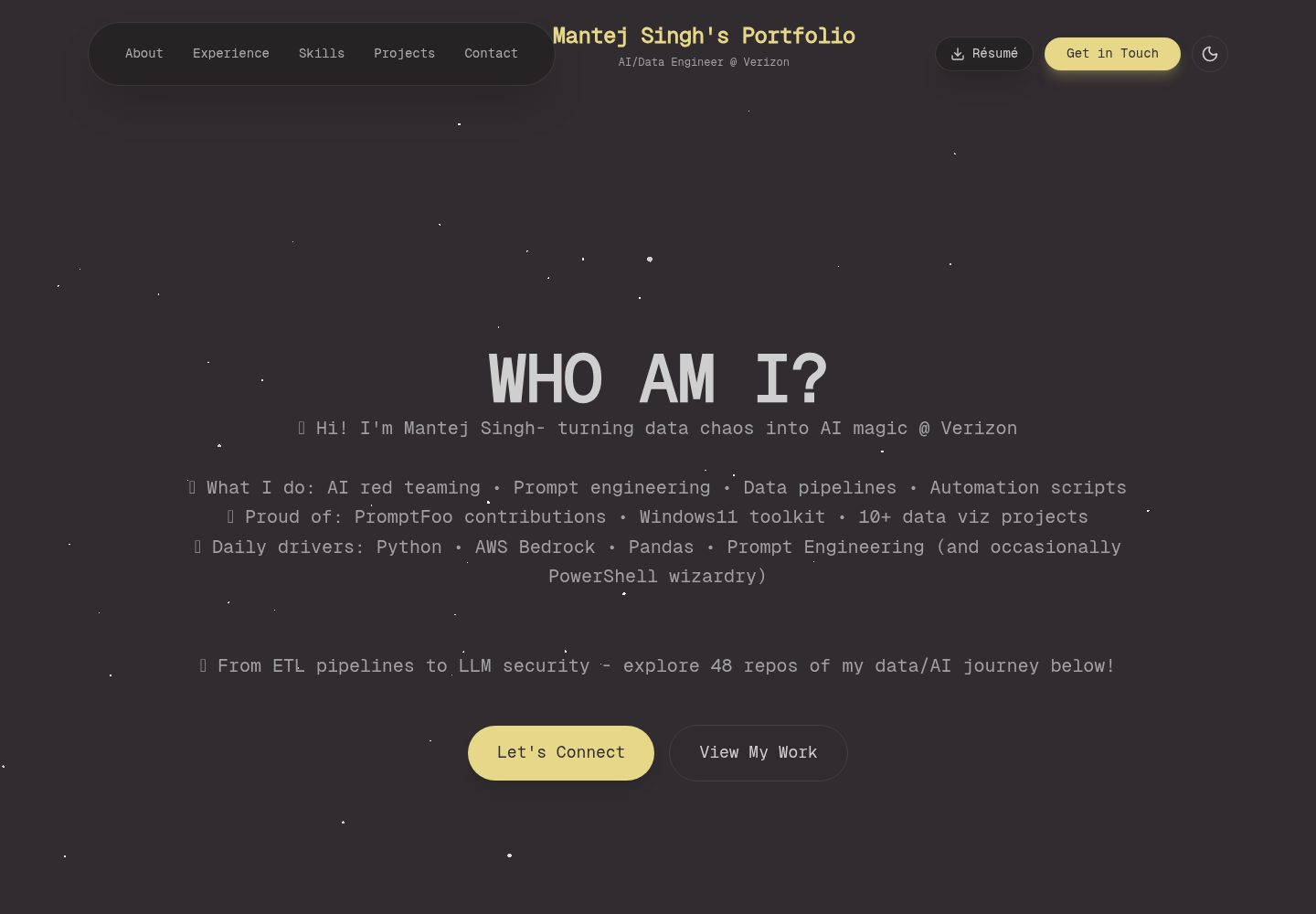
Content is driven by TypeScript data files under src/data, so personal information, experience, and projects can be updated without directly editing HTML
ViteReactHTMLPortfolio
modern-portfolio-react — Vite Portfolio Template
By Mantej-Singh
A personal portfolio website template built with React, TypeScript, and Vite, with content driven by data files under src/data, including animated components and a responsive layout; the README provides installation, customization, and GitHub Pages deployment instructions.
Explore the design
Compare the page layouts and mobile experience. Open any screenshot for a closer look.
Desktop homepage1 / 2
Desktop captureTop of page
Actual screenshot captured by the server browser.
All pages & views 2
Screenshots show visual appearance; interactive behavior may differ.
Recorded 2026-10-16View source
What stands out
A quick read of the recorded project description.
Built with React, TypeScript, Vite, Tailwind CSS, and shadcn/ui components
Includes animated components such as DecryptedText, SpotlightCard, PrismBackground, and TargetCursor
The README states support for a mobile horizontal carousel, dark/light theme switching, and a responsive layout
The README mentions code splitting, lazy loading, and PWA-related configuration
Template Details
This project is a React portfolio website migrated from a static HTML5UP template. The README states that it is built with React, TypeScript, Vite, Tailwind CSS, and shadcn/ui, and includes animation and icon dependencies such as framer-motion and lucide-react. Content is centrally managed through files including personal.ts, experience.ts, and projects.ts in the src/data directory, making it easy to replace personal information, work experience, and project lists. The page consists of components such as Header, Hero, Skills, Experience, Projects, Contact, and Footer. The README also lists animated components such as DecryptedText, SpotlightCard, PrismBackground, and TargetCursor. The README mentions features such as a mobile horizontal carousel, dynamic calculation of years of experience, skill progress bars, tooltips, dark/light theme switching, code splitting, lazy loading, and PWA, but does not provide a complete dependency version list or production environment verification notes. For deployment, the README only states the use of GitHub Pages and notes to run npm run build before deployment.
ViteReactHTMLPortfolio
Is it right for your project?
Use Cases
- Building a personal portfolio website to centrally showcase work experience, skills, and projects
- Migrating an existing static HTML portfolio to a project based on React and TypeScript
- Portfolio pages that need to include animation effects and mobile interactions
- Deploying a personal static site via GitHub Pages
Suitable For
- Front-end developers with a foundation in React and TypeScript who want to quickly build a portfolio
- Users who need to maintain personal experience and project content via data files
- Developers who want a reference for migrating from a static template to a React component-based implementation
Getting started & customization
Use these recorded setup notes alongside the repository instructions for your chosen version.
- 1
The README requires Node.js 18+ and npm, and uses npm create vite to initialize a React + TypeScript project
- 2
Dependencies such as Radix UI, Tailwind CSS, framer-motion, and lucide-react need to be installed, and shadcn/ui components initialized
- 3
Tailwind CSS and path aliases need to be configured; the README points to docs/KeyFeatures.md for detailed configuration
- 4
Before deploying to GitHub Pages, run npm run build and deploy the dist directory to the gh-pages branch
License & source material
Usage conditions & limitations
Free to use · keep license noticeThis entry covers the free version under the MIT license in the public repository; the free scope is the code of this version and does not mean that external services or third-party assets are free.
Must comply with when using
- The code of this version may be used, modified, used commercially, and distributed free of charge.
- When distributing copies or substantial portions of the code, retain the original author's copyright notice and the complete MIT license notice.
- The code is provided as is; warranties and limitations of liability are governed by the original license and applicable law.
Additional costs & items to verify
- Demo images, fonts, icons, and other third-party assets must be checked against their respective licenses and cannot be judged solely by the code's MIT license.
- External services such as domains, hosting, databases, payments, or AI may incur separate charges.
View Original Text Basis
Compiled by DeepSeek based on repository license and README ·2026-10-16. Results only cover the materials read; dependencies, images, fonts, and subsequent term changes are subject to their respective original texts.
Project checks & description sources
Template Information
- Source platforms
- GitHub
- Documentation and maintenance reference score
- More documented · 85 / 100
- Technologies
- Vite · React · HTML
- Website type
- Portfolio
How this score is calculated
Our heuristic uses license records (up to 30), a demo link (12), a preview (10), stars (15), recorded maintenance (15), description completeness (8), feature records (5) and classification data (5). It is not a code, security or performance test, or a Google score. A link does not establish tested functionality.
What to verify for this project
- Repository update recorded
- 2025-11-23
- Screenshot last checked
- 2026-10-16
A demo link is listed. Check it with your own content and viewport sizes; its presence does not confirm that forms, authentication or payments work.
The catalog identifies Vite as the primary stack. Check the actual dependency manifest and lockfile for versions and hosting requirements. These notes use recorded metadata, not a code audit or a deployment test.
Use a selection guide →How this description was prepared
AI-assisted description based on catalog records and repository material. Repository authors are not automatically the reviewers of this description.
Review declaration: codex-user-requested-batch-review-20261017 · 2026-10-16
Inspect the recorded source material
SHA-256: da8693732ef054b53ff117c13e140b46ca6b168f40b0ae76e74536b82e4cc414
2026-10-16T12:18:13.526Z
Source file / repository# 🚀 Modern React Portfolio - From Static to Dynamic
A modern, performant portfolio website built with React 19.1, TypeScript, and cutting-edge animations. This project showcases a complete transformation from a static HTML5UP template to a fully interactive React application with advanced animations, real-time data, and optimized performance.
## 🎬 **The Transformation Story**
### **From Static HTML5UP to Dynamic React**
What began in 2016 as a humble experiment in legacy web development (see the [original website](https://mantej-singh.github.io/) and [repo](https://github.com/Mantej-Singh/mantej-singh.github.io)) has grown into a showcase of modern React architecture. My journey took me from the confines of a lengthy GitHub Pages URL (`mantej-singh.github.io/modern-portfolio-react/`) to the pride of a professional custom domain (`mantejsingh.dev`), powered by a strategic investment in Cloudflare’s domain and CDN services. **[Read my complete domain migration journey🌐 →](docs/cloudflare.md)**
Let me walk you through this transformation—and why every step mattered:
#### **🔙 The HTML5UP Era (Static Template)**
The original portfolio was built on HTML5UP's "Landed" template - a beautiful but static solution with several limitations:
```html
<!-- Original stack: Multiple tracking scripts, jQuery dependencies -->
<script src="jquery.min.js"></script>
<script src="jquery.dropotron.min.js"></script>
<script src="jquery.scrollex.min.js"></script>
<script src="skel.min.js"></script>
<!-- Heavy tracking and analytics -->
<script>(function(w,d,s,l,i){w[l]=w[l]||[];w[l].push({'gtm.start'...</script>
<script>aid=43827;sid=49497;</script>
```
**Pain Points Identified:**
- **Manual Updates**: Every project, skill, or experience required HTML editing
- **No Type Safety**: JavaScript errors only discovered at runtime
- **jQuery Dependencies**: 50KB+ of legacy JavaScript libraries
- **Static Content**: No dynamic calculations (years worked, skill levels)
- **Performance Issues**: Multiple tracking scripts, unoptimized images
- **Maintenance Overhead**: Repetitive HTML for similar components
- **No Component Reusability**: Copy-paste development patterns
- **SEO Limitations**: Static meta tags, no dynamic content optimization
#### **🚀 The React Renaissance (Modern Stack)**
The transformation introduced systematic solutions to every limitation:
```typescript
// Modern stack: Type-safe, component-based, optimized
React 19.1 + TypeScript + Vite + Tailwind CSS + shadcn/ui
```
**Solutions Implemented:**
- **Data-Driven Content**: Edit `src/data/` files instead of HTML
- **Type Safety**: TypeScript catches errors before deployment
- **Component Architecture**: Reusable, maintainable code structure
- **Dynamic Calculations**: Automatic years worked, skill assessments
- **Performance Optimization**: Code splitting, lazy loading, PWA features
- **Modern Animations**: Smooth, accessible, performant effects
- **Developer Experience**: Hot reload, intelligent debugging, path aliases
#### **📊 Measurable Improvements**
| Metric | HTML5UP (Before) | React Portfolio (After) | Improvement |
|--------|-------------------|------------------------|-------------|
| **Build Time** | Manual deployment | 15s automated build | ⚡ 95% faster |
| **Bundle Size** | ~200KB (jQuery + deps) | ~110KB (gzipped) | 📦 45% reduction |
| **Type Safety** | 0% (vanilla JS) | 100% (TypeScript) | 🛡️ Complete coverage |
| **Component Reuse** | 0% (static HTML) | 80%+ (shared components) | ♻️ Massive efficiency |
| **Update Speed** | Hours (manual HTML) | Minutes (data files) | ⏱️ 90% time savings |
| **Lighthouse Score** | 78/100 | 95+/100 | 🎯 22% improvement |
### **Why This Evolution Matters**
This transformation demonstrates **modern web development best practices** and showcases the ability to:
- **Migrate Legacy Systems**: Successfully evolved from jQuery-era to modern React
- **Performance Engineering**: Achieved superior performance with more features
- **Developer Experience**: Created a maintainable, scalable codebase
- **User Experience**: Delivered smooth animations and responsive design
- **Future-Proofing**: Built with latest React features and TypeScript
---
## 🚀 **Quick Installation & Setup**
> [!NOTE]
> This setup assumes you have Node.js 18+ and npm installed. If not, [download Node.js](https://nodejs.org/) first.
### **1. Initialize React + Vite Project**
> [!IMPORTANT]
> **Why?** Vite provides lightning-fast development server and optimized production builds
```bash
npm create vite@latest mantej-portfolio-react -- --template react-ts
cd mantej-portfolio-react && npm install
```
### **2. Install Core Dependencies**
> [!TIP]
> **Why?** These libraries provide the UI components, animations, and styling system
```bash
# UI Framework & Components
npm install @radix-ui/react-slot @radix-ui/react-label @radix-ui/react-progress @radix-ui/react-tooltip
# Styling & Utilities
npm install tailwindcss postcss autoprefixer class-variance-authority clsx tailwind-merge
# Animations & Icons
npm install framer-motion lucide-react
```
### **3. Configure Tailwind CSS**
> [!IMPORTANT]
> **Why?** Tailwind provides utility-first CSS framework for rapid UI development
```bash
npx tailwindcss init -p
```
### **4. Setup shadcn/ui Components**
> [!TIP]
> **Why?** shadcn/ui provides high-quality, customizable components with dark theme support
```bash
npx shadcn-ui@latest init
npx shadcn-ui@latest add button card input textarea label progress badge
```
### **5. Configure Path Aliases**
> [!NOTE]
> **Why?** Path aliases enable clean imports (`@/components/ui/button` vs `../../../components/ui/button`)
Add to `vite.config.ts` and `tsconfig.json` - [See detailed configuration →](docs/KeyFeatures.md#path-aliases)
### **6. Start Development**
> [!WARNING]
> **PWA Configuration?** Progressive Web App features enable offline functionality and mobile installation
```bash
npm run dev # Opens at http://localhost:5173
```
---
## ✨ **Key Features**
### **Latest Release:**
- **🍎 iOS26-Inspired Glass Design** - Premium navigation with ultra-transparent effects, backdrop-blur elements, and subtle elasticity animations matching iOS26 design language
### **Core Features:**
- **📱 Horizontal Carousel Navigation** - Mobile-only carousels for Work Experience, Skills & Technologies, and Featured Projects with smooth spring animations and desktop grid preservation
- **🎯 Dynamic Work Experience Timeline** - Auto-calculates years worked with color-coded badges
- **📊 Interactive Skills Visualization** - Realistic proficiency levels with animated progress bars
- **🎮 Smart Tooltip System** - Context-aware tooltips with randomized engaging messages
- **⚡ Performance Optimized** - Code splitting, lazy loading, and PWA capabilities
- **🎨 Advanced Animations** - DecryptedText, SpotlightCard, PrismBackground, TargetCursor effects
- **📱 Responsive Design** - Mobile-first approach with touch-friendly interactions
- **🌙 Dark/Light Theme** - System preference detection with manual toggle
- **🔍 Type-Safe Development** - Full TypeScript implementation with strict typing
- **🚀 Modern Architecture** - React 19.1 with concurrent features and Suspense
> [!TIP]
> **Want detailed implementation examples?** Check out our comprehensive [Key Features Documentation →](docs/KeyFeatures.md)
---
## ⚡ **Performance Features**
This portfolio is built for speed and efficiency:
- **Code Splitting**: Components load only when needed (11.29kB avg per section)
- **Lazy Loading**: Images and heavy components load on demand
- **PWA Ready**: Offline functionality and mobile installation
- **Bundle Optimization**: 45% smaller than original jQuery-based version
- **Type Safety**: 100% TypeScript coverage prevents runtime errors
> [!NOTE]
> **Performance Details**: [View complete performance analysis and metrics →](docs/performance.md)
---
## 🛠️ **Customization Guide**
### **📝 Editing Personal Data**
Want to add your information? All content is stored in easy-to-edit data files:
```typescript
// src/data/personal.ts - Your basic information
export const personalInfo = {
name: "Your Name",
tagline: "Your Professional Title | Company",
email: "[email protected]"
}
// src/data/experience.ts - Work experience
export const workExperience = [
{
title: "Your Job Title",
company: "Company Name",
period: "2023 - Present",
location: "City, State"
}
]
// src/data/projects.ts - GitHub projects
export const featuredProjects = [
{
title: "Your Project",
description: "Project description",
github: "https://github.com/yourusername/project"
}
]
```
### **🎨 Visual & Layout Changes**
Need to modify the design? Here's where to look:
- **Header/Footer**: Edit `src/components/layout/Header.tsx` and `Footer.tsx`
- **Section Cards**: Modify `src/components/sections/` for Skills, Contact, Experience
- **Colors & Theme**: Update `tailwind.config.js` and `src/index.css`
- **Animations**: Customize `src/components/animations/` components
### **🔧 Component Modifications**
Want to change how sections look? Each section is a separate component:
- **Skills Section**: `src/components/sections/SkillsVisualization.tsx`
- **Project Cards**: `src/components/sections/ProjectCard.tsx`
- **Contact Form**: `src/components/sections/ContactForm.tsx`
- **Experience Timeline**: `src/components/sections/ExperienceCard.tsx`
### **⚙️ App-Level Changes**
For major layout or routing changes, edit `src/App.tsx`:
```typescript
// Add new sections, reorder components, or modify app structure
function App() {
return (
<div className="App">
<Header />
<HeroSection />
<SkillsSection /> // Reorder these sections
<ExperienceSection /> // Or add new ones
<ProjectsSection />
<ContactSection />
<Footer />
</div>
)
}
```
### **🎨 Animation Customizations**
Want to modify animations? All animation components are in `src/components/animations/`:
- **DecryptedText**: Matrix-style text reveal effect
- **SpotlightCard**: Mouse-following spotlight on cards
- **PrismBackground**: Animated particle background
- **TargetCursor**: Custom cursor with trailing effect
> [!TIP]
> **Need comprehensive customization help?** Check out our detailed [Customization Guide →](docs/customization.md) with step-by-step examples for every component and feature.
---
## 🏗️ **Project Structure**
```
src/
├── components/
│ ├── animations/ # DecryptedText, SpotlightCard, PrismBackground
│ ├── layout/ # Header, Footer components
│ ├── sections/ # Skills, Contact, Experience, Projects
│ └── ui/ # shadcn/ui components (Button, Card, etc.)
├── data/ # ✏️ EDIT THESE: Personal info, projects, experience
├── lib/ # Utilities and helper functions
├── types/ # TypeScript interfaces and types
└── App.tsx # ⚙️ EDIT FOR: App structure and routing
```
---
## 🌐 **Deployment Guide**
### **GitHub Pages (I am using this)**
```bash
npm run build
# Deploy dist/ folder to gh-pages branch
```
> [!WARNING]
> **Before deploying**: Always run `npm run build` to ensure there are no TypeScript errors or build issues.
---
## 🔮 **Future Enhancements**
This portfolio is designed for continuous evolution. Planned improvements include:
- **Advanced Analytics** with visitor insights and heat mapping
- **Theme Customizer** with multiple color schemes
- **Multi-language Support** for international reach
- **Blog Section** with technical articles and tutorials (Maybe lol)
---
## 📚 **Resources & Credits**
### **Inspiration & Design**
- **HTML5UP**: [html5up.net](https://html5up.net) - Original template inspiration
- **TweakCN Theme Editor**: [tweakcn.com/editor/theme](https://tweakcn.com/editor/theme) - Theme customization and editing
- **Canva Templates**: [canva.com/templates](https://www.canva.com/templates) - Design templates and assets
- **Figma Community**: [figma.com/community/website-templates](https://www.figma.com/community/website-templates) - Website templates and UI kits
- **React Bits Animations**: [reactbits.dev/animations](https://reactbits.dev/animations/) - Animation examples and inspiration
> [!TIP]
> **I relied on these heavily for any new feature or ideas**
---
## 🤝 **Contributing**
### **Development Setup**
1. Fork the repository
2. Create feature branch: `git checkout -b feature/amazing-feature`
3. Make your changes following the project structure
4. Test thoroughly: `npm run build` and `npm run dev`
5. Commit changes: `git commit -m 'Add amazing feature'`
6. Push and create Pull Request
### **Code Standards**
- **TypeScript**: All components must be typed
- **ESLint**: Follow established linting rules
- **Responsive**: Mobile-first design approach
- **Accessibility**: WCAG 2.1 compliance
---
## 📄 **License**
This project is licensed under the MIT License - see the [LICENSE](LICENSE) file for details.
---
**Built with ❤️ using React 19.1, TypeScript, and modern web technologies.**
*Last updated: November 2025*Explore similar templates
Compare previews and descriptions within the same stack and category.

Resumify
Resumify is a browser-based resume builder built with React, TypeScript, and Vite.
Vite · Portfolio

showlit
Showlit is a personal website template built with React, Vite, TypeScript, Tailwind CSS, and shadcn/ui.
Vite · Portfolio

folium
A developer portfolio template built with Vite, React, TypeScript, and Tailwind CSS.
Vite · Portfolio

kurizu-discord
A personal portfolio website built with React and Vite that mimics the Discord desktop app, organizing projects, skills, and experience into customizable channels, threads, a member list, and emoji reactions.
Vite · Portfolio
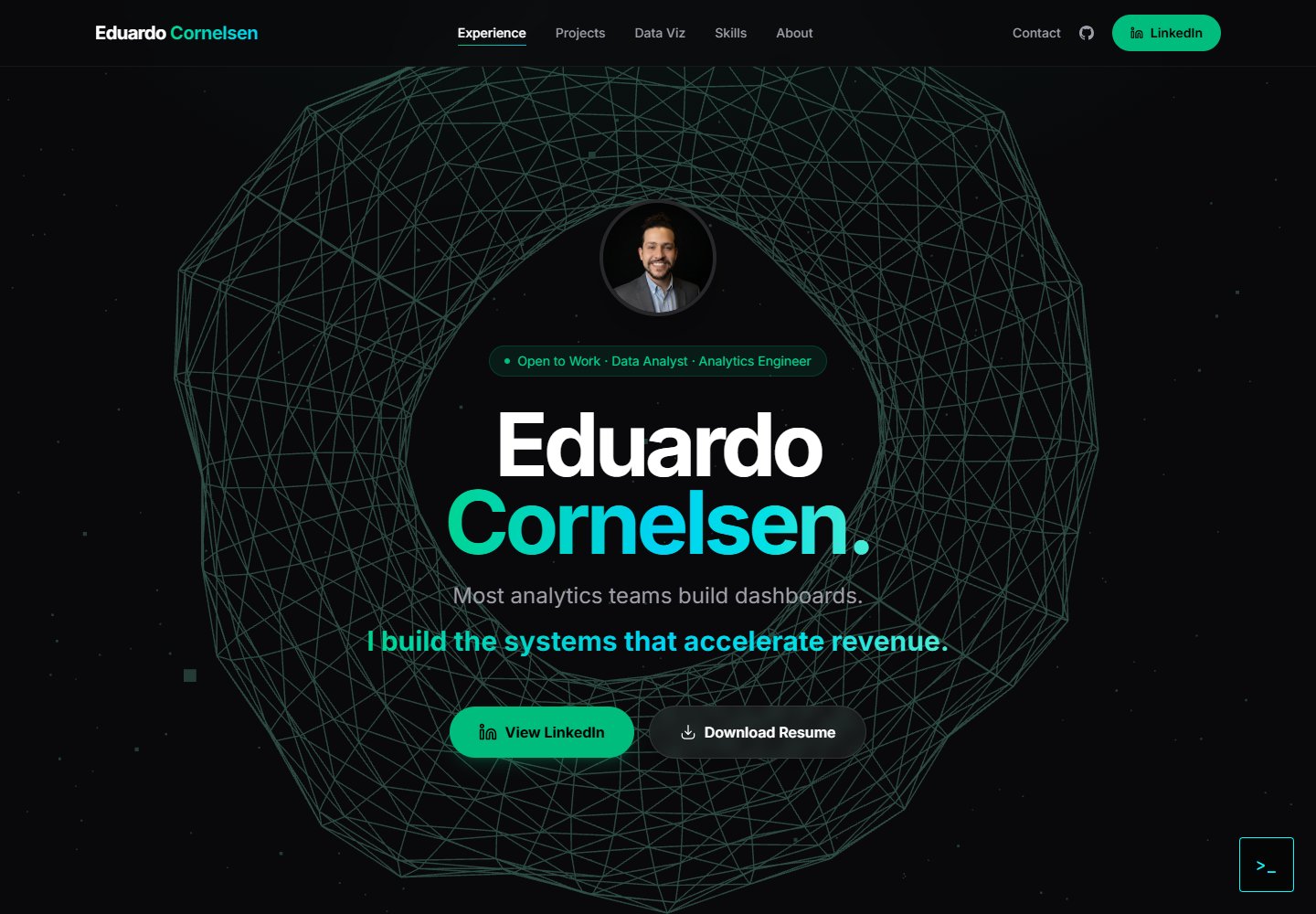
cv-educornelsen
A React + TypeScript personal portfolio template built with Vite, featuring a streaming AI chatbot powered by Google Gemini. An Express backend proxies requests to keep the API key server-side, with rate limiting, IP throttling, canary token injection, and LangFuse tracing.
Vite · Portfolio

about-me-personal-portfolio-website-template
AboutMe is a free personal website template built with Bootstrap and Vite, released under the MIT license. It provides a single-page index.html with organized src directories for images, JavaScript, and SCSS, along with npm scripts for development and build.
Vite · Portfolio