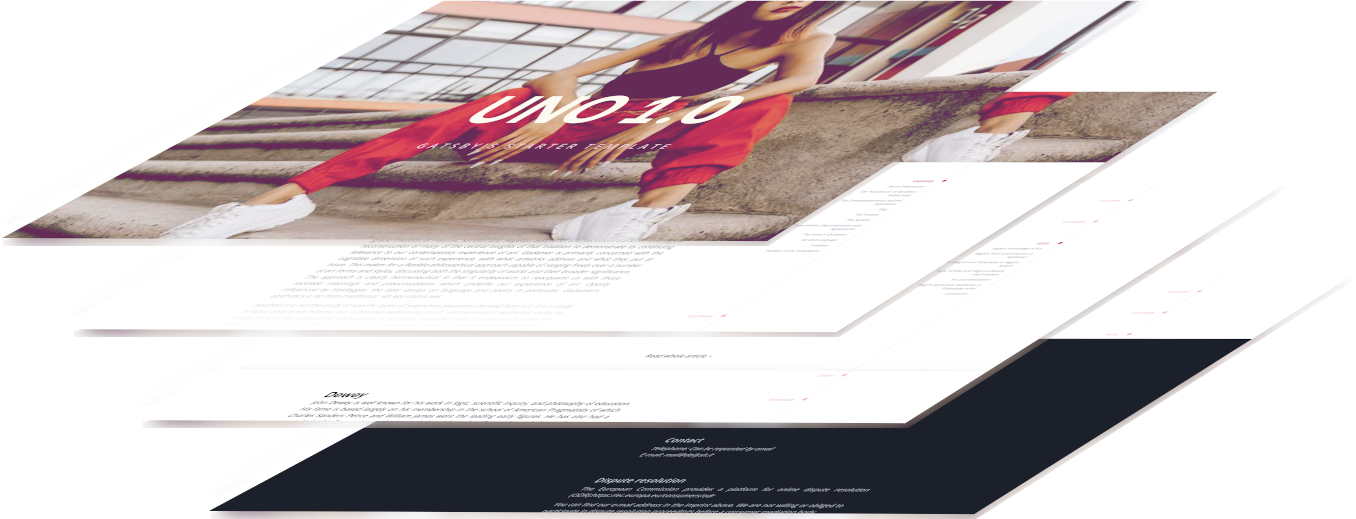
A Gatsby landing page starter template, described in the repository as a minimal template
GatsbyReactCorporate WebsiteStarter
gatsby-starter-uno — Gatsby Business Template
By nextlevelshit
A minimal landing page starter template built on Gatsby and Tailwind CSS, with routable modal pages and a SASS/SCSS style structure.
Explore the design
Compare the page layouts and mobile experience. Open any screenshot for a closer look.
Author preview
Author-provided preview
Preview provided in the project README.
One original preview is available. Open the full image to inspect the design.
Screenshots show visual appearance; interactive behavior may differ.
Recorded 2026-10-13View source
What stands out
A quick read of the recorded project description.
Uses Tailwind CSS and provides tailwind.config.js for adjusting default style parameters
The style layer uses SASS/SCSS, with CSS variables defined in src/styles and Tailwind imported
Supports routable modal pages; each Markdown file in the pages directory gets its own static path
Images in src/images are used by the image-map plugin to build an interactive hero section
Licensed under Apache-2.0, allowing free use, modification, commercial use, and distribution
Template Details
gatsby-starter-uno is a Gatsby starter template for landing pages, using a text-centered layout. The repository describes it as a "Minimal Gatsby Starter Template for a Landingpage with TailwindCSS". The template includes Gatsby's main configuration files, Tailwind CSS, and routable modals. The style layer uses SASS/SCSS, defines CSS variables in src/styles, and imports Tailwind features.
In terms of project structure, the pages directory holds Markdown files, each of which gets a static path; currently these are used for the content of routable modal pages. src/components holds reusable standalone components, src/images stores images for the image-map plugin, and src/templates is used to generate routable pages in gatsby-node.js. tailwind.config.js is used to adjust Tailwind's default style parameters; the README recommends making general style changes here rather than overriding SCSS or component styles.
Regarding usage limitations, the repository provides no feature documentation beyond the README and the example site, and does not describe data sources, forms, a CMS, or deployment options. The template is positioned as a minimal starter, and both page content and components must be edited by the user. It is licensed under Apache-2.0, allowing free use, modification, commercial use, and distribution, provided that the license is included, modified files are marked, and attribution notices are retained when distributing. Third-party assets such as demo images, fonts, and icons require separate license verification, and external services such as domains and hosting may incur additional charges.
GatsbyCorporate websiteStarter
Is it right for your project?
Use Cases
- Quickly setting up a landing page project with a text-centered layout
- Organizing front-end styles with Gatsby alongside Tailwind CSS and SASS/SCSS
- Displaying content through routable modal pages generated from Markdown files
- Using the image-map plugin to create an interactive hero image area
- Generating routable pages via src/templates in gatsby-node.js
Suitable For
- Developers familiar with Gatsby and Tailwind CSS who want to start from a minimal template
- Individuals or teams that need a landing page foundation and will fill in the content themselves
- Projects that accept the Apache-2.0 license terms and can meet the attribution and license-inclusion requirements
Getting started & customization
Use these recorded setup notes alongside the repository instructions for your chosen version.
- 1
Create a site with the Gatsby CLI: gatsby new gatsby-starter-uno https://github.com/nextlevelshit/gatsby-starter-uno
- 2
After entering the directory, run gatsby develop to start local development; the default address is http://localhost:8000
- 3
Edit src/pages/index.js to change the homepage content; the browser updates in real time after saving
- 4
Make general style adjustments in tailwind.config.js rather than overriding SCSS or component styles
- 5
When distributing derivative works, include the Apache-2.0 license, mark modified files, and retain attribution notices
License & source material
Usage conditions & limitations
Free to use · keep license noticeThis entry covers the free version in the public repository under the Apache-2.0 license; the free scope applies to that version's code and does not mean external services or third-party assets are free.
Must comply with when using
- Free use, modification, commercial use, and distribution are permitted; when distributing, include the Apache-2.0 license.
- Modified files must be prominently marked as changed, and relevant copyright, patent, trademark, and attribution notices must be retained.
- If the original project includes a NOTICE file, applicable attribution notices in it must be retained when distributing derivative works.
- The license includes an applicable contributor patent grant; initiating patent litigation as described in the license terminates that patent grant, and no trademark rights are granted.
- The code is provided as is; warranties and limitations of liability are governed by the original license and applicable law.
Additional costs & items to verify
- Demo images, fonts, icons, and other third-party assets must be checked against their respective licenses; the code's Apache-2.0 license alone is not sufficient to determine this.
- External services such as domains, hosting, databases, payments, or AI may incur additional charges.
View Original Text Basis
https://github.com/nextlevelshit/gatsby-starter-uno/blob/master/LICENSEhttps://github.com/nextlevelshit/gatsby-starter-uno/blob/master/README.mdno-charge, royalty-free, irrevocable copyright license
Original License Text
Compiled by DeepSeek based on repository license and README ·2026-10-13. Results only cover the materials read; dependencies, images, fonts, and subsequent term changes are subject to their respective original texts.
Project checks & description sources
Template Information
- Source platforms
- GitHub
- Documentation and maintenance reference score
- Partly documented · 70 / 100
- Technologies
- Gatsby · React
- Website type
- Corporate Website · Starter
How this score is calculated
Our heuristic uses license records (up to 30), a demo link (12), a preview (10), stars (15), recorded maintenance (15), description completeness (8), feature records (5) and classification data (5). It is not a code, security or performance test, or a Google score. A link does not establish tested functionality.
What to verify for this project
- Repository update recorded
- 2023-01-11
- Screenshot last checked
- 2026-10-13
A demo link is listed. Check it with your own content and viewport sizes; its presence does not confirm that forms, authentication or payments work.
The catalog identifies Gatsby as the primary stack. Check the actual dependency manifest and lockfile for versions and hosting requirements. These notes use recorded metadata, not a code audit or a deployment test.
Use a selection guide →How this description was prepared
AI-assisted description based on catalog records and repository material. Repository authors are not automatically the reviewers of this description.
Review declaration: [email protected] · 2026-10-13
Inspect the recorded source material
SHA-256: 3b73fd09aac41b22e6330eec449f498a2bbea421734e4e26f881168c2a407a21
2026-10-13T02:15:19.884Z
Source file / repository<div align="center">
<h1>UNO - Minimal Gatsby Starter Template</h1>
<sup>GatsbyJS · Tailwind CSS · SASS/SCSS</sup>
</div>
<br><br>

<br><br>
Kick off your project with this text centered boilerplate.
This starter ships with the main Gatsby configuration files, Tailwind CSS and routable modals.
## Examples
- [https://uno.dailysh.it](https://uno.dailysh.it)
*Feel free to contribute other online examples of this template.*
## Quick start
1. **Create a Gatsby site.**
Use the Gatsby CLI to create a new site, specifying the uno starter.
```shell
# create a new Gatsby site using the default starter
gatsby new gatsby-starter-uno https://github.com/nextlevelshit/gatsby-starter-uno
```
1. **Start developing.**
Navigate into your new site’s directory and start it up.
```shell
cd gatsby-starter-uno/
gatsby develop
```
1. **Open the source code and start editing!**
Your site is now running at `http://localhost:8000`!
_Note: You'll also see a second link: _`http://localhost:8000/___graphql`_. This is a tool you can use to experiment with querying your data. Learn more about using this tool in the [Gatsby tutorial](https://www.gatsbyjs.org/tutorial/part-five/#introducing-graphiql)._
Open the `gatsby-starter-uno` directory in your code editor of choice and edit `src/pages/index.js`. Save your changes and the browser will update in real time!
## Usage
## What's inside?
A quick look at the top-level files and directories you'll see in a Gatsby project.
.
├── docs
├── node_modules
├── pages
└── src
├── components
├── images
├── pages
├── styles
└── templates
├── .gitignore
├── gatsby-browser.js
├── gatsby-config.js
├── gatsby-node.js
├── gatsby-ssr.js
├── LICENSE
├── package.json
├── README.md
├── tailwind.config.js
└── yarn.lock
1. **`/docs`**: This directory contains all of the modules of code that your project depends on (npm packages) are automatically installed.
2. **`/node_modules`**: This directory contains all of the modules of code that your project depends on (npm packages) are automatically installed.
3. **`/pages`**: This directory contains all markdown files which all get a static path to navigate to. For now they are used for the content of routable modals.
4. **`/src`**: This directory will contain all the code related to what you will see on the front-end of your site (what you see in the browser) such as your site header or a page template. `src` is a convention for „source code”.
4.1. **`/src/components`**: This directory contains reuasable components that you can implement on purpose. They run as stand-alone and do not have any dependencies to other modules, components or pages. Some are organized in directories, if your include some styling.
4.2. **`/src/images`**: This direcotry contains (for now) all the images used for the `image-map` plugin that creates an interactive first impression of your website.
4.3. **`/src/styles`**: This directory contains the main part of your styles, defines CSS variables and imports the tailwind functionality. All global stylings that are not connected to a specific component (see above) come here.
4.4. **`/src/templates`**: This directory contains templates which are helpful to generate routable pages inside of `gatsby-node.js`.
5. **`.gitignore`**: This file tells git which files it should not track / not maintain a version history for.
6. **`gatsby-browser.js`**: This file is where Gatsby expects to find any usage of the [Gatsby browser APIs](https://www.gatsbyjs.org/docs/browser-apis/) (if any). These allow customization/extension of default Gatsby settings affecting the browser.
7. **`gatsby-config.js`**: This is the main configuration file for a Gatsby site. This is where you can specify information about your site (metadata) like the site title and description, which Gatsby plugins you’d like to include, etc. (Check out the [config docs](https://www.gatsbyjs.org/docs/gatsby-config/) for more detail).
8. **`gatsby-node.js`**: This file is where Gatsby expects to find any usage of the [Gatsby Node APIs](https://www.gatsbyjs.org/docs/node-apis/) (if any). These allow customization/extension of default Gatsby settings affecting pieces of the site build process.
9. **`gatsby-ssr.js`**: This file is where Gatsby expects to find any usage of the [Gatsby server-side rendering APIs](https://www.gatsbyjs.org/docs/ssr-apis/) (if any). These allow customization of default Gatsby settings affecting server-side rendering.
9. **`LICENSE`**: Uno starter is licensed under Apache 2.0.
10. **`package.json`**: A manifest file for Node.js projects, which includes things like metadata (the project’s name, author, etc). This manifest is how npm knows which packages to install for your project.
11. **`README.md`**: A text file containing useful reference information about your project.
12. **`tailwind.config.js`**: A configuration file for changing the default styling parameters for Tailwind CSS. General styling adaptions should be done inside this file instead of overwriting everything in the SCSS files or component styles.
13. **`yarn.lock`** (See `package.json` below, first). This is an automatically generated file based on the exact versions of your npm dependencies that were installed for your project. **(You won’t change this file directly).**
Explore similar templates
Compare previews and descriptions within the same stack and category.

gatsby-starter-gcn
A Gatsby starter for building static blogs with Contentful and Netlify.
Gatsby · Blog

gatsby-starter-morning-dew
A Gatsby and React blog starter/theme that uses Markdown or MDX for posts, supports multilingual content, dark mode, tag grouping, PWA, and Disqus comments, and is MIT licensed.
Gatsby · Blog

starter-gatsby-blog
A community-maintained Gatsby blog starter for Contentful, with a simple content model, npm run setup import, Sync API support, and gatsby-plugin-image. Suitable for quickly building a CMS-driven static blog or learning Gatsby and Headless CMS integration.
Gatsby · 社区

automatic-gatsbyjs-app-landing-page
A GatsbyJS template for iOS app landing pages, ported from Emil Baehr's Automatic App Landing Page. Configure content in site-config.js without writing HTML or CSS, upload video previews or screenshots, and deploy via Netlify or build for GitHub Pages.
Gatsby · Tool Site
gatsby-starter-cv
A Gatsby and React starter for building a responsive personal digital resume. It includes sections for About, Skills, Job experiences, GitHub repositories, and Portfolio, with all personal data configured in data/siteConfig.js.
Gatsby · Starter

clay-theme
Clay is an image-centric Gatsby theme for publishers, portfolios, and photography blogs. It includes PWA support, a preconfigured Netlify/Decap CMS, PurgeCSS, Netlify deployment settings, and Netlify Forms.
Gatsby · Portfolio