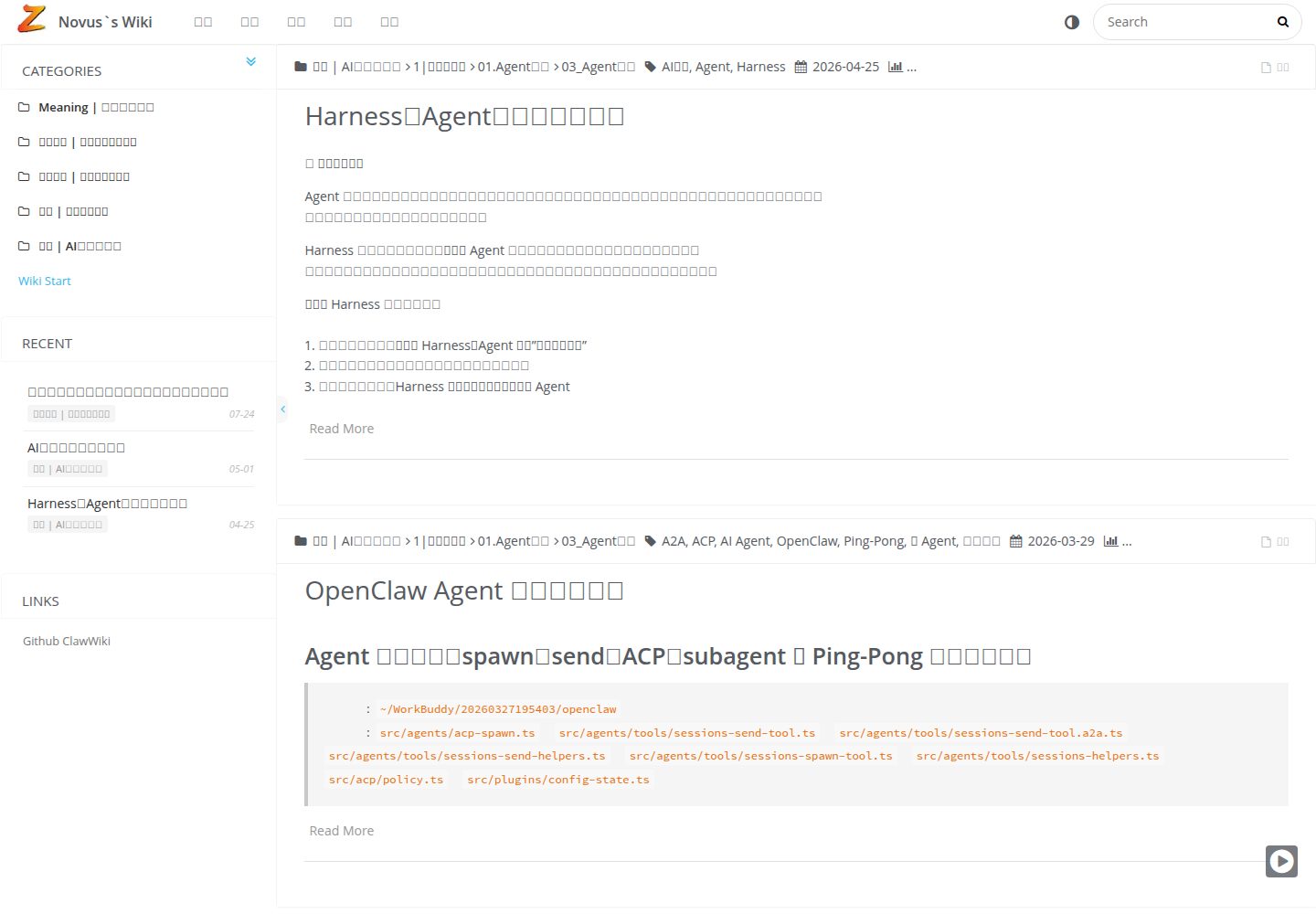
Dual-mode routing: full-site SPA (hash navigation, ?fullpage=1) and parameter-free single-page mode, switchable
HexoBlog
hexo-theme-Quinoa — Hexo Blog Template
By quanoc
A Hexo theme for personal wiki knowledge bases, offering dual-mode routing (SPA and single-page), a hierarchical category sidebar, and client-side full-text search.
Explore the design
Compare the page layouts and mobile experience. Open any screenshot for a closer look.
Desktop homepage1 / 2
Desktop captureTop of page
Actual screenshot captured by the server browser.
All pages & views 2
Screenshots show visual appearance; interactive behavior may differ.
Recorded 2026-10-02View source
What stands out
A quick read of the recorded project description.
Sidebar multi-level category tree with expand/collapse, organizing knowledge by directory structure
Client-side full-text search powered by Insight Search, depending on hexo-generator-json-content
Mobile adaptation: collapsible sidebar and touch-friendly toolbar
Built-in code highlighting, image lightbox and gallery, customizable dark color scheme
Optional integration of sitemap, RSS, Open Graph, Google/Baidu Analytics, and Busuanzi visit statistics
Template Details
hexo-theme-Quinoa is a Hexo theme for personal wiki knowledge bases. The repository describes it as "a Hexo-based personal wiki knowledge base theme," with a demo site at waisec.cn. It organizes content into a hierarchical category tree, displayed in the sidebar as expandable/collapsible sections, and includes client-side full-text search powered by Insight Search. It is suited to turning scattered notes into an interlinked knowledge base rather than just a chronological blog.
Two routing modes are available: a full-site mode using hash navigation (entered via the ?fullpage=1 parameter) with a sidebar and page transitions, and a single-page mode that outputs clean pages without parameters, making them easy to link to externally or embed. The two can be switched. The theme also includes code highlighting, an image lightbox and gallery, a collapsible sidebar on mobile, SEO-related output (sitemap, RSS, Open Graph), and optional integrations such as Google Analytics, Baidu Analytics, and Busuanzi visit statistics. It can also link each post's history on GitHub/GitLab via history_control.
Before use, note that the theme depends on a set of Hexo plugins (such as hexo-generator-json-content, hexo-abbrlink, hexo-generator-sitemap, hexo-renderer-kramed, etc.). Installation involves copying the _source and _scaffolds files and generating the theme configuration from _config.yml.example; the README recommends Node.js v18+ and pnpm. The repository does not provide real-time collaboration or built-in database capabilities; these require a Git workflow or other tools. The code is MIT-licensed, but third-party assets such as demo images, fonts, and icons require separate license verification.
HexoBlog
Is it right for your project?
Use Cases
- Organizing personal notes into a wiki knowledge base with hierarchical categories and full-text search
- Generating clean single pages without parameters for external links or iframe embedding
- Writing in Markdown and managing content and version history via Git
- Adding SEO output and visit statistics to a Hexo site
Suitable For
- Authors using Hexo to build a personal knowledge base or documentation site
- Users who write in Markdown and manage content with Git
- Those who need hierarchical categories and site search to organize large numbers of notes
- Site maintainers who want pages to be linkable or embeddable externally
Getting started & customization
Use these recorded setup notes alongside the repository instructions for your chosen version.
- 1
The README recommends Node.js v18+ and pnpm, and requires installing the Hexo CLI and initializing a site first
- 2
Clone the theme into themes/Quinoa, copy the contents of _source and _scaffolds, and generate the theme configuration from _config.yml.example
- 3
Install dependency plugins such as hexo-autonofollow, hexo-generator-json-content, hexo-abbrlink, hexo-generator-sitemap, and hexo-renderer-kramed
- 4
Set theme: Quinoa in the site _config.yml, and configure permalink, abbrlink, jsonContent, sitemap, etc. as needed
- 5
Replace social links, history_control repository information, and analytics IDs in the theme configuration with your own
License & source material
Usage conditions & limitations
Free to use · keep license noticeThis entry covers the free version of the public repository under the MIT license; the free scope is the code of this version and does not imply that external services or third-party assets are free.
Must comply with when using
- Free use, modification, commercial use, and distribution of this version's code are permitted.
- When distributing copies or substantial portions of the code, retain the original author's copyright notice and the full MIT license notice.
- The code is provided as is; warranties and limitations of liability are governed by the original license and applicable law.
Additional costs & items to verify
- The theme itself is free, but deploying it online still requires bearing domain and server costs yourself.
- Enabling post history tracking requires configuring GitHub/GitLab repository information and depends on an external code hosting service.
- Using Google Analytics requires applying for it yourself and entering the GA tracking ID.
- Using Baidu Analytics requires applying for it yourself and entering the Baidu Analytics ID.
- Full-text search depends on the hexo-generator-json-content plugin, which must be installed separately.
- The short-link permalink feature depends on the hexo-abbrlink plugin, which must be installed separately.
- The pinyin URL feature depends on the hexo-permalink-pinyin plugin, which must be installed separately.
- Social links, repository information, and analytics IDs in the theme configuration must be replaced with the user's own information.
- Demo images, fonts, icons, and other third-party assets must be checked against their respective licenses and cannot be judged solely by the code's MIT license.
- External services such as domain, hosting, database, payment, or AI may incur separate charges.
View Original Text Basis
Permission is hereby granted, free of charge
Original License Text
**Cost** | ✅ Free (domain + server only)
Original README
history_control: enable: true server_link: https://github.com
Original README
google_analytics: # GA tracking ID
Original README
baidu_analytics: # Baidu tracking ID
Original README
insight: true # Requires hexo-generator-json-content
Original README
# Short URL Configuration (requires hexo-abbrlink)
Original README
# Pinyin URL Configuration (requires hexo-permalink-pinyin)
Original README
https://github.com/quanoc/hexo-theme-Quinoa/blob/master/LICENSEhttps://github.com/quanoc/hexo-theme-Quinoa/blob/master/README.mdReplace personal information with your own!
Original README
Compiled by DeepSeek based on repository license and README ·2026-10-02. Results only cover the materials read; dependencies, images, fonts, and subsequent term changes are subject to their respective original texts.
Project checks & description sources
Template Information
- Source platforms
- GitHub
- Documentation and maintenance reference score
- More documented · 75 / 100
- Technologies
- Hexo
- Website type
- Blog
How this score is calculated
Our heuristic uses license records (up to 30), a demo link (12), a preview (10), stars (15), recorded maintenance (15), description completeness (8), feature records (5) and classification data (5). It is not a code, security or performance test, or a Google score. A link does not establish tested functionality.
What to verify for this project
- Repository update recorded
- 2026-03-28
- Screenshot last checked
- 2026-10-02
A demo link is listed. Check it with your own content and viewport sizes; its presence does not confirm that forms, authentication or payments work.
The catalog identifies Hexo as the primary stack. Check the actual dependency manifest and lockfile for versions and hosting requirements. These notes use recorded metadata, not a code audit or a deployment test.
Use a selection guide →How this description was prepared
AI-assisted description based on catalog records and repository material. Repository authors are not automatically the reviewers of this description.
Automatically checked against source and license rules; no manual editorial review.
Inspect the recorded source material
SHA-256: 5031c3f8d4c5191433293dc88a71423575ab9404a3d9ac87559bd1c0bcd32a4e
2026-10-02T15:05:51.081Z
Source file / repository<div align="center">
# 📚 hexo-theme-Quinoa
<p align="center">
<a href="https://waisec.cn/" target="_blank">
<img src="./source/images/SitePreview2.jpg" alt="Quinoa Preview" width="800">
</a>
</p>
<p align="center">
<a href="./README_zh-CN.md">🇨🇳 中文文档</a> •
<a href="https://waisec.cn/">🌐 Live Demo</a> •
<a href="#-quick-start">🚀 Quick Start</a> •
<a href="#-features">✨ Features</a>
</p>
<p align="center">
<img src="https://img.shields.io/badge/Hexo-3.6+-0e83cd?style=flat-square&logo=hexo" alt="Hexo Version">
<img src="https://img.shields.io/badge/License-MIT-blue.svg?style=flat-square" alt="License">
<img src="https://img.shields.io/badge/Node-v18+-339933?style=flat-square&logo=nodedotjs" alt="Node Version">
</p>
> **A modern, elegant Hexo theme designed for personal knowledge management and documentation.**
>
> Built for thinkers, writers, and knowledge builders who value clarity and seamless navigation.
</div>
---
## 🌟 Highlights
**Cross-Platform** 📱💻 - Perfectly adapted for desktop, tablet, and mobile. Access your knowledge base anytime, anywhere
**Lightning Fast** ⚡ - SPA navigation without refresh, 40% faster first-screen rendering, static site instant loading
**User-Friendly** 🎯 - Native Markdown writing, hierarchical category management, focus on content without distractions
---
## ✨ Features
### 🧭 Dual-Mode Routing System
- **Full-Site Mode (SPA)**: Hash-based navigation with smooth transitions, sidebar navigation, and full wiki experience. Access via `?fullpage=1` parameter
- **Single-Page Mode (Standalone)**: Clean, shareable pages without parameters - perfect for external linking and embedding
- **Seamless Toggle**: Switch between modes instantly without losing context
### 📖 Knowledge-First Design
- **Hierarchical Categories**: Multi-level category tree in sidebar with expandable/collapsible sections
- **Full-Text Search**: Lightning-fast client-side search powered by Insight Search
- **Wiki-Style Navigation**: Designed specifically for interconnected knowledge bases, not just blogs
### 📱 Responsive & Mobile-Optimized
- **Mobile-First Approach**: Collapsible sidebar, touch-friendly interface
- **Adaptive Layout**: Optimized reading experience across all devices
- **Smart Toolbar**: Context-aware actions for mobile users
### 🎨 Modern Aesthetics
- **Clean Typography**: Optimized for long-form reading
- **Code Highlighting**: Syntax highlighting with multiple themes
- **Image Gallery**: Built-in lightbox and justified gallery support
- **Dark Mode Ready**: Easy to customize color schemes
### 🔧 Developer-Friendly
- **Version Control Integration**: GitHub/GitLab history tracking per article
- **Plugin Ecosystem**: MathJax, Mermaid diagrams, music player, encrypted posts
- **SEO Optimized**: Sitemap, RSS feeds, Open Graph meta tags
- **Analytics Ready**: Google Analytics, Baidu Analytics, Busuanzi visitor stats
### 🤖 AI-Ready Architecture
- **Markdown Native**: Perfect for AI content generation and processing
- **Static Site**: Easy for AI crawlers to index and build knowledge bases
- **Git Workflow**: AI can participate in content review and version control
- **Data Sovereignty**: Complete ownership of your knowledge data
---
## 🆚 Quinoa vs Notion
> **Why choose Quinoa over Notion?** Here's the comparison:
| Feature | **Quinoa** | **Notion** |
|---------|------------|------------|
| **Data Ownership** | ✅ Full control (Git-managed) | ⚠️ Hosted on Notion servers |
| **AI-Friendly** | ✅ Markdown native, static HTML | ⚠️ Proprietary format |
| **SEO** | ✅ Search engine optimized | ⚠️ Limited SEO capabilities |
| **Embedding** | ✅ Clean standalone pages (default) | ⚠️ Branded embeds |
| **Cost** | ✅ Free (domain + server only) | 💰 Paid for advanced features |
| **Offline Access** | ✅ Full static files | ⚠️ Requires caching |
| **Real-time Collab** | ❌ Git workflow | ✅ Multiplayer editing |
| **Database** | ❌ File-based | ✅ Built-in databases |
**Choose Quinoa when:** You want full data control, AI-ready content, SEO optimization, and the ability to embed clean pages anywhere.
**Choose Notion when:** You need real-time collaboration and built-in databases.
---
## 🚀 Quick Start
### Prerequisites
- **Node.js**: v18+ recommended
- **npm**: v10+ recommended
### Installation
#### Step 1: Install Hexo CLI
If you don't have Hexo installed globally:
```bash
# Install Hexo CLI globally
pnpm install -g hexo-cli
# Verify installation
hexo --version
```
#### Step 2: Create a New Hexo Site
```bash
# Create a new Hexo site
hexo init your-hexo-site
cd your-hexo-site
# Install dependencies
pnpm install
```
#### Step 3: Install Quinoa Theme
```bash
# 1. Clone the theme into themes directory
git clone https://github.com/quanoc/hexo-theme-Quinoa.git themes/Quinoa
# 3. Copy required template files
cp -rf themes/Quinoa/_source/* source/
cp -rf themes/Quinoa/_scaffolds/* scaffolds/
# 4. Create theme configuration
cp themes/Quinoa/_config.yml.example themes/Quinoa/_config.yml
# 5. Install required plugins
pnpm add hexo-autonofollow hexo-directory-category hexo-generator-feed hexo-generator-json-content hexo-generator-sitemap hexo-abbrlink hexo-generator-archive hexo-generator-category hexo-generator-tag hexo-renderer-ejs hexo-renderer-kramed hexo-renderer-stylus
```
### Enable the Theme
#### Option 1: Command Line (Recommended)
```bash
# Replace 'landscape' with 'Quinoa' in _config.yml
# For macOS:
sed -i '' 's/theme: landscape/theme: Quinoa/' _config.yml
LINE=$(grep -n "index_generator:" _config.yml | head -1 | cut -d: -f1) && NEXT=$((LINE + 1)) && sed -i '' "${NEXT}s/.*/ path: 'list'/" _config.yml
# For Linux:
# sed -i 's/theme: landscape/theme: Quinoa/' _config.yml
# LINE=$(grep -n "index_generator:" _config.yml | head -1 | cut -d: -f1) && NEXT=$((LINE + 1)) && sed -i '' "${NEXT}s/.*/ path: 'list'/" _config.yml
# Or if theme line doesn't exist, add it (macOS version)
sed -i '' '/^theme:/d' _config.yml && echo 'theme: Quinoa' >> _config.yml
```
#### Option 2: Manual Edit
Edit your site's `_config.yml`:
```yaml
theme: Quinoa
```
### Start Writing
```bash
hexo new "My Knowledge Article"
hexo server
```
---
## ⚙️ Configuration
### Site Configuration (`_config.yml`)
```yaml
# URL Structure (Wiki-style permalinks)
# Option 1: Short ID (Recommended) - Clean, shareable URLs
permalink: wiki/:abbrlink/
# Option 2: Title-based (Original) - May contain Chinese characters
# permalink: wiki/:title/
# Skip rendering for special files
skip_render:
- README.md
- '_posts/**/embed_page/**'
# Writing settings
new_post_name: :title.md
# Markdown rendering
marked:
gfm: true
# Search configuration
jsonContent:
meta: false
pages:
title: true
date: true
path: true
text: true
posts:
title: true
date: true
path: true
text: true
tags: true
categories: true
ignore:
- 404.html
# SEO
sitemap:
path: sitemap.xml
nofollow:
enable: true
exclude:
- your-domain.com
# Short URL Configuration (requires hexo-abbrlink)
abbrlink:
alg: crc32 # Algorithm: crc16 (default) or crc32
rep: hex # Format: hex (default) or dec
drafts: false # Process draft posts
# Pinyin URL Configuration (requires hexo-permalink-pinyin)
# Auto-generates readable pinyin slugs for Chinese titles
permalink_pinyin:
enable: true
separator: '-' # Separator between pinyin words
lowercase: true # Convert to lowercase
transform: title # Transform title to pinyin
# Note: For abbreviated pinyin (e.g., rhsy-hexo), manually specify slug in front-matter:
# ---
# title: 如何使用 Hexo
# slug: rhsy-hexo
# ---
```
### Theme Configuration (`themes/Quinoa/_config.yml`)
> ⚠️ **Important**: Replace personal information with your own!
```yaml
# Customize your site identity
customize:
sidebar: left # Sidebar position: left | right
category_perExpand: false # Auto-expand categories
default_index_file: index.md # Use specific page as homepage
# Social links
social_links:
github: https://github.com/yourname
rss: /atom.xml
# Widgets (sidebar components)
widgets:
- category
# - recent_posts
# - archive
# - tag
# - tagcloud
# - links
# Git version control integration
history_control:
enable: true
server_link: https://github.com
user: <your-github-username>
repertory: <your-repo-name>
branch: master
# Search
search:
insight: true # Requires hexo-generator-json-content
# Analytics
plugins:
busuanzi_count: true # Visitor statistics
google_analytics: # GA tracking ID
baidu_analytics: # Baidu tracking ID
```
---
## 🖼️ Screenshots
<div align="center">
| Desktop View | Mobile View |
|:------------:|:-----------:|
|  |  |
</div>
---
## 📚 Documentation
### Core Concepts
| Feature | Description |
|---------|-------------|
| **SPA Routing** | Hash-based navigation via `?fullpage=1` for seamless browsing without page reloads |
| **Standalone Mode** | Clean, shareable pages without parameters - perfect for external linking |
| **Category Tree** | Hierarchical organization with expandable sidebar navigation |
| **Full-Text Search** | Instant search across all your content |
### Writing Tips
1. **Organize with Categories**: Use directory structure for automatic categorization
2. **Link Freely**: Internal links work seamlessly in both SPA and standalone modes
3. **Embed Media**: Support for images, videos, code blocks, and interactive diagrams
4. **Version Control**: Enable `history_control` to track changes via Git
### 🤖 AI Agent Use Cases
Quinoa's architecture is perfectly suited for AI-powered workflows:
#### 1. **AI Knowledge Base Builder**
```bash
# Workflow: AI-Assisted Documentation
AI generates content → Markdown files → Git commit → Hexo build → Quinoa deploy
```
- Use ChatGPT/Claude to generate technical docs
- Store in Git for version control
- Auto-deploy via CI/CD pipeline
#### 2. **RAG (Retrieval-Augmented Generation) Source**
- Static HTML pages are easily crawled by AI
- Build vector databases from your Quinoa site
- Use as knowledge source for AI assistants
#### 3. **AI Chatbot Integration**
```html
<!-- Embed clean standalone pages in AI chat interfaces -->
<iframe src="https://your-wiki.com/article/"></iframe>
```
- Single-page mode provides context to AI agents
- No navigation clutter for AI parsing
#### 4. **Automated Content Pipeline**
```yaml
# Example: GitHub Actions + AI
1. AI monitors code changes
2. Auto-generates documentation
3. Creates pull request
4. Merges → Auto-deploys to Quinoa site
```
#### 5. **Personal AI Second Brain**
- Write notes in Markdown (AI-friendly)
- Organize hierarchically with categories
- Full-text search enables quick retrieval
- Git history tracks idea evolution
---
## 🔄 Updates
```bash
cd themes/Quinoa
git pull origin master
```
---
## 🤝 Contributing
Contributions are welcome! Please feel free to submit issues or pull requests.
---
## 📄 License
This project is licensed under the [MIT License](./LICENSE).
---
<div align="center">
**Made with ❤️ for knowledge builders**
[⬆ Back to Top](#-hexo-theme-quinoa)
</div>
Explore similar templates
Compare previews and descriptions within the same stack and category.

hexo-theme-matery
hexo-theme-matery is a Material Design, responsive Hexo blog theme with homepage carousel, waterfall post list, timeline archive, word cloud tags, radar chart categories, and an about page.
Hexo · Blog

hexo-theme-cactus
Cactus is a responsive Hexo theme for personal websites and blogs, maintained by probberechts. It offers four color schemes (dark, light, white, classic), configurable navigation, homepage post lists, project lists, social links, and copyright year ranges.
Hexo · Blog

hexo-theme-volantis
Volantis is a blog theme for Hexo, distributed as the npm package hexo-theme-volantis and enabled by setting theme to volantis in the Hexo site's _config.yml. It requires Hexo 7.3+, hexo-cli 4.3+, Node.js 22.x LTS+, and npm 10.x LTS+.
Hexo · Blog

hexo-theme-aurora
Hexo Theme Aurora is a futuristic Hexo blog theme built around aurora gradients and a magazine-style grid layout.
Hexo · Blog

hexo-theme-Claudia
Claudia is a Hexo blog theme focused on a clean look and easy configuration. It automatically follows the device's dark mode and claims a 90+ Lighthouse score.
Hexo · Blog

hexo-theme-A4
hexo-theme-A4 is a minimalist Hexo blog theme that mimics the texture of A4 paper, emphasizing simplicity, small size, and minimal configuration.
Hexo · Blog