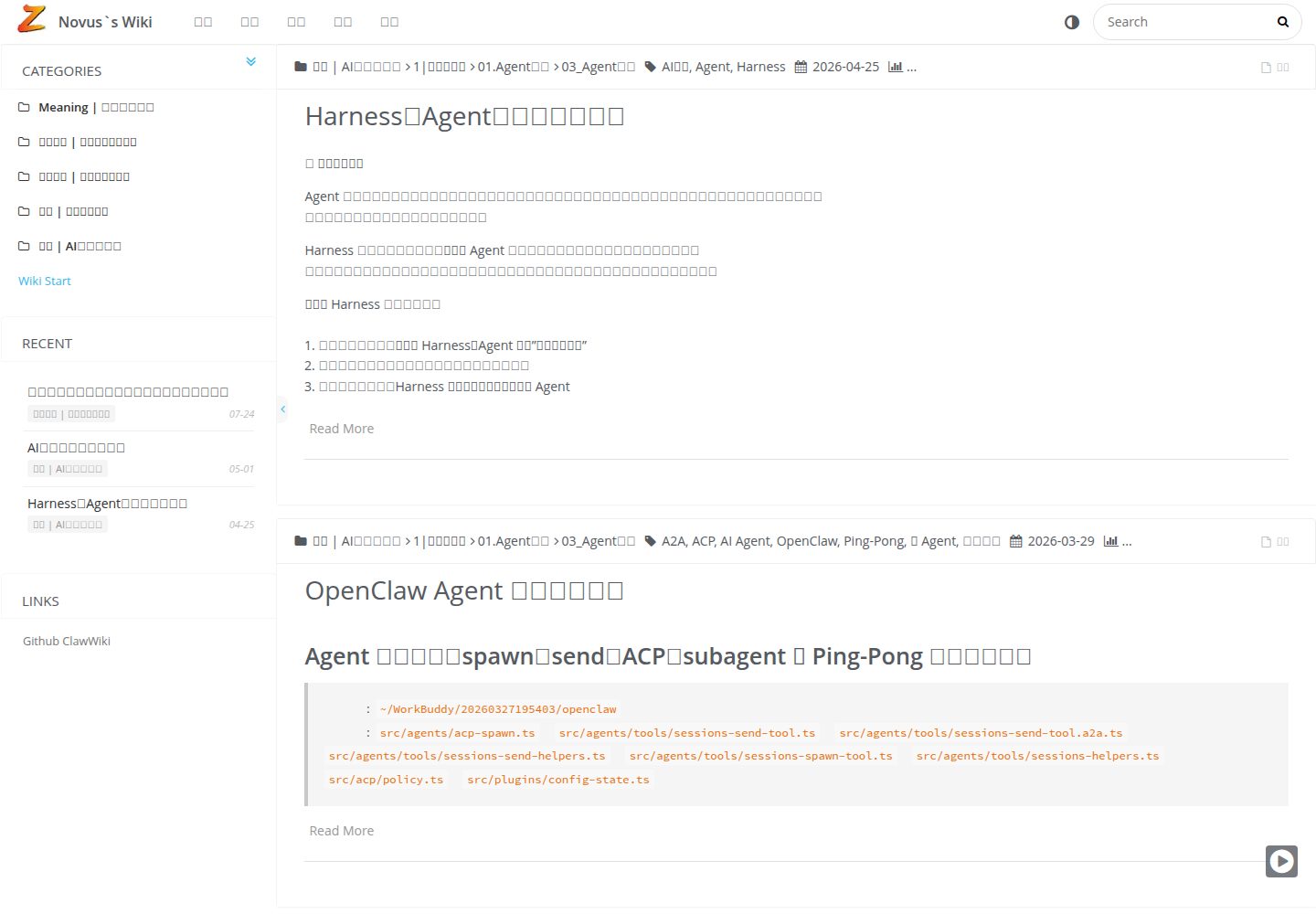
双模式路由:全站 SPA(hash 导航,?fullpage=1)与无参数单页模式可切换
Hexo博客
hexo-theme-Quinoa — Hexo 博客模板
作者 quanoc
基于 Hexo 的个人 wiki 知识库主题,提供 SPA 与单页双模式路由、层级分类侧边栏和客户端全文搜索。
看看你的网站会是什么样
浏览真实页面截图,比较内容排版与手机效果。点击下方缩略图切换,放大查看整页细节。
全部页面与视图 2
截图用于了解视觉与布局,交互效果请以实际项目为准。
采集于 2026-10-02查看来源
值得关注的模板亮点
从已有项目资料中,快速了解它的特点。
侧边栏多级分类树,支持展开/折叠,按目录结构组织知识
基于 Insight Search 的客户端全文搜索,依赖 hexo-generator-json-content
移动端适配:可折叠侧边栏与触控友好的工具栏
内置代码高亮、图片灯箱与画廊、深色配色可定制
可选接入 sitemap、RSS、Open Graph、Google/百度统计与不蒜子访问统计
模板详细介绍
hexo-theme-Quinoa 是一个面向个人 wiki 知识库的 Hexo 主题,仓库描述为“基于 hexo 的个人 wiki 知识库主题”,演示站点为 waisec.cn。它把内容组织成层级分类树,在侧边栏以可展开/折叠的方式呈现,并内置基于 Insight Search 的客户端全文搜索,适合把零散笔记整理成互相链接的知识库,而不只是按时间排列的博客。
路由上提供两种模式:全站模式使用 hash 导航(通过 ?fullpage=1 参数进入),带侧边栏与页面过渡;单页模式输出不带参数的干净页面,便于外部链接与嵌入。两者可切换。主题还包含代码高亮、图片灯箱与画廊、移动端折叠侧边栏、SEO 相关输出(sitemap、RSS、Open Graph)以及 Google Analytics、百度统计、不蒜子访问统计等可选接入,并可通过 history_control 关联 GitHub/GitLab 的每篇文章历史。
使用前需注意:主题依赖一组 Hexo 插件(如 hexo-generator-json-content、hexo-abbrlink、hexo-generator-sitemap、hexo-renderer-kramed 等),安装步骤包含复制 _source 与 _scaffolds 文件、从 _config.yml.example 生成主题配置;README 建议 Node.js v18+ 与 pnpm。仓库未提供实时协作与内置数据库能力,这部分需借助 Git 工作流或其他工具。代码采用 MIT 许可,但演示图片、字体、图标等第三方素材需单独核对许可。
Hexo博客
适合你的项目吗?
适用场景
- 把个人笔记整理成带层级分类与全文搜索的 wiki 知识库
- 为文章生成不带参数的干净单页,用于外部链接或 iframe 嵌入
- 用 Markdown 写作并通过 Git 管理内容与版本历史
- 在 Hexo 站点上补充 SEO 输出与访问统计
适合人群
- 使用 Hexo 搭建个人知识库或文档站的作者
- 习惯 Markdown 写作、用 Git 管理内容的用户
- 需要层级分类与站内搜索来组织大量笔记的人
- 希望页面可被外部链接或嵌入引用的站点维护者
上手与定制指南
结合仓库当前版本的说明,按下面的资料检查内容、配置与运行要求。
- 1
README 建议 Node.js v18+ 与 pnpm,并需先安装 Hexo CLI 与初始化站点
- 2
将主题克隆到 themes/Quinoa,复制 _source 与 _scaffolds 内容,并从 _config.yml.example 生成主题配置
- 3
需安装 hexo-autonofollow、hexo-generator-json-content、hexo-abbrlink、hexo-generator-sitemap、hexo-renderer-kramed 等依赖插件
- 4
在站点 _config.yml 中设置 theme: Quinoa,并按需配置 permalink、abbrlink、jsonContent、sitemap 等项
- 5
主题配置中的社交链接、history_control 仓库信息、统计 ID 等需替换为自己的信息
授权与来源资料
使用条件与限制
免费使用 · 保留许可声明本次收录的是公开仓库中采用 MIT 许可的免费版本;免费范围为该版本代码,不代表外部服务或第三方素材免费。
使用时需要遵守
- 允许免费使用、修改、商用和分发该版本代码。
- 分发代码副本或实质性部分时,保留原作者版权声明和完整 MIT 许可声明。
- 代码按现状提供;担保与责任限制以原许可证及适用法律为准。
额外费用与待核对事项
- 主题本身免费,但部署上线仍需自行承担域名与服务器费用。
- 启用文章历史追踪需配置 GitHub/GitLab 仓库信息,依赖外部代码托管服务。
- 使用 Google Analytics 统计需自行申请并填入 GA 跟踪 ID。
- 使用百度统计需自行申请并填入百度统计 ID。
- 全文搜索依赖 hexo-generator-json-content 插件,需额外安装该依赖。
- 短链接永久地址功能依赖 hexo-abbrlink 插件,需额外安装。
- 拼音 URL 功能依赖 hexo-permalink-pinyin 插件,需额外安装。
- 主题配置中的社交链接、仓库信息与统计 ID 等需替换为用户自己的信息。
- 演示图片、字体、图标及其他第三方素材需按各自许可核对,不能仅凭代码的 MIT 许可判断。
- 域名、托管、数据库、支付或 AI 等外部服务可能另外收费。
查看原文依据
Permission is hereby granted, free of charge
许可证原文
**Cost** | ✅ Free (domain + server only)
README 原文
history_control: enable: true server_link: https://github.com
README 原文
google_analytics: # GA tracking ID
README 原文
baidu_analytics: # Baidu tracking ID
README 原文
insight: true # Requires hexo-generator-json-content
README 原文
# Short URL Configuration (requires hexo-abbrlink)
README 原文
# Pinyin URL Configuration (requires hexo-permalink-pinyin)
README 原文
https://github.com/quanoc/hexo-theme-Quinoa/blob/master/LICENSEhttps://github.com/quanoc/hexo-theme-Quinoa/blob/master/README.mdReplace personal information with your own!
README 原文
DeepSeek 根据仓库许可证和 README 整理 ·2026-10-02。结果仅覆盖已读取资料,依赖、图片、字体及后续条款变更以各自原文为准。
项目核对记录与介绍依据
模板资料
- 来源平台
- GitHub
- 资料与维护参考分
- 资料较完整 · 75 / 100
- 技术栈
- Hexo
- 网站类型
- 博客
这个分数如何计算
本站按许可资料(最高30分)、演示链接(12分)、预览图(10分)、Star数(15分)、记录的维护时间(15分)、描述完整度(8分)、功能记录(5分)和分类资料(5分)计算。它不是代码、安全或性能测试,也不是 Google 评分;有链接不代表已实测可用。
这个项目需要核对什么
- 记录的仓库更新时间
- 2026-03-28
- 截图检查日期
- 2026-10-02
已收录演示链接。请用你的内容与屏幕尺寸检查;有演示不代表表单、认证或支付已经可用。
目录记录的主要技术栈是 Hexo。请通过依赖清单和锁文件核对实际版本与托管要求。这些说明基于收录资料,不代表代码审计或部署实测。
查看具体选型方法 →介绍的制作与核对状态
介绍由 AI 辅助整理目录与仓库资料。仓库作者不等于这篇介绍的审核者。
已完成服务器许可规则与 AI 来源核对;未经过人工编辑审核。
查看当时使用的来源资料
SHA-256: 5031c3f8d4c5191433293dc88a71423575ab9404a3d9ac87559bd1c0bcd32a4e
2026-10-02T15:05:51.081Z
来源文件 / 仓库<div align="center">
# 📚 hexo-theme-Quinoa
<p align="center">
<a href="https://waisec.cn/" target="_blank">
<img src="./source/images/SitePreview2.jpg" alt="Quinoa Preview" width="800">
</a>
</p>
<p align="center">
<a href="./README_zh-CN.md">🇨🇳 中文文档</a> •
<a href="https://waisec.cn/">🌐 Live Demo</a> •
<a href="#-quick-start">🚀 Quick Start</a> •
<a href="#-features">✨ Features</a>
</p>
<p align="center">
<img src="https://img.shields.io/badge/Hexo-3.6+-0e83cd?style=flat-square&logo=hexo" alt="Hexo Version">
<img src="https://img.shields.io/badge/License-MIT-blue.svg?style=flat-square" alt="License">
<img src="https://img.shields.io/badge/Node-v18+-339933?style=flat-square&logo=nodedotjs" alt="Node Version">
</p>
> **A modern, elegant Hexo theme designed for personal knowledge management and documentation.**
>
> Built for thinkers, writers, and knowledge builders who value clarity and seamless navigation.
</div>
---
## 🌟 Highlights
**Cross-Platform** 📱💻 - Perfectly adapted for desktop, tablet, and mobile. Access your knowledge base anytime, anywhere
**Lightning Fast** ⚡ - SPA navigation without refresh, 40% faster first-screen rendering, static site instant loading
**User-Friendly** 🎯 - Native Markdown writing, hierarchical category management, focus on content without distractions
---
## ✨ Features
### 🧭 Dual-Mode Routing System
- **Full-Site Mode (SPA)**: Hash-based navigation with smooth transitions, sidebar navigation, and full wiki experience. Access via `?fullpage=1` parameter
- **Single-Page Mode (Standalone)**: Clean, shareable pages without parameters - perfect for external linking and embedding
- **Seamless Toggle**: Switch between modes instantly without losing context
### 📖 Knowledge-First Design
- **Hierarchical Categories**: Multi-level category tree in sidebar with expandable/collapsible sections
- **Full-Text Search**: Lightning-fast client-side search powered by Insight Search
- **Wiki-Style Navigation**: Designed specifically for interconnected knowledge bases, not just blogs
### 📱 Responsive & Mobile-Optimized
- **Mobile-First Approach**: Collapsible sidebar, touch-friendly interface
- **Adaptive Layout**: Optimized reading experience across all devices
- **Smart Toolbar**: Context-aware actions for mobile users
### 🎨 Modern Aesthetics
- **Clean Typography**: Optimized for long-form reading
- **Code Highlighting**: Syntax highlighting with multiple themes
- **Image Gallery**: Built-in lightbox and justified gallery support
- **Dark Mode Ready**: Easy to customize color schemes
### 🔧 Developer-Friendly
- **Version Control Integration**: GitHub/GitLab history tracking per article
- **Plugin Ecosystem**: MathJax, Mermaid diagrams, music player, encrypted posts
- **SEO Optimized**: Sitemap, RSS feeds, Open Graph meta tags
- **Analytics Ready**: Google Analytics, Baidu Analytics, Busuanzi visitor stats
### 🤖 AI-Ready Architecture
- **Markdown Native**: Perfect for AI content generation and processing
- **Static Site**: Easy for AI crawlers to index and build knowledge bases
- **Git Workflow**: AI can participate in content review and version control
- **Data Sovereignty**: Complete ownership of your knowledge data
---
## 🆚 Quinoa vs Notion
> **Why choose Quinoa over Notion?** Here's the comparison:
| Feature | **Quinoa** | **Notion** |
|---------|------------|------------|
| **Data Ownership** | ✅ Full control (Git-managed) | ⚠️ Hosted on Notion servers |
| **AI-Friendly** | ✅ Markdown native, static HTML | ⚠️ Proprietary format |
| **SEO** | ✅ Search engine optimized | ⚠️ Limited SEO capabilities |
| **Embedding** | ✅ Clean standalone pages (default) | ⚠️ Branded embeds |
| **Cost** | ✅ Free (domain + server only) | 💰 Paid for advanced features |
| **Offline Access** | ✅ Full static files | ⚠️ Requires caching |
| **Real-time Collab** | ❌ Git workflow | ✅ Multiplayer editing |
| **Database** | ❌ File-based | ✅ Built-in databases |
**Choose Quinoa when:** You want full data control, AI-ready content, SEO optimization, and the ability to embed clean pages anywhere.
**Choose Notion when:** You need real-time collaboration and built-in databases.
---
## 🚀 Quick Start
### Prerequisites
- **Node.js**: v18+ recommended
- **npm**: v10+ recommended
### Installation
#### Step 1: Install Hexo CLI
If you don't have Hexo installed globally:
```bash
# Install Hexo CLI globally
pnpm install -g hexo-cli
# Verify installation
hexo --version
```
#### Step 2: Create a New Hexo Site
```bash
# Create a new Hexo site
hexo init your-hexo-site
cd your-hexo-site
# Install dependencies
pnpm install
```
#### Step 3: Install Quinoa Theme
```bash
# 1. Clone the theme into themes directory
git clone https://github.com/quanoc/hexo-theme-Quinoa.git themes/Quinoa
# 3. Copy required template files
cp -rf themes/Quinoa/_source/* source/
cp -rf themes/Quinoa/_scaffolds/* scaffolds/
# 4. Create theme configuration
cp themes/Quinoa/_config.yml.example themes/Quinoa/_config.yml
# 5. Install required plugins
pnpm add hexo-autonofollow hexo-directory-category hexo-generator-feed hexo-generator-json-content hexo-generator-sitemap hexo-abbrlink hexo-generator-archive hexo-generator-category hexo-generator-tag hexo-renderer-ejs hexo-renderer-kramed hexo-renderer-stylus
```
### Enable the Theme
#### Option 1: Command Line (Recommended)
```bash
# Replace 'landscape' with 'Quinoa' in _config.yml
# For macOS:
sed -i '' 's/theme: landscape/theme: Quinoa/' _config.yml
LINE=$(grep -n "index_generator:" _config.yml | head -1 | cut -d: -f1) && NEXT=$((LINE + 1)) && sed -i '' "${NEXT}s/.*/ path: 'list'/" _config.yml
# For Linux:
# sed -i 's/theme: landscape/theme: Quinoa/' _config.yml
# LINE=$(grep -n "index_generator:" _config.yml | head -1 | cut -d: -f1) && NEXT=$((LINE + 1)) && sed -i '' "${NEXT}s/.*/ path: 'list'/" _config.yml
# Or if theme line doesn't exist, add it (macOS version)
sed -i '' '/^theme:/d' _config.yml && echo 'theme: Quinoa' >> _config.yml
```
#### Option 2: Manual Edit
Edit your site's `_config.yml`:
```yaml
theme: Quinoa
```
### Start Writing
```bash
hexo new "My Knowledge Article"
hexo server
```
---
## ⚙️ Configuration
### Site Configuration (`_config.yml`)
```yaml
# URL Structure (Wiki-style permalinks)
# Option 1: Short ID (Recommended) - Clean, shareable URLs
permalink: wiki/:abbrlink/
# Option 2: Title-based (Original) - May contain Chinese characters
# permalink: wiki/:title/
# Skip rendering for special files
skip_render:
- README.md
- '_posts/**/embed_page/**'
# Writing settings
new_post_name: :title.md
# Markdown rendering
marked:
gfm: true
# Search configuration
jsonContent:
meta: false
pages:
title: true
date: true
path: true
text: true
posts:
title: true
date: true
path: true
text: true
tags: true
categories: true
ignore:
- 404.html
# SEO
sitemap:
path: sitemap.xml
nofollow:
enable: true
exclude:
- your-domain.com
# Short URL Configuration (requires hexo-abbrlink)
abbrlink:
alg: crc32 # Algorithm: crc16 (default) or crc32
rep: hex # Format: hex (default) or dec
drafts: false # Process draft posts
# Pinyin URL Configuration (requires hexo-permalink-pinyin)
# Auto-generates readable pinyin slugs for Chinese titles
permalink_pinyin:
enable: true
separator: '-' # Separator between pinyin words
lowercase: true # Convert to lowercase
transform: title # Transform title to pinyin
# Note: For abbreviated pinyin (e.g., rhsy-hexo), manually specify slug in front-matter:
# ---
# title: 如何使用 Hexo
# slug: rhsy-hexo
# ---
```
### Theme Configuration (`themes/Quinoa/_config.yml`)
> ⚠️ **Important**: Replace personal information with your own!
```yaml
# Customize your site identity
customize:
sidebar: left # Sidebar position: left | right
category_perExpand: false # Auto-expand categories
default_index_file: index.md # Use specific page as homepage
# Social links
social_links:
github: https://github.com/yourname
rss: /atom.xml
# Widgets (sidebar components)
widgets:
- category
# - recent_posts
# - archive
# - tag
# - tagcloud
# - links
# Git version control integration
history_control:
enable: true
server_link: https://github.com
user: <your-github-username>
repertory: <your-repo-name>
branch: master
# Search
search:
insight: true # Requires hexo-generator-json-content
# Analytics
plugins:
busuanzi_count: true # Visitor statistics
google_analytics: # GA tracking ID
baidu_analytics: # Baidu tracking ID
```
---
## 🖼️ Screenshots
<div align="center">
| Desktop View | Mobile View |
|:------------:|:-----------:|
|  |  |
</div>
---
## 📚 Documentation
### Core Concepts
| Feature | Description |
|---------|-------------|
| **SPA Routing** | Hash-based navigation via `?fullpage=1` for seamless browsing without page reloads |
| **Standalone Mode** | Clean, shareable pages without parameters - perfect for external linking |
| **Category Tree** | Hierarchical organization with expandable sidebar navigation |
| **Full-Text Search** | Instant search across all your content |
### Writing Tips
1. **Organize with Categories**: Use directory structure for automatic categorization
2. **Link Freely**: Internal links work seamlessly in both SPA and standalone modes
3. **Embed Media**: Support for images, videos, code blocks, and interactive diagrams
4. **Version Control**: Enable `history_control` to track changes via Git
### 🤖 AI Agent Use Cases
Quinoa's architecture is perfectly suited for AI-powered workflows:
#### 1. **AI Knowledge Base Builder**
```bash
# Workflow: AI-Assisted Documentation
AI generates content → Markdown files → Git commit → Hexo build → Quinoa deploy
```
- Use ChatGPT/Claude to generate technical docs
- Store in Git for version control
- Auto-deploy via CI/CD pipeline
#### 2. **RAG (Retrieval-Augmented Generation) Source**
- Static HTML pages are easily crawled by AI
- Build vector databases from your Quinoa site
- Use as knowledge source for AI assistants
#### 3. **AI Chatbot Integration**
```html
<!-- Embed clean standalone pages in AI chat interfaces -->
<iframe src="https://your-wiki.com/article/"></iframe>
```
- Single-page mode provides context to AI agents
- No navigation clutter for AI parsing
#### 4. **Automated Content Pipeline**
```yaml
# Example: GitHub Actions + AI
1. AI monitors code changes
2. Auto-generates documentation
3. Creates pull request
4. Merges → Auto-deploys to Quinoa site
```
#### 5. **Personal AI Second Brain**
- Write notes in Markdown (AI-friendly)
- Organize hierarchically with categories
- Full-text search enables quick retrieval
- Git history tracks idea evolution
---
## 🔄 Updates
```bash
cd themes/Quinoa
git pull origin master
```
---
## 🤝 Contributing
Contributions are welcome! Please feel free to submit issues or pull requests.
---
## 📄 License
This project is licensed under the [MIT License](./LICENSE).
---
<div align="center">
**Made with ❤️ for knowledge builders**
[⬆ Back to Top](#-hexo-theme-quinoa)
</div>
看看同类模板
对比同技术栈与用途的模板,找到更适合的视觉与内容结构。

hexo-theme-matery
A beautiful hexo blog theme with material design and responsive design.一个基于材料设计和响应式设计而成的全面、美观的Hexo主题。
Hexo · 博客

hexo-theme-cactus
:cactus: A responsive, clean and simple theme for Hexo.
Hexo · 博客

hexo-theme-volantis
A Wonderful Theme for Hexo.
Hexo · 博客

hexo-theme-aurora
Hexo Theme Aurora 是一款以极光色彩和渐变 UI 为核心的 Hexo 博客主题,整体走未来感路线。 它的首页采用杂志式网格布局,文章列表与精选区域层次分明,视觉上更接近个人媒体站点而非传统博客。
Hexo · 博客

hexo-theme-Claudia
Claudia 是一款为 Hexo 设计的博客主题,主打简洁外观与易配置。 它支持自动跟随设备深色模式,并在 README 中宣称拥有 90+ 的 Lighthouse 评分,适合追求轻量与性能的博客作者。
Hexo · 博客

hexo-theme-A4
A hexo theme that looks like an A4 paper.(一个类A4纸张质感的hexo博客主题。 )
Hexo · 博客