Modified from hexo-theme-pure and hexo-theme-dawn, removing unnecessary animations
HexoHTMLBlog
hexo-theme-symphony — Hexo Blog Template
By snowme34
A Hexo blog theme modified from hexo-theme-pure and hexo-theme-dawn, removing unnecessary animations, with icon fonts and preset page files.
Explore the design
Compare the page layouts and mobile experience. Open any screenshot for a closer look.
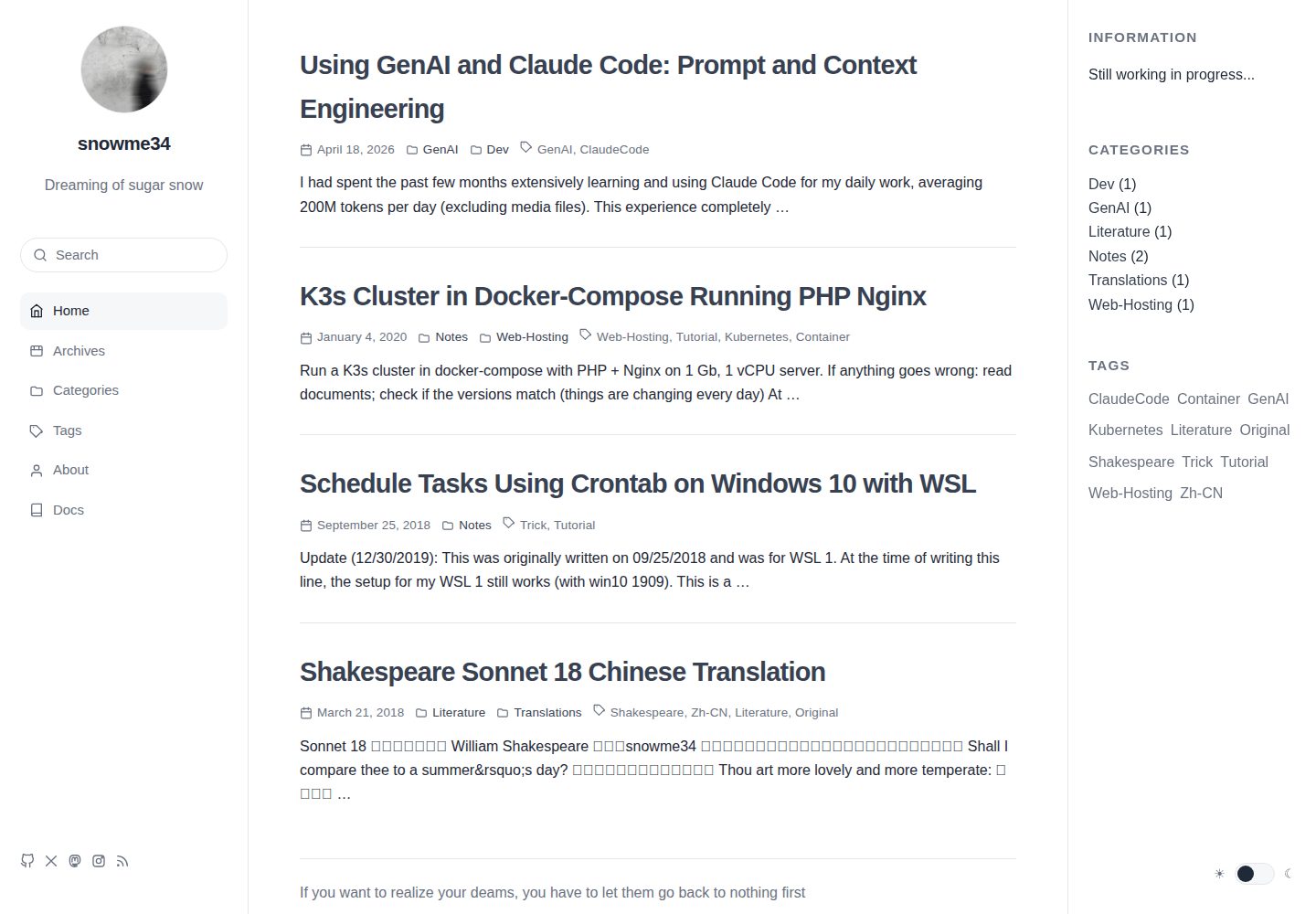
Desktop homepage1 / 2
Desktop captureTop of page
Actual screenshot captured by the server browser.
All pages & views 2
Screenshots show visual appearance; interactive behavior may differ.
Recorded 2026-10-03View source
What stands out
A quick read of the recorded project description.
Provides _config.yml.example; the theme configuration file must be created by the user
Posts support toggle variables such as disableDate, disableWordcount, and copyright
The sidebar variable supports three behaviors: none, toc, and custom
Adds extra icons such as Instagram to the icon font
Adds a Languages list in the about sidebar that behaves the same as the Skills list
Template Details
Symphony is a Hexo blog theme modified from hexo-theme-pure and hexo-theme-dawn. The author emphasizes that it contains no unnecessary animations. The theme is distributed as a Git repository; installation involves cloning the repository into the themes directory of a Hexo project, pointing the theme in the site configuration to symphony, and creating your own _config.yml based on the provided _config.yml.example.
Compared to the original themes, Symphony makes several specific adjustments: it no longer includes a personal theme configuration file in the repository, requiring users to create one manually; it corrects some English translations and states that this repository does not focus on maintaining a Chinese version; it adds icons such as Instagram to the icon font; it adds a Languages list in the about sidebar that behaves the same as the Skills list; it modifies the footer file; it adds variables such as disableDate, disableWordcount, and copyright for posts, and changes the behavior of the sidebar variable (none disables the sidebar, toc shows the table of contents sidebar when toc is true, custom shows a custom sidebar such as the About page); it removes the sticky bar at the bottom of posts and the comment count display; it modifies code blocks with reference to material-x; it changes fonts and line height, and updates normalize.css.
The theme repository provides a local demo page for the icon font, as well as index files for preset pages such as Categories and Tags, which need to be manually copied to the corresponding folders under the site's source directory. The README also lists some unfinished items, such as adding excerpts, fixing the issue where subcategories under the Categories page cannot be collapsed, adding a sidebar toggle, adding a pink theme, adding underlines to custom page titles, adding Telegram sharing, testing Google Analytics, and fixing menu highlighting.
HexoHTMLBlog
Is it right for your project?
Use Cases
- Building a personal blog with Hexo and wanting to switch to a theme without unnecessary animations
- Blogs that need a table of contents sidebar, a custom sidebar, or no sidebar
- Wanting to control the display of date, word count, and copyright on a per-post basis
- Hexo sites that need preset page files such as Categories and Tags
Suitable For
- Hexo blog authors
- Users who prefer a clean interface without unnecessary animations
- Users willing to manually create the theme configuration file and copy preset page files
Getting started & customization
Use these recorded setup notes alongside the repository instructions for your chosen version.
- 1
In the themes directory of the Hexo project, run git clone https://github.com/snowme34/hexo-theme-symphony.git themes/symphony
- 2
Change the theme in the site _config.yml to symphony
- 3
Copy _config.yml.example to _config.yml and modify the configuration as needed
- 4
When using pages such as Categories and Tags, copy the index files under symphony/_source to the corresponding folders in the site's source directory
- 5
Add images such as donate and logo to the corresponding paths as needed; some paths can be customized in the configuration file
License & source material
Usage conditions & limitations
Free to use · keep license noticeThis entry covers the free version in the public repository under the MIT license; the free scope is the code of this version and does not imply that external services or third-party assets are free.
Must comply with when using
- Free use, modification, commercial use, and distribution of this version's code are permitted.
- When distributing copies or substantial portions of the code, retain the original author's copyright notice and the full MIT license notice.
- The code is provided as is; warranties and limitations of liability are governed by the original license and applicable law.
Additional costs & items to verify
- Usage instructions rely on the upstream hexo-theme-pure documentation; this repository does not provide complete standalone documentation, so external project documentation must be consulted separately.
- The Chinese version is not a focus of maintenance in this repository; the Chinese interface or translations may be incomplete or outdated.
- When using preset pages such as Categories and Tags, you must manually copy the index files under _source to the corresponding directories in the site's source, otherwise the pages will not work.
- The repository does not include a personal theme configuration file; users must create their own _config.yml to configure the theme properly.
- Images such as donate and logo must be prepared by the user and placed in the corresponding paths; the theme does not include these assets.
- The none/toc/custom behaviors of the sidebar have only been tested when the sidebar is on the right side of the page; other layouts may behave abnormally.
- The sticky bar at the bottom of posts only appears when comments are enabled and when scrolling to the end of the post.
- The hexo-translate-title plugin depends on Google, Baidu, or Youdao translation services and may require a network proxy or third-party API keys.
- When using the Youdao translation method, you must apply for and fill in credentials such as youdao_api_key yourself, which is an external service account requirement.
- The translation plugin can be configured with a proxy, indicating that in some network environments an additional proxy service is needed to access the translation interface.
- Demo images, fonts, icons, and other third-party assets must be checked against their respective licenses; they cannot be judged solely by the code's MIT license.
- External services such as domain names, hosting, databases, payments, or AI may incur additional charges.
View Original Text Basis
Permission is hereby granted, free of charge
Original License Text
Please read [documentation of Pure](https://github.com/cofess/hexo-theme-pure) for more details.
Original README
Please note the maintenance of Chinese version is not a focus in this repo.
Original README
If the pages like `Categories` and `Tags` are used, please copy the `index` files under `[blog root]/symphony/_source` to the correspond folders inside `[blog root]/source`.
Original README
User needs to manually create `_config.yml`.
Original README
Please add the necessary images to the corresponding path, like `donate` and `logo`.
Original README
Note: the behavior above was only tested when the sidebar is on the right side of the page.
Original README
The bottom bar can only be seen at the end of the post, after comment part is enabled.
Original README
translate_way: google #google | baidu | youdao
Original README
youdao_api_key: XXX
Original README
https://github.com/snowme34/hexo-theme-symphony/blob/master/LICENSEhttps://github.com/snowme34/hexo-theme-symphony/blob/master/README.mdis_need_proxy: true #true | false
Original README
Compiled by DeepSeek based on repository license and README ·2026-10-03. Results only cover the materials read; dependencies, images, fonts, and subsequent term changes are subject to their respective original texts.
Project checks & description sources
Template Information
- Source platforms
- GitHub
- Documentation and maintenance reference score
- Partly documented · 73 / 100
- Technologies
- Hexo · HTML
- Website type
- Blog
How this score is calculated
Our heuristic uses license records (up to 30), a demo link (12), a preview (10), stars (15), recorded maintenance (15), description completeness (8), feature records (5) and classification data (5). It is not a code, security or performance test, or a Google score. A link does not establish tested functionality.
What to verify for this project
- Repository update recorded
- 2019-01-24
- Screenshot last checked
- 2026-10-03
A demo link is listed. Check it with your own content and viewport sizes; its presence does not confirm that forms, authentication or payments work.
The catalog identifies Hexo as the primary stack. Check the actual dependency manifest and lockfile for versions and hosting requirements. These notes use recorded metadata, not a code audit or a deployment test.
Use a selection guide →How this description was prepared
AI-assisted description based on catalog records and repository material. Repository authors are not automatically the reviewers of this description.
Automatically checked against source and license rules; no manual editorial review.
Inspect the recorded source material
SHA-256: e412b73d5325b88ef07320afcc165acb853b96718e1e34482a7ae4e6e2133b78
2026-10-03T07:49:30.341Z
Source file / repository# Symphony
A modified version of [Hexo](https://hexo.io) theme [Pure](https://github.com/cofess/hexo-theme-pure) and [Dawn](https://github.com/Ruffianjiang/hexo-theme-dawn).
[中文](README.cn.md)
[Preview](https://blog.snowme34.com/) | [iconfont](iconfont/demo.html)
[Preview of Pure](https://blog.cofess.com) | [Preview of Dawn](https://lossingdawn.top/)
Please read [documentation of Pure](https://github.com/cofess/hexo-theme-pure) for more details.
## Install theme
Execute the following command under your `hexo` folder.
```bash
git clone https://github.com/snowme34/hexo-theme-symphony.git themes/symphony
```
Then modify the property `theme` of the file `hexo/_config.yml` to `theme: symphony`
After this modification, please make a copy of the `_config.yml.example` file called `_config.yml` and change the config accordingly.
The iconfont demo can be found [here](iconfont/demo.html). It is a html file included in the repo, which can be cloned directly and opened locally.
### Files for pre-designed pages
If the pages like `Categories` and `Tags` are used, please copy the `index` files under `[blog root]/symphony/_source` to the correspond folders inside `[blog root]/source`.
### Add images
Please add the necessary images to the corresponding path, like `donate` and `logo`.
Some of the path can be customized in the config files.
## Update theme
Execute the following command to update theme.
```bash
cd themes/symphony
git pull
```
## Modifications from original theme
### Removed personal theme config file from repo
User needs to manually create `_config.yml`.
### Fixed English translations
Please note the maintenance of Chinese version is not a focus in this repo.
In the original version, several places were hard-coded as Chinese, like titles and date. Some were hard-coded again as English and others are replaced with variables.
### Added new icons
Some additional icons, like Instagram, were added to the iconfont.
### Additional list in about-sidebar
A list called `Languages` are added to the about-sidebar, behaving same as the `Skills` sidebar.
### Footer
The [footer file](layout/_common) was changed accordingly.
### New variables for post
* disableDate
Set `true` to disable the date displayed.
* disableWordcount
Set `true` to disable the wordcount displayed.
* copyright
Set `false` to disable the copyright displayed.
### New behavior of post variable
sidebar - control the sidebar
`none`: Disable sidebar
`toc`: Display Catalogue sidebar (when variable `toc` is set `true`)
`custom`: Display customized sidebar, like the `About` page
Note: the behavior above was only tested when the sidebar is on the right side of the page.
### Disabled sticky bar for post
The bottom bar can only be seen at the end of the post, after comment part is enabled.
### Disabled comment number count
The comment number count displayed for the post was removed.
### Code block
The code block was modified. The modifications were heavily inspired by [material-x](https://github.com/xaoxuu/hexo-theme-material-x).
### Style
* Changed font and line-height
Now use `Open Sans` and so on.
* Updated normalize.css
## Todo
* Add excerpt
* Fix the bug where the subcategories cannot be collapsed under `Categories` page
* Add a sidebar-toggle
* Add pink color theme
* Add a line beneath Titles of customized pages
* Add Telegram share support
* Test Google analytics
* Fix menu highlight bug
* Update based on original repo
* [fork list](https://github.com/snowme34/hexo-theme-symphony/network/members)
* Add demo page for iconfont
* After a lot of preparation
## Install plugin
### [hexo-wordcount](https://github.com/willin/hexo-wordcount)
```
npm install hexo-wordcount --save
```
### [hexo-generator-json-content](https://github.com/alexbruno/hexo-generator-json-content)
```
npm install hexo-generator-json-content --save
```
### [hexo-generator-feed](https://github.com/hexojs/hexo-generator-feed)
```
npm install hexo-generator-feed --save
```
### [hexo-generator-sitemap](https://github.com/hexojs/hexo-generator-sitemap)
```
npm install hexo-generator-sitemap --save
```
### [hexo-generator-baidu-sitemap](https://github.com/coneycode/hexo-generator-baidu-sitemap)
```
npm install hexo-generator-baidu-sitemap --save
```
## Data files
Sometimes you may need to use some data in templates which is not directly available in your posts, or you want to reuse the data elsewhere. For such use cases, Hexo 3 introduced the new Data files. This feature loads YAML or JSON files in source/_data folder so you can use them in your site.
For example, add links.yml in source/_data folder.
### links data
add links.yml in source/_data folder.
The format of the link :
```
Name:
link: http://example.com
avatar: http://example.com/avatar.png
desc: description
```
Add a number of links, we just need to repeat the format according to the above.
## Blog optimization
### [hexo-neat](https://github.com/rozbo/hexo-neat)
> auto Minify html、js、css and make it neat
```
npm install hexo-neat --save
```
You can configure this plugin in `_config.yml`.
```
# hexo-neat
neat_enable: true
neat_html:
enable: true
exclude:
neat_css:
enable: true
exclude:
- '*.min.css'
neat_js:
enable: true
mangle: true
output:
compress:
exclude:
- '*.min.js'
```
### [hexo-baidu-url-submit](https://github.com/huiwang/hexo-baidu-url-submit)
```
npm install hexo-baidu-url-submit --save
```
### [hexo-translate-title](https://github.com/cometlj/hexo-translate-title)
> translate the chinese title of Hexo blog to english words automatially
```
npm install hexo-translate-title --save
```
You can configure this plugin in `_config.yml`.
```yml
translate_title:
translate_way: google #google | baidu | youdao
youdao_api_key: XXX
youdao_keyfrom: XXX
is_need_proxy: true #true | false
proxy_url: http://localhost:8123
```
## Mathjax Support
### [hexo-renderer-markdown-it-plus](https://github.com/CHENXCHEN/hexo-renderer-markdown-it-plus)
install
```
npm un hexo-renderer-marked --save
npm i hexo-renderer-markdown-it-plus --save
```
You can configure this plugin in `_config.yml`.
```
markdown_it_plus:
highlight: true
html: true
xhtmlOut: true
breaks: true
langPrefix:
linkify: true
typographer:
quotes: “”‘’
plugins:
- plugin:
name: markdown-it-katex
enable: true
- plugin:
name: markdown-it-mark
enable: false
```
Article enable mathjax
```
title: Hello World
mathjax: true
```
Explore similar templates
Compare previews and descriptions within the same stack and category.

hexo-theme-matery
hexo-theme-matery is a Material Design, responsive Hexo blog theme with homepage carousel, waterfall post list, timeline archive, word cloud tags, radar chart categories, and an about page.
Hexo · Blog

hexo-theme-cactus
Cactus is a responsive Hexo theme for personal websites and blogs, maintained by probberechts. It offers four color schemes (dark, light, white, classic), configurable navigation, homepage post lists, project lists, social links, and copyright year ranges.
Hexo · Blog

hexo-theme-volantis
Volantis is a blog theme for Hexo, distributed as the npm package hexo-theme-volantis and enabled by setting theme to volantis in the Hexo site's _config.yml. It requires Hexo 7.3+, hexo-cli 4.3+, Node.js 22.x LTS+, and npm 10.x LTS+.
Hexo · Blog

hexo-theme-aurora
Hexo Theme Aurora is a futuristic Hexo blog theme built around aurora gradients and a magazine-style grid layout.
Hexo · Blog

hexo-theme-Claudia
Claudia is a Hexo blog theme focused on a clean look and easy configuration. It automatically follows the device's dark mode and claims a 90+ Lighthouse score.
Hexo · Blog

hexo-theme-A4
hexo-theme-A4 is a minimalist Hexo blog theme that mimics the texture of A4 paper, emphasizing simplicity, small size, and minimal configuration.
Hexo · Blog