由 hexo-theme-pure 与 hexo-theme-dawn 修改而来,去除了不必要的动画
HexoHTML博客
hexo-theme-symphony — Hexo 博客模板
作者 snowme34
基于 Hexo 的博客主题,由 hexo-theme-pure 与 hexo-theme-dawn 修改而来,去除了不必要的动画,附带图标字体与预置页面文件。
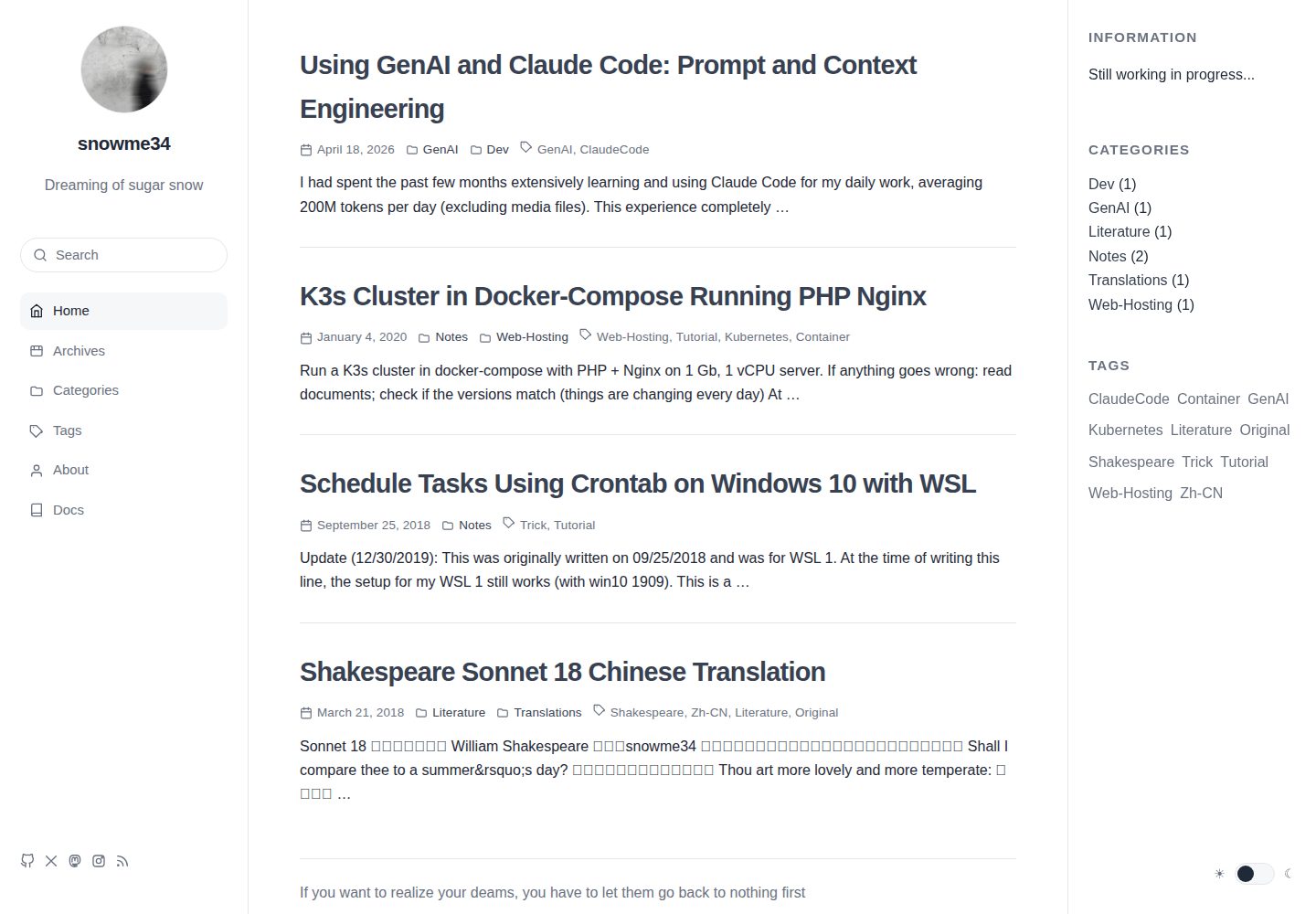
看看你的网站会是什么样
浏览真实页面截图,比较内容排版与手机效果。点击下方缩略图切换,放大查看整页细节。
全部页面与视图 2
截图用于了解视觉与布局,交互效果请以实际项目为准。
采集于 2026-10-03查看来源
值得关注的模板亮点
从已有项目资料中,快速了解它的特点。
提供 _config.yml.example,主题配置文件需用户自行创建
文章支持 disableDate、disableWordcount、copyright 等开关变量
sidebar 变量支持 none、toc、custom 三种行为
图标字体中补充了 Instagram 等额外图标
about 侧栏新增与 Skills 行为相同的 Languages 列表
模板详细介绍
Symphony 是一个 Hexo 博客主题,由 hexo-theme-pure 和 hexo-theme-dawn 修改而来,作者在说明中强调它不包含多余的动画。主题以 Git 仓库形式分发,安装方式是在 Hexo 项目的 themes 目录下克隆仓库,再把站点配置中的 theme 指向 symphony,并基于仓库提供的 _config.yml.example 创建自己的 _config.yml。
相对原始主题,Symphony 做了一些具体调整:不再把个人主题配置文件放进仓库,需要用户手动创建;修正了部分英文翻译,并说明本仓库不重点维护中文版本;在图标字体中补充了 Instagram 等图标;在 about 侧栏中新增与 Skills 行为相同的 Languages 列表;修改了页脚文件;为文章增加了 disableDate、disableWordcount、copyright 等变量,并改变 sidebar 变量的行为(none 关闭侧栏,toc 在 toc 为 true 时显示目录侧栏,custom 显示自定义侧栏,如 About 页面);取消了文章底部粘性栏和评论数显示;参考 material-x 修改了代码块;更换字体与行高,并更新了 normalize.css。
主题仓库中提供了图标字体的本地演示页面,以及 Categories、Tags 等预置页面的 index 文件,需要手动复制到站点 source 目录下对应文件夹。README 还列出了一些尚未完成的事项,例如添加摘要、修复 Categories 页下子分类无法折叠的问题、增加侧栏开关、增加粉色主题、为自定义页面标题添加下划线、增加 Telegram 分享、测试 Google Analytics、修复菜单高亮等。
HexoHTML博客
适合你的项目吗?
适用场景
- 使用 Hexo 搭建个人博客并希望更换为无多余动画的主题
- 需要文章目录侧栏、自定义侧栏或关闭侧栏的博客
- 希望按文章控制日期、字数与版权显示
- 需要 Categories、Tags 等预置页面文件的 Hexo 站点
适合人群
- 使用 Hexo 的博客作者
- 偏好简洁、无多余动画界面的用户
- 愿意手动创建主题配置文件并复制预置页面文件的用户
上手与定制指南
结合仓库当前版本的说明,按下面的资料检查内容、配置与运行要求。
- 1
在 Hexo 项目的 themes 目录下执行 git clone https://github.com/snowme34/hexo-theme-symphony.git themes/symphony
- 2
将站点 _config.yml 中的 theme 改为 symphony
- 3
复制 _config.yml.example 为 _config.yml 并按需修改配置
- 4
使用 Categories、Tags 等页面时,把 symphony/_source 下的 index 文件复制到站点 source 对应文件夹
- 5
按需补充 donate、logo 等图片到对应路径,部分路径可在配置文件中自定义
授权与来源资料
使用条件与限制
免费使用 · 保留许可声明本次收录的是公开仓库中采用 MIT 许可的免费版本;免费范围为该版本代码,不代表外部服务或第三方素材免费。
使用时需要遵守
- 允许免费使用、修改、商用和分发该版本代码。
- 分发代码副本或实质性部分时,保留原作者版权声明和完整 MIT 许可声明。
- 代码按现状提供;担保与责任限制以原许可证及适用法律为准。
额外费用与待核对事项
- 使用说明依赖上游 hexo-theme-pure 的文档,本仓库未提供完整独立文档,需另行查阅外部项目文档。
- 中文版本不在本仓库重点维护范围内,中文界面或翻译可能不完整或滞后。
- 使用 Categories、Tags 等预置页面时,必须手动把 _source 下的 index 文件复制到站点 source 对应目录,否则页面不可用。
- 仓库不包含个人主题配置文件,用户必须自行创建 _config.yml 才能正常配置主题。
- donate、logo 等图片需用户自行准备并放入对应路径,主题不附带这些素材。
- sidebar 的 none/toc/custom 行为仅在侧栏位于页面右侧时经过测试,其他布局可能异常。
- 文章底部粘性栏仅在启用评论功能后、且滚动到文章末尾时才会显示。
- hexo-translate-title 插件依赖 Google、百度或有道翻译服务,可能需要网络代理或第三方 API 密钥。
- 使用有道翻译方式时需自行申请并填写 youdao_api_key 等凭据,属于外部服务账号要求。
- 翻译插件可配置代理,说明在部分网络环境下需要额外代理服务才能访问翻译接口。
- 演示图片、字体、图标及其他第三方素材需按各自许可核对,不能仅凭代码的 MIT 许可判断。
- 域名、托管、数据库、支付或 AI 等外部服务可能另外收费。
查看原文依据
Permission is hereby granted, free of charge
许可证原文
Please read [documentation of Pure](https://github.com/cofess/hexo-theme-pure) for more details.
README 原文
Please note the maintenance of Chinese version is not a focus in this repo.
README 原文
If the pages like `Categories` and `Tags` are used, please copy the `index` files under `[blog root]/symphony/_source` to the correspond folders inside `[blog root]/source`.
README 原文
User needs to manually create `_config.yml`.
README 原文
Please add the necessary images to the corresponding path, like `donate` and `logo`.
README 原文
Note: the behavior above was only tested when the sidebar is on the right side of the page.
README 原文
The bottom bar can only be seen at the end of the post, after comment part is enabled.
README 原文
translate_way: google #google | baidu | youdao
README 原文
youdao_api_key: XXX
README 原文
https://github.com/snowme34/hexo-theme-symphony/blob/master/LICENSEhttps://github.com/snowme34/hexo-theme-symphony/blob/master/README.mdis_need_proxy: true #true | false
README 原文
DeepSeek 根据仓库许可证和 README 整理 ·2026-10-03。结果仅覆盖已读取资料,依赖、图片、字体及后续条款变更以各自原文为准。
项目核对记录与介绍依据
模板资料
- 来源平台
- GitHub
- 资料与维护参考分
- 资料一般 · 73 / 100
- 技术栈
- Hexo · HTML
- 网站类型
- 博客
这个分数如何计算
本站按许可资料(最高30分)、演示链接(12分)、预览图(10分)、Star数(15分)、记录的维护时间(15分)、描述完整度(8分)、功能记录(5分)和分类资料(5分)计算。它不是代码、安全或性能测试,也不是 Google 评分;有链接不代表已实测可用。
这个项目需要核对什么
- 记录的仓库更新时间
- 2019-01-24
- 截图检查日期
- 2026-10-03
已收录演示链接。请用你的内容与屏幕尺寸检查;有演示不代表表单、认证或支付已经可用。
目录记录的主要技术栈是 Hexo。请通过依赖清单和锁文件核对实际版本与托管要求。这些说明基于收录资料,不代表代码审计或部署实测。
查看具体选型方法 →介绍的制作与核对状态
介绍由 AI 辅助整理目录与仓库资料。仓库作者不等于这篇介绍的审核者。
已完成服务器许可规则与 AI 来源核对;未经过人工编辑审核。
查看当时使用的来源资料
SHA-256: e412b73d5325b88ef07320afcc165acb853b96718e1e34482a7ae4e6e2133b78
2026-10-03T07:49:30.341Z
来源文件 / 仓库# Symphony
A modified version of [Hexo](https://hexo.io) theme [Pure](https://github.com/cofess/hexo-theme-pure) and [Dawn](https://github.com/Ruffianjiang/hexo-theme-dawn).
[中文](README.cn.md)
[Preview](https://blog.snowme34.com/) | [iconfont](iconfont/demo.html)
[Preview of Pure](https://blog.cofess.com) | [Preview of Dawn](https://lossingdawn.top/)
Please read [documentation of Pure](https://github.com/cofess/hexo-theme-pure) for more details.
## Install theme
Execute the following command under your `hexo` folder.
```bash
git clone https://github.com/snowme34/hexo-theme-symphony.git themes/symphony
```
Then modify the property `theme` of the file `hexo/_config.yml` to `theme: symphony`
After this modification, please make a copy of the `_config.yml.example` file called `_config.yml` and change the config accordingly.
The iconfont demo can be found [here](iconfont/demo.html). It is a html file included in the repo, which can be cloned directly and opened locally.
### Files for pre-designed pages
If the pages like `Categories` and `Tags` are used, please copy the `index` files under `[blog root]/symphony/_source` to the correspond folders inside `[blog root]/source`.
### Add images
Please add the necessary images to the corresponding path, like `donate` and `logo`.
Some of the path can be customized in the config files.
## Update theme
Execute the following command to update theme.
```bash
cd themes/symphony
git pull
```
## Modifications from original theme
### Removed personal theme config file from repo
User needs to manually create `_config.yml`.
### Fixed English translations
Please note the maintenance of Chinese version is not a focus in this repo.
In the original version, several places were hard-coded as Chinese, like titles and date. Some were hard-coded again as English and others are replaced with variables.
### Added new icons
Some additional icons, like Instagram, were added to the iconfont.
### Additional list in about-sidebar
A list called `Languages` are added to the about-sidebar, behaving same as the `Skills` sidebar.
### Footer
The [footer file](layout/_common) was changed accordingly.
### New variables for post
* disableDate
Set `true` to disable the date displayed.
* disableWordcount
Set `true` to disable the wordcount displayed.
* copyright
Set `false` to disable the copyright displayed.
### New behavior of post variable
sidebar - control the sidebar
`none`: Disable sidebar
`toc`: Display Catalogue sidebar (when variable `toc` is set `true`)
`custom`: Display customized sidebar, like the `About` page
Note: the behavior above was only tested when the sidebar is on the right side of the page.
### Disabled sticky bar for post
The bottom bar can only be seen at the end of the post, after comment part is enabled.
### Disabled comment number count
The comment number count displayed for the post was removed.
### Code block
The code block was modified. The modifications were heavily inspired by [material-x](https://github.com/xaoxuu/hexo-theme-material-x).
### Style
* Changed font and line-height
Now use `Open Sans` and so on.
* Updated normalize.css
## Todo
* Add excerpt
* Fix the bug where the subcategories cannot be collapsed under `Categories` page
* Add a sidebar-toggle
* Add pink color theme
* Add a line beneath Titles of customized pages
* Add Telegram share support
* Test Google analytics
* Fix menu highlight bug
* Update based on original repo
* [fork list](https://github.com/snowme34/hexo-theme-symphony/network/members)
* Add demo page for iconfont
* After a lot of preparation
## Install plugin
### [hexo-wordcount](https://github.com/willin/hexo-wordcount)
```
npm install hexo-wordcount --save
```
### [hexo-generator-json-content](https://github.com/alexbruno/hexo-generator-json-content)
```
npm install hexo-generator-json-content --save
```
### [hexo-generator-feed](https://github.com/hexojs/hexo-generator-feed)
```
npm install hexo-generator-feed --save
```
### [hexo-generator-sitemap](https://github.com/hexojs/hexo-generator-sitemap)
```
npm install hexo-generator-sitemap --save
```
### [hexo-generator-baidu-sitemap](https://github.com/coneycode/hexo-generator-baidu-sitemap)
```
npm install hexo-generator-baidu-sitemap --save
```
## Data files
Sometimes you may need to use some data in templates which is not directly available in your posts, or you want to reuse the data elsewhere. For such use cases, Hexo 3 introduced the new Data files. This feature loads YAML or JSON files in source/_data folder so you can use them in your site.
For example, add links.yml in source/_data folder.
### links data
add links.yml in source/_data folder.
The format of the link :
```
Name:
link: http://example.com
avatar: http://example.com/avatar.png
desc: description
```
Add a number of links, we just need to repeat the format according to the above.
## Blog optimization
### [hexo-neat](https://github.com/rozbo/hexo-neat)
> auto Minify html、js、css and make it neat
```
npm install hexo-neat --save
```
You can configure this plugin in `_config.yml`.
```
# hexo-neat
neat_enable: true
neat_html:
enable: true
exclude:
neat_css:
enable: true
exclude:
- '*.min.css'
neat_js:
enable: true
mangle: true
output:
compress:
exclude:
- '*.min.js'
```
### [hexo-baidu-url-submit](https://github.com/huiwang/hexo-baidu-url-submit)
```
npm install hexo-baidu-url-submit --save
```
### [hexo-translate-title](https://github.com/cometlj/hexo-translate-title)
> translate the chinese title of Hexo blog to english words automatially
```
npm install hexo-translate-title --save
```
You can configure this plugin in `_config.yml`.
```yml
translate_title:
translate_way: google #google | baidu | youdao
youdao_api_key: XXX
youdao_keyfrom: XXX
is_need_proxy: true #true | false
proxy_url: http://localhost:8123
```
## Mathjax Support
### [hexo-renderer-markdown-it-plus](https://github.com/CHENXCHEN/hexo-renderer-markdown-it-plus)
install
```
npm un hexo-renderer-marked --save
npm i hexo-renderer-markdown-it-plus --save
```
You can configure this plugin in `_config.yml`.
```
markdown_it_plus:
highlight: true
html: true
xhtmlOut: true
breaks: true
langPrefix:
linkify: true
typographer:
quotes: “”‘’
plugins:
- plugin:
name: markdown-it-katex
enable: true
- plugin:
name: markdown-it-mark
enable: false
```
Article enable mathjax
```
title: Hello World
mathjax: true
```
看看同类模板
对比同技术栈与用途的模板,找到更适合的视觉与内容结构。

hexo-theme-matery
A beautiful hexo blog theme with material design and responsive design.一个基于材料设计和响应式设计而成的全面、美观的Hexo主题。
Hexo · 博客

hexo-theme-cactus
:cactus: A responsive, clean and simple theme for Hexo.
Hexo · 博客

hexo-theme-volantis
A Wonderful Theme for Hexo.
Hexo · 博客

hexo-theme-aurora
Hexo Theme Aurora 是一款以极光色彩和渐变 UI 为核心的 Hexo 博客主题,整体走未来感路线。 它的首页采用杂志式网格布局,文章列表与精选区域层次分明,视觉上更接近个人媒体站点而非传统博客。
Hexo · 博客

hexo-theme-Claudia
Claudia 是一款为 Hexo 设计的博客主题,主打简洁外观与易配置。 它支持自动跟随设备深色模式,并在 README 中宣称拥有 90+ 的 Lighthouse 评分,适合追求轻量与性能的博客作者。
Hexo · 博客

hexo-theme-A4
A hexo theme that looks like an A4 paper.(一个类A4纸张质感的hexo博客主题。 )
Hexo · 博客