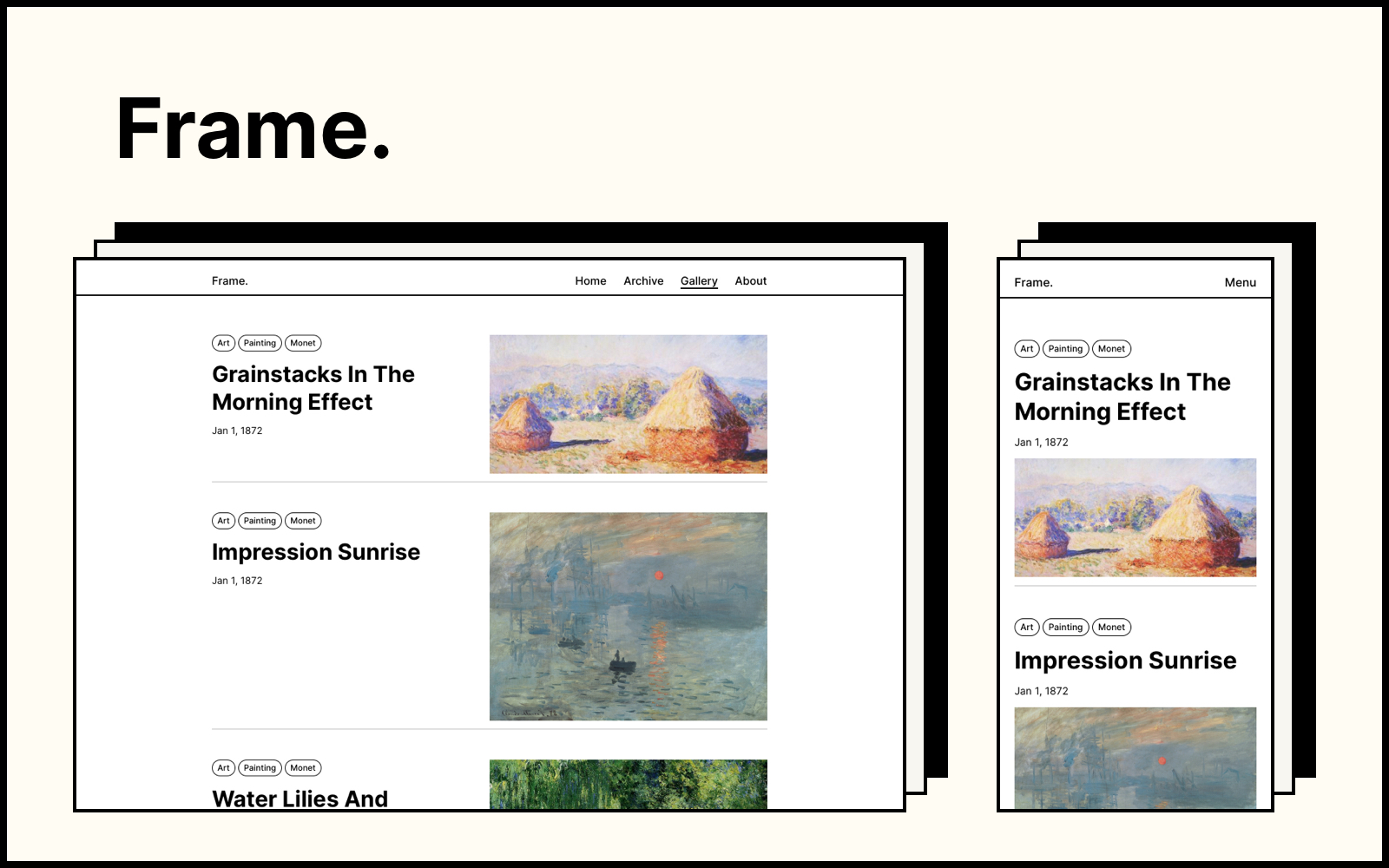
Minimalist picture-frame style, inspired by traditional paintings, suitable for presenting a personal blog, profile, or portfolio
HexoBlog
Hexo-blog-theme-frame — Hexo Blog Template
By yy933
Frame is a minimalist Hexo theme inspired by traditional paintings and picture frames, designed for personal blogs, profiles, or portfolios, offering three color schemes, a gallery view, a profile page, and a tag cloud.
Explore the design
Compare the page layouts and mobile experience. Open any screenshot for a closer look.
Author preview
Author-provided preview
Preview provided in the project README.
One original preview is available. Open the full image to inspect the design.
Screenshots show visual appearance; interactive behavior may differ.
Recorded 2026-10-02View source
What stands out
A quick read of the recorded project description.
Offers default, classic, and dark color schemes, switchable in the theme configuration
Gallery view: after adding the gallery category to a post, it is displayed with its featured image and tags
The homepage profile page can be configured with a title, body text, avatar, and multiple links, or the template can be modified directly
Supports MathJax math formulas, Valine/Disqus comments, and hexo-generator-searchdb local search
Header navigation, footer copyright and custom information, site logo, and favicon are all configurable
Template Details
Frame is a minimalist theme for Hexo, with design inspiration drawn from traditional paintings and their frames, aiming to present a personal blog, profile, or portfolio in a clean and elegant way. The theme offers three color schemes—default, classic, and dark—which can be switched in the theme directory's config.yml. For content organization, the theme supports a gallery view: after adding the gallery category to a post, the post is listed in the gallery with its featured image and tags, and the featured image is specified via the featured_image field in the Front-matter. The homepage is the profile page, which by default includes a title, body text, several links, and an avatar; the content can be configured in the profile section of the theme's config.yml, or the layout and styles can be adjusted directly by modifying frame/layout/pages/profile.ejs. The tags page provides a tag cloud, and you need to manually create a Hexo page named tag and specify layout: tag. The header consists of the site identity and navigation menu, while the footer can be configured with copyright information, Powered by, and other custom content; the favicon and site logo can also be specified in the configuration. The theme also supports enabling MathJax math formulas via the hexo-math plugin, integrating Valine or Disqus third-party comments, and implementing local search with hexo-generator-searchdb. Before use, you need to install and initialize a Hexo project, then clone the theme into the themes directory and change theme in the site configuration to frame.
HexoBlog
Is it right for your project?
Use Cases
- Building a personal blog focused on text and images, using the gallery view to showcase posts with featured images
- Creating a personal profile or portfolio page that displays an avatar, introductory text, and external links on the homepage
- Needing a tag cloud page to aggregate and browse all blog tags
- Writing posts with math formulas and enabling MathJax rendering
- Needing to integrate Valine or Disqus comments, or use local search to find content on the site
Suitable For
- Developers or writers using Hexo to build a personal blog
- Users who prefer a minimalist, picture-frame visual style and want to present content with images
- Personal sites that need a profile page and a portfolio entry point
- Blogs that need optional features such as math formulas, third-party comments, or local search
Getting started & customization
Use these recorded setup notes alongside the repository instructions for your chosen version.
- 1
First install and initialize a Hexo project, then clone the theme into the themes directory and change theme in the site config.yml to frame
- 2
Configure options such as color scheme, header, footer, favicon, profile page, and MathJax in the theme directory's config.yml
- 3
For the tag cloud, manually run hexo new page tag to create the page and set layout: tag in source/tag/index.html
- 4
Before using MathJax, install the hexo-math plugin; for local search, install hexo-generator-searchdb
- 5
The images in the demo site are public domain paintings; when replacing them or using other images, you must verify the asset licensing yourself
License & source material
Usage conditions & limitations
Free to use · keep license noticeThis entry covers the free version under the MIT license in the public repository; the free scope is the code of that version and does not mean external services or third-party assets are free.
Must comply with when using
- Free use, modification, commercial use, and distribution of that version's code are permitted.
- When distributing copies or substantial portions of the code, retain the original author's copyright notice and the full MIT license notice.
- The code is provided as is; warranties and limitations of liability are governed by the original license and applicable law.
Additional costs & items to verify
- Before using the MathJax math formula feature, you need to install the hexo-math plugin (npm i hexo-math --save), otherwise formulas will not render.
- The comment feature relies on the third-party services Valine or Disqus; you need to register and configure the corresponding account/keys yourself, and it may be subject to those external services' terms and fees.
- The local search feature requires additionally installing the hexo-generator-searchdb plugin to be usable.
- The demo site images are public domain paintings by Monet; when replacing them or using other images, you must confirm the asset licensing yourself, and the theme's MIT license does not cover third-party assets.
- Demo images, fonts, icons, and other third-party assets must be checked against their respective licenses and cannot be judged solely by the code's MIT license.
- External services such as domains, hosting, databases, payments, or AI may incur additional charges.
View Original Text Basis
Permission is hereby granted, free of charge
Original License Text
if you haven't install the hexo math plugin, you need to install it first
Original README
Frame now supports third-party comment systems: [valine](https://valine.js.org/) and [disqus](https://disqus.com/)
Original README
Frame now supports local search with the hexo plugin [hexo-generator-searchdb]
Original README
https://github.com/yy933/Hexo-blog-theme-frame/blob/main/LICENSEhttps://github.com/yy933/Hexo-blog-theme-frame/blob/main/README.mdAll the images used in the [demo site](https://frame.zhangyongqi.com) are the works from Claude Monet
Original README
Compiled by DeepSeek based on repository license and README ·2026-10-02. Results only cover the materials read; dependencies, images, fonts, and subsequent term changes are subject to their respective original texts.
Project checks & description sources
Template Information
- Source platforms
- GitHub
- Documentation and maintenance reference score
- Less documented · 45 / 100
- Technologies
- Hexo
- Website type
- Blog
How this score is calculated
Our heuristic uses license records (up to 30), a demo link (12), a preview (10), stars (15), recorded maintenance (15), description completeness (8), feature records (5) and classification data (5). It is not a code, security or performance test, or a Google score. A link does not establish tested functionality.
What to verify for this project
- Repository update recorded
- 2023-09-26
- Screenshot last checked
- 2026-10-02
No demo link is recorded. Use the repository instructions to evaluate the project locally; the screenshot alone cannot establish interactive behavior.
The catalog identifies Hexo as the primary stack. Check the actual dependency manifest and lockfile for versions and hosting requirements. These notes use recorded metadata, not a code audit or a deployment test.
Use a selection guide →How this description was prepared
AI-assisted description based on catalog records and repository material. Repository authors are not automatically the reviewers of this description.
Automatically checked against source and license rules; no manual editorial review.
Inspect the recorded source material
SHA-256: 36c8f42c0aba311c0a4d44daae9103a8ac9bdf5b4098fd89dfec97414295ed2e
2026-10-02T22:59:02.502Z
Source file / repositoryEnglish | [简体中文](README-CN.md)
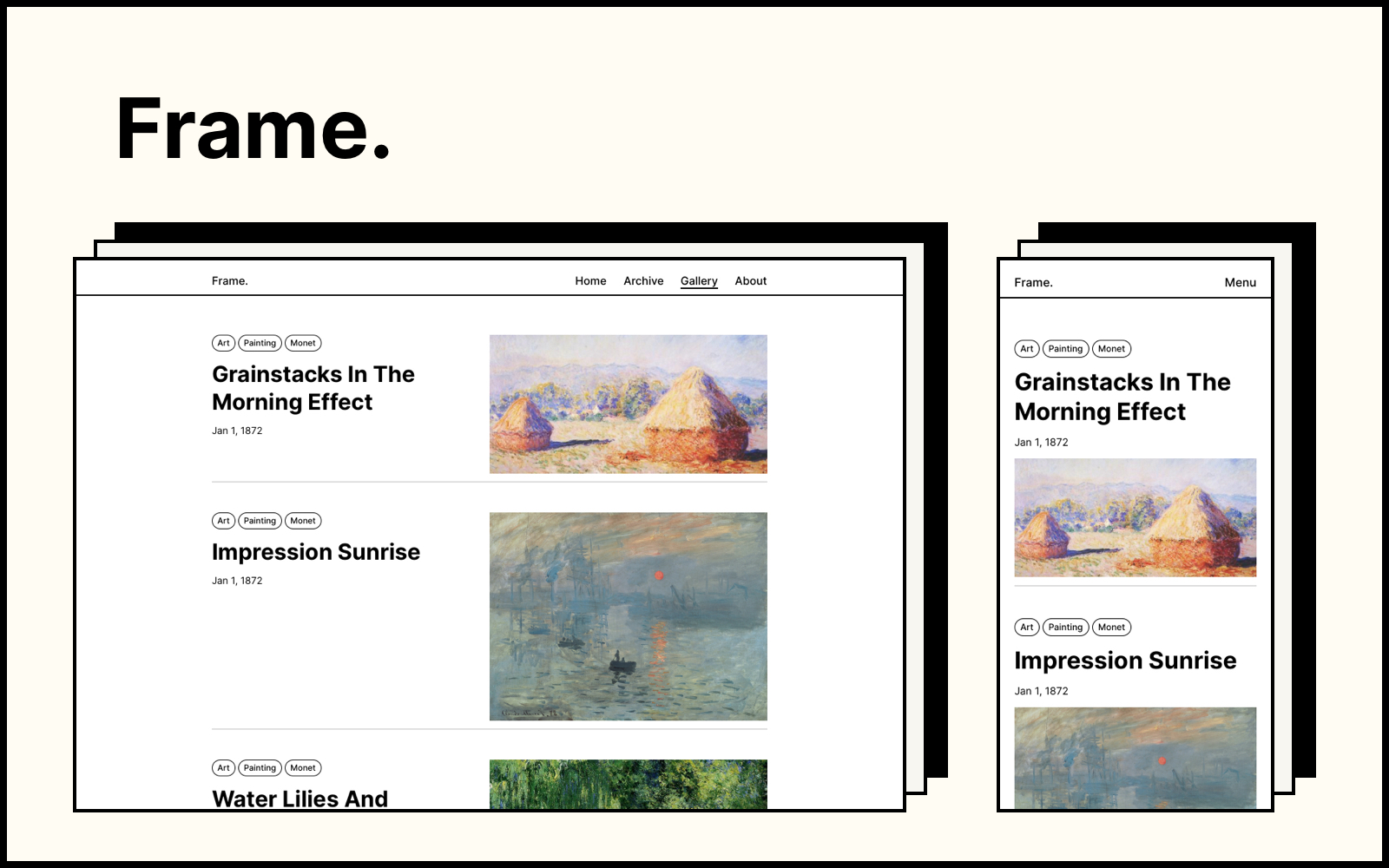
Frame is a minimal hexo theme. Inspired by traditional paintings and their frames, Frame is designed to showcase personal blogs, profiles, or portfolios in a concise and elegant way.
[👉 Demo Site](https://frame.zhangyongqi.com/)
## Getting started
### Installation
If this is your first time using hexo, please go to the official [hexo website](https://hexo.io/) to install and initialize your hexo project. Then, clone the theme in your hexo project:
```
# go to your hexo theme folder
cd themes
# clone the project
git clone https://github.com/zoeingwingkei/frame.git
```
### Configuration
Go to the hexo configuration file `config.yml`, and change the following theme settings:
```
theme: frame
```
### Run Server
Now that **Frame** is all set up 👌. You can test the theme through:
```
hexo server
```
## Color Mode
Frame provides 3 color modes: default, classic and dark.
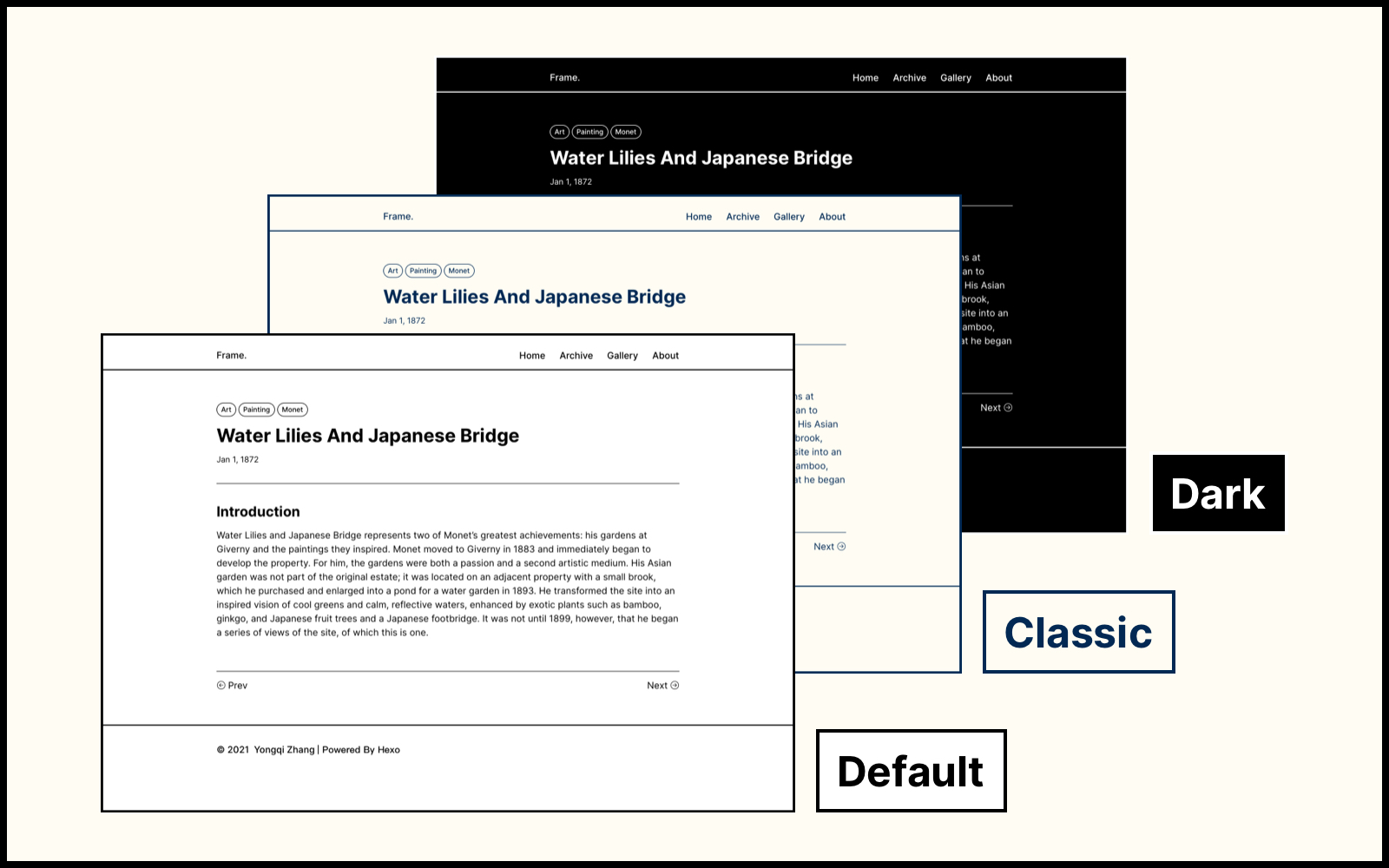
To change the color mode, go to the `config.yml` file under the `frame` theme folder, and modify the following settings:
```
# color mode: default / classic / dark
color_mode: classic
```
## Gallery View
Frame provides a gallery view, where blog posts are presented with their featured images and tags. Simply add a category "gallery" to your post, then it would be listed in the gallery view.
```
categories:
- [gallery]
```
The featured image of the post can also be added to the [Front-matter](https://hexo.io/docs/front-matter) of the post:
```
featured_image: /path/to/your/image.jpg
```
## Profile Page
The profile page, or the home page, is the very first page of your site. By default, there is a title, some body text, several links and a profile image on this page. You can customize the content of your profile at the `config.yml` file of the theme:
```
# profile
profile:
title: Your profile title.
body: Your profile body
image: /path/to/your/image.jpg
links:
Blogs: /archive/
Resume: /path/to/your/resume.pdf
Projects: /categories/gallery/
```
In case you prefer to customize your profile page, go to `frame/layout/pages/profile.ejs` and modify the layout and style of your own page, have fun 🙌.
## Tag Page
Frame provides a tag cloud on the `/tag/` page, which contains all possible tags in your blog. In order to set up the tag cloud, you need to create a hexo page named `tag`.
```
hexo new page tag
```
Inside the `source/tag/index.html` file, type the following:
```
---
title: '''tag'''
layout: tag
---
```
## Configurations
### Header
The header is simply consist of a site logo and a navigation menu, you can change those content at the `config.yml` file under the theme folder. You can upload an image as the site logo, otherwise it would be your site name.
```
# header
site_brand_name: Frame.
logo_image:
enable: true
image_path: /logo.png # path to your logo image
menu:
Home: /
Archive: /archives/
Gallery: /categories/gallery/
About: /about/
```
### Footer
You can also customize the content of your footer at the `config.yml` file:
```
# footer
footer:
copyright_info:
enable: true
author: © Your name
powered_by: # Powered by Hexo & Frame
enable: true
other_info:
enable: true
content: Customized content.
```
### Favicon
Add your own favicon of the website at the `frame/source/` folder, then configure it at the `config.yml` file:
```
# favicon
favicon: /favicon.ico
```
### Math
In case you would like to use math equations in your blog, go to the `config.yml` file and turn on the [MathJax](*https://github.com/hexojs/hexo-math*) tool:
```
# mathjax setting
mathjax_enable: true
```
Note: if you haven't install the hexo math plugin, you need to install it first:
```
npm i hexo-math --save
```
### Blog Comments
Frame now supports third-party comment systems: [valine](https://valine.js.org/) and [disqus](https://disqus.com/). A detailed description can be found in [this post](https://frame.zhangyongqi.com/2021/11/11/comment/).
### Local Search
Frame now supports local search with the hexo plugin [hexo-generator-searchdb](https://github.com/theme-next/hexo-generator-searchdb). A detailed description can be found in [this post](https://frame.zhangyongqi.com/2022/08/05/local-search/).
## License
This project is released under [MIT License](https://opensource.org/licenses/MIT).
All the images used in the [demo site](https://frame.zhangyongqi.com) are the works from Claude Monet (1840 - 1926), which is considered to be in the public domain in its country of origin and other countries and areas.
Explore similar templates
Compare previews and descriptions within the same stack and category.

hexo-theme-matery
hexo-theme-matery is a Material Design, responsive Hexo blog theme with homepage carousel, waterfall post list, timeline archive, word cloud tags, radar chart categories, and an about page.
Hexo · Blog

hexo-theme-cactus
Cactus is a responsive Hexo theme for personal websites and blogs, maintained by probberechts. It offers four color schemes (dark, light, white, classic), configurable navigation, homepage post lists, project lists, social links, and copyright year ranges.
Hexo · Blog

hexo-theme-volantis
Volantis is a blog theme for Hexo, distributed as the npm package hexo-theme-volantis and enabled by setting theme to volantis in the Hexo site's _config.yml. It requires Hexo 7.3+, hexo-cli 4.3+, Node.js 22.x LTS+, and npm 10.x LTS+.
Hexo · Blog

hexo-theme-aurora
Hexo Theme Aurora is a futuristic Hexo blog theme built around aurora gradients and a magazine-style grid layout.
Hexo · Blog

hexo-theme-Claudia
Claudia is a Hexo blog theme focused on a clean look and easy configuration. It automatically follows the device's dark mode and claims a 90+ Lighthouse score.
Hexo · Blog

hexo-theme-A4
hexo-theme-A4 is a minimalist Hexo blog theme that mimics the texture of A4 paper, emphasizing simplicity, small size, and minimal configuration.
Hexo · Blog