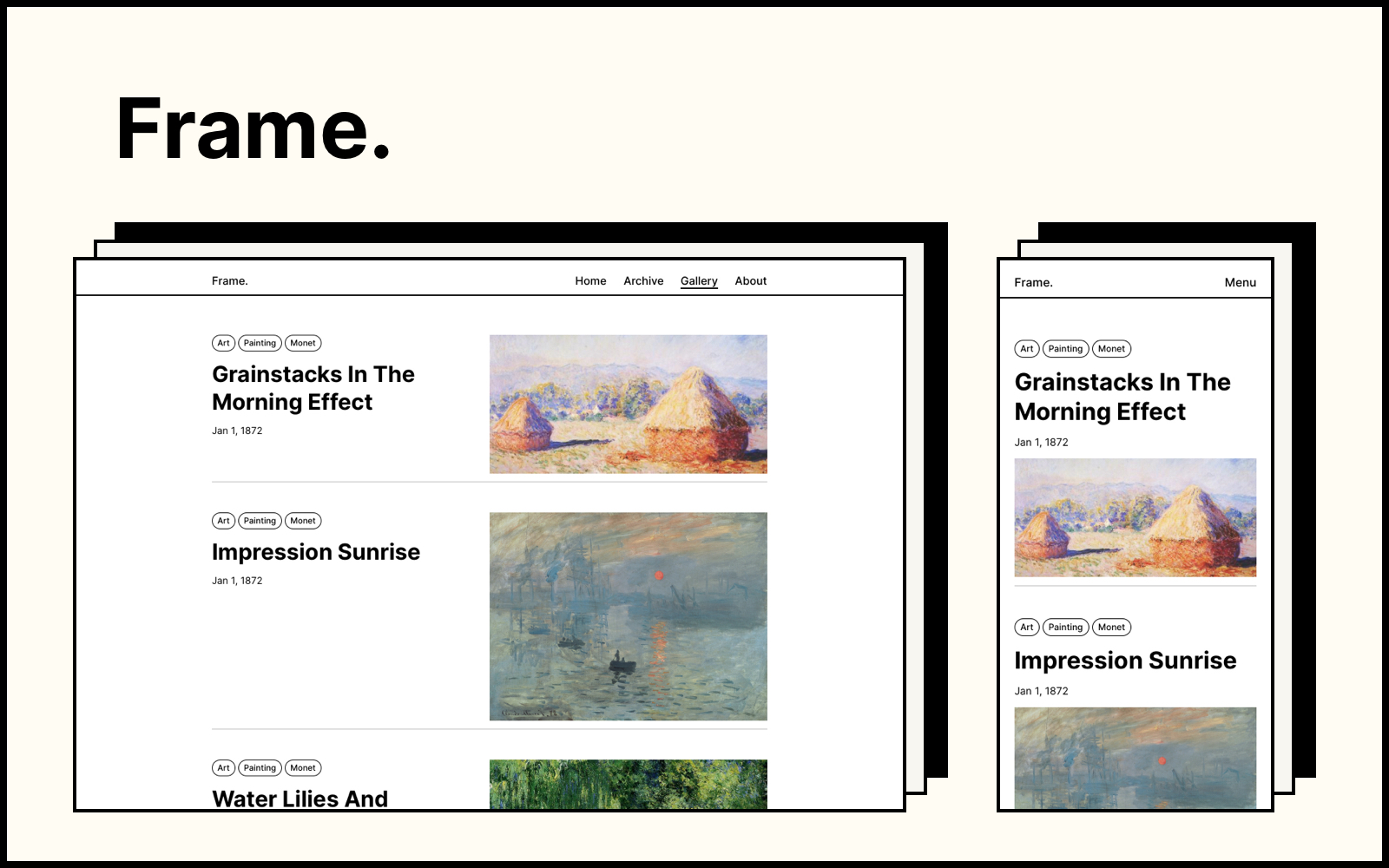
极简画框风格,灵感来自传统绘画,适合展示个人博客、简介或作品集
Hexo博客
Hexo-blog-theme-frame — Hexo 博客模板
作者 yy933
Frame 是一款极简风格的 Hexo 主题,灵感来自传统画作与画框,用于展示个人博客、简介或作品集,提供三种配色模式、画廊视图、个人资料页与标签云。
看看你的网站会是什么样
浏览真实页面截图,比较内容排版与手机效果。点击下方缩略图切换,放大查看整页细节。
目前有 1 张原始预览,可打开完整图片查看设计细节。
截图用于了解视觉与布局,交互效果请以实际项目为准。
采集于 2026-10-02查看来源
值得关注的模板亮点
从已有项目资料中,快速了解它的特点。
提供默认、经典、暗色三种配色模式,可在主题配置中切换
画廊视图:为文章添加 gallery 分类后,以特色图片和标签形式展示
首页个人资料页可配置标题、正文、头像与多个链接,也可直接改模板
支持 MathJax 数学公式、Valine/Disqus 评论与 hexo-generator-searchdb 本地搜索
页眉导航、页脚版权与自定义信息、站点 logo 和 favicon 均可配置
模板详细介绍
Frame 是一个面向 Hexo 的极简主题,设计灵感来自传统绘画及其画框,目标是以简洁优雅的方式展示个人博客、个人简介或作品集。主题提供默认、经典、暗色三种配色模式,可在主题目录的 config.yml 中切换。内容组织上,主题支持画廊视图:给文章添加 gallery 分类后,文章会以特色图片和标签的形式在画廊中列出,特色图片通过 Front-matter 的 featured_image 字段指定。首页即个人资料页,默认包含标题、正文、若干链接和头像,内容可在主题 config.yml 的 profile 段配置,也可直接修改 frame/layout/pages/profile.ejs 调整布局与样式。标签页提供标签云,需要手动创建名为 tag 的 Hexo 页面并指定 layout: tag。页眉由站点标识与导航菜单组成,页脚可配置版权信息、Powered by 与其他自定义内容,favicon 与站点 logo 也可在配置中指定。主题还支持通过 hexo-math 插件启用 MathJax 数学公式、接入 Valine 或 Disqus 第三方评论,以及借助 hexo-generator-searchdb 实现本地搜索。使用前需先安装并初始化 Hexo 项目,再将主题克隆到 themes 目录并把站点配置中的 theme 改为 frame。
Hexo博客
适合你的项目吗?
适用场景
- 搭建以文字和图片为主的个人博客,用画廊视图集中展示带特色图片的文章
- 制作个人简介或作品集页面,在首页展示头像、简介文字与外部链接
- 需要标签云页面来汇总和浏览博客全部标签
- 希望在博客中撰写含数学公式的文章并启用 MathJax 渲染
- 需要接入 Valine 或 Disqus 评论,或使用本地搜索查找站内内容
适合人群
- 使用 Hexo 搭建个人博客的开发者或写作者
- 偏好极简、画框式视觉风格并希望以图片展示内容的用户
- 需要个人简介页与作品集入口的个人站点
- 需要数学公式、第三方评论或本地搜索等可选功能的博客
上手与定制指南
结合仓库当前版本的说明,按下面的资料检查内容、配置与运行要求。
- 1
先安装并初始化 Hexo 项目,再将主题克隆到 themes 目录,并把站点 config.yml 中的 theme 改为 frame
- 2
在主题目录的 config.yml 中配置配色模式、页眉、页脚、favicon、个人资料页与 MathJax 等选项
- 3
标签云需手动执行 hexo new page tag 创建页面,并在 source/tag/index.html 中设置 layout: tag
- 4
使用 MathJax 前需安装 hexo-math 插件,本地搜索需安装 hexo-generator-searchdb
- 5
演示站点中的图片为公有领域画作,替换或使用其他图片时需自行核对素材许可
授权与来源资料
使用条件与限制
免费使用 · 保留许可声明本次收录的是公开仓库中采用 MIT 许可的免费版本;免费范围为该版本代码,不代表外部服务或第三方素材免费。
使用时需要遵守
- 允许免费使用、修改、商用和分发该版本代码。
- 分发代码副本或实质性部分时,保留原作者版权声明和完整 MIT 许可声明。
- 代码按现状提供;担保与责任限制以原许可证及适用法律为准。
额外费用与待核对事项
- 使用 MathJax 数学公式功能前,需先安装 hexo-math 插件(npm i hexo-math --save),否则公式无法渲染。
- 评论功能依赖第三方服务 Valine 或 Disqus,需自行注册并配置相应账号/密钥,可能受这些外部服务的条款与费用约束。
- 本地搜索功能需额外安装 hexo-generator-searchdb 插件才能使用。
- 演示站点图片为莫奈公有领域画作;替换或使用其他图片时需自行确认素材许可,主题的 MIT 许可不涵盖第三方素材。
- 演示图片、字体、图标及其他第三方素材需按各自许可核对,不能仅凭代码的 MIT 许可判断。
- 域名、托管、数据库、支付或 AI 等外部服务可能另外收费。
查看原文依据
Permission is hereby granted, free of charge
许可证原文
if you haven't install the hexo math plugin, you need to install it first
README 原文
Frame now supports third-party comment systems: [valine](https://valine.js.org/) and [disqus](https://disqus.com/)
README 原文
Frame now supports local search with the hexo plugin [hexo-generator-searchdb]
README 原文
https://github.com/yy933/Hexo-blog-theme-frame/blob/main/LICENSEhttps://github.com/yy933/Hexo-blog-theme-frame/blob/main/README.mdAll the images used in the [demo site](https://frame.zhangyongqi.com) are the works from Claude Monet
README 原文
DeepSeek 根据仓库许可证和 README 整理 ·2026-10-02。结果仅覆盖已读取资料,依赖、图片、字体及后续条款变更以各自原文为准。
项目核对记录与介绍依据
模板资料
- 来源平台
- GitHub
- 资料与维护参考分
- 资料较少 · 45 / 100
- 技术栈
- Hexo
- 网站类型
- 博客
这个分数如何计算
本站按许可资料(最高30分)、演示链接(12分)、预览图(10分)、Star数(15分)、记录的维护时间(15分)、描述完整度(8分)、功能记录(5分)和分类资料(5分)计算。它不是代码、安全或性能测试,也不是 Google 评分;有链接不代表已实测可用。
这个项目需要核对什么
- 记录的仓库更新时间
- 2023-09-26
- 截图检查日期
- 2026-10-02
目前没有记录演示链接。请依据仓库说明在本地评估;仅凭截图无法确认交互行为。
目录记录的主要技术栈是 Hexo。请通过依赖清单和锁文件核对实际版本与托管要求。这些说明基于收录资料,不代表代码审计或部署实测。
查看具体选型方法 →介绍的制作与核对状态
介绍由 AI 辅助整理目录与仓库资料。仓库作者不等于这篇介绍的审核者。
已完成服务器许可规则与 AI 来源核对;未经过人工编辑审核。
查看当时使用的来源资料
SHA-256: 36c8f42c0aba311c0a4d44daae9103a8ac9bdf5b4098fd89dfec97414295ed2e
2026-10-02T22:59:02.502Z
来源文件 / 仓库English | [简体中文](README-CN.md)
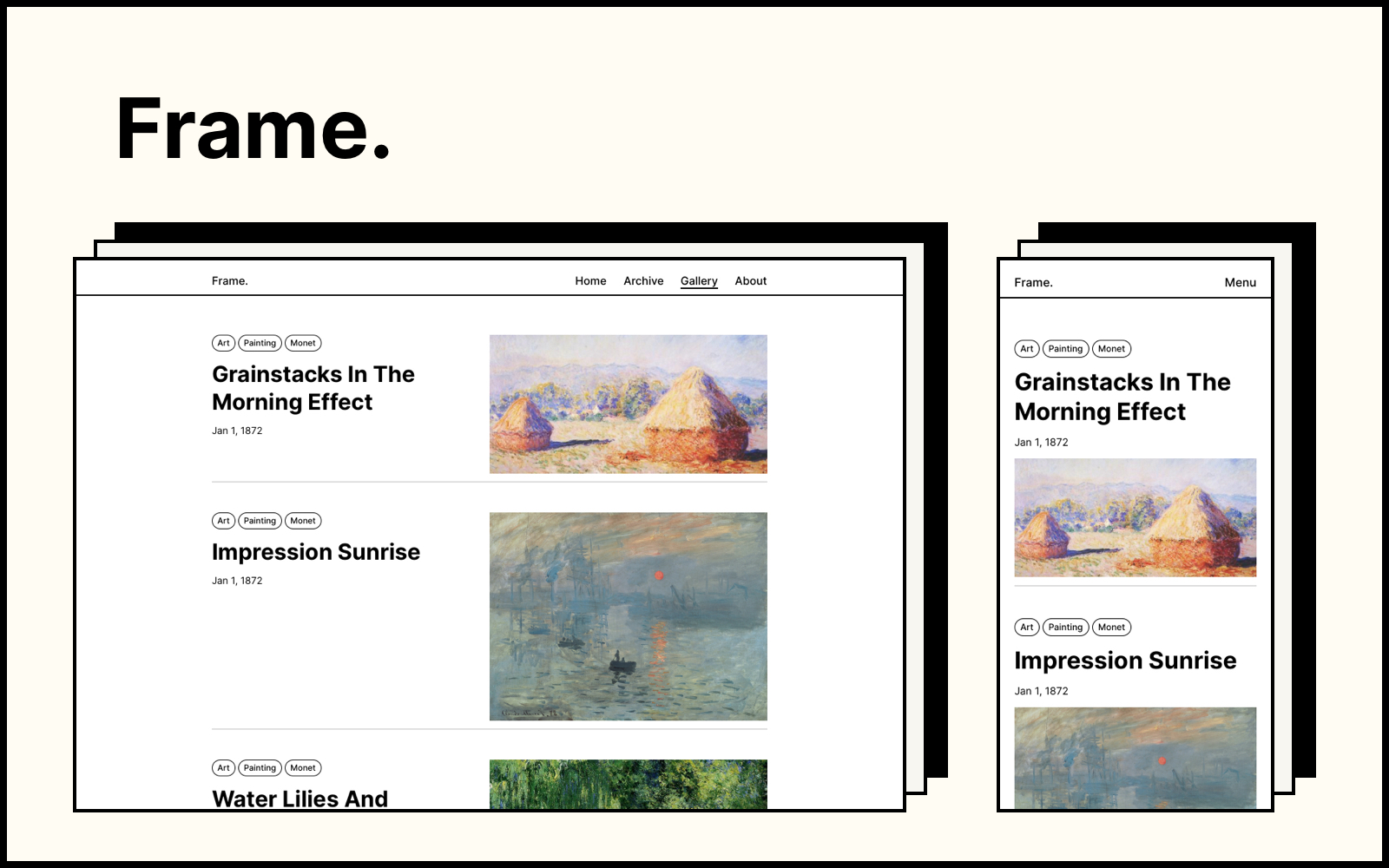
Frame is a minimal hexo theme. Inspired by traditional paintings and their frames, Frame is designed to showcase personal blogs, profiles, or portfolios in a concise and elegant way.
[👉 Demo Site](https://frame.zhangyongqi.com/)
## Getting started
### Installation
If this is your first time using hexo, please go to the official [hexo website](https://hexo.io/) to install and initialize your hexo project. Then, clone the theme in your hexo project:
```
# go to your hexo theme folder
cd themes
# clone the project
git clone https://github.com/zoeingwingkei/frame.git
```
### Configuration
Go to the hexo configuration file `config.yml`, and change the following theme settings:
```
theme: frame
```
### Run Server
Now that **Frame** is all set up 👌. You can test the theme through:
```
hexo server
```
## Color Mode
Frame provides 3 color modes: default, classic and dark.
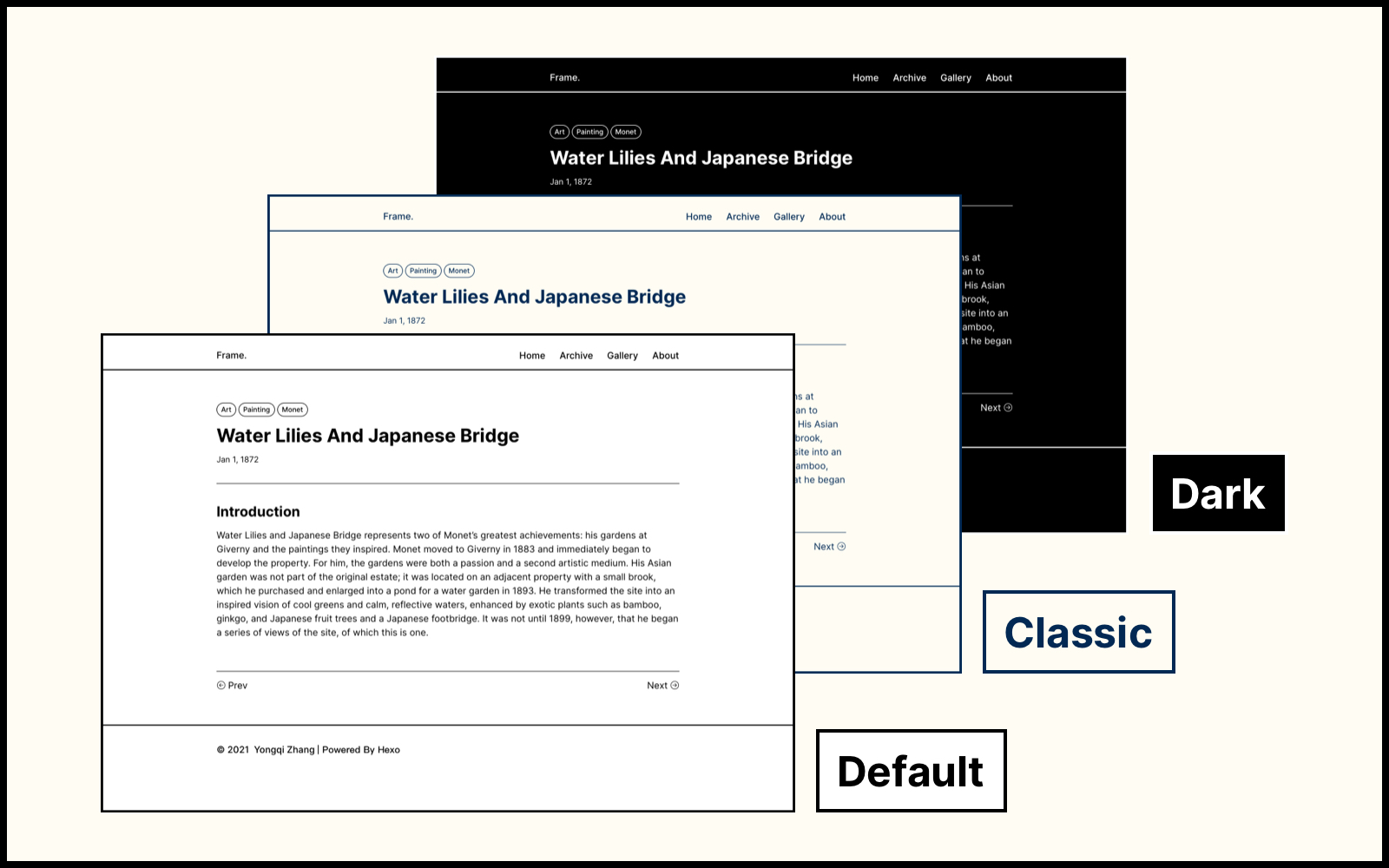
To change the color mode, go to the `config.yml` file under the `frame` theme folder, and modify the following settings:
```
# color mode: default / classic / dark
color_mode: classic
```
## Gallery View
Frame provides a gallery view, where blog posts are presented with their featured images and tags. Simply add a category "gallery" to your post, then it would be listed in the gallery view.
```
categories:
- [gallery]
```
The featured image of the post can also be added to the [Front-matter](https://hexo.io/docs/front-matter) of the post:
```
featured_image: /path/to/your/image.jpg
```
## Profile Page
The profile page, or the home page, is the very first page of your site. By default, there is a title, some body text, several links and a profile image on this page. You can customize the content of your profile at the `config.yml` file of the theme:
```
# profile
profile:
title: Your profile title.
body: Your profile body
image: /path/to/your/image.jpg
links:
Blogs: /archive/
Resume: /path/to/your/resume.pdf
Projects: /categories/gallery/
```
In case you prefer to customize your profile page, go to `frame/layout/pages/profile.ejs` and modify the layout and style of your own page, have fun 🙌.
## Tag Page
Frame provides a tag cloud on the `/tag/` page, which contains all possible tags in your blog. In order to set up the tag cloud, you need to create a hexo page named `tag`.
```
hexo new page tag
```
Inside the `source/tag/index.html` file, type the following:
```
---
title: '''tag'''
layout: tag
---
```
## Configurations
### Header
The header is simply consist of a site logo and a navigation menu, you can change those content at the `config.yml` file under the theme folder. You can upload an image as the site logo, otherwise it would be your site name.
```
# header
site_brand_name: Frame.
logo_image:
enable: true
image_path: /logo.png # path to your logo image
menu:
Home: /
Archive: /archives/
Gallery: /categories/gallery/
About: /about/
```
### Footer
You can also customize the content of your footer at the `config.yml` file:
```
# footer
footer:
copyright_info:
enable: true
author: © Your name
powered_by: # Powered by Hexo & Frame
enable: true
other_info:
enable: true
content: Customized content.
```
### Favicon
Add your own favicon of the website at the `frame/source/` folder, then configure it at the `config.yml` file:
```
# favicon
favicon: /favicon.ico
```
### Math
In case you would like to use math equations in your blog, go to the `config.yml` file and turn on the [MathJax](*https://github.com/hexojs/hexo-math*) tool:
```
# mathjax setting
mathjax_enable: true
```
Note: if you haven't install the hexo math plugin, you need to install it first:
```
npm i hexo-math --save
```
### Blog Comments
Frame now supports third-party comment systems: [valine](https://valine.js.org/) and [disqus](https://disqus.com/). A detailed description can be found in [this post](https://frame.zhangyongqi.com/2021/11/11/comment/).
### Local Search
Frame now supports local search with the hexo plugin [hexo-generator-searchdb](https://github.com/theme-next/hexo-generator-searchdb). A detailed description can be found in [this post](https://frame.zhangyongqi.com/2022/08/05/local-search/).
## License
This project is released under [MIT License](https://opensource.org/licenses/MIT).
All the images used in the [demo site](https://frame.zhangyongqi.com) are the works from Claude Monet (1840 - 1926), which is considered to be in the public domain in its country of origin and other countries and areas.
看看同类模板
对比同技术栈与用途的模板,找到更适合的视觉与内容结构。

hexo-theme-matery
A beautiful hexo blog theme with material design and responsive design.一个基于材料设计和响应式设计而成的全面、美观的Hexo主题。
Hexo · 博客

hexo-theme-cactus
:cactus: A responsive, clean and simple theme for Hexo.
Hexo · 博客

hexo-theme-volantis
A Wonderful Theme for Hexo.
Hexo · 博客

hexo-theme-aurora
Hexo Theme Aurora 是一款以极光色彩和渐变 UI 为核心的 Hexo 博客主题,整体走未来感路线。 它的首页采用杂志式网格布局,文章列表与精选区域层次分明,视觉上更接近个人媒体站点而非传统博客。
Hexo · 博客

hexo-theme-Claudia
Claudia 是一款为 Hexo 设计的博客主题,主打简洁外观与易配置。 它支持自动跟随设备深色模式,并在 README 中宣称拥有 90+ 的 Lighthouse 评分,适合追求轻量与性能的博客作者。
Hexo · 博客

hexo-theme-A4
A hexo theme that looks like an A4 paper.(一个类A4纸张质感的hexo博客主题。 )
Hexo · 博客