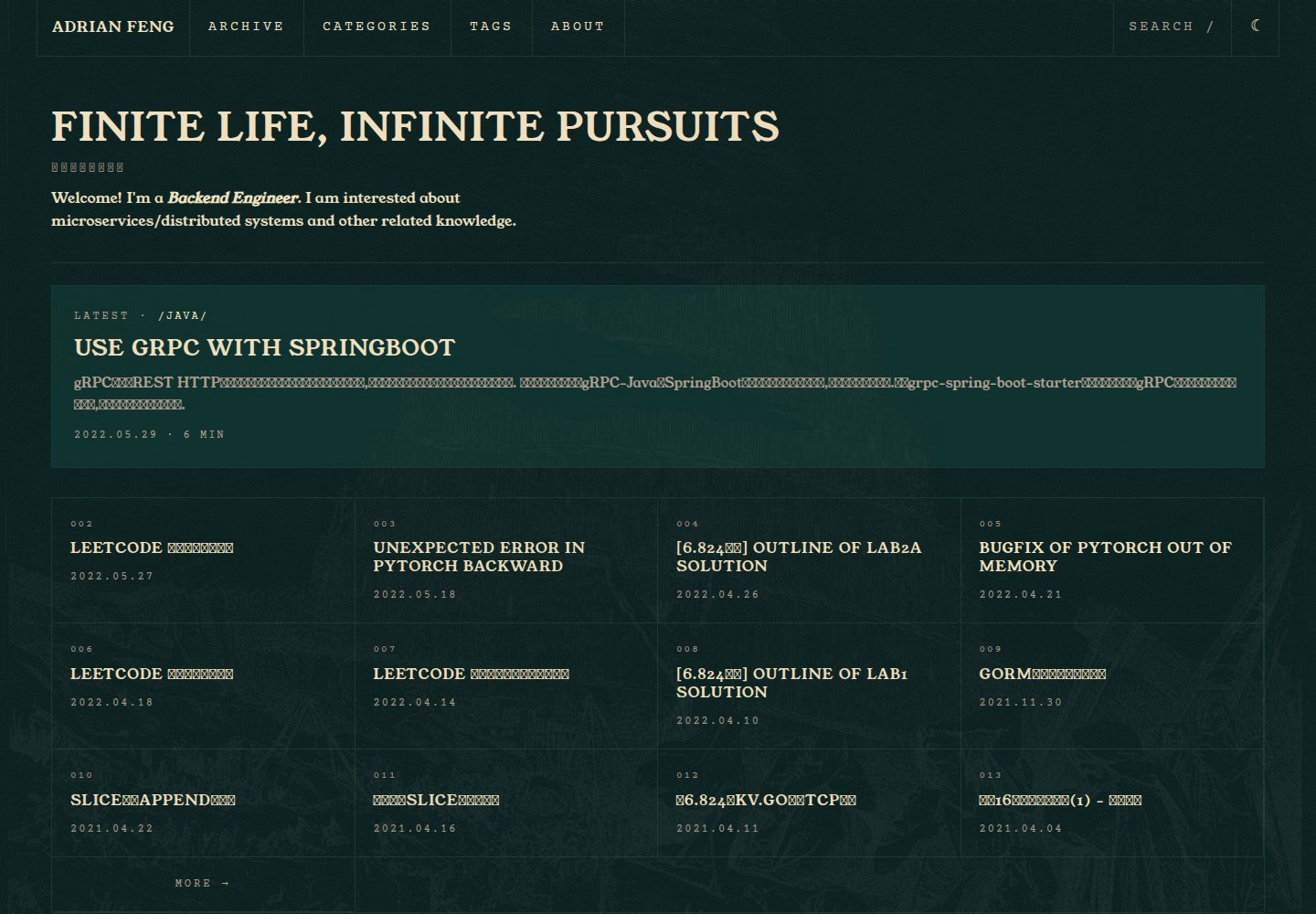
Deep teal and warm beige terminal colors, with toggleable visual effects such as CRT noise, a blinking cursor, and grid panels
HexoBlog
hexo-theme-hermes-agent — Hexo Blog Template
By zhiwei-Feng
A Hexo-based static blog theme that brings the terminal look of the Nous Research Hermes Agent site to personal blogs, with light and dark modes, search, KaTeX, and keyboard navigation.
Explore the design
Compare the page layouts and mobile experience. Open any screenshot for a closer look.
Desktop homepage1 / 3
Desktop captureTop of page
Actual screenshot captured by the server browser.
All pages & views 3
Screenshots show visual appearance; interactive behavior may differ.
Recorded 2026-10-03View source
What stands out
A quick read of the recorded project description.
Light mode is implemented via filter: invert(1) on html.light, with images, code, and KaTeX excluded from inversion using .no-invert
Keyboard controls: / opens search, t toggles the theme, and g h / g a / g t jump to home, archives, and tags
The sticky table of contents highlights as you scroll, code blocks have copy buttons, and search is client-side fuzzy filtering with arrow-key selection
KaTeX is enabled per post and loads only when math: true is set in the front matter; English and Simplified Chinese language packs are included
Provides override entry points for 8 color tokens and font variables, allowing you to replace the palette and display fonts
Template Details
This is a blog theme for Hexo whose visual language comes from the Nous Research Hermes Agent site: deep teal and warm beige phosphor-decay colors, terminal-style metadata lines, grid panels, and monospace type. The theme is installed via npm or by git clone into themes/hermes-agent; after installation, set theme: hermes-agent in the site _config.yml.
Functionally, the theme provides sticky table-of-contents highlighting based on IntersectionObserver, a client-side fuzzy search modal triggered by /, code block copy buttons, g-key navigation (g h for home, g a for archives, g t for tags), and t to toggle light and dark. KaTeX math is enabled per post by default and requires math: true in the front matter. The interface offers English and Simplified Chinese language packs and is extensible.
Light and dark modes use an invert approach: light mode applies filter: invert(1) to html.light, with images, code, and KaTeX excluded from inversion via the .no-invert class. The configuration also includes a classic option for theme_mode, but the documentation states it is reserved for v0.2 and is currently unavailable. The theme bundles four OFL fonts—Young Serif, Archivo, Archivo Narrow, and Courier Prime—which can be replaced by overriding CSS variables such as --font-display.
In terms of limitations, the theme requires Hexo 7+ and supports only the latest two versions of Chromium, Firefox, and Safari; IE is not supported. Comments are provided only as Giscus scaffolding, disabled by default, and require you to fill in repository information yourself. When installing via npm, you should not modify files inside node_modules directly; instead, override the default configuration using _config.hermes-agent.yml in the site root.
HexoBlog
Is it right for your project?
Use Cases
- Personal sites that want to give a Hexo blog a terminal or retro sci-fi look
- Writing blogs that need light and dark modes, in-site search, table-of-contents highlighting, and keyboard shortcuts
- Publishing technical articles with math formulas and wanting per-post control over KaTeX loading
- Users who want a Chinese interface and custom colors and fonts without modifying the theme source
Suitable For
- Developers building blogs with Hexo 7 or later
- Writers who prefer terminal aesthetics and monospace typography
- Technical blogs that need bilingual English and Chinese interfaces, light and dark modes, and keyboard navigation
- Users willing to override the theme's default configuration via _config.hermes-agent.yml
Getting started & customization
Use these recorded setup notes alongside the repository instructions for your chosen version.
- 1
Requires Hexo 7+; for npm installation run npm install hexo-theme-hermes-agent, then set theme: hermes-agent in the site _config.yml
- 2
For git clone, place the repository in themes/hermes-agent and additionally install hexo-renderer-ejs, hexo-renderer-sass-next, and hexo-generator-search
- 3
When installing via npm, do not edit files inside node_modules; instead create _config.hermes-agent.yml in the site root to override the theme's default configuration
- 4
Comments are disabled by default; enabling Giscus requires filling in repo, repo_id, and category_id; search depends on hexo-generator-search
- 5
Browser support covers the latest two versions of Chromium, Firefox, and Safari; IE is not supported
License & source material
Usage conditions & limitations
Free to use · keep license noticeThis entry covers the free version under the MIT license in the public repository; the free scope is the code of that version and does not mean external services or third-party assets are free.
Must comply with when using
- You may use, modify, commercially use, and distribute the code of this version for free.
- When distributing copies or substantial portions of the code, retain the original author's copyright notice and the full MIT license notice.
- The code is provided as is; warranties and limitations of liability are governed by the original license and applicable law.
Additional costs & items to verify
- Using this theme requires Hexo 7 or later; Hexo sites below this version cannot use it directly.
- Only the latest two versions of Chromium, Firefox, and Safari are supported; IE is not supported.
- The classic option for the theme_mode configuration item is not yet implemented and is reserved for v0.2; currently only the invert light scheme is available.
- When installing via npm, you should not directly modify theme files inside node_modules; instead use _config.hermes-agent.yml in the site root to override configuration.
- Comments are disabled by default and only Giscus scaffolding is provided; enabling them requires configuring a Giscus app in your GitHub repository and filling in repo, repo_id, and category_id.
- In-site search depends on the hexo-generator-search plugin; search is available only after installing that dependency.
- If you replace the fonts with commercial ones, you must obtain them yourself and bear their licensing and costs; the theme bundles only OFL fonts.
- Demo images, fonts, icons, and other third-party assets must be checked against their respective licenses and cannot be judged solely by the code's MIT license.
- External services such as domains, hosting, databases, payments, or AI may incur additional charges.
View Original Text Basis
Permission is hereby granted, free of charge
Original License Text
Requires Hexo 7+.
Original README
Latest two versions of Chromium, Firefox, Safari. No IE support.
Original README
`classic`: reserved for v0.2; will use a conventional light colour palette.
Original README
When installed via npm, do **not** edit files under `node_modules/`.
Original README
Giscus comment scaffold. Set enable: true and fill in the repo fields # after wiring up a Giscus app on your GitHub repository.
Original README
Search modal powered by hexo-generator-search.
Original README
https://github.com/zhiwei-Feng/hexo-theme-hermes-agent/blob/main/LICENSEhttps://github.com/zhiwei-Feng/hexo-theme-hermes-agent/blob/main/README.mdTo swap in a commercial typeface (e.g. `Mondwest-Regular.woff2`):
Original README
Compiled by DeepSeek based on repository license and README ·2026-10-03. Results only cover the materials read; dependencies, images, fonts, and subsequent term changes are subject to their respective original texts.
Project checks & description sources
Template Information
- Source platforms
- GitHub
- Documentation and maintenance reference score
- More documented · 80 / 100
- Technologies
- Hexo
- Website type
- Blog
How this score is calculated
Our heuristic uses license records (up to 30), a demo link (12), a preview (10), stars (15), recorded maintenance (15), description completeness (8), feature records (5) and classification data (5). It is not a code, security or performance test, or a Google score. A link does not establish tested functionality.
What to verify for this project
- Repository update recorded
- 2026-05-23
- Screenshot last checked
- 2026-10-03
A demo link is listed. Check it with your own content and viewport sizes; its presence does not confirm that forms, authentication or payments work.
The catalog identifies Hexo as the primary stack. Check the actual dependency manifest and lockfile for versions and hosting requirements. These notes use recorded metadata, not a code audit or a deployment test.
Use a selection guide →How this description was prepared
AI-assisted description based on catalog records and repository material. Repository authors are not automatically the reviewers of this description.
Automatically checked against source and license rules; no manual editorial review.
Inspect the recorded source material
SHA-256: 4cebb09f557cc3addbf00205567ee345ef4ad16430f66c8f7b481f17a3e78fbd
2026-10-03T03:40:17.195Z
Source file / repository# hexo-theme-hermes-agent
[](https://github.com/zhiwei-Feng/hexo-theme-hermes-agent/actions/workflows/ci.yml)
[](LICENSE)
A Hexo theme that brings the Nous Research Hermes Agent terminal aesthetic to static blogs.
## Screenshots


## Features
- Deep-teal / warm-cream phosphor-decay palette sampled from the Hermes reference site
- Invert-based light mode (`html.light { filter: invert(1); }`) with `.no-invert` escape for images, code, and KaTeX
- Terminal-style post meta (`$ cat posts/slug.md`), blink cursor, grid-framed panels
- Sticky TOC with scroll-based highlighting via IntersectionObserver
- `/`-triggered search modal, client-side fuzzy filter, arrow-key navigation
- Code block COPY button, Prism token overrides
- `g` chord navigation (`g h` = home, `g a` = archives, `g t` = tags), `t` toggles theme
- KaTeX opt-in via `math: true` front-matter
- English + zh-CN language packs (extendable)
- Mobile hamburger drawer, 3 responsive breakpoints (1200, 768, 480)
- OFL fonts bundled (Young Serif, Archivo, Archivo Narrow, Courier Prime)
## Install
Requires Hexo 7+.
### Via npm (recommended)
```bash
cd your-hexo-blog
npm install hexo-theme-hermes-agent
```
Then set `theme: hermes-agent` in the site's `_config.yml`.
The theme's runtime dependencies (`hexo-renderer-ejs`, `hexo-renderer-sass-next`, `hexo-generator-search`) are installed automatically as transitive dependencies.
### Via git clone
Use this if you want to fork the theme or edit its files directly.
```bash
cd your-hexo-blog
git clone https://github.com/zhiwei-Feng/hexo-theme-hermes-agent themes/hermes-agent
npm install hexo-renderer-ejs hexo-renderer-sass-next hexo-generator-search
```
Then set `theme: hermes-agent` in the site's `_config.yml`.
## Configuration
When installed via npm, do **not** edit files under `node_modules/`. Instead, create an **alternate theme config** at your site root:
```
your-hexo-blog/
├── _config.yml
├── _config.hermes-agent.yml ← create this file; overrides the theme defaults
└── source/
```
Hexo merges `_config.<theme-name>.yml` on top of the theme's packaged `_config.yml` automatically (see [Hexo — Alternate Theme Config](https://hexo.io/docs/configuration#Alternate-Theme-Config)).
When installed via git clone, either edit `themes/hermes-agent/_config.yml` directly or use the same `_config.hermes-agent.yml` pattern.
All available keys:
```yaml
# Override the display title and tagline shown above the nav.
# Defaults to config.title / config.subtitle if left empty.
site_title: ""
tagline: ""
# Top navigation entries. Each entry needs `name` and either `path` (site-relative) or `url` (absolute).
nav:
- { name: ARCHIVE, path: /archives/ }
- { name: TAGS, path: /tags/ }
- { name: ABOUT, path: /about/ }
# Light/dark strategy.
# `invert` (default): light mode is achieved via `filter: invert(1)` on `html.light`.
# `classic`: reserved for v0.2; will use a conventional light colour palette.
theme_mode: invert
# Which post appears in the homepage featured card.
# `latest`: always the most recent post.
# `front_matter`: post with `featured: true` in its front-matter, falling back to newest.
featured_post: front_matter
# Bundled font family IDs for display (headings) and mono (code) faces.
# Available IDs: young_serif, archivo, archivo_narrow, courier_prime
fonts:
display: young_serif
mono: courier_prime
# Visual effects; set any to false to disable.
effects:
dither: true # CRT noise overlay on the hero panel
blink: true # blinking cursor in terminal-style meta lines
arc_border: true # rounded-arc border on the featured card
bevel: true # inset bevel shadow on grid panels
# Faint full-bleed background illustration (Gustave Doré, public domain —
# see source/images/CREDITS.txt). Sits above the page with mix-blend-mode:
# difference so it only surfaces on large light/empty regions, like the
# human-figure background on the Hermes Agent source site.
portrait_bg:
enable: true
image: /images/portrait-bg.webp # site-relative; swap by pointing at any image under source/
opacity: 0.05 # 0–1; raise for stronger presence
blend: difference # any CSS mix-blend-mode keyword
position: "0% 0%" # CSS object-position, e.g. "right bottom"
# Search modal powered by hexo-generator-search.
# shortcut: key that opens the modal (default "/").
search:
enable: true
shortcut: "/"
# Giscus comment scaffold. Set enable: true and fill in the repo fields
# after wiring up a Giscus app on your GitHub repository.
comments:
enable: false
giscus:
repo: "" # e.g. username/repo
repo_id: "" # from giscus.app
category_id: "" # from giscus.app
# KaTeX math rendering.
# When per_post is true, KaTeX only loads on posts that have `math: true` in front-matter.
katex:
enable: true
per_post: true
# Footer links. Set github to your username string; rss: true emits the default /atom.xml link.
social:
github: ""
rss: true
# Optional 8-token colour overrides. Remove the whole block to use the defaults.
palette:
background: "#041c1b"
surface: "#11332f"
background_deep: "#000203"
line: "#1a3834"
foreground: "#f0e0c0"
foreground_dim: "#b0a090"
midground: "#384038"
accent: "#fb2c36"
```
## Customizing fonts
The bundled OFL fonts cover most use cases. To swap in a commercial typeface (e.g. `Mondwest-Regular.woff2`):
1. Drop the `.woff2` file into your site's `source/fonts/` directory (Hexo copies `source/` to `public/` on build).
2. Create a custom stylesheet — for example `source/css/custom.css` — and declare the `@font-face` there. Load it after the theme by adding it to your layout or via `hexo-inject`.
3. Override the CSS custom property the theme exposes:
```scss
@font-face {
font-family: "Mondwest";
src: url("/fonts/Mondwest-Regular.woff2") format("woff2");
font-weight: 400;
font-style: normal;
}
:root {
--font-display: "Mondwest", serif;
}
```
The theme uses `var(--font-display)` for all headings and the site title, so a single property override is sufficient.
## Front-matter supported
| Key | Type | Effect |
|-----|------|--------|
| `description` | string | Renders as the post subtitle under the title |
| `featured` | bool | Marks a post as the homepage featured card (requires `featured_post: front_matter`) |
| `math` | bool | Loads KaTeX on this post only (when `katex.per_post: true`) |
| `toc` | bool | Set to `false` to disable the TOC on a specific post |
| `layout` | string | `about` invokes the grid-cell layout where each H2 becomes a cell |
## Keyboard shortcuts
| Key | Action |
|-----|--------|
| `/` | Open search |
| `t` | Toggle light/dark |
| `g h` | Go home |
| `g a` | Go to archives |
| `g t` | Go to tags |
| `Esc` | Close modals |
## Browser support
Latest two versions of Chromium, Firefox, Safari. No IE support.
## License
MIT for the theme code (see `LICENSE`). Bundled fonts are OFL — see `source/fonts/OFL.txt` for attributions.
## Credits
Visual language inspired by the [Nous Research Hermes Agent site](https://hermes-agent.nousresearch.com/). This is an unofficial fan theme. Not affiliated with or endorsed by Nous Research.
Explore similar templates
Compare previews and descriptions within the same stack and category.

hexo-theme-matery
hexo-theme-matery is a Material Design, responsive Hexo blog theme with homepage carousel, waterfall post list, timeline archive, word cloud tags, radar chart categories, and an about page.
Hexo · Blog

hexo-theme-cactus
Cactus is a responsive Hexo theme for personal websites and blogs, maintained by probberechts. It offers four color schemes (dark, light, white, classic), configurable navigation, homepage post lists, project lists, social links, and copyright year ranges.
Hexo · Blog

hexo-theme-volantis
Volantis is a blog theme for Hexo, distributed as the npm package hexo-theme-volantis and enabled by setting theme to volantis in the Hexo site's _config.yml. It requires Hexo 7.3+, hexo-cli 4.3+, Node.js 22.x LTS+, and npm 10.x LTS+.
Hexo · Blog

hexo-theme-aurora
Hexo Theme Aurora is a futuristic Hexo blog theme built around aurora gradients and a magazine-style grid layout.
Hexo · Blog

hexo-theme-Claudia
Claudia is a Hexo blog theme focused on a clean look and easy configuration. It automatically follows the device's dark mode and claims a 90+ Lighthouse score.
Hexo · Blog

hexo-theme-A4
hexo-theme-A4 is a minimalist Hexo blog theme that mimics the texture of A4 paper, emphasizing simplicity, small size, and minimal configuration.
Hexo · Blog