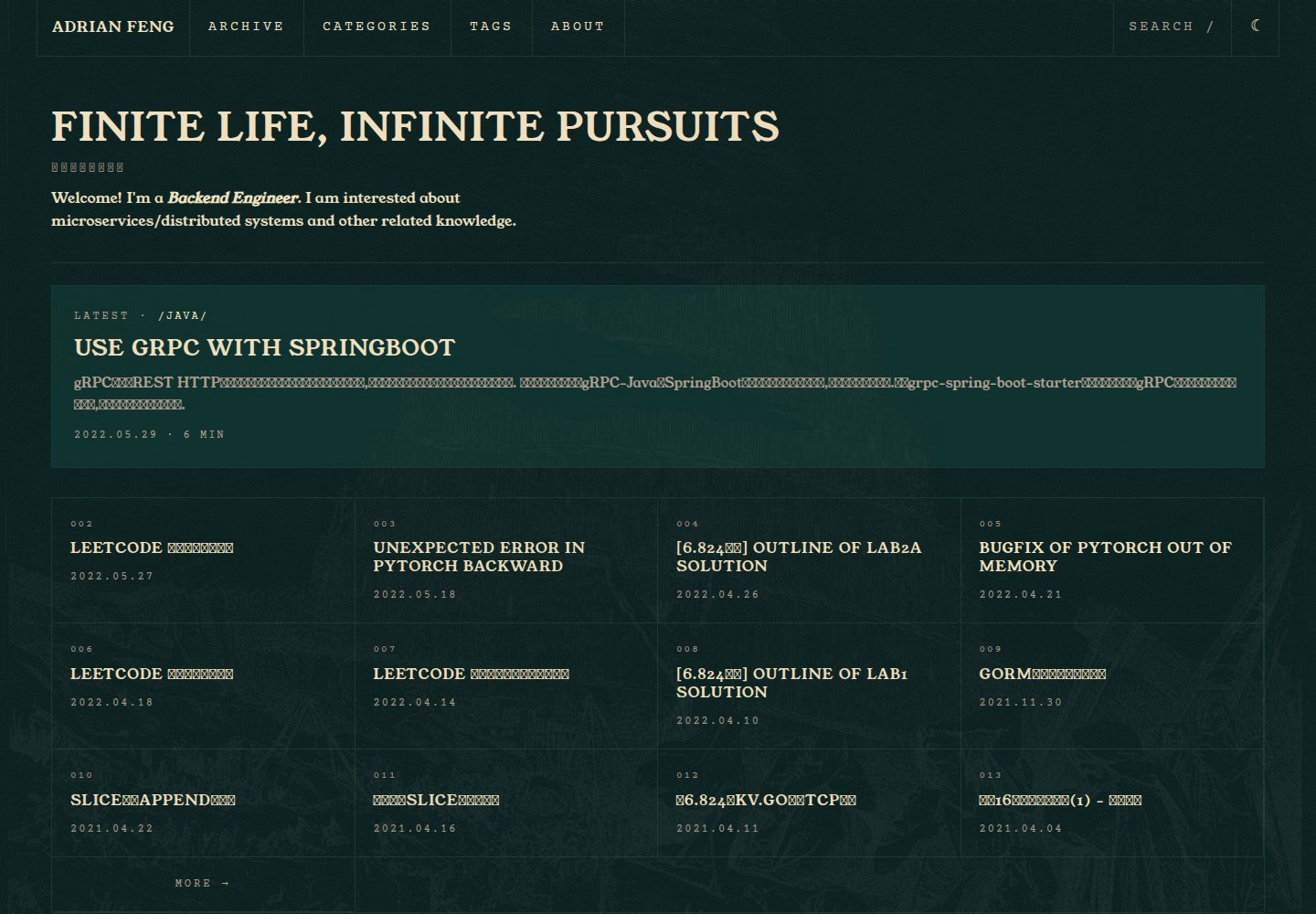
深青与暖米色的终端配色,配 CRT 噪点、闪烁光标、网格面板等可开关的视觉效果
Hexo博客
hexo-theme-hermes-agent — Hexo 博客模板
作者 zhiwei-Feng
基于 Hexo 的静态博客主题,把 Nous Research Hermes Agent 站点的终端视觉搬到个人博客上,包含明暗模式、搜索、KaTeX 与键盘导航。
看看你的网站会是什么样
浏览真实页面截图,比较内容排版与手机效果。点击下方缩略图切换,放大查看整页细节。
全部页面与视图 3
截图用于了解视觉与布局,交互效果请以实际项目为准。
采集于 2026-10-03查看来源
值得关注的模板亮点
从已有项目资料中,快速了解它的特点。
亮色模式通过 html.light 上的 filter: invert(1) 实现,图片、代码与 KaTeX 用 .no-invert 排除反转
键盘操作:/ 打开搜索、t 切换主题、g h / g a / g t 跳转首页、归档与标签
粘性目录随滚动高亮,代码块带复制按钮,搜索为客户端模糊过滤并支持方向键选择
KaTeX 按文章开启,front-matter 写 math: true 才加载;内置英文与简体中文语言包
提供 8 个颜色 token 与字体变量的覆盖入口,可替换配色和显示字体
模板详细介绍
这是一个面向 Hexo 的博客主题,视觉语言取自 Nous Research Hermes Agent 站点:深青与暖米色的磷光衰减配色、终端风格的元信息行、网格面板与等宽字体。主题通过 npm 安装或 git clone 到 themes/hermes-agent 使用,安装后需在站点 _config.yml 中设置 theme: hermes-agent。
功能上,主题提供基于 IntersectionObserver 的粘性目录高亮、由 / 触发的客户端模糊搜索弹窗、代码块复制按钮、g 组合键导航(g h 首页、g a 归档、g t 标签)以及 t 键切换明暗。KaTeX 数学公式默认按文章开启,需在 front-matter 写 math: true。界面提供英文与简体中文两套语言包,可扩展。
明暗模式采用 invert 方案:亮色模式是对 html.light 应用 filter: invert(1),图片、代码与 KaTeX 通过 .no-invert 类排除反转。配置中另有 theme_mode 的 classic 选项,但资料说明其保留给 v0.2,当前不可用。主题内置 Young Serif、Archivo、Archivo Narrow、Courier Prime 四款 OFL 字体,可通过覆盖 --font-display 等 CSS 变量替换。
限制方面,主题要求 Hexo 7+,仅支持 Chromium、Firefox、Safari 的最新两个版本,不支持 IE。评论功能只提供 Giscus 脚手架,默认关闭,需自行填写仓库信息。通过 npm 安装时不应直接修改 node_modules 内的文件,应使用站点根目录的 _config.hermes-agent.yml 覆盖默认配置。
Hexo博客
适合你的项目吗?
适用场景
- 想给 Hexo 博客换一套终端/复古科幻风格外观的个人站点
- 需要明暗双模式、站内搜索、目录高亮和键盘快捷操作的写作博客
- 发布含数学公式的技术文章,希望按文章粒度控制 KaTeX 加载
- 希望用中文界面并自定义配色与字体,而不改动主题源码
适合人群
- 使用 Hexo 7 及以上版本搭建博客的开发者
- 偏好终端美学与等宽字体排版的写作者
- 需要中英双语界面、明暗模式和键盘导航的技术博客
- 愿意通过 _config.hermes-agent.yml 覆盖主题默认配置的用户
上手与定制指南
结合仓库当前版本的说明,按下面的资料检查内容、配置与运行要求。
- 1
要求 Hexo 7+;npm 安装执行 npm install hexo-theme-hermes-agent,然后在站点 _config.yml 设置 theme: hermes-agent
- 2
git clone 方式需把仓库放到 themes/hermes-agent,并额外安装 hexo-renderer-ejs、hexo-renderer-sass-next、hexo-generator-search
- 3
npm 安装时不要编辑 node_modules 内文件,应在站点根目录新建 _config.hermes-agent.yml 覆盖主题默认配置
- 4
评论默认关闭,启用 Giscus 需填写 repo、repo_id、category_id;搜索依赖 hexo-generator-search
- 5
浏览器支持 Chromium、Firefox、Safari 最新两个版本,不支持 IE
授权与来源资料
使用条件与限制
免费使用 · 保留许可声明本次收录的是公开仓库中采用 MIT 许可的免费版本;免费范围为该版本代码,不代表外部服务或第三方素材免费。
使用时需要遵守
- 允许免费使用、修改、商用和分发该版本代码。
- 分发代码副本或实质性部分时,保留原作者版权声明和完整 MIT 许可声明。
- 代码按现状提供;担保与责任限制以原许可证及适用法律为准。
额外费用与待核对事项
- 使用该主题需要 Hexo 7 或更高版本,低于此版本的 Hexo 站点无法直接使用。
- 仅支持 Chromium、Firefox、Safari 的最新两个版本,不支持 IE 浏览器。
- 配置项 theme_mode 的 classic 选项尚未实现,保留给 v0.2,当前只能使用 invert 亮色方案。
- 通过 npm 安装时不应直接修改 node_modules 内的主题文件,需改用站点根目录的 _config.hermes-agent.yml 覆盖配置。
- 评论功能默认关闭,仅提供 Giscus 脚手架;启用需自行在 GitHub 仓库配置 Giscus 应用并填写 repo、repo_id、category_id。
- 站内搜索依赖 hexo-generator-search 插件,需安装该依赖后搜索功能才可用。
- 若替换为商业字体,需自行获取并承担该字体的授权与费用,主题仅内置 OFL 字体。
- 演示图片、字体、图标及其他第三方素材需按各自许可核对,不能仅凭代码的 MIT 许可判断。
- 域名、托管、数据库、支付或 AI 等外部服务可能另外收费。
查看原文依据
Permission is hereby granted, free of charge
许可证原文
Requires Hexo 7+.
README 原文
Latest two versions of Chromium, Firefox, Safari. No IE support.
README 原文
`classic`: reserved for v0.2; will use a conventional light colour palette.
README 原文
When installed via npm, do **not** edit files under `node_modules/`.
README 原文
Giscus comment scaffold. Set enable: true and fill in the repo fields # after wiring up a Giscus app on your GitHub repository.
README 原文
Search modal powered by hexo-generator-search.
README 原文
https://github.com/zhiwei-Feng/hexo-theme-hermes-agent/blob/main/LICENSEhttps://github.com/zhiwei-Feng/hexo-theme-hermes-agent/blob/main/README.mdTo swap in a commercial typeface (e.g. `Mondwest-Regular.woff2`):
README 原文
DeepSeek 根据仓库许可证和 README 整理 ·2026-10-03。结果仅覆盖已读取资料,依赖、图片、字体及后续条款变更以各自原文为准。
项目核对记录与介绍依据
模板资料
- 来源平台
- GitHub
- 资料与维护参考分
- 资料较完整 · 80 / 100
- 技术栈
- Hexo
- 网站类型
- 博客
这个分数如何计算
本站按许可资料(最高30分)、演示链接(12分)、预览图(10分)、Star数(15分)、记录的维护时间(15分)、描述完整度(8分)、功能记录(5分)和分类资料(5分)计算。它不是代码、安全或性能测试,也不是 Google 评分;有链接不代表已实测可用。
这个项目需要核对什么
- 记录的仓库更新时间
- 2026-05-23
- 截图检查日期
- 2026-10-03
已收录演示链接。请用你的内容与屏幕尺寸检查;有演示不代表表单、认证或支付已经可用。
目录记录的主要技术栈是 Hexo。请通过依赖清单和锁文件核对实际版本与托管要求。这些说明基于收录资料,不代表代码审计或部署实测。
查看具体选型方法 →介绍的制作与核对状态
介绍由 AI 辅助整理目录与仓库资料。仓库作者不等于这篇介绍的审核者。
已完成服务器许可规则与 AI 来源核对;未经过人工编辑审核。
查看当时使用的来源资料
SHA-256: 4cebb09f557cc3addbf00205567ee345ef4ad16430f66c8f7b481f17a3e78fbd
2026-10-03T03:40:17.195Z
来源文件 / 仓库# hexo-theme-hermes-agent
[](https://github.com/zhiwei-Feng/hexo-theme-hermes-agent/actions/workflows/ci.yml)
[](LICENSE)
A Hexo theme that brings the Nous Research Hermes Agent terminal aesthetic to static blogs.
## Screenshots


## Features
- Deep-teal / warm-cream phosphor-decay palette sampled from the Hermes reference site
- Invert-based light mode (`html.light { filter: invert(1); }`) with `.no-invert` escape for images, code, and KaTeX
- Terminal-style post meta (`$ cat posts/slug.md`), blink cursor, grid-framed panels
- Sticky TOC with scroll-based highlighting via IntersectionObserver
- `/`-triggered search modal, client-side fuzzy filter, arrow-key navigation
- Code block COPY button, Prism token overrides
- `g` chord navigation (`g h` = home, `g a` = archives, `g t` = tags), `t` toggles theme
- KaTeX opt-in via `math: true` front-matter
- English + zh-CN language packs (extendable)
- Mobile hamburger drawer, 3 responsive breakpoints (1200, 768, 480)
- OFL fonts bundled (Young Serif, Archivo, Archivo Narrow, Courier Prime)
## Install
Requires Hexo 7+.
### Via npm (recommended)
```bash
cd your-hexo-blog
npm install hexo-theme-hermes-agent
```
Then set `theme: hermes-agent` in the site's `_config.yml`.
The theme's runtime dependencies (`hexo-renderer-ejs`, `hexo-renderer-sass-next`, `hexo-generator-search`) are installed automatically as transitive dependencies.
### Via git clone
Use this if you want to fork the theme or edit its files directly.
```bash
cd your-hexo-blog
git clone https://github.com/zhiwei-Feng/hexo-theme-hermes-agent themes/hermes-agent
npm install hexo-renderer-ejs hexo-renderer-sass-next hexo-generator-search
```
Then set `theme: hermes-agent` in the site's `_config.yml`.
## Configuration
When installed via npm, do **not** edit files under `node_modules/`. Instead, create an **alternate theme config** at your site root:
```
your-hexo-blog/
├── _config.yml
├── _config.hermes-agent.yml ← create this file; overrides the theme defaults
└── source/
```
Hexo merges `_config.<theme-name>.yml` on top of the theme's packaged `_config.yml` automatically (see [Hexo — Alternate Theme Config](https://hexo.io/docs/configuration#Alternate-Theme-Config)).
When installed via git clone, either edit `themes/hermes-agent/_config.yml` directly or use the same `_config.hermes-agent.yml` pattern.
All available keys:
```yaml
# Override the display title and tagline shown above the nav.
# Defaults to config.title / config.subtitle if left empty.
site_title: ""
tagline: ""
# Top navigation entries. Each entry needs `name` and either `path` (site-relative) or `url` (absolute).
nav:
- { name: ARCHIVE, path: /archives/ }
- { name: TAGS, path: /tags/ }
- { name: ABOUT, path: /about/ }
# Light/dark strategy.
# `invert` (default): light mode is achieved via `filter: invert(1)` on `html.light`.
# `classic`: reserved for v0.2; will use a conventional light colour palette.
theme_mode: invert
# Which post appears in the homepage featured card.
# `latest`: always the most recent post.
# `front_matter`: post with `featured: true` in its front-matter, falling back to newest.
featured_post: front_matter
# Bundled font family IDs for display (headings) and mono (code) faces.
# Available IDs: young_serif, archivo, archivo_narrow, courier_prime
fonts:
display: young_serif
mono: courier_prime
# Visual effects; set any to false to disable.
effects:
dither: true # CRT noise overlay on the hero panel
blink: true # blinking cursor in terminal-style meta lines
arc_border: true # rounded-arc border on the featured card
bevel: true # inset bevel shadow on grid panels
# Faint full-bleed background illustration (Gustave Doré, public domain —
# see source/images/CREDITS.txt). Sits above the page with mix-blend-mode:
# difference so it only surfaces on large light/empty regions, like the
# human-figure background on the Hermes Agent source site.
portrait_bg:
enable: true
image: /images/portrait-bg.webp # site-relative; swap by pointing at any image under source/
opacity: 0.05 # 0–1; raise for stronger presence
blend: difference # any CSS mix-blend-mode keyword
position: "0% 0%" # CSS object-position, e.g. "right bottom"
# Search modal powered by hexo-generator-search.
# shortcut: key that opens the modal (default "/").
search:
enable: true
shortcut: "/"
# Giscus comment scaffold. Set enable: true and fill in the repo fields
# after wiring up a Giscus app on your GitHub repository.
comments:
enable: false
giscus:
repo: "" # e.g. username/repo
repo_id: "" # from giscus.app
category_id: "" # from giscus.app
# KaTeX math rendering.
# When per_post is true, KaTeX only loads on posts that have `math: true` in front-matter.
katex:
enable: true
per_post: true
# Footer links. Set github to your username string; rss: true emits the default /atom.xml link.
social:
github: ""
rss: true
# Optional 8-token colour overrides. Remove the whole block to use the defaults.
palette:
background: "#041c1b"
surface: "#11332f"
background_deep: "#000203"
line: "#1a3834"
foreground: "#f0e0c0"
foreground_dim: "#b0a090"
midground: "#384038"
accent: "#fb2c36"
```
## Customizing fonts
The bundled OFL fonts cover most use cases. To swap in a commercial typeface (e.g. `Mondwest-Regular.woff2`):
1. Drop the `.woff2` file into your site's `source/fonts/` directory (Hexo copies `source/` to `public/` on build).
2. Create a custom stylesheet — for example `source/css/custom.css` — and declare the `@font-face` there. Load it after the theme by adding it to your layout or via `hexo-inject`.
3. Override the CSS custom property the theme exposes:
```scss
@font-face {
font-family: "Mondwest";
src: url("/fonts/Mondwest-Regular.woff2") format("woff2");
font-weight: 400;
font-style: normal;
}
:root {
--font-display: "Mondwest", serif;
}
```
The theme uses `var(--font-display)` for all headings and the site title, so a single property override is sufficient.
## Front-matter supported
| Key | Type | Effect |
|-----|------|--------|
| `description` | string | Renders as the post subtitle under the title |
| `featured` | bool | Marks a post as the homepage featured card (requires `featured_post: front_matter`) |
| `math` | bool | Loads KaTeX on this post only (when `katex.per_post: true`) |
| `toc` | bool | Set to `false` to disable the TOC on a specific post |
| `layout` | string | `about` invokes the grid-cell layout where each H2 becomes a cell |
## Keyboard shortcuts
| Key | Action |
|-----|--------|
| `/` | Open search |
| `t` | Toggle light/dark |
| `g h` | Go home |
| `g a` | Go to archives |
| `g t` | Go to tags |
| `Esc` | Close modals |
## Browser support
Latest two versions of Chromium, Firefox, Safari. No IE support.
## License
MIT for the theme code (see `LICENSE`). Bundled fonts are OFL — see `source/fonts/OFL.txt` for attributions.
## Credits
Visual language inspired by the [Nous Research Hermes Agent site](https://hermes-agent.nousresearch.com/). This is an unofficial fan theme. Not affiliated with or endorsed by Nous Research.
看看同类模板
对比同技术栈与用途的模板,找到更适合的视觉与内容结构。

hexo-theme-matery
A beautiful hexo blog theme with material design and responsive design.一个基于材料设计和响应式设计而成的全面、美观的Hexo主题。
Hexo · 博客

hexo-theme-cactus
:cactus: A responsive, clean and simple theme for Hexo.
Hexo · 博客

hexo-theme-volantis
A Wonderful Theme for Hexo.
Hexo · 博客

hexo-theme-aurora
Hexo Theme Aurora 是一款以极光色彩和渐变 UI 为核心的 Hexo 博客主题,整体走未来感路线。 它的首页采用杂志式网格布局,文章列表与精选区域层次分明,视觉上更接近个人媒体站点而非传统博客。
Hexo · 博客

hexo-theme-Claudia
Claudia 是一款为 Hexo 设计的博客主题,主打简洁外观与易配置。 它支持自动跟随设备深色模式,并在 README 中宣称拥有 90+ 的 Lighthouse 评分,适合追求轻量与性能的博客作者。
Hexo · 博客

hexo-theme-A4
A hexo theme that looks like an A4 paper.(一个类A4纸张质感的hexo博客主题。 )
Hexo · 博客