使用 Eleventy 作为静态站点生成器,配合 Nunjucks 模板与 Markdown 内容
Eleventy启动器
teatime-starter — Eleventy 启动器模板
作者 alanmosely
teatime-starter 是一个基于 Eleventy 的静态站点启动器,使用 Tailwind CSS 与 Alpine.js,可部署到 Netlify 或 Firebase Hosting。
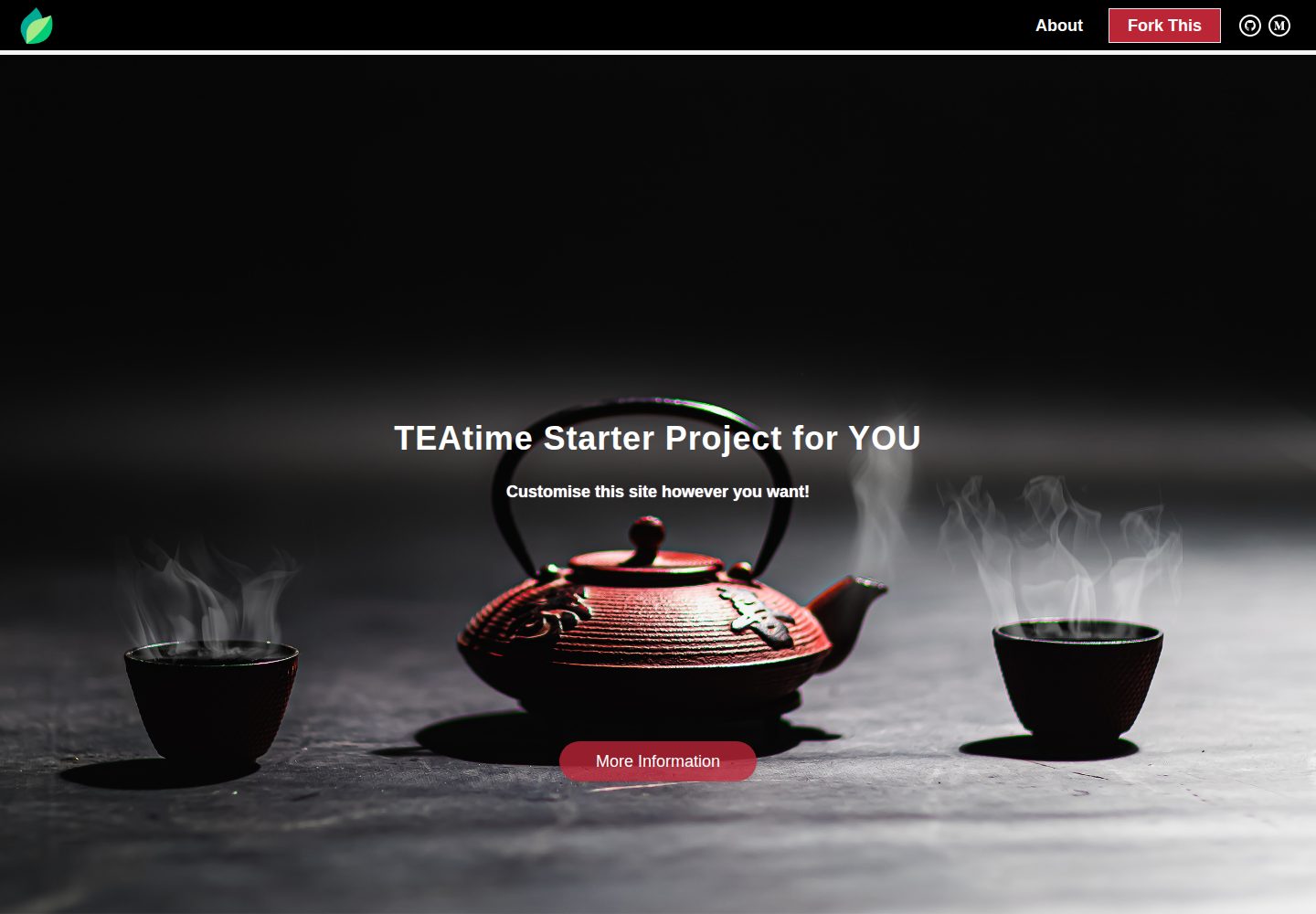
看看你的网站会是什么样
浏览真实页面截图,比较内容排版与手机效果。点击下方缩略图切换,放大查看整页细节。
全部页面与视图 2
截图用于了解视觉与布局,交互效果请以实际项目为准。
采集于 2026-09-30查看来源
值得关注的模板亮点
从已有项目资料中,快速了解它的特点。
集成 Tailwind CSS 与 Alpine.js,并演示了原生 CSS 与原生 JS 的写法
内置基础 SEO 配置:Front Matter、Google Analytics、Facebook Pixel、动态 sitemap.xml 与 robots.txt
提供自定义 404 页面,并通过 Eleventy Image Plugin 处理图片
同时提供 Netlify 与 Firebase Hosting 的部署配置
包含 AGENTS.md 与 CLAUDE.md,记录面向 AI 编码代理的约定与命令
模板详细介绍
teatime-starter 是一个 Eleventy 启动器项目,仓库由 alanmosely 维护,采用 MIT 许可。它把 Eleventy、Tailwind CSS 和 Alpine.js 组合在一起,用于搭建静态网站。模板使用 Nunjucks 作为模板语言,并支持 Markdown 内容与自定义属性。项目内置基础 SEO 相关配置,包括 Front Matter 生成的 HTML 标签、Google Analytics 与 Facebook Pixel 集成、动态 sitemap.xml 和 robots.txt,以及一个自定义 404 页面。构建流程包含 PostCSS、Lightning CSS 和 html-minifier-terser,并使用 Eleventy Image Plugin 处理图片。
项目结构清晰:eleventy.config.js 负责 Eleventy 配置,netlify.toml 与 firebase.json 分别对应 Netlify 和 Firebase Hosting 的部署设置,src 目录下包含 _data、_includes、_layouts、css、static 以及页面文件。构建输出到 public 目录,该目录被 git 忽略。README 提到仓库已更新到 Eleventy 3、Tailwind CSS 4 和 Node 24,并说明需要 Node.js 22 或更新版本。
使用限制方面:README 提及 Firebase 集成,启用相关动态功能前需要自行配置并核对 Firebase 的额度与收费。演示图片、字体、图标等第三方素材需按各自许可核对,不能仅凭代码的 MIT 许可判断。域名、托管、数据库、支付或 AI 等外部服务可能另外收费。
Eleventy启动器
适合你的项目吗?
适用场景
- 需要快速搭建一个使用 Eleventy、Tailwind CSS 和 Alpine.js 的静态网站
- 希望以 Netlify 或 Firebase Hosting 作为托管平台并直接部署
- 需要一个包含基础 SEO、404 页面和图片优化配置的起点项目
- 想参考 Tailwind CSS 4 的 CSS-first 配置与 Eleventy 插件、过滤器、短代码的用法
适合人群
- 熟悉或愿意学习 Eleventy 与 Nunjucks 的前端开发者
- 需要静态站点启动器并自行配置托管与第三方服务的个人或团队
- 希望使用 Tailwind CSS 与 Alpine.js 构建轻量页面的项目
上手与定制指南
结合仓库当前版本的说明,按下面的资料检查内容、配置与运行要求。
- 1
需要 Node.js 22 或更新版本,可使用 nvm 或 nvm-windows 安装
- 2
克隆仓库后运行 npm i 安装依赖
- 3
在 src/_data 的 env.js 和 site.json 中配置域名、站点名称、社交链接与 Facebook Pixel 等
- 4
主题颜色与首屏背景图在 src/_includes/css/_page.css 的 @theme 块中定义
- 5
本地运行 npm run start,默认访问 http://localhost:8080;部署到 Firebase 前需在 .firebaserc 设置项目 id 并登录
授权与来源资料
使用条件与限制
免费使用 · 保留许可声明本次收录的是公开仓库中采用 MIT 许可的免费版本;免费范围为该版本代码,不代表外部服务或第三方素材免费。
使用时需要遵守
- 允许免费使用、修改、商用和分发该版本代码。
- 分发代码副本或实质性部分时,保留原作者版权声明和完整 MIT 许可声明。
- 代码按现状提供;担保与责任限制以原许可证及适用法律为准。
额外费用与待核对事项
- 部署到 Firebase Hosting 需自行拥有 Firebase 账号,在 .firebaserc 中设置项目 id,并登录 firebase-tools;Firebase 服务可能产生费用。
- 启用 Google Analytics 与 Facebook Pixel 需自行注册对应账号并配置跟踪 id,属于外部服务。
- 使用 Netlify 一键部署需拥有并登录 Netlify 账号,托管服务可能另行收费。
- README 提及 Firebase 集成;启用相关动态功能前需自行配置,并核对 Firebase 的额度与收费。
- 演示图片、字体、图标及其他第三方素材需按各自许可核对,不能仅凭代码的 MIT 许可判断。
- 域名、托管、数据库、支付或 AI 等外部服务可能另外收费。
查看原文依据
Permission is hereby granted, free of charge
许可证原文
set your project id in `.firebaserc`, sign in once with `npx firebase-tools login`
README 原文
[Google Analytics](https://analytics.google.com) and [Facebook Pixel](https://www.facebook.com/business/learn/facebook-ads-pixel) integration
README 原文
https://github.com/alanmosely/teatime-starter/blob/master/LICENSEhttps://github.com/alanmosely/teatime-starter/blob/master/README.mdIf you have a [Netlify](https://netlify.com) account and are logged in
README 原文
DeepSeek 根据仓库许可证和 README 整理 ·2026-10-01。结果仅覆盖已读取资料,依赖、图片、字体及后续条款变更以各自原文为准。
项目核对记录与介绍依据
模板资料
- 来源平台
- GitHub
- 资料与维护参考分
- 资料较完整 · 83 / 100
- 技术栈
- Eleventy
- 网站类型
- 启动器
这个分数如何计算
本站按许可资料(最高30分)、演示链接(12分)、预览图(10分)、Star数(15分)、记录的维护时间(15分)、描述完整度(8分)、功能记录(5分)和分类资料(5分)计算。它不是代码、安全或性能测试,也不是 Google 评分;有链接不代表已实测可用。
这个项目需要核对什么
- 记录的仓库更新时间
- 2026-09-16
- 截图检查日期
- 2026-10-01
已收录演示链接。请用你的内容与屏幕尺寸检查;有演示不代表表单、认证或支付已经可用。
目录记录的主要技术栈是 Eleventy。请通过依赖清单和锁文件核对实际版本与托管要求。这些说明基于收录资料,不代表代码审计或部署实测。
查看具体选型方法 →介绍的制作与核对状态
介绍由 AI 辅助整理目录与仓库资料。仓库作者不等于这篇介绍的审核者。
已完成服务器许可规则与 AI 来源核对;未经过人工编辑审核。
查看当时使用的来源资料
SHA-256: 3bdba299159af933f3ed22ee8c3b048f4a54861ff4c264ec2edb518fbc771dda
2026-10-01T15:01:58.244Z
来源文件 / 仓库# 🍵 The TEAtime Starter Project
> [This Medium story](https://medium.com/geekculture/build-and-host-the-low-code-website-you-always-wanted-734f43c25874) is a complete guide on how to build and host the low-code website you’ve always wanted, for free, in a day
>
> _The story covers the original 2022 stack; this repo has since been modernised to Eleventy 3, Tailwind CSS 4 and Node 24 — the concepts in the story still apply, but some configuration details differ_
## Demo
https://teatime-starter.netlify.app
[](https://app.netlify.com/sites/teatime-starter/deploys)
[](https://teatime-starter.netlify.app)
## Deploy your own
### Netlify
If you have a [Netlify](https://netlify.com) account and are logged in, you can deploy this site in under a minute:
<a href="https://app.netlify.com/start/deploy?repository=https://github.com/alanmosely/teatime-starter"><img src="https://www.netlify.com/img/deploy/button.svg" alt="Deploy to Netlify"></a>
### Firebase Hosting
The project also ships ready for [Firebase Hosting](https://firebase.google.com/docs/hosting): set your project id in `.firebaserc`, sign in once with `npx firebase-tools login`, then:
```
npm run deploy
```
## Ingredients
- [**T**ailwind CSS](https://tailwindcss.com) v4, including CSS-first configuration and optimisation ('vanilla' CSS is also demonstrated)
- [**E**leventy](https://www.11ty.dev), including plugins, filters and shortcodes
- [**A**lpine.js](https://alpinejs.dev), including basic animation with CSS ('vanilla' JS is also demonstrated)
- [Nunjucks](https://mozilla.github.io/nunjucks) templates
- [Markdown](https://www.markdownguide.org), including custom attributes
- Custom 404 'Page not found' page
- AI-agent friendly: conventions and commands are documented in [AGENTS.md](AGENTS.md) (picked up by Codex and most coding agents, and by Claude Code via [CLAUDE.md](CLAUDE.md))
- Basic SEO:
- HTML tags with [Front Matter](https://www.11ty.dev/docs/data-frontmatter)
- [Google Analytics](https://analytics.google.com) and [Facebook Pixel](https://www.facebook.com/business/learn/facebook-ads-pixel) integration
- Performance optimisation with [postcss](https://postcss.org), [Lightning CSS](https://lightningcss.dev) (built into Tailwind v4) and [html-minifier-terser](https://www.npmjs.com/package/html-minifier-terser)
- Image optimisation with the [Eleventy Image Plugin](https://www.11ty.dev/docs/plugins/image)
- Dynamic sitemap.xml and robots.txt
## Project structure
```
├── eleventy.config.js # Eleventy config: plugins, shortcodes, transforms
├── netlify.toml # Netlify build settings (Node version, publish dir)
├── firebase.json # Firebase Hosting settings
└── src/
├── _data/ # Global data: site.json (site metadata), env.js (URLs, tracking ids)
├── _includes/ # Partials: navbar, footer, head, js, page content
│ └── css/_page.css # Tailwind entry: @theme block with colours & hero images
├── _layouts/ # base.njk and page.njk layouts
├── css/page.11ty.js # Compiles the CSS with PostCSS + Tailwind at build time
├── static/ # Copied verbatim to the site root (images, favicons)
└── *.njk / *.md # Pages: index, credits, 404, sitemap, robots
```
The build output goes to `public/` (git-ignored — never edit it directly).
## Getting started
### Install Node.js
Use `nvm` or `nvm-windows` to install the latest LTS version of `Node.js, npm and npx` (Node.js 22 or newer is required): https://docs.npmjs.com/downloading-and-installing-node-js-and-npm
### Clone the repository
```
git clone https://github.com/alanmosely/teatime-starter.git
```
### Install the dependencies
```
npm i
```
### Optionally customise the site
Configure your domain name, website name, social media links, facebook pixel and more in the `env.js` and `site.json` files in the `src/_data` directory
Theme colours and the hero background images are defined in the `@theme` block in `src/_includes/css/_page.css` ([Tailwind CSS v4 CSS-first configuration](https://tailwindcss.com/docs/theme))
### Run the website locally
```
npm run start
```
### Browse the local website
Open http://localhost:8080 in a browser of your choice
## Scripts
| Command | What it does |
| --- | --- |
| `npm start` | Serve the site locally with live reload (dev URLs) |
| `npm run build` | Clean and build with dev URLs |
| `npm run build:prod` | Build with production URLs (used by Netlify) |
| `npm run clean` | Delete the `public` output directory |
| `npm run deploy` | Build for production and deploy to Firebase Hosting |
## License
[MIT](LICENSE)
看看同类模板
对比同技术栈与用途的模板,找到更适合的视觉与内容结构。

eleventy-base-blog
A starter repository for a blog web site using the Eleventy static site generator.
Eleventy · 博客

eleventy-garden
:seedling: A starter site for building a mind garden with eleventy
Eleventy · 启动器

eleventastic
An Eleventy Starter Kit
Eleventy · 启动器

neat-starter
Starter Template for Netlify CMS, Eleventy, Alpine JS & Tailwind CSS
Eleventy · 启动器

Eleventy-Starter-Boilerplate
🚀 Eleventy Starter is production-ready with SEO-friendly for quickly starting a blog. ⚡ Built with Eleventy, …
Eleventy · 博客

eleventy-plus-vite
A clean and fast Eleventy Starter Project with Vite
Eleventy · 启动器