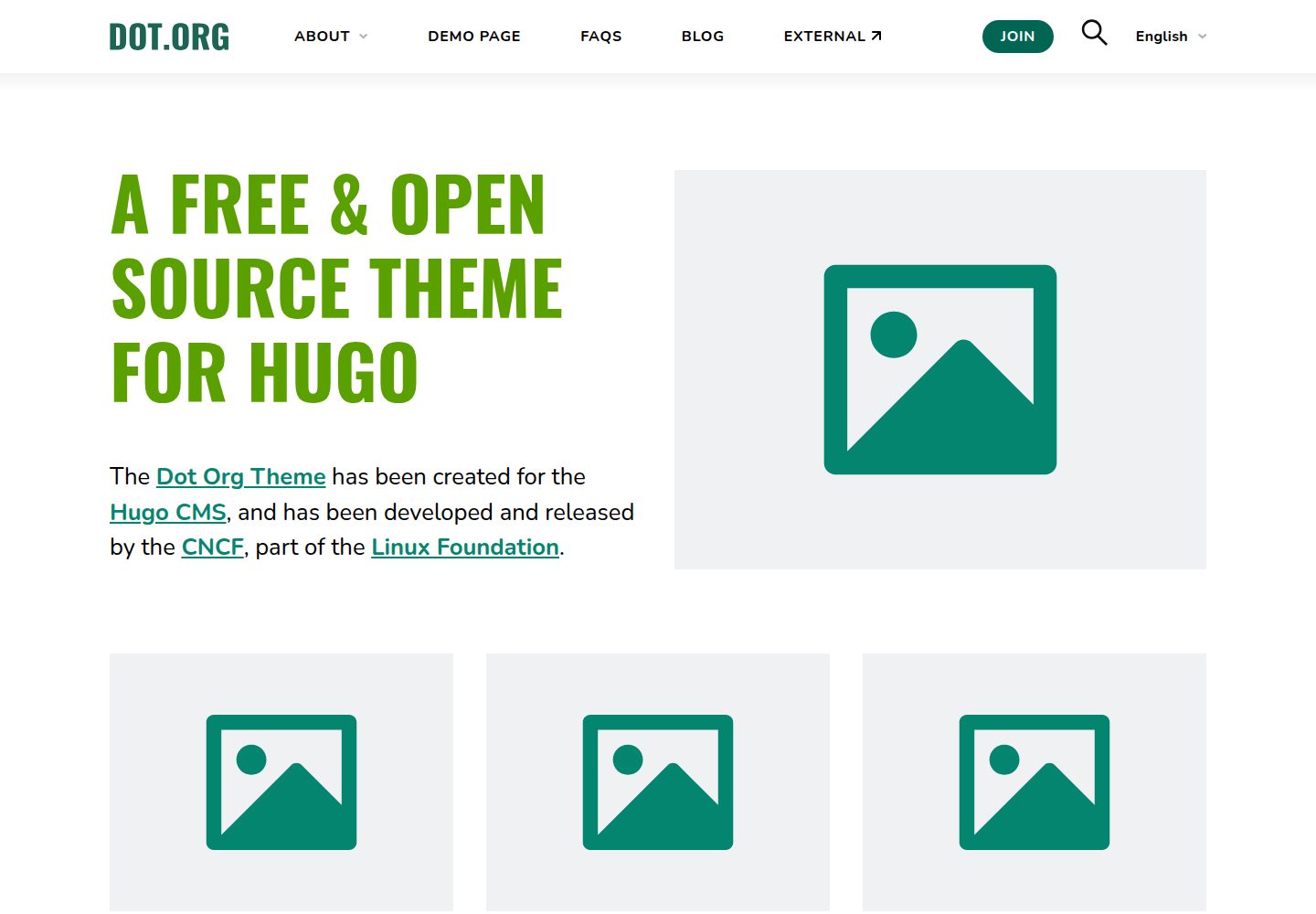
面向小型组织官网的 Hugo 主题,最初为 TODO Group 站点改版构建
Hugo启动器
dot-org-hugo-theme — Hugo 启动器模板
作者 cncf
由 CNCF 维护的 Hugo 主题,面向小型组织官网,最初为 TODO Group 站点改版而构建,内置多语言、大菜单、FAQ 手风琴与 PageFind 搜索。
看看你的网站会是什么样
浏览真实页面截图,比较内容排版与手机效果。点击下方缩略图切换,放大查看整页细节。
全部页面与视图 3
截图用于了解视觉与布局,交互效果请以实际项目为准。
采集于 2026-10-03查看来源
值得关注的模板亮点
从已有项目资料中,快速了解它的特点。
支持多语言内容,并提供带下拉分区的大菜单(Mega Menu)
集成 PageFind 搜索,主题内含已配置好的 search.html 与搜索表单 shortcode
提供按钮、卡片、分栏、响应式表格、目录、间距、iFrame、图片等自定义 shortcode
FAQ 页面采用手风琴结构,YouTube 嵌入为隐私友好形式并支持播放列表参数
MIT 许可,允许免费使用、修改、商用与分发该版本代码
模板详细介绍
dot-org-hugo-theme 是一个 Hugo 主题,定位是给小型组织搭建官网使用,最初为 TODO Group 的站点改版而开发,现由 CNCF 维护。主题自带多语言内容支持、带下拉分区的大菜单(Mega Menu)、FAQ 手风琴页面,并集成 PageFind 搜索。README 列出了多个使用该主题的站点,包括 TODO Group、ModSecurity、OWASP CRS、k8up 等。
主题通过自定义 shortcode 扩展 Markdown 的排版能力,涵盖按钮、卡片、分栏、响应式表格、目录、介绍段落、间距、iFrame、图片、当前年份、搜索表单以及隐私友好的 YouTube 嵌入。其中 YouTube 嵌入支持播放列表、自动加载与起始时间参数;图片 shortcode 支持 alt、宽高、caption 与 loading 属性。README 提示,嵌套 shortcode 可能无法按预期渲染,此时需要在 Goldmark 配置中开启 render "unsafe" HTML。
安装方式有两种:将仓库克隆到站点 themes 目录,或作为 git submodule 添加。使用前需要从 exampleSite 复制 package.json 与 postcss.config.js,并建议复制 config 目录作为配置起点,随后通过 npm install 安装依赖,用 npm run start 启动本地服务、npm run build 构建站点。搜索索引需要单独构建:先构建站点,再运行 npx -y pagefind --site public,且每次内容更新后都要重新生成索引,因此应把这一步纳入部署流程。
主题还提供自定义 front matter:showHeader: false 可隐藏页面标题或文章头部,noindex: true 可为页面添加 noindex。README 未给出主题对 Hugo 版本的具体要求,也未说明除 PageFind 与 Node.js 之外的其他运行依赖。
Hugo启动器
适合你的项目吗?
适用场景
- 为小型组织或开源项目搭建多语言官网
- 需要大菜单导航与 FAQ 手风琴页面的组织站点
- 希望在 Markdown 中通过 shortcode 快速排版按钮、卡片、分栏与响应式表格的内容团队
- 需要站内搜索并愿意在部署流程中加入 PageFind 索引步骤的 Hugo 站点
- 需要以隐私友好方式嵌入 YouTube 视频或播放列表的页面
适合人群
- 使用 Hugo 构建站点、需要组织类官网主题的开发者
- 需要多语言内容与大型导航菜单的小型组织
- 接受在构建流程中额外运行 PageFind 索引命令的团队
- 希望通过 shortcode 在 Markdown 中控制排版的内容维护者
上手与定制指南
结合仓库当前版本的说明,按下面的资料检查内容、配置与运行要求。
- 1
在 Hugo 站点的 themes 目录中克隆仓库,或以 git submodule 方式添加该主题
- 2
从 exampleSite 复制 package.json 与 postcss.config.js 到项目根目录,并复制 config 目录作为配置起点
- 3
运行 npm install 安装依赖,使用 npm run start 启动本地服务,或使用 npm run build 构建站点
- 4
搜索功能需先构建站点,再运行 npx -y pagefind --site public 生成索引,内容更新后需重新执行
- 5
嵌套 shortcode 渲染异常时,在配置中为 Goldmark 开启 render unsafe HTML
授权与来源资料
使用条件与限制
免费使用 · 保留许可声明本次收录的是公开仓库中采用 MIT 许可的免费版本;免费范围为该版本代码,不代表外部服务或第三方素材免费。
使用时需要遵守
- 允许免费使用、修改、商用和分发该版本代码。
- 分发代码副本或实质性部分时,保留原作者版权声明和完整 MIT 许可声明。
- 代码按现状提供;担保与责任限制以原许可证及适用法律为准。
额外费用与待核对事项
- 使用该主题需在本地安装 Node.js 并运行 npm install 安装依赖,构建与本地预览均依赖 Node.js 环境。
- 站内搜索功能依赖 Pagefind,需先构建站点再运行 pagefind 命令生成索引,否则搜索不可用。
- 每次内容更新后都必须重新运行 pagefind 命令重建搜索索引,需将该步骤纳入部署流程,否则搜索结果会过期。
- 若嵌套 shortcode 渲染异常,需在 Hugo 配置中为 Goldmark 开启 render unsafe HTML,即允许渲染不安全的 HTML。
- 演示图片、字体、图标及其他第三方素材需按各自许可核对,不能仅凭代码的 MIT 许可判断。
- 域名、托管、数据库、支付或 AI 等外部服务可能另外收费。
查看原文依据
Permission is hereby granted, free of charge
许可证原文
After that, run this command to install dependencies (requires [node.js](https://nodejs.org/)).
README 原文
For Pagefind to work, the pagefind index must be built from the files in your `public` directory.
README 原文
Every time your content is updated, you need to update the search index by again running `npx -y pagefind --site public`, so this should be part of your deployment process.
README 原文
https://github.com/cncf/dot-org-hugo-theme/blob/main/LICENSEhttps://github.com/cncf/dot-org-hugo-theme/blob/main/README.mdthis can often be resolved by allowing Hugo to [render "unsafe" HTML](https://gohugo.io/getting-started/configuration-markup/#goldmark).
README 原文
DeepSeek 根据仓库许可证和 README 整理 ·2026-10-03。结果仅覆盖已读取资料,依赖、图片、字体及后续条款变更以各自原文为准。
项目核对记录与介绍依据
模板资料
- 来源平台
- Hugo Themes
- 资料与维护参考分
- 资料较完整 · 87 / 100
- 技术栈
- Hugo
- 网站类型
- 启动器
这个分数如何计算
本站按许可资料(最高30分)、演示链接(12分)、预览图(10分)、Star数(15分)、记录的维护时间(15分)、描述完整度(8分)、功能记录(5分)和分类资料(5分)计算。它不是代码、安全或性能测试,也不是 Google 评分;有链接不代表已实测可用。
这个项目需要核对什么
- 记录的仓库更新时间
- 2026-09-28
- 截图检查日期
- 2026-10-03
已收录演示链接。请用你的内容与屏幕尺寸检查;有演示不代表表单、认证或支付已经可用。
目录记录的主要技术栈是 Hugo。请通过依赖清单和锁文件核对实际版本与托管要求。这些说明基于收录资料,不代表代码审计或部署实测。
查看具体选型方法 →介绍的制作与核对状态
介绍由 AI 辅助整理目录与仓库资料。仓库作者不等于这篇介绍的审核者。
已完成服务器许可规则与 AI 来源核对;未经过人工编辑审核。
查看当时使用的来源资料
SHA-256: 8781f3d0f52aaeb9cb7d9290b44d987e5d6eff5246947f21e0da7197be83c988
2026-10-03T03:40:53.017Z
来源文件 / 仓库# Dot-Org theme for Hugo
This Hugo theme is ideal for powering the website of a small organization. It was built initially for the [TODO Group](https://todogroup.org/) and has the following strengths:
- **Modern** - simple yet effective modern design
- **Accessible** - design and markup comply with WCAG 2.1 AA guidelines
- **Performant** - HTML/CSS/JS written from scratch to be as fast as possible without relying on frameworks or libraries
- **Multilingual** - ready to support multiple languages of content
- **Mega Menu** - large menu with dropdown sections
- **FAQ accordion** - FAQ page with accordion structure
- **Search** - PageFind search is integrated
[View demo site](https://dot-org-hugo-theme-demo.netlify.app/)
# Installation
There are two main methods of installing this theme to an existing Hugo site:
## 1) Download it
Inside the folder of your Hugo site, run:
```bash
git clone https://github.com/cncf/dot-org-hugo-theme themes/dot-org-hugo-theme
```
This downloads the repo from GitHub and puts the contents in your themes folder.
To update your theme to future versions:
```bash
cd themes/dot-org-hugo-theme
git pull
```
## 2) Use git submodule
Inside the folder of your Hugo site run:
```bash
git submodule add https://github.com/cncf/dot-org-hugo-theme.git themes/dot-org-hugo-theme
```
This downloads the repo from GitHub and puts the contents in your themes folder as a git sub-module.
To update your theme to future versions:
```bash
git submodule update --remote --merge
```
## Installing dependencies
Copy (at least) the following files from the themes exampleSite to the root folder of your project.
- themes/dot-org-hugo-theme/exampleSite/package.json
- themes/dot-org-hugo-theme/exampleSite/postcss.config.js
For ease you can run from the command line:
```bash
cp themes/dot-org-hugo-theme/exampleSite/package.json .
cp themes/dot-org-hugo-theme/exampleSite/postcss.config.js .
```
We recommend a config directory approach to replace your config.toml or hugo.toml file. To get up and running quickly with the default config, you can copy the following folder to the root of your site:
- themes/dot-org-hugo-theme/exampleSite/config/
From the command line in your project root, you can run the following to copy the themes exampleSite config to your project:
```bash
cp -r themes/dot-org-hugo-theme/exampleSite/config ./config
```
After that, run this command to install dependencies (requires [node.js](https://nodejs.org/)).
```bash
npm install
```
You can then run a local server using:
```bash
npm run start
```
or you can build your site using:
```bash
npm run build
```
## Config files
See /exampleSite/config/ for example configuration files.
You should copy these across or merge them with your existing config.
## Custom front matter
We have created custom front matter to use in your markdown files:
#### Hide the page title / article header
```
showHeader: false
```
#### Add noindex to a page
```
noindex: true
```
## Search index
[Pagefind](https://pagefind.app/) can be used to search the contents of your site. We include a search.html in the theme that is already set up. The search and results UI can also be inserted into any page using the [shortcode](#search-form). For Pagefind to work, the pagefind index must be built from the files in your `public` directory. First, make sure your site it built, and then install pagefind and index the site:
```
npm run build
npx -y pagefind --site public
```
Every time your content is updated, you need to update the search index by again running `npx -y pagefind --site public`, so this should be part of your deployment process.
## Custom shortcodes
You can use our custom shortcodes to quickly style your website in markdown. Due to the way Hugo deals with nested content, particularly nested shortcodes, you may find that shortcodes that are children of other shortcodes do not render as they should. If this happens to your site, this can often be resolved by allowing Hugo to [render "unsafe" HTML](https://gohugo.io/getting-started/configuration-markup/#goldmark). Add the following to your config YAML file:
```yaml
markup:
goldmark:
renderer:
unsafe: true
```
### Button
There is a button ready to be inserted into markdown files:
```md
{{< button link="/path/to/page" text="Default Button" >}}
```
```md
{{< button link="/path/to/page" style="secondary" text="Secondary Button" >}}
```
```md
{{< button link="/path/to/page" style="tertiary" text="Tertiary Button" >}}
```
```md
{{< button link="https://example.com" text="External Button" target="_blank" >}}
```
Options:
- link # (required) the button link
- text # (required) the button text
- style # (optional) secondary, tertiary
- target # (optional) the link target, e.g. _blank to open the link in a new tab.
With target="_blank" the button also gets rel="noopener noreferrer".
### Cards
An outlined box that is useful for highlighting information or using to wrap list elements.
```
{{< cards count=2 >}}
{{< card >}}
## Special Feature 1
Lorem ipsum dolor sit amet consectetuer adipiscing elit aenean commodo
{{< spacer >}}
[Download](#)
{{< /card >}}
{{< card >}}
## Special Feature 2
Lorem ipsum dolor sit amet consectetuer adipiscing elit aenean commodo
{{< spacer >}}
[About us](#)
{{< /card >}}
{{< /cards >}}
```
Options:
- count # (optional) number of columns on desktop; 2,3,4. Default: 3.
### Columns
A responsive column structure.
```
{{< columns >}}
{{< column >}}
Column 1
{{< /column >}}
{{< column >}}
Column 2
{{< /column >}}
{{< /columns >}}
```
Options:
- count # (optional) number of columns on desktop; 2,3,4. Default: 3.
### Current Year
Insert the current year easily with this shortcode:
```
{{< current_year >}}
```
Useful for copyright notices and evergreen blog content.
### iFrame
Insert an iFrame with your desired content.
```
{{< iframe title="My slides" src="https://www.slideshare.net/slideshow/embed_code/key/vTNvkwIXN4pmr8" >}}
```
Options:
- src # (required) the page to display
- width # (optional)
- height # (optional)
- title # (optional) the title of the iframe for accessibility
- loading # (optional) defaults to lazy
### Img
Inserts an image in a more advanced format than standard Hugo syntax.
```
{{< img src="/img/blog/image-name.png" >}}
```
Options:
- src # (required) the image link
- alt # (optional) describing the image, defaults to filename
- width # (optional) recommended
- height # (optional) recommended
- caption # (optional) markdown is accepted
- loading # (optional) defaults to lazy, use eager above the fold
### Intro
Formats a paragraph with larger text as suitable for an introduction paragraph at the top of a page.
```
{{< intro >}}
Paragraph text...
{{< /intro >}}
```
### Linebreak
Sometimes markdown can bunch paragraphs together. You can force a line return using the linebreak shortcode.
```
{{< br >}}
```
### Responsive Table
Wrap your large tables with this shortcode so they overflow on mobile:
```
{{< responsive_table >}}
| Option | Option | Description |
| ------ | ------ | ----------- |
| one | data | path to data files to supply the data that will be passed into templates. |
| two | engine | engine to be used for processing templates. Handlebars is the default. |
| three | ext | extension to be used for dest files. |
{{< /responsive_table >}}
```
### Search form
A search form for querying [the pagefind index](#search-index) and showing results.
```
{{< search_form >}}
```
### Spacer
A spacer is useful for spacing out content on your page. By default our spacer inserts a 50px height space. Our spacer is responsive, so on mobile devices the value is reduced by 50% (i.e. 50px space becomes 25px space).
```
{{< spacer >}}
```
```
{{< spacer 100 >}}
```
### Table of Contents (TOC)
Insert a Table of Contents automatically into your page. Picks up on all H2 elements on the page.
```
{{< toc >}}
```
### YouTube Enhanced
A privacy friendly and fast YouTube embed.
```
{{< youtube_enhanced id="9oVr7rrNZVI" >}}
```
For embedding playlists, a singular video id must be mentioned as playlists do not have a thumbnail.
```
{{< youtube_enhanced id="xPSXtoJNGLs" title="Play Videos from Kubecon" playlistid="PLj6h78yzYM2PyrvCoOii4rAopBswfz1p7" >}}
```
Options:
- id # (required)
- title # (optional) defaults to Play Video
- playlistid # (optional) your playlist ID
- autoload # (optional) defaults to false
- start # (optional) the start time in seconds, default 0
## Setting up a local instance for improving this theme
If you want to create improvements for this theme for everyone, follow these instructions to launch the exampleSite.
```bash
git clone https://github.com/cncf/dot-org-hugo-theme.git
cd dot-org-hugo-theme/exampleSite
npm install
npm run dev:start
```
## Other npm commands for working with a local instance
- `npm run dev:start` - Starts the local dev environment using exampleSite
- `npm run dev:start:with-pagefind` - Starts the local dev environment using exampleSite with working pagefind search
- `npm run dev:build` - Builds the site using exampleSite
## Showcase
Check out some themes that are using the Dot-Org theme for Hugo:
- [TODO Group](https://todogroup.org)
- [DeepCausality](https://deepcausality.com)
- [ModSecurity](https://modsecurity.org)
- [Northeast Collegiate Cyber Defense League](https://neccdl.org)
- [OWASP® CRS](https://coreruleset.org)
- [Hardware City](https://hardwarecity.org)
- [k8up](https://k8up.io)
- [FodyDev](https://www.fodydev.org)
- [Millennium IT](https://millenniumit.net)
- [Starship Factory](https://starship-factory.ch/)
看看同类模板
对比同技术栈与用途的模板,找到更适合的视觉与内容结构。

hugo-xmin
eXtremely Minimal Hugo theme: about 140 lines of code in total, including HTML and CSS (with no dependencies)
Hugo · 启动器

hugo-theme-gallery
Gallery Theme for Hugo
Hugo · 启动器

reveal-hugo
📽️ Create rich HTML-based presentations with Hugo and Reveal.js
Hugo · 启动器

anatole
Anatole is a minimalistic two-column theme for Hugo.
Hugo · 启动器

hugo-theme-diary
Moments piled up. A Hugo theme ported from SumiMakito/hexo-theme-Journal.
Hugo · 启动器

risotto
A minimalist, responsive hugo theme inspired by terminal ricing aesthetics.
Hugo · 启动器