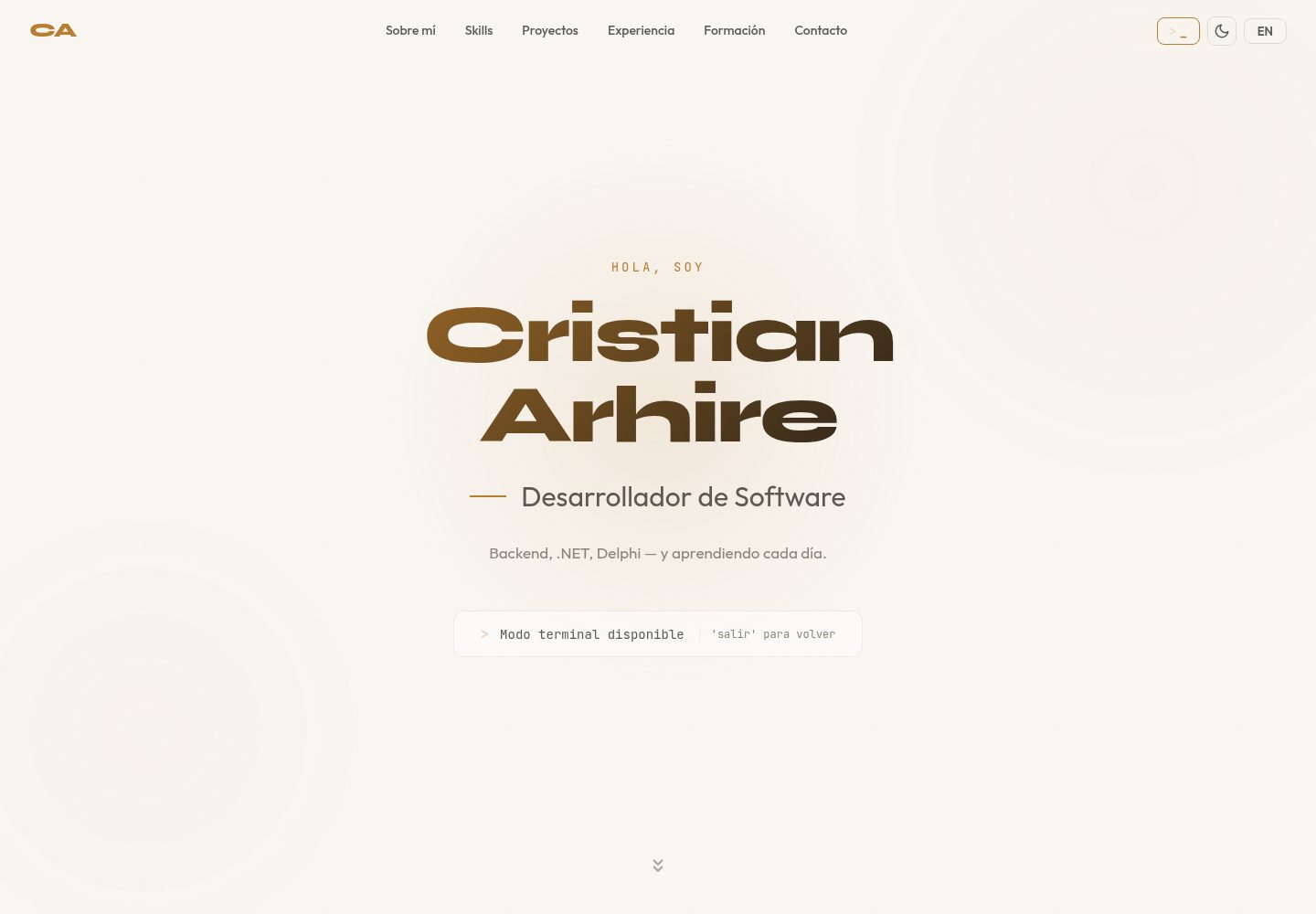
交互式终端界面,支持 about、skills、projects、experience、education、contact 等命令,并提供对应的西班牙语命令
ViteReact作品集
react-terminal-portfolio — Vite 作品集模板
作者 CristianArhire
基于 React 与 TypeScript 的终端风格作品集模板,通过单一配置文件填写个人信息,支持西英双语命令、多主题切换与命令历史,可作模板应用或 npm 组件使用。
看看你的网站会是什么样
浏览真实页面截图,比较内容排版与手机效果。点击下方缩略图切换,放大查看整页细节。
全部页面与视图 2
截图用于了解视觉与布局,交互效果请以实际项目为准。
采集于 2026-10-17查看来源
值得关注的模板亮点
从已有项目资料中,快速了解它的特点。
内置 Dracula、Matrix、Ubuntu、Catppuccin 四套主题,可通过 theme 命令切换,并支持在配置中合并自定义主题
支持 ES/EN 双语切换(lang 命令),个人数据以 Bilingual 结构分别维护两种语言内容
命令历史支持方向键导航,欢迎屏可使用 ASCII 艺术,界面动画基于 Framer Motion
所有个人数据集中在 src/config.ts 一个文件中配置,构建产物为静态 dist/ 目录
同一代码库可构建为模板应用(npm run build)或 npm 库(npm run build:lib)
模板详细介绍
该项目提供一个可交互的终端式个人作品集界面,用户输入命令查看关于、技能、项目、经历、教育、联系方式等内容。README 说明其支持西班牙语与英语双语命令,内置 Dracula、Matrix、Ubuntu、Catppuccin 四套主题,并可通过配置添加自定义主题;同时提供命令历史(方向键导航)、ASCII 艺术欢迎屏、Framer Motion 动画、移动端响应式布局,以及键盘导航和减少动态效果支持。
使用方式有两种:一是克隆仓库后编辑 src/config.ts 中的个人数据,运行开发或构建命令,将 dist/ 部署到任意静态托管;二是安装为 npm 包,以 <TerminalPortfolio config={...} /> 组件形式嵌入现有 React 项目。配置项涵盖提示符、标题栏文本、ASCII 艺术、双语欢迎语、关于、技能(1–10 等级)、项目、经历、教育、可选证书、联系方式、默认主题与语言、自定义主题及可选的 exit 命令回调。
限制方面,README 未说明浏览器兼容范围、无障碍达标的具体审计结果、npm 包的版本发布状态或长期维护计划,也未提供除静态托管部署外的服务端集成说明。
ViteReact作品集
适合你的项目吗?
适用场景
- 个人开发者希望以终端交互形式展示简历、技能与项目,并自行填写配置后部署到静态托管
- 需要在同一页面提供西班牙语和英语两种语言内容的作品集站点
- 希望将终端风格的个人介绍作为 React 组件嵌入已有网站或视觉版作品集(配合 exit 命令回调返回)
适合人群
- 熟悉 React 与 TypeScript、愿意编辑配置文件的前端开发者
- 需要双语个人作品集并偏好终端视觉风格的求职者或自由职业者
- 已有 React 项目、希望以组件方式加入终端式介绍模块的团队
上手与定制指南
结合仓库当前版本的说明,按下面的资料检查内容、配置与运行要求。
- 1
模板方式:克隆仓库后执行 npm install,编辑 src/config.ts 填入个人信息,再运行 npm run dev 或 npm run build
- 2
构建产物位于 dist/,README 说明可部署到 Netlify、Vercel、GitHub Pages 等静态托管
- 3
组件方式:npm install react-terminal-portfolio,引入 TerminalPortfolio 组件与 style.css,并传入 TerminalConfig 配置对象
- 4
可通过配置中的 exit 字段定义退出命令名称与回调,用于与其他项目集成
- 5
README 未提供环境变量、服务端或数据库相关配置说明
授权与来源资料
使用条件与限制
免费使用 · 保留许可声明本次收录的是公开仓库中采用 MIT 许可的免费版本;免费范围为该版本代码,不代表外部服务或第三方素材免费。
使用时需要遵守
- 允许免费使用、修改、商用和分发该版本代码。
- 分发代码副本或实质性部分时,保留原作者版权声明和完整 MIT 许可声明。
- 代码按现状提供;担保与责任限制以原许可证及适用法律为准。
额外费用与待核对事项
- 演示图片、字体、图标及其他第三方素材需按各自许可核对,不能仅凭代码的 MIT 许可判断。
- 域名、托管、数据库、支付或 AI 等外部服务可能另外收费。
查看原文依据
https://github.com/CristianArhire/react-terminal-portfolio/blob/main/LICENSEhttps://github.com/CristianArhire/react-terminal-portfolio/blob/main/README.mdPermission is hereby granted, free of charge
许可证原文
DeepSeek 根据仓库许可证和 README 整理 ·2026-10-17。结果仅覆盖已读取资料,依赖、图片、字体及后续条款变更以各自原文为准。
项目核对记录与介绍依据
模板资料
- 来源平台
- GitHub
- 资料与维护参考分
- 资料较完整 · 85 / 100
- 技术栈
- Vite · React
- 网站类型
- 作品集
这个分数如何计算
本站按许可资料(最高30分)、演示链接(12分)、预览图(10分)、Star数(15分)、记录的维护时间(15分)、描述完整度(8分)、功能记录(5分)和分类资料(5分)计算。它不是代码、安全或性能测试,也不是 Google 评分;有链接不代表已实测可用。
这个项目需要核对什么
- 记录的仓库更新时间
- 2026-02-22
- 截图检查日期
- 2026-10-17
已收录演示链接。请用你的内容与屏幕尺寸检查;有演示不代表表单、认证或支付已经可用。
目录记录的主要技术栈是 Vite。请通过依赖清单和锁文件核对实际版本与托管要求。这些说明基于收录资料,不代表代码审计或部署实测。
查看具体选型方法 →介绍的制作与核对状态
介绍由 AI 辅助整理目录与仓库资料。仓库作者不等于这篇介绍的审核者。
审核声明: codex-user-requested-batch-review-20261018 · 2026-10-18
查看当时使用的来源资料
SHA-256: 5e1f565a968eb6f2560eeb67f1f9bd19dadd94458451b724a79871118b615e78
2026-10-17T10:32:59.335Z
来源文件 / 仓库# react-terminal-portfolio
A customizable, interactive terminal-style portfolio built with **React** and **TypeScript**. Features bilingual support (ES/EN), multiple themes, command history, ASCII art, and smooth animations.
Use it as a **template** (clone + edit one config file + deploy) or as an **npm component** (`<TerminalPortfolio config={...} />`).
## Features
- Interactive terminal with bilingual commands (Spanish/English)
- 4 built-in themes: Dracula, Matrix, Ubuntu, Catppuccin
- Custom theme support
- Command history with arrow key navigation
- ASCII art welcome screen
- Smooth animations (Framer Motion)
- Fully responsive (mobile-friendly)
- Single config file for all personal data
- Accessible (WCAG keyboard navigation, reduced motion support)
- Dual distribution: template app + npm library
## Quick Start (Template)
```bash
git clone https://github.com/yourusername/react-terminal-portfolio.git
cd react-terminal-portfolio
npm install
```
Edit `src/config.ts` with your personal data, then:
```bash
npm run dev # Development server
npm run build # Production build → dist/
```
Deploy the `dist/` folder to any static host (Netlify, Vercel, GitHub Pages, etc.).
## npm Component
```bash
npm install react-terminal-portfolio
```
```tsx
import { TerminalPortfolio } from 'react-terminal-portfolio';
import 'react-terminal-portfolio/style.css';
const config = {
prompt: 'user@dev:~$',
titleBarText: 'user@dev:~',
asciiArt: ['', ' Hello World!', ''],
welcomeMessage: {
es: [' Bienvenido!', ''],
en: [' Welcome!', ''],
},
about: { /* ... */ },
skills: { /* ... */ },
projects: { /* ... */ },
experience: { /* ... */ },
education: { /* ... */ },
contact: { /* ... */ },
};
function App() {
return <TerminalPortfolio config={config} />;
}
```
## Configuration Reference
The `TerminalConfig` type defines all available options:
| Field | Type | Description |
|-------|------|-------------|
| `prompt` | `string` | Prompt text (e.g. `"user@dev:~$"`) |
| `titleBarText` | `string` | Title bar text (e.g. `"user@dev:~"`) |
| `asciiArt` | `string[]` | ASCII art lines for welcome screen |
| `welcomeMessage` | `Bilingual<string[]>` | Welcome message in ES/EN |
| `about` | `Bilingual<PersonalInfo>` | Name, role, tagline, bio, location |
| `skills` | `Bilingual<SkillCategory[]>` | Skill categories with levels (1-10) |
| `projects` | `Bilingual<Project[]>` | Projects (public with URL or private) |
| `experience` | `Bilingual<ExperienceItem[]>` | Work experience entries |
| `education` | `Bilingual<EducationItem[]>` | Education entries |
| `certifications` | `string[]` | Optional certifications list |
| `contact` | `Bilingual<ContactInfo>` | Email, GitHub, LinkedIn, CTA |
| `defaultTheme` | `string` | Default theme name (default: `"dracula"`) |
| `defaultLang` | `Lang` | Default language: `"es"` or `"en"` |
| `themes` | `Record<string, Theme>` | Optional custom themes |
| `exit` | `ExitConfig` | Optional exit command configuration |
## Available Commands
| English | Spanish | Description |
|---------|---------|-------------|
| `about` | `sobremi` | About me |
| `skills` | `habilidades` | Technical skills |
| `projects` | `proyectos` | Featured projects |
| `experience` | `experiencia` | Work experience |
| `education` | `formacion` | Education |
| `contact` | `contacto` | Contact info |
| `theme [name]` | `tema [nombre]` | Change theme |
| `lang [es\|en]` | `idioma [es\|en]` | Change language |
| `clear` | `limpiar` | Clear terminal |
| `help` | `ayuda` | Show commands |
## Custom Themes
Add custom themes via the `themes` field in your config:
```ts
const config: TerminalConfig = {
// ...
themes: {
ocean: {
name: 'ocean',
label: 'Ocean',
bg: '#1b2838',
text: '#c0d6e4',
prompt: '#5fb3b3',
accent: '#6699cc',
comment: '#65737e',
titleBar: '#15232d',
selection: '#2b3f52',
},
},
};
```
Custom themes are merged with the 4 built-in themes and become available via the `theme` command.
## Exit Command
For integration with other projects (e.g., a visual portfolio with a terminal mode), configure the exit command:
```ts
const config: TerminalConfig = {
// ...
exit: {
command: {
es: { name: 'salir', description: 'Volver al portfolio visual' },
en: { name: 'exit', description: 'Back to visual portfolio' },
},
action: () => {
// Your custom exit logic
console.log('Exiting terminal...');
},
},
};
```
## Scripts
| Command | Description |
|---------|-------------|
| `npm run dev` | Start dev server |
| `npm run build` | Build template app to `dist/` |
| `npm run build:lib` | Build npm library to `dist/lib/` |
| `npm run lint` | Run ESLint |
| `npm run preview` | Preview production build |
## Tech Stack
- [React](https://react.dev/) 19
- [TypeScript](https://www.typescriptlang.org/) 5.9
- [Vite](https://vite.dev/) 6
- [Framer Motion](https://www.framer.com/motion/) 11
- CSS Modules
## License
MIT
看看同类模板
对比同技术栈与用途的模板,找到更适合的视觉与内容结构。

Resumify
Free, privacy-first resume builder — 6 ATS-friendly templates, full customization, JSON import/export. No sign…
Vite · 作品集

showlit
✨ Showlit - A modern and clean template for creating a personal website
Vite · 作品集

folium
Professional developer portfolio boilerplate (React • TypeScript • Tailwind • Vite) with simple content custom…
Vite · 作品集

kurizu-discord
A Discord themed website built using React & Vite
Vite · 作品集
cv-educornelsen
Production portfolio with a streaming AI chatbot (Gemini + SSE), containerized via Docker, deployed to Google …
Vite · 作品集

about-me-personal-portfolio-website-template
Simple Personal Website Template, built with bootstrap and vite js project.
Vite · 作品集